

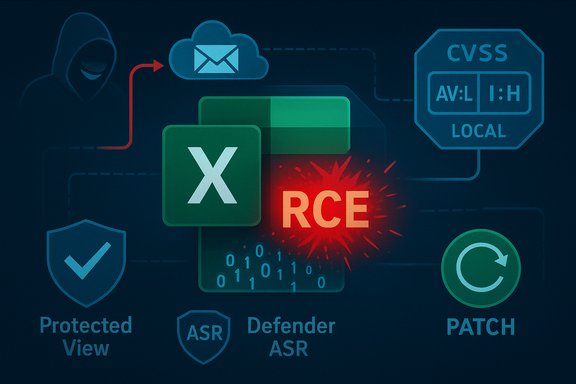
Microsoft’s CVE entry for CVE-2025-62203 is labeled a “Remote Code Execution” (RCE) vulnerability for Excel even though the published CVSS vector records the Attack Vector as Local (AV:L) — and that apparent contradiction is intentional, rooted in the difference between impact messaging and technical exploit mechanics. The vendor’s headline warns defenders that an attacker can reach victims from off-host locations (for example, by sending a malicious workbook), while the CVSS AV metric records where the vulnerable code actually executes at the moment of exploitation — inside a local Excel process.
Microsoft’s Security Update Guide lists CVE-2025-62203 as an Excel vulnerability that results from a use‑after‑free in the Excel parsing stack and that can lead to arbitrary code execution on the victim host. The advisory title uses the concise label “Remote Code Execution” to communicate operational severity: an external attacker can deliver a crafted file that, if opened or previewed, leads to code executing on the target machine. At the same time, the vendor-supplied CVSS v3.1 vector for the CVE records AV:L/AC:L/PR:N/UI:R/S:U/C:H/I:H/A:H, i.e., Attack Vector Local, User Interaction Required, no privileges required, and high impacts — which yields a base score in the high severity band. This dual phrasing — headline RCE vs. CVSS AV:L — is common for document-parsing bugs in Office because two different, valid questions are being answered:
 ). When a vulnerable component is invoked by a local application parsing a file saved on disk or handled by a local process, the CVSS guidance instructs scorers to mark AV:L — even if the attacker delivered that file over the network earlier. This prevents “double-counting” the delivery stage and keeps scoring consistent across many attack models.
Because the exploit is triggered by data embedded in the file, classic macro-blocking controls are insufficient. Detection based solely on macro signatures will not catch data-driven exploits that corrupt native parsing code. This increases urgency for prompt patching and layered mitigations.
If a network-accessible server or service — such as an email gateway that generates attachment previews, a document-conversion service, Office Online Server, or a cloud collaboration platform — invokes the vulnerable parser on behalf of remote clients, then the vulnerable code executes inside a network-bound process. In that scenario the attack vector can legitimately be Network (AV:N) because the attacker can trigger the vulnerable code remotely without requiring a specific user to open the document on their endpoint. Advisories highlight this when applicable because it drastically enlarges exposure and changes remediation priorities.
Operational takeaway: if your environment performs server-side previewing or conversion of Office documents, treat the vulnerability as more urgent and prioritize patching of those server components first.
Microsoft’s advisory language and the CVSS specification are designed for different, complementary goals: one to prompt action with a clear impact label, the other to enable standardized scoring and automation. Both are necessary for sound operational security, and together they should drive rapid patching, layered mitigations, and targeted monitoring across email, endpoint, and server-side document processing systems.
Source: MSRC Security Update Guide - Microsoft Security Response Center
 Background / Overview
Microsoft’s Security Update Guide lists CVE-2025-62203 as an Excel vulnerability that results from a use‑after‑free in the Excel parsing stack and that can lead to arbitrary code execution on the victim host. The advisory title uses the concise label “Remote Code Execution” to communicate operational severity: an external attacker can deliver a crafted file that, if opened or previewed, leads to code executing on the target machine. At the same time, the vendor-supplied CVSS v3.1 vector for the CVE records AV:L/AC:L/PR:N/UI:R/S:U/C:H/I:H/A:H, i.e., Attack Vector Local, User Interaction Required, no privileges required, and high impacts — which yields a base score in the high severity band. This dual phrasing — headline RCE vs. CVSS AV:L — is common for document-parsing bugs in Office because two different, valid questions are being answered:- “What can the attacker achieve and from where can they try?” → answered by the CVE/advisory title (RCE).
- “Where and how must the exploit be executed to trigger the vulnerability?” → answered by CVSS Attack Vector (AV:L for local execution).
Why the CVE title says "Remote Code Execution" while CVSS shows AV:L
Two complementary lenses: impact vs. trigger
Vendor advisories and CVE titles are terse operational signals. Labeling a bug as “Remote Code Execution” tells defenders a remote adversary — someone not physically present on the machine — can cause code to run on the target if the exploitation chain completes. The CVSS Attack Vector, by contrast, is a mechanistic metric: it marks the locality of the moment of exploitation (the vulnerable code’s execution context). If that moment requires a local application to parse a file (for example, when a user opens an Excel workbook), CVSS correctly records AV:L even though the malicious file may have been delivered over the network. Put plainly: the advisory is describing the attacker’s origin and end-state capability; CVSS is describing the exploit’s execution locality. These are different but compatible statements. Security teams must read both together to form an accurate risk picture.The “remote delivery, local execution” model — step by step
- Attacker crafts a weaponized Excel workbook that targets a parser bug (use‑after‑free, heap overflow, out‑of‑bounds access).
- Attacker delivers the file remotely — via email attachment, a shared cloud link, a public download page, or a compromised shared drive.
- Victim opens the workbook in local Excel (or a client-side renderer that calls Excel’s parser). That user action invokes the vulnerable parsing code inside the local process.
- Memory corruption occurs; the attacker’s payload executes inside the Excel process on the victim endpoint.
How CVSS defines Attack Vector and why AV:L is correct for document parsing bugs
CVSS intent and the AV metric
The CVSS Attack Vector (AV) metric is intended to capture how remote an attacker can be at the moment the exploitable code runs. CVSS distinguishes four AV values: Network (AV:N), Adjacent (AV:A), Local (AV:L), and Physical (AV). When a vulnerable component is invoked by a local application parsing a file saved on disk or handled by a local process, the CVSS guidance instructs scorers to mark AV:L — even if the attacker delivered that file over the network earlier. This prevents “double-counting” the delivery stage and keeps scoring consistent across many attack models. Canonical CVSS example: document-based exploits
The CVSS working group explicitly uses document-parsing examples to show why such cases are AV:L. For instance, an attacker who mails a crafted PDF or Excel file and relies on the user to open it is classed as AV:L because the vulnerable process must parse the file locally for exploitation to occur. FIRST’s CVSS examples show the same pattern and assign AV:L for typical document-parsing RCEs.Technical anatomy: why Excel parsing bugs enable code execution without macros
Excel’s formats and parsers are complex: they encompass legacy binary BIFF records, Open XML subdocuments, embedded OLE/ActiveX objects, formula engines, chart metadata, and numerous native-code renderers. Those native parsing paths operate in-process at native speed and have historically contained memory-safety defects (use‑after‑free, heap overflow, out‑of‑bounds writes/reads). When attackers control crafted data inside the file, they can manipulate memory structures, hijack control flow, and redirect execution to attacker-supplied payloads — all without macros or scripts. That’s why many modern Excel CVEs are weaponized as data-only exploits.Because the exploit is triggered by data embedded in the file, classic macro-blocking controls are insufficient. Detection based solely on macro signatures will not catch data-driven exploits that corrupt native parsing code. This increases urgency for prompt patching and layered mitigations.
The server-side exception: when AV:N is the right CVSS value
There is a materially important exception to the “remote delivery, local execution” model: server-side rendering or parsing.If a network-accessible server or service — such as an email gateway that generates attachment previews, a document-conversion service, Office Online Server, or a cloud collaboration platform — invokes the vulnerable parser on behalf of remote clients, then the vulnerable code executes inside a network-bound process. In that scenario the attack vector can legitimately be Network (AV:N) because the attacker can trigger the vulnerable code remotely without requiring a specific user to open the document on their endpoint. Advisories highlight this when applicable because it drastically enlarges exposure and changes remediation priorities.
Operational takeaway: if your environment performs server-side previewing or conversion of Office documents, treat the vulnerability as more urgent and prioritize patching of those server components first.
Real‑world implications and likely exploitation models
Why AV:L RCEs remain high-risk in practice
Labeling the vector as Local does not mean the issue is low-risk. Several contextual factors keep document-based RCEs attractive to attackers:- Ubiquity of Excel: Excel is widely used across enterprises and consumers; weaponized spreadsheets can reach large numbers of users.
- Low delivery friction: Email, cloud sharing, and file transfer services make large-scale distribution trivial.
- Social engineering effectiveness: Well-crafted messages, invoices, or shared sheets reliably trick users into opening attachments or links.
- Preview and mail-pane risks: Preview panes or server-side previews can reduce or eliminate explicit click-to-open behavior in some environments.
Typical attack chains in enterprise contexts
- Phishing campaign sends malicious workbook to targeted users.
- Recipients open (or preview) the file in local Excel or a preview handler.
- Memory corruption in Excel occurs; arbitrary code runs under the user’s account.
- Attacker performs post-exploitation tasks: credential harvesting, persistence, lateral movement, or ransomware deployment.
What administrators should do now — prioritized action plan
Immediate, practical controls reduce both exposure and the chance of successful exploitation. Apply these steps in sequence:- Patch first: map installed Office/Excel builds to Microsoft’s advisory and deploy the vendor update for CVE‑2025‑62203 through your standard patch pipeline (WSUS, SCCM, Intune, Microsoft Update). Patching is the definitive remediation.
- Harden file handling:
- Enforce Protected View for files from the internet and email attachments.
- Disable or restrict automatic previewing in Outlook and Windows Explorer for high-risk groups.
- Apply endpoint controls:
- Use Attack Surface Reduction (ASR) rules in Microsoft Defender for Endpoint or equivalent EDR controls to block Office applications from spawning child processes (common post‑exploit behavior).
- Implement application allowlists (AppLocker, SmartScreen, enterprise app control).
- Least privilege: ensure users run as standard (non-admin) accounts and remove unnecessary local admin rights.
- Mail and gateway defenses:
- Enable attachment sandboxing/detonation in mail gateways.
- Block or quarantine suspicious Excel attachments from untrusted senders.
- Detection and hunting:
- Hunt EDR telemetry for Office processes spawning cmd.exe, PowerShell, wscript, or making unusual outbound connections after file opens.
- Inspect mail gateway sandbox logs for detonations of suspicious spreadsheets around disclosure time.
- Communications:
- Notify staff not to open unexpected spreadsheets and provide direct instructions on reporting suspicious attachments.
Detection guidance and incident response cues
- Watch for abrupt child-process creation by excel.exe immediately after file opens.
- Look for unexpected file writes, new scheduled tasks, or unusual registry persistence patterns originating from Office processes.
- Correlate mail delivery logs with endpoint telemetry: identify machines that opened suspicious attachments and immediately isolate them for investigation.
- If compromise is suspected, collect forensic artifacts (EDR telemetry, memory captures, relevant event logs) and follow your incident response runbook — reset credentials where appropriate and perform lateral-movement containment.
Critical analysis — strengths, risks, and communication pitfalls
Strengths of the vendor wording
- Operational clarity: “Remote Code Execution” is a succinct, high‑urgency label that prompts administrators to prioritize patching.
- Triage efficiency: Security teams, especially in large enterprises, use impact class (RCE vs. information disclosure) as the first triage axis; the RCE label aligns with that workflow.
- The title warns non-technical stakeholders (executive decision-makers, help desks) that external actors — not insiders — can cause severe outcomes.
Risks and misunderstandings from headline phrasing
- False comfort from ‘Local’: Teams that read only the CVSS AV:L and assume “local = safe” can mistakenly deprioritize fixes. Local AV simply documents where the vulnerable code runs at trigger time, not the feasibility of remote delivery.
- Automated triage traps: Security tooling that auto-prioritizes solely on CVSS AV may underweight RCE-class advisories that require user interaction but are trivial to deliver at scale via phishing.
- Communication friction: Non-technical stakeholders may interpret “Remote” and “Local” as mutually exclusive, creating confusion in cross-functional briefings.
Where to be cautious — unverifiable details and assumptions
- Public advisories often omit low-level root-cause details (exact parser function, internal data structures) to avoid aiding weaponization. Treat any third‑party reconstructions of exploit mechanics as reasoned analysis rather than vendor-confirmed facts unless the vendor or credible researchers publish technical write‑ups. Flag those reconstructions accordingly.
- If your environment uses server-side Office rendering or third-party document services, confirm whether they rely on the same vulnerable parser paths before assuming AV:L; vendors explicitly call out server-side impacts when relevant. If that information is missing in the advisory, treat server components as higher exposure until verified patched.
Reconciling automated scoring and human triage
Automated vulnerability management systems frequently ingest CVSS vectors to drive prioritization. For Office document RCEs, use a combined rule: treat CVEs labeled RCE as high-priority even when CVSS AV:L is present — especially if the CVSS vector shows PR:N/UI:R and high impact. Factor in operational context:- If your environment provides server-side previews or untrusted document rendering, escalate to immediate patching of those network-exposed components.
- If your user population tends to run with elevated privileges or receives frequent external spreadsheets (finance, procurement), accelerate patch deployment for those groups.
Closing assessment and final recommendations
CVE-2025-62203’s title and CVSS vector are both correct: the title communicates attacker origin and impact (RCE), while CVSS documents the exploit’s execution locality (AV:L) because the vulnerable Excel parsing code executes locally when a crafted file is opened. Treat the two messages as complementary inputs to risk triage rather than contradictory signals. Actionable priorities for defenders:- Apply Microsoft’s published update for CVE‑2025‑62203 immediately across affected Excel/Office builds.
- Harden file handling (Protected View, disable automatic previews, gateway sandboxing).
- Enforce least privilege and use EDR/ASR policies to block Office spawned child processes.
- Hunt for indicators of Excel-based exploitation and correlate mail logs with endpoint telemetry.
- If you operate server-side document rendering, prioritize patching those hosts to eliminate the AV:N possibility.
Microsoft’s advisory language and the CVSS specification are designed for different, complementary goals: one to prompt action with a clear impact label, the other to enable standardized scoring and automation. Both are necessary for sound operational security, and together they should drive rapid patching, layered mitigations, and targeted monitoring across email, endpoint, and server-side document processing systems.
Source: MSRC Security Update Guide - Microsoft Security Response Center
