

February’s Insider drops for Windows 11 landed as a workmanlike collection of focused improvements rather than a single, splashy rewrite—small UX refinements, meaningful accessibility and security upgrades, and a few platform moves that matter most to administrators, creators, and Copilot‑hardware early adopters.
Microsoft pushed a slate of preview builds across Insider channels in February 2026: matched Dev and Beta previews (builds in the 26200/26300 series) and experimental Canary builds in the 28020 and 29531 series. That distribution reflects a deliberate staging strategy: incremental changes and UX polishing in the Beta/Dev path, platform experiments for new hardware in the 28020 stream, and more far‑reaching platform groundwork in the 29531 line. The practical result is that Insiders are seeing a mix of small, visible improvements (Settings polish, File Explorer tweaks) and deeper platform shifts intended for future releases. ps://www.techradar.com/computing/windows/it-seems-microsoft-just-started-work-on-windows-11-27h2-and-this-could-be-the-update-that-saves-the-os-or-dooms-it)
This article walks through the biggest visible changes, the technical moves administrators should test now, and the practical trade‑offs Windows users should consider before enabling preview features. I verify key claims against Microsoft’s published guidance and independent coverage where available, and I flag items that remain Insider‑only or carry operational caveats.
Why this matters: Settings has been a slow‑rolling battleground for discoverability. Small layout changes that surface the right information with less navigation are low risk and disproportionately helpful—especially on phones and for help desk workflows.
Key constraints and reality check:
Practical note: the feature is app‑dependent and requires OEM support on the phone side; Spotify and a few browser integrations demonstrate the model, but developer adoption will determine how broadly useful the experience becomes.
Operational caveats:
Practical guidance:
Operational implications:
For IT teams, the actionable items are straightforward: validate automation against the new batch locking semantics, vet external ESS peripherals before procurement, and treat Shared audio and Cross‑Device Resume as consumer‑facing preview features that will grow in utility as OEM firmware and developer adoption mature. For enthusiasts and Insiders, these builds deliver small but visible wins—less friction in Settings, better dark mode fidelity in dialog boxes, and the early joy of modern Bluetooth audio sharing when your hardware supports it.
Source: Windows Central Windows 11’s Feb Insider update is here with new features and zero drama
 Background / Overview
Microsoft pushed a slate of preview builds across Insider channels in February 2026: matched Dev and Beta previews (builds in the 26200/26300 series) and experimental Canary builds in the 28020 and 29531 series. That distribution reflects a deliberate staging strategy: incremental changes and UX polishing in the Beta/Dev path, platform experiments for new hardware in the 28020 stream, and more far‑reaching platform groundwork in the 29531 line. The practical result is that Insiders are seeing a mix of small, visible improvements (Settings polish, File Explorer tweaks) and deeper platform shifts intended for future releases. ps://www.techradar.com/computing/windows/it-seems-microsoft-just-started-work-on-windows-11-27h2-and-this-could-be-the-update-that-saves-the-os-or-dooms-it)This article walks through the biggest visible changes, the technical moves administrators should test now, and the practical trade‑offs Windows users should consider before enabling preview features. I verify key claims against Microsoft’s published guidance and independent coverage where available, and I flag items that remain Insider‑only or carry operational caveats.
What landed and why it matters
Settings app and About page: clarity over flash
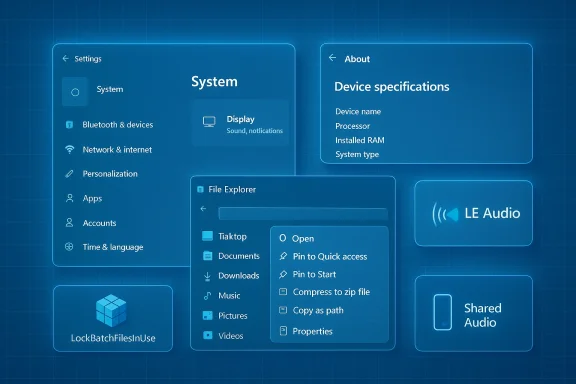
Microsoft quietly refined the Settings Home and the System > About layout in Beta/Dev previews. The changes are modest but practical: the Settings Home card now surfaces simplified device specifications, and the About page restores a top‑level hardware summary that includes CPU, RAM, GPU, and Storage details—now grouped with copy/paste supeshooting. That restructure reduces friction for users who contact support or need to confirm device specs quickly.Why this matters: Settings has been a slow‑rolling battleground for discoverability. Small layout changes that surface the right information with less navigation are low risk and disproportionately helpful—especially on phones and for help desk workflows.
File Explorer and context menus: subtle polish that improves day‑to‑day flows
Insiders saw continued work on the modern content menu and File Explorer. Notable items include an updated context‑menu behavior where right‑clicking file types such as .exe, .bat, or .cmd surfaces the app icon next to the Open entry, and the Folder Options dialog received improved dark‑mode rendering in recent Canary builds. These areof‑life* touches that reduce tiny cognitive frictions across thousands of daily interactions.Shared audio (preview): Windows finally embraces LE Audio broadcasting
One of the more consumer‑visible experiments is Shared audio (preview)—a system‑level capability built on Bluetooth LE Audio that can stream the same audio feed to two distinct LE Audio receivers (headphones, earbuds, speakers, or compatible hearing aids). On supported Copilot+ PCs, Quick Settings includes a Shared audio tile and per‑listener volume sliders, plus a taskbar indicator that signals when audio is being shared. Microsoft’s Insider blog announced the initial rollout, and independent tech outlets documented compatibility and the early device list.Key constraints and reality check:
- Today the feature is gated to a narrow set of Copilot+ devices with the requisite Bluetooth and driver/firmware support, so expect limited compatibility initially. Independent coverage confirms the roster is small at first and will expand as OEMs ship compatible radios and firmware.
- The LE Audio stack introduces advantages (lower power, modern codecs like LC3, broadcast primitives similar to Auracast) but also depends on vendor firmware and driver quality; user experience will vary by headphone model and OEM update cadence.
Cross‑Device Resume: Android → PC handoff gets more apps and OEM support
Microsoft’s Cross‑Device Resume (the “resume from your phone” taskbar flow) expanded in Canary builds to cover more real‑world scenarios: Spotify playback, browsing sessions from certain OEM browsers (for example, vivo Browser), and Microsoft 365 Copilot online files for specific Android OEMs (HONOR, OPPO, Samsung, vivo, Xiaomi). Microsoft’s documentation explains the prerequisites—Android 10+, Link to Windows, and a linked device—and shows how apps are surfaced on the taskbar for one‑click continuation. This is a clear step toward macOS‑style handoff for Android→Windows workflows.Practical note: the feature is app‑dependent and requires OEM support on the phone side; Spotify and a few browser integrations demonstrate the model, but developer adoption will determine how broadly useful the experience becomes.
Batch file security and performance: LockBatchFilesInUse
Arguably the most consequential change for administrators is a new opt‑in mode that locks batch files while they execute to avoid mid‑run modifications and reduce repeated validation overhead under code‑integrity enforcement. The capability is surfaced as a registry toggle and an application manifest control:- Registry path: HKEY_LOCAL_MACHINE\Software\Microsoft\Command Processor
- Value name: LockBatchFilesInUse (DWORD) — set to 1 to enable, 0 to disable
Operational caveats:
- This changes runtime semantics. Scripts that intentionally self‑modify or rewrite parts of themselves at runtime will fail or behave differently; test critical automation in staging before enabling broadly.
- The manifest control — LockBatchFilesWhenInUse — gives app publishers a declarative way to opt‑in, which is useful for controlled deployment scenarios, but enterprise policy remains the safest way to coordinate behavior across a fleet.
Accessibility and assistive tech refinements
Narrator personalization: read‑out behavior that adapts to workflows
The Narrator received a welcome customization dialog that lets users control which properties are announced for specific control types (buttons, checkboxes, links, sliders, text fields). Rather than a fixed speak order, users can reorder or remove properties to better match how they navigate apps—an accessibility improvement that reduces screen‑reader verbosity and speeds navigation for power users. This landed in Insider previews as a configurable experience reachable with the Narrator key shortcut.Voice Typing / Voice Access: more granular timing and a setup wizard
Voice Typing gained a “wait time before acting” control (from instant to very long) so users can tune how quickly voice commands execute—useful for those who prefer breathing room when dictating commands. Voice Access introduces a setup wizard that steps through downloading the required speech model, selecting a microphone, and getting started—reducing onboarding friction for first‑time users. Both are incremental but meaningful improvements for speech workflows.Security and sign‑in: Windows Hello ESS and more peripheral support
Windows Hello Enhanced Sign‑in Security (ESS)—which previously favored built‑in sensors—now supports certain external fingerprint readers that implement match‑on‑sensor authentication and carry required vendor certificates. Microsoft’s documentation on ESS and independent Windows Forum reporting confirm the change and advise procurement and attestation considerations for enterprises adopting peripheral ESS readers. ESS remains a higher‑assurance pathway, so only sensors that meet specific hardware and firmware requirements will be supported.Practical guidance:
- Validate vendor firmware/driver behavior and certificate provisioning before deploying external ESS readers at scale.
- Remember ESS still introduces constraints: whenon‑ESS devices from the sign‑in UX, so user education and managed rollouts are essential.
Recovery, device management, and OEM features
Quick Machinero by default (for non‑managed devices)
Quick Machine Recovery (QMR), Microsoft’s cloud‑assisted rescue path for unbootable PCs, is being turned on by default for Windows 11 Pro in recent Canary builds—except for managed devices. QMR lets a device boot into WinRE, connect to Microsoft’s cloud remediation service, and attempt automated fixes pulled via Windows Update. Microsoft guidance and coverage makes clear that QMR is powerful but not a silver bullet; it depends on network access and on Microsoft having a remediation that matches the failure mode.Operational implications:
- QMR is a major win for home users and small businesses that lack large IT teams, but organizations with strict change control should plan for QMR to be configurable via Intune or group policy.
- On Pro devices in managed environments, QMR defaults remain conservative; confirm tenant policy before assuming behavior across a fleet.
Camera pan/tilt controls, Start menu account links, network speed test in the taskbar
A variety of smaller, practical features also arrived in channel previews:- Camera device properties now expose pan and tilt controls for compatible webcams. This makes integrated device configuration easier w The Start menu account chooser added a link to Microsoft account benefits, surfacing subscription/benefit information more directly.
- A taskbar‑accessible network speed test shortcut triggers a diagnostic flow when you right‑click the network icon—handy for quick troubleshooting from the tray.
Channel strategy and what the builds signal about future Windows updates
Microsoft is running parallel development tracks with clear goals:- The Dev Channel is already moving toward the next big platform iteration (internally referenced as the 26300/26H2 engineering stream), even as some builds continue to report as 25H2 in their metadata for compatibility reasons. That transition opens the Dev Channel to platform changes and feature experiments that may not appear in Beta.
- The Canary Channel was split into two paths: the 28020 series (tied to 26H1 and new ARM64 hardware builds) and the 29531 series (platform groundwork for future releases and more radical platform work). This dual path lets Microsoft test next‑gen ARM hardware support while continuing separate platform exploration for long‑lead features. Independent reporting and Microsoft’s own Insider guidance corroborate this split.
- If you want the most stable preview experience and a close look at user‑facing polish, Beta builds that mirror Dev changes temporarily are a safer place to test.
- If you want to experiment with new hardware or deep platform plumbing (ARM64 Bromine platform, or 29531 groundworks), Canary’s split paths are where those tests will show up first—and should be treated as experimental.
Strengths, risks, and recommended testing guidance
Strengths: incremental, practical improvements
- Microsoft is shipping useful refinements rather than headline features—Settings discoverability, device info in About, and File Explorer dark‑mode fixes measurably improve daily workflows.
- The Shared audio feature and Cross‑Device Resume are tangible examples of Windows catching up on modern device continuity and wireless audio convenience, powered by industry standards (LE Audio / LC3) and OEM cooperation.
- Security and manageability additions such as batch‑file locking and ESS peripheral support are explicitly aimed at enterprise reliability and threat‑reduction, showing Microsoft is thinking about operational realities.
Risks and unknowns: where to be cautious
- Preview constraints and narrow device support: Copilot+ gating means some features will not be meaningful to most users until OEMs and accessory vendors ship compatible firmware/drivers and Microsoft expands the rollout. Shared audio is useful but currently limited.
- Behavioral changes that affect automation: the LockBatchFilesInUse toggle changes the semantic behavior of batch scripts. Any automation that relies on self‑modifying scripts or unusual file‑rewrite patterns will need regression testing before enabling globally. Treat this as an operational risk for production automation.
- Recovery dependence on network and cloud: Quick Machine Recovery is a strong safety net, but it depends on successful WinRE networking and a matching cloud remediation; offline or highly‑locked environments may not see the benefit.
How to test safely (recommended steps)
- Use a lab or VM: deploy Beta/Dev builds in a test ring first—do not enable experimental Canary features on production machines.
- For batch file locking:
- Create a representative automation set and run it with LockBatchFilesInUse disabled, then enaboral changes.
- Document scripts that self‑modify and refactor them for immutability where possible before enabling the registry toggle fleet‑wide.
- For Shared audio: test on a Copilot+ device with multiple LE Audio accessories and the latest firmware; evaluate per‑listener volume behavior and latency characteristics.
- For ESS peripherals: verify device driver/firmware vendor certificates and match‑on‑sensor behavior on a staging device before rolling the change to domain‑joined PCs.
- If enabling Quick Machine Recovery for managed fleets, first prepare network profiles and test QMR in a controlled recovery test mode so you understand how the workflow behaves when connectivity or remediation is unavailable.
The overall take: February’s Insider updates are steady, sensible, and pragmatic
February’s Insider wave is not a blockbuster; it’s a disciplined set of refinements and platform experiments that make Windows more usable, more secure, and better suited for cross‑device continuity. The pattern is clear: Microsoft is focusing on polishing core UX flows (Settings, About, File Explorer), expanding Copilot+ and LE Audio capabilities, and hardening operational surfaces that matter to IT (batch file semantics, ESS peripheral support, QMR).For IT teams, the actionable items are straightforward: validate automation against the new batch locking semantics, vet external ESS peripherals before procurement, and treat Shared audio and Cross‑Device Resume as consumer‑facing preview features that will grow in utility as OEM firmware and developer adoption mature. For enthusiasts and Insiders, these builds deliver small but visible wins—less friction in Settings, better dark mode fidelity in dialog boxes, and the early joy of modern Bluetooth audio sharing when your hardware supports it.
Final thoughts and what to watch next
- Watch the Dev/Canary branching closely: the Canary split (28020 vs 29531) signals where ARM and platform groundwork will show up versus broader platform experiments. Expect bolder changes in the 29531 stream and hardware‑specific updates in 28020.
- Shared audio will be a feature to monitor: once driver and firmware support expand beyond Copilot+ test devices, it will move from novelty to practical utility for travel, education, and co‑watching scenarios.
- Administrators should include the batch‑file behavior change in automation test plans now—this is a low‑risk administrative toggle with outsized operational implications if overlooked.
Source: Windows Central Windows 11’s Feb Insider update is here with new features and zero drama
