

Firefox 145 arrives as a pragmatic, user-facing update that closes a long-running compatibility chapter — ending official 32‑bit Linux builds — while delivering practical improvements like in‑browser PDF annotations, smarter tab handling, and a subtly refreshed tab UI aimed at streamlining daily workflows.
Mozilla’s November release cadence continues to be shipping practical, iterative improvements across the browser. Firefox 145 is positioned as a bridge between modern platform requirements and day‑to‑day usability: it drops legacy 32‑bit Linux builds to reduce maintenance overhead while introducing features that matter to students, editors, and heavy tab users alike. The release was prepared alongside incremental ESR updates and developer‑focused platform changes slated to ship in November. This article unpacks the key changes in Firefox 145, explains who is affected by the 32‑bit decision, walks through the new PDF and tab features, assesses the visual and extensions UX tweaks, and evaluates the risks and migration paths for users and organizations.
The tradeoffs are clear: short‑term friction for a small subset of users in exchange for a simpler, faster, and more secure Firefox development lifecycle going forward. For most users on contemporary hardware, Firefox 145 will feel like a tidy, useful update that brings incremental polish and real utility.
Source: Windows Report Firefox's Latest Version Ends 32-Bit Linux Support, Adds Smarter PDF Comments & More
 Background
Mozilla’s November release cadence continues to be shipping practical, iterative improvements across the browser. Firefox 145 is positioned as a bridge between modern platform requirements and day‑to‑day usability: it drops legacy 32‑bit Linux builds to reduce maintenance overhead while introducing features that matter to students, editors, and heavy tab users alike. The release was prepared alongside incremental ESR updates and developer‑focused platform changes slated to ship in November. This article unpacks the key changes in Firefox 145, explains who is affected by the 32‑bit decision, walks through the new PDF and tab features, assesses the visual and extensions UX tweaks, and evaluates the risks and migration paths for users and organizations.What changed: a concise summary
- 32‑bit Linux support ends with Firefox 145 — Mozilla will no longer publish 32‑bit x86 desktop builds starting with this major, and users who can’t or won’t move immediately can remain on ESR 140, which will continue to receive security updates through at least September 2026.
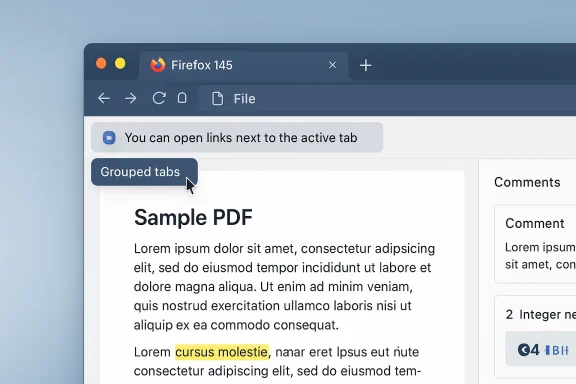
- PDF annotation inside the browser — you can now add, edit, and delete comments directly in the built‑in PDF viewer, closing a usability gap for students, reviewers, and anyone who works with document review cycles. The change is explicitly called out in the official release notes.
- Tab groups and tab placement improvements — hovering a collapsed tab group now previews the tabs inside it, and a new setting lets links opened from external apps appear next to your active tab rather than at the far end of the strip. These adjustments aim to reduce tab chaos and improve discoverability.
- Visual polish and small UX changes — the horizontal tab bar receives slightly rounded corners and updated control styles; when no extensions are installed, the Extensions button now prompts users to explore the official add‑ons store. These are cosmetic but usability‑focused touches.
Background / Overview: Why Mozilla made the 32‑bit call
The rationale
Mozilla’s engineering teams have been explicit: 32‑bit x86 Linux is no longer widely supported by mainstream distributions, and continuing to build and test a separate 32‑bit codepath imposes ongoing complexity. Over time, dependencies, toolchains, and CI systems increasingly assume 64‑bit or ARM64 targets; keeping a 32‑bit pipeline raises reliability and security testing costs and slows feature throughput. Ending official 32‑bit builds lets Mozilla focus resources on modern platforms and on delivering optimized 64‑bit and ARM64 experiences.The transition window
To soften the blow, Mozilla is keeping 32‑bit builds alive on the Extended Support Release (ESR) 140 channel and promises security updates for those builds until at least September 2026. That gives organizations and users a defined migration runway to either upgrade their OS to 64‑bit, switch machines, or adopt ESR long‑term while they plan. That ESR commitment is important, but it is explicitly framed as provisional and “at least” through September 2026 rather than an indefinite guarantee.Who is affected — and how hard the impact will be
Most modern desktop systems have been 64‑bit for years. The practical effect of this change will be limited for the majority of users, but some important groups are affected:- Very old or lightweight netbook devices using legacy 32‑bit kernels and toolchains will no longer receive feature updates in the mainline release channel. Those devices will be able to run ESR 140 for security updates only.
- Users running a 32‑bit userland on 64‑bit capable CPUs (some lightweight distros, or bespoke installs) can usually remedy the situation by installing a 64‑bit distro image — a reinstall or fresh OS upgrade will restore compatibility.
- Enterprises and embedded use cases that standardize on specific OS images will need to audit images and CI flows to ensure compatibility with 64‑bit builds or keep an ESR image for as long as necessary. The ESR window gives time for planned migrations.
Quick checks and immediate mitigations
- Run uname -m in a terminal to confirm architecture; outputs like i386 or i686 mean a 32‑bit kernel/userland.
- If the hardware is 64‑bit capable, consider a 64‑bit distro reinstall (most mainstream Linux distros provide 64‑bit images).
- If reinstalling is not possible, move to Firefox ESR 140 for security updates until you can migrate.
PDF comments: what’s new, how it works, and why it matters
Add, edit, delete comments directly in the PDF viewer
Firefox’s built‑in PDF viewer now supports inline comments: you can add comment notes, edit them, and delete them without leaving the browser. The feature appears in the release notes and the support documentation and includes a comments sidebar for review and management. This transforms Firefox from a passive PDF viewer into a lightweight review tool.Why this is significant
- Reduces friction for students and reviewers who previously had to download files to a separate editor to annotate.
- Improves speed for research workflows that pivot across tabs and documents.
- Secures annotations within the browser session, avoiding extra file transfers.
Practical behavior and limits
- Comments are stored in the PDF when the file format and permissions allow it, and you can drag comments to reposition them. The sidebar lets you see all comments at a glance. However, the browser is not a full‑featured PDF editor: advanced editing of PDF structure, digital signatures, or form‑flattening workflows still require dedicated apps. Users should verify comment persistence when saving or sharing PDFs with strict digital policies.
Caveats and verification
Mozilla’s release notes confirm the feature shipping in version 145, and the support documentation details how to perform actions. However, compatibility with complex, form‑protected, or DRM’ed PDFs can vary; where compliance or legal evidentiary standards are required, users should verify that the annotations are saved and read back by the downstream tools used by their collaborators. This is a practical limitation rather than a bug.Tab groups, tab placement, and the fight against tab bloat
Hover to preview groups and more visible group management
Firefox’s tab groups feature has been refined: hovering over a collapsed group now shows a preview of tabs contained in that group, making it faster to find the tab you need without expanding the group or switching context. This is an evolution of tab preview mechanics and is intended to reduce friction for users who rely on grouping to manage workspaces. The feature was developed in Nightly and tracked through the Mozilla community feedback channels before landing in release.Open links from apps next to your active tab
One small but highly practical setting — “Open links from apps next to your active tab” — changes where pages opened from external apps (email clients, chat apps, document viewers) appear. Instead of landing at the far right of the tab strip, links open immediately next to the tab you’re using, keeping context intact and preventing the tab bar from scattering new external links across the rightmost end. The setting appears in Preferences under the Tabs section and behaves differently for horizontal and vertical tab modes (right of the active tab or below it, respectively).Why these changes matter
- Context preservation: External links typically relate to the currently active tab; placing them next to the active tab keeps related content together.
- Reduced cognitive load: Previewing group contents without fully expanding reduces the number of context switches for users juggling many tasks.
- Custom behavior: Users can opt into this tab placement behavior, so existing workflows are not forced to change.
Edge cases and expected behavior
- If the active tab is pinned, new links open as the first unpinned tab.
- If the active tab belongs to a collapsed group, the new tab respects group boundaries and is placed following the group end.
- Behavior varies with vertical vs horizontal tab layouts, which Mozilla documents in the Preferences strings and release notes.
Visual and UX polish: horizontal tabs, extensions nudges, and controls
Horizontal tab design and control updates
Firefox 145 brings a visual refinement to the horizontal tab bar: smoother, slightly rounded corners and updated controls for consistent text inputs and buttons across settings and the address bar. These are subtle styling updates but contribute to a cleaner, more modern appearance that mirrors changes in the vertical tabs layout. The change is about consistency and reducing visual noise rather than dramatic redesign.Extensions button when no add‑ons are installed
A small UX improvement: clicking the Extensions button with no add‑ons installed now prompts users to explore the official Add‑ons store. This is a context‑sensitive nudge that helps less technical users discover curated extensions and reduces the barrier to customizing Firefox. It’s a modest change with potential discoverability benefits for the add‑ons ecosystem.Developer and platform notes
Firefox 145 includes a number of developer‑oriented changes that are worth calling out:- New or improved web platform APIs: support for Atomics.waitAsync and partial support for the Integrity‑Policy header, along with CSS compatibility fixes such as legacy -webkit-fill-available support. These changes assist web authors migrating cross‑browser CSS and multithreading patterns.
- Performance and graphics: Nightly builds received GPU process improvements on macOS and compositor updates on Windows that are progressively rolling into release channels. For developers testing WebGPU or WebRender, this is relevant to stability and performance expectations.
Security, ESR strategy, and enterprise implications
ESR as a migration mechanism
Maintaining 32‑bit builds on ESR 140 until September 2026 is Mozilla’s concession to environments that require extended support — enterprises, educational labs, and legacy installations. ESR provides a predictable security patch cadence for known platforms while giving IT teams time to validate and migrate images. However, ESR is not a substitute for long‑term modernization: it buys time, not permanence.Security testing simplification
Dropping a legacy build target simplifies test matrices and continuous integration. For Mozilla, that translates into more engineering cycles focused on modern CPU features, ARM64 optimization, and better support for modern cryptography, sandboxing, and WebAssembly improvements. From a security standpoint, fewer targets mean deeper testing per target and quicker fixes for platform issues.Enterprise risk considerations
- Image drift — organizations running frozen 32‑bit images must plan migration to 64‑bit images or maintain ESR for defined lifecycles.
- Third‑party compatibility — custom plugins, legacy automation, or internal webapps should be retested against 64‑bit builds and the newer ESR timelines.
- Support SLAs — internal SLAs that depend on mainstream Firefox updates will need to align with ESR maintenance windows if migration cannot be completed before support ends.
Critical analysis: strengths and potential risks
Notable strengths
- Practical feature set: PDF annotation and refined tab behaviors are high‑utility, low‑risk improvements that will be appreciated by many users.
- Clear migration path: The ESR 140 commitment is a pragmatic buffer that moderates the abruptness of dropping a platform build.
- Developer alignment: Platform API updates and smaller compat fixes help web developers avoid fragmentation headaches and speed cross‑browser parity efforts.
Potential risks and downsides
- User friction and e‑waste: Ending 32‑bit builds may accelerate hardware obsolescence for a small user subset. While many affected devices are functionally limited, some are still in use in resource‑constrained contexts (e.g., small labs or hobbyist setups). The ecological and social implications vary, and Mozilla’s ESR window only partially mitigates this reality. This is an inferred impact and should be considered a likely but not universally proven outcome.
- Distribution variance: Some Linux distributions may continue to ship or maintain community 32‑bit builds beyond Mozilla’s official pipeline. That can create mixed realities: an upstream distro build may exist, but it won’t be the official Mozilla build or necessarily receive feature parity or timely patches. This means security responsibilities could shift to distro maintainers.
- Edge case compatibility: Organizations that rely on specialized automation, proprietary add‑ons, or legacy webapps may find that moving to 64‑bit requires regression testing and possibly code updates. The ESR route helps but is not a replacement for proactive compatibility checks.
Practical migration checklist (for users and admins)
- Check architecture: run uname -m; if you see i386 or i686, the system is 32‑bit.
- Evaluate hardware: determine if the CPU supports 64‑bit; if yes, plan a 64‑bit distro reinstall or image replacement.
- Consider Firefox ESR 140: use ESR if immediate migration is infeasible, but schedule a migration before or during the ESR coverage window.
- Test critical workflows: validate internal webapps, automation scripts, and add‑ons on 64‑bit builds before mass rollout.
- Backup and document: keep a profile backup and document custom required extensions, because profiles and extension compatibility occasionally differ between architectures.
- Monitor release notes: follow the release notes and Nightly/Developer blogs for any late changes affecting your workflows.
Final verdict: a balanced, modernizing release
Firefox 145 is a balanced release that nudges users toward modern platforms while delivering practical, high‑value features. The decision to end 32‑bit Linux builds is inevitable from an engineering and maintenance perspective; Mozilla’s ESR buffer is a practical concession that provides time to migrate. Meanwhile, the PDF annotation capability and tab workflow improvements address real user pain points — enhancing productivity without demanding large behavior changes.The tradeoffs are clear: short‑term friction for a small subset of users in exchange for a simpler, faster, and more secure Firefox development lifecycle going forward. For most users on contemporary hardware, Firefox 145 will feel like a tidy, useful update that brings incremental polish and real utility.
Closing notes and verification checklist
- The 32‑bit Linux support change and the ESR timeline are confirmed by Mozilla’s help documentation and trade press coverage.
- The PDF comments feature is enumerated in Mozilla’s release notes and support pages; users should test annotation persistence on their PDF toolchain.
- Tab group previews and the “Open links from apps next to your active tab” setting are documented in Nightly and preference strings, and have been covered by independent outlets.
Source: Windows Report Firefox's Latest Version Ends 32-Bit Linux Support, Adds Smarter PDF Comments & More
