• Thread Author
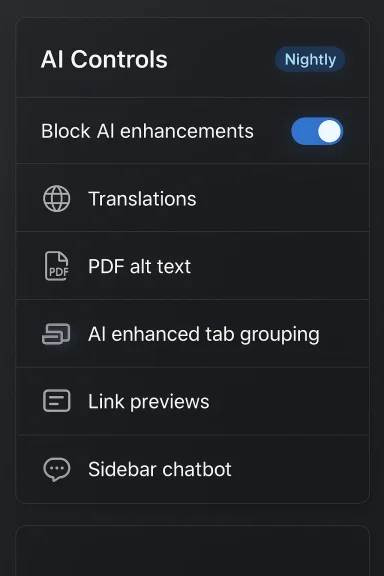
Mozilla has given users a one-click way to tell the AI revolution to stay out of their browser: starting with Firefox 148, rolling out February 24, the desktop browser adds an AI Controls panel with a single “Block AI enhancements” master switch that disables current and future generative AI features and suppresses promotional entry points across the UI.

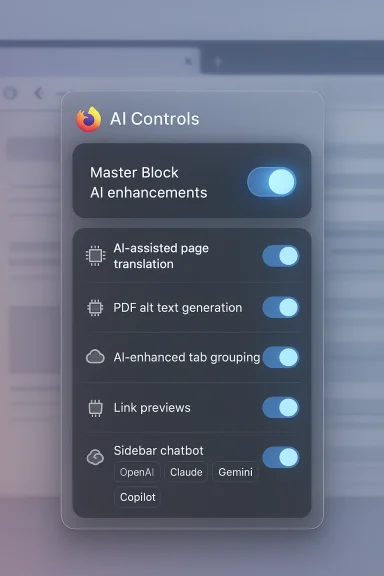
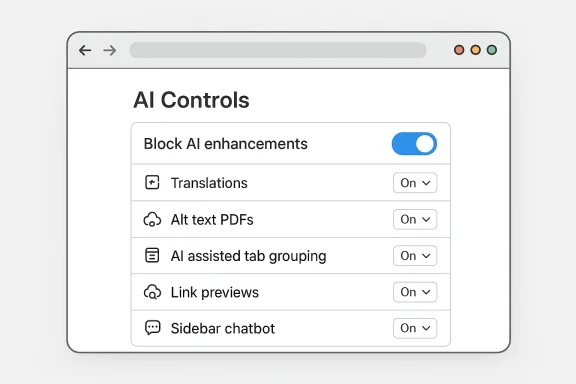
Firefox Settings UI featuring AI controls and provider logos.Background​

Mozilla’s shift reflects a strategic bet: as major browser vendors race to weave generative AI into search bars, sidebars, and system-level assistants, Firefox is doubling down on choice — letting users decide whether they want AI at all, or only specific AI tools. The change is tied to broader leadership messaging at Mozilla that places agency, transparency, and simple controls at the center of product design. Under the company’s recent leadership statements, Mozilla committed to making AI optional, understandable, and controllable. That pledge is now embodied in the AI Controls interface arriving in Firefox 148.
This new control panel is a reaction to two simultaneous forces: growing user skepticism about opaque AI features, and persistent competitive pressure to add AI-powered conveniences. Mozilla appears to be positioning Firefox as the browser that gives users the final say — whether they want full AI on their terms, selective features, or no AI at all.

Overview of the AI Controls in Firefox 148​

What the master switch does​

The new AI Controls panel provides two parallel modes of management:
  • A master “Block AI enhancements” toggle that, when enabled, prevents Firefox from showing pop-ups, reminders, or UI entry points for both existing and future generative-AI features.
  • Granular controls that let users enable or disable individual AI capabilities, or set them to “Available,” “Enabled,” or “Blocked.”
Put simply, the master switch is the nuclear option — flip it on and Firefox behaves as if AI features do not exist, while leaving open the ability to re-enable individual tools later if desired.

Which AI features are covered at launch​

At initial rollout, Firefox’s AI Controls let users manage these built-in features:
  • Translations — generative-AI-assisted page translation to browse in a preferred language.
  • Alt text for images in PDFs — automatic descriptions generated for images embedded in PDFs to improve accessibility.
  • AI-enhanced tab grouping — automated suggestions for grouping and naming tabs based on content relevance.
  • Link previews / key points — short summaries or “key points” generated from a target page to help users decide whether to click a link.
  • Sidebar chatbot — a dedicated AI chatbot panel in the Firefox sidebar that can connect to multiple providers (users can choose providers such as Anthropic Claude, ChatGPT, Microsoft Copilot, Google Gemini, and Le Chat Mistral).
These are the initial features covered by the Controls page; Mozilla has said future AI features will also be subject to the same preferences by default.

How the feature behaves in practice​

  • When a feature is set to Blocked, its functionality is disabled and the browser removes UI entry points for that tool (for example, the chatbot button in the sidebar will not appear).
  • When Block AI enhancements is turned on, Firefox suppresses promotional pop-ups and reminders for both current and upcoming AI features.
  • For on-device AI features (small models that can be downloaded to the user’s machine), setting a feature to Blocked will remove any already-downloaded models.
  • The Controls are persistent across browser updates: once you configure your AI preferences, they remain in effect until you change them.

Why this matters: privacy, control, and trust​

A privacy-forward differentiation​

Mozilla’s move is explicitly framed as a privacy- and trust-oriented design choice. By giving users an explicit, easy-to-find toggle that disables generative-AI features — and by distinguishing between on-device AI and cloud-based providers — Firefox signals that it takes user agency seriously. For privacy-conscious users, the ability to remove on-device AI model artifacts and to block browser-surface integrations with third-party chatbots can provide real reassurance.

Transparency and discoverability​

The Controls page centralizes AI settings that were previously scattered or surfaced in product prompts. That simplifies discoverability: users who care about AI settings no longer have to hunt through multiple menus or decipher small toggles buried in unrelated settings pages. This is a usability win for users who want to tailor the browser to a specific privacy posture.

Trust vs. feature-led growth​

Mozilla’s approach is a clear contrast with competitors that often fold AI features into default experiences. By making AI an opt-in (or opt-out) experience with a prominent kill switch, Mozilla is staking a brand positioning claim: trust through choice. That may resonate with users who fled mainstream browsers precisely because they disliked default AI invasions.

Technical design and limitations​

On-device vs. cloud processing​

Firefox’s AI architecture is intentionally mixed: some features use on-device models, while others rely on external chatbots hosted by third-party providers. On-device models reduce the amount of user data leaving the device and can offer faster, offline-capable experiences. Firefox’s Controls page labels and groups on-device features separately and explicitly states that models downloaded for on-device features are removed when blocked.
For chatbots and other server-backed AI features, the browser acts primarily as a client: it provides the UI and connectivity to a chosen provider, but actual model inference and storage of conversation data are handled by the provider. This means blocking AI features in Firefox may hide the UI and suppress calls to those providers, but it does not alter the provider’s own privacy model if a user later chooses to connect.

Extensions and the kill switch​

A notable nuance: the master Block AI enhancements toggle is intended to block AI features provided by Firefox and to remove UI and on-device artifacts for those features. It does not — and cannot technically — prevent third-party extensions from contacting external AI services independently of Firefox’s own AI stack. Mozilla’s documentation clarifies this distinction: extensions that use AI services outside of Firefox’s own AI plumbing can continue to operate unless they specifically integrate with Firefox’s built-in features.

Persistence and update behavior​

Firefox’s AI preferences are designed to persist across updates, meaning once configured, they remain in place even as Mozilla ships new versions. For enterprises and power users this persistence provides stability: one-time choice that withstands automatic updates.

What’s not covered (yet)​

  • Mobile support: the new AI Controls are introduced in the desktop browser settings. Mobile browsers are not explicitly listed as covered at launch, so mobile Firefox users should expect different behavior until and unless similar controls are added to Android and iOS versions.
  • Enterprise policy endpoints: Mozilla’s enterprise/IT policy management integrations for centralized blocking of AI features are not yet widely documented. Administrators should look for policy updates as corporate adoption scenarios emerge; at the time of launch, organizations may need to rely on local configuration or group policy workarounds.

UX implications: helpful AI vs. unwanted noise​

Where AI actually helps​

Not all AI is hype; some of these features solve real problems:
  • Automatic translations remove language friction and are useful when browsing international content.
  • Alt text generation in PDFs improves accessibility for screen reader users and for document sharing scenarios.
  • AI-enhanced tab grouping can reduce cognitive load for people who juggle many windows and tabs.
  • Link previews help users triage links without losing browsing context.
For many users, those gains justify limited integration of AI into the browsing workflow.

Where AI becomes an annoyance​

The problems users are reacting to are not purely theoretical. Common annoyance patterns include:
  • Persistent promotional chrome encouraging users to try new AI features they explicitly do not want.
  • Auto-installed artifacts such as on-device model downloads that consume storage even if a user only experimented with a feature once.
  • Default exposures that turn optional features into effectively mandatory UX changes, like permanently visible sidebars or pinned chatbot buttons.
By allowing the user to kill both functionality and promotional entry points, Firefox attempts to eliminate both the annoyance and the accidental opt-in.

Strategic and market implications​

Differentiation in a crowded field​

As Google embeds Gemini deeper into Chrome and search, and Microsoft continues a Copilot-first strategy across Windows and Edge, Mozilla is carving out a privacy-first differentiation. The gamble: there’s a non-trivial user base that actively dislikes the default proliferation of AI features and will prefer a browser that treats AI as an explicit, revocable choice.

Risks for Mozilla​

  • Missing the AI convenience market: Users who value AI-powered productivity may migrate to browsers where AI is more tightly integrated and enabled by default, potentially reducing Mozilla’s appeal to those segments.
  • Developer burden: Supporting both AI-first and AI-off user experiences increases product complexity — more UI surfaces, more conditional logic, and more support scenarios to test.
  • Perception vs. reality: If users perceive the kill switch as cosmetic (i.e., it hides UI but doesn’t stop data flows), Mozilla risks damaging trust. The implementation needs to be both technically and communicatively convincing.
  • Extension ecosystem friction: Because third-party extensions can independently use AI services, power users or admins may experience inconsistent enforcement of their AI preferences unless extensions explicitly respect the browser-wide setting.

Opportunities for Mozilla​

  • Reclaiming lapsed users: Former Firefox users who left because of perceived bloat or telemetry may find the explicit AI opt-out an attractive reason to return.
  • Regulatory goodwill: Regulators focused on transparency and user consent may view Mozilla’s approach favorably compared with vendors that rely on implied consent.
  • A new privacy product narrative: Framing Firefox as the “AI-optional” browser gives Mozilla a clearer story to tell enterprise and consumer audiences concerned about opaque AI behaviors.

Practical guide: how to use the AI Controls​

  • Open Firefox on desktop.
  • Go to Menu > Settings and find the new AI Controls section, or load the AI Controls preferences directly.
  • To disable all Firefox-provided generative AI: toggle Block AI enhancements to On.
  • To manage features individually:
  • Expand each AI feature row (Translations, Alt text in PDFs, Tab group suggestions, Key points in link previews, Sidebar chatbot).
  • Choose between Available, Enabled, or Blocked depending on whether you want the feature visible, actively enabled, or fully disabled.
  • For the sidebar chatbot, pick your preferred provider if you want to use it; otherwise set it to Blocked to remove it entirely.
  • Restart the browser if prompted; on-device models for blocked features will be removed automatically.
Note: Blocking AI enhancements prevents Firefox from showing promotional entry points for new or upcoming generative features, and the preference persists across updates.

Security, bias, and reliability considerations​

Hallucinations and misinformation​

Generative AI summaries and link previews are convenient but imperfect. Summaries can hallucinate facts or present contested information with unjustified certainty. When such features are disabled you remove both convenience and this class of risk. Users who rely on machine-generated summaries for research, medical, or financial decisions should exercise caution and prefer primary sources.

Data leakage through providers​

Sidebar chatbots that connect to remote providers inevitably expose user prompts to those services. Even if the browser suppresses prompts, choosing to enable a chatbot later will transmit text to the provider under that provider’s terms. Users and organizations should assume that any query sent to a third-party chatbot is subject to that provider’s data retention and usage policies unless explicitly stated otherwise.

Attack surface and safety​

Integrations that fetch page content to summarize or to generate alt text enlarge the browser’s attack surface: maliciously crafted pages could try to exploit flaws in summarization parsers or in the way content is extracted. Keeping an auditable kill switch and being able to disable automatic content extraction features reduces exposure to such attacks.

What’s unclear and what to watch​

  • Enterprise management: Formal enterprise policies for centralized control of AI features (e.g., Group Policy or MDM profiles) were not fully documented at launch. IT administrators should monitor Mozilla’s enterprise policy updates.
  • Mobile parity: The desktop-first rollout leaves questions about when and how Android and iOS builds will support the same master switch semantics.
  • Third-party extension compliance: Whether extension authors will adopt a standard to respect the browser-wide AI block remains an open ecosystem question. Extension store governance and permissions may evolve to address this.
  • Future feature taxonomy: As Mozilla develops additional AI features, how they will be categorized (on-device vs. cloud, optional vs. integrated) and how granular controls will scale remains to be seen.
Given those uncertainties, users and administrators should treat the master switch as a strong first line of defense, but not a guarantee against all externally supplied AI behaviors.

Verdict: a pragmatic, user-first counterpoint — with caveats​

Mozilla’s AI Controls in Firefox 148 are a deliberate, pragmatic response to a polarized marketplace. The master toggle and granular controls provide a level of user agency that many other browser vendors have not rushed to offer. For privacy-conscious and control-oriented users, this may be a major selling point: the ability to nuke AI features and promotional prompts with one action is a simple, powerful value proposition.
Yet the move comes with trade-offs. It increases engineering complexity, creates potential perception risk if not implemented transparently, and does not eliminate all sources of AI interaction (notably third-party extensions and external websites). Enterprise customers should be cautious and seek policy-based management if they need organization-wide guarantees. Power users should note that mobile parity and extension behavior are still areas to watch.
Ultimately, this change reframes a core question for browsers in 2026: will user control and trust become the competitive differentiator, or will seamless AI conveniences win by default? Mozilla’s answer is clear: make AI optional, obvious, and revocable — and give users the right to say no. For a significant portion of the web audience that has been vocal about AI fatigue, that promise may be exactly what keeps them loyal to Firefox.

Source: The Tech Buzz https://www.techbuzz.ai/articles/firefox-lets-users-block-all-ai-features-in-privacy-push/

 

Mozilla is giving users a clear, durable way to opt out of built‑in generative AI: starting with Firefox 148, a new AI Controls section adds a single Block AI enhancements master toggle plus per‑feature controls so you can disable all Firefox‑provided AI features or pick and choose which to keep.

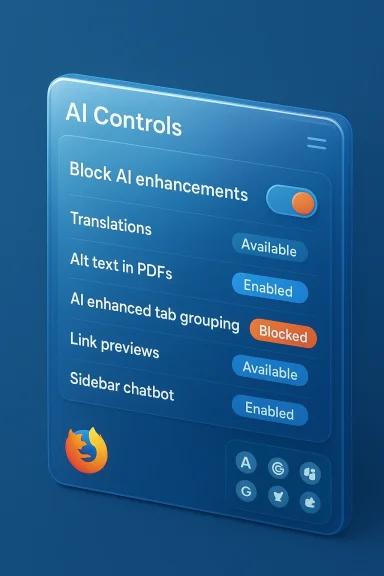
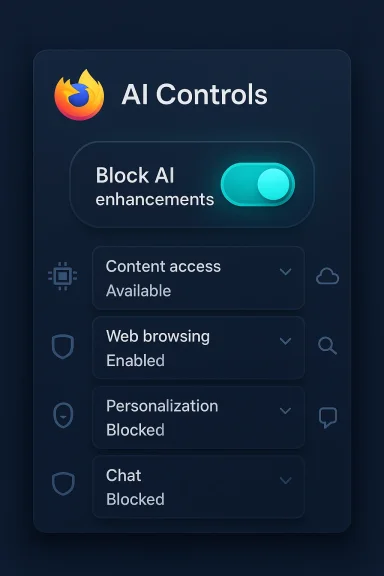
A glossy blue UI panel titled 'AI Controls' showing multiple feature toggles.Background / Overview​

Mozilla announced the new centralized AI Controls in a blog post on February 2, 2026, and says the feature will ship with Firefox 148, which begins rolling out on February 24, 2026. The move is explicitly aimed at users who want nothing to do with browser‑level AI, while preserving optional AI features for those who find them useful.
At a high level the change does three things:
  • Adds a discoverable settings page named AI Controls.
  • Provides a master toggle labeled Block AI enhancements to hide and disable current and future generative AI features.
  • Offers granular per‑feature controls so users can set individual AI capabilities to Available, Enabled, or Blocked.
This is a deliberate product decision: rather than burying a series of scattered toggles or forcing an opt‑out through obscure flags, Mozilla centralizes choices so users and administrators can control exposure to AI in one place. Industry coverage and early hands‑on reporting confirm the feature set and timing.

What Mozilla announced — the details​

Rollout and x 148 is the version that will introduce the AI Controls UI; Mozilla lists Feb. 24, 2026 as the rollout start date. Early access and Nightly/Beta builds may expose the controls sooner for testers.​

  • The announcement centers on the desktop browser; mobile parity (Android/iOS) is not guaranteed at launch and remains a point to watch for future updates.

Features covered at launch​

At release, AI Controls covers these built‑in Firefox capabilities:
  • Translations — AI‑assisted page translation.
  • Alt text in PDFs — automatic accessibility descriptions for images inside PDFs.
  • AI‑enhanced tab grouping — suggestions for grouping tabs and generating descriptive names.
  • Link previews / key points — short summaries shown before opening links.
  • Sidebar chatbot — an AI chatbot panel that can connect to multiple providers such as Anthropic Claude, ChatGPT, Microsoft Copilot, Google Gemini, and Le Chat Mistral.
These are the initial targets; Mozilla has said that the master toggle is intended to apply to future generative AI features as well. That forward‑compatibility promise is central to the product’s pitch: one durable preference, set once, that persists across updates.

How the master toggle behaves​

When Block AI enhancements is turned on:
  • Firefox removes UI entry points for covered AI features (for example, the chatbot button in the sidebar will not appop‑ups, nudges, and reminders to try AI features are suppressed.
  • For on‑device AI features, any already‑downloaded models are removed when a feature is blocked.
Mozilla frames this as more than a cosmetic switch: the company intends the toggle to act as a practical, persistent opt‑out for generative AI surfaced by the browser itself. That said, the precise runtime guarantees—especially around third‑party extensions and network‑level behaviors—require careful reading of documentation and follow‑up tests.

On‑device vs. cloud: important technical distinctions​

A central nuance in Mozilla’s messaging is the mixed architecture of its AI features:
  • Some capabilities run on‑device, which reduces the amount of browsing data leaving your PC and allows offline operation for small models.
  • Others are client connectors to remote providers—the sidebar chat, for exat; inference and data retention are handled by the chosen provider.
Why this matters: blocking an on‑device feature can remove the downloaded model and stop local inference. Blocking a cloud‑backed feature will hide the UI and suppress calls initiated by Firefox, but if you later choose to connect the sidebar chatbot to a provider, your prompts will be governed by that provider’s retention and usage policies. Enterprise teams and privacy‑minded users should assume that provider contracts—not Firefox—determine long‑term handling of chatbot data.

and the scope of the kill switch​

One critical caveat: the master toggle targets Firefox‑provided generative AI features and the browser’s own UI surfaces. It cannot technically prevent third‑party extensions from making independent API calls to external AI services unless those extensions explicitly integrate with Firefox’s AI Controls framework or are blocked bycies. In other words, the kill switch is a powerful first line of defense, but it isn’t a total guarantee against every possible AI interaction inside the browser. Administrators should treat it as a strong but bounded control.
This limitation opens two immediate implications:
  • Power users and enterprises should audit installed extensions and review extension permissions before assuming a global AI blackout.
  • Enterprise management (Group Policy / MDM) documentation for centralized enforcement was not fully detailed at launch, so IT teams should watch Mozilla’s enterprise policy updates.

Why this matters: privacy, UX, and market positioning​

Privacy and trust​

Mozilla is positioning Firefox as a browser where AI is optional and revocable, a direct counterpoint to vendors that bake assistants into default flows. For privacy‑conscious users, the durable opt‑out reduces surprise exposures and gives a tangible way to reduce data surface area. This is especially relevant for features that extract page content for summarization or alt‑text generation.

User experience and discoverability​

Consolidating AI preferences into one settings page addresses a common UX failure when new capabilities are scattered across menus or exposed via persistent promotional chrome. The AI Controls page improves discoverability and makes it easier for users to enforce their preferred privacy posture.

Market differentiation​

As Chrome and Edge push deeper platform‑level AI integrations, Mozilla is trying to convert its historical privacy brand into a modern competitive differentiator: the browser that gives users a true “kill switch.” If executed and communicated well, this could reclaim lapsed users and set expectations for industry; if executed poorly (perception of cosmetic toggles, missing enterprise controls), it risks reputational damage. Analysts and community posts highlic upside and the implementation risk.

Security and reliability considerations​

Hallucinations and misinformation​

Generative summaries and link previews are convenient but imperfect. They can hallucinate facts or present contested claims with unjustified confidence. Disabling summary features reduces this particular attack surface and thnowingly rely on incorrect machine‑generated content for important decisions. Users who use AI summaries for legal, medical, or financial decisions should continue to verify facts against primary sources.

Data leakage through providers​

Sidebar chat integrations and cloud‑backed tools inevitably expose prompts and possibly surrounding context to external vendors. Even if Firefox hides UI entry poiot later will transmit text to the provider under that provider’s terms. Treat each provider connection as a separate risk surface.

Attack surface expansion​

Features that fetch page content for summarization or alt text increase the browser’s attack surface. Maliciously crafted HTML, images, or PDF payloads could attempt to exploit parsers or content extraction routines. A visible kill switch and the ability to removeuce exposure but do not eliminate the need for hardened parsing and runtime sandboxing.

Supply chain and model authenticity​

On‑device models must be sourced, signed, and updated securely. Questions about model provenance—who built them, how updates are validated—matter forust. Mozilla’s promise to remove downloaded models when blocked helps, but the download and update path must be auditable. This remains an area where independent verification and follow‑up documentation are needed.

Practical guide: how to use AI Controls (what to do now)​

  • Update: Install Firefox 148 on or after Feb. 24, 2026, or use Nightly/Beta for early access.
  • Open settings: Menu > Settings > AI Controls to find the new centralized page.
  • Toggle global block: Flip Block AI enhancements to On to disable current and future Firefox AI features.
  • Fine tune: If you want selective AI, leave the master toggle off and set individual features to Available/Enabled/Blocked as audit: Review installed extensions and disable any that contact external LLM endpoints if you require a stricter posture.
A quick checklist for administrators:
  • Don’t assume immediate enterprise policy keys exist—test in a controlled fleet.
  • Combine browser controls with network‑level restrictions if you must guarantee no outbound calls toains.
  • Consult accessibility stakeholders before blanket blocking features like PDF alt text that help assistive technologies.

Risks, caveats, and unanswered questions​

  • Extensions remain a wildcard. The kiherently override extension behavior; extension authors and store governance will determine how comprehensively the browser‑wide preferencethe master toggle as a powerful convenience, not an absolute firewall.
  • Enterprise management details are incomplete. At launch, centralized policy endpoints (Group Policy / MDM) were not fully documented; enterprises should withhold broad deonfirm policy schemas.
  • Mobile parity is unclear. The initial rollout is desktop‑first; Android and iOS users should expect delayed or different behaviors.
  • Perception risk. If users perceive the control as cosmetic—hiding buttons but not halting all data flows—Mozilla risks reputational damage. The company must be transparent about exactly what the toggle does and document what it does not do.
Flagging unverifiable claims: community posts and some early reports suggest additional behaviors (for example, automatic removal of models from disk when blocked). These behaviors are plausible and reported by early testers, but users should verify in their environment—inspect local model caches and network activity after toggling the setting to confirm effects. Until Mozilla publishes full technical notes, treat such operational claims cautiously.

How this compares with other browsers​

Major vendors are taking different approaches:
  • Some browsers are embedding AI assistants into core flows (search bars, omnibox, OS integrations) and defaulting to visible UI placements. Other vendors provide opt‑outs, but discoverability and granularity vary. Mozilla’s centralized master toggle is a stronger, easier‑to‑find opt‑out than most current offerings and may pressure competitors to match visibility and scope.
For users choosing a browser based on AI exposure:
  • If you want a clear, explicit option to disableox’s new controls will be among the most user‑friendly.
  • If you want AI tightly integrated and enabled by default for productivity workflows, other browsers may provide deeper platform ties and conveniences that Firefox

What to watch next​

  • Enterprise policy documentation: Will Mozilla publish Group Policy/MDM keys and a schema for ct? This will determine corporate adoption speed.
  • Extension store governance: Will Mozilla require extensions that call external AI providers to respect the browser‑wide setting or request expon rules could close the remaining enforcement gap.
  • Mobile rollouts: Android/iOS parity and how mobile browsers expose the same semantics will affect day‑to‑day user behavior.
  • Transparency docs: Detailed technical notes about on‑device model provenance, update channels, and deletion processes will determine whether the kill switch is trusted as more than cosmetic.

Recommendations for users and IT teams​

  • Casual users: If you preferng, enable Block AI enhancements once Firefox 148 is installed. Follow up by reviewing installed extensions.
  • Power users who whe per‑feature controls to retain only helpful tools (for example, translations or PDF alt text) and keep the rest blocked. Monitor disk and network usage for any on‑device models.
  • Privacy‑first users: Audit provider terms before connecting the sidebar chatbot; assume prompts sent to third by those providers. Consider network controls if you must enforce complete isolation.
  • IT administrators: Pilot in a small fleet, wait for official enterprise policy keys, and consider combining browser settings with network controls to obtain a provable, auditable posture. Consult accessibility stakeholders before blanket blocking features that help users with disabilities.

Conclusion​

Mozilla’s AI Controls and the Block AI enhancements master toggle represent a meaningful, user‑centric response to the polarizing question of how AI should appear in everyday software. The centralized settings page, per‑feature controls, and the promise to apply the toggle to future generative features give privacy‑minded users an unusually clear and durable mechanism to avoid AI in the browser. At the same time, limitations remain: third‑party extensions, enterprise policy maturity, mobile parity, and technical transparency around on‑device models are open issues that Mozilla must address to make the kill switch both real and defensible. Early reporting and Mozilla’s own blog provide the facts about the rollout and features; now the practical test will be whether the controls behave as promised across real‑world deployments. For anyone who has been frustrated by hidden AI surfacing in browsers, Firefox 148’s controls are worth testing as soon as the update arrives on February 24, 2026.

Source: Windows Report https://windowsreport.com/firefox-t...dedicated-controls-rollout-starts-this-month/
 

Mozilla’s latest update to Firefox doesn’t just ship a handful of AI toys — it ships an escape hatch: a single, discoverable settings page that lets users block current and future generative AI features across the desktop browser with one click. The new AI Controls panel, which Mozilla says will arrive with Firefox 148 starting on February 24, 2026, includes a master toggle called Block AI enhancements plus per-feature dropdowns for finer control. This is a deliberate product posture: ship AI features for those who want them, and give everyone else a durable, user-facing way to say “no thanks.”

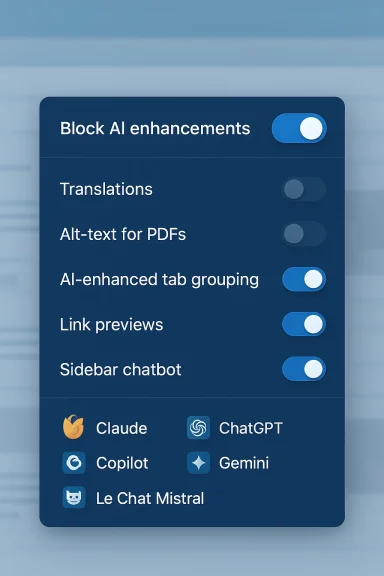
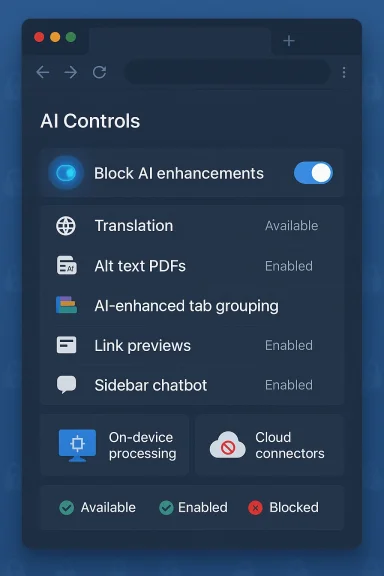
AI Controls panel with a toggle to Block AI enhancements and settings like content access and browsing.Background / Overview​

Mozilla published the announcement on February 2, 2026, framing the addition as a response to competing user demands — some want AI everywhere, many others want none of it. The new settings consolidate generative-AI controls into a single area of the desktop Settings UI and promise that the master toggle will suppress UI entry points, promotional nudges, and, for on-device features, remove any locally downloaded models. That combination of discoverability and durability is what makes the change noteworthy.
At launch, the AI Controls panel covers several concrete features Mozilla has been developing or previewing recently:
  • Translations — generative-AI-assisted page translation.
  • Alt text for PDF images — automatic image descriptions inside PDFs for accessibility.
  • AI-enhanced tab grouping — automatic suggestions for grouping and naming tabs.
  • Link previews / key points — short summaries surfaced before opening links.
  • Sidebar chatbot — a sidebar assistant that can connect to third-party providers such as OpenAI’s ChatGPT, Anthropic’s Claude, Microsoft Copilot, Google Gemini, and others.
Multiple outlets picked up Mozilla’s message the same day, emphasizing the central theme: choice. Coverage from major tech press confirmed the rollout date and the basic behavior of the master toggle, underscoring that Mozilla wants to both continue building AI features and give users a clear way to opt out.

What the AI Controls actually do​

The master toggle: “Block AI enhancements”​

The Block AI enhancements switch is presented as a forward‑compatible, global override. When toggled on, Mozilla says Firefox will:
  • Hide UI entry points for built‑in generative-AI features (for example, the chatbot button in the sidebar).
  • Suppress promotional popups and reminders encouraging use of AI features.
  • Remove downloaded on‑device models for features that run locally.
  • Ensure that future generative features added by Mozilla remain blocked by default for users who left the master toggle on.
This is more than a cosmetic setting — Mozilla positions it as a durable preference designed to survive automatic updates so users do not need to repeat their opt‑out. That persistence is a critical usability improvement over the typical model of buried flags and opt‑outs that reset with each release.

Per‑feature controls and the “Available / Enabled / Blocked” model​

If a global kill switch is too blunt, Firefox’s AI Controls allow per‑feature nuance. Each listed capability uses a three-state dropdown:
  • Available — the feature is visible and can be used, but not enabled by default.
  • Enabled — the feature is actively opted into.
  • Blocked — the feature is removed from the UI and, for on‑device features, any local models are deleted.
This design lets users preserve accessibility or productivity features (for instance, PDF alt text) while disabling other generative experiences they dislike.

Important technical distinctions: on‑device vs. cloud connectors​

The AI Controls page documents a crucial architecture split:
  • On‑device features run small models locally and, when blocked, will have their models removed from the device.
  • Cloud‑backed connectors are client UIs that route user prompts to external providers; blocking will hide Firefox’s UI and suppress its requests, but it cannot change the retention or inference policies of the third‑party provider if the user later chooses to connect.
Put simply: the toggle controls Firefox’s surfaces. It is not a network firewall that guarantees zero data leaves a machine; extensions and external websites can still call third‑party AI services unless additional controls are layered on by the user or admin. Mozilla’s support documentation is explicit about this limitation.

Why this matters now: market context and user trust​

Browsers are strategic platforms. Over the last year, major vendors have moved from simply enabling AI features to making them central, default experiences. That shift has raised two broad problems for privacy‑minded users and administrators:
  • Default exposure — promotional chrome, badges, and persistent UI can result in accidental opt‑in or ongoing nudges that push users toward AI features they did not ask for.
  • Expanded data surfaces — integrated AI often requires networked inference or model access, creating fresh questions about telemetry, data handling, and contract terms with third‑party providers.
Mozilla’s central AI Controls represent a strategic decision: rather than competing by invisibly surfacing more AI, Firefox aims to compete on user choice and transparency. For privacy advocates and enterprise IT teams, that is a tangible, positive signal — provided the toggle behaves as promised. Independent reporting and early hands‑on articles framed the change as Mozilla’s attempt to square product innovation with traditional Firefox values.

Strengths: what Mozilla got right​

  • Clear discoverability: Centralizing AI controls in a single Settings page solves a longstanding UX problem. Users no longer need to hunt through fragmented toggles or dismiss repeated product prompts to avoid an undesired feature. This improves both accessibility and consent hygiene.
  • Durability across updates: Promising that preferences persist through automatic updates removes friction and embraces the reality of modern browser update cycles. A one‑time decision that survives upgrades is far more reliable than ephemeral flags.
  • Granularity for mixed needs: The three‑state per‑feature model recognizes real tradeoffs. Accessibility features like PDF alt text matter to users with disabilities; productivity features like translations help many users. The UI design allows these to coexist with an overall opt‑out.
  • Signalling to the industry: By offering a visible off switch, Mozilla sets a precedent. If consumers come to expect an opt‑out as a baseline, competitors will face pressure to match that level of user control. That could rebalance the “AI by default” momentum in browser product strategies.

Remaining gaps and technical caveats — where the risks are​

The master toggle is powerful in intent but limited in scope. Every technical or governance gap below matters for users who need provable, auditable protections.

1) It controls Firefox’s built‑in surface, not the entire network stack​

The toggle hides and disables Firefox’s own AI UI surfaces. It does not serve as a global network filter. Third‑party extensions that independently call external AI APIs can still function unless they explicitly integrate with Firefox’s AI plumbing. For organizations that require strict data flow guarantees, that distinction is decisive. Mozilla’s support page explicitly warns that extensions can still use third‑party AI services.

2) Extension ecosystem compliance is uncertain​

Whether extension authors will voluntarily respect the browser‑wide AI setting is an open question. Extension store governance could evolve to enforce compliance, but until then there is an enforcement gap. Admins and power users should plan to audit installed extensions, limit store access, or block specific permissions where necessary.

3) Mobile parity is not guaranteed​

The announcement centers on the desktop browser. Mozilla did not commit to immediate feature parity on Android and iOS at launch. That leaves a cross‑device gap in the user experience: a kill switch on desktop is less useful if a user’s phone or tablet still surfaces the same AI endpoints. Mobile rollout timelines will matter for everyday behavior and for enterprise BYOD considerations.

4) Enterprise policy and management keys​

Large organizations need Group Policy/MDM keys and a published schema to centrally enforce settings at scale. The product update will be more meaningful for IT teams if Mozilla ships enterprise policy templates and a documented management API. Without them, admins must rely on brittle scripts and network controls.

5) Transparency about data flows and on‑device models​

Mozilla says on‑device models will be removed when a feature is blocked, but the announcement leaves technical details unspecified: how model artifacts are stored, how deletion is verified, how updates are signed, and what, if any, telemetry remains. For trust to be durable, Mozilla should publish detailed technical notes on model provenance, update channels, and the exact mechanics of deletion. Right now, users and admins must accept a high‑level assurance without forensic detail.

6) Sync and cross‑device settings​

The announcement didn’t clearly state whether AI control preferences will synchronize via Firefox Sync. If preferences are not synchronized, users will need to repeat settings across devices or rely on enterprise policies. That reduces convenience and increases the risk of mismatched exposures.

Practical guidance: what users and IT teams should do now​

  • Casual users
  • Enable Block AI enhancements once Firefox 148 lands if you don’t want AI features in your browsing experience.
  • After toggling, review installed extensions and remove or disable any that call external AI services you don’t trust.
  • Use per‑feature controls to retain specific accessibility or productivity features as desired.
  • Power users and privacy‑minded individuals
  • Combine the master toggle with local firewall rules to create a stronger practical barrier against outbound AI API calls.
  • Audit disk folders for on‑device model artifacts after enabling Block AI enhancements to verify deletion behavior.
  • Test the sidebar chatbot only with providers you’ve vetted; read their retention policies before sending sensitive prompts.
  • IT administrators
  • Pilot Firefox 148 in a controlled fleet to validate how the controls interact with your extension set and enterprise tooling.
  • Wait for Mozilla’s official enterprise policy keys before broad enforcement; until then, combine browser settings with network rules and endpoint controls.
  • Consult accessibility stakeholders before blanket blocking: PDF alt text and other assistive features may be essential for compliance.
  • Developers and extension authors
  • If you build extensions that use AI, consider adopting clear opt‑in UX and honor the browser’s AI control settings where feasible.
  • Document external provider contracts and retention for your users, and add manifest flags that make AI usage explicit during install.

Wider implications: product design, competition, and regulation​

Mozilla’s approach reframes an industry conversation. Where other vendors have folded AI into default experiences and relied on habituation and visual badges to drive engagement, Firefox is staking a different claim: user agency as a competitive differentiator. That posture could influence regulatory conversations about consent, transparency, and default settings, and it may prompt competitors to offer similar toggles to avoid user churn.
Two further political-economic angles are worth watching:
  • Attention and provenance: As browsers add summarizers and link‑preview features, they become gatekeepers of attention. How these systems present provenance and favor (or disfavor) publishers will have real downstream effects on media ecosystems. Mozilla’s emphasis on choice does not neutralize those dynamics, but explicit toggles at least give users an option to opt out of AI‑mediated discovery.
  • Enterprise compliance: Regulators and enterprise security teams will press for verifiable documentation and auditable controls. If Mozilla wants corporate adoption, it must publish policy keys and hard guarantees about telemetry and deletion. The product is only halfway there without those artifacts.

How this compares to other browsers​

In contrast to browsers that embed AI tightly — sometimes with default enabled assistants and prominent branding — Firefox’s kill switch is an explicit counter‑proposal. That doesn’t mean Firefox won’t ship AI conveniences; Mozilla is clear it will. The difference is consent architecture: rather than surfacing AI by default and requiring manual opt‑out, Firefox gives users a durable opt‑out and granular per‑feature settings. Depending on user priorities, that difference can be decisive. Coverage from outlets like The Verge and TechCrunch captured this contrast, noting Mozilla’s unusual public emphasis on giving people an “off” option.

What to test when Firefox 148 rolls out​

  • Verify that turning Block AI enhancements on removes sidebar chatbot entry points and other UI elements claimed in the announcement.
  • Confirm that per‑feature Blocked state removes local model files for on‑device features (note exact file locations and timestamps).
  • Install or enable a known AI‑calling extension and observe whether it continues to make outbound calls; document network behavior for compliance.
  • Test Sync behavior: change settings on desktop, then check whether mobile instances reflect the same preference.
  • For enterprises, try to apply centralized policy keys once Mozilla publishes them and measure enforcement at scale.

Verdict: a pragmatic step with meaningful limits​

Mozilla’s AI Controls in Firefox 148 are a pragmatic, user‑centered counterpoint to a market racing to make AI invisible and ubiquitous. The master toggle plus per‑feature controls do what many privacy‑minded users crave: a single place to make a durable decision about whether generative AI should surface in their browser. That is a meaningful usability and trust win.
But the feature is not a universal panacea. It is scoped to Firefox’s built‑in surfaces. It leaves extension behavior, cross‑device parity, and the need for enterprise enforcement as open issues. For the kill switch to be more than a comforting label, Mozilla must follow up with:
  • Comprehensive technical documentation about on‑device models and deletion guarantees.
  • Clear enterprise policy keys and configuration schemas.
  • Extension store guidance or enforcement that aligns ecosystem behavior with browser settings.
  • Cross‑device synchronization semantics so users don’t face surprising exposures on mobile.
If Mozilla delivers on those operational details, the AI Controls panel will be a model for how to balance innovation with agency. If it does not, the toggle risks becoming a reassuring UI element that leaves important data flows unaddressed.

Final recommendations​

  • If you are privacy‑focused: install Firefox 148 and enable Block AI enhancements as your first defensive step. Follow up with an extension audit and consider network-level policies for complete coverage.
  • If you are an IT admin: pilot the update, demand enterprise policy artifacts from Mozilla, and combine browser‑level controls with perimeter defenses during rollout. Map accessibility needs before applying blanket block policies.
  • If you are a developer or extension author: be explicit about AI usage, document provider terms, and offer clear opt‑ins. Consider honoring the browser’s AI controls to build user trust.
Mozilla’s choice is an important one: build AI, but place the power to accept or refuse it clearly in users’ hands. That’s the product tradeoff of 2026 — innovation plus an explicit right to opt out — and for many Firefox users, it will make all the difference.

Source: The Decoder Firefox users will soon be able to block all generative AI features in one place
Source: VOI.id https://voi.id/en/amp/555850/
 

Mozilla is giving users an unmistakable way to tell the AI revolution to stay out of their browser: starting with Firefox 148, rolling out February 24, 2026, the desktop browser will include a dedicated AI Controls panel with a single “Block AI enhancements” master toggle that disables current and future generative-AI features, plus granular per-feature switches for those who want only some AI tools. ([blog.mozilla.orga.org/en/firefox/ai-controls/))

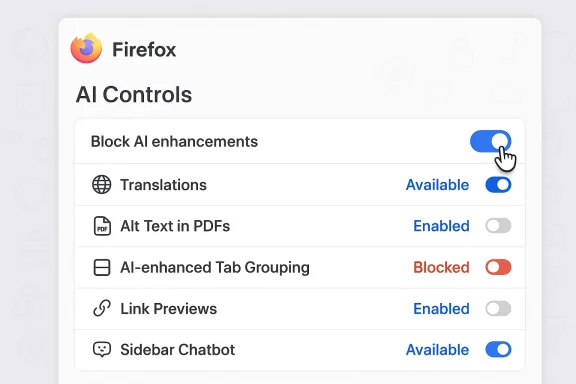
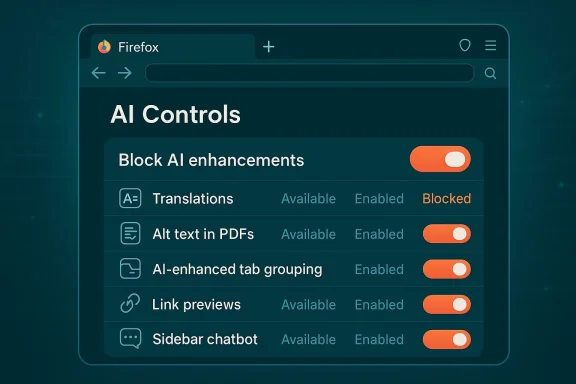
Firefox AI Controls panel showing toggles for translations, alt text in PDFs, tab grouping, and more.Background​

Mozilla’s announcement is a clear product- and policy-level response to a polarized moment in browser design. Under new CEO Anthony Enzor-DeMeo, Mozilla has publicly framed the next phase of Firefox around user agency, transparency, and choice — explicitly promising that “AI should always be a choice — something people can easily turn off.” (blog.mozilla.org)
The AI Controls rollout was published on February 2, 2026 and will appear in the stable Firefox 148 release beginning February 24, 2026. Early testers can already try the controls in Nightly builds. Coverage across consumer tech outlets confirmed the same timing and the same feature list. (blog.mozilla.org)
This functional shift is complemented by a strategic financial commitment: Mozilla is directing significant reserves toward building an alternative ecosystem for “open, trustworthy” AI — roughly $1.4 billion in reserves that the organization intends to deploy in support of startups, nonprofits, and in-house initiatives aiming to rebalance the field. Mozilla leadership, including President Mark Surman, has described an effort to assemble a kind of “rebel alliance” of mission-driven technologists to push for trustworthy AI.

What Mozilla is shipping in Firefox 148​

One-stop AI Controls — global and granular choices​

At a glance, the new AI Controls panel introduces two complementary management layers:
  • A global master switch: Block AI enhancements, which is intended to hide and disable all browser-provided generative-AI surfaces now and into the future.
  • Per-feature controls: individual toggles that let users set each built-in capability to Available, Enabled, or Blocked.
Mozilla emphasizes that preferences are persistent across updates, so a one-time decision should survive automatic browser upgrades. Nightly users can test the panel today; stable users will see it with the public roll‑out of Firefox 148 on Feb. 24. (blog.mozilla.org)

Features controlled at launch​

The initial AI Controls list covers five explicit feature areas:
  • Translations — AI-assisted webpage translation so you can view foreign-language sites in your preferred language.
  • Alt text in PDFs — AI-generated accessibility descriptions for images embedded inside PDF documents.
  • AI-enhanced tab grouping — automatic suggestions for grouping related tabs and proposing group names.
  • Link previews (key points) — short, upfront summaries of linked content to help triage before you click.
  • Sidebar chatbot — an optional assistant panel that can connect to third‑party providers including Anthropic Claude, OpenAI ChatGPT, Microsoft Copilot, Google Gemini, and Le Chat Mistral. (blog.mozilla.org)
These are the explicit first targets; Mozilla says the master toggle will be forward-compatible and apply to future generative-AI features introduced by the browser. That promise — and its operational limits — is central to assessing how comprehensive this “off” switch actually is. (blog.mozilla.org)

How the toggle works — technical realities and important distinctions​

Mozilla’s public messaging and hands-on reporting make a key techrefox’s AI surface is a mixed architecture of on-device models and cloud connectors. That split matters for what “Block AI enhancements” can and cannot guarantee.
  • For on-device features (small models downloaded to the client), Mozilla indicates the toggle will remove downloaded models and disable local inference when a feature is blocked. That means the browser aims to erase or disable locally stored assets when yououd-backed features** (the sidebar chatbot or other connectors), the browser acts as a client: it provides UI and routing but the inference, retention, and contractual data handling are governed by the chosen provider. Turning the browser toggle off will remove the UI and suppress browser-initiated calls, but it cannot retroactively delete or change data already held by third-party services if you previously used them.
This mixed architecture is a pragmatic compromise: local models reduce somk traffic, while cloud connectors provide capability at scale. But it also means the kill switch is a strong, practical opt-out for Mozilla-provided AI surfaces — not a panacea for every AI interaction that could occur inside the browser environment. Third-party extensions and external web pages that call LLM APIs directly can remain outside the toggle’s remit unless ecosystem governance changes.

Why this matters: user agency, discoverability, and persistence​

Three UX-focused wins that Mozilla is pitching are worth calling out:
  • Discoverability: A single, clearly labeled settings page avoids hiding opt-outs in obscure flags or repeated dialogs. This reduces accidental opt-in from nags, tips, and promotional chrome. (blog.mozilla.org)
  • **Duraare designed to persist across updates, so users won’t need to reapply settings after every Firefox release. That persistence is critical for users who want stable, long-term control. (blog.mozilla.org)
  • Granularity: Per-feature controls let people keep specific accessibility or productivity tools (for example, PDF alt text) while blocking other AI conveniences, striking a balance between inclusion and avoidance.
Those are meaningful design choices — and they position Firefox differently than many browsers that are aggressively shifting to default-on AI experiences. The implication: Mozilla is betting that trust and control can be a durable differentiator in the browser market.

Critical analysis — stlimitations​

Strengths​

  • Plainspoken user control: A single, discoverable master toggle that claims to suppress both current and future AI features is a rare and bold user-rights statement from a mainstream vendor. It addresses a clear pain point for users fatinudges. (blog.mozilla.org)
  • Forward compatibility: By design, the toggle’s remit extends to future generative features, which reduces the administrative burden for users who want an AI-free experience going forward.
  • Selective retention of accessibility features: The ability to disable many AI features while retaining specific accessibility enhancements shows nuance: it prevents a binary trade-off between privacy and usability for those who rely on AI-driven assistive tools.
  • Strategic alignment with leadership messaging: The feature fits the public strategy outlined by CEO Anthony Enzor-DeMeo: evolve Firefox into an AI-capable browser while centeringy. That consistency strengthens Mozilla’s credibility if they follow through operationally. (blog.mozilla.org)

Limitations and risks​

  • **Third-party ex toggle applies primarily to first‑party UI and features; extensions that call external AI APIs may continue operating unless extension authors or store policy change to respect the browser setting. That creates a potential bypass for the opt-out. Administrators should not assume a universal AI blackout without audions.
  • Network-level guarantees: The toggle is not a network firewall. For organizations that need provable, auditable isolation from external LLM endpoints, policy enforcement must include network rules or endpoint controls in addition to browser settings.
  • Supply-chain and model provenance: On-device models introducons: where are models hosted, how are they signed, and how are updates authenticated? Deleting downloaded artifacts helps, but independent verification and cryptographic provenance would be needed to eliminate supply-chain risk.
  • Sync behavior and enterprise policy: Mozilla’s initiully document whether AI preferences sync via Firefox Sync or what Group Policy / MDM keys will enforce settings in managed environments. Organizations should wait for explicit enterprise policy templates or test carefully before broad deployments.
  • Perception risk: If the toggle behaves like a cosmetic UI hide — rather than actually halting data flows or removing models — Mozilla risks eroding the very trust it seeks to build. Clear, verifiable technical documentation and transparency about what “block” means are essential.

Accessibility trade-offs — a careful balancing act​

Accessibility-focused AI features — especially automatic alt text in PDFs — are among the itemols. For many users with visual impairments, autogenerated descriptions are meaningfully helpful. That creates a tension:
  • Organizations or individuals who blanket-disable all AI may inadvertently remove valuable assistive features.
  • Mozilla’s per-feature controls are explicitly designed to let administrators and users keep accessibility enhancements while blocking other AI surfaces. But blanket organizational policies should involve accessibility stakeholders to avoid harming users who rely on these aids.
This is a key practical point: choice must not become an excuse to remove accessibility by default. Employers, schools, and public services should weigh trade-offs carefully and consider targeted controls rather than blunt toggles when people with disabilities arecurity and privacy implications
AI features introduce new parsing and inferencing codepaths into the browser. That creates multiple classes of security and privacy risk:
  • Malicious content: Features that extract content for summarization or alt-text generation add parsing complexity and can increase attack surface if adversarially crafted pages exploit those parsers. A kill switch reducnot eliminate the need for hardened sandboxing and robust input validation.
  • Data leakage to third parties: Cloud-based sidebar chat or link-summary services mean that prompts or page context might be transmitted to external providers. Turning off the browser UI prevents browser-initiated erase data already held by a third-party provider if you previously used it. That distinction matters when considering legal and regulatory obligations.
  • Model authenticity and updates: On-device model downloads require secure update mechanisms and provenance. Mozilla’s promise to delete downloaded models when blocked is positive, but independent cryptographic provenance and clear update channels are necessary to make that promise robust.

Competitive context — why Firefox’s approach matters​

The browser market in 2025–2026 has bifurcated: legacy vendors embedding AI into default workflows (e.g., Chrome’s Gemini integrations or Edge’s Copilot) versus AI‑native browsers and assistants (Arc/Dia, Perplexity’s Comet, ChatGPT Atlas/Atlas variants). Many of those entrants make AI central to the product experience rather than optional.
Mozilla’s strategy — add AI, but make it clearly optional and user-controlled — is competitive positioning built on trust and choice rather than raw AI feature count. It aims to attract users and organizations that value predictable behavior and agency over seamless, always-on AI assistance. If Mozilla can operationalize the toggle with strong technical guarantees, iation for how mainstream products must expose emergent AI features.

Practical guidance: how to approach the new controls​

  • Update and test
  • Update to Firefox 148or try Nightly for early access. Open Settings > AI Controls to inspect options. (blog.mozilla.org)
  • For privacy-first individuals
  • Flip Block AI enhancements to On to remove built-in AI UI and delete local models. Review ins remove any that call external LLMs directly.
  • For selective users
  • Keep the master toggle off, and use per-feature controls to retain accessibility features (like PDF alt text) link previews.
  • For IT administrators
  • Don’t rush an organization-wide enforcement until Mozilla publishes explicit enterprise policy keys and schema. Pilot on a test fleet, audit extensions for AI calls, and consider combining browser settings with network-level blocks for provable isolation.
  • ms
  • Consult stakeholders before applying blanket blocks; preserve necessary assistive features or provide alternate accommodations if features are removed.

Open questions and what to watch next​

  • Will Mozilla publish clear enentation (Group Policy, MDM keys) and guarantee that AI preferences can be centrally enforced? Early signals suggest this is a high-priority follow-up, but official schemas and templates are still pending.
  • How will extensions be governed? Will Mozillahors to respect the browser-wide AI block or provide store-level policies that prevent circumvention? Extension compliance is currently an unresolved ecosystem question.
  • What is the exact behavior of Firefox Sync with respect to AI preferences? Cross-devortant for users who expect a single privacy posture across mobile and desktop. Mozilla’s announcement does not yet provide explicit guarantees.
  • Will Mozilla publish technical transparency reports that enumerate data flows, model provenance, and the contracts governing third-party connectors? Without clear documentation, perception risk could erode trust even if the toggle is technically robust.

The bigger picture — Mozilla’s strategic bet​

Firefox’s master kill-switch is more than a product feature: it is a statement about how a mainstream browser can hold to a user-first ethos while still participating in the AI era. The move maps to the leadership narrative — build an “AI browser” but make AI optional and explainable — and is reinforced by a substantial financial commitment aimed at fostering open, trustworthy alternatives in the AI ecosystem. That combination of product design and capital deployment is an attempt to influence not only Firefox users but also the broader market dynamics around AI governance and competition. (blog.mozilla.org)
Yet the practical value of that stance will be judged by execution: whether the toggle’s promises hold up under real-world testing, whether enterprise controls and extension governance are delivered, and whether Mozilla backs transparent, auditable documentation that proves the toggle is more than cosmetic. Early reporting and hands-on write-ups affirm the timing and the UI mechanics; the next weeks and months will test operational details.

Conclusion​

Mozilla’s AI Controls in Firefox 148 deliver a rare and powerful user right: a single, durable setting to remove first‑party generative-AI features from the browsing experience. For users and organizations who want an explicit, one-click opt‑out from browser-level AI, this is a practical and welcome tool. For Mozilla, it’s also a reputational play — a way to stake a claim for trust through choice in a market increasingly dominated by default-on AI experiences.
But the toggle is not a complete guarantee against all AI exposure: extensions, third-party services, sync behavior, supply-chain concerns, and enterprise policy maturity remain open areas to monitor. Users and IT teams should treat the master switch as a strong first line of defense and pair it with extension audits, network controls, and testing in representative environments.
If Mozilla can close the remaining governance and transparency gaps — publish explicit enterprise controls, require extension compliance, and document model provenance — Firefox’s approach could become the practical standard for how major products give users real agency over AI. Until then, Firefox 148 is both a meaningful technical tool and an invitation: test the controls, pressure the vendor for clarity, and demand proofs that “block” means exactly what it promises.

Source: Technology Org Firefox Adds Toggle to Block All AI Features - Technology Org
 

Mozilla is shipping a clear, user-facing “off” switch for browser-level generative AI: starting with Firefox 148 (rolling out February 24, 2026), the desktop browser will include a new AI Controls panel with a global Block AI enhancements toggle and granular per-feature controls that let users block or permit specific AI-driven capabilities.

Laptop screen shows AI Controls UI with toggles to block AI enhancements and related features.Background / Overview​

Browsers are no longer simple page renderers — they’re rapidly becoming platforms for AI-assisted workflows. That shift has pushed browser makers to ship summarizers, translation assistants, link previews, tab-management helpers, and integrated chat assistants. For many users this is convenient; for others it raises privacy, data-governance, and trust questions. Mozilla’s AI Controls are explicitly designed to answer that tension by making AI an opt-in part of the Firefox experience while giving people a durable cr
Mozilla announced the feature in a February 2, 2026 post and says Firefox 148 will begin rolling out on February 24, 2026. The company frames the change as a consumer and product response to polarized user feedback: some users “want nothing to do with AI,” while others want useful AI tools — and both desires should be respected.

What Firefox 148 ships: the controls and the feature list​

At a high level Firefox 148 brings:
  • A single, discoverable settings page called AI Controls inside desktop settings.
  • A global master switch labeled Block AI enhancements that — according to Mozilla — will hide and disable both current and future Firefox-provided generative-AI surfaces, and suppress promotional pop-ups and reminders.
  • Per-feature controls (each with options like Available, Enabled, or Blocked) so users can keep only the AI features they want.
The initial set of Firefox-provided AI features the Controls cover at launch includes:
  • Translations — AI-assisted webpage translation to let you read foreign-language pages in your preferred language.
  • Alt text in PDFs — automated accessibility descriptions for images embedded inside PDFs.
  • AI-enhanced tab grouping — suggestions for grouping related tabs and naming groups.
  • Link previews / Key points — short summaries shown before opening links to help triage content.
  • Sidebar chatbot — an optional assistant panel that can connect to third-party providers; Mozilla lists providers such as Anthropic Claude, ChatGPT, Mice Gemini, and Le Chat Mistral as examples.
Multiple independent outlets corroborate the rollout date and feature list published by Mozilla, signaling that this is a deliberate, well-documented product change rather than an isolated leak or rumor.

How the AI Controls work in practice​

The master switch: “Block AI enhancements”​

The master toggle is positioned as the easiest path for users who want no Firefox-provided generative AI. When enabled, Mozilla says it will:
  • Hide UI entry points for covered AI features (for example, the chatbot button in the sidebar).
  • Suppress promotional prompts and reminders that encourage usage of AI features.
  • For on‑device features, remove any previously downloaded model artifacts so local inference stops.
  • Apply forward-compatibly to future generative-AI features added by Firefox, so a one-time opt‑out persists across updates.
That forward‑compatibility promise — making the preference durable across future updates — is a central part of Firefox’s product pitch and addresses the common frustration users have when a new release silently re-enables features or surfaces new prompts.

Per-feature controls​

For users who want nuance, each AI capability can be set independently to one of the states Mozilla documents:
  • Available — the feature is discoverable and can be used.
  • Enabled — you’ve actively opted in and the feature runs.
  • Blocked — the feature is removed from the UI and, for on-device features, any local models are deleted.
This three-state model lets users, for example, retain accessibility features like PDF alt text while disabling conversational assistants or link previews.

The architecture question: on-device vs cloud-backed features​

A crucial detail to understand is that Firefox’s AI surface is architecturally mixed. Some capabilities rely on small, local models that run on the device (or at least download small assets to the device). Others are connectors — UI and routing inside the browser that forward queries to external model providers for inference and storage. The practical consequences are:
  • If a feature uses an on‑device model, blocking it can delete the downloaded model and stop local inference entirely.
  • If a feature uses a cloud provider (for example, the sidebar chatbot when connected to OpenAI, Anthropic, Microsoft, or Google), the browser can suppress its own UI and stop initiating calls, but it cannot retroactively remove data that was already sent to a third party nor change the provider’s retention policies.
Mozilla’s documentation is explicit about this distinction: the toggle controls Firefox-provided AI surfaces and also affects extensions that use Firefox’s AI plumbing, but it does not — and cannot — act as a blanket network firewall that blocks every AI call originating from third‑party web pages or extensions that talk directly to external APIs.

What the Controls do not (guarantee) — important caveats​

Mozilla’s AI Controls are an important step, but they are not an absolute guarantee against all AI activity your browser might encounter. Key limits to be aware of:
  • Third‑party extensions: Extensions can still use their own APIs and call external AI services unless the extension explicitly uses Firefox’s built-in AI plumbing or is blocked by extension-store policy. The master toggle affects extensions that use Firefox-provided AI services, but not extensions that independently call external AI endpoints.
  • Web pages and scripts: Sites can embed client-side JavaScript that calls model APIs or proxies. The master toggle is not a blanket content‑security or network-level block — it hides and disables Firefox-provided UI and stops browser-initiated calls from those surfaces. It does not intercept or sandbox arbitrary JavaScript requests from a page’s own code.
  • Enterprise needs: Organizations seeking provable, audit-ready “no-AI” policies across managed fleets will likely need network-level controls, extension whitelisting, or device‑level firewall rules in addition to the browser’s toggle. Mozilla’s Controls are designed for individual choice; enterprise policy support is a separate and necessary layer.
Mozilla has signaled awareness of these technical boundaries in its messaging and support docs; they describe the master toggle as a strong user-facing opt‑out for Firefox-provided AI rather than a comprehensive ecosystem firewall.

Privacy, telemetry, and data flow — what to check​

When reasoning about privacy impact, there are three practical questions every user or admin should ask:
  • Does the feature process locally or remotely?
    If processing is local, data may never leave the device; if remote, prompts and page content may be sent to third‑party servers. Mozilla documents which features are on-device versus cloud-connected, and blocking on-device features removes downloaded models.
  • Who is the inference provider and what are its retention policies?
    For the sidebar chatbot, users pick providers. The browser provides UI and connectivity; the provider’s terms determine retention and reuse of prompts. Turning Firefox’s UI off prevents the browser from sending new requests, but it cannot erase data already held by a provider.
  • Do extensions or sites add other AI surfaces?
    Even with the master toggle on, extensions and visited sites can independently call LLM APIs. Enterprises that require a provable “no external AI” posture must combineh extension governance, network monitoring, or endpoint policy enforcement.
Mozilla’s own guidance flags these exact issues: the Controls are valuable and necessary, but not a single silver bullet that elieraction that could occur on a device or within a managed environment.

Enterprise and IT implications​

For IT teams planning rollouts, the practical checklist should include:
  • Test in a controlled environment — validate how the master toggle interacts with corporate extensions and existing management tooling. Firefox 148 is slated to roll on February 24, 2026; test builds are available earlier in Nightly/Beta channels.
  • Audit extensions — flag any add-ons that call external AI services and evaluate whether they respect the browser-level controls or require additional policy enforcement.
  • Define a layered policy — combine Firefox’s AI Controls with enterprise extension whitelists, firewall rules for LLM endpoints, and endpoint configurations to achieve the desired compliance posture.
  • Watch for Sync/management behavior — confirm whether AI preference state syncs via Firefox Sync in your environment and whether management templates exist to centrally set AI preferences (Mozilla documentation and enterprise policy pages should be consulted as they appear). As of the announcement, specifics about Sync behavior and enterprise policy templates remain an area to watch.
For many organizations, the Controls will be a helpful user tool; for robust, auditable governance, IT teams should expect to supplement the browser-level settings with policy, monitoring, and network controls.

Competitive context: how does Mozilla’s approach compare?​

Mozilla’s posture is explicitly different from the push-weave approach taken by some other vendors. Where Microsoft and Google have been embedding AI features more aggressively into Edge and Chrome experiences, Mozilla is staking a differentiation on agency, discoverability, and revocability — i.e., giving users a durable and obvious way to say “no.”
That’s a strategic bet: Mozilla aims to appeal to privacy-minded users who want modern features but also a clear off-ramp. Whether this becomes a competitive advantage depends on execution — particularly around extension governance, enterprise policy support, and clarity about exactly what the toggle blocks.

Mozilla’s broader strategy and the funding backdrop​

Firefox’s AI Controls arrive alongside a broader institutional push at Mozilla to shape an alternative path for AI. In late January 2026 Mozilla’s leadership outlined plans to deploy a portion of its financial reserves (figures reported around $1.4 billion in total reserves) toward supporting mission-driven startups, nonprofihat emphasize openness, agency, and trust in AI. Mozilla President Mark Surman described efforts to cultivate a loose “rebel alliance” of organizations and developers working on trustworthy AI alternatives; TechCrunch and other outlets reported on Mozilla’s intent to dedicate reserves and other resources to this purpose.
Separately, company leadership has also shifted: Anthony Enzor‑DeMeo (named CEO in mid‑December 2025) has repeatedly framed Mozilla’s AI strategy around user control and transparency, saying “AI should always remain a choice” and stressing product-level controls as part of building trust. Those leadership signals help explain why Mozilla is packaging an obvious, durable control into Firefox’s settings rather than hiding opt-outs behind flags.

Strengths of Mozillar discoverability:** A single settings page removes guesswork and reduces accidental opt-ins. This is a concrete UX win for non‑technical users.​

  • Forward compatibility: Promising that the master switch applies to future Firefox-provided generative AI addresses a major paireep.
  • Granular control for power users: The Available/Enabled/Blocked states let users preserve accessibility or while removing other AI surfaces.
  • Strategic clarity: Tying the Controls into a broader mission (including funding and leadership messaging) signals Mozilla’s intent to treat user agency as a defining product differentiator.

Risks, limitations, and what to watch​

  • Not a total firewall: The Controls cannot prevent all AI traffic originating from web pages or third‑party extensions. Users and admins should not assume universal protection from all AI interactions.
  • Extension compliance is unclear: Whether the extension ecosystem will voluntarily respect the master toggle or whether Mozilla will update store policies to enforce compliance is an open question. This matters for users who install many add-ons.
  • Sync and management gaps: Mozilla hasn’t, as of the announcement, fully detailed Sync behavior for AI preferences or provided enterprise policy templates for centralized enforcement. IT teams should delay large-scale rollouts until these details are confirmed and tested.
  • Perception risk: If Mozilla promises durability but later ships updates that circumvent or confuse the Controls, the move could backfire reputationally. Clear documentation and telemetry are required.
Where details are still missing, I flag those as open issues and recommend readers assume the Controls apply primarily to Firefox-provided surfaces until technical verification proves otherwise.

Practical guidance: what Firefox users and admins should do now​

  • Try the Nightly/Beta preview (if comfortable) to validate behavior with your extensions and workflows. Pay special attention to any add-ons that surface assistant-like features.
  • If you rely on the master toggle for privacy assurances, complement it with extension audits and, for enterprises, network policies that block known LLM endpoints or use DNS/firewall rules to control traffic.
  • Preserve accessibility trade-offs: if you value PDF alt‑text generation or similar accessibility gains, test those features independently and consider per-feature settings rather than the global kill switch.
  • Monitor Mozilla’s enterprise policy documentation and support pages for templates or GPO/MDM guidance before rolling the setting organization-wide.

Final analysis — why this matters​

Firefox 148’s AI Contrroduct and policy statement: Mozilla is demonstrating that the browser-era question is no longer whether to add AI, but how to add it in ways that respect user agency, discoverability, and reversibility. By shipping both a master “Block AI enhancements” toggle and per-feature controls, Mozilla is putting a stake in the ground for a user‑centric approach to AI in software — and that could influence how competitors expose AI features going forward.
At the same time, the Controls are not a panacea. The technical limits (third‑party extensions, site-originated API calls, and enterprise management needs) mean that savvy users and IT professionals must still combine browser-level settings with complementary governance and network controls if they require provable, auditable protections. Mozilla appears to know this, and the broader institutional commitment to invest reserves behind trustworthy AI suggests the company is prepared to follow up with documentation, policy tools, and ecosystem work — but those follow-ups will determine whether the AI Controls become a practical, high‑assurance tool or merely a visible UX-level reassurance.
Firefox 148’s AI Controls launch is therefore both an immediate product convenience for users and an experiment in how to balance innovation with explicit opt‑out mechanisms. For anyone who values choice and transparency in a browser, this is a welcome step — provided Mozilla continues the hard work of clarifying the technical guarantees, documenting enterprise controls, and aligning the extension ecosystem to respect the new user settings.

Mozilla’s announcement and the supporting coverage are available in Mozilla’s own blog post and support documentation, and were independently reported by multiple outlets — a tightly consistent message that this UI-level control will appear with Firefox 148 beginning February 24, 2026. Readers who plan to rely on the kill switch should test it in their environment, verify extension behavior, and watch for Mozilla’s follow-up enterprise guidance.

Source: Букви Mozilla Firefox to Introduce AI Control Features in Version 148 | Ukraine news - #Mezha
 

Mozilla has given users an unmistakable way to tell the AI revolution to stay out of their browser: starting with Firefox 148, rolling out on February 24, 2026, the desktop browser includes a dedicated AI Controls panel with a single, prominent master toggle labeled Block AI enhancements and granular per-feature switches for people who want only parts of the AI toolkit.

Dark AI Controls panel with a Block AI enhancements toggle and multiple feature statuses.Background / Overview​

Mozilla’s announcement frames the change as a response to sharply divided user sentiment: some people want every AI convenience available; many want nothing to do with it. The new AI Controls put that choice into one discoverable place in Settings and make the preference sticky so it persists across updates. At launch, the panel covers five built-in capabilities: webpage translations, AI-generated alt text in PDFs, AI-enhanced tab grouping, link previews (key points), and an optional sidebar chatbot that can connect to third‑pamozilla.org])
This is both a product decision and a reputational one. Mozilla is signaling that it will continue building AI features for those who want them while offering a clear escape hatch for privacy‑minded users. The result is a purposeful vation, but make opting out simple, persistent, and visible.

What arrives in Firefox 148​

The UI and the master toggle​

At the top level, the new AI Controls settings page exposes:
  • A global Block AI enhancements master toggle that suppresses both current and future Firefox-provided generative-AI surfaces and promotional chrome.
  • Per-feature controls that let each capability be set to options like Available, Enabled, or Blocked so users can mix-and-match.
When the master toggle is turned on, Mozilla says Firefox will hide UI entry points (for example, the chatbot shortcut in the sidebar), prevent promotional pop‑ups and reminders, and remove on‑device models that were downloaded for local features. Preferences are intended to persist across automatic updates so a single decision remains durable.

The feature list covered at launch​

Mozilla explicitly lists five areas covered by the Controls at launch:
  • Translations — AI-assisted page translation.
  • Alt text in PDFs — automatic accessibility descriptions of images embedded in PDFs.
  • AI-enhanced tab grouping — suggested groups and group names based on content.
  • Link previews / key points — short summaries surfaced before opening a link.
  • Sidebar chatbot — an optional assistant in the sidebar that can connect to providers such as Anthropic Claude, ChatGPT, Microsoft Copilot, Google Gemini, and Le Chat Mistral.
Multiple independent outlets corroborated the launch timing and the same initial feature list, underlining that this is a coordinated rollout rather than a rumor.

How the master toggle works — technical scope and practical limits​

On‑device models vs cloud connectors​

Firefox’s AI architecture is explicitly mixed: some features use small models that can run locally on the device, while others act as connectors to cloud‑based LLMs hosted by third‑party providers. That split matters because the master toggle can operate differently depending on where inference happens. For on‑device capabilities, Mozilla indicates that toggling a feature to Blocked will remove any dowable local inference. For cloud‑backed connectors (like the sidebar chatbot), the browser removes the UI and stops initiating calls from its own surfaces—but it cannot retroactively delete data already stored by third‑party services.

What the toggle can’t (necessarily) do​

It’s critical to be precise: the master toggle is a control for Firefox‑provided generative‑AI features and UI surfaces. It likely does not act as a network‑level firewall or an absolute block on all AI activity that may occur within the browser environment. Specifically, the toggle cannot reliably prevent:
  • Third‑party extensions that independently contact external AI APIs.
  • Websites that call y from JavaScript.
  • External apps or OS‑level agents performing AI work outside the browser’s control.
Enterprises and power users that need a provable, no‑AI posture should therefore pair the new settings with extension audits, endpoint policies, and network rules.

Uncertainties that remain​

Mozilla’s announcement is clear about the UI behavior and the covered features, but some operational questions are still open or underspecified in public materials:
  • Will AI preference settings sync across devices via Firefox Sync by default?
  • What enterprise policy keys will be available to enforce AI preferences at scale and to report compliance?
  • How strictly will Mozilla govern its extension store so that extensions respect the master toggle?
  • What are the exact retention and contrachird‑party AI provider used through connectors?
These gaps matter for organizations that require auditable guarantees and for privacy‑conscious users who expect an “off” switch to be comprehensive rather than cosmetic. Mozilla has signaled intent, but follow‑through in documentation and enterprise tooling will determine the practical value.

Who the sidebar chatbot can connect to — a practical note on providers​

Mozilla’s blog lists several example providers available as connectors for the optional sidebar chatbot at launch: Anthropic Claude, OpenAI ChatGPT, Microsoft Copilot, Google Gemini, and Le Chat Mistral. The Firefox support documentation confirms that multiple providers are supported and outlines how users select a provider in the sidebar.
That connector model gives users choice and lets Mozilla avoid exclusive, platform‑only model lock‑in. It also means that privacy, retention, and training‑data policies are primarily governed by the chosen provider and their contracts—not by Mozilla. When a user toggles the sidebar chatbot off, Mozilla’s client stops surfacing the UI and initiating calls, but users should assume prior interactions may still exist with the third‑party provider unless that provider’s policies offer deletion or export controls.

Why Mozilla’s approach matters — product, trust, and the broader market​

A design posture for a polas today are more than page renderers — they’re becoming AI platforms. In that context, Mozilla’s decision to ship a clear, single control is a user‑centric stance that contrasts with competitors who have pushed AI features into defaults, toolbars, or system assistants without an obvious, single off switch. This move reframes “AI in the browser” from an inevitability to a user choice and sets a precedent other vendors may feel pressured to match.​

Differentiation on privacy and discoverability​

The real-world value of an off switch isn’t just the ability to stop a function; it’s being able to find and trust that setting. By centralizing controls, Mozilla improves discoverability and reduces accidental opt‑ins that come from promotional chrome and repeated prompts. For privacy‑minded consumers and administrators, this discoverability is as important.

Reputation management for a community project​

Mozilla’s community includes many staunch advocates for privacy and minimalism. Introducing AI broadly risked alienating that base; offering a simple, durable opt‑out is a practical reputational hedge that lets the project move forward while preserving its ethos of user agency. This is smart product politics—ship innovation without forcing it on users.

Risks, attack surface, and governance concerns​

Extension ecosystem and supply‑chain exle that blocks first‑party AI UIs still leaves open extensions and web content as channels for AI capabilities. Extension authors could ship features that call LLM APIs; websites can embed JS that speaks to model endpoints. Without store policy changes or technical enforcement, the browser’s kill switch remains bounded to in‑browser surfaces Mozilla controls rather than the entire ecosystem. Administrators should therefore include extension governance in their risk model.​

Data flow transparency and model provenance​

For cloud‑backed features, the most important questions are: what gets sent, how long is it retained, and can it be used for training? Mozilla’s announcement describes connector patterns but does not replace the need for clear, auditable documentation about data retention and training use for each provider. Users and IT teams should seek provider‑level assurances or insist on on‑device processing for sensitive workloads where feasible.

Accessibility tradeoffs​

Some of the AI features covered by the toggle are accessibility‑oriented — for example, automatic alt text in PDFs. For users that rely on those features, a blanket “off” could degrade accessibility. Mozilla’s per‑feature granularity is therefore important: administrators and users should avoid one‑size‑fits‑all decisions and instead treat accessibility AI fclass that merits separate consent flows where possible.

The danger of cosmetic controls​

There’s a well‑founded skepticism that product toggles can be more comforting than effective. To avoid the master switch becoming a mere badge, Mozilla must back the UI with transparent tese policy keys, and measurable behavior (for example, a diagnostic mode that demonstrates what the toggle actually blocks). If follow‑through lags, the control risks being reassuring but incomplete.

Comowsers​

  • Microsoft Edge has aggressively integrated Copilot across Windows and Edge features, but users and admins have pushed back when controls were hard to find; Mozilla’s approach presents a counterexample that emphasizes discoverable opt‑outs.
  • Chromium‑based browsers have tended to roll AI into default experiences or sideload providers; a single global kill switch like Firefox’s could become a competitive advantage for users who prioritize control.
In short: Mozilla’s move is less about technical superiority and more about policy‑by‑design—making the right to refuse an integral part of the experience.

Practical guidance — what users and administrators should do now​

For everyday users (quick checklist)​

  • After upgrading to Firefox 1y/Beta beforehand), open Settings and locate AI Controls.
  • If you want no first‑party AI UIs, enable Block AI enhancements; otherwise, toggle individual conthe features you need (for example, keep PDF alt text on).
  • Review any installed extensions for AI capabilities extensions that contact external LLM APIs if you want broader protection.

For IT administrators and security teams​

  • Treat the master toggle as a first line of defense—not the whole story. Plan for extension audits, network‑level controls (e.g., allowlist/denylist ), and endpoint policy enforcement.
  • Test the toggle in a controlled environment to confirm what it removes (UI, local models) and what remains (extension calls, web‑based API traffic). Document findings before rolling into production.
  • Press Mozilla for explicit enterprise policy keys and reporting hooks so that large deployments can enforce and audit AI settings at scale. If such keys are not available at launch, delay wide production rollouts until governance controls meet your compliance needs.

Strengths and where Mozilla still needs to prove it​

Notable streand discoverability:** A single settings page and a prominent master toggle make opting out accessible to non‑technical users. ([blog.mozilla.org]
[*]Granular control: Per‑feature toggles pred utility for users who want targeted AI assistance.
[/LIST]

Potential weaknesses / open questions​

  • Ecosystem limits: Without extension store governance and enterprise policy primitives, the toggle cannot create a complete “no‑AI” environment.
  • Documentation and verifiability: Mozilla must publish clear, auditable docs that explain what the toggle blocks and how it behaves at a network and storage level. The UI alone is not proof.
  • Sync and multi‑device behavior: It’s not yet explicit whether preferences sync across devienterprises will want device‑level enforcement.

A note on unverified claims and cautionary language​

Some aggregated reporting circulating in community channels referenced larger corporate commitments and dollar figures tied to Mozilla’s AI strategy. Those specific financial numbers and strategic reserve figures are not present in Mozilla’s AI Controls announcement and should be treated as unverified until Mozilla publishes them formally. Readers should avoid assuming large financial commitments or broad ecosystem programs unless corroborated by Mozilla’s official disclosures.

Final appraisal — pragmatic, user‑first, but not a silver bullet​

Firefox 148’s AI Controls is a meaningful, customer‑facing design choice: a clear statement that AI should be an opt‑in choice, not a default imposition. The combination of a Block AI enhancements master toggle and granular per‑feature settings is an elegant UX answer to a polarized market and a welcome differentiator for privacy‑minded users.
That said, it’s not a complete cure for every AI exposure scenario. Third‑party extensions, web pages, and external services remain potential vectors. For organizations and power users that require provable guarantees, the new settings are an important first step—but they must be paired with extension governance, network controls, and testing. Mozilla can turn this practical win into a durable standard only if it follows the UI change with clear technical documentation, enterprise policy keys, and extension‑store rules that ensure the toggle has operational teeth.
If Mozilla executes on those follow‑throughs, Firefox’s AI Controls could become a practical model for how major consumer apps give users transparent, auditable control over generative AI. For now, the rollout scheduled on February 24, 2026 gives users and administrators a tangible tool to test—and a new baseline expectation to demand from browsers: if you build AI into the web, you must make it easy for people to refuse it.


Source: Trend Hunter https://www.trendhunter.com/amp/trends/global-toggle/
 

Back
Top