

Background
HDR became part of the Windows platform years ago
High Dynamic Range, or HDR, describes a collection of display and content technologies intended to reproduce a broader range of luminance and color than Standard Dynamic Range. In practical terms, a good HDR presentation can show an intensely bright reflection, detailed clouds near the sun, and subtle information in a dark interior without flattening all three into the narrower range available to conventional SDR video.
Microsoft began pushing HDR more seriously during the Windows 10 and Xbox One generation, when televisions, graphics hardware, streaming services, and newer video codecs started converging around consumer HDR formats. Windows 10’s Fall Creators Update expanded operating-system support in 2017, while Microsoft Edge gained the ability to play protected HDR content from services including Netflix under supported hardware and software configurations.
Google followed with HDR video playback in Chrome 64 in early 2018. Because the modern Edge browser moved to Chromium, much of the broader web-video ecosystem increasingly developed around a browser engine that already had mature pathways for detecting, decoding, compositing, and presenting HDR content on Windows.
Firefox remained the prominent exception. Mozilla supported HDR in other contexts and platforms over time, but Windows users who relied on Firefox often had to open Chrome, Edge, or another Chromium browser whenever they wanted to watch an HDR stream.
User demand grew alongside better displays
The omission became increasingly visible as HDR hardware moved beyond premium living-room televisions. OLED laptops, Mini-LED notebooks, HDR-capable gaming monitors, and brighter professional displays made high-quality HDR practical on more Windows PCs.
Requests for Windows HDR support became a persistent topic in Mozilla’s community channels. The complaint was not merely about matching a feature-list checkbox: users could play the same YouTube video on the same PC and display, yet receive HDR through one browser and an SDR stream through another.
Mozilla began exposing experimental Windows HDR support in Firefox Nightly during the Firefox 148 development cycle. Firefox 153 represents the transition from that testing phase to a default-enabled feature in the regular release channel.
What Firefox 153 Actually Adds
Native HDR output through the Windows display pipeline
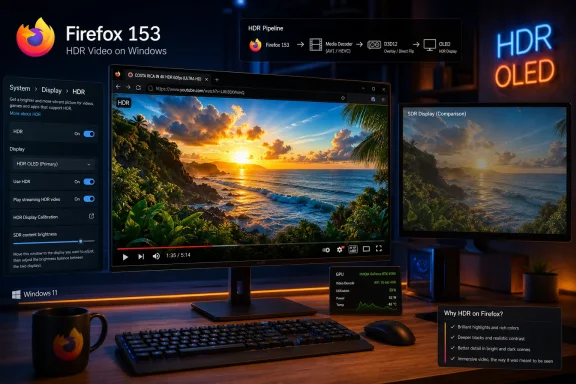
Firefox 153 can now identify suitable HDR video, decode it through an available software or hardware path, preserve its high-dynamic-range color information, and present it through Windows when the selected display is operating in full HDR mode. Users do not need to visit about:config or enable a hidden media preference.
That distinction matters because HDR support involves much more than decoding a 10-bit video file. The browser must correctly interpret color metadata, select an appropriate rendering surface, avoid converting the picture into SDR during composition, and communicate the intended color space to Windows and the graphics driver.
The operating system then has to combine Firefox’s HDR video with ordinary SDR browser elements, such as tabs, buttons, captions, menus, and the surrounding webpage. Any incorrect conversion along that chain can produce clipped highlights, raised blacks, dull colors, excessive saturation, or a picture that looks worse than the SDR version.
The feature is enabled automatically
Mozilla has chosen to enable HDR video support by default when Firefox detects a compatible environment. There is no ordinary Firefox settings switch that users must activate before watching supported content.
Windows remains the control point. On Windows 11, users should select the intended display under Settings > System > Display, open the HDR settings page, and enable HDR before loading or refreshing an HDR video.
A practical setup sequence is:
- Confirm that the monitor or laptop panel supports HDR and is connected through a suitable interface.
- Install current graphics drivers from Windows Update or the GPU or PC manufacturer.
- Open Settings > System > Display and select the HDR-capable screen.
- Turn on full Windows HDR rather than relying only on an HDR video-streaming capability.
- Start or restart Firefox 153 after changing the display mode.
- Open a known HDR video and check the service’s playback information for an HDR format.
Firefox may need a page refresh if Windows HDR is enabled after the video has already loaded. Restarting the browser can also clear stale display-capability information when troubleshooting.
Why Full Windows HDR Mode Is Required
“HDR video streaming” is not the same capability
One of the most important limitations in Firefox 153 concerns the distinction between full Windows HDR and the narrower HDR video streaming feature available on some laptops. Windows can report that a built-in panel supports HDR video playback even when it cannot run the entire desktop in a system-wide HDR presentation mode.
That arrangement allows certain video applications to use specialized playback behavior while the rest of the desktop remains SDR. It has historically been useful on laptops where the panel, graphics path, power characteristics, or manufacturer configuration does not provide a complete desktop HDR experience.
Firefox 153 does not currently support that streaming-only path. Mozilla’s implementation requires a display that can enter full Windows HDR mode, meaning the primary HDR toggle must be available and enabled for the selected screen.
Many laptop owners may initially be excluded
This requirement creates an awkward outcome for users whose Windows settings show HDR video streaming: Supported but do not offer full Use HDR support. Such a machine may be able to play HDR through another application or browser yet continue to receive SDR in Firefox.
The limitation is likely to affect some thin-and-light laptops more than desktop systems connected to conventional HDR monitors or televisions. It also demonstrates why an “HDR-capable” label in a product listing does not always describe the exact capabilities available to every Windows application.
Users should inspect the Display capabilities section for each screen rather than assuming that a supported streaming toggle is sufficient. If Windows does not expose full HDR mode, there is no Firefox preference in version 153 that can force the new rendering path to operate.
The Codec Question
HDR is independent of any single video codec
HDR is sometimes discussed as though it were a video format, but it is better understood as a presentation characteristic carried through one of several codecs and transfer functions. A streaming service might deliver HDR video using VP9 Profile 2, AV1, or HEVC, depending on the site, browser, operating system, device capabilities, and content-protection requirements.
YouTube has commonly used VP9 and AV1 for browser-delivered HDR video. Commercial movie and television services may rely more heavily on HEVC, particularly when protected playback and established hardware-decoding pipelines are involved.
Firefox supporting HDR output therefore does not guarantee that every HDR stream on every service will work. The browser must also support the codec selected by the provider, and Windows may need the corresponding decoder components.
HEVC may require an additional Windows component
HEVC, also known as H.265, is the most obvious source of confusion. Due partly to licensing and distribution considerations, HEVC decoding is not uniformly available on every Windows installation.
Some PCs receive a decoder through the device manufacturer, while others require Microsoft’s HEVC Video Extensions. If an HDR video uses HEVC and no suitable decoder is available, Firefox cannot solve the problem merely by having an HDR-capable output pipeline.
The broader codec picture includes several variables:
- VP9 HDR playback depends on the content being offered in an appropriate VP9 profile and on Firefox, Windows, and the GPU handling the stream correctly.
- AV1 HDR playback may use hardware decoding on newer GPUs, while older systems can fall back to more power-intensive software decoding.
- HEVC HDR playback may require Microsoft’s HEVC extension and compatible graphics hardware.
- Protected commercial streams can add digital-rights-management and hardware-security requirements beyond ordinary codec support.
- Site-level browser detection may prevent a service from offering its HDR version to Firefox even when the underlying PC could theoretically play it.
This means YouTube is a useful first test, but success there does not prove that every subscription streaming platform will expose HDR to Firefox.
Tone-Mapping Is the Biggest Unfinished Piece
HDR must be adapted to the target display
No two HDR displays reproduce content in precisely the same way. A premium Mini-LED monitor may sustain far more brightness than an entry-level HDR LCD, while an OLED can deliver exceptional black levels but may reduce brightness across large, bright areas.
HDR video can also be mastered beyond the capabilities of the screen displaying it. Tone-mapping transforms the content’s luminance range so that highlights, midtones, and shadows fit within the target display’s practical limits.
This process is not simply a way to make HDR viewable on an SDR monitor. Tone-mapping also matters when an HDR display has less brightness or color volume than the mastering display, which is true for a large proportion of consumer hardware.
Firefox 153 does not yet have display-aware tone-mapping
Mozilla says that display-aware tone-mapping is still in development. Firefox 153’s initial Windows HDR implementation consequently works best when the display and graphics pipeline can handle the content without requiring extensive browser-managed adaptation.
On a high-quality HDR display, the operating system, GPU driver, monitor, and existing metadata may still produce an attractive image. On a weaker panel with limited brightness, however, highlights may not be presented with the balance users expect from a more mature playback path.
Display-aware processing could eventually let Firefox account for the panel’s reported luminance and color capabilities. That would help it preserve highlight detail and perceived contrast rather than passing along a result that is technically HDR but poorly matched to the physical screen.
Calibration remains important
Windows 11 users can improve system-level results through proper display configuration and, on suitable hardware, the Windows HDR Calibration app. Calibration cannot add brightness, local dimming, or color volume that the panel does not possess, but it can provide more accurate information about clipping and luminance limits.
Users should also avoid judging HDR quality by the presence of an HDR badge alone. A low-brightness display without meaningful local dimming may accept an HDR signal yet offer little visible improvement over a well-calibrated SDR presentation.
Content Detection and Smartphone Video Limitations
Orientation can interfere with HDR recognition
Mozilla has identified a detection issue involving some HDR videos recorded on smartphones in particular orientations. These clips may contain valid HDR imagery but use metadata, rotation, or container arrangements that Firefox 153 does not yet recognize correctly.
When detection fails, Firefox plays the material as SDR rather than activating the HDR output path. The video may still be viewable, but its highlights and colors will not be reproduced as intended.
This is an important limitation because smartphones have become one of the largest sources of user-generated HDR video. Modern phones can record HDR with little or no intervention, meaning users may upload or share clips without knowing which transfer function, metadata scheme, or orientation tags the device used.
User-generated HDR is less predictable than studio content
Professionally distributed HDR content generally follows controlled mastering and packaging workflows. Smartphone video is messier: applications can edit, rotate, transcode, strip metadata, or combine clips in ways that produce unusual files.
A browser therefore has to handle more than a handful of pristine demonstration videos. It must make reasonable decisions when a clip has ambiguous color metadata or a rotation transform that separates the coded frame orientation from the intended presentation.
The current fallback to SDR is safer than presenting the wrong colors or brightness, but it can make the feature appear unreliable. Mozilla will need broad testing across iPhone, Android, camera, editing, and social-media workflows before Windows HDR playback feels universal.
Performance, Power, and Graphics Hardware
HDR video can increase system workload
HDR frequently arrives with high resolutions, high bitrates, 10-bit color, and computationally demanding codecs. A 4K AV1 HDR stream is a substantially heavier workload than a conventional 1080p SDR video.
Modern GPUs include fixed-function decode blocks designed to process these formats efficiently. When Firefox can use compatible hardware decoding, playback should consume less CPU time and generally deliver better battery life than software decoding.
Older hardware may support HDR display output without having a decoder for the codec being streamed. In that case, Firefox may use the CPU, lower the playback resolution, drop frames, or receive an alternative stream from the website.
Laptop battery life will be affected
HDR raises power consumption at several levels. The panel may run at higher brightness, the GPU has to process a higher-precision composition path, and the video decoder may handle a more complex stream.
Windows can disable HDR or HDR video playback when a laptop switches to battery power, depending on the device and its power settings. This behavior can cause a video to switch appearance after the power cable is removed.
Users who prioritize endurance may prefer SDR while mobile. Those who enable HDR on battery should expect shorter runtime, especially on bright OLED or Mini-LED laptops playing high-resolution video.
Early-release defects require attention
Mozilla’s public bug tracking has already documented a memory leak associated with HDR video playback in Firefox 153 on Windows. The defect is marked as affecting Firefox 153 and later development work, with a fix progressing through Mozilla’s engineering process.
A memory leak does not necessarily mean every user will experience a crash. Its impact depends on playback duration, video switching, memory availability, and the exact graphics path, but it reinforces the early-stage nature of the feature.
Until fixes reach stable builds, users who notice Firefox consuming steadily increasing memory during HDR sessions can restart the browser and compare behavior with hardware acceleration enabled and disabled. Disabling acceleration may remove HDR or reduce performance, however, so it is a diagnostic step rather than an ideal permanent solution.
Consumer Impact
Firefox users no longer need a second browser for basic HDR
The most immediate benefit is straightforward: users with suitable hardware can remain in Firefox when watching supported HDR videos. That removes an annoying interruption for people who use Firefox because of its privacy controls, extension ecosystem, customization, or independence from Chromium.
Browser switching also carries hidden friction. Separate browsers maintain different histories, cookies, logins, site permissions, extensions, picture-in-picture behavior, and media preferences.
HDR support keeps more of the user’s activity inside one environment. It also reduces the chance that someone will gradually abandon Firefox simply because media playback is better elsewhere.
OLED and Mini-LED owners gain the most
Users with genuinely capable displays should see the clearest benefit. Bright specular highlights, saturated colors, dark-scene detail, and smoother gradients can all become more convincing when the video, browser, operating system, and monitor cooperate.
The improvement will vary sharply by hardware. A DisplayHDR 400-class monitor without local dimming may show only modest gains, whereas a strong OLED or higher-tier Mini-LED display can reveal a much more dramatic difference.
Consumers should therefore temper expectations:
- The browser update cannot improve the physical contrast or peak brightness of the panel.
- An HDR logo does not guarantee accurate or impressive image quality.
- Incorrect Windows brightness balance can make ordinary webpages look washed out beside HDR video.
- Some sites may still send Firefox an SDR stream because of codec or browser-support policies.
- Changing displays during playback can require a refresh before the service selects the correct stream.
The feature is meaningful, but it does not eliminate the complexity that has long surrounded HDR on Windows.
Enterprise and Professional Impact
Firefox 153 is also a major enterprise release
Firefox 153 begins a new Extended Support Release generation, replacing Firefox 140 ESR as the forward path for organizations that want Mozilla’s longer enterprise maintenance cycle. That makes the new media behavior relevant beyond enthusiasts installing the monthly consumer update.
Enterprises may encounter HDR in training content, digital signage, design review, browser-based editing, remote production, medical visualization, and internal video platforms. Even when HDR is not required, IT departments need to understand how it affects power consumption, graphics-driver compatibility, screen capture, conferencing, and support calls.
The default-enabled approach means administrators do not have to deploy a special preference to activate it. Conversely, organizations with tightly validated media workstations may want to test Firefox 153 before broad ESR deployment.
Professional creators need predictable color behavior
Creative professionals should not assume that browser HDR playback is a color-critical reference. Accurate review depends on the display, calibration, Windows color management, GPU behavior, browser implementation, video metadata, and sometimes the streaming platform’s transcoding.
Firefox 153 is better suited to general playback and compatibility testing than final mastering approval. The absence of Mozilla’s planned display-aware tone-mapping is particularly relevant on displays that cannot reproduce the content’s mastering range.
Organizations evaluating the release should test:
- Known HDR10 material with documented mastering metadata.
- VP9, AV1, and HEVC files where licensing permits.
- Internal browser-based video applications.
- Multiple-monitor configurations containing both SDR and HDR displays.
- Screen-sharing and capture tools used during support or collaboration.
- Long playback sessions to identify memory or stability regressions.
- Laptop operation on AC power and battery.
A controlled test matrix will reveal far more than relying on a single HDR demonstration clip.
Competitive Implications for Firefox
Mozilla is catching up rather than taking the lead
Firefox 153 deserves credit for resolving a long-standing deficiency, but HDR is not a new competitive advantage. Chrome and Edge users have had Windows HDR playback for years, and the Chromium ecosystem has accumulated extensive compatibility work across GPUs, drivers, codecs, and services.
Mozilla therefore faces two tasks. It must make the rendering pipeline technically reliable, and it must persuade streaming providers to treat Firefox as a fully supported HDR client.
The second challenge can be harder. Websites often base media delivery on browser allowlists, DRM capabilities, codec reporting, past support experience, and customer-service costs, not solely on what the browser can decode in a laboratory test.
Engine diversity still matters
The update is strategically important because Firefox remains the principal mainstream desktop browser built on Gecko rather than Chromium. Every major web capability that works only in Chromium increases pressure on users and developers to treat that engine as the practical definition of the web.
Closing the HDR gap helps Mozilla defend the argument that users can choose a different browser engine without giving up modern media features. It also gives web developers another implementation against which to test capability detection and adaptive video delivery.
Competition benefits when independent engines support the same user-facing outcome through their own architecture. It reduces the risk that a single implementation’s assumptions become an unofficial standard.
Troubleshooting Firefox HDR on Windows
Confirm the complete playback chain
When an HDR video remains in SDR, the cause can sit anywhere between the streaming service and the panel. Randomly changing Firefox preferences is less useful than checking each layer in order.
A sensible troubleshooting process is:
- Update Firefox and verify that the installed version is 153 or newer.
- Confirm that Windows exposes full HDR for the selected display.
- Enable HDR before opening Firefox or refresh the video afterward.
- Verify that the display is using an HDR-capable connection and mode.
- Install current GPU drivers and restart Windows.
- Test a known HDR video from a service that offers VP9 or AV1 to Firefox.
- Inspect the service’s technical playback information to confirm an HDR stream.
- Check whether the video uses HEVC and whether a compatible decoder is installed.
- Test with only the HDR display active if a mixed-monitor setup behaves incorrectly.
- Compare another browser to separate Firefox problems from Windows or hardware problems.
This ordered approach helps distinguish unsupported hardware from a Firefox defect or a site that simply does not offer HDR to Mozilla’s browser.
Mixed-monitor configurations can complicate playback
Systems using an SDR display alongside an HDR monitor are especially prone to inconsistent behavior. The browser window may be created on one display and moved to another, while Windows and the site retain assumptions made when playback started.
If a video fails to switch into HDR after being moved, place Firefox on the HDR display and reload the page. Users can also temporarily disconnect or disable the SDR display to determine whether display enumeration is contributing to the problem.
Duplicating displays can impose the capabilities of the weaker screen on the entire configuration. Extending the desktop is generally the safer arrangement when only one monitor supports HDR.
Strengths and Opportunities
Firefox 153’s implementation is incomplete, but it creates a foundation Mozilla can improve without asking users to rely on Nightly builds or obscure settings.
- Default activation minimizes friction. Firefox automatically uses HDR when the Windows environment and content meet its requirements.
- YouTube HDR becomes practical for more Firefox users. VP9 and AV1 provide useful paths that do not depend exclusively on HEVC.
- The browser becomes more competitive on premium Windows hardware. OLED and Mini-LED owners no longer face an automatic browser switch for every supported HDR video.
- Gecko gains a modern high-precision media path. The engineering work can support future improvements in color management, video composition, and display adaptation.
- Enterprise testing can begin on an ESR baseline. Organizations moving to Firefox 153 ESR can evaluate the feature under controlled policies and hardware configurations.
- Mozilla can collect broader telemetry and bug reports. Stable-channel deployment exposes edge cases that a smaller Nightly population cannot reproduce.
- Streaming providers gain a reason to expand Firefox support. A reliable browser implementation can encourage services to remove restrictive client checks.
- Future tone-mapping could improve lower-tier HDR displays. Display-aware processing would make the feature useful across a wider range of real-world hardware.
The opportunity is larger than video alone. Better handling of HDR surfaces could eventually contribute to richer graphics, imaging, and browser-based creative applications.
Risks and Concerns
The first stable implementation also introduces technical and usability risks that Mozilla will need to address quickly.
- Full HDR mode excludes streaming-only laptop displays. Some PCs that can play HDR elsewhere will still receive SDR in Firefox.
- Tone-mapping is unfinished. Limited-brightness displays may not present difficult HDR content as effectively as mature competing pipelines.
- Codec availability remains inconsistent. HEVC licensing and optional Windows extensions can produce confusing failures.
- Streaming sites may not enable HDR for Firefox. Browser capability and service policy are separate parts of the delivery chain.
- Smartphone orientation metadata can defeat detection. Some user-generated HDR clips will silently fall back to SDR.
- Early memory-management defects may affect long sessions. Mozilla has already been working on an HDR playback memory leak associated with Firefox 153.
- Battery consumption can rise substantially. HDR display operation and high-resolution decoding are expensive on mobile hardware.
- Low-quality displays can create disappointing results. Marketing claims often overstate the visible benefits available from entry-level HDR panels.
- Mixed SDR and HDR monitors can introduce state problems. Moving windows or duplicating screens may prevent the desired playback mode.
- Windows 10 is now outside ordinary consumer support. Although Firefox 153 can use the relevant Windows 10 HDR facilities, running an unsupported operating system introduces broader security and driver concerns.
None of these issues negate the value of the update, but they show why Mozilla is shipping a foundation rather than a finished answer to every Windows HDR scenario.
What to Watch Next
Display-aware tone-mapping is the key milestone
Mozilla’s planned tone-mapping work will determine how well Firefox performs beyond premium displays. A robust implementation should account for the target screen’s real capabilities while preserving artistic intent and avoiding unnecessary clipping.
The details will matter. Aggressive processing can dim highlights or flatten contrast, while insufficient adaptation can discard visible detail on lower-brightness panels.
Users should watch for improvements in Firefox 154 and subsequent releases, though Mozilla has not guaranteed that every remaining feature will arrive on a specific schedule. Point releases may also contain urgent stability fixes if problems in the initial implementation prove widespread.
Broader display and content support must follow
Support for HDR-video-streaming-only laptop panels would materially expand the eligible Windows hardware base. Mozilla also needs to improve recognition of rotated and smartphone-generated video so that fallback to SDR becomes less common.
Streaming-service behavior will be another visible measure of success. YouTube compatibility is important, but users will judge the feature by whether it works across their actual subscriptions and media libraries.
Firefox’s capability reporting must be accurate enough for sites to choose suitable streams without guessing. Consistent hardware-decoding information, codec support, DRM integration, and HDR metadata handling will all influence adoption.
Stability will define the real launch
The stable release is only the start of large-scale testing. Memory use, GPU resets, multi-monitor behavior, sleep and resume, driver differences, and battery transitions can expose defects that are difficult to discover in controlled development environments.
Mozilla’s response speed will shape perceptions. Rapidly correcting high-impact leaks and rendering regressions would turn Firefox 153 into a credible platform milestone rather than an experimental feature that happened to reach the release channel.
Firefox 153 finally gives Windows users a native route to HDR video without abandoning Mozilla’s browser, closing a gap that had become increasingly difficult to justify as HDR displays spread across laptops and desktops. The initial version is narrower and less mature than the implementations in Chrome and Edge, but its arrival strengthens Firefox as a serious alternative browser and gives Mozilla a platform on which to build better tone-mapping, broader laptop support, stronger codec compatibility, and more reliable playback. If those improvements arrive promptly, July 2026 may be remembered not merely as the month Firefox caught up with Windows HDR, but as the point when Gecko’s media stack became ready for the next generation of PC displays.
Update: Firefox 153.0.1 will add HDR troubleshooting details (July 22, 2026)
Windows Report says Mozilla is preparing Firefox 153.0.1 with HDR display information added to Firefox’s about:support diagnostics page. This should help users and IT administrators determine what display capabilities Firefox detects when HDR playback fails or unexpectedly falls back to SDR.
The newer reporting also identifies BT.2100 HLG and BT.2100 PQ, commonly associated with HDR10 delivery, as supported video formats. This provides more specific detail about the HDR standards handled by Firefox 153’s initial Windows implementation.
Mozilla reportedly plans both display-aware tone-mapping and a user-facing control in a future update. No release version has been confirmed for those improvements. Until then, exceptionally bright scenes may be presented differently from browsers that already apply their own tone-mapping, particularly on displays whose brightness capabilities differ substantially from the content’s mastering target.
Update: Additional details (July 23, 2026)
Contrary to earlier framing, Tech-Ish reports that Mozilla’s Windows HDR work began landing during the Firefox 151 and 152 development cycles, rather than arriving as an entirely new code path in Firefox 153. Firefox 153 remains the release where the capability is becoming more visible to stable-channel users, but the implementation reflects an ongoing rollout with fixes and refinements spanning multiple versions.
The report also adds an important format-specific caveat: BT.2100 HLG playback may behave differently on Intel graphics hardware because some Intel drivers lack the conversion support Firefox requires for full HDR presentation. In those cases, Firefox may fall back to SDR or a wider-color-gamut result rather than deliver the expected HDR output. BT.2100 PQ, more commonly associated with HDR10-style content, is expected to be the more predictable early path across supported Windows configurations.
