

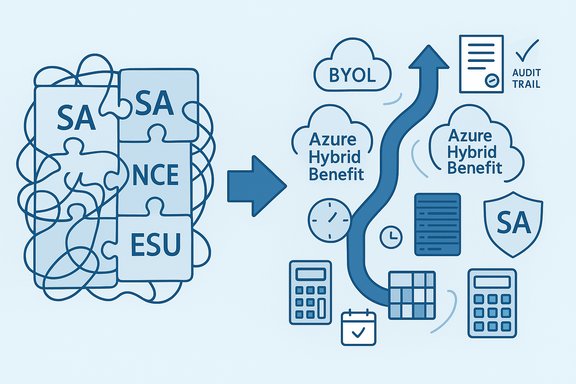
Microsoft licensing still feels like alphabet soup, but there are five simple truths every IT leader should lock into the budget and the migration plan: Software Assurance (SA) is more than an insurance policy — it’s the gatekeeper to upgrade rights, license mobility, BYOL for cloud, and disaster-recovery flexibility; CALs travel backward but not forward unless protected by SA; virtualization and per‑vCPU licensing have strict minimums and special rules; Extended Security Updates (ESUs) and Microsoft’s New Commerce Experience (NCE) are timeline-driven levers you can’t ignore; and resellers and partners still add measurable value for negotiation, optimization, and audit defense. This primer untangles those threads, verifies technical specifics against product guidance, flags risky assumptions, and gives practical next steps for Windows, SQL, and Exchange environments.
Microsoft licensing is a layered combination of product use rights (what the software lets you do), purchase programs (EA, Open Value, CSP/NCE), and benefit contracts (Software Assurance). The relationship between perpetual licenses, SA, and modern subscription offers directly affects whether an on‑prem license will cover a VM, a cloud VM, a warm/passive failover, or a migration to Exchange Server Subscription Edition.
Source: BizTech Magazine Windows, SQL and Exchange Server Licensing 101
 Background / Overview
Microsoft licensing is a layered combination of product use rights (what the software lets you do), purchase programs (EA, Open Value, CSP/NCE), and benefit contracts (Software Assurance). The relationship between perpetual licenses, SA, and modern subscription offers directly affects whether an on‑prem license will cover a VM, a cloud VM, a warm/passive failover, or a migration to Exchange Server Subscription Edition.- SA is typically sold as an add‑on matched to the license and is structured around multi‑year enterprise agreements. Historically, SA pricing for server products has been in the neighborhood of roughly 25% of license list per year, with desktop maintenance sometimes nearer 29%, which explains the “about one‑third over three years” rule of thumb many procurement teams use. This pricing heuristic is reflected in industry guidance and Microsoft enterprise program behavior.
- CALs (Client Access Licenses) are versioned. A CAL purchased for a newer version can generally access older servers; the opposite is not true without SA upgrade rights. This asymmetry causes compliance traps when organizations upgrade server OS or server application versions but skip CAL coverage.
- Virtualization introduced two licensing models: license by physical cores on the host (with minimums) or license per virtual OSE (VM) — the latter requires SA or an equivalent subscription to be valid. Microsoft’s guidance spells out minimum core counts and per‑VM constraints; these minimums matter in consolidation scenarios.
- The support clock matters: end‑of‑support dates and ESU windows create short, high‑cost migration windows. Windows Server 2012 and 2012 R2 ESUs run through October 13, 2026, and organizations that want to keep running those versions securely must plan now.
What Software Assurance Really Covers — the practical reality
Core SA entitlements (the checklist)
Software Assurance is a bundled set of rights and services attached to volume/perpetual licenses (and some subscription offers) that deliver real operational value — not just theoretical protection.- Version protection / Upgrade rights — the right to move to new product releases during the SA term without repurchasing licenses. This is the single most‑valuable SA benefit for many buyers.
- License mobility & BYOL — the ability to reassign eligible server licenses to shared cloud environments (License Mobility) or benefit from Azure Hybrid Benefit for Windows Server/SQL when SA or qualifying subscription coverage exists. This is the mechanism that makes BYOL into Azure or AWS possible and cost‑effective.
- Cold backup / disaster‑recovery rights — the right to install the same software on a cold standby server for DR without buying another license, so long as the standby remains turned off except for updates, testing, or when activated in a disaster. This avoids double licensing for truly passive DR copies.
- License reassignment and mobility within a server farm — fewer reassign restrictions and broader reassignment flexibility for virtualized infrastructures, which matters for dynamic VM migrations and clustered hosts.
- Additional entitlements — home‑use rights, some training and planning services, support incidents in certain programs, and other deployment aids that can reduce migration costs. These benefits vary by program and change over time.
The real cost-benefit decision
SA looks expensive when you view it as a recurring add‑on. Historically, SA has been roughly 25% (server) to 29% (desktop) of the license list per year, meaning a three‑year SA commitment will approximate a third of the upfront license price in total — hence the “one‑third” shorthand many teams use. But the financial calculus should compare (a) the annual SA investment vs (b) the one‑time cost of repurchasing licenses at upgrade time, plus the operational cost of accelerated migrations, and the risk‑adjusted cost of being unsupported. For many organizations that plan to keep Windows/SQL/Exchange for multiple versions or to move workloads between on‑prem and cloud, SA pays back quickly via upgrade rights, BYOL savings, and DR rights. Flag: pricing percentages and discounts are negotiated and program‑dependent; treat percent figures as guidance, not a firm quote. Always validate with your reseller or Microsoft account team.Beware: the CAL compatibility trap
How CALs actually work (short version)
- Backward compatibility: CALs are backward‑compatible — a newer CAL will generally grant access to older servers of the same product family. This means a 2022 CAL can access a 2019 server in most cases.
- No forward compatibility without SA: A CAL for an older version (e.g., 2019 CAL) does not automatically entitle access to a newer server (e.g., 2022) unless the CAL is covered by active SA, which provides upgrade rights. That’s the core reason SA matters for CALs.
Why this trips small orgs and some admins
Because software often continues to run after an upgrade, teams assume access = license. It does not. Microsoft’s licensing model is entitlement‑based; running software successfully does not prove you have the right to run it under the license terms. Audits or vendor reconciliations can produce large, unexpected bills if upgrades occurred without CAL coverage. Community and forum evidence shows this confusion is common in real ops teams.Windows Server and SQL Server licensing updates you must know
Windows Server: per‑VM licensing, minimums, and host options
Microsoft supports two principal ways to license Windows Server for virtualized workloads: license the physical host (core‑based licensing), or choose the license by virtual machine model (VM‑based) where permitted. When licensing by physical cores, there is a minimum of eight core licenses per processor and 16 per server. The per‑VM licensing option exists but comes with specific limitations and is only available under defined terms; consult the product terms for eligibility and exact use rights. Practically this means:- Consolidation onto a large host might still require licensing the host cores if you want to run many VMs.
- If your environment runs only a small number of Windows VMs and you have SA, licensing VMs directly can be cheaper — but watch minimums (e.g., eight virtual cores per VM) and cumulative counts.
SQL Server: per‑vCore rules, SA and mobility
Starting with the modern SQL Server licensing models (notably SQL Server 2022 onwards), customers choosing per‑virtual‑core licensing for VMs must have Software Assurance (or equivalent subscription construct) to use certain entitlements like license mobility, upgrade rights, and some virtualization privileges. Microsoft’s licensing documentation explicitly states that licensing by virtual machine requires SA or subscription licenses and includes minimum core counts per virtual OSE (for example, a minimum of four licenses per virtual OSE).- If you run SQL in the cloud with license‑included images (AWS or Azure), you pay per‑vCPU with the license included, unless you bring your own license (BYOL) with SA and use mobility options. AWS and Azure have different mechanisms (e.g., EC2 SQL License Included optimization flows and Azure Hybrid Benefit) that can materially reduce cost — but they rely on proper SA or subscription coverage.
Extended Support, Downgrade Rights, and the migration “hard dates”
Windows Server 2012 / 2012 R2 ESU timeline
Windows Server 2012 and 2012 R2 exited mainstream support in October 2023 and are covered under a time‑limited Extended Security Update program that runs through October 13, 2026. To legally and technically remain on older server builds with Microsoft security coverage, organizations must purchase ESUs or maintain qualifying SA/subscription coverage; otherwise they face unsupported code and rising security risk. Plan firm migration or ESU purchases now — these windows are non‑negotiable and short.Downgrade rights strategy
If you are standardizing on a later license but need to run older server binaries, downgrade rights (a different but related entitlement) let you run an earlier version — but the license and CAL versioning rules still apply for clients. Practically, many organizations buy the newest license and exercise downgrade rights to deploy an older image, but CAL versions must match or exceed server version unless SA/upgrade rights are present.Commerce changes: New Commerce Experience (NCE) and practical procurement guidance
Microsoft’s New Commerce Experience (NCE) has consolidated many CSP and licensing flows into a single commerce model with new terms, pricing behaviours, and cancellation windows. NCE enforces term commitments and has different monthly vs annual pricing that can penalize short‑term churn; migrating legacy CSP offers to NCE is now standard practice and partners must manage customer migrations. For organizations, this changes renewal tactics and favors planning over ad hoc seat churn.- Resellers such as CDW (and other value‑added resellers) still provide real value: negotiation, consolidated billing, 24/7 support offerings, license‑visibility tooling, and advisory services. For many mid‑sized customers, reseller guidance mitigates audit risk and improves renewal economics.
Cloud specifics: BYOL, Azure Hybrid Benefit, AWS License Mobility and the audit trail
- Azure Hybrid Benefit (AHB) allows reusing on‑prem Windows Server and SQL Server licenses in Azure when covered by SA or qualifying subscription licenses; it’s not automatic — you must meet the license prerequisites. Azure also distinguishes BYOL for images and platform license‑included costs.
- AWS License Mobility is available for eligible server applications covered by active Software Assurance; AWS is an Authorized Mobility Partner, which means you can bring SQL, Exchange, SharePoint and other covered server licenses to AWS shared tenancy if SA is active. AWS also offers license‑included images and dedicated host options where BYOL rules differ.
Real‑world scenarios and recommended next steps
Scenario 1 — Small business running on-prem Exchange 2016 and Windows Server 2012 R2
- Check ESU status: Exchange Server 2016/2019 had a one‑time ESU window that ended earlier than some Windows ESUs; verify exactly which ESU offerings you can still enroll in and the end dates for those enrollments. If you are still running Exchange 2016/2019, a short‑term ESU was available; migrating to Exchange SE or Exchange Online is the safe path.
- If you plan to stay on 2012 R2 for limited time, budget for ESUs through Oct 13, 2026, or accelerate migrations to minimize total cost and risk.
Scenario 2 — Mid‑sized company consolidating SQL to VMs on AWS
- Inventory cores and vCPUs and map to license models (per‑core vCore vs license‑included).
- Determine if SA is active on your SQL entitlements; if not, calculate costs to reacquire or buy license‑included instances.
- If you plan BYOL to AWS shared tenancy, ensure License Mobility eligibility (SA active) and implement telemetry to prove passive vs active states for any HA nodes in audit.
Scenario 3 — Enterprise planning a three‑year refresh under an Enterprise Agreement
- Treat SA as part of the EA total package; EA pricing commonly amortizes license + SA across three‑year terms and includes upgrade rights automatically. Use step‑up and true‑up planning windows to optimize spend and avoid repurchases at renewal. Consider whether a subscription (CSP/NCE) makes more sense for cloud‑first workloads.
Practical checklist for license governance (actionable daily steps)
- Run a current license inventory mapped to product versions, SA status, and CAL counts.
- Tag any license lacking SA that will need to access a newer server within 12–24 months. Flag for budget.
- If you use cloud IaaS, identify which workloads will be BYOL vs license‑included and confirm SA eligibility for License Mobility or Azure Hybrid Benefit.
- Document DR/standby topology and ensure cold standby servers remain “off” as required by the rights you claim; archive patch/test windows and telemetry.
- Engage a reseller or licensing specialist for renewal negotiations — NCE and EA renewals now have nontrivial term mechanics that impact price and cancellation windows.
- Preserve failover and passive evidence (logs, runbooks, telemetry) for any passive‑waive or cold‑standby claim.
Strengths, risks, and final cautions
Strengths
- Predictability with SA/EA: Upgrade rights and mobility benefits reduce long‑term capex and enable cloud migration without double licensing.
- Cloud cost levers: BYOL and hybrid benefits materially reduce runtime cost in Azure/AWS when implemented correctly.
Risks
- Forward compatibility blind spots: Skipping SA on CALs or servers forces expensive repurchase if you upgrade servers later. This is a common audit exposure.
- Operational evidence requirements: Cloud passive‑waive benefits and cold backup rights require disciplined telemetry and documented tests. If you can’t produce evidence an instance was passive, auditors might bill for the license.
- Program complexity and changing terms: NCE changes, ESU timelines, and program migrations mean that procurement must be proactive; last‑minute renewals are costly.
Unverifiable or variable claims to treat with caution
- Any published percentage for SA or reseller discount should be treated as estimative — actual pricing is negotiated and varies by program, volume, and geography. Use published percentages only for budgeting, not final purchase decisions.
Conclusion — where to spend time this quarter
- Audit and inventory now: confirm SA status, CAL counts, active ESU enrollments, and cloud license strategies. Licenses are black‑and‑white in contract terms; the occasional “it worked” myth is a compliance landmine.
- If you plan cloud moves, quantify BYOL vs license‑included economics and ensure SA or subscription equivalency is in place before migrating. Evidence and telemetry will protect you during post‑migration audits.
- Engage procurement or a trusted reseller early for NCE/EA renewal negotiations and ask for visibility tools (license dashboards, true‑up calculators, and migration playbooks) — the small delta they add in savings and compliance often justifies advisory fees.
Source: BizTech Magazine Windows, SQL and Exchange Server Licensing 101
