

Defender’s Quiet Engine Becomes the Patch Tuesday Headliner
CVE-2026-41091 is the sort of vulnerability that exposes a strange truth about modern Windows security: some of the most important patches no longer arrive as the big cumulative update everyone watches. They arrive through the antimalware update channel, wrapped into the constant churn of security intelligence, engine, and platform releases that most users never see.
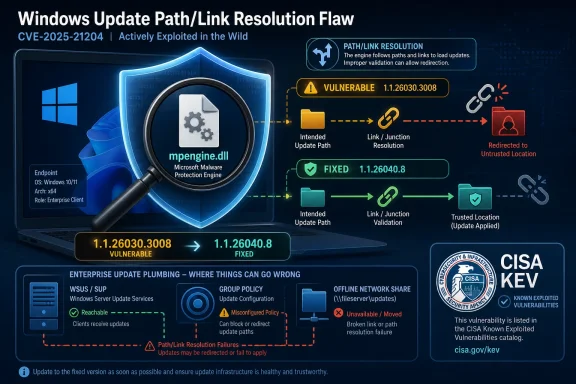
The vulnerable component is mpengine.dll, the Microsoft Malware Protection Engine. It is the part of Microsoft’s antimalware stack that performs scanning, detection, and cleanup work for Defender and related Microsoft security products. When that engine has a privilege escalation bug, the concern is not that Defender merely fails to detect something; the concern is that the trusted scanner itself becomes part of the attacker’s path upward.
Microsoft describes the weakness as improper link resolution before file access, the class of bug commonly associated with link following. In plain English, that means the software can be tricked into acting on a path that is not really the file or location it thinks it is. In a security service that may run with elevated privileges and routinely touches untrusted files, that is a serious boundary mistake.
The CVSS score of 7.8 lands it in high-severity territory, not because it is remotely exploitable from the open internet, but because the payoff can be large once an attacker already has a foothold. A local attacker with some level of authorization may be able to elevate privileges on the affected machine. For ransomware crews, hands-on-keyboard intruders, and post-exploitation toolchains, that is exactly the stage where Windows defenses often matter most.
The Fix Is Small, but the Blast Radius Is Not
Microsoft identifies the last affected engine as 1.1.26030.3008 and the first fixed engine as 1.1.26040.8. That version boundary is the operational line administrators should care about. If the engine is older than the fixed version, the system belongs in the remediation queue unless there is a defensible reason it cannot be affected.
The awkward part is that Microsoft Defender is not merely an app a user chose to install. It is part of the Windows security baseline, and Microsoft says Defender runs on supported Windows versions by default. Even in environments that standardize on another endpoint protection product, Defender components may remain present on disk, sometimes in passive mode, disabled mode, or simply dormant behind the third-party product.
That is why vulnerability scanners are lighting up systems where administrators insist Defender is “disabled.” The scanners are not conducting a philosophical inquiry into whether Defender is actively protecting the endpoint. They are doing what scanners usually do: looking for specific binaries and version numbers. If mpengine.dll or related Defender files are present and report an affected version, the scanner reports risk.
Microsoft’s position is narrower. If Defender is disabled, the files can still exist on disk, but the system is not in an exploitable state for this issue. That is a useful distinction, but it is not the same as telling administrators to ignore every finding. A scanner report can be technically overbroad and still operationally useful, especially when it reveals stale security components that nobody has been updating because nobody thought they mattered.
Disabled Does Not Mean Gone
The scanner confusion around CVE-2026-41091 is not a side note; it is the most Windows-like part of the whole incident. Enterprise Windows estates are full of components that are disabled, superseded, left behind, or placed into compatibility states, yet still present enough to trigger inventory tools. Defender is especially prone to this because Microsoft has made it both a consumer antivirus product and a deeply integrated operating system security layer.
In organizations using third-party antivirus, administrators may believe they have removed Defender from the equation. Often they have not. Defender may be inactive as the primary antivirus provider, but its engine files can remain installed, and update behavior can vary based on policy, server role, connectivity, Windows version, and management stack.
That gap between not active and not present is where scanner noise thrives. Security teams already live with findings that are technically true but contextually misleading. CVE-2026-41091 adds another example: a machine may contain an affected engine binary while not exposing the vulnerable code path because Defender is disabled.
Still, Microsoft’s reassurance should not become an excuse for poor hygiene. If Defender is disabled because another product is active, document that state and make sure the scanner exception is scoped to that reality. If Defender is supposed to be updating but is stuck on 1.1.26030.3008, that is not a false positive; it is a failure in the protection update pipeline.
Automatic Updates Are a Promise, Not Evidence
Microsoft says no action is required in default configurations because the Malware Protection Engine and malware definitions are updated automatically. That is true for a healthy, internet-connected, normally configured Windows device. It is also exactly the kind of statement that makes enterprise administrators roll their eyes, because default behavior is rarely the whole estate.
Defender engine updates are typically delivered with security intelligence updates, while platform updates use their own servicing paths. Microsoft usually releases Malware Protection Engine updates monthly, or as needed, and security intelligence updates much more frequently. In other words, the fixed engine should reach many machines quickly without a traditional patch deployment cycle.
But the phrase “should reach” is doing too much work. Enterprises route updates through WSUS, Configuration Manager, Intune, network shares, proxies, firewalls, maintenance windows, staged rings, and change-control policies. Some of those systems are well maintained. Some are archaeological sites.
A system can be “managed” into being vulnerable. If a WSUS approval process misses Defender security intelligence updates, if a disconnected network uses a stale file share, or if a policy prevents fallback to Microsoft Update, automatic remediation becomes theoretical. CVE-2026-41091 is therefore less a test of whether Microsoft shipped a fix than a test of whether each organization’s Defender update path is actually alive.
Link-Following Bugs Are Old, Boring, and Still Dangerous
The underlying bug class matters because it explains why a local privilege escalation in an antivirus engine deserves attention. Link-following flaws generally involve software making a privileged decision about a path that can be redirected, swapped, or otherwise manipulated. On Windows, that can involve reparse points, symbolic links, junctions, hard links, or other filesystem features that complicate the relationship between a visible path and the object ultimately accessed.
This class of bug is not glamorous. It does not require a cinematic exploit chain or a novel memory corruption technique. It depends on a more prosaic failure: privileged software trusts a file path at the wrong moment and does work on behalf of a less-privileged user.
Antivirus engines are attractive targets for this class of weakness because they are designed to inspect hostile content. They may open files written by untrusted users, quarantine objects, move samples, clean malware, or write logs and metadata. Those actions must be performed carefully because the scanner often has more authority than the person or process that created the file.
That is the uncomfortable irony of endpoint security. The more deeply a protection tool integrates with the operating system, the more valuable it becomes as a security boundary. When it gets path handling wrong, attackers do not need to defeat the tool outright; they may be able to persuade it to perform a privileged action in the wrong place.
The Attack Requires a Foothold, Which Is Not Much Comfort
CVE-2026-41091 is local privilege escalation, so it is not the vulnerability an attacker uses to arrive at the front door. It is the vulnerability used after arrival, when a phishing payload, stolen credential, malicious document, exposed remote service, or abused helpdesk workflow has already created some level of access. That distinction is real, but it should not lead to complacency.
Privilege escalation is the hinge between nuisance and control. A low-privileged account can be constrained, monitored, and sometimes cleaned up. A process that gains SYSTEM-level power can disable defenses, dump secrets, tamper with logs, install persistence, and move more freely through the environment.
This is why local privilege escalation flaws in ubiquitous Windows components show up repeatedly in real intrusions. They turn partial compromise into durable compromise. They also let attackers standardize their playbooks: gain any user-level execution, elevate locally, then harvest credentials or pivot.
The practical risk depends heavily on exposure. A kiosk, a shared workstation, a developer box, and a domain controller do not carry the same threat model. But the ubiquity of Defender means administrators cannot treat this as a niche product advisory. It touches the default security stack.
The CISA KEV Signal Raises the Triage Priority
The most important external signal around CVE-2026-41091 is its addition to CISA’s Known Exploited Vulnerabilities catalog. That designation means exploitation has been observed, not merely theorized. For federal civilian agencies, KEV entries come with remediation expectations; for everyone else, the catalog is a useful triage shortcut in a world with too many CVEs.
The presence of a vulnerability in KEV does not tell us everything. It does not reveal the scale of exploitation, the threat actor, the victim profile, or the exploit’s reliability. It does, however, move the issue from “patch when convenient” to “verify that the fix actually landed.”
That matters because CVE-2026-41091 is easy to assume away. Microsoft’s default automatic update story is reassuring. The scanner false-positive explanation for disabled Defender is reassuring. The local-only attack requirement is reassuring. Stack enough reassurances together and a real exploited bug can become tomorrow’s problem.
The better reading is more disciplined. If the engine is 1.1.26040.8 or later, the specific issue is addressed. If Defender is genuinely disabled and not exploitable, document the state and tune the finding. If neither of those statements is proven, do not wave away the alert.
Version Numbers Beat Dashboard Vibes
For administrators, the immediate task is not to debate whether Defender “should have updated.” It is to confirm the engine version on endpoints. The fixed line is clear: the Microsoft Malware Protection Engine needs to be at version 1.1.26040.8 or later for CVE-2026-41091.
There are several ways to inspect that state. Windows Security exposes protection update details for individual machines. PowerShell and endpoint management tooling can collect Defender status at scale. Microsoft Intune, Configuration Manager, Defender for Endpoint, and other inventory platforms may also surface engine, platform, and security intelligence versions, depending on configuration.
The key is to distinguish the engine version from adjacent numbers. Defender has multiple moving parts: security intelligence version, engine version, platform or antimalware client version, product version, and sometimes package version. CVE-2026-41091 is tied to the Malware Protection Engine, not merely to whether the latest definition package arrived sometime this morning.
That distinction matters during incident response. A machine may have current signatures but an older platform, or a newer platform with an engine that failed to advance because of a servicing issue. Treat the version boundary as evidence, not as a vibe inferred from a green dashboard tile.
WSUS and Offline Estates Are Where This Gets Messy
The highest-risk administrative mistakes are likely to happen in managed environments that intentionally control updates. Consumer PCs and unmanaged business laptops will often receive Defender updates directly. The machines that fall behind are the ones behind process.
WSUS can be a culprit when Defender security intelligence updates are not approved, not synchronized, or not classified the way administrators expect. Configuration Manager can add another layer of delay if software update points, antimalware policies, or deployment rings are misaligned. Disconnected or semi-disconnected environments may depend on file shares or manual packages that drift behind Microsoft’s release cadence.
None of this is exotic. Air-gapped networks, regulated environments, industrial systems, virtual desktop pools, lab machines, golden images, and server templates routinely lag behind the consumer update channel. Sometimes that lag is intentional. Sometimes it is neglect disguised as control.
CVE-2026-41091 is a reminder that security tooling itself has a patch surface. Organizations that slow-roll operating system patches may still need a faster lane for antimalware engine updates. If the update mechanism for your endpoint protection cannot move quickly during active exploitation, it is not a control; it is a bottleneck.
Servers Deserve Special Attention
Windows Server complicates the story further. Defender is present and active by default on newer supported server versions unless configured otherwise, but server update behavior often differs from client behavior. Administrators may disable automatic installation, rely on maintenance windows, or assume endpoint protection is handled by a separate product.
That makes server verification important, especially for systems that process user-supplied files. File servers, Remote Desktop hosts, build servers, document processing systems, and application servers with upload directories are all plausible places where local privilege escalation could become useful after an attacker gains limited access. The risk is not evenly distributed, but it is not limited to laptops.
Servers also tend to carry older policy decisions forward. A group policy created years ago to tame update behavior may still be suppressing protection updates. A firewall rule built for a previous architecture may block Defender update endpoints. A third-party product migration may have left Defender in a half-managed state.
The correct response is not panic-patching every server by hand. It is targeted verification. Find engine versions, map them to exposure, update the laggards, and fix the policy path that allowed laggards to exist.
Scanner Noise Is a Governance Problem, Not Just a Tool Problem
Microsoft’s explanation for scanner alerts on disabled Defender systems is reasonable, but it also exposes a recurring flaw in vulnerability management. Scanners are good at seeing artifacts. They are worse at understanding whether a component is reachable, enabled, loaded, and exploitable in a specific configuration.
That does not mean the scanner is wrong to report old binaries. From an inventory perspective, stale security components matter. From an exploitability perspective, Microsoft says disabled Defender systems are not in an exploitable state for this vulnerability. Those are different claims, and vulnerability management programs need room for both.
The worst response is blanket suppression. If every Defender CVE gets waived because “we use another antivirus,” the organization loses visibility into systems where Defender is unexpectedly active, passive, or stale. The second-worst response is blind escalation of every finding without configuration context, which burns analyst time and teaches administrators to distrust the vulnerability program.
A mature response creates a narrow exception path. Confirm Defender’s state, confirm the engine version, and document whether the finding represents exploitable risk or merely file presence. Then use the noise to improve asset tagging, update validation, and scanner logic.
Microsoft’s Fast Patch Channel Cuts Both Ways
There is a reason Microsoft built Defender to update outside the monthly cumulative update ritual. Malware does not wait for Patch Tuesday, and the antimalware engine must adapt quickly. That model gives Microsoft a way to ship fixes like 1.1.26040.8 rapidly and broadly.
The trade-off is visibility. Monthly Windows updates have rituals: KB numbers, maintenance windows, reboot planning, compliance reports, user complaints, and executive dashboards. Defender engine updates are quieter. They happen in the background when everything works, which means their failure can also be quiet.
That quietness is both strength and weakness. It reduces friction for urgent security content, but it asks administrators to trust a pipeline that many do not actively monitor. In a small environment, that may be fine. In a large enterprise, trust without telemetry is just hope with a dashboard.
The lesson from CVE-2026-41091 is not that Microsoft’s automatic update model is broken. It is that automatic update models need independent verification. Security teams should know not only that Defender updates are configured, but that they are arriving on real endpoints within an acceptable time window.
The Second Defender Bug Makes the Week Harder to Ignore
CVE-2026-41091 did not land in isolation. Reporting around the disclosure also pointed to another Defender-related vulnerability, CVE-2026-45498, a denial-of-service issue in the Microsoft Defender Antimalware Platform addressed in platform version 4.18.26040.7. The two flaws affect different pieces of the Defender stack, but together they reinforce the same operational message: Defender’s own components must be treated as patchable attack surface.
It is tempting to focus only on the elevation-of-privilege bug because privilege escalation is more obviously dangerous than denial of service. But pairing a local elevation bug with a security platform availability bug is exactly the kind of situation that should make defenders look carefully at version drift. Attackers do not have to respect product boundaries.
Administrators should avoid conflating the version numbers. CVE-2026-41091 is fixed in Malware Protection Engine 1.1.26040.8. The related platform issue has a different fixed platform version. An endpoint can be compliant for one and not the other.
That distinction is tedious, but security operations is often tedious by design. The machines that survive real incidents are not protected by vibes about being “fully patched.” They are protected by boring evidence collected before the incident starts.
The Real Remediation Is Proving the Update Pipeline Works
The direct remediation is simple: ensure the Microsoft Malware Protection Engine is at least 1.1.26040.8. The more durable remediation is to prove that Defender engine and security intelligence updates flow reliably across the environment. CVE-2026-41091 is a reason to audit that pipeline, not merely to check one version once.
Start with representative asset groups rather than a single global percentage. Workstations, servers, VDI images, remote laptops, domain controllers, DMZ hosts, disconnected networks, and lab systems often update through different paths. A compliance average can hide a pocket of stale machines that all share the same broken policy.
Then look at update sources. Some endpoints may use Microsoft Update directly. Others may use WSUS, Configuration Manager, Intune policy, a file share, or fallback order logic. The more customized the path, the more important it is to test it under pressure.
Finally, make Defender version reporting part of routine endpoint health. If engine updates are supposed to arrive monthly or as needed, and security intelligence updates multiple times daily, stale versions should be visible quickly. A security product that silently stops updating is itself an incident precursor.
The Defender Finding That Should Survive the Noise
CVE-2026-41091 is not a reason to rip out Defender, nor is it proof that third-party antivirus products are inherently safer. Every privileged endpoint security tool has attack surface. The relevant question is how quickly the vendor ships fixes and how reliably customers receive them.
Microsoft appears to have used its rapid antimalware update machinery in exactly the way that machinery is meant to be used. The fixed engine version gives administrators a clear target, and the default update model should protect many devices without manual intervention. That is the good news.
The less comfortable news is that enterprises frequently create their own exceptions to defaults. They disable Defender, replace it, partially manage it, route it through internal infrastructure, or freeze images for operational reasons. Each of those choices may be justified, but each also creates a place where Microsoft’s “no action required” assumption may not hold.
This is where security teams should resist both extremes. Do not dismiss scanner findings automatically because Defender is “disabled.” Do not treat every stale Defender binary as proof of immediate exploitability. Instead, use the finding to force an answerable question: is this component active, is it fixed, and is the update path healthy?
The Version Check That Matters This Week
CVE-2026-41091 is a small version-number story with large estate-management implications. The immediate work is straightforward, but the value comes from using it to expose broken assumptions about Defender updates.
- Systems running Microsoft Malware Protection Engine 1.1.26030.3008 or earlier should be treated as needing attention unless Defender is confirmed disabled and non-exploitable in that configuration.
- The first engine version Microsoft identifies as addressing CVE-2026-41091 is 1.1.26040.8.
- Vulnerability scanners may report disabled Defender installations because Defender files can remain on disk even when the product is not active.
- Default automatic updates should remediate many systems, but WSUS, Configuration Manager, offline update shares, proxy rules, and policy choices can all interrupt that path.
- Administrators should verify the Defender engine version separately from security intelligence and platform version numbers.
- Scanner exceptions should be narrow, documented, and tied to confirmed Defender state rather than broad assumptions about third-party antivirus coverage.
CVE-2026-41091 will probably disappear from most home users’ lives without a reboot, a dialog box, or a memorable KB number. For administrators, that is exactly why it deserves a careful look: the security components that update silently can also fail silently. The next Defender engine flaw will not wait for organizations to untangle their WSUS approvals, scanner exceptions, and passive-mode assumptions, so the useful response now is not just to reach 1.1.26040.8, but to make sure the next fixed engine lands everywhere before the dashboard has to shout.
References
- CVE-2026-41091 Microsoft Defender Elevation of Privilege Vulnerability MSRC · 2026-05-26T07:00:00-07:00