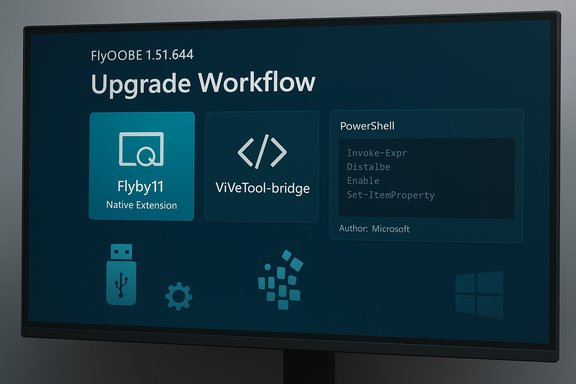
FlyOOBE’s latest public build, reported as FlyOOBE 1.51.644 in recent coverage, doubles down on the project’s shift from a one‑trick installer patcher into a compact Out‑Of‑Box Experience (OOBE) toolkit — bundling the original Flyby11 upgrade bypass as a native extension, expanding the PowerShell extensions engine, polishing UI scaling on high‑DPI displays, and refining how third‑party scripts are surfaced to users.
Windows 11’s strict hardware gating — TPM 2.0, UEFI Secure Boot, curated CPU lists and minimum memory requirements — created a persistent class of “unsupported” but functioning PCs. Community tooling arose to bridge that gap: some utilities modify installation media, others steer the installer along alternate code paths. Flyby11 began as a compact wrapper to automate those installer bypasses; over time the project rebranded and expanded into FlyOOBE (sometimes styled Flyoobe), adding first‑run customization, debloat presets and scriptable extension points while preserving the original upgrade mechanics. FlyOOBE’s core promise is pragmatic: make it simple for refurbishers, technicians and enthusiasts to get a working Windows 11 install on hardware Microsoft’s retail installer would ordinarily block, and then shape the very first‑boot experience so the system is leaner, less telemetry‑heavy, and ready for users. The project’s publicly documented methods avoid kernel exploits; instead they automate community‑documented installer routing and small media or registry edits that historically bypass certain front‑end checks.
The project team has taken responsible steps: rebranding to emphasize OOBE and provisioning, decoupling potentially controversial low‑level patching into optional components, and improving extension transparency. Still, reliance on community‑maintained bypass routes remains inherently fragile and requires active maintenance and careful operational controls by those who deploy it.
The most immediate, high‑impact caution is supply chain safety: do not download FlyOOBE from lookalike or unofficial domains; the developer and independent reporting have flagged malicious mirrors that may distribute tampered, dangerous installers. If you follow the safety checklist and limit unsupported installs to nonproduction machines or clearly documented refurbisher batches, FlyOOBE can be a useful, time‑saving tool — but it is not a silver bullet.
Every upgrade path carries tradeoffs. FlyOOBE makes one particular set of tradeoffs easier to manage — but responsibility and risk remain with the operator.
Source: Neowin FlyOOBE 1.51.644
 Background / Overview
Windows 11’s strict hardware gating — TPM 2.0, UEFI Secure Boot, curated CPU lists and minimum memory requirements — created a persistent class of “unsupported” but functioning PCs. Community tooling arose to bridge that gap: some utilities modify installation media, others steer the installer along alternate code paths. Flyby11 began as a compact wrapper to automate those installer bypasses; over time the project rebranded and expanded into FlyOOBE (sometimes styled Flyoobe), adding first‑run customization, debloat presets and scriptable extension points while preserving the original upgrade mechanics. FlyOOBE’s core promise is pragmatic: make it simple for refurbishers, technicians and enthusiasts to get a working Windows 11 install on hardware Microsoft’s retail installer would ordinarily block, and then shape the very first‑boot experience so the system is leaner, less telemetry‑heavy, and ready for users. The project’s publicly documented methods avoid kernel exploits; instead they automate community‑documented installer routing and small media or registry edits that historically bypass certain front‑end checks. What’s new in FlyOOBE 1.51 (short summary)
- The built‑in extensions engine (PowerShell based) was expanded; Flyby11 (the classic upgrader) is now included as a native extension inside FlyOOBE.
- Extensions now show their author/source (for example, Flyby11 by Belim or ViVeTool‑bridge by Albacore) to improve transparency.
- Improved documentation for extensions and better UI scaling on 4K / >200% Windows display scaling.
- Continued emphasis on a small, portable distribution model with no installation required.
How FlyOOBE works — the technical primer
Two pragmatic techniques, not exploits
FlyOOBE packages two widely used, community‑documented techniques rather than inventing new low‑level attacks:- Server‑variant setup routing — invoke or emulate the Windows Server installer path so Setup follows code paths that historically perform fewer consumer‑facing compatibility checks. This approach still installs the normal Windows 11 image but uses the server installer engine to avoid some front‑end gating.
- LabConfig / registry and wrapper edits — for in‑place upgrades, small registry keys (commonly grouped under LabConfig or similar flags) can be created to tell Setup to bypass checks for TPM, Secure Boot, RAM and CPU generation. FlyOOBE automates these edits or wraps the official ISO so the installer proceeds.
Hard limits that remain
There are genuine hardware constraints that cannot be bypassed by any installer trick:- Instruction‑set requirements (for example, POPCNT or SSE4.2) are enforced by the runtime and CPU microarchitecture; if a CPU lacks these instructions the OS may not even boot reliably. FlyOOBE’s documentation and maintainers explicitly warn that POPCNT is a hard requirement for some Windows 11 builds and cannot be bypassed.
- Firmware‑rooted protections (hardware TPM with certain security features) may still be absent on unsupported machines, meaning features that depend on hardware‑backed keys or secured storage will not be available.
Feature breakdown — what FlyOOBE actually offers
FlyOOBE blends installer bypass mechanics with OOBE customization and scripted provisioning. The most consequential user‑facing capabilities are:- Bypass of TPM requirement during the Windows 11 installation workflow.
- Bypass of Secure Boot checks when needed.
- Workarounds for unsupported CPU checks (subject to instruction‑set limits).
- Bypass of minimum RAM checks in many upgrade/clean‑install scenarios.
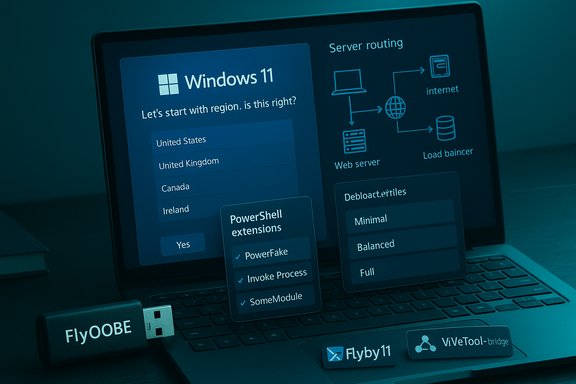
- OOBE interception to allow local account creation (skip mandatory Microsoft account sign‑in), bypass network/region checks, and suppress certain first‑run prompts.
- A debloat engine with curated profiles (Minimal, Balanced, Full) to remove preinstalled Store/OEM packages during first sign‑in.
- Scriptable, PowerShell‑based extensions so technicians can run reproducible provisioning during setup (now showing author/source metadata).
Independent verification and context
Multiple independent outlets and the project repository corroborate FlyOOBE’s key claims. The official GitHub project and release notes describe the Server setup routing method and call out POPCNT as an immutable constraint for some builds, confirming the project’s technical posture. Security and technology press coverage — including coverage of community bypass scripts and installer workarounds — documents the same general methods (LabConfig flags, server‑variant routing) and the tradeoffs involved. Reporting on similar bypass scripts and utilities independently confirms that the techniques FlyOOBE automates are not unique to this project. Microsoft’s own support pages explicitly warn that devices that don’t meet Windows 11 minimum requirements “aren’t guaranteed to receive updates” and recommend rolling back to Windows 10 if compatibility issues arise, which underlines the long‑term risk of running an unsupported configuration.Strengths — why FlyOOBE matters to certain users
- Practicality for refurbishers and labs: FlyOOBE bundles ISO handling, registry edits and first‑boot configuration into a single, portable UI — a real time‑saver when provisioning many machines. The built‑in winget integration and scripted extensions can reduce manual post‑install setup.
- Reduces immediate e‑waste and cost: For many organizations or home users, replacing perfectly functional hardware because of a TPM or model restriction is expensive; FlyOOBE offers a pragmatic path to run modern OS builds on existing machines.
- Transparency and auditability: By automating known community techniques and preferring official ISOs rather than redistributing modified images, FlyOOBE reduces supply‑chain opacity. Extensions now display author/source metadata to increase transparency around third‑party scripts.
- Lightweight and portable: No installer is required, and the app is designed to run from USB or an admin workstation, making it convenient for field technicians.
Risks, caveats and the security surface
- Unsupported status and update uncertainty: Microsoft’s policy is explicit — unsupported installs are not guaranteed software updates and may be excluded from future patches. Relying on an unsupported pathway carries long‑term maintenance risk.
- Supply‑chain and malware risk from forged downloads: The FlyOOBE project (and its developer) has warned that fake sites are distributing tampered builds. Security reporting has highlighted an active fake mirror (for example, flyoobe.net) that may host malicious or modified binaries; users are repeatedly urged to use official GitHub releases only. This is a high‑impact risk because installer helpers run with high privileges and could introduce persistent malware during OS setup if tampered.
- Antivirus false positives and detection churn: Utilities that modify installer behavior or apply system‑level changes are frequently flagged by AV engines. That can complicate deployment in managed environments and may necessitate whitelisting or exclusions for administrators. FlyOOBE’s maintainer has taken steps to reduce unnecessary bundled helpers for that reason.
- Brittleness across Windows servicing: Because FlyOOBE steers Setup along specific code paths or relies on shallow configuration hooks, Microsoft can — and occasionally does — change Setup’s internals so that these bypasses no longer function. That brittleness means a reliable, long‑term upgrade strategy shouldn’t depend on a single third‑party tool.
- Feature gaps and security posture: Even after a successful install, lacking TPM or Secure Boot reduces the efficacy of platform protections (device encryption tied to TPM, hardware‑backed keys, Secure Boot protections). Those tradeoffs matter for organizations with compliance or regulatory obligations.
Practical safety checklist for anyone considering FlyOOBE
- Download only from the project’s official GitHub releases page; do not trust third‑party mirrors or lookalike domains. The project maintainer and multiple outlets have warned about malicious fake sites.
- Verify the release asset: if the release includes cryptographic hashes or signatures, validate them before running the binary. If no signature is present, inspect the release notes and consider building from source.
- Test in a controlled environment first: run the workflow on a spare machine or VM to validate driver compatibility, update behavior and the desired OOBE customizations.
- Create full backups and a recovery plan: image the device, create a recovery USB, and record driver packages so rollback is possible. Microsoft’s support doc also explains the 10‑day rollback window after an upgrade.
- Confirm CPU instruction support: verify the target CPU supports POPCNT (and other required instruction sets) — if not, the install may fail or the system may not boot reliably. FlyOOBE’s compatibility checker and documentation surface this requirement.
- Expect AV churn: temporarily disable or adjust AV policies only when you trust the source and understand the implications; prefer white‑listing the tool in an enterprise policy after code review.
- Document and limit usage: For organizations, keep unsupported installs out of production devices that require vendor support, compliance attestations or long‑term security guarantees.
Recommended deployment pattern for technicians and refurbishers
- Inventory and health check: catalog CPU model, firmware (UEFI), RAM, storage and driver availability.
- Run FlyOOBE’s health tool / compatibility checks (or use independent tools) to ensure instruction‑set requirements are met.
- Acquire an official Microsoft ISO (use the Media Creation Tool or verified download), store it in your organization’s signed artifact repo.
- Run FlyOOBE from an admin workstation, choose the UpgradeOOBE / Flyby11 extension when an in‑place upgrade is desired, or use the Install path for clean installs.
- Apply a minimal debloat profile during OOBE, validate driver functionality and patch Windows Update behavior in a controlled pilot group for several weeks.
- If using at scale, maintain an internal build of any extension scripts or convert them into signed provisioning artifacts to reduce dependence on external sources.
Supply‑chain and legal considerations
- Supply chain: Because the tool runs with elevated privileges and manipulates setup behavior, obtaining binaries only from the project’s official GitHub and validating signatures/hashes is non‑negotiable. Multiple news outlets and the project maintainer have flagged impersonator sites distributing potentially malicious builds.
- Legal/terms: Installing Windows 11 on unsupported hardware is technically possible but not supported by Microsoft; that can affect warranty claims and support eligibility. Microsoft’s policy documentation explicitly recommends reverting to Windows 10 if issues arise. Administrators should weigh legal and compliance requirements before approving unsupported installs for business systems.
The bigger picture — community tooling, user choice and platform stewardship
FlyOOBE sits at the intersection of practical stewardship and user agency. On one side, it answers a real need: keep functioning devices secure and usable without forcing wholesale hardware replacement. On the other, it externalizes long‑term update risk and reduces certain platform security guarantees that Microsoft designed into Windows 11.The project team has taken responsible steps: rebranding to emphasize OOBE and provisioning, decoupling potentially controversial low‑level patching into optional components, and improving extension transparency. Still, reliance on community‑maintained bypass routes remains inherently fragile and requires active maintenance and careful operational controls by those who deploy it.
Verdict and final guidance
FlyOOBE 1.51.644 continues an evolution from a compact bypass tool into a more complete OOBE and provisioning toolkit that lowers the friction of installing Windows 11 on hardware Microsoft’s retail installer bars. For refurbishers, technicians and advanced enthusiasts it is a pragmatic and well‑documented tool that can save money and reduce e‑waste — provided it is used with disciplined safety practices: obtain releases only from official channels, verify artifacts, test thoroughly, and treat each unsupported install as an operational compromise rather than a permanent equivalence to a vendor‑supported device.The most immediate, high‑impact caution is supply chain safety: do not download FlyOOBE from lookalike or unofficial domains; the developer and independent reporting have flagged malicious mirrors that may distribute tampered, dangerous installers. If you follow the safety checklist and limit unsupported installs to nonproduction machines or clearly documented refurbisher batches, FlyOOBE can be a useful, time‑saving tool — but it is not a silver bullet.
Every upgrade path carries tradeoffs. FlyOOBE makes one particular set of tradeoffs easier to manage — but responsibility and risk remain with the operator.
Source: Neowin FlyOOBE 1.51.644