

Windows shortcut (.LNK) files are once again in the crosshairs: researcher Wietze Beukema has publicly documented four previously undocumented ways that crafted LNK files can spoof what users see, hide dangerous command-line arguments, and execute entirely different binaries than the shortcut appears to point to. This isn’t a minor UI quirk — it expands the practical attack surface for phishing, removable-media (USB) attacks, and initial-access operations that rely on user interaction. The techniques rely on ambiguities and fallback behavior in Windows Explorer’s parsing of LNK metadata, and they re-open a debate that has been running for years: when does a “UI bug” become a security vulnerability that must be fixed centrally, rather than mitigated by detection and policy controls? The findings are documented by Beukema and reported across multiple outlets, and defenders should treat the disclosure as actionable intelligence even if Microsoft frames the issues as “not meeting the bar” for a security patch.
The
That flexibility is exactly what makes LNK files attractive for abuse. For years attackers have weaponized LNKs to:
Microsoft has occasionally shipped mitigations (for example, hardening against certain remote-icon lookups), but attackers have repeatedly found bypasses and variants that restore the original abuse vector in novel ways. The current disclosure by Beukema adds more techniques to that catalog, demonstrating how legacy LNK parsing leads to inconsistent UI vs execution behavior.
Beukema shows that when both EnvironmentVariableDataBlock and LinkTargetIDList are present, Explorer will display the EnvironmentVariableDataBlock path in the Properties dialog but will, in some fallback cases, execute the LinkTargetIDList path. Crucially, if the EnvironmentVariableDataBlock contains a syntactically invalid Windows path, Explorer still shows it — but at runtime it silently falls back to the LinkTargetIDList. An attacker can therefore present what looks like a harmless program or a document while actually executing a different binary.
Why this matters practically: users frequently check shortcut properties to validate a file before double-clicking, and attackers already rely on user inattention and fast clicks. A crafted LNK that displays “invoice.pdf” but executes PowerShell with embedded commands is a straightforward social-engineering multiplier.
This is a subtle but powerful mismatch: the information shown to the user (the ‘bait’) can come from one block, while the actual executable (the ‘switch’) comes from another. Combined with persuasive file names and context (e.g., a downloaded ZIP labeled “Tax-Return”), this behavior greatly increases the chance of a victim running attacker-chosen code.
This is particularly dangerous for “living off the land” attacks: an attacker can point the LNK at a trusted binary (for example, a system PowerShell or MSHTA instance) and pass a hidden command that downloads and executes a payload. Because the binary executed is a trusted Microsoft executable, many endpoint protection engines may not flag the initial process, and because the arguments are hidden, human inspection becomes unreliable.
At the same time, there are important caveats:
Observation across prior incidents shows that when moderately sophisticated threats find a reliable social-engineering vector, they will exploit it at scale. The November 2025 patch cycle and the subsequent bypasses (several CVEs in 2025 show a pattern of mitigation-then-bypass) illustrate that defenders cannot assume a single patch will solve the class of problems; the LNK ecosystem has a deep historical precedent of repeated, creative bypasses. Treating LNKs as “safe to ignore” exposes organizations to avoidable risk.
For blue teams, the immediate takeaway is that policy, detection, and user education must compensate for the gaps in product-level vulnerability classification. Blocking LNKs at ingress, preventing automatic SMB egress, and building specific detection for explorer-initiated suspicious behavior are practical, deployable mitigations.
Until Microsoft changes the fundamental parsing and prioritization rules in Explorer (or provides a clear, comprehensive mitigative update), the safest posture is to assume any untrusted LNK could be malicious and to apply layered defenses that do not rely on the user’s ability to visually inspect properties or the assumption that UI equals truth.
The practical actions to take now are clear: tighten egress filtering, prevent LNKs from entering mail/cloud workflows, deploy process ancestry monitoring for explorer.exe, and incorporate LNK parsing into file-inspection tooling. These measures will materially reduce the risk that an otherwise innocent-looking shortcut becomes an initial access vector or credential-exfiltration tool in your environment.
Beukema’s work is a timely reminder that even decades-old file formats can surprise us — and that security must be layered and proactive, not hopeful.
Source: Computerworld Four new reasons why Windows LNK files cannot be trusted
 Background: why LNK files remain attractive to attackers
The .LNK format is an ancient, binary shortcut structure introduced in early Windows that stores not only a target path, but also optional metadata: command-line arguments, working directories, icon locations, shell link IDs, and several “extra data” blocks. Because Explorer must be forgiving and backwards-compatible, it reads multiple optional fields and applies fallback logic when values conflict or are missing.That flexibility is exactly what makes LNK files attractive for abuse. For years attackers have weaponized LNKs to:
- Force the system to contact attacker-controlled SMB/WebDAV servers (by pointing icons or targets at UNC paths), leaking authentication artifacts like NTLM challenge/response hashes.
- Hide malicious payload execution behind legitimate or trusted binaries (LOLBINs), thereby evading signature-based detection.
- Obfuscate the true execution intent when a user inspects the shortcut properties — giving a false sense of safety.
Microsoft has occasionally shipped mitigations (for example, hardening against certain remote-icon lookups), but attackers have repeatedly found bypasses and variants that restore the original abuse vector in novel ways. The current disclosure by Beukema adds more techniques to that catalog, demonstrating how legacy LNK parsing leads to inconsistent UI vs execution behavior.
Overview of Beukema’s four techniques
Beukema’s lab work (demonstrated publicly at recent conferences and documented in his writeups and tooling) shows four distinct ways to manipulate LNK metadata so that what Explorer shows to the user differs from what actually executes. The practical effects combine three classes of risk:- Target spoofing: a harmless-looking path appears in properties while a different program runs.
- Argument hiding: command-line arguments that perform the malicious work are not visible to users inspecting the shortcut.
- Program substitution: the binary executed is not the binary the UI displays.
1) Conflicting metadata — EnvironmentVariableDataBlock vs TargetIDList
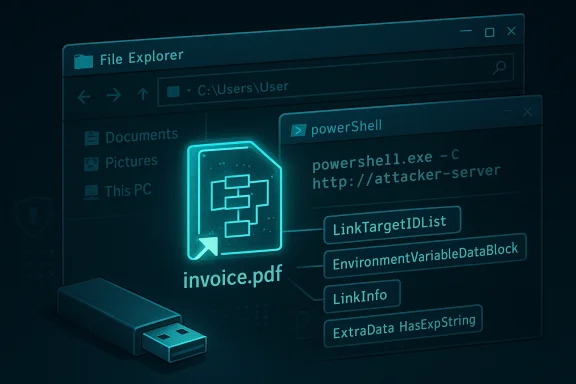
The LNK format can store a target path in multiple places: the LinkTargetIDList (a binary identifier list), the EnvironmentVariableDataBlock (a human-readable path that can include environment variables), and the LinkInfo structure (also containing path information). Explorer must decide which field to display and which to execute.Beukema shows that when both EnvironmentVariableDataBlock and LinkTargetIDList are present, Explorer will display the EnvironmentVariableDataBlock path in the Properties dialog but will, in some fallback cases, execute the LinkTargetIDList path. Crucially, if the EnvironmentVariableDataBlock contains a syntactically invalid Windows path, Explorer still shows it — but at runtime it silently falls back to the LinkTargetIDList. An attacker can therefore present what looks like a harmless program or a document while actually executing a different binary.
Why this matters practically: users frequently check shortcut properties to validate a file before double-clicking, and attackers already rely on user inattention and fast clicks. A crafted LNK that displays “invoice.pdf” but executes PowerShell with embedded commands is a straightforward social-engineering multiplier.
2) Non-matching LinkTargetIDList and LinkInfo mismatch
A variant occurs when the EnvironmentVariableDataBlock is present but the LinkTargetIDList does not match the LinkInfo entries. In Beukema’s tests, Windows Explorer continues to display the EnvironmentVariableDataBlock value in UI elements while running the executable specified in the LinkInfo structure.This is a subtle but powerful mismatch: the information shown to the user (the ‘bait’) can come from one block, while the actual executable (the ‘switch’) comes from another. Combined with persuasive file names and context (e.g., a downloaded ZIP labeled “Tax-Return”), this behavior greatly increases the chance of a victim running attacker-chosen code.
3) ANSI/Unicode pair inconsistencies — the disabled Target field
LNK stores both ANSI and Unicode variants of some text fields. Beukema demonstrated that supplying only the ANSI target value while leaving the paired Unicode field empty can cause Explorer to treat the data as inconsistent. In practice, Explorer then:- Displays a path derived from the LinkTargetIDList,
- Disables the editable Target field in the Properties dialog (preventing simple user verification), and
- Hides any visible arguments — while at runtime the hidden ANSI path is executed.
4) Hiding command-line arguments via ExtraData/HasExpString
Beyond target spoofing, Beukema showed how command-line arguments embedded in LNK ExtraData fields can be rendered invisible in Explorer while still being passed to the executed process. By enabling the HasExpString flag and carefully configuring the EnvironmentVariableDataBlock and TargetANSI/TargetUnicode fields (including filling certain fields with null bytes), the Properties UI makes the target field read-only and does not display the arguments — yet the system still passes the arguments to the launched program.This is particularly dangerous for “living off the land” attacks: an attacker can point the LNK at a trusted binary (for example, a system PowerShell or MSHTA instance) and pass a hidden command that downloads and executes a payload. Because the binary executed is a trusted Microsoft executable, many endpoint protection engines may not flag the initial process, and because the arguments are hidden, human inspection becomes unreliable.
How this expands attackers’ toolkits: realistic use cases
Beukema’s techniques are not purely academic; they map directly to attack patterns already used by multiple threat actors. Consider these scenarios:- USB-borne initial access: an attacker leaves a crafted LNK on a thumb drive labeled with enticing content. When a curious employee double-clicks, Explorer runs a hidden command that fetches a payload. This is vintage USB spearphishing with modern stealth. Historical incident reports document LNK usage in USB and ISO campaigns, underlining how effective this delivery vector is.
- Phishing attachments and archive previews: email or cloud services that show previews or metadata may render LNK thumbnails or parse content. If Explorer (or server-side preview engines) renders icon resources or parses LNK metadata, the machine may contact attacker-controlled servers and leak credentials or directly execute code when users interact. Past exploitation patterns and CVEs show extraction/preview flows are weaponized.
- Living-off-the-land (LOLBIN) execution: LNKs that point to legitimate system binaries but pass hidden arguments permit payload staging without an obvious malicious binary on disk. This reduces signature-based detection and gives attackers a low-noise foothold. Multiple reports on LNK abuses have used this exact strategy.
- Credential harvesting and NTLM leakage: while Beukema’s specific disclosure is about UI/execution mismatch and argument hiding, it sits next to a family of LNK-induced NTLM/SMB leakage techniques where Explorer accesses remote resources (icons, resources embedded in remote PE files) and the system attempts SMB authentication — exposing hashes. Microsoft’s previous mitigations were bypassed by careful LNK crafting, demonstrating this class of attack remains live.
Cross-checking and verification: what is corroborated, and what needs caution
Multiple independent outlets and the researcher’s own materials align on the core points: LNK files can present conflicting metadata, Explorer’s fallback logic can be manipulated, and command-line arguments can be hidden. Computerworld’s reporting summarizes Beukema’s disclosure; BleepingComputer and SecurityWeek provide corroborating technical detail and reporting on Microsoft’s response. Beukema has published tooling (referred to as “lnk-it-up” in coverage) and presented his work at conferences, which supports the veracity of demonstrations.At the same time, there are important caveats:
- Microsoft’s classification: Microsoft has told researchers and reporters that these LNK behaviors require user interaction and do not cross security boundaries in their severity classification, so some of the techniques may be treated as UI/compatibility issues rather than code-execution vulnerabilities eligible for emergency servicing. That distinction matters for whether Microsoft will issue an out-of-band patch or rely on cumulative updates and defense-in-depth mitigations. Reporters quote Microsoft to that effect. Defenders should not interpret the classification as benign risk: user interaction is the very vector many targeted attacks exploit.
- Attack feasibility vs detection: several techniques rely on precisely crafted LNK fields and edge-case parsing. While demonstrable in lab conditions and practical enough to be weaponized, the operational complexity can affect widespread adoption by opportunistic criminals. But state-sponsored groups and advanced attackers routinely invest in such intricacies when the payoff is stealthy initial access. Historical campaigns documented by vendors show just that.
- Unverified claims about new CVEs: readers should be cautious when a blog or social post asserts new CVE numbers or zero-click RCE without cross-validation. In this coverage, the LNK UI/metadata techniques are separate from the NTLM/automatic-authentication chain-of-exploitation CVEs that have had several installments in recent years; those older CVEs and their bypasses are well-documented, but not every LNK nuance maps directly to a new CVE. Treat CVE discussions carefully and verify vendor advisories and patch notes for precise impact and affected builds.
Detection and mitigation: practical steps for defenders
Because Microsoft’s posture may classify some LNK behaviors as UI issues rather than security bugs, the operational burden falls heavily on defenders to mitigate risk. The following layered recommendations combine vendor guidance, community best practice, and practical detection work that can reduce exposure to LNK-based abuse. These measures range from immediate policy controls to investigative detection logic.Quick, high-priority actions (apply immediately)
- Treat any LNK from untrusted sources as dangerous. Block LNK attachments at email gateways and cloud-sharing services whenever possible, or at minimum strip LNK files from inbound archives. Many campaigns deliver malicious LNKs zipped into archives to bypass simple filters.
- Apply Microsoft security updates promptly. Although not all LNK behaviors may be classified as patchable vulnerabilities, Microsoft has released mitigations for previously abused LNK parsing flows; staying fully patched reduces the known attack surface. Check vendor advisories and apply cumulative updates on a tested schedule.
- Harden network egress for SMB/NetBIOS: block outbound SMB (TCP 445) and NetBIOS (137–139) at egress points where not required. Many LNK-based credential-leak techniques depend on Explorer initiating SMB connections to attacker-controlled servers; preventing that outbound flow closes a common exfiltration channel.
Configuration and policy controls
- Enforce execution controls such as Smart App Control, AppLocker, or Windows Defender Application Control (WDAC) to limit which binaries can run or receive elevated arguments. While these controls can be operationally heavy, they dramatically reduce the effectiveness of LNK-based LOLBIN invocation.
- Configure MIME-type and file-extension handling for mail servers and endpoints to treat .LNK as potentially dangerous, and ensure mail/web preview services do not render or execute LNK metadata that could trigger network connections.
- Use Group Policy to require SMB signing and encryption where possible; this increases the difficulty of performing NTLM relay or capture attacks from Explorer-initiated connections.
Detection and hunting (technical controls)
- Hunt for Explorer-initiated outbound connections to unknown SMB hosts. Monitor processes (explorer.exe) that spawn unusual network activity, especially towards external IPs or suspicious domain names. This is a high-value signal; many exploit chains reintroduce network calls as part of the attack.
- Detect anomalous child processes launched by explorer.exe or shortcuts that include suspicious command-line patterns. Because Beukema’s techniques aim to hide arguments, focus on process ancestry and behavior (for example, explorer -> powershell or explorer -> cmd with network or downloader behaviors), not just argument strings.
- Index and normalize LNK file metadata during triage: for forensic analysis, parse the LinkTargetIDList, EnvironmentVariableDataBlock, LinkInfo, and ExtraData sections and compare what Explorer displays vs what a raw parser reveals. Beukema published a test toolset that provides a model for this approach (the “lnk-it-up” tool mentioned in reporting), and defenders should incorporate such parsing logic into file-inspection pipelines.
Incident response checklist if LNK-based compromise is suspected
- Isolate affected hosts and block suspicious egress to attacker-controlled SMB/WebDAV servers.
- Collect the LNK file and parse all internal fields offline to determine the displayed target vs actual execution target.
- Hunt for processes spawned by explorer.exe and anomalous child executions (PowerShell, WScript, MSHTA).
- Review network logs for SMB/NTLM authentication attempts immediately before or during the suspected execution time.
- Rotate credentials and check for lateral movement attempts that could have used harvested authentication artifacts.
Why Microsoft’s “UI issue” stance matters — and why defenders should still act
Microsoft’s public position (as reported) is that many of these LNK behaviors require user interaction and therefore do not meet the servicing guideline for immediate security patches. From a narrow product-risk classification, that’s defensible: Windows Explorer is meant to be backward compatible and forgiving. However, from an operational risk perspective, the distinction is less meaningful: attackers rely on user interaction, and countless campaigns exploit exactly that human element.Observation across prior incidents shows that when moderately sophisticated threats find a reliable social-engineering vector, they will exploit it at scale. The November 2025 patch cycle and the subsequent bypasses (several CVEs in 2025 show a pattern of mitigation-then-bypass) illustrate that defenders cannot assume a single patch will solve the class of problems; the LNK ecosystem has a deep historical precedent of repeated, creative bypasses. Treating LNKs as “safe to ignore” exposes organizations to avoidable risk.
Red-team and blue-team takeaways
For red teams, Beukema’s work is a reminder that legacy formats still harbor practical, low-noise techniques for initial access and stealth. If responsible and permitted, red teams should test detection pipelines against LNKs crafted with conflicting metadata and hidden arguments to verify defenses.For blue teams, the immediate takeaway is that policy, detection, and user education must compensate for the gaps in product-level vulnerability classification. Blocking LNKs at ingress, preventing automatic SMB egress, and building specific detection for explorer-initiated suspicious behavior are practical, deployable mitigations.
- Red-teamers: test realistic scenarios that combine social engineering with local metadata mismatches to evaluate detection coverage.
- Blue-teamers: add parse-based comparison of what Explorer displays vs raw LNK contents to your analytic toolkits; this is an operationally feasible detection enhancement.
Strengths and limitations of Beukema’s disclosure
Strengths:- The research is practical and reproducible: Beukema presented code and a toolset that defenders can use to model both attack and detection scenarios. That practical focus improves defenders’ ability to respond.
- The disclosure surfaces multiple independent failure modes in LNK handling, not just a single edge-case, which makes the findings robust and not merely “lab trick.” Reporters independently verified the core behaviors.
- Because attackers already use similar tactics, the disclosure provides timely, actionable defenses for organizations that haven’t hardened LNK handling or SMB egress.
- Some of the techniques rely on nuanced parsing and very specific field layouts; their operational simplicity is lower than “click-and-execute” drive-by exploits. However, that complexity has not stopped sophisticated threat actors in the past.
- Microsoft’s handling of the issue may limit the speed of vendor-side remediation, placing the onus on defenders and security product vendors to adapt detection and policy controls instead.
Final assessment: treat every untrusted shortcut as potentially dangerous
Beukema’s research should be read as a practical escalation of an old problem: Windows Explorer’s need for backwards compatibility and rich metadata parsing has repeatedly yielded avenues for abuse. The newly described techniques are not theoretical curiosities — they are operationally meaningful and augment the existing LNK weaponization playbook that has been exploited by multiple threat groups over the past decade. Defenders must: patch, block LNKs from untrusted inputs, harden SMB egress, and add detection logic that compares what Explorer displays with what is embedded in the LNK.Until Microsoft changes the fundamental parsing and prioritization rules in Explorer (or provides a clear, comprehensive mitigative update), the safest posture is to assume any untrusted LNK could be malicious and to apply layered defenses that do not rely on the user’s ability to visually inspect properties or the assumption that UI equals truth.
The practical actions to take now are clear: tighten egress filtering, prevent LNKs from entering mail/cloud workflows, deploy process ancestry monitoring for explorer.exe, and incorporate LNK parsing into file-inspection tooling. These measures will materially reduce the risk that an otherwise innocent-looking shortcut becomes an initial access vector or credential-exfiltration tool in your environment.
Beukema’s work is a timely reminder that even decades-old file formats can surprise us — and that security must be layered and proactive, not hopeful.
Source: Computerworld Four new reasons why Windows LNK files cannot be trusted
