

FreeXP is the kind of Linux distribution that aims squarely at one audience: people who want to try Linux but don’t want to leave the Windows interface behind. It wraps Debian stability and the Q4OS utility stack in a convincing Windows-themed shell — available as FreeXP (XP-like) and Free10 (Windows 10-like) live images — giving newcomers a low-friction path to explore Linux without confronting an unfamiliar desktop paradigm.
FreeXP is not a Microsoft product. It’s a community-driven packaging of the XPQ4 theming project combined with the Q4OS distribution (a Debian-based, lightweight desktop OS). The XPQ4 project supplies themed installers and ready-made live images called FreeXP (Trinity desktop, XP look) and Free10 (KDE Plasma, Windows 10 look); Q4OS provides the Debian foundation, the Desktop Profiler, and conveniences that make acceptance by Windows users easier. This arrangement has been discussed across specialist outlets and the project’s own pages, and the XPQ4 SourceForge project publishes the live images and installer artifacts. Why this matters now: the formal end-of-support for Windows 10 (October 14, 2025) has pushed many users to evaluate alternatives — upgrading to Windows 11, paying for Extended Security Updates, or switching to Linux. For users who want to preserve a familiar UI while moving off an unsupported Windows release, FreeXP/Free10 provides an immediately recognizable desktop experience with modern security updates underneath. Microsoft’s own documentation confirms the Windows 10 end-of-support date and recommends migration paths, underlining why alternatives matter.
Under the hood, Debian + Q4OS = durability. Q4OS’ conservative approach to updates and its Desktop Profiler/Software Center utilities make day-to-day administration straightforward. The underlying Debian model means security patches and long-term stability, a real contrast to frequent forced Windows feature updates. This combination is a strong technical foundation for any production-lite desktop environment. However, the project’s niche focus is also a liability. The intense theming that makes FreeXP appealing could inadvertently train users to expect Windows behavior across the board — from update cadence to driver provisioning — and those expectations will be violated when native Linux differences appear. That mismatch can produce friction far beyond the initial novelty of the theme. Reviewers repeatedly warn that the familiarity of the UI can lull users into false equivalence; they must still learn Linux concepts for long-term success. Long-term viability is dependent on community attention. Q4OS and XPQ4 have active pages and recent releases, and XPQ4’s SourceForge project shows ongoing maintenance (installers updated for current Q4OS releases). Still, projects that occupy a niche need either a broad user base or a small, committed developer team to keep pace with upstream changes. For now, both the Q4OS and XPQ4 projects are active and regularly updated, which bodes well for near-term sustainability, but potential adopters should be mindful that smaller ecosystems can change direction or slow down.
FreeXP is not a gimmick: it’s a practical, well-executed bridge that gives Windows users a familiar front end while moving them onto a secure, modern Linux base. For anyone considering the switch from Windows 10 now that free support has ended, or for users who want to revive older hardware with a comfortable UI, FreeXP and Free10 are worthy additions to the migration shortlist — provided you test carefully, verify application compatibility, and accept that “familiar look” is not the same as “identical behavior.”
Source: ZDNET Want to try Linux but prefer the Windows UI? This distro is for you
 Background / Overview
FreeXP is not a Microsoft product. It’s a community-driven packaging of the XPQ4 theming project combined with the Q4OS distribution (a Debian-based, lightweight desktop OS). The XPQ4 project supplies themed installers and ready-made live images called FreeXP (Trinity desktop, XP look) and Free10 (KDE Plasma, Windows 10 look); Q4OS provides the Debian foundation, the Desktop Profiler, and conveniences that make acceptance by Windows users easier. This arrangement has been discussed across specialist outlets and the project’s own pages, and the XPQ4 SourceForge project publishes the live images and installer artifacts. Why this matters now: the formal end-of-support for Windows 10 (October 14, 2025) has pushed many users to evaluate alternatives — upgrading to Windows 11, paying for Extended Security Updates, or switching to Linux. For users who want to preserve a familiar UI while moving off an unsupported Windows release, FreeXP/Free10 provides an immediately recognizable desktop experience with modern security updates underneath. Microsoft’s own documentation confirms the Windows 10 end-of-support date and recommends migration paths, underlining why alternatives matter. What FreeXP actually is (and what it isn’t)
The basics — a themed, Debian-based live image
- FreeXP/Free10 are live images you can boot from USB, test without touching your drive, and optionally install. The images integrate XPQ4 theming onto a Q4OS base and include native Linux applications so the system is usable out of the box. XPQ4 offers installers for both the Trinity Desktop Environment (TDE) and KDE Plasma, letting users choose lightweight or more modern desktop engines.
- The distribution ships with everyday apps commonly found in user-facing spins: a Chromium-family browser, LibreOffice, media players (VLC), an email client (Thunderbird), and system utilities. The exact bundle varies between images and builds; reviewers and project pages repeatedly note that package lists can change between releases, so expect small differences from ISO to ISO.
What FreeXP is not
- It is not Windows. The UX attempts to imitate Windows visuals and behavior, but the kernel, package manager, update model, device drivers, and security model are all Linux. Windows-only programs don’t run natively; you’ll need compatibility layers (Wine) or virtualization to run true Windows binaries. Many Q4OS and XPQ4 pages explicitly document this distinction.
- The look-and-feel is the product’s aim, not a binary compatibility layer with Windows application ecosystems. That’s both the selling point and the main limitation.
First impressions and user-facing features
The familiar first boot
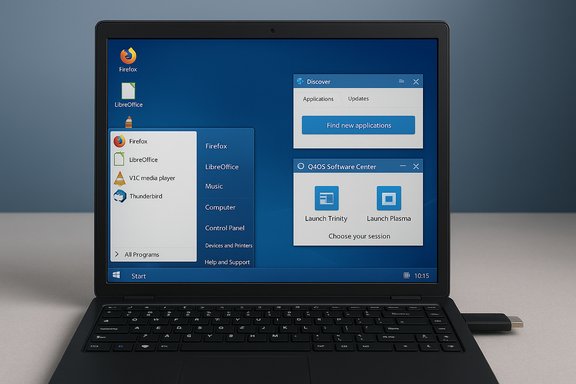
Boot FreeXP/Free10 from a USB stick to experience the environment instantly; the live session demonstrates how far theming can go. The welcome screen (a Q4OS utility) helps with setup tasks like selecting desktop profiles, installing codecs, and connecting hardware. XPQ4 adds a shortcut tool to pick between historical Windows themes — Windows 2000, XP Classic, XP Luna, Windows 7, Windows 8, and Windows 10 Light — though some builds default only to the Windows 10 look.Start Menu, System Tray, and workflow parity
- Free10 (Plasma) gives a Windows 10–style Start menu and an optionally docked panel; FreeXP (Trinity) recreates the XP menu and taskbar metaphors. Some builds add conveniences like drag-and-drop favorites in the Start-like menu and a near-identical system tray experience (notifications, quick settings, clipboard manager). Reviewers have singled out the drag-and-drop favorites grid and the familiar system tray as effective psychological affordances for Windows migrators.
- KDE Discover is included on Plasma editions; Q4OS’s own Software Center and the Desktop Profiler provide first-time setup workflows and curated app choices, reducing the need to use the terminal for basic tasks. The combination aims to replicate Windows’ “one-stop” app installation experience.
Under the hood — what you’re actually installing
Debian stability and Q4OS tooling
Q4OS is a Debian-focused distribution that emphasizes lightweight performance (Trinity) and flexible appearance (Plasma). Recent Q4OS releases track Debian stable branches and ship with tools like Desktop Profiler and a Software Center tailored for new users. Those tools are the scaffolding that lets FreeXP deliver a Windows-like surface while staying on a rock-solid Debian foundation. The Q4OS project page and release notes confirm the Debian lineage and ongoing maintenance.Desktop environments and performance trade-offs
- Trinity Desktop Environment (TDE): a maintained fork of KDE 3 that is extremely lightweight and ideal for older hardware. FreeXP uses TDE for the XP-like experience to keep resource demands low.
- KDE Plasma: modern, rich, and highly configurable — used by Free10 for a convincing Windows 10 aesthetic. Plasma variants can include Discover and are comfortable on contemporary hardware.
Package management and app ecosystems
- Base packaging: APT/dpkg (Debian standard). Expect Synaptic and apt-based operations for deeper control.
- Graphical stores: Q4OS Software Center + KDE Discover; Flatpak/Flathub support can be added to broaden available apps quickly. This combination gives non-technical users a GUI-first app installation path while preserving Debian’s stable package base.
Strengths — why FreeXP can be the gentle way out of Windows
- Familiarity reduces friction. The psychological cost of switching OSes is real. Recreating the Start menu, taskbar, and desktop icons means users can focus on tasks rather than relearning the UI. This is the product’s clearest win.
- Debian-backed stability. Q4OS follows Debian’s conservative update model; that translates to fewer surprise regressions and predictable maintenance windows compared with some consumer OS update behaviors. For users tired of forced feature updates or unexpected behavior changes, that predictability is compelling.
- Low-end hardware revival. The Trinity edition extends usable life for older laptops and desktops. Where Windows 10/11 might struggle, FreeXP can deliver acceptable performance and modern security. This makes it a strong candidate for refurbishing machines.
- Live media + easy installer. Booting from USB to test and then installing is low risk; Q4OS’s Windows-side installer and integrated live installer help users deploy the system without a complex installation ritual.
- Out-of-the-box usability. Preinstalled productivity and media apps mean that the system is pragmatic from first boot for common tasks like browsing, email, and office work.
Risks, limitations, and realistic expectations
It’s not a drop-in replacement for Windows in every environment
Even the best UI mimicry can’t turn Linux into Windows for software that relies on Windows-only drivers, vendor utilities, or specific copy-protected installers. Business-critical or niche applications (CAD, some medical/industrial tools, specialized drivers) frequently remain Windows-only. Migrating such workloads requires careful verification, replacement software, virtualization, or running a Windows VM. Multiple project and reviewer write-ups emphasize this important boundary.Application compatibility: Wine helps but it’s not perfect
Wine (or front-ends like PlayOnLinux) can run a lot of Windows programs, and gaming has improved dramatically thanks to Proton, but neither is a universal solution. License dongles, copy-protected installers, and hardware-locked vendors can be problematic. Q4OS documentation and multiple reviewers recommend installing Wine from the Software Center if you need Windows application support, but it’s not guaranteed to work for every title or utility out of the box. Treat Wine as a compatibility tool, not a guarantee.Hardware drivers and edge cases
Mainstream hardware (Intel, AMD, NVIDIA) sees good Linux support, but printers, scanners, and some Wi-Fi/USB peripherals sometimes require vendor Windows drivers. Expect extra effort: searching vendor Linux drivers, using generic drivers, or replacing legacy hardware. Testing the live image on your specific machine before committing to an install is essential.Image variation and bundle uncertainty
FreeXP/Free10 builds vary. Some earlier releases packed multiple Windows theme choices; later images may default to a single theme. Similarly, whether Wine or certain third-party codecs are installed by default can change between images, so don’t assume parity between one ISO and the next. Verify by testing the live image or checking the ISO’s package manifest when possible. This variability is commonly noted across reviews and project pages.Practical migration checklist — how to evaluate FreeXP safely
- Back up everything. Create a full image or copy of critical files before altering partitions.
- Test via live USB. Boot FreeXP/Free10 in live mode to verify UI comfort, Wi-Fi, display, and peripheral support.
- Check application needs. List must-have Windows apps and verify compatibility via Wine/proton or confirm alternatives exist on Linux.
- Try a VM. If a core app must remain Windows-native, run Windows inside VirtualBox/virt-manager or keep a small Windows partition.
- Prepare drivers. If a printer/scanner/medical device is essential, locate Linux drivers or vendor support before committing.
- Add Flathub/Flatpak if needed. If KDE Discover misses an app, enabling Flathub often solves availability gaps.
- Decide your install mode. Dual-boot preserves the Windows fallback; full install commits your device to Linux.
How to get the most from FreeXP/Free10 (tips and recommended tweaks)
- Enable Flatpak and add Flathub through Discover or the Desktop Profiler to widen your app selection quickly.
- If you need Windows app support, install Wine from the Q4OS Software Center and consult WineHQ’s AppDB for app-specific tweaks and success reports.
- Use Trinity for older PCs — it’s deliberately lightweight and keeps resource usage low. Move to Plasma on more capable hardware for a closer Windows 10 look and modern features.
- Keep the live USB handy — troubleshooting is easier if you can boot the live environment to recover files or reconfigure bootloaders.
- Read the XPQ4 project README and release notes before downloading. It explains installers and differences between FreeXP and Free10 images.
Critical analysis — strengths, trade-offs, and long-term viability
FreeXP’s core strength is psychological: it eliminates the immediate shock of a new desktop and lets Windows users evaluate Linux in a familiar context. That lowers the adoption barrier and gives users breathing room to learn Linux concepts without losing productivity. For users whose concerns are primarily UI-related — “I’m comfortable with Windows, but the licensing or security situation is worrying” — FreeXP is a pragmatic transitional tool.Under the hood, Debian + Q4OS = durability. Q4OS’ conservative approach to updates and its Desktop Profiler/Software Center utilities make day-to-day administration straightforward. The underlying Debian model means security patches and long-term stability, a real contrast to frequent forced Windows feature updates. This combination is a strong technical foundation for any production-lite desktop environment. However, the project’s niche focus is also a liability. The intense theming that makes FreeXP appealing could inadvertently train users to expect Windows behavior across the board — from update cadence to driver provisioning — and those expectations will be violated when native Linux differences appear. That mismatch can produce friction far beyond the initial novelty of the theme. Reviewers repeatedly warn that the familiarity of the UI can lull users into false equivalence; they must still learn Linux concepts for long-term success. Long-term viability is dependent on community attention. Q4OS and XPQ4 have active pages and recent releases, and XPQ4’s SourceForge project shows ongoing maintenance (installers updated for current Q4OS releases). Still, projects that occupy a niche need either a broad user base or a small, committed developer team to keep pace with upstream changes. For now, both the Q4OS and XPQ4 projects are active and regularly updated, which bodes well for near-term sustainability, but potential adopters should be mindful that smaller ecosystems can change direction or slow down.
Final verdict — who should consider FreeXP?
FreeXP and Free10 are best for:- Users who must keep a Windows-like interface while moving away from unsupported Windows 10 installations.
- Home users and hobbyists refurbishing older hardware who value a familiar layout.
- Education environments or labs that prefer a gentle visual transition to Linux for novice users.
- Enthusiasts who enjoy retro aesthetics but want modern security and maintainability.
- Enterprises with proprietary Windows-only applications or AV/management stacks that cannot be migrated.
- Users who require guaranteed vendor support for niche peripherals that only ship Windows drivers.
- People who expect a 1:1 behavioral match with Windows updates, services, or app compatibility.
Quick resources and verification notes
- Q4OS — project site and blog with release notes, Desktop Profiler and Software Center details; confirms Debian base and the Plasma/TDE options.
- XPQ4 — SourceForge project with FreeXP and Free10 live images and installers for Trinity and Plasma. Check installers and ISO manifests to confirm included packages.
- Windows 10 end of support — Microsoft’s official notice (October 14, 2025) underlines why considering alternatives is timely.
FreeXP is not a gimmick: it’s a practical, well-executed bridge that gives Windows users a familiar front end while moving them onto a secure, modern Linux base. For anyone considering the switch from Windows 10 now that free support has ended, or for users who want to revive older hardware with a comfortable UI, FreeXP and Free10 are worthy additions to the migration shortlist — provided you test carefully, verify application compatibility, and accept that “familiar look” is not the same as “identical behavior.”
Source: ZDNET Want to try Linux but prefer the Windows UI? This distro is for you
