

Microsoft’s latest push to make AI the default interface for work is not an incremental update — it’s an architectural pivot that rethinks how business applications are built, accessed, and governed. The company calls this shift Frontier Transformation: a convergence of conversational AI as the primary interface, agent-based orchestration for workflows, and an intelligence layer that ties together structured and unstructured sources into a single operational memory. The announcement — which folds Dynamics 365, Microsoft 365 Copilot, Power Platform, agents, and a new Work IQ layer into a unified narrative — lays out a practical path from “Copilot as helper” to “Copilot as workspace” and from point automation to agentic business applications. .com]
The last five years of Microsoft product direction have been about turning generative models and retrieval systems into practical tools inside Office, Teams, and Dynamics. What’s new in Frontier Transformation is the insistence that the interface, the orchestration layer, and the grounding intelligence must be engineered together — not as discrete add-ons but as a single system that changes the unit of value from “screens and clicks” to “answers and actions.”
Agents that can read or write across SharePoint, OneDrive, and Dataverse introduce complex data exposure scenarios. Enforcing DLP, MIP, and privacy rules while preserving conversational convenience is non-trivial. Rollouts should begin in guarded environments with strict policy controls and thorough privacy impact assessments.
Independent coverage of the 2025–2026 release waves shows that Microsoft’s strategy is consistent across conferences and product posts: Copilot is intended to be the operational fabric, not just a sidebar helper. Observers note that the tradeoff is deeper vendor coupling, heavier governance needs, and an operational lift for IT teams — but also meaningful upside in speed and cross-system automation.
That said, the costs of rushing — data exposure, agent sprawl, auditability gaps, and unexpected license/compute bills — are material. The most successful early deployments will be those that pair ambition with strict guardrails: pilot small, instrument thoroughly, require human approval for high-risk actions, and treat agent identity and lifecycle with the same discipline as a human employee’s access.
If you run IT or lead digital transformation, treat today’s announcements as the start of a multi-quarter program, not a single feature sprint. Build the governance scaffolding now, then let the agents run the workflows. The frontier Microsoft describes is reachable — but it will be worth exactly what organizations invest in security, governance, and disciplined adoption.
Source: Microsoft A new way of working is taking shape: Frontier Transformation - Microsoft Dynamics 365 Blog
 Background: why this matters now
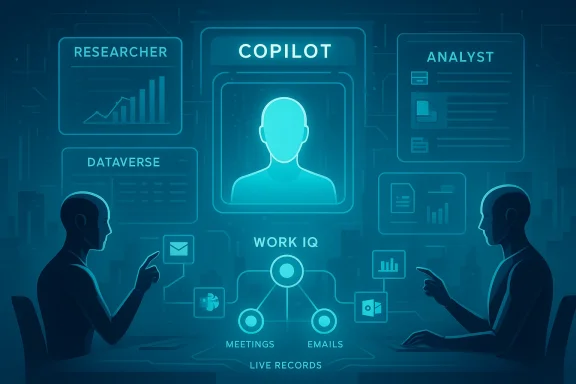
The last five years of Microsoft product direction have been about turning generative models and retrieval systems into practical tools inside Office, Teams, and Dynamics. What’s new in Frontier Transformation is the insistence that the interface, the orchestration layer, and the grounding intelligence must be engineered together — not as discrete add-ons but as a single system that changes the unit of value from “screens and clicks” to “answers and actions.”- The interface layer now surfaces answers and actions in Microsoft 365 Copilot — not just suggestebut fully interactive application experiences inside chat. Users can stay in conversation and act.
- The orchestration layer is built around autonomous or semi-autonomous agents (Researcher, Analyst, and vertical role agents) that can call tools, run multi-step workflows, and coordinate across services.
- The intelligence layer, labeled Work IQ, reconciles entities and relationships across Microsoft 365 signals and Dataverse, so agents and Copilot share a common view of what “the business” is doing.
What Microsoft announced (the essentials)
Agentic business applications: a new class of app
Microsoft defines agentic business applications as applications that remain faithful to real business processes but are designed to be:- Integrated directly into the Copilot conversational workspace,
- Accessible to agents for workflow orchestration,
- Grounded in an organization’s own intelligence via Dataverse and Work IQ.
Two-way integration: Copilot in apps, apps in Copilot
The experience is bidirectional. Microsoft 365 Copilot will be embedded inside Dynamics 365 Sales, Dynamics 365 Customer Service, and Power Apps, giving users consistent Copther they start from their inbox, a CRM record, or a canvas app. Pre-built Dynamics agents (Sales Qualification, Case Management, Account Reconciliation) continue to operate and now present within the broader Copilot context — collapsing the gap between insight and execution.Work IQ: the intelligence layer
Work IQ is positioned as the connective tissue. It ingests signals from Microsoft 365 (documents, chats, meetings) and operational data from Dataverse so that agents aren’t operating on partial context. Work IQ maps decisions and mentions made in meetings and emails to live records — for example, surfacing opportunities in Dynamics 365 Sales impacted by a pricing discussion held in a meeting. The result: agents act against live, governed business state rather than stale snapshots.Timing, partners, and licensing (what Microsoft said)
Microsoft stated specific rollouts: Power Apps integration enters public preview in late March 2026, with Dynamics 365 Sales and Customer Service integrations following in early April 2026. The company also listed a first wave of partner apps that will surface through the Microsoft 365 Agent Store. Microsoft’s announcement also says a Microsoft 365 Copilot license is required for these experiences and that Power Apps premium licensing is necessary for the Power Apps side of the integration. These specifics came directly from Microsoft’s product blogs and developer posts about Dataverse and Copilot.How it works: the technology stack (simple, practical view)
1) Copilot as the conversational workspac UI — a place to ask natural-language questions and receive interactive, actionable answers. The assistant is not just producing text but presenting app outputs (tables, maps, forms) and offering “action” buttons you can click without context-switching. This is a crucial UX distinction: Copilot is where work happens, not merely where it’s planned.
2) Agents and MCP tooling
Agents built with Copilot Studio or using the Agent 365 framework can perform deterministic operations through Model Context Protocol (MCP) tooling servers. These tooling servers safely expose business systems (Outlook, Teams, SharePoint, Dataverse) as governed tools agents can call — preserving enterprise policies like DLP and making actions auditable. Agent 365 acts as the control plane for identity, governance, and lifecycle management of agents.3) Work IQ + Dataverse grounding
Work IQ resolves entities and relationships so the agent understands that “Project Atlas” in a meeting refers to a Dataverse project record, pulling in the latest pipeline, documents, and related tasks. Dataverse acts as the secure, schematized source of truth for operational data, which is why Microsoft emphasizes grounding agents in Dataverse rather than letting them hallucinate against unstructured signals.Use cases that are now practical (not theoretical)
- Sales: a seller asks Researcher to “generate an account overview” and receives CRM context, internal notes, and external research consolidated in one interactive response — then qualifies the opportunity without leaving Copilot.
- Service: an agent starts the day in Copilot with a summary of priority cases from Dynamics 365 Customer Service, acting on cases inline.
- HR: a PeopleOps specialist queries a Power App inside Copilot for new-hire counts by location and instantly requests a map view or export.
- Cross-team orchestration: agents schedule follow-ups, update records, and draft communications in one flow while honoring DLP and audit logs.
Strengths and potential gains
1) Reduced friction — fewer app switches, faster execution
The single biggest, immediate win is removing context switching. Flowing from insight to action inside the same conversational surface shortens execution loops and reduces the time between decision and outcome. For knowledge work that relies on multiple systems, that matters.2) Consistent grounding in enterprise data
By centering Dataverse and Work IQ as the ground truth, Microsoft reduces the risk of "context drift" where agents operate on stale or contradictory information. This improves decision quality and auditability when agents perform actions on behalf of users.3) Democratized app access and low-code acceleration
Power Apps integration into Copilot lowers the bar for business teams to interact s. When combined with Copilot-driven app generation and prompt-based tooling, organisations can accelerate citizen-development while retaining governance. That’s a core promise of the Power Platform strategy.4) Partner ecosystem activation
Opening the agent surface to partner apps (Adobe Express, Figma, Wix, Canva, etc. in the initial list) signals an extensible ecosystem where third-party tools can participate in the same conversational fabric. That matters for cross-disciplinary work like marketing, design, and operations.Real risks and unanswered operational challenges
Microsoft’s vision is powerful — but the details of enterprise operations and IT controls expose several risk vectors that deserve urgent attention.1) Agent sprawl and governance complexity
Every team can build agents; every partner can publish agent experiences. Without tight governance, organizations risk thousands of semi-autonomous agents running with varying degrees of controls. Agent 365 intends to be the control plane, but adoption of and integration with enterprise policy frameworks will be the decisive factor. Enterprises must plan identity, RBAC, lifecycle, and audit integration upfront.2) Observability and forensics
When an agent writes to Dataverse, schedules meetings, or sends messages, IT must have clear observability and forensics: which agent performed the action, why, and under what tenant policy. Microsoft’s tool servers and integration with Defender and Sentinel aim to provide this, but organizations will need to validate these flows end-to-end in their own environments. ([learn.microsoft.com](Agent 365 tooling servers overview protection, compliance, and DLP enforcementAgents that can read or write across SharePoint, OneDrive, and Dataverse introduce complex data exposure scenarios. Enforcing DLP, MIP, and privacy rules while preserving conversational convenience is non-trivial. Rollouts should begin in guarded environments with strict policy controls and thorough privacy impact assessments.
4) Accuracy, hallucination, and business risk
Even grounded agents can return plausible-but-wrong answers if retrieval, inference, or schema mapping fails. For decision-critical workflows (pricing, legal commitments, financial entries), organizations must require verification steps and human-in-the-loop controls before agents execute consequential actions. The UX that lets Copilot “just do it” must be gated for high-risk scenarios.5) Licensing, cost, and vendor lock-in
Microsoft’s announcement ties agent functionality to specific licenses (Microsoft 365 Copilot, Power Apps premium). Organizations need to model the incremental cost of per-seat Copilot licenses, Power Apps premium tiers, and the compute costs that agent workloads may trigger. There’s also platform lock-in risk if your agents and intelligence layer are tightly coupled to Dataverse and Microsoft ID. Evaluate multi-cloud or multi-agent strategies where necessary.Practical deployment checklist for IT leaders
- Inventory critical workflows that could benefit from agentic experiences and categorize them by risk (low/medium/high).
- Pilot in a contained tenant with a strict policy baseline, focusing on a single business process (e.g., sales account overviews) to validate grounding and audit trails.
- Integrate agent registration and governance into your identity lifecycle (onboarding/offboarding of agent identities).
- Enforce DLP, MIP labeling, and Defender/Sefor agent tool calls; validate end-to-end logs.
- Build human approval gates for any agent action that alters finance, contracts, or access controls.
- Model licensing and compute costs for each expected scale tier and compare to expected time-savings or revenue impact.
Developer and partner implications
For low-code teams and citizen developers
Power Apps plus Copilot inside the same conversation is a true accelerator: non-developers can compose app experiences and call them conversationally. That expands the use of low-code across the organization, but it also stresses governance and testing practices for citizen-built agents.For pro-developers and ISVs
Expect to build MCP tool servers, agent endpoints, and deterministic tool wrappers for critical business systems. Partners who deliver secure, auditable tooling and strong UI experiences inside Copilot will be well-positioned. The initial partner list and Microsoft’s Agent Store are early indicators of this market opening.For ISVs and integrators
Opportunity: rebuild value propositions from “screens” to “actions.” The vendor that can move its product from a web UI to an agent-capable tool gains a new surface for daily engagement — but must also accept new responsibilities for auditability, DLP, and integration with tenant-based intelligence layers. Independent analysts highlight the cost and governance imperatives this shift imposes on integrators and enterprise architects.How Microsoft’s approach compares to the market
Microsoft’s advantage is end-to-end control: identity (Entra), productivity (Microsoft 365), operational data (Dataverse), agent runtime and governance (Agent 365), and infrastructure (Azure AI Foundry). That allows them to promise a cohesive, governed experience. Other vendors are pursuing agentic features but often lack the same vertical integration between productivity signals and operational data.Independent coverage of the 2025–2026 release waves shows that Microsoft’s strategy is consistent across conferences and product posts: Copilot is intended to be the operational fabric, not just a sidebar helper. Observers note that the tradeoff is deeper vendor coupling, heavier governance needs, and an operational lift for IT teams — but also meaningful upside in speed and cross-system automation.
What to watch next (practical signals)
- Early adopters’ reports on agent observability and audit logs. Practical experience with Defender + Sentinel integration will determine whether administrators can reliably trace agent actions.
- Billing patterns and licensing language. Watch how Microsoft publishes detailed licensing guidance for Copilot-enabled experiences and Power Apps premium usage; this will determine ROI math for many organizations.
- Interoperability and model routing. The behavior of the model router and the agent control plane in mixed-model environments (OpenAI, Anthropic, internal models) will show whether enterprises can balance cost, performance, and governance.
- Partner readiness. How quickly partners publish robust agent experiences in the Agent Store, and how well those experiences meet enterprise security and compliance expectations, will influence adoption.
- Developer tooling and testing frameworks for agents. Mature unit/integration testing for agent behaviours and tool calls will be required to move agentic apps from preview to production. (
Final assessment: practical optimism with a governance-first posture
Frontier Transformation is a plausible and pragmatic evolution of the modern enterprise stack. Microsoft is not merely adding chat to apps; it’s designing an integrated system where conversational UI, agent orchestration, and an enterprise intelligence layer work together to shift what gets built and how work gets done. For organizations that invest in governance, observability, and disciplined rollout practices, the potential productivity gains and faster decision-to-action loops are real.That said, the costs of rushing — data exposure, agent sprawl, auditability gaps, and unexpected license/compute bills — are material. The most successful early deployments will be those that pair ambition with strict guardrails: pilot small, instrument thoroughly, require human approval for high-risk actions, and treat agent identity and lifecycle with the same discipline as a human employee’s access.
If you run IT or lead digital transformation, treat today’s announcements as the start of a multi-quarter program, not a single feature sprint. Build the governance scaffolding now, then let the agents run the workflows. The frontier Microsoft describes is reachable — but it will be worth exactly what organizations invest in security, governance, and disciplined adoption.
Source: Microsoft A new way of working is taking shape: Frontier Transformation - Microsoft Dynamics 365 Blog