

The debate over whether a VPN helps—or hurts—your online gaming is less about absolutes and more about context: Top10VPN’s recent guide argues bluntly that VPNs “can’t” speed up internet, reduce lag, prevent DDoS or unlock early releases, while also listing several legitimate gaming use-cases; the truth sits between those two positions. Some VPNs and protocols can deliver near-native throughput and useful protections, but outcomes depend on which VPN you pick, where you connect, and why you’re using it.
Online gaming demands three things that rarely coexist without trade-offs: low latency, stable packet delivery, and geographically appropriate routing. Gamers who chase the lowest possible ping will quickly learn that every extra hop, tunnel, or encryption layer can add milliseconds. Yet modern VPN protocols and purpose-built gaming VPN services have narrowed that gap considerably—so much so that a VPN can sometimes help and sometimes harm, depending on the situation.
This feature will:
Source: Top10VPN The Best VPNs for Gaming (Free & Free Trial Picks)
 Background / Overview
Online gaming demands three things that rarely coexist without trade-offs: low latency, stable packet delivery, and geographically appropriate routing. Gamers who chase the lowest possible ping will quickly learn that every extra hop, tunnel, or encryption layer can add milliseconds. Yet modern VPN protocols and purpose-built gaming VPN services have narrowed that gap considerably—so much so that a VPN can sometimes help and sometimes harm, depending on the situation.This feature will:
- Explain how VPNs affect latency, routing, and NAT.
- Evaluate real use-cases where a VPN can meaningfully help gamers.
- Call out common myths and risks (including account bans and hardware bans).
- Give an actionable checklist for choosing and testing a gaming VPN.
- List practical free and free‑trial picks and explain limits you must accept.
How VPNs interact with gaming traffic
What a VPN does (brief technical primer)
A VPN creates an encrypted tunnel between your device and a VPN server; from there, your traffic exits to the wider internet using the VPN provider’s routing and public IP address. That means:- Your ISP sees encrypted traffic to a VPN endpoint, not which game server or service you’re using.
- Your visible public IP changes to whatever IP the VPN server provides, which hides your home IP from peers and attackers.
- Your packets travel through extra hops (your device → VPN server → game server), which usually increases round‑trip time (latency).
Protocols matter: WireGuard / NordLynx / Lightway / OpenVPN
- WireGuard is the modern, lightweight protocol favored for gaming—lower overhead, fewer context switches, typically less latency than old OpenVPN builds. Many reviewers and labs show WireGuard-based implementations delivering the best latency/throughput balance.
- NordLynx is NordVPN’s WireGuard-based adaptation that adds a privacy-preserving NAT/connection handling layer; in lab tests it reaches very high throughput on nearby servers while keeping latency competitive.
- Proprietary protocols such as ExpressVPN’s Lightway also aim to reduce overhead and drop reconnect times, which helps in situations where a VPN disconnect would otherwise interrupt a match.
What VPNs can and cannot realistically do for gamers
1) Can a VPN reduce ping or lag?
Short answer: sometimes—but usually not.- Typical effect: connecting via a VPN introduces at least a small latency increase because traffic travels further and is encrypted. In many tests the VPN adds single‑digit to low‑double-digit milliseconds on local servers; for nearby servers with high-quality VPN backbones, throughput loss can be negligible.
- When a VPN can help: if your ISP is applying content‑based throttling (e.g., lowering UDP or gaming flows during peak hours) or routing your packets along a congested/inefficient path, a VPN can reroute you onto a faster backbone and improve ping or reduce packet loss. This is uncommon, but it happens—especially for players whose ISPs have poor peering with game networks.
- When a VPN cannot help: if the root cause of high ping is geographic distance to the game host or overloaded game servers, a VPN cannot magically teleport packets—latency remains dominated by physics and server load.
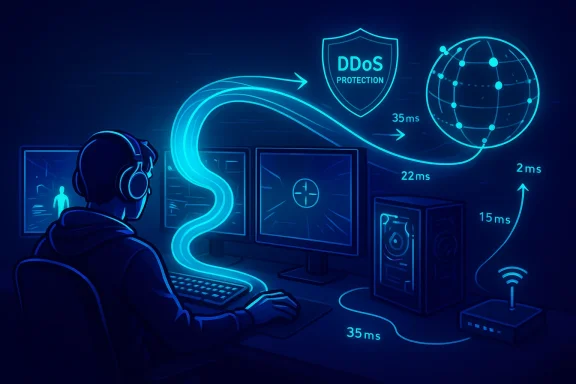
2) Can a VPN stop DDoS attacks?
It can—if the service explicitly offers DDoS mitigation.- Hiding your real IP behind a VPN server prevents attackers who know your home IP from targeting you directly. Many gaming-targeted VPNs and specialized DDoS-mitigation networks advertise this feature: they sit in front of your connection and absorb volumetric traffic or drop malicious packets before they reach you. Services built for gaming (or VPN providers with enterprise-style mitigation) can keep you online during an IP-targeted attack.
- Caveat: if the attacker targets the VPN provider’s network or the game server itself, protection depends on the provider’s mitigation capacity. Not all consumer VPNs include enterprise-grade DDoS protection—check the fine print.
3) Can a VPN let you buy or play games before release?
Possibly—but it’s risky and often against storefront or publisher rules.- Some storefronts gate content by region and local release times. Changing your apparent country with a VPN can sometimes let you access stores or multiplayer earlier—but payment checks, regional billing restrictions, and publisher enforcement frequently block or flag this behavior. In many cases using a VPN to purchase or activate content may violate terms of service and risk account actions. Proceed with caution and prefer official region‑based purchases.
4) Can a VPN change your NAT Type or help with strict NAT?
Yes—if the provider supports port forwarding or you use router-level configurations.- Strict NAT often comes from double‑NAT or CGNAT at the ISP. When you are behind CGNAT (common with mobile/fixed wireless), standard port forwarding on your router does nothing because the ISP’s NAT is upstream. A VPN that provides inbound port mapping (or a dedicated public IP) can terminate the NAT on its side and let incoming connections reach you—effectively producing an “Open” NAT experience for consoles and P2P features. That’s why guides and providers advertise NAT‑fix features and port forwarding options.
- Important security caveat: opening ports reduces the NAT firewall’s protection and increases exposure—know what you’re opening and close ports when done.
5) Can a VPN bypass IP bans or avoid SBMM (easier lobbies)?
Short answer: technically yes; ethically and practically it’s nuanced.- IP bans: changing to a different VPN server IP can circumvent an IP-level ban, but many services block known VPN IP address ranges or flag sudden region jumps. Some game protections escalate to hardware (HWID) or account bans that a VPN cannot bypass. For example, some publishers use HWID bans or other non-IP mitigation which a VPN won’t help.
- SBMM (skill‑based matchmaking) & easier lobbies: by connecting to low‑population regions you may reduce the chance of being matched against top players or encounter bot‑heavy lobbies. Community guidance and multiple review sites describe this strategy in titles where matchmaking is region‑sensitive. That said, publishers may frown on deliberate region‑manipulation and technical anti‑abuse systems can detect unusual location patterns.
Free and free‑trial gaming VPN picks (practical shortlist)
Free VPNs can be useful for occasional testing but are generally poor fits for regular gaming due to data caps, smaller server fleets, and higher congestion. That said, a few free options and risk‑free trials stand out for short-term testing:- Proton VPN (Free tier) — unlimited data on the free plan but limited server locations; reputable privacy stance and reasonable speeds for testing. Good for trying NAT and geo‑tests without paying.
- PrivadoVPN (Free plan) — often ranks well among free VPNs for speed and user experience; capped monthly allowance but decent throughput for short gaming sessions.
- Windscribe (Free plan) — flexible monthly allowance and split‑tunneling features in paid plans; free tier useful for quick checks.
- Paid providers’ money‑back trials — the single best way to evaluate a gaming VPN is to use a full paid trial or 30‑day money-back guarantee from a top provider (NordVPN, ExpressVPN, Surfshark). These let you test WireGuard/NordLynx or Lightway performance under real gaming conditions without long-term commitment.
- Test latency to your usual game servers (use in‑game ping or ping‑test tools).
- Play a quick match during your normal play window (peak and off‑peak).
- Try servers close to the game host and servers in the target region if you’re testing SBMM or geo‑access.
- Confirm whether the provider supports port forwarding or offers a dedicated IP (if NAT fixes are required).
Paid VPN recommendations for gamers (features to prioritize)
If you decide to pay, look for these features (and test with their trials or guarantees):- WireGuard / NordLynx / Lightway support for low overhead and quick reconnection.
- Server locations near major game hosts or the regions you want to join.
- DDoS‑protected servers / gaming‑specific network if you need mitigation.
- Port forwarding or dedicated IP if you need persistent NAT behavior.
- Router support (for console households) and reliable kill‑switch behavior.
- Large, lightly‑loaded server fleet (fewer users per server = less congestion).
- Clear policy on VPN detection and refunds in case the VPN gets blocked by your target service.
Step‑by‑step: how to test a VPN for gaming (practical lab)
- Baseline — run a set of speed and ping tests without VPN during your normal gaming window and record:
- Download/upload throughput
- Latency to the target game server (in‑game ping or ping to server IP)
- Packet loss (simple ping tests for a minute)
- Protocol test — connect to the VPN using WireGuard/NordLynx or Lightway; repeat the same tests to the same server.
- Server placement test — test a local VPN server (closest city) and a target region server (if trying to access remote lobbies). Note differences in RTT and jitter.
- In‑game test — play one or two real matches and note:
- Perceived responsiveness
- Any disconnects or rubber‑banding
- Voice chat quality
- NAT/port test — if your goal is NAT fix, enable provider port forwarding (or router routing) and verify console NAT type or that clubhouse hosting works.
- Resilience test — enable kill switch and simulate VPN drop (temporarily disable the client). Confirm that the kill switch prevents leaks and that the client recovers gracefully.
Risks, red flags, and publisher policies
- Account and policy risk: using a VPN to spoof region for purchases or matchmaking can violate storefront and publisher terms. Some publishers explicitly prohibit location‑spoofing or region‑linked purchases; account action is possible depending on enforcement. Also, bans can be hardware-based—IP changes via VPN won’t help if the publisher uses HWID bans. Always check the game’s terms and official support notes before trying to circumvent restrictions.
- Free VPN traps: data caps, server overcrowding, in‑app ads, and inferior privacy policies are common. Some free VPNs monetize by logging or selling data—avoid any provider with unclear logging practices.
- Port forwarding exposures: open ports reduce NAT protection and can expose services on your device. Only forward what you need and monitor logs.
- Provider DDoS claims: consumer VPNs claiming “DDoS protection” vary widely in capability. Enterprise-grade mitigation is not the same as a consumer VPN’s promise—verify mitigation capacity and real‑world case studies if DDoS protection is mission‑critical.
- VPN detection and blocking: many game networks and streaming platforms actively block known VPN IP ranges or use fingerprinting. Being blocked is a major usability risk; choose providers that explicitly test and support gaming and have responsive support.
Quick decisions: when to use a VPN for gaming
- Use a VPN when:
- Your ISP throttles gaming/UDP traffic and you suspect content‑based shaping.
- You need to hide your home IP for DDoS protection and your provider offers mitigation.
- You must change NAT behavior because you’re behind CGNAT or you need inbound connectivity for hosting.
- You’re troubleshooting routing problems and want to test alternate backbones quickly.
- Avoid a VPN when:
- You need absolute minimum latency for elite competitive play and your baseline ping is already excellent.
- A game or service explicitly forbids region‑spoofing or you rely on a retail purchase bound to your country.
- You plan to rely on a free provider for heavy, sustained online matches.
A short checklist for choosing a gaming VPN
- Does it support WireGuard / NordLynx / Lightway? (Yes → better latency)
- Does it have servers near your game hosts and in the regions you need?
- Does it offer port forwarding, dedicated IPs, or router support?
- Is there DDoS mitigation for gaming‑targeted protection?
- Are logs audited and is the privacy policy clear?
- Is there a trustworthy money‑back guarantee or free trial so you can test in real matches?
- Do independent reviews show consistent low latency and stability for gaming?
Final verdict: pragmatism beats absolutes
Blanket statements that VPNs “can’t” do X for gaming are misleading. A VPN is a tool: in the right circumstances it can be a performance and security booster—fixing ISP throttling, hiding your IP against DDoS, or opening NAT when you’re behind CGNAT. But it is not a silver bullet for distance‑limited latency, and bad VPNs or incorrect configurations can make gaming worse (higher ping, jitter, disconnects), or even create policy exposure if you use region spoofing irresponsibly. The smart approach is to define your priority (latency, NAT, anonymity, or geo‑access), test with reputable providers that offer WireGuard/NordLynx/Lightway, and always validate results in real matches under your typical play conditions.Quick reference — recommended starting picks (test-first)
- For trial/quick testing: Proton VPN Free, PrivadoVPN Free, Windscribe Free. Use these to validate routing and NAT basics.
- For serious gaming with trials: NordVPN (NordLynx/NordLynx performance), ExpressVPN (Lightway, easy setup on consoles), Surfshark (value + WireGuard). Start with money‑back guarantees and test during peak hours.
- If DDoS protection is essential: choose providers that explicitly advertise gaming DDoS mitigation or pair a high‑capacity DDoS shield in front of your home endpoint (enterprise gateways exist). Verify mitigation capacity before trusting it.
Source: Top10VPN The Best VPNs for Gaming (Free & Free Trial Picks)