

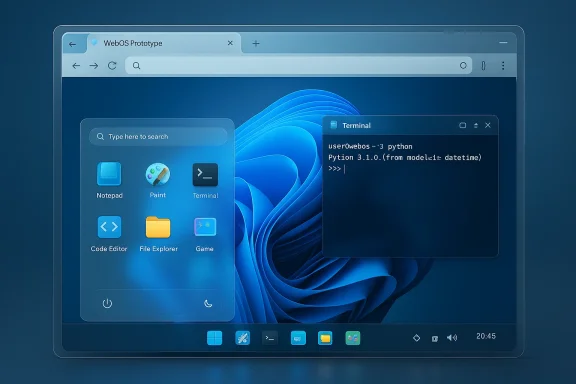
Google’s latest Gemini 3.1 Pro has done something that reads like a thought experiment from a developer conference demo: within hours of the model appearing in preview, community testers used a single prompt to generate a fully interactive, browser-based Windows 11–style WebOS — complete with a Start menu, functioning apps, a paint program, a terminal that runs Python, and playable mini‑games. The demo is not a drop‑in replacement for Microsoft’s OS, but it crystallizes a fast-moving trend: large multimodal models are now able to produce multi-file, interactive front‑end applications that behave like simplified desktop environments — and they can do it in minutes rather than weeks.
On February 19, 2026, Google announced Gemini 3.1 Pro, positioning it as an upgrade focused on deeper reasoning, agentic workflows, and complex engineering tasks. Google’s announcement highlighted a verified 77.1% score on ARC‑AGI‑2 — a benchmark designed to measure novel logical reasoning — and said the model is rolling out across the Gemini app, NotebookLM, Vertex AI, and developer tooling. The company framed this release as a push to make “deep think” style reasoning broadly available to both consumers and enterprise developers.
Almost immediately, independent developers and hobbyists began stress‑testing the model. One highly publicized example from a community user who publishes code and demos publicly showed Gemini assembling a single, self‑contained HTML/CSS/JavaScript file that reproduces the look and much of the feel of Windows 11 inside a browser. The result was shared on social media and published as a live CodePen so others could inspect and run the generated artifact directly in their browsers.
This combination of a vendor‑backed model release plus community stress tests offers a rare window into how these models are moving from narrow text tasks and images into full application generation — including state, UI logic, and interactive behaviors.
Important caveat: while the artifact is publicly available and runnable, the provenance — i.e., whether every line was generated end‑to‑end by Gemini in one shot, or produced through an iterative prompting and human curation loop — cannot be verified definitively from the artifact alone. The author’s claim is credible and widely reported, but it remains a community demonstration rather than a controlled lab reproduction by the model vendor.
But it is not a plug‑and‑play replacement for engineering discipline. Generated UI artifacts still require human validation for security, reliability, accessibility, and legal compliance. The right approach is to treat these models as accelerators — powerful tools that can compress ideation cycles and scaffold prototypes — while rigorously applying software engineering best practices before any produced artifact reaches production.
What the demo makes undeniably clear is that the velocity of UI and prototype development will change. Teams that learn to integrate multimodal models into safe, testable, and auditable pipelines will enjoy a tangible competitive edge. Those that treat model output as finished software will quickly learn the cost of shortcuts. The future is not automatic replacement of developers; it’s an accelerated, human‑centered, and safety‑first partnership between people and models.
Source: hi-Tech.ua Google Gemini AI recreated working Windows 11 code from scratch
 Background / Overview
On February 19, 2026, Google announced Gemini 3.1 Pro, positioning it as an upgrade focused on deeper reasoning, agentic workflows, and complex engineering tasks. Google’s announcement highlighted a verified 77.1% score on ARC‑AGI‑2 — a benchmark designed to measure novel logical reasoning — and said the model is rolling out across the Gemini app, NotebookLM, Vertex AI, and developer tooling. The company framed this release as a push to make “deep think” style reasoning broadly available to both consumers and enterprise developers.Almost immediately, independent developers and hobbyists began stress‑testing the model. One highly publicized example from a community user who publishes code and demos publicly showed Gemini assembling a single, self‑contained HTML/CSS/JavaScript file that reproduces the look and much of the feel of Windows 11 inside a browser. The result was shared on social media and published as a live CodePen so others could inspect and run the generated artifact directly in their browsers.
This combination of a vendor‑backed model release plus community stress tests offers a rare window into how these models are moving from narrow text tasks and images into full application generation — including state, UI logic, and interactive behaviors.
What the demo actually shows
Anatomy of the WebOS demo
The community demo — attributed to a developer operating under the handle used across social platforms — is a single HTML file containing:- A desktop canvas with wallpaper, icons, and a taskbar that visually mirrors Windows 11.
- A Start menu with pinned apps and search.
- Multiple app windows (Notepad, File Explorer, Paint, Calculator, Terminal, Code Editor, and a small game) that can be opened, moved, minimized, and closed.
- A terminal emulator that accepts commands and executes a subset of Python commands inside the browser sandbox (via an embedded interpreter).
- Lightweight apps with basic state persistence in an in‑memory virtual file system.
- UI animations, theme switching (light/dark), and connectivity to browser APIs for audio and small 3D visuals in demo modules.
How the code was produced (claimed workflow)
According to the demo author, the entire file was produced in one prompt to Gemini 3.1 Pro (or its preview endpoint), and the author then pasted the returned code into CodePen where it executed immediately. The published pen includes the full code, letting anyone run and inspect it. That direct availability is useful for verification; however, the claim that the code was produced in one single model invocation rests on the author’s reporting and the accompanying social media thread, not on an independently reproducible audit from Google.Important caveat: while the artifact is publicly available and runnable, the provenance — i.e., whether every line was generated end‑to‑end by Gemini in one shot, or produced through an iterative prompting and human curation loop — cannot be verified definitively from the artifact alone. The author’s claim is credible and widely reported, but it remains a community demonstration rather than a controlled lab reproduction by the model vendor.
Why this matters: the technical implications
From prompts to interactive software
Historically, LLMs were used to sketch components — a CSS snippet, a React component, a small utility. Gemini 3.1 Pro’s demos push that boundary to holistic application assembly:- The model demonstrates multi-file reasoning in a single artifact (layout + behavior + runtime logic).
- It maintains stateful design (virtual file systems, window manager) inside a stateless prompt-response cycle by encoding state and logic directly into generated code.
- It couples UI semantics (taskbar, icons) with functional behavior (calculations, drawing, running interpreted code) in a self-contained package.
Tooling and distribution
Google shipped Gemini 3.1 Pro into the same ecosystem where developers already build agentic workflows: APIs, Vertex AI, AI Studio, and apps such as NotebookLM. That distribution makes it straightforward for developers to embed the model into tools that can iterate over longer contexts, call compilers, or chain multiple tool invocations — enabling complex developer workflows that mix model output with automated testing and static analysis.Benchmarks and reality checks
Google’s own announcement highlighted strong gains on reasoning benchmarks (e.g., ARC‑AGI‑2 at 77.1%). Independent benchmark trackers and industry write‑ups confirm that Gemini 3.1 Pro leads on a range of reasoning and coding leaderboards, including competitive coding Elo metrics and novel logic tasks. However, the picture is nuanced: on certain software engineering benchmarks that emulate real engineering tasks (for example SWE‑Bench Pro / SWE‑Bench Verified), some models — particularly ones specialized for code — still perform comparably or better in targeted scenarios where toolchain integration, resilience to complex code bases, and incremental bug‑fixing are decisive.Strengths: what Gemini 3.1 Pro is demonstrably good at
- Rapid prototyping and ideation. The demo shows that designers and developers can get a working prototype of a UI and interactive behaviors in minutes, dramatically shortening the design‑to‑prototype loop.
- Multimodal composition. Gemini’s improved multimodal reasoning lets it produce graphics, SVG code, and animated elements in code form rather than as bitmaps — a storage and scalability advantage for UI assets.
- Long-context reasoning. The model shows better performance when planning multi‑step solutions (agentic sequences) and synthesizing high‑level architecture, which is crucial for complex UI flows and multi‑component systems.
- Accessibility to non‑developers. Non‑technical users with the right prompts can experiment with designs and small interactive experiences, lowering the barrier to entry for creating prototypes and educational demos.
- Integration with tooling. Rolling out via Vertex AI and developer APIs enables teams to embed the model in CICD pipelines, prompt orchestration frameworks, and code testing agents.
Risks, limitations, and safety concerns
Not production‑ready code by default
Code generated by LLMs — especially large artifacts produced in one pass — often lacks the guarantees expected of production software. Common issues:- Edge‑case bugs and brittle behaviors. Hand‑written tests and targeted refactors are usually required to harden generated code.
- Security vulnerabilities. Generated code may include unsafe evals, exposed secrets, or insecure use of third‑party libraries unless explicitly constrained.
- Licensing and dependency problems. When a model includes code or patterns trained on public repositories, licensing implications may arise for downstream use. Generated code may reference libraries or snippets with specific licenses — teams need to perform license scans.
Hallucinations and incorrect logic
Even with improved reasoning scores, Gemini (like other LLMs) can hallucinate — inventing APIs, misusing library calls, or returning plausible but incorrect algorithmic steps. Those hallucinations can be subtle in UI code (for example, miswired event handlers that look correct but fail under specific user flows).Fragility across large codebases
Benchmarks and industry reporting indicate Gemini 3.1 Pro still faces challenges on large‑scale engineering tasks that demand cross‑file reasoning, incremental debugging, and deep integration with existing architecture. These tasks often require toolchain integration (tests, linters, debuggers) beyond single‑file generation.IP and branding concerns
Recreating a UI that closely mimics Windows 11 raises intellectual property and trademark questions. An AI‑generated WebOS that replicates a major vendor’s look could create legal friction if reused in a commercial product. Designers and legal teams must evaluate how close is too close when republishing or commercializing derivative UIs.Security implications of “instant” app generation
Easy generation of interactive code could accelerate threat development if malicious actors use models to rapidly assemble phishing pages, convincing UI clones, or automated exploit scaffolding. The same capabilities that empower designers can empower bad actors; this dual‑use risk needs mitigation through monitoring, rate limits, and policy controls.How developers and teams should treat model‑generated UIs
If you plan to use Gemini or similar models for UI or app generation, follow a disciplined, safety‑first workflow:- Start with a constrained prompt and small scope: generate one component or app module, not an entire product in one shot.
- Run automated security scans on all generated artifacts to detect unsafe patterns (insecure eval, unsanitized inputs, remote code execution vectors).
- Use static analysis and linters immediately after generation to catch syntax issues, GIGO anti‑patterns, and potential runtime errors.
- Add unit and integration tests before merging generated code into a codebase. Treat generated code as untrusted input until verified.
- Pin and vet dependencies introduced by the model; confirm licensing and patch levels.
- Maintain a human‑in‑the‑loop review: code reviews, UX reviews, and security sign‑offs are mandatory.
- Use sandboxed execution for interactive demos that accept user input (e.g., in‑browser Python) to prevent escalation beyond the demo scope.
Practical use cases and recommended workflows
- Rapid concept validation: product teams can iterate UI concepts and workflows, using models to generate skeleton apps that stakeholders can interact with.
- Prototyping for usability testing: create clickable prototypes for early user testing, then replace generated code with production‑grade implementations guided by learnings.
- Internal tooling and dashboards: generate admin UIs or internal dashboards where release velocity matters more than long‑term maintainability.
- Education and learning: use model‑generated interactive demos to teach web development and interface concepts.
- Don’t ship model‑generated critical infrastructure or security‑sensitive code without rigorous human engineering.
- Don’t assume generated code is performance‑optimized; always profile and refactor for production.
Broader industry and policy implications
Democratization vs. deskilling
These tools democratize creation — allowing non‑engineers to build interactive experiences — but they also risk deskilling if organizations rely on models without investing in engineering knowledge and testing practices. The right balance is augmentation, not replacement.Legal and IP frameworks need updating
As LLMs are used to recreate familiar UIs and UX patterns, legal frameworks around derivative works, copyright, and trademarks will be tested. Companies should prepare policies that define acceptable reuse and transformation limits when model outputs mimic existing products.Vendor responsibility and transparency
Model vendors must be transparent about:- The datasets and licensing guardrails used to train models.
- Limitations on code generation and known failure modes.
- Mechanisms to prevent abusive use of model outputs (rate limits, flagged behaviors, and audit trails).
Short, actionable checklist for teams considering Gemini for UI generation
- Enable model usage within a controlled preview environment first.
- Require generated artifacts to pass a pre‑merge suite of automated tests and security scans.
- Keep human reviewers in the workflow for UI/UX and accessibility validation.
- Implement provenance tracking: annotate which files were model‑generated and retain model prompts and responses for traceability.
- Maintain legal review for any UI that closely resembles a recognizable brand’s product.
Conclusion
Gemini 3.1 Pro’s arrival — and the community’s rapid creation of a Windows 11–style WebOS — is a milestone in practical generative AI. It demonstrates that large models have progressed from generating snippets and text to assembling complex, interactive, and runnable user experiences. That leap accelerates prototyping, lowers the bar for experimentation, and redefines what a single engineer or designer can achieve in a short time.But it is not a plug‑and‑play replacement for engineering discipline. Generated UI artifacts still require human validation for security, reliability, accessibility, and legal compliance. The right approach is to treat these models as accelerators — powerful tools that can compress ideation cycles and scaffold prototypes — while rigorously applying software engineering best practices before any produced artifact reaches production.
What the demo makes undeniably clear is that the velocity of UI and prototype development will change. Teams that learn to integrate multimodal models into safe, testable, and auditable pipelines will enjoy a tangible competitive edge. Those that treat model output as finished software will quickly learn the cost of shortcuts. The future is not automatic replacement of developers; it’s an accelerated, human‑centered, and safety‑first partnership between people and models.
Source: hi-Tech.ua Google Gemini AI recreated working Windows 11 code from scratch
