

- Thread Author
- #1
Most of all windows 7 users are aware of native VHD support in Windows 7. The Microsoft Virtual Hard Disk file
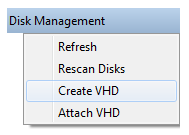
format aka VHD is virtual hard disk used in Microsoft Virtual PC. Now you can Create, Mount and Boot from VHD images on Windows 7. You can also easily create VHD image from Disk Management but booting from VHD image is not that much easy.
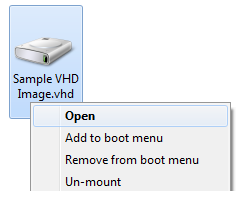
Here is handy tool Link Removed - Invalid URL for Windows 7 which adds all VHD related action like Mount, Un-mount, Boot from VHD images right in your Right Click Context menu. Just right click on VHD image and select mount or add to boot menu that’s it.
Screenshot of VHD Mount for Windows 7
Link Removed - Invalid URL
format aka VHD is virtual hard disk used in Microsoft Virtual PC. Now you can Create, Mount and Boot from VHD images on Windows 7. You can also easily create VHD image from Disk Management but booting from VHD image is not that much easy.
Here is handy tool Link Removed - Invalid URL for Windows 7 which adds all VHD related action like Mount, Un-mount, Boot from VHD images right in your Right Click Context menu. Just right click on VHD image and select mount or add to boot menu that’s it.
Screenshot of VHD Mount for Windows 7
Link Removed - Invalid URL

