

The GMKtec G10 has quietly become one of the most talked-about budget mini PCs this season: a Mac mini–styled chassis that ships with Windows 11 Pro, a Ryzen 5 3500U APU, 16GB DDR4, a 512GB NVMe SSD, triple‑display outputs and a 2.5 Gigabit Ethernet port — and it’s been sliding into shopping carts at prices that put genuine desktop power within reach of ultra-budget buyers. Retailers and deal roundups have shown the 16GB / 512GB SKU near the low‑$200 mark, turning the G10 into a compelling Mac Mini alternative for people who want small‑form‑factor Windows hardware without paying Apple prices.
Mini PCs have matured from novelty living‑room media boxes into legitimate compact desktops for work, labs, and low‑power servers. The GMKtec NucBox G10 (sold broadly as the GMKtec G10) aims squarely at value seekers by repurposing a reasonably capable laptop APU — the AMD Ryzen 5 3500U — into a tiny, upgradeable chassis with generous ports and internal expansion. That strategy trades cutting‑edge silicon for a lower street price and practical expandability: SO‑DIMM memory slots, dual M.2 2280 NVMe sockets and a standard RJ45 jack with multi‑gig networking are notable inclusions that raise the G10 above the very cheapest “system-in-a-box” sellers. This article verifies the core technical claims, cross‑references independent reviews and retailer listings, and lays out a practical buying checklist: where the G10 punches well above its price, where it compromises, and which buyers should treat the deal as a smart purchase versus a short‑term headline grab.
If the price is right for your use case and the SKU checks out, the G10 is one of the smartest ways to get a compact, capable Windows 11 Pro desktop without paying Mac‑mini or premium‑mini prices — but do the simple diligence steps before you click buy.
Conclusion: the GMKtec G10 turns an older AMD Ryzen mobile chip into a highly practical, upgradeable mini PC platform with surprising connectivity and triple‑display utility at a bargain price. For budget‑minded users who value expansion and wired performance over the newest wireless or silicon, it’s a strong contender — provided you confirm the SKU and seller details at checkout.
Source: Gizmodo This Mac Mini Lookalike With Windows 11 Pro Is Going for Pennies and Packs 512GB SSD, Ryzen 5, and 16GB RAM
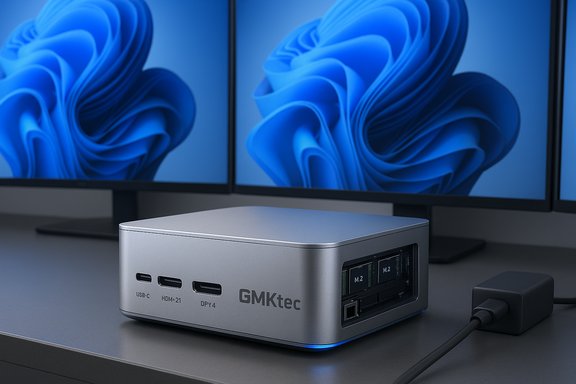 Background / Overview
Mini PCs have matured from novelty living‑room media boxes into legitimate compact desktops for work, labs, and low‑power servers. The GMKtec NucBox G10 (sold broadly as the GMKtec G10) aims squarely at value seekers by repurposing a reasonably capable laptop APU — the AMD Ryzen 5 3500U — into a tiny, upgradeable chassis with generous ports and internal expansion. That strategy trades cutting‑edge silicon for a lower street price and practical expandability: SO‑DIMM memory slots, dual M.2 2280 NVMe sockets and a standard RJ45 jack with multi‑gig networking are notable inclusions that raise the G10 above the very cheapest “system-in-a-box” sellers. This article verifies the core technical claims, cross‑references independent reviews and retailer listings, and lays out a practical buying checklist: where the G10 punches well above its price, where it compromises, and which buyers should treat the deal as a smart purchase versus a short‑term headline grab.What’s actually inside: components and verified specs
Processor and integrated graphics
- CPU: AMD Ryzen 5 3500U — 4 cores / 8 threads, Zen+ (Picasso) family, base ~2.1 GHz, boost up to ~3.7 GHz. The chip is a 12 nm mobile APU designed for thin‑and‑light laptops.
- GPU: Radeon Vega 8 integrated graphics (vendor lists ~1.2 GHz GPU clock), which still outperforms many modern low‑power N‑series chips in integrated GPU workloads.
Memory and storage
- Ships with 16GB DDR4 (dual‑channel, 2400 MT/s commonly listed) and two SO‑DIMM slots supporting up to 64GB (manufacturer listings).
- Storage: 512GB NVMe M.2 2280 SSD in the base/retail SKU with a second M.2 2280 slot for expansion — vendor pages advertise up to 2×8TB (16TB total) theoretical capacity. Practical limits depend on which high‑capacity drives are used and vendor firmware.
Display and ports
- Triple‑display capability via HDMI 2.1, DisplayPort 1.4, and USB‑C (DP alt‑mode) is advertised on manufacturer pages, with each capable of 4K output in typical configurations (vendor pages and some retailer listings show the Type‑C port may be DP1.4 but sometimes limited to 4K@30Hz depending on SKU/port wiring). Buyers should confirm the exact port wiring on the SKU they see in the listing.
- USB: Mostly USB 3.2 Gen1 (5 Gbps) Type‑A ports, one USB‑C with PD + DP + USB3.2 and one PD‑only USB‑C in many listings. No Thunderbolt / USB4 indicated.
Networking and wireless
- Wired: 2.5 Gigabit Ethernet using a Realtek 8125 family controller is listed across official SKUs and multiple retailers; it supports multi‑gig LAN at up to ~2.5Gbps on compatible networks.
- Wireless: Wi‑Fi 5 (802.11ac) and Bluetooth 5.0; the G10 does not ship with Wi‑Fi 6/6E on standard SKUs.
Power and form factor
- Size: roughly 103 × 98 × 42 mm and ~0.5–0.6 kg — truly compact and VESA‑mountable.
- Power: USB‑C Power Delivery support is advertised (most SKUs accept 19V/3.42A PD input / ~65 W), meaning you can use a standard 65W laptop charger in many cases. Confirm PD support on the exact listing.
Performance expectations — what to actually expect
- Everyday productivity: Excellent. Web browsing with many tabs, Office applications, Slack/Teams, video calls and light spreadsheet work will be handled smoothly thanks to dual‑channel memory and NVMe storage.
- Light content work: Reasonable. Photo editing, small video edits and GPU‑accelerated web workloads benefit from Vega 8’s relative strength compared to N‑series CPUs’ iGPUs.
- Heavy workloads: Limited. The 4c/8t Ryzen 5 3500U is not meant to replace modern 6–8‑core desktop silicon for sustained heavy compiling, rendering or large export jobs. Thermal and power constraints in a tiny chassis will throttle long‑running loads.
Price, availability, and the “pennies” headlines
Retail prices for mini PCs — especially from smaller OEMs — are volatile. Several recent retailer listings and deal writeups put the G10’s 16GB/512GB configuration in the $189–$229 range during promotional windows, with one large US retailer showing the SKU at about $218.99 at the time of checking. Promotional pricing and coupons are often limited to specific sellers and SKUs; the same chassis may appear at higher prices on other storefronts. If you see an unusually low price, verify the SKU (CPU, RAM and SSD), the seller’s return policy, and whether Windows 11 Pro is activated on arrival. The “3x cheaper than a Mac mini” narrative is simple math when you compare headline prices: a sub‑$220 G10 vs an entry Mac mini MSRP many times higher. But buyers should weigh price against long‑term support, platform features (Thunderbolt/USB4, Wi‑Fi 6/6E, single‑thread performance), and ecosystem differences — the Mac mini and the G10 serve different needs at different price points.Strengths: where the GMKtec G10 excels
- Outstanding price-to-spec ratio: Dual‑channel 16GB, 512GB NVMe and 2.5GbE in a sub‑$250 footprint is rare.
- Triple‑display support that enables multi‑monitor workflows for productivity users and traders who need lots of screen real estate.
- User‑upgradeable memory and storage — SO‑DIMM and dual M.2 slots mean incremental upgrades are inexpensive and straightforward.
- 2.5GbE inclusion gives real benefit for local NAS and file transfer workflows without additional adapters.
- Windows 11 Pro preinstalled on many retail SKUs, providing enterprise features like BitLocker and Hyper‑V where licensed and activated.
Risks and compromises — what buyers must watch for
- Older CPU architecture: the Ryzen 5 3500U is competent but is older (Zen+). For longevity and sustained heavy workloads, newer silicon is preferable. Expect the G10 to lag modern midrange mini PCs in single‑thread peak performance and energy efficiency.
- Inconsistent Type‑C/DP claims: some vendor pages and retailer copies vary on whether the Type‑C is full DP1.4 at 4K@60Hz or limited to 4K@30Hz; other pages even use phrasing that could be misread as USB4. Confirm port functionality on the exact SKU you buy because substitutions or regional variations are common. Treat aggressive display‑rate marketing as subject to verification.
- Wi‑Fi 5 (not Wi‑Fi 6): wireless connectivity is adequate but not modern; in congested environments the G10 will fall behind Wi‑Fi 6 devices. For many users, 2.5GbE offsets this for local transfers.
- Support and warranty variability: smaller OEMs and third‑party sellers sometimes produce inconsistent post‑sales experiences; community threads show mixed reports on shipping, support response times and warranty handling. Buying from a reputable retailer with a clear returns window and an optional protection plan is prudent.
- Windows activation ambiguity: while many SKUs ship with Windows 11 Pro, activation status can vary by seller and distribution channel. Business buyers should verify license type (OEM vs retail) and activation on delivery.
Practical buying checklist — verify before you buy
- Confirm the exact SKU on the product page: Ryzen 5 3500U, 16GB RAM, 512GB SSD (or whichever variant you want). Don’t assume photos reflect the exact internals.
- Verify port map: which Type‑C supports DP Alt‑Mode? Which is PD‑only? Is the HDMI labeled HDMI 2.1 or HDMI 2.0? Small differences matter for docking and display setups.
- Check that Windows 11 Pro is activated on arrival and learn the license type (OEM vs retail) if license portability is important.
- Confirm seller returns, warranty length and support channel (official GMKtec warranty vs third‑party seller guarantee). Faster returns reduce risk on a discounted purchase.
- If you need Wi‑Fi 6, Thunderbolt/USB4 or higher sustained CPU headroom, budget for a different model — these are not strengths of the G10.
Alternatives to consider (if the G10’s tradeoffs matter)
- If you need modern wireless and Thunderbolt/USB4: look at mini PCs that advertise Wi‑Fi 6/6E and USB4/Thunderbolt support (these will cost more but offer better future compatibility).
- If you need significantly higher sustained CPU performance: consider mini PCs based on H‑series laptop CPUs or recent Ryzen mobile HX APUs — they consume more but sustain higher power and throughput in well‑cooled chassis.
- If you want a long software support horizon and strong single‑thread speed: the official Mac mini (Apple silicon) remains a compelling if more expensive option, especially for Apple‑centric workflows.
Real‑world buying scenarios — who should buy the GMKtec G10
- Home‑office users who need a small, quiet Windows desktop for email, browser‑heavy workloads, Zoom/Teams and spreadsheet work.
- Traders, designers and multitaskers who benefit from triple displays and want to avoid large desktop towers.
- Home‑lab builders who want 2.5GbE for faster NAS transfers, and who value internal M.2 expansion for VMs or media libraries.
- Students and educators needing a low‑cost, upgradeable Windows 11 Pro box for productivity and learning.
Final assessment — value, tradeoffs and recommended next steps
The GMKtec G10 is an impressively pragmatic mini PC: it repackages older but competent silicon into a small, well‑connected chassis with real upgrade paths — and it does so at prices that make compact Windows desktops accessible. For users who prioritize value, expandability, and wired multi‑gig networking, the G10 is a standout bargain. Independent reviews validate that the box delivers snappy everyday performance and better integrated graphics than the cheapest N‑series alternatives. That said, the bargain comes with real compromises: older CPU architecture, non‑cutting‑edge wireless, possible variation in Type‑C/DP implementation across SKUs, and uneven vendor support stories. Buyers should verify SKU details, confirm Windows activation, and buy from a seller with a clear returns policy. If you need long‑term platform modernity (Wi‑Fi 6E, Thunderbolt/USB4, newer Zen architectures), expect to pay more elsewhere.If the price is right for your use case and the SKU checks out, the G10 is one of the smartest ways to get a compact, capable Windows 11 Pro desktop without paying Mac‑mini or premium‑mini prices — but do the simple diligence steps before you click buy.
Conclusion: the GMKtec G10 turns an older AMD Ryzen mobile chip into a highly practical, upgradeable mini PC platform with surprising connectivity and triple‑display utility at a bargain price. For budget‑minded users who value expansion and wired performance over the newest wireless or silicon, it’s a strong contender — provided you confirm the SKU and seller details at checkout.
Source: Gizmodo This Mac Mini Lookalike With Windows 11 Pro Is Going for Pennies and Packs 512GB SSD, Ryzen 5, and 16GB RAM
