

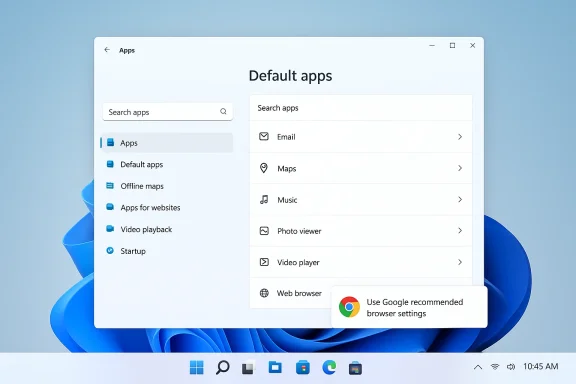
Google is quietly testing a new in‑browser prompt that reads “Use Google recommended browser settings” — a bubble-style dialog that steers Windows 11 users toward setting Chrome as their system default (and, in some variants, toward pinning it to the taskbar). This is not a marketing mockup: the language and UI surfaces exist in Chromium’s source strings and in experimental flags, and the behavior is already visible in screenshots and early reports from Canary/Dev channels.
Since Windows 11’s debut, the question of which browser opens a link has been a subtle battleground. Microsoft’s own prompts, first‑run nudges, and system defaults historically favored Edge; more recently, regulatory pressure from the EU’s Digital Markets Act (DMA) and competitive moves by browser vendors have pushed the ecosystem toward lower‑friction alternatives for users who want non‑Edge browsers. Against that backdrop, Google’s latest experiment is straightforward: present a concise, friendly dialog that explains the benefits of making Chrome the default, then open the Windows Default Apps page so the user can complete the change.
The strings found in Chromium’s code make the intent explicit. The modal and bubble titles read “Use Google recommended browser settings” and the body copy promises “easy access to the features you know and love by setting Chrome as your default browser.” Chromium’s localized strings also include variants that mention pinning Chrome to the taskbar as part of the default-setting flow. Those strings are present in the official Chromium source tree — a strong technical signal that the feature is part of an engineered experiment rather than an unverifiable leak.
At the same time, this move exists within a larger industry loop: Microsoft adjusts OS behaviors (in part due to the DMA), both vendors test targeted pinning and default prompts, and regulators watch the consequences. The likely near‑term outcome is iterative: experiments, user feedback, and adjustments. The tipping point will be whether the UX changes materially alter market behavior at scale and whether regulators or enterprises demand stricter controls. For now, users should treat the prompt as a legitimate convenience offer — useful if you want Chrome as a default — but also as a reminder that defaults are a competitive lever, and that transparency and admin controls are essential to keep nudging within acceptable boundaries.
In short: the new Chrome prompt is real, its text and surfaces are present in Chromium’s public codebase, and it’s being tested in Dev/Canary channels; its impact is primarily about habit and visibility — and it will be judged on whether Google provides clear controls, respects privacy, and makes enterprise management straightforward.
Source: Windows Report https://windowsreport.com/chrome-tests-google-recommended-browser-settings-pop-up-in-windows-11/
 Background / Overview
Since Windows 11’s debut, the question of which browser opens a link has been a subtle battleground. Microsoft’s own prompts, first‑run nudges, and system defaults historically favored Edge; more recently, regulatory pressure from the EU’s Digital Markets Act (DMA) and competitive moves by browser vendors have pushed the ecosystem toward lower‑friction alternatives for users who want non‑Edge browsers. Against that backdrop, Google’s latest experiment is straightforward: present a concise, friendly dialog that explains the benefits of making Chrome the default, then open the Windows Default Apps page so the user can complete the change.The strings found in Chromium’s code make the intent explicit. The modal and bubble titles read “Use Google recommended browser settings” and the body copy promises “easy access to the features you know and love by setting Chrome as your default browser.” Chromium’s localized strings also include variants that mention pinning Chrome to the taskbar as part of the default-setting flow. Those strings are present in the official Chromium source tree — a strong technical signal that the feature is part of an engineered experiment rather than an unverifiable leak.
What the prompt looks like (and how it behaves)
The message and UX
The test UI is terse and tailored: a small bubble or modal anchored near the menu that says “Use Google recommended browser settings”, followed by a short explanation and two action buttons — typically Open settings (which launches the Windows Default Apps page so the user can finish the switch) and Set later (which dismisses the prompt). The same experiment also uses a slimmer infobar for repeat dismissals, with the bubble surface reserved for earlier interactions.Flagging, field trials, and dismissal behavior
Chromium’s codebase includes a field‑trial configuration and flagging options that control which surface appears. The experiment is toggled behind what Chromium developers have described as default browser prompt surfaces — with options that enable an infobar, a bubble dialog, or the refreshed first‑run experience. The code indicates Chrome will escalate or change the UI based on how many times a user dismisses it: after a small number of declines it may switch to a different surface, and then fall back to an infobar. That behavior — repeated prompting with graduated surfaces — is a classic product design pattern aimed at balancing discoverability with annoyance.When and where this appears
At present, the experiment is visible in dev and Canary channels and guarded by flags; it’s implemented across multiple platforms in the Chromium source (Windows, macOS, Linux, and ChromeOS), but the Windows variant is the one that triggers system Default Apps settings. The presence of the strings and flags in the Chromium repo suggests Google can flip the behavior on across channels regionally or by channel.Why this matters: product, privacy, and regulatory context
Product and habit formation
Defaults matter. From a product perspective, being the system default reduces friction for routine tasks: links from mail apps, documents, widgets, and web shortcuts open where the user expects. Pinning to the taskbar lowers the activation cost even further — a single click becomes the path of least resistance. That combination drives measurable engagement: more foreground launches, higher active user metrics, and more opportunities for feature discoverability. Google’s experiment is a calculated UX play to recover and protect that first line of interaction on Windows.Regulatory backdrop — DMA and platform adjustments
Regulators have forced platform owners to rethink default workflows. The EU’s DMA specater parity for third‑party apps on certain platform features, and Microsoft implemented changes in Windows to make assigning a third‑party browser less frictionful for EEA users — including a behavior that can pin the newly selected default to the taskbar unless the user opts out. Those platform‑level changes change the competitive landscape: a vendor that designs a single‑click default + pin flow inside its app is aligning its product behaviors with the platform’s newly expected user experience. Google’s experiment appears to be a product reaction to that regulatory and platform environment.Privacy and telemetry concerns
The Edge side of the competition has also experi‑gated nudges — for example, flags that would prompt heavy Chrome users to pin Edge when the browser is closed. Those experiments exposed how telemetry signals (e.g., “Chrome usage > 90%”) could be used to gate targeted prompts, raising privacy questions about what signals are recorded and how experimentation data is processed. If either Microsoft or Google uses local usage telemetry to decide which users should see which pinning or default prompts, administrators and privacy‑minded users will want clarity about data retention, opt‑outs, and enterprise policy controls.Technical verification: what exists in the Chromium tree
Chromium’s code confirms the copy and the surfaces. The official localized strings in the Chromium repositories include message IDs and plain text that match the prompt’s language: “Use Google recommended browser settings” and supporting copy mentioning pinning and making Chrome the default. Those entries exist in both Chrome‑specific and Chromium‑generic string files, which makes the experiment verifiable by anyone who reads the public source. Because Chromium is the upstream project for Chrome, Google’s team routinely merges experiments into the tree and gates them behind flags or field trials. The presence of these strings is therefore strong evidence that Google intends to ship this experience to some audience.Strengths of Google’s approach
- Clear, human copy: The prompt uses simple language and emphasizes benefits — synced passwords, bookmarks, and quick access — which aligns with user motivations when choosing a browser.act**: The UI directs users to the exact Windows Settings page where the change is made, avoiding multi‑step copy/paste instructions that have historically frustrated users.
- Platform‑aware: By including copy that mentions pinning, Google is matching the platform affordances that Windows itself and other vendors are using; this reduces mental friction because the action feels native.
- Code‑level transparency: The experiment is visible in Chromium’s public repo, which allows independent verification and reduces the likelihood of surprise behavior.
Risks, trade‑offs, and potential harms
1) Perception of aggressive nudging
Even when prompts are short and polite, users can perceive repeated nudges as coercive. The documented escalation logic (bubble → infobar) means some users will see multiple surfaces if they decline, inor a subset of users, that annoyance translates to distrust. The exact tolerance threshold and the fall‑back strategy will determine whether the experiment feels helpful or harassing.2) Antitrust and regulatory scrutiny
In markets sensitive to antitrust concerns — particularly the EU — UI moves that materially alter app visibility can attract regulatory attention. Regulators have already scrutinized platform and browser makers for design patterns that favor in‑house products. While the DMA has pushed Windows toward parity, Google’s prompts could be read as a competitive counterors view neutral, opt‑in prompts as acceptable will depend on transparency and parity across vendors.3) Enterprise and IT management friction
Enterprises rely on predictable, centrally manageable defaults. If Chrome’s prompt interacts with Windows Default Apps in ways that conflict with group policy, MDM, or enterprise images, administrators could see additional helpdesk tickets. Enterprises will want granular controls to suppress such prompts across managed fleets. Absent clear policy controls, IT staff may view these experiments as unwelcome noise.4) Privacy and experimentation telemetry
If the prompt selection logic or eligibility gating uses local telemetry or signals about usage, that raises questions. What telemetry is used? Is it processed locally or remotely? Can users opt out of experimentation and diagnostic collection? These concerns have precedents in earlier Edge experiments that refds in feature flags. Vendors must be explicit about telemetry practices so users and admins can make informed choices.How this fits into the browser competition playbook
Browsers compete on performance, features, and habit — and habit is heavily influenced by launch friction. The fastest path to a casual user’s attention is to reduce that friction: make the browser the default and make it one click away on the taskbar. This is why both Microsoft and Google have invested in similar flows: Microsoft through operating‑system integration and Edge experiments, and Google throes, in‑product prompts, and now the recommended settings bubble. The strategic logic is straightforward: increase the probability that the user opens your browser first, then deliver value that keeps them coming back.What users and administrators should watch for
Users
- Watch for repeated prompts: If you don’t want to change defaults, dismissing is fine — but check the browser’s settings to see if you can disable the prompt surface or to opt out of product improvement/enhanced features.
- Review what “Set default” actually changes: Windows 11 can assign defaults per protocol and file type. When the Default Apps page opens, confirm which file types (HTTP, HTTPS, .htm, .html, .pdf) are reassigned.
- Be mindful of pinning: If a dialog offers to pin the browser to the taskbar, consider whether that change matches your habits.
Enterprises / IT admins
- Verify applied policies: Use Group Policy, MDM controls, or Edge/Chrome enterprise templates to ensure defaults are set consistently across machin‑run or default prompts where appropriate: Many enterprise images use "first run" suppression flags to avoid user‑level nudges.
- Monitor support channels: If you operate a helpdesk, track whether prompt experiments generate more tickets and decide whether to publish a short how‑to or set a policy to block the behavior.
Developer and vendor obligations: transparency and controls
There are two practical obligations vendors should meet when rolling out this type of behavior:- Transparency: Make it clear to users and admins what the prompt will do, what telemetry (if any) is used to gate the experience, and where users can opt out. Chromium’s public strings are a posacing controls and clear privacy documentation are essential.
- Administrative controls: Provide documented Group Policy / MDM settings that suppress these prompts in managed environments. Many organizations will want predictable, scriptable ways to prevent user‑level prompts from interfering with standardized device images.
Scenario analysis: how this could play out
- Conservative rollout — Google enables the bubble only in Dev/Canary and adds an easy toggle in Settings. The prompt remains an optional nudging mechanism with clear privacy controls. Minimal friction; minor press coverage.
- Aggressive consumer rollout — Chrome surfaces the bubble broadly across stable channels, uses escalation on dismissals, and pairs the change with a default + pin combo. That will drive adoption metrics up but likely attract press attention, criticism from privacy advocates, and possibly regulatory queries.
- Escalation into competition — Microsofwn UX optimizations or by making pinning more visible for Edge in Windows. This tit‑for‑tat could continue until regulators or platform policies create clearer boundaries for in‑product default nudges. Historical experiments in Edge’s Canary builds show how quickly such dynamics can escalate.
Recommendations for readers
- If you are a casual user and happy with Chrome: Allow the prompt when it appears and confirm the settings in Windows if you want Chrome to handle web links and be easy to launch.
- If you are privacy‑conscious: Inspect Chrome’s privacy and telemetry settings and disable participation in product improvement programs if you prefer not to be part of field trials.
- If you manage devices: Deploy policies to control first‑run behavior and communicate to end users what prompts to expect and why your organization enforces specific defaults.
- If you care about competition policy: Expect more scrutiny from regulators if the market impact of these flows becomes measurable; follow official guidance from regulators and vendor policy pages for updates.
Final analysis: measured experiment or competitive escalation?
Google’s “Use Google recommended browser settings” dialog is a textbook product nudge: simple copy, direct action, and low friction. The appearance of the strings in Chromium’s source and the early screenshots reported from Canary/Dev channels show this is an engineered experiment with clear product intent. That makes the prompt verifiable — not speculative — and puts the onus on Google to balance effectiveness with user respect and transparency.At the same time, this move exists within a larger industry loop: Microsoft adjusts OS behaviors (in part due to the DMA), both vendors test targeted pinning and default prompts, and regulators watch the consequences. The likely near‑term outcome is iterative: experiments, user feedback, and adjustments. The tipping point will be whether the UX changes materially alter market behavior at scale and whether regulators or enterprises demand stricter controls. For now, users should treat the prompt as a legitimate convenience offer — useful if you want Chrome as a default — but also as a reminder that defaults are a competitive lever, and that transparency and admin controls are essential to keep nudging within acceptable boundaries.
In short: the new Chrome prompt is real, its text and surfaces are present in Chromium’s public codebase, and it’s being tested in Dev/Canary channels; its impact is primarily about habit and visibility — and it will be judged on whether Google provides clear controls, respects privacy, and makes enterprise management straightforward.
Source: Windows Report https://windowsreport.com/chrome-tests-google-recommended-browser-settings-pop-up-in-windows-11/
