

Google’s May 2016 decision to bring Android apps and the Google Play Store to Chrome OS put Microsoft on notice that the future Windows had to defend was not just the desktop, but the app-and-services ecosystem surrounding it. A decade later, Googlebook makes that old warning feel less like an abandoned experiment and more like the opening move in a very long game. The threat was never that Chromebooks would become better Windows PCs. It was that Google might eventually stop trying to imitate Windows at all.
That is the thread running through Daniel Rubino’s 2016 Windows Central piece, now reread through the lens of Google’s 2026 Googlebook push. At the time, Android apps on Chrome OS looked like a clever way to patch the Chromebook’s most obvious weakness: it was cheap, secure, manageable, and popular in schools, but it did not have the application depth that made Windows feel indispensable. Today, Google is selling a more ambitious version of the same premise: not merely a laptop that can run mobile apps, but a laptop designed around Android, Gemini, and an assistant layer meant to sit between the user and the operating system itself.
In 2016, the easy story was app count. Google had Android, Google Play, and a mobile ecosystem with more than a million apps; Microsoft had Windows, Win32, Office, and a still-struggling Universal Windows Platform. Put that way, the comparison seemed awkward but legible: Google was moving mobile upward, Microsoft was trying to move Windows downward.
But the deeper argument in Rubino’s piece was about gravity. The platform that captures a user’s habits early tends to define what “a computer” feels like later. For decades, Windows benefited from that effect. A school PC, a family desktop, a college laptop, and an office machine all taught the same muscle memory: Start menu, window controls, local files, Office documents, browser, printer, network drive, repeat.
Chromebooks disrupted that loop not because they were more powerful, but because they were good enough in the places where institutions had the least patience for traditional PC administration. In schools, the case was devastatingly simple: low cost, easy lockdown, fast provisioning, low maintenance, and a browser-first model that matched the direction of classroom software. Windows could do far more, but that was not always an advantage when a district wanted hundreds or thousands of machines that students could not easily break.
Android apps on Chrome OS mattered because they suggested Google’s “good enough” laptop might not stay so limited. The Chromebook’s weakness was not merely technical; it was psychological. Consumers and IT buyers understood a laptop as something that ran applications. By bringing the Play Store to Chrome OS, Google began closing the gap between a web terminal with a keyboard and a general-purpose computing device.
That argument was true then, and much of it remains true now. Compatibility is not a talking point for administrators; it is the infrastructure of work. A platform that breaks workflows has to be dramatically better somewhere else to justify the migration pain.
The problem is that compatibility cuts both ways. It keeps Windows entrenched, but it also makes Windows hard to reinvent. Every Microsoft attempt to modernize the platform has had to negotiate with the installed base: Win32, drivers, enterprise management, shell expectations, device diversity, legacy hardware, and the fact that many Windows users do not want their PC to become a phone, a cloud endpoint, or an AI experiment.
That tension shaped Windows 10, Windows 11, Windows on Arm, the Microsoft Store, UWP, Windows S mode, Cloud PC, Copilot, and Copilot+ PCs. Microsoft has repeatedly tried to make Windows more modern without severing the old contract. Google, by contrast, has often been freer to define new categories because Chrome OS never carried the same historical burden.
This is why the 2016 Android-on-Chrome story still matters. It was not a frontal assault on Windows’ strongest territory. It was a flank attack against the assumption that the next generation of users would need that territory in the first place.
That language is marketing, but the shift it describes is real. The old Chromebook pitch was subtraction: fewer local complications, fewer admin headaches, fewer ways for users to damage the machine. The Googlebook pitch is addition: more automation, more ambient context, more continuity with Android phones, more Gemini inside the daily workflow.
If Chrome OS was the browser pretending to be a laptop, Googlebook is Android and Gemini pretending the old laptop metaphor is no longer the center of the experience. That is the part Microsoft has to take seriously. Google is not simply asking whether users can live without Win32. It is asking whether the central interface of computing can move from files, windows, and installed programs to intent, context, and agent-mediated action.
The 2016 story foreshadowed this because Android apps were the first major bridge. They made Chrome OS less isolated from Google’s broader consumer ecosystem. Googlebook extends that bridge into a platform argument: if your phone, apps, files, assistant, browser, and AI agent all belong to Google, why should the laptop be a Windows machine sitting awkwardly outside that loop?
Microsoft understood this danger long before Googlebook. The company has fought hard in education with low-cost Windows devices, Microsoft 365 for Education, Teams, OneNote, Intune for Education, Minecraft Education, and cloud management improvements. But Google’s classroom foothold was not merely about price. It was about lowering the operational burden for schools that did not want to run miniature enterprise IT departments.
That advantage compounds. Once a district standardizes on Google accounts, Google Classroom, Drive, Docs, and Chromebooks, the device becomes part of a broader administrative and pedagogical system. The hardware is replaceable; the workflow is the lock-in.
Googlebook could bring that same logic to a more premium and more AI-centered market. If Google can persuade students, families, and eventually knowledge workers that an Android-and-Gemini laptop is the natural companion to an Android phone, it does not need to beat Windows in every enterprise scenario. It only needs to erode the assumption that Windows is the default laptop choice for the next decade of users.
Google’s move to bring Android apps to Chrome OS did not magically solve that mismatch. Many Android apps looked awkward on larger displays, behaved strangely with windows, or lacked the richness of desktop-class alternatives. The Play Store added breadth, but not always depth.
That remains a cautionary note for Googlebook. A laptop that runs Android apps is not automatically a great laptop. Touch-first apps can feel second-rate with a cursor. Mobile workflows can become clumsy when stretched across a 14-inch display. Developers may not optimize unless the installed base is large enough to justify the work. Enterprise buyers may still demand desktop-grade applications, security controls, offline behavior, peripheral support, and manageability.
But the app gap has changed because AI can paper over some of the seams that app stores never solved. If an assistant can extract data from one app, summarize content from another, draft a reply, manipulate files, schedule a meeting, or automate a form, the user may care less about whether each individual app was designed as a perfect desktop citizen. The interface becomes less about launching the right program and more about asking the system to complete the job.
That is the strategic risk for Windows. Microsoft’s historical advantage was that Windows could run the tool you needed. Google’s emerging argument is that the system should increasingly use the tools for you.
That is a harder problem for Microsoft than for Google. Windows is the general-purpose computing substrate for enormous parts of the global economy. A controversial AI feature in Windows does not land like a clever experiment; it lands like a risk assessment. Recall demonstrated that clearly. Even when the technical idea is plausible, the trust model has to satisfy people who manage fleets, protect regulated data, handle legal discovery, and defend endpoints from attackers.
Google faces trust questions too, especially around data use, advertising incentives, privacy, and the degree to which Gemini-mediated computing increases Google’s visibility into user behavior. But Googlebook begins as a new category. Microsoft has to retrofit the future into a platform that people already depend on for the past.
That difference matters. A new Google laptop can present agentic computing as the product. Windows has to present it as an enhancement that does not break everything else.
That argument still has merit in technical and professional contexts. Developers, engineers, designers, analysts, gamers, researchers, sysadmins, and many office workers can quickly hit the limits of simplified platforms. But culturally, “real computer” has less power than it once did. Millions of people now do serious work in browsers, SaaS tools, messaging platforms, web-based design suites, cloud IDEs, mobile banking apps, creator tools, and AI assistants.
The younger the user, the less likely they are to treat local Win32 software as the natural center of computing. The smartphone already taught the mass market that apps, cloud sync, and identity are more important than local installation rituals. Chromebooks taught schools that manageability can matter more than capability. AI agents may teach the next generation that the interface itself is negotiable.
That is the bridge from 2016 to 2026. Android apps on Chrome OS challenged the idea that a laptop needed traditional desktop software to be useful. Googlebook challenges the idea that a laptop needs the traditional operating system experience to be primary.
Google can compete in pieces, and it already does through Workspace, Chrome Enterprise, Android Enterprise, and ChromeOS management. But replacing a Windows fleet is not the same as selling a better laptop story. It requires migration paths, support guarantees, hardware availability, procurement channels, training, auditability, and a credible answer for every weird legacy dependency hiding in a department budget.
Googlebook’s assistant layer may even raise new enterprise questions. If Gemini can see, summarize, infer, and act across apps, admins will want to know what data is processed locally, what goes to the cloud, how permissions are scoped, how logs are retained, how actions are audited, and how the system prevents prompt injection or malicious automation. The more capable the assistant becomes, the more it resembles both a productivity tool and a privileged actor on the endpoint.
That does not make Googlebook irrelevant to business. It means its first enterprise wins are more likely to come where work is already web-first, mobile-centric, or Google Workspace-heavy. The Windows displacement story will be uneven, not cinematic.
Microsoft has a consumer ecosystem, but it is patchier. Windows remains ubiquitous, Xbox is strong, Office is still a household name, and OneDrive has reach. Yet Microsoft lost the phone, and losing the phone means losing the most intimate daily computing surface. Copilot can live on phones as an app, but it does not own the device in the way Gemini can be woven through Android.
That is the structural weakness Rubino was circling in 2016. Microsoft could build one Windows core for many device types, but it no longer had meaningful mobile share. Google had the mobile users but not the desktop. The intervening decade did not reverse that reality. It made it sharper.
Googlebook is therefore not just a laptop announcement. It is Google trying to cash in on Android’s scale at the one point where Microsoft remains culturally strongest. The bet is that the phone ecosystem can finally pull the laptop along with it.
Both visions were partly right and partly wrong. Microsoft underestimated how hard it would be to revive mobile relevance and persuade developers to embrace UWP at scale. Google underestimated, or at least took years to resolve, how messy it would be to make Android apps feel natural on laptop hardware.
But convergence did happen. It just did not arrive as one operating system running everywhere in a clean architectural triumph. It arrived as shared identity, shared services, shared app ecosystems, shared browser engines, shared cloud storage, shared notification systems, shared silicon assumptions, and now shared AI models.
Googlebook reflects this messier reality. It does not need Android and ChromeOS to merge in a way that satisfies operating-system purists. It needs users to feel that the experience is continuous: phone to laptop, app to browser, prompt to action, file to message, calendar to task. Microsoft’s challenge is similar, but its missing phone platform makes the continuity harder to own end to end.
That is why Googlebook feels more significant than another Chromebook iteration. Magic Pointer, custom widgets, Gemini Intelligence, and phone-to-laptop integration are individual features, but the platform ambition is broader. Google wants Gemini to become the mediator between the user and the machine.
Microsoft wants the same role for Copilot. Apple is moving more cautiously, but it is aiming at a similar destination across macOS, iOS, and its own device ecosystem. The difference is that Google’s assistant layer can lean on Android’s mobile dominance, Microsoft’s can lean on workplace dominance, and Apple’s can lean on premium hardware integration.
Windows users should be clear-eyed about this. The future PC may not be won by the operating system with the most settings panels, the broadest driver support, or the deepest back catalog. Those things still matter, especially to power users and administrators. But the mainstream user may increasingly judge a computer by how well it converts intention into completed work.
In 2026, the question is more severe. Can Google move Android and Gemini into laptops before Microsoft can make Windows feel like a trustworthy AI-native environment rather than a legacy platform with an assistant bolted to the side?
That framing is harsh, but not unfair. Windows is still enormously capable, and for many users it remains the only practical choice. Yet capability is not the same as inevitability. The PC market has already absorbed enough shocks — smartphones, tablets, web apps, cloud desktops, Chromebooks, Arm laptops, AI assistants — to prove that old defaults can erode slowly and then suddenly.
Rubino’s piece did not predict every detail of Googlebook. It did something more useful: it identified the direction of travel. Google’s route to the laptop was always going to run through Android’s scale, Google’s services, and a generation trained to think of computing as cloud identity plus apps rather than a local desktop with programs.
For WindowsForum readers, the near-term impact will vary. Power users will still need Windows. Many businesses will still standardize on Windows. Gamers, developers, and admins will still find reasons to prefer the platform that exposes more of the machine. But the strategic center of gravity is shifting toward devices that are easier to manage, more integrated with phones, and increasingly mediated by AI.
That is the thread running through Daniel Rubino’s 2016 Windows Central piece, now reread through the lens of Google’s 2026 Googlebook push. At the time, Android apps on Chrome OS looked like a clever way to patch the Chromebook’s most obvious weakness: it was cheap, secure, manageable, and popular in schools, but it did not have the application depth that made Windows feel indispensable. Today, Google is selling a more ambitious version of the same premise: not merely a laptop that can run mobile apps, but a laptop designed around Android, Gemini, and an assistant layer meant to sit between the user and the operating system itself.
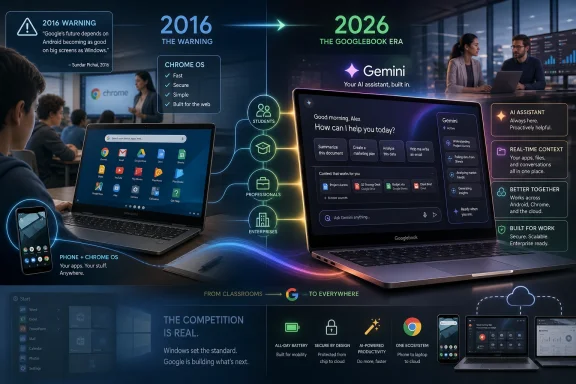 The 2016 Warning Was Not About Apps, It Was About Gravity
In 2016, the easy story was app count. Google had Android, Google Play, and a mobile ecosystem with more than a million apps; Microsoft had Windows, Win32, Office, and a still-struggling Universal Windows Platform. Put that way, the comparison seemed awkward but legible: Google was moving mobile upward, Microsoft was trying to move Windows downward.But the deeper argument in Rubino’s piece was about gravity. The platform that captures a user’s habits early tends to define what “a computer” feels like later. For decades, Windows benefited from that effect. A school PC, a family desktop, a college laptop, and an office machine all taught the same muscle memory: Start menu, window controls, local files, Office documents, browser, printer, network drive, repeat.
Chromebooks disrupted that loop not because they were more powerful, but because they were good enough in the places where institutions had the least patience for traditional PC administration. In schools, the case was devastatingly simple: low cost, easy lockdown, fast provisioning, low maintenance, and a browser-first model that matched the direction of classroom software. Windows could do far more, but that was not always an advantage when a district wanted hundreds or thousands of machines that students could not easily break.
Android apps on Chrome OS mattered because they suggested Google’s “good enough” laptop might not stay so limited. The Chromebook’s weakness was not merely technical; it was psychological. Consumers and IT buyers understood a laptop as something that ran applications. By bringing the Play Store to Chrome OS, Google began closing the gap between a web terminal with a keyboard and a general-purpose computing device.
Microsoft’s Fortress Was Compatibility, and Compatibility Was Also the Moat
Microsoft’s answer in 2016 was still rooted in the unmatched power of Windows compatibility. A Windows machine could run Photoshop, full Office, iTunes, line-of-business applications, custom drivers, obscure utilities, enterprise VPN clients, printer software, management agents, and the decades of small tools that keep offices, factories, hospitals, law firms, and governments functioning. Chrome OS could not.That argument was true then, and much of it remains true now. Compatibility is not a talking point for administrators; it is the infrastructure of work. A platform that breaks workflows has to be dramatically better somewhere else to justify the migration pain.
The problem is that compatibility cuts both ways. It keeps Windows entrenched, but it also makes Windows hard to reinvent. Every Microsoft attempt to modernize the platform has had to negotiate with the installed base: Win32, drivers, enterprise management, shell expectations, device diversity, legacy hardware, and the fact that many Windows users do not want their PC to become a phone, a cloud endpoint, or an AI experiment.
That tension shaped Windows 10, Windows 11, Windows on Arm, the Microsoft Store, UWP, Windows S mode, Cloud PC, Copilot, and Copilot+ PCs. Microsoft has repeatedly tried to make Windows more modern without severing the old contract. Google, by contrast, has often been freer to define new categories because Chrome OS never carried the same historical burden.
This is why the 2016 Android-on-Chrome story still matters. It was not a frontal assault on Windows’ strongest territory. It was a flank attack against the assumption that the next generation of users would need that territory in the first place.
Googlebook Turns the Chromebook Argument Inside Out
Googlebook is not just a renamed Chromebook, at least not in Google’s framing. The company describes it as a new laptop category designed for Gemini Intelligence, combining Android’s app ecosystem, ChromeOS’s browser heritage, and a more proactive assistant model. The premise is that the laptop is no longer primarily an operating system with apps attached. It is an intelligence system that can interpret context, automate multi-step actions, and move across devices.That language is marketing, but the shift it describes is real. The old Chromebook pitch was subtraction: fewer local complications, fewer admin headaches, fewer ways for users to damage the machine. The Googlebook pitch is addition: more automation, more ambient context, more continuity with Android phones, more Gemini inside the daily workflow.
If Chrome OS was the browser pretending to be a laptop, Googlebook is Android and Gemini pretending the old laptop metaphor is no longer the center of the experience. That is the part Microsoft has to take seriously. Google is not simply asking whether users can live without Win32. It is asking whether the central interface of computing can move from files, windows, and installed programs to intent, context, and agent-mediated action.
The 2016 story foreshadowed this because Android apps were the first major bridge. They made Chrome OS less isolated from Google’s broader consumer ecosystem. Googlebook extends that bridge into a platform argument: if your phone, apps, files, assistant, browser, and AI agent all belong to Google, why should the laptop be a Windows machine sitting awkwardly outside that loop?
The Schools Beachhead Was Always Bigger Than Education
Rubino’s 2016 focus on schools was prescient because education is not just a market segment. It is a habit factory. A student who grows up submitting assignments in Google Docs, navigating through Chrome, logging into managed Chromebooks, storing files in Drive, and using Android on a phone may never develop the same emotional or procedural attachment to Windows that previous generations did.Microsoft understood this danger long before Googlebook. The company has fought hard in education with low-cost Windows devices, Microsoft 365 for Education, Teams, OneNote, Intune for Education, Minecraft Education, and cloud management improvements. But Google’s classroom foothold was not merely about price. It was about lowering the operational burden for schools that did not want to run miniature enterprise IT departments.
That advantage compounds. Once a district standardizes on Google accounts, Google Classroom, Drive, Docs, and Chromebooks, the device becomes part of a broader administrative and pedagogical system. The hardware is replaceable; the workflow is the lock-in.
Googlebook could bring that same logic to a more premium and more AI-centered market. If Google can persuade students, families, and eventually knowledge workers that an Android-and-Gemini laptop is the natural companion to an Android phone, it does not need to beat Windows in every enterprise scenario. It only needs to erode the assumption that Windows is the default laptop choice for the next decade of users.
The App Gap Changed Shape Instead of Disappearing
In 2016, Microsoft’s app problem was brutally visible. Windows had the desktop software library, but its modern app platform lagged far behind iOS and Android. Google had the opposite problem: Android had enormous app volume, but those apps were designed first for phones and tablets, not keyboard-and-trackpad laptops.Google’s move to bring Android apps to Chrome OS did not magically solve that mismatch. Many Android apps looked awkward on larger displays, behaved strangely with windows, or lacked the richness of desktop-class alternatives. The Play Store added breadth, but not always depth.
That remains a cautionary note for Googlebook. A laptop that runs Android apps is not automatically a great laptop. Touch-first apps can feel second-rate with a cursor. Mobile workflows can become clumsy when stretched across a 14-inch display. Developers may not optimize unless the installed base is large enough to justify the work. Enterprise buyers may still demand desktop-grade applications, security controls, offline behavior, peripheral support, and manageability.
But the app gap has changed because AI can paper over some of the seams that app stores never solved. If an assistant can extract data from one app, summarize content from another, draft a reply, manipulate files, schedule a meeting, or automate a form, the user may care less about whether each individual app was designed as a perfect desktop citizen. The interface becomes less about launching the right program and more about asking the system to complete the job.
That is the strategic risk for Windows. Microsoft’s historical advantage was that Windows could run the tool you needed. Google’s emerging argument is that the system should increasingly use the tools for you.
Microsoft Saw the Agentic PC Coming, but Its Burden Is Heavier
It would be wrong to frame Microsoft as asleep at the switch. Copilot, Copilot+ PCs, Recall, Windows Studio Effects, local NPUs, cloud-hosted AI services, Microsoft 365 Copilot, and the broader integration of AI into Edge, Office, Teams, and Windows show that Microsoft recognizes the same platform transition. Redmond is not debating whether AI belongs in the operating system. It is debating how deeply it can be embedded without alienating users, regulators, enterprises, and security teams.That is a harder problem for Microsoft than for Google. Windows is the general-purpose computing substrate for enormous parts of the global economy. A controversial AI feature in Windows does not land like a clever experiment; it lands like a risk assessment. Recall demonstrated that clearly. Even when the technical idea is plausible, the trust model has to satisfy people who manage fleets, protect regulated data, handle legal discovery, and defend endpoints from attackers.
Google faces trust questions too, especially around data use, advertising incentives, privacy, and the degree to which Gemini-mediated computing increases Google’s visibility into user behavior. But Googlebook begins as a new category. Microsoft has to retrofit the future into a platform that people already depend on for the past.
That difference matters. A new Google laptop can present agentic computing as the product. Windows has to present it as an enhancement that does not break everything else.
The Old “Real Computer” Argument Is Losing Cultural Force
For years, Windows defenders could win arguments by invoking the “real computer.” A Chromebook was fine for web browsing, schoolwork, or streaming, but a real computer ran real applications. An iPad was great on the couch, but a real computer had a file system, external monitors, scripting, local development tools, and desktop software. A phone could do many things, but a real computer remained the thing you used when work got serious.That argument still has merit in technical and professional contexts. Developers, engineers, designers, analysts, gamers, researchers, sysadmins, and many office workers can quickly hit the limits of simplified platforms. But culturally, “real computer” has less power than it once did. Millions of people now do serious work in browsers, SaaS tools, messaging platforms, web-based design suites, cloud IDEs, mobile banking apps, creator tools, and AI assistants.
The younger the user, the less likely they are to treat local Win32 software as the natural center of computing. The smartphone already taught the mass market that apps, cloud sync, and identity are more important than local installation rituals. Chromebooks taught schools that manageability can matter more than capability. AI agents may teach the next generation that the interface itself is negotiable.
That is the bridge from 2016 to 2026. Android apps on Chrome OS challenged the idea that a laptop needed traditional desktop software to be useful. Googlebook challenges the idea that a laptop needs the traditional operating system experience to be primary.
Enterprise IT Will Not Move Just Because Gemini Wiggles the Cursor
The case against overhyping Googlebook is straightforward: enterprise computing is stubborn. Windows is deeply embedded in endpoint management, identity, security, compliance, procurement, application compatibility, and support processes. Microsoft’s relationship with enterprise IT is not just about Windows licenses; it is about Active Directory, Entra ID, Intune, Defender, Microsoft 365, Azure, Power Platform, and the enormous ecosystem of vendors that build around Microsoft infrastructure.Google can compete in pieces, and it already does through Workspace, Chrome Enterprise, Android Enterprise, and ChromeOS management. But replacing a Windows fleet is not the same as selling a better laptop story. It requires migration paths, support guarantees, hardware availability, procurement channels, training, auditability, and a credible answer for every weird legacy dependency hiding in a department budget.
Googlebook’s assistant layer may even raise new enterprise questions. If Gemini can see, summarize, infer, and act across apps, admins will want to know what data is processed locally, what goes to the cloud, how permissions are scoped, how logs are retained, how actions are audited, and how the system prevents prompt injection or malicious automation. The more capable the assistant becomes, the more it resembles both a productivity tool and a privileged actor on the endpoint.
That does not make Googlebook irrelevant to business. It means its first enterprise wins are more likely to come where work is already web-first, mobile-centric, or Google Workspace-heavy. The Windows displacement story will be uneven, not cinematic.
The Consumer PC Is Where Microsoft Should Worry First
If Googlebook becomes a genuine threat, the consumer and education markets are the obvious starting points. That is where ecosystem continuity matters most and legacy compatibility matters least. An Android phone owner who lives in Gmail, Photos, Drive, YouTube, Chrome, Maps, Messages, and Gemini may find a Googlebook more coherent than a Windows laptop with Google apps layered on top.Microsoft has a consumer ecosystem, but it is patchier. Windows remains ubiquitous, Xbox is strong, Office is still a household name, and OneDrive has reach. Yet Microsoft lost the phone, and losing the phone means losing the most intimate daily computing surface. Copilot can live on phones as an app, but it does not own the device in the way Gemini can be woven through Android.
That is the structural weakness Rubino was circling in 2016. Microsoft could build one Windows core for many device types, but it no longer had meaningful mobile share. Google had the mobile users but not the desktop. The intervening decade did not reverse that reality. It made it sharper.
Googlebook is therefore not just a laptop announcement. It is Google trying to cash in on Android’s scale at the one point where Microsoft remains culturally strongest. The bet is that the phone ecosystem can finally pull the laptop along with it.
The 2016 Convergence Debate Was Right, but the Destination Changed
The word convergence was everywhere in the mid-2010s. Microsoft pursued it through Windows 10, OneCore, UWP, Continuum, and the dream that one platform could span desktop, tablet, phone, Xbox, HoloLens, and IoT. Google approached it from the other direction, gradually making Chrome OS more app-capable while Android matured beyond the phone.Both visions were partly right and partly wrong. Microsoft underestimated how hard it would be to revive mobile relevance and persuade developers to embrace UWP at scale. Google underestimated, or at least took years to resolve, how messy it would be to make Android apps feel natural on laptop hardware.
But convergence did happen. It just did not arrive as one operating system running everywhere in a clean architectural triumph. It arrived as shared identity, shared services, shared app ecosystems, shared browser engines, shared cloud storage, shared notification systems, shared silicon assumptions, and now shared AI models.
Googlebook reflects this messier reality. It does not need Android and ChromeOS to merge in a way that satisfies operating-system purists. It needs users to feel that the experience is continuous: phone to laptop, app to browser, prompt to action, file to message, calendar to task. Microsoft’s challenge is similar, but its missing phone platform makes the continuity harder to own end to end.
The Real Fight Is Over Who Mediates the User’s Intent
Operating systems used to compete by managing hardware and running software. Then they competed by attracting developers and building app stores. Then they competed by syncing identity, files, photos, passwords, and notifications across devices. The next fight is over intent: when the user wants something done, whose layer understands the request, chooses the tool, performs the action, and reports back?That is why Googlebook feels more significant than another Chromebook iteration. Magic Pointer, custom widgets, Gemini Intelligence, and phone-to-laptop integration are individual features, but the platform ambition is broader. Google wants Gemini to become the mediator between the user and the machine.
Microsoft wants the same role for Copilot. Apple is moving more cautiously, but it is aiming at a similar destination across macOS, iOS, and its own device ecosystem. The difference is that Google’s assistant layer can lean on Android’s mobile dominance, Microsoft’s can lean on workplace dominance, and Apple’s can lean on premium hardware integration.
Windows users should be clear-eyed about this. The future PC may not be won by the operating system with the most settings panels, the broadest driver support, or the deepest back catalog. Those things still matter, especially to power users and administrators. But the mainstream user may increasingly judge a computer by how well it converts intention into completed work.
The Decade-Old Story Now Reads Like a Platform Memo
The most striking part of the 2016 Windows Central piece is how little of its central tension has expired. Chromebooks were rising in schools. Google had mobile momentum. Microsoft had the desktop and the legacy software advantage. The question was whether Google could move upward before Microsoft could make Windows feel modern everywhere.In 2026, the question is more severe. Can Google move Android and Gemini into laptops before Microsoft can make Windows feel like a trustworthy AI-native environment rather than a legacy platform with an assistant bolted to the side?
That framing is harsh, but not unfair. Windows is still enormously capable, and for many users it remains the only practical choice. Yet capability is not the same as inevitability. The PC market has already absorbed enough shocks — smartphones, tablets, web apps, cloud desktops, Chromebooks, Arm laptops, AI assistants — to prove that old defaults can erode slowly and then suddenly.
Rubino’s piece did not predict every detail of Googlebook. It did something more useful: it identified the direction of travel. Google’s route to the laptop was always going to run through Android’s scale, Google’s services, and a generation trained to think of computing as cloud identity plus apps rather than a local desktop with programs.
The Googlebook Bet Leaves Windows With No Room for Complacency
The practical lesson from this archive is not that Windows is doomed or that Googlebook will conquer the PC market. The lesson is that Microsoft cannot rely on the old hierarchy of “real PC” versus “limited Chromebook” to hold forever. Google has spent a decade turning the limitation into a different philosophy of computing.For WindowsForum readers, the near-term impact will vary. Power users will still need Windows. Many businesses will still standardize on Windows. Gamers, developers, and admins will still find reasons to prefer the platform that exposes more of the machine. But the strategic center of gravity is shifting toward devices that are easier to manage, more integrated with phones, and increasingly mediated by AI.
- Google’s 2016 Android-apps-on-Chrome-OS move was less an app-store story than an early attempt to pull laptop computing into the Android ecosystem.
- Googlebook extends that strategy by making Gemini and Android continuity central to the laptop rather than treating them as add-ons.
- Microsoft’s greatest Windows advantage remains compatibility, but that same inheritance slows attempts to reinvent the platform around AI.
- Education remains strategically important because students who grow up inside Google’s workflows may not inherit older assumptions about Windows as the default computer.
- Enterprise adoption will depend less on demos and more on management, security, auditability, data controls, and legacy application realities.
- The real platform contest is shifting from which OS runs the most software to which assistant layer best understands and completes user intent.
References
- Primary source: Windows Central
Published: Fri, 22 May 2026 16:59:11 GMT
Loading…
www.windowscentral.com - Related coverage: androidcentral.com
Loading…
www.androidcentral.com - Related coverage: techcrunch.com
Loading…
techcrunch.com - Official source: 9to5google.com
Loading…
9to5google.com - Related coverage: androidpolice.com
Loading…
www.androidpolice.com - Related coverage: phonearena.com
Loading…
www.phonearena.com
- Related coverage: parentherald.com
Loading…
www.parentherald.com - Related coverage: arstechnica.com
Loading…
arstechnica.com - Related coverage: computerworld.com
Loading…
www.computerworld.com - Related coverage: forbes.com
Loading…
www.forbes.com - Related coverage: networkworld.com
Loading…
www.networkworld.com - Related coverage: tomshardware.com
Loading…
www.tomshardware.com - Related coverage: blog.google
Loading…
blog.google