

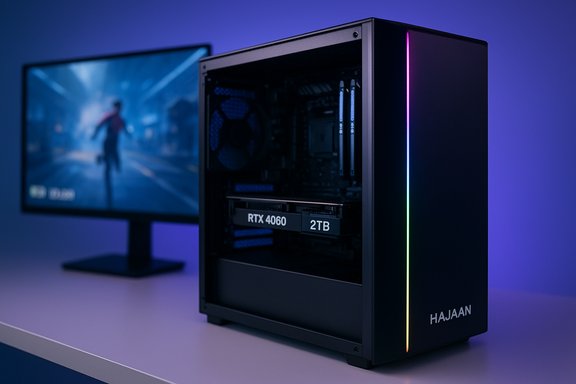
The HAJAAN-branded desktop being promoted with an AMD Ryzen 7 5700X, NVIDIA GeForce RTX 4060 (8GB), 32GB DDR4, and 2TB NVMe is an attention-grabbing midrange package on paper — but the actual buyer experience depends on important details that vary by SKU, seller and regional stock. The core promise is straightforward: a current‑generation midrange GPU paired with a competent Zen 3 eight‑core CPU, plenty of RAM and a large SSD for immediate gaming and content‑creation needs. This feature examines the hardware choices, expected real‑world performance, value tradeoffs, upgrade considerations, and vendor‑level risks so readers can decide whether a HAJAAN prebuilt like this is the right move.
The product listing the user referenced appears in retail feeds and marketplace listings under the HAJAAN/SuperX family of prebuilt desktops, which show multiple configurations and occasional promotional discounts. A direct visit to the Gamespresso link in the request resolves to the site’s front page rather than a dedicated product page, so the product details on that specific URL could not be verified there. HAJAAN systems are sold through several mainstream channels (examples include marketplace listings with differing CPU and GPU combinations), and identical model names sometimes point to different internal parts depending on the seller and branch of the product family. Two merchant listings illustrate this SKU fragmentation: a HAJAAN SKU with a Ryzen 7 7700X / RTX 4060 appears on Newegg, while a separate HAJAAN desktop with a 13th‑gen Intel i7 and RTX 4060 Ti is listed at Walmart. That fragmentation is typical for small/white‑box OEMs who assemble multiple variants under a common model name. Before buying, verify the exact SKU string, the seller, and the warranty terms. The rest of this article walks through what each component brings, how it performs in real workloads, and the practical red flags to watch.
The appeal of a ready‑to‑run HAJAAN desktop is understandable: convenience, a large SSD, abundant RAM, and a capable GPU are enticing. Yet the small print matters: check the PSU, ask which GPU board partner is installed, confirm SSD generation and the RAM configuration, and make sure the seller’s return and warranty terms meet your expectations. Independent benchmarks and platform specs show the Ryzen 7 5700X and RTX 4060 are a competent pairing for modern gaming — especially at 1080p — but buyers should approach the purchase like any prebuilt deal: verify the parts, price them against alternatives, and understand the upgrade and support path before closing the sale.
Source: Gamespresso Gamespresso: Gaming News & Reviews
 Background / overview
The product listing the user referenced appears in retail feeds and marketplace listings under the HAJAAN/SuperX family of prebuilt desktops, which show multiple configurations and occasional promotional discounts. A direct visit to the Gamespresso link in the request resolves to the site’s front page rather than a dedicated product page, so the product details on that specific URL could not be verified there. HAJAAN systems are sold through several mainstream channels (examples include marketplace listings with differing CPU and GPU combinations), and identical model names sometimes point to different internal parts depending on the seller and branch of the product family. Two merchant listings illustrate this SKU fragmentation: a HAJAAN SKU with a Ryzen 7 7700X / RTX 4060 appears on Newegg, while a separate HAJAAN desktop with a 13th‑gen Intel i7 and RTX 4060 Ti is listed at Walmart. That fragmentation is typical for small/white‑box OEMs who assemble multiple variants under a common model name. Before buying, verify the exact SKU string, the seller, and the warranty terms. The rest of this article walks through what each component brings, how it performs in real workloads, and the practical red flags to watch.The platform in detail
CPU — AMD Ryzen 7 5700X: capable, efficient Zen 3 silicon
The Ryzen 7 5700X is a socket AM4, 8‑core / 16‑thread Zen 3 CPU with a nominal TDP of 65 W, base clocks around 3.4 GHz and boost frequencies up to ~4.6 GHz. It’s a mature part that delivers strong multi‑threaded throughput and solid gaming performance at mainstream resolutions. The 5700X is widely considered an excellent balance between price, power draw, and performance for gaming and light content creation workloads. What this means for a HAJAAN tower:- Gaming at 1080p and 1440p: the 5700X will not bottleneck midrange GPUs for most modern titles and will sustain high frame rates in CPU‑sensitive games.
- Content work: eight cores are capable for video editing, streaming, and multithreaded tasks, though there are faster modern alternatives if you need absolute rendering speed.
- Upgrade path: being AM4, the platform has many compatible motherboards and used CPU upgrade options — but verify the motherboard chipset in the exact build for future CPU swap compatibility.
GPU — NVIDIA GeForce RTX 4060 (8GB GDDR6): solid 1080p performer, constrained at higher resolutions
The GeForce RTX 4060 is an Ada Lovelace mainstream GPU with 3,072 CUDA cores in reference form, a 128‑bit memory bus and 8GB of GDDR6 VRAM in standard retail parts. It supports NVIDIA features such as DLSS (frame generation and quality upscaling, depending on driver/firmware versions), third‑generation ray‑tracing cores, and the broader GeForce software stack. Manufacturer spec pages and board partner tech sheets confirm the 8GB memory configuration and architecture details. Benchmarks from independent labs show the practical implications:- Excellent 1080p performance across many titles, often delivering high frame rates at high or ultra settings.
- Mixed 1440p suitability: because the 4060 ships with 8GB of VRAM and a narrower memory bus, some modern AAA titles at 1440p with max textures will stress memory and bandwidth, leading to diminished results unless you use upscaling (DLSS) or reduce texture settings. Independent reviewers repeatedly point to the 8GB VRAM ceiling as a practical limit for futureproofing at 1440p.
Memory — 32GB DDR4: generous and sensible for modern workloads
A 32GB DDR4 configuration is generous for gaming and multitasking, and particularly helpful if the buyer streams, runs background capture/recording software, or uses the PC for content creation. DDR4 vs DDR5 is a tradeoff: DDR4 remains very capable and more cost‑efficient in many prebuilt systems, though DDR5 offers bandwidth upside in some high‑end workloads. For the Ryzen 7 5700X, DDR4 at 3200 MHz or thereabouts is the practical pairing. Verify whether the vendor ships two 16GB sticks (recommended for dual‑channel) or a single 32GB stick, because dual‑channel is important for gaming and iGPU performance. Some HAJAAN listings show DDR4 configurations paired with varying CPU families — confirm exact kit specs before purchase.Storage — 2TB NVMe M.2 SSD: fast and roomy, confirm the interface
A 2TB NVMe M.2 SSD as the boot and game drive is a strong inclusion for a modern gaming PC. Two practical checks:- Confirm whether the drive is PCIe Gen3 or Gen4 — Gen4 drives offer higher sequential reads/writes and generally better game‑load behavior, but Gen3 NVMe SSDs are still fast for most real‑world tasks.
- Ask the seller if the system includes an additional SATA/HDD bay for bulk storage. Many prebuilt vendors use a single NVMe slot in budget cases, so confirm expansion options if you manage large libraries. Marketplace listings show options for both 1TB and 2TB NVMe tiers — make sure the advertised capacity is actually the drive in the SKU you order.
Cooling, PSU and chassis: what to look for
Prebuilts vary massively in power delivery and cooling. Key items to verify:- PSU wattage and brand: small OEMs sometimes use generic PSUs with marginal headroom. For a Ryzen 7 5700X + RTX 4060 system, a quality 550–650W unit from a trusted vendor is typically recommended; some board partner designs recommend 550W nominal, but leave headroom for overclocking and future GPUs. ASUS partner recommendations for RTX 4060 cards often list 550W as a baseline. Confirm the HAJAAN SKU’s PSU model and rail specs.
- Cooling: “liquid cooled” can mean a wide range of solutions from a small AIO to basic all‑in‑one loops. Verify radiator size, fan count, and whether the case supports additional airflow. HAJAAN listings commonly mention liquid cooling in promotional text, but exact cooler models are not always specified in marketplace listings. Treat ambiguous marketing claims cautiously.
Real‑world expectations and benchmarks
- At 1080p the Ryzen 7 5700X + RTX 4060 pairing should deliver high frame rates in competitive titles and comfortable settings in modern AAA games. Independent tests place the RTX 4060 firmly ahead of older 3060‑class cards at 1080p averages, but gains versus alternatives depend on driver versions and game engine optimization.
- At 1440p, plan to use DLSS (or other upscalers) or reduce texture and shadow fidelity in VRAM‑heavy titles. Multiple lab reviews found that the RTX 4060’s 8GB VRAM and 128‑bit bus limit its headroom at 1440p maximum settings; in some titles the RX 7600 (AMD) or other cards provide competitive or exceed performance depending on the build. For highest fidelity 1440p gaming, cards with 10–12GB+ VRAM and wider memory buses are safer.
- In content creation and multi‑threaded workloads, the Ryzen 7 5700X is more than capable. It delivers strong throughput for encoding, streaming and creative suites, and with 32GB of RAM and a fast NVMe drive the system will handle typical creator workloads smoothly. However, for large professional render farms or heavy 3D workloads, higher‑core CPUs or workstation silicon will be faster.
Value and price: how to judge HAJAAN’s offer
Prebuilt value is a function of component quality, warranty, and the total package price. Marketplace HAJAAN listings show wide price variation depending on bundled extras (monitors, peripherals, or included monitors). Two examples: HAJAAN builds appear on Newegg and Walmart at different price points and with varying CPUs (Ryzen 7 vs Core i7 variants and Ti vs non‑Ti GPUs). That variability is a reminder to compare SKUs, not brand names. To evaluate the deal:- Price out the same combination from reputable system integrators and local DIY parts to see the delta.
- Factor in warranty length and support process. Smaller vendors typically offer one‑year warranties; read the fine print about cross‑shipments, RMA turnaround, and whether the warranty covers labor and shipping.
- Check return policies on the retail channel. Marketplace returns and third‑party sellers can complicate refunds and RMAs.
Upgradeability and futureproofing
- GPU headroom: the RTX 4060 is midrange — upgradeable, but check the case length and PSU connectors. If you envision stepping up to a 4070/4070 Ti or later, verify the chassis clearance and PSU wattage.
- Memory: 32GB DDR4 gives breathing room today. If the board supports DDR5 and you prefer DDR5, that will be a different SKU; double‑check whether the system uses two DIMMs and leaves empty slots for expansion.
- Storage and slots: confirm number of M.2 slots and spare SATA ports. Many value prebuilt systems ship with a single M.2 populated, leaving limited internal expansion.
- Motherboard: a standard ATX board with off‑the‑shelf headers makes upgrades easier; proprietary motherboards or cable harnesses make component swaps headache‑prone.
Risks, disclaimers and unverifiable claims
- SKU inconsistencies: multiple marketplace listings show HAJAAN using similar model names with different internals. Confirm the exact CPU model, GPU variant (RTX 4060 vs 4060 Ti, vendor partner brand), RAM type/speed, SSD make/model and PSU brand before purchase. Product names alone are not reliable indicators of uniform hardware across channels.
- Ambiguous marketing claims: phrases like “liquid cooled,” “premium components,” or “RTX 4060” do not guarantee specific part quality, radiator size, or GPU partner model. These claims should be verified with an itemized spec sheet or seller confirmation.
- Gamespresso product page could not be verified: the specific Gamespresso URL in the request resolves to the site homepage in the public crawl; the advertised item could be an ad or a targeted retail listing that was not available on the page content retrieved. Treat that URL as an unverified product landing until a working product page is shown.
- Warranty and support variability: smaller or marketplace sellers may use third‑party fulfillment; warranty periods and RMA practices can vary widely and sometimes require shipping the entire PC back at buyer expense. Confirm support terms and service location.
- Performance claims vs. real world: vendor stated fps or “4K ready” claims should be treated cautiously. Independent lab reviews show the RTX 4060 is not a 4K card and is limited at 1440p in texture‑heavy scenarios — marketers sometimes emphasize peak numbers without context. Cross‑reference vendor claims with reputable reviews.
Purchase checklist — practical steps before you buy
- Confirm the exact SKU string (full part code), not just the model name.
- Verify the GPU model (RTX 4060 vs 4060 Ti or OEM variant) and VRAM size.
- Request the PSU model and wattage, and confirm available connectors for future upgrades.
- Ask for the NVMe drive make/model and whether it’s PCIe Gen3 or Gen4.
- Confirm RAM configuration (2x16GB vs 1x32GB) and memory speed.
- Read the seller’s warranty terms, RMA process, and return window — record contact info.
- Compare total price vs DIY parts + local assembly and other integrators to ensure value parity.
Final verdict — who should consider this HAJAAN configuration?
- Buy this configuration if you want a turnkey 1080p gaming and streaming rig with strong multi‑tasking and room for personal upgrades, and if the price compares favorably to similar builds from better‑known integrators.
- Avoid this specific SKU if you need maximum 1440p fidelity without using upscaling, if you demand an enterprise‑class warranty, or if PSU/parts details are not disclosed up front.
- Consider alternative systems or custom builds if you plan immediate high‑end GPU upgrades; ensure the case and PSU will support a larger GPU and higher TDP CPUs.
The appeal of a ready‑to‑run HAJAAN desktop is understandable: convenience, a large SSD, abundant RAM, and a capable GPU are enticing. Yet the small print matters: check the PSU, ask which GPU board partner is installed, confirm SSD generation and the RAM configuration, and make sure the seller’s return and warranty terms meet your expectations. Independent benchmarks and platform specs show the Ryzen 7 5700X and RTX 4060 are a competent pairing for modern gaming — especially at 1080p — but buyers should approach the purchase like any prebuilt deal: verify the parts, price them against alternatives, and understand the upgrade and support path before closing the sale.
Source: Gamespresso Gamespresso: Gaming News & Reviews
