Windows 7 HD Diagnostic Tools By Manufacturer

Adamsappleone

U.S.Navy D.A.V.
Joined
Aug 2, 2009
Messages
1,647
Here is a list of Diagnostic Tools for hard drives by manufacturer.


http://majorgeeks.co...rmax_d1386.html

http://www.seagate.c...nloads/seatools

Link Removed

Link Removed - Invalid URL

http://www.fujitsu.c.../utilities.html

Link Removed - Invalid URL

Toshiba - N/A
There are no tools available for Toshiba, but you may be able to use IBM or Maxtor's drive tools as well as other third party programs.
IBM is supported by Hitachi.

Most of these utilities require installation on a floppy disk or CD, then ask you to boot off that medium.

Of these companies, Western Digital's Windows-capable Data Lifeguard Diagnostics is the only program which will willingly scan the drives of other manufacturers. In fact, this program is also extremely easy to use and performs error checking, surface scans and SMART diagnostics. Let's take a look at how to use it:

First, install and run the program.

diskdiag_3.gif

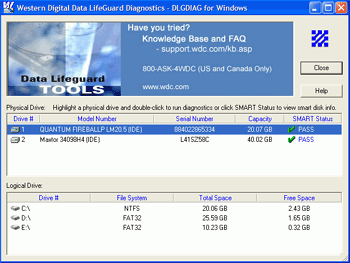
The main screen shows all available physical and logical drives. Double click the physical drive you wish to test.

diskdiag_4.gif

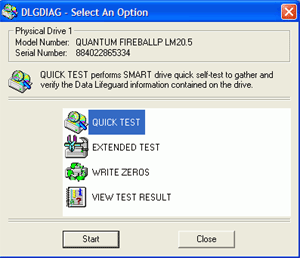
From here, 'quick test' will do the basic file and folder integrity check, 'extended test' will perform a surface scan of the drive, and 'write zeros' will fully or quickly erase all the data on the disk. Click the 'SMART status' column of the drive you wish to test to see a full SMART diagnostic list.

Partial acquisition from; http://www.pcstats.c...eid=1583&page=6
 

Solution
The post provides a list of diagnostic tools for hard drives by various manufacturers along with instructions on using Western Digital's Data Lifeguard Diagnostics program. Here's a summary of the information provided:

Diagnostic Tools by Manufacturer​

Using Western...​

The post provides a list of diagnostic tools for hard drives by various manufacturers along with instructions on using Western Digital's Data Lifeguard Diagnostics program. Here's a summary of the information provided:

Diagnostic Tools by Manufacturer​

Using Western Digital's Data Lifeguard Diagnostics Program​

  • Installation and Running:
  • Install and run the program. [*Testing Process:
  • The main screen displays all available physical and logical drives.
  • Double-click the physical drive you want to test. [*Testing Options:
  • Quick Test: Conducts basic file and folder integrity check.
  • Extended Test: Performs a surface scan of the drive.
  • Write Zeros: Fully or quickly erases all data on the disk.
  • Click the 'SMART status' column of the drive for a full SMART diagnostic list. The Western Digital's Data Lifeguard Diagnostics program is noted for being Windows-capable, easy to use, and capable of scanning drives from other manufacturers. For more detailed instructions, you can refer to the original source provided: http://www.pcstats.com/articleview.cfm?articleid=1583&page=6.
 

Solution
Back
Top