

Holi’s riot of color meets the new ritual of personalisation: this year, you can make a bespoke Holi greeting in minutes using modern AI image tools — whether you choose ChatGPT’s Images, Google’s Gemini (Nano Banana 2), or xAI’s Grok Imagine — and walk away with a shareable, high‑resolution image that looks like it was crafted by a designer.
Holi is about color, texture and immediacy — elements that map naturally onto generative image AI, which excels at bold palettes, motion-like splashes, and stylized portraiture. Over the last 18 months major multimodal models have added image-generation as a first‑class capability: OpenAI integrated a new Images experience into ChatGPT and exposed it via the API, Google matured its Gemini image engine (popularly known in product messaging as “Nano Banana”), and xAI rolled out image features for Grok. Each tool targets slightly different trade‑offs between speed, fidelity, instruction following, and safety controls.
Windows‑focused communities and creators have been experimenting with these tools enthusiastically — forum threads and help posts show users sharing prompts, troubleshooting artifacts, and discussing moderation and provenance features as they make festival imagery. That community interest makes Holi an ideal seasonal example to explain a practical workflow that scales from casual greetings to polished social posts.
Holi is a festival that celebrates togetherness; when you use AI to create and share images for a festival, aim for images that celebrate people and culture respectfully. These new tools let even non‑designers craft images that sing with color and mood — but the responsibility for consent, provenance, and lawful usage rests with the creator. Use the power to create joy, not harm, and you’ll find the technical steps are only part of making something that really connects.
Source: Times Now Happy Holi 2026: How To Create Stunning AI Images Using ChatGPT, Gemini And Grok In Minutes
 Background
Holi is about color, texture and immediacy — elements that map naturally onto generative image AI, which excels at bold palettes, motion-like splashes, and stylized portraiture. Over the last 18 months major multimodal models have added image-generation as a first‑class capability: OpenAI integrated a new Images experience into ChatGPT and exposed it via the API, Google matured its Gemini image engine (popularly known in product messaging as “Nano Banana”), and xAI rolled out image features for Grok. Each tool targets slightly different trade‑offs between speed, fidelity, instruction following, and safety controls.Windows‑focused communities and creators have been experimenting with these tools enthusiastically — forum threads and help posts show users sharing prompts, troubleshooting artifacts, and discussing moderation and provenance features as they make festival imagery. That community interest makes Holi an ideal seasonal example to explain a practical workflow that scales from casual greetings to polished social posts.
Overview: ChatGPT vs Gemini (Nano Banana 2) vs Grok — quick comparison
- ChatGPT Images (OpenAI)
- Strengths: precise instruction following, editing (inpainting/masks), strong text rendering and integration into the ChatGPT conversational UI and API. OpenAI’s Images capability sits on the gpt‑image family (gpt‑image‑1 and later 1.5) and is available in chat and via API endpoints designed for both single-shot generation and iterative conversational refinement. Safety guardrails and optional content moderation are built into the flow.
- Google Gemini / Nano Banana 2
- Strengths: lightning‑fast generation, subject consistency for characters and objects across multiple images, production‑ready text rendering and integrated provenance (SynthID + C2PA credentials). Nano Banana 2 is Google’s latest image model designed for speed without sacrificing control, and it’s being rolled out across Gemini app, Google Search AI Mode, AI Studio, and Cloud Vertex AI. Google emphasizes provenance tooling to help people identify AI‑generated media.
- Grok Imagine (xAI)
- Strengths: integrated into X (formerly Twitter) and Grok apps for quick, social‑first outputs and rapid remixing. Grok’s Aurora engine (and subsequent variants) offers photorealistic rendering and direct editing on X/Grok, but the service has faced public controversies around misuse that have led to changes in availability and moderation controls. If you use Grok, expect differences in quotas, access tiers, and some policy churn.
What you can create: five Holi image concepts that work well with AI
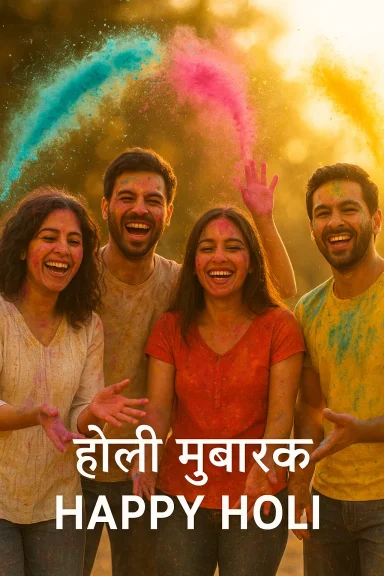
- Photorealistic group portrait mid‑splash — friends throwing colored powder at golden‑hour light. Great for a heartfelt greeting.
- Painterly abstract powder explosion — close‑up, slow‑motion color clouds; ideal for social banners and backgrounds.
- Traditional subject in contemporary style — a plate of gujiya and thandai arranged as a still life painted in saturated analogue colours.
- Rangoli mandala with modern textures — top‑down graphic with precise symmetry and localized realistic shadows.
- Playful caricature / poster — stylized characters wearing traditional clothes, bold typography for a greeting card.
How to create a Holi image in minutes — step‑by‑step workflows
1) ChatGPT Images (quick, iterative, editable)
- Open ChatGPT and select the Images tool (or use the “Create image” widget). The UI supports both text‑to‑image and image edits where you upload a photo and ask for modifications.
- Start with a compact, precise prompt. Example:
- “Photorealistic portrait of three friends throwing bright Holi powder at sunset, motion blur on the powders, warm golden light, shallow depth of field, 50mm lens, vibrant cyan‑magenta‑yellow palette, natural skin tones, high‑res poster crop 4:5.”
- Generate variants; pick one you like and edit gently rather than trying to force everything in a single prompt. Use follow‑ups like: “Make the second person’s scarf bright teal and add powdered color on the cheeks.”
- For precise corrections, upload the chosen image and use the mask tool: paint the area to change (e.g., background), then prompt for the edit (e.g., replace background with a festive bokeh).
- Export in the target size or request a higher resolution via the API if you need print or a large banner. OpenAI’s Images API supports size and quality parameters; pricing varies by quality and resolution.
- Use camera and lighting language (“shot on 85mm, golden hour”) to help the model lock photographic realism.
- If you want text in the image (greeting message), specify font style, placement and color; modern models have improved text rendering but still benefit from clear guidance.
2) Google Gemini / Nano Banana 2 (fast, production ready, provenance)
- Open the Gemini app or Google AI Studio; choose the image generation template and set the model to the Nano Banana 2 (Gemini 3.1 Flash Image) if available. Google’s release notes show Nano Banana 2 is designed to make fast, editable images with reliable text rendering.
- Prompt example:
- “High‑resolution Holi festival portrait — three friends mid‑splash, cinematic lighting, bright powder clouds, lens flare, authentic Indian clothing details, natural skin tones, editorial magazine style, include ‘Happy Holi 2026’ in Devanagari and English on the lower third in elegant serif.”
- Use the built‑in templates for greeting cards or social post sizes. If you need provenance, enable SynthID/C2PA credentials so the image carries detectable metadata indicating AI origin (useful if you want recipients to know it’s generated).
- Iterate quickly; Nano Banana 2 aims to make edits and re‑generations very fast, so refine composition across several quick passes.
- Nano Banana 2 is particularly strong at subject consistency — if you want multiple images of the same group in different poses, emphasize continuity in your prompt.
- If you’re producing images for public campaigns, prefer Gemini’s provenance features to be transparent about AI generation.
3) Grok Imagine (social, quick, remixing inside X/Grok)
- If you have access to Grok’s Imagine tab on X or the Grok app, select “Imagine” and write a prompt. Grok’s Aurora engine supports fast photorealistic outputs and direct editing. Access may be gated behind subscription tiers; free users face quotas.
- Prompt example:
- “Make a lively Holi image: a candid shot of two kids throwing gulal, frozen motion, colorful powder arcs, sun flare, slightly desaturated background to highlight powders, fun expression.”
- Share directly to your X timeline or download for WhatsApp/Instagram. Be mindful: Grok has had public moderation and policy changes after misuse incidents; respect content rules when editing images of real people.
- Grok’s strength is social immediacy: if you want to post a shareable greeting directly from the platform, it’s fast and integrated.
- If your photo includes recognizable people, check Grok/X rules and local laws before posting edits that alter appearance.
Sample Holi prompts — tailored for each engine
- ChatGPT (photorealistic): “Photorealistic portrait of four friends laughing and throwing powdered Holi color in the air, backlit, orange‑pink sunset, motion blur on powders, soft bokeh, 85mm, high‑detail skin, natural tones, 4:5 crop.”
- Gemini / Nano Banana 2 (poster): “Cinematic Holi festival poster: single hero portrait, dramatic colored powder cloud around the subject, rich textures, poster typography at bottom reading ‘Happy Holi 2026’ in serif, translate the greeting to Hindi below the English line, high contrast, editorial finish.”
- Grok (social share): “Playful Holi snapshot of a family splashing color, vivid saturated powders, candid smiles, warm ambient light, slightly stylized color grade for social media.”
Advanced editing: masks, inpainting, multi‑stage workflows
- For realistic edits of a real photo (e.g., add powder to an existing family picture), prefer an edited/mask workflow: upload the photo, paint the mask over the area to change, then instruct the model on the intended edit. OpenAI’s Images API and ChatGPT UI support this; Gemini also supports powerful edit flows.
- Multi‑stage compositing: produce a high‑quality background (powder cloud), then generate foreground characters separately and composite in a graphics editor. This approach gives the best control over pose, light, and subject continuity.
- Upscaling and sharpening: if you need print quality, use a dedicated upscaler after generation (many APIs provide higher‑res output options), or request high quality / large output size at generation time. Note that price increases with quality.
Costs, quotas and practical access (what to expect)
- OpenAI / ChatGPT Images: API pricing for gpt‑image‑1 is tiered by token type and image output quality; per‑image cost varies by size/quality. The Images API and Responses API give control over quality vs cost. For quick consumer use in ChatGPT, image generation is often included with standard access, but API calls and higher resolution outputs carry explicit costs.
- Google (Gemini / Nano Banana 2): Nano Banana 2 is being rolled into Google apps and Cloud (Vertex AI) with different pricing and availability models; some features may be behind “Pro” subscription tiers or preview programs. Google has stated Nano Banana 2 will replace earlier Flash image models across many surfaces while preserving Pro access for high‑fidelity tasks.
- Grok / xAI: Grok’s imagine feature is often limited by quotas for free users and expanded for paying subscribers; access rules can change quickly in response to abuse and moderation issues. Expect usage limits, and check the app for current details.
Safety, ethics, provenance and legal risks — what you must know
Creating festive Holi images is often harmless fun, but generative image tech introduces real risks that matter for everyday users and Windows‑based small businesses alike.Moderation and misuse
All major providers apply moderation filters and safety rules, but policy differences and enforcement vary. OpenAI and Google build in content guardrails and moderation options; Google pairs generation with SynthID and C2PA credentials to provide provenance signals for content created with its models. xAI’s Grok has experienced public controversies after its image features were misused, leading to policy changes and restricted access to certain functionality — a reminder that access models and moderation stances can change rapidly.Provenance and watermarks
- Google: SynthID and C2PA Content Credentials are specifically designed to attach provenance metadata and an invisible signal to AI‑generated content, helping downstream tools and platforms mark images as AI‑created. This is valuable for transparency in social posts or public campaigns.
- OpenAI: OpenAI embeds content metadata and cautions developers to adopt C2PA metadata where appropriate; the company provides moderation controls in the API to manage sensitive or harmful outputs.
Copyright and ownership
Licenses vary by platform and tier. Even when a provider’s terms grant you the right to use generated outputs commercially, there remain thorny legal issues:- Outputs might closely resemble copyrighted works (images of existing brands, characters, or specific artistic styles), triggering potential infringement claims.
- Some jurisdictions and institutions treat fully AI‑generated content differently with respect to copyright protection if human authorship is minimal. If you need strong exclusive rights, manual human creative input, multi‑stage editing, or enterprise agreements that guarantee no training on your data are safer routes.
Privacy, consent and portraits
Editing photos of real people requires consent—especially if you alter clothing, nudity, or identity features. Laws differ by country; in many places creating non‑consensual sexually explicit imagery or realistic deepfakes is illegal. Platforms may also prohibit certain edits. Be especially careful when sharing images of children or altering others’ likenesses. Grok’s controversy around “digital undressing” shows how misuse can quickly become criminalized and prompt policy crackdowns.Windows workflows & practical tips for WindowsForum readers
- Use the browser on Windows (Edge, Chrome) or the official apps where available (ChatGPT desktop app, Gemini web) to access these tools. The image generation UIs are web‑first; local GPU‑based alternatives exist for power users, but cloud tools provide the fastest reliable results for most people.
- When you need high‑res output for printing or poster use, generate at the highest quality the model supports or generate at standard size and then perform a secondary upscaling pass with a dedicated upscaler to avoid compression artifacts.
- If you plan to integrate the generation into an automated pipeline (e.g., batch‑creating festival cards), use the official APIs (OpenAI Images API, Gemini API / Vertex AI) and respect organization verification and moderation settings to avoid unexpected throttling or policy violations.
- Keep a local, versioned repository of the prompts you use. Good prompts are iterative and worth reusing — store the exact phrasing, seed or style settings, and any post‑processing steps so you can reproduce or tweak outputs later.
Practical checklist before you hit “Generate”
- Have you obtained consent from any real people pictured or referenced?
- Did you check the tool’s usage/publishing terms for commercial vs personal rights?
- Will the image’s provenance metadata (SynthID/C2PA) be visible or needed for transparency?
- Are you avoiding sensitive content and complying with local laws (especially around minors)?
- Do you have a fallback: a graphic editor to fix small artifacts (text glitches, fingers, or color bleeding)?
Strengths, trade‑offs, and what to expect next
- Strengths: Today’s multimodal models let you create festival imagery that’s both arresting and culturally resonant in minutes. They democratize design tasks that once required a photographer or an art director. OpenAI and Google now give creators fine control (masks, edit flows, precision text rendering) with clear UI affordances for Windows users and API access for automation.
- Trade‑offs: Speed vs. control is the central trade‑off. Gemini’s Nano Banana 2 emphasizes speed and subject consistency; OpenAI focuses on instruction fidelity and fine edits; Grok centers on social immediacy. All three rest on evolving policy and moderation regimes. Expect quotas, subscription tiers, and guardrails to keep changing throughout the year.
- Risks: The most serious risks are misuse (deepfakes, sexualized edits), legal exposure around copyright or portrait rights, and reputational risk if AI‑generated content is passed off as real. Provenance systems like SynthID/C2PA mitigate some risks, but adoption across platforms is uneven; tampering can also defeat invisible signals in many cases. If you’re producing images for a brand or public campaign, favour transparency and documented consent.
Final checklist and quick templates
- Quick‑use template for a heartfelt Holi social card (ChatGPT / Gemini):
- “High‑res festive Holi greeting: candid group of three friends mid‑splash, golden light, colorful powders arcing, natural skin tones, shallow depth of field, include ‘Happy Holi 2026’ in elegant serif at lower third; keep composition clean for mobile share.”
- If editing an existing photo:
- Upload the photo.
- Mask the area to change (background or powder).
- Prompt for targeted edit (“add magenta & teal powder splashes behind subjects; preserve skin texture; maintain natural shadows”).
- If you need a version for print: request highest quality and then run one pass with a trusted upscaler and light sharpening.
Holi is a festival that celebrates togetherness; when you use AI to create and share images for a festival, aim for images that celebrate people and culture respectfully. These new tools let even non‑designers craft images that sing with color and mood — but the responsibility for consent, provenance, and lawful usage rests with the creator. Use the power to create joy, not harm, and you’ll find the technical steps are only part of making something that really connects.
Source: Times Now Happy Holi 2026: How To Create Stunning AI Images Using ChatGPT, Gemini And Grok In Minutes
