

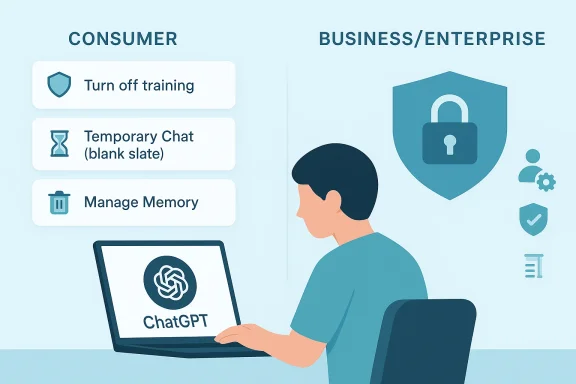
AI apps are increasingly collecting user data by default, but the good news is that most major platforms now provide controls that let you reduce what gets stored, remembered, or used for model training. In ChatGPT’s case, OpenAI says consumers can turn off model training in Data Controls, use Temporary Chat for a blank-slate session, and delete chats or their entire account if they want stronger cleanup. For business users, OpenAI also states that ChatGPT Enterprise, Business, Edu, and API data are not used for training by default.
The privacy debate around AI apps did not appear overnight. It grew out of a simple tension: the same data that makes a chatbot more useful can also make it more invasive if the user does not understand how the system handles it. As AI assistants moved from novelty tools to everyday copilots, they began absorbing more sensitive material, from work documents and customer emails to personal reflections and health-related questions. That shift forced companies to clarify what is collected, what is retained, and what can be excluded from training.
For consumer AI products, the default settings have often favored broad data usage because model improvement depends on large-scale feedback. OpenAI’s consumer-facing documentation says ChatGPT users can decide whether conversations help improve models, and that turning off training applies to the account across devices. It also states that temporary chats do not appear in history, do not create memories, and are not used to train models.
At the same time, platform vendors have made a sharp distinction between consumer and business use. OpenAI says business offerings such as ChatGPT Enterprise and API services do not use customer data for training by default, and enterprise pages emphasize security controls, admin tooling, and stronger isolation from model improvement pipelines. That separation reflects a market reality: companies will adopt AI faster if they know internal data is not automatically feeding future public models.
The broader industry trend is clear. AI platforms are becoming more personalized, more connected, and more persistent in memory, but those same features increase the amount of information they may retain about users. OpenAI’s current documentation shows that memory can be turned off or managed, that Temporary Chat avoids memory creation, and that deletion carries a 30-day retention window in many cases. In other words, privacy is no longer a binary choice between “using AI” and “not using AI”; it is now a menu of trade-offs.
Those are related, but they are not identical. Chat history is about convenience, memory is about personalization, and model training is about platform improvement. OpenAI’s documentation separates these functions explicitly: users can disable training, manage memories, and use Temporary Chat to avoid history and memory creation.
The practical lesson is simple: you need to inspect the app’s control panel, not just assume one privacy toggle covers everything. OpenAI’s help pages make that distinction repeatedly, especially around Data Controls and Temporary Chat.
Temporary Chat is the cleaner option if a user wants a conversation that does not create history or memories and is not used to train models. OpenAI says Temporary Chats are deleted from its systems after 30 days and are not used to improve models. That makes them useful for one-off research, sensitive brainstorming, or any session where the user wants minimal footprint.
That policy has real enterprise consequences. Corporate buyers care less about whether a chatbot feels helpful in a demo and more about whether it can sit inside an acceptable data-governance framework. If the answer is no, procurement stalls. If the answer is yes, the app can spread from a pilot team to a broader deployment very quickly.
OpenAI’s enterprise materials stress admin controls, usage insights, and security features alongside the no-training-by-default promise. That combination is meant to reassure IT and security teams that AI can be integrated without collapsing existing policy boundaries.
But memory also makes privacy more complicated. A system that remembers your preferences can just as easily remember information you would rather have forgotten. That is why memory controls matter as much as training controls, especially if the assistant has access to long-running conversations or connected services.
The practical takeaway is that users should treat memory as an ongoing convenience feature, not as a substitute for deletion. If the content is highly sensitive, the safer move is to avoid storing it in the first place. Temporary Chat and strict deletion habits are the strongest defense here.
That does not mean Temporary Chat is absolute invisibility. OpenAI notes that chats may still be kept for safety purposes, and third-party actions triggered inside a GPT can be governed by the recipient’s privacy policy. In other words, Temporary Chat limits ChatGPT’s own retention and training use, but it does not magically neutralize every downstream integration.
The main limitation is that users must remember to activate it. Privacy features that depend on user diligence are better than nothing, but they are not as strong as protective defaults. That is why many privacy advocates still argue that opt-out models are inherently weaker than opt-in ones.
This matters because users often conflate visible removal with backend removal. A vanished conversation in the interface does not necessarily mean the infrastructure has instantly forgotten it. The company’s published policies are more precise than casual users usually realize, and that precision is a sign of how serious the retention question has become.
That layered structure is useful because different users have different needs. Some just want to keep their chats out of model training. Others want a lower-retention workflow for sensitive work. A few will want a full exit. The product now supports all three patterns, though not always with equal elegance.
The key question is whether vendors make consent understandable enough that users can make informed choices. OpenAI’s documentation now gives more detail than many people expect, especially around training, memory, and temporary chats. But clarity only helps if people actually read the settings, and many won’t unless privacy becomes a visible part of onboarding.
It also means consumer apps may become more configurable over time, even if their defaults remain data-forward. The likely future is not zero collection. The likely future is more granular collection with more granular controls. That is a better world than the old black-box model, but it still demands user attention.
A second concern is that retention policies can feel counterintuitive. A deleted chat may still exist for a period of time, and temporary chats may still be retained for safety purposes. That is not necessarily a flaw, but it does mean the experience is less private than the UI may suggest at first glance.
Expect privacy to become a more prominent selling point in enterprise AI procurement and a more visible concern in consumer product design. Features like Temporary Chat, memory switches, and no-training business tiers are probably just the beginning. The real competition will be over which platform can make sophisticated privacy control feel almost invisible to the user. That is a hard design problem, but a solvable one.
Source: fakta.co AI Apps Collect User Data by Default, Here's How to Adjust Settings
 Background
The privacy debate around AI apps did not appear overnight. It grew out of a simple tension: the same data that makes a chatbot more useful can also make it more invasive if the user does not understand how the system handles it. As AI assistants moved from novelty tools to everyday copilots, they began absorbing more sensitive material, from work documents and customer emails to personal reflections and health-related questions. That shift forced companies to clarify what is collected, what is retained, and what can be excluded from training.For consumer AI products, the default settings have often favored broad data usage because model improvement depends on large-scale feedback. OpenAI’s consumer-facing documentation says ChatGPT users can decide whether conversations help improve models, and that turning off training applies to the account across devices. It also states that temporary chats do not appear in history, do not create memories, and are not used to train models.
At the same time, platform vendors have made a sharp distinction between consumer and business use. OpenAI says business offerings such as ChatGPT Enterprise and API services do not use customer data for training by default, and enterprise pages emphasize security controls, admin tooling, and stronger isolation from model improvement pipelines. That separation reflects a market reality: companies will adopt AI faster if they know internal data is not automatically feeding future public models.
The broader industry trend is clear. AI platforms are becoming more personalized, more connected, and more persistent in memory, but those same features increase the amount of information they may retain about users. OpenAI’s current documentation shows that memory can be turned off or managed, that Temporary Chat avoids memory creation, and that deletion carries a 30-day retention window in many cases. In other words, privacy is no longer a binary choice between “using AI” and “not using AI”; it is now a menu of trade-offs.
What “Default Data Collection” Really Means
When people say an AI app “collects data by default,” they usually mean one of three things. First, the app may retain chat content to power history and continuity. Second, it may use that content to improve future models unless the user opts out. Third, it may attach metadata or memory to make responses more personalized over time.Those are related, but they are not identical. Chat history is about convenience, memory is about personalization, and model training is about platform improvement. OpenAI’s documentation separates these functions explicitly: users can disable training, manage memories, and use Temporary Chat to avoid history and memory creation.
Why users confuse history, memory, and training
A lot of friction comes from the fact that these features live in different places in the product. A user may think deleting a chat removes it from every system, but retention policies can still apply for up to 30 days in some cases. Likewise, turning off memory does not automatically mean training is disabled, and turning off training does not erase history. That separation is good design from a product-engineering perspective, but it is bad ergonomics for privacy-conscious users.The practical lesson is simple: you need to inspect the app’s control panel, not just assume one privacy toggle covers everything. OpenAI’s help pages make that distinction repeatedly, especially around Data Controls and Temporary Chat.
- Chat history keeps your past conversations visible in the interface.
- Memory helps the assistant remember preferences or facts across chats.
- Training determines whether future model versions can learn from new content.
- Temporary Chat is the closest thing to an incognito mode in the ChatGPT product line.
- Deletion is not always immediate on backend systems, even when a chat disappears from view.
How to Reduce Data Use in ChatGPT
OpenAI’s current consumer guidance gives users several layers of control. The main switch is in Settings > Data Controls, where users can disable “Improve the model for everyone.” According to OpenAI, when that setting is off, new conversations will not be used to train ChatGPT, although they may still remain in the user’s history.Temporary Chat is the cleaner option if a user wants a conversation that does not create history or memories and is not used to train models. OpenAI says Temporary Chats are deleted from its systems after 30 days and are not used to improve models. That makes them useful for one-off research, sensitive brainstorming, or any session where the user wants minimal footprint.
A simple privacy checklist
If the goal is to reduce exposure rather than abandon AI entirely, the workflow is straightforward. First, turn off model training. Second, review memory settings. Third, use Temporary Chat when the conversation should not persist in your history. Fourth, delete any chats that no longer need to remain in your account. Fifth, if you want the strongest clean break, delete the account through the Privacy Portal or within ChatGPT.- Open Settings in ChatGPT.
- Go to Data Controls.
- Turn off Improve the model for everyone.
- Review Memory under personalization settings.
- Use Temporary Chat for sensitive or disposable sessions.
- Delete chats or the account if you want backend cleanup.
Enterprise Versus Consumer: The Big Divide
The most important privacy distinction in the AI market today is not between one app and another; it is between consumer and business tiers. OpenAI says business offerings such as ChatGPT Enterprise, ChatGPT Business, ChatGPT Edu, and its API platform do not use customer data for training by default. That means companies can adopt the product without turning employee prompts into future model fuel.That policy has real enterprise consequences. Corporate buyers care less about whether a chatbot feels helpful in a demo and more about whether it can sit inside an acceptable data-governance framework. If the answer is no, procurement stalls. If the answer is yes, the app can spread from a pilot team to a broader deployment very quickly.
Why businesses care more than consumers
A consumer may worry about a single awkward prompt being saved. A business worries about source code, contracts, customer records, financial data, and regulated content. For that reason, enterprise privacy controls are not a luxury feature; they are a deployment requirement.OpenAI’s enterprise materials stress admin controls, usage insights, and security features alongside the no-training-by-default promise. That combination is meant to reassure IT and security teams that AI can be integrated without collapsing existing policy boundaries.
- Consumers need simple opt-outs and clear retention rules.
- Businesses need default isolation from training pipelines.
- Admins need auditability, identity controls, and policy enforcement.
- Regulated industries need predictable data retention and access limits.
- Procurement teams often make privacy the final gatekeeper.
Memory Is Powerful, But It Changes the Privacy Equation
Memory is one of the most useful features in modern AI assistants because it reduces repetition and creates a sense of continuity. OpenAI says ChatGPT can use both saved memories and chat history to make future conversations more helpful. It also says users can delete memories, clear them, or turn memory off entirely.But memory also makes privacy more complicated. A system that remembers your preferences can just as easily remember information you would rather have forgotten. That is why memory controls matter as much as training controls, especially if the assistant has access to long-running conversations or connected services.
Memory control is not the same as data deletion
Users sometimes assume that turning off memory wipes away everything the app knows about them. That is not how these systems are built. Memory controls are about whether the assistant references stored context in future sessions, while deletion and retention policies govern how long content remains in backend systems. Those are different layers of control, and they must be managed separately.The practical takeaway is that users should treat memory as an ongoing convenience feature, not as a substitute for deletion. If the content is highly sensitive, the safer move is to avoid storing it in the first place. Temporary Chat and strict deletion habits are the strongest defense here.
- Saved memories are explicit facts you want the system to remember.
- Reference chat history pulls context from past conversations.
- Turn-off controls can reduce personalization without deleting the account.
- Temporary Chat avoids memory creation altogether.
- Manual deletion remains the only way to remove chats from your visible history.
Temporary Chat: The Closest Thing to Incognito Mode
Temporary Chat is OpenAI’s clearest answer to the privacy anxiety surrounding AI assistants. The feature is designed to create a conversation with a blank slate, without prior chat history or memories influencing the exchange. OpenAI says these chats are not used to train models and are deleted from its systems after 30 days.That does not mean Temporary Chat is absolute invisibility. OpenAI notes that chats may still be kept for safety purposes, and third-party actions triggered inside a GPT can be governed by the recipient’s privacy policy. In other words, Temporary Chat limits ChatGPT’s own retention and training use, but it does not magically neutralize every downstream integration.
Where Temporary Chat fits best
Temporary Chat is ideal for situations where the user wants a quick answer without building long-term context. It is also useful for low-trust environments, exploratory prompts, and private questions that do not warrant a stored record. For enterprise users, it can serve as a process safeguard, but it should not be treated as a full compliance substitute.The main limitation is that users must remember to activate it. Privacy features that depend on user diligence are better than nothing, but they are not as strong as protective defaults. That is why many privacy advocates still argue that opt-out models are inherently weaker than opt-in ones.
- Blank slate conversations reduce personalization carryover.
- No history means less clutter and lower persistence.
- No training use protects the session from model improvement pipelines.
- 30-day safety retention still exists in some cases.
- Third-party actions remain governed by external policies.
Account Deletion, Chat Deletion, and What They Actually Do
Deleting a chat is not the same as deleting an account, and neither is the same as opting out of training. OpenAI says deleted chats are removed from the chat history immediately but are scheduled for permanent deletion from its systems within 30 days unless legal or de-identification exceptions apply. It also says that deleting an account will delete data within 30 days, subject to limited legal retention.This matters because users often conflate visible removal with backend removal. A vanished conversation in the interface does not necessarily mean the infrastructure has instantly forgotten it. The company’s published policies are more precise than casual users usually realize, and that precision is a sign of how serious the retention question has become.
What the deletion ladder looks like
The privacy ladder has at least four rungs. First, you can archive or delete individual chats. Second, you can turn off training. Third, you can use Temporary Chat for new sessions. Fourth, you can delete the account entirely if you want the broadest possible account-level removal. Each rung gives you more control, but also more friction.That layered structure is useful because different users have different needs. Some just want to keep their chats out of model training. Others want a lower-retention workflow for sensitive work. A few will want a full exit. The product now supports all three patterns, though not always with equal elegance.
- Delete chat if you want it removed from view and queued for backend deletion.
- Archive chat if you want to hide it without deleting it.
- Turn off training if you want future prompts excluded from model improvement.
- Use Temporary Chat if the session should not persist in history.
- Delete account if you want the broadest account-level cleanup.
Why This Matters Beyond OpenAI
Even though OpenAI gets much of the attention, the underlying issue is market-wide. AI apps are becoming data-rich personal systems, and the more helpful they become, the more they need to know. That dynamic is not unique to one vendor. It is the central business model of modern AI assistants.The key question is whether vendors make consent understandable enough that users can make informed choices. OpenAI’s documentation now gives more detail than many people expect, especially around training, memory, and temporary chats. But clarity only helps if people actually read the settings, and many won’t unless privacy becomes a visible part of onboarding.
Competitive pressure is pushing privacy features forward
Privacy controls are no longer just compliance overhead; they are product differentiators. If one AI platform can promise cleaner data boundaries, better retention controls, or default no-training policies for business customers, it gains a procurement advantage. That pressure is forcing the whole sector to publish more explicit privacy language.It also means consumer apps may become more configurable over time, even if their defaults remain data-forward. The likely future is not zero collection. The likely future is more granular collection with more granular controls. That is a better world than the old black-box model, but it still demands user attention.
- Vendor transparency is now a product requirement.
- Enterprise isolation is a buying trigger.
- Granular consent is replacing generic privacy promises.
- Memory features are forcing new UI and policy designs.
- Retention windows are becoming a core trust issue.
Strengths and Opportunities
OpenAI’s current privacy stack shows that consumer AI can offer meaningful controls without making the product unusable. The combination of Data Controls, Temporary Chat, memory management, and account deletion gives users a practical spectrum of privacy choices rather than a single on/off switch. That is a significant improvement over the vague consent models that defined earlier software eras.- Clearer opt-out paths for model training.
- Temporary Chat for low-footprint conversations.
- Memory controls for personalization management.
- Enterprise no-training defaults that make business adoption easier.
- Deletion workflows that give users multiple exit options.
- Cross-device consistency for account-level training preferences.
- More transparent policy language than many users expect from AI products.
Risks and Concerns
The biggest risk is false confidence. Many users will toggle one setting and assume the entire privacy problem is solved, when in reality history, memory, training, and third-party actions are different layers with different rules. That misunderstanding can expose sensitive data even when users believe they have “turned privacy on.”A second concern is that retention policies can feel counterintuitive. A deleted chat may still exist for a period of time, and temporary chats may still be retained for safety purposes. That is not necessarily a flaw, but it does mean the experience is less private than the UI may suggest at first glance.
- User misunderstanding of what each control actually does.
- Retention lag that persists after visible deletion.
- Third-party app exposure through connected actions and integrations.
- Sensitivity creep as users feed more personal and corporate data into AI.
- Memory overreach if personalization becomes too persistent.
- Default-on behavior that places too much burden on user vigilance.
- Policy complexity that can outpace ordinary users’ ability to manage settings.
Looking Ahead
The next phase of AI privacy will likely revolve around three things: better defaults, more visible settings, and stricter separation between consumer and business data. Vendors know they cannot keep asking users to memorize policy documents, so they will keep refining the interface layer. But the underlying tension will remain: the smarter the assistant, the more data it wants.Expect privacy to become a more prominent selling point in enterprise AI procurement and a more visible concern in consumer product design. Features like Temporary Chat, memory switches, and no-training business tiers are probably just the beginning. The real competition will be over which platform can make sophisticated privacy control feel almost invisible to the user. That is a hard design problem, but a solvable one.
- More granular consent options across consumer AI products.
- Better onboarding that explains data use before first use.
- Expanded enterprise controls for auditability and retention.
- Tighter app-to-app boundaries for connected services.
- Greater scrutiny from regulators, IT buyers, and privacy-conscious users.
Source: fakta.co AI Apps Collect User Data by Default, Here's How to Adjust Settings
