

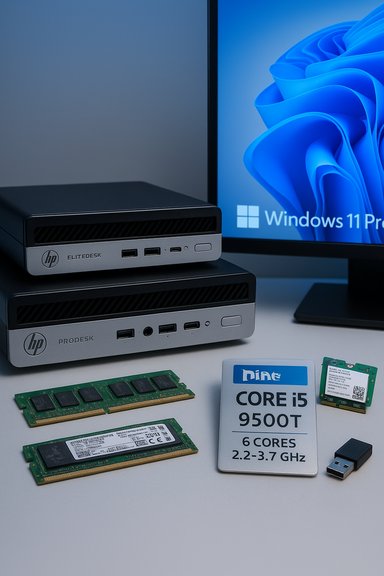
The renewed listing that bundles the HP EliteDesk 800 G4 and HP ProDesk 600 G5 Mini chassis with an Intel Core i5‑9500T, 16 GB DDR4, a 512 GB NVMe drive, Windows 11 Pro and Wi‑Fi presents a compact, business‑class mini PC proposition that’s appealing on paper — but the devil is in the details. This feature unpacks the ad’s claims, verifies the technical specifics against vendor and independent sources, assesses real‑world value for different buyer profiles, and calls out the upgrade, warranty and compatibility caveats buyers must weigh before pressing “buy.”
The two HP families named in the ad — EliteDesk 800 G4 and ProDesk 600 G5 Mini — are mainstream business mini‑PC lines that ship in multiple configurations and are commonly resold as refurbished or renewed systems. Both chassis support M.2 NVMe storage and user‑accessible DDR4 memory, making them natural candidates for the advertised 16 GB / 512 GB spec. On the CPU claim, the listing references the Intel Core i5‑9500T, a 9th‑generation desktop CPU (Coffee Lake Refresh) with characteristics worth confirming before drawing performance conclusions. Independent community threads and product guides repeatedly warn that refurb listings can mix SKUs and optional upgrades, so verification is essential.
The purchase makes the most sense for buyers who:
Conclusion: the hardware claims are verifiable in principle, the configuration is practical and useful, and the value proposition is real — but only when the seller supplies clear hardware proof and fair warranty terms.
Source: theglobalfilipinomagazine.com https://theglobalfilipinomagazine.c...ktop-Intel-Core-I5-9500T-16GB-RAM-512GB-NVME/
 Background
The two HP families named in the ad — EliteDesk 800 G4 and ProDesk 600 G5 Mini — are mainstream business mini‑PC lines that ship in multiple configurations and are commonly resold as refurbished or renewed systems. Both chassis support M.2 NVMe storage and user‑accessible DDR4 memory, making them natural candidates for the advertised 16 GB / 512 GB spec. On the CPU claim, the listing references the Intel Core i5‑9500T, a 9th‑generation desktop CPU (Coffee Lake Refresh) with characteristics worth confirming before drawing performance conclusions. Independent community threads and product guides repeatedly warn that refurb listings can mix SKUs and optional upgrades, so verification is essential.Overview: what the listing actually claims
- HP EliteDesk 800 G4 / HP ProDesk 600 G5 Mini chassis
- Intel Core i5‑9500T (9th Gen)
- 16 GB DDR4 RAM
- 512 GB NVMe (M.2) SSD
- Windows 11 Pro
- Wi‑Fi (dongle included in some kits) or an internal AX210 Wi‑Fi 6E module on upgraded units
- Renewed / refurbished condition
Technical verification: CPU, memory, storage, and wireless
CPU: Intel Core i5‑9500T — real specs and limits
The Intel Core i5‑9500T is a 9th‑generation Coffee Lake Refresh desktop processor with 6 cores and 6 threads, a base frequency of 2.20 GHz, and a max turbo of 3.70 GHz. Its default thermal design power (TDP) is 35 W (configurable down to 25 W), and it carries 9 MB of L3 cache. These are firm hardware facts from the official Intel product documentation. What that means in practice: the i5‑9500T is a multi‑core capable desktop CPU that excels at mainstream desktop workloads — Office, browser tabs, spreadsheets, multi‑window productivity, light media editing and many server‑light tasks. It is not a modern high‑efficiency U‑series laptop part or a current H‑series high‑performance part; it sits between current mobile offerings and higher‑end desktop chips in single‑thread burst and sustained multi‑thread throughput. Independent CPU databases and review databases confirm the same core counts and frequencies and report real‑world performance consistent with Intel’s specs.Memory: 16 GB DDR4 — single vs dual‑channel matters
The ad lists 16 GB DDR4 RAM, which is a solid baseline for Windows 11 Pro desktop use. However, performance depends heavily on whether that 16 GB runs in dual‑channel (8+8) or single‑channel (1×16) mode. Dual‑channel brings a measurable boost to integrated graphics and memory‑sensitive workloads; single‑channel reduces some responsiveness, especially under memory pressure and GPU‑accelerated tasks. HP mini models typically ship with SODIMM slots and support DDR4‑2666 or similar speeds, so physically upgrading or reconfiguring is possible — but the specific configuration should be verified with the seller and confirmed by checking the machine’s BIOS or Windows Task Manager on arrival. HP product manuals and support pages explicitly document the presence of SODIMM slots and memory speed limits for these product families.Storage: 512 GB NVMe — speed is real but model matters
A 512 GB NVMe M.2 SSD is standard and will deliver substantially faster boot, application load and file‑copy performance than SATA or eMMC alternatives. HP’s Mini series supports M.2 2280 NVMe drives in primary storage slots, so the advertised 512 GB NVMe is credible and typical for refreshed business builds. The practical experience depends on the actual NVMe model (e.g., TLC vs QLC NAND, controller, sustained write behavior). For heavy sustained write workloads, not all NVMe drives perform equally; sellers that specify the SSD model (Samsung, Western Digital, Kingston, etc. enable better buyer expectations. HP’s support docs and commercial spec sheets confirm M.2 NVMe support on both EliteDesk and ProDesk mini families.Wireless: Intel AX210, dongle, and Bluetooth nuance
The ad alternates between including a Wi‑Fi dongle and claiming built‑in AX210 Wi‑Fi 6E with Bluetooth. The AX210 module does exist as an M.2 Wi‑Fi 6E solution that supports tri‑band operation (2.4 / 5 / 6 GHz) and peak link rates up to 2.4 Gbps. Intel’s AX210 product brief documents support for Wi‑Fi 6E and lists Bluetooth in its specifications, but there’s documented ambiguity in public materials about the AX210’s Bluetooth version: Intel brief pages and some product pages have referenced Bluetooth 5.2 while later product listings sometimes show Bluetooth 5.3. In real markets, some AX210 units have firmware/drivers that expose Bluetooth 5.3 features while other units report 5.2 — vendor firmware updates and driver package versions can affect this. For buyers this means: an AX210 presence is a genuine upgrade for Wi‑Fi speed and 6 GHz compatibility, but Bluetooth feature level may vary by manufacturing batch and driver; treat the wireless claim as a sellable upgrade that must be verified with the seller.Use cases and performance expectations
Who benefits most from this configuration
- Small‑business desktops and conference‑room PCs that need a compact footprint and reliable multi‑tasking.
- Remote employees or home‑office users who prioritize a small desk footprint and Windows 11 Pro management features.
- Lab environments, light dev/test servers, or kiosk systems that need fast NVMe storage and respectable CPU throughput without a large power/cooling budget.
Not a fit for everyone
- Heavy video editing, large‑scale rendering or CPU‑bound compilation workloads should prefer newer multi‑core CPUs (8+ cores) or modern H‑series processors.
- Serious gaming rigs should look at discrete GPU machines; these minis rely on integrated graphics and are constrained thermally for sustained high FPS.
- Buyers wanting guaranteed Bluetooth 5.3 LE Audio features should verify the AX210 firmware/driver details — firmware differences mean Bluetooth capabilities can be inconsistent across units.
Strengths: what makes the build attractive
- Compact, proven chassis — EliteDesk and ProDesk minis are designed for business deployment: VESA‑mountable, low‑profile, and easy to place on desks or behind monitors. HP’s Mini product family also includes business features like BIOS manageability and firmware protections that are relevant for corporate buyers.
- Fast storage — 512 GB NVMe gives fast boot and application launch times and significantly improves perceived responsiveness over HDD or SATA SSD alternatives.
- Sensible multi‑core CPU — the i5‑9500T’s six physical cores are useful for true multitasking, background sync services, and multi‑tab browsing without the worst of throttling associated with older low‑power laptop chips.
- Upgradeable path — the mini platforms typically expose M.2 and SODIMM slots, giving buyers options to upgrade memory or storage later more cheaply than replacing the entire system.
- Business OS — Windows 11 Pro adds enterprise features (BitLocker, Group Policy, Remote Desktop and better management for domain‑joined machines) which are legitimate selling points for small businesses and pro users.
Risks and buyer‑protections: stay sharp on the details
- Renewed / refurbished condition — warranty and support vary
- “Renewed” listings are handled by third‑party refurbishers or resellers; warranty length, return window and support are seller‑dependent. The ad’s silence on warranty specifics is a red flag until clarified. Confirm return policy, on‑site versus depot service options, and whether the unit includes genuine HP warranty coverage. Community coverage of refurbished listings repeatedly flags activation, warranty and driver support issues that arise when vendors mix SKUs or use non‑standard licensing.
- SKU mixing and copy‑paste marketing
- Many marketplace listings amalgamate multiple SKUs and throw in optional upgrades as if they were standard. The presence of both “EliteDesk 800 G4” and “ProDesk 600 G5” in a single listing title is itself a sign to scrutinize the product page. Ask the seller for the exact model number (product number / serial) and the Hardware Inventory Report (or a photo of the BIOS/UEFI system information screen) before purchase.
- Wireless claims are often seller‑specific
- The AX210 claim is plausible but could be a paid upgrade or only available on specific refurbished SKUs. If the ad mentions an AX210 or AX210NGW module, request the BIOS/Hardware Inventory screenshot showing the module, or ask the seller to confirm whether Wi‑Fi is internal (M.2) or delivered as an external USB dongle. Bluetooth feature parity (5.2 vs 5.3) can vary by firmware; if Bluetooth 5.3 features are important, require explicit confirmation and a driver version that exposes LMP 12 / Bluetooth 5.3 functionality.
- Memory configuration details
- Verify whether the 16 GB runs as 8+8 dual‑channel or as 1×16 single‑channel. Sellers sometimes list raw capacity without disclosing channel configuration; dual‑channel yields better integrated GPU and memory bandwidth results.
- Software licensing and activation
- Confirm that Windows 11 Pro is legitimately licensed and activated — ask whether the OS is licensed via original HP COA/OEM or through the refurbisher’s volume or retail keys. Non‑standard activation can cause reactivation issues or future update problems. Community posts highlight activation and Office license pitfalls with refurbished systems; insist on seeing a validated activation status before finalizing the deal.
Purchasing checklist: concrete steps before you buy
- Request the exact model number or serial number and confirm it matches the advertised chassis (EliteDesk 800 G4 or ProDesk 600 G5 Mini).
- Ask the seller for a hardware inventory screenshot or the output of “System Information” (msinfo32) showing:
- CPU model (Intel Core i5‑9500T)
- Installed RAM and channel configuration
- NVMe model and capacity
- WLAN module or USB dongle details.
- Confirm warranty length, return policy and any refurbisher or marketplace protection (e.g., 30‑day return, 90‑day limited warranty).
- If AX210 Wi‑Fi 6E is claimed, request a screenshot from Device Manager or the UEFI that proves the presence of AX210NGW and the installed driver version.
- If Bluetooth 5.3 features matter (LE Audio, connection subrating), ask the seller for the Bluetooth LMP version or test evidence after driver updates.
- Confirm Windows 11 Pro activation status and whether a recovery image / recovery key is provided.
Comparison: refurbished mini vs small modern new mini
- Renewed HP minis with i5‑9500T and 16/512 are often priced well below new modern mini PCs (which can feature newer Intel Core U/H or AMD Ryzen 5000/7000 series silicon and tighter power efficiency).
- New mini PCs deliver newer connectivity standards (native Wi‑Fi 6/6E support depending on model), updated CPUs with improved single‑thread and multi‑thread performance per watt, and manufacturer warranties that are usually clearer.
- The refurbished route wins on price and upgradeability (if you want to add RAM or NVMe storage cheaply), while new systems win on long‑term performance, battery/wireless firmware modernity and vendor support.
Practical tips for deployment and upgrades
- If the unit arrives with single‑channel RAM, buy a matching SODIMM and install as a matched pair to unlock dual‑channel benefits. RAM upgrading on these HP minis is straightforward but confirm slot count first in the seller’s documentation or HP’s maintenance guide.
- Use a reputable NVMe model if replacing or upgrading the 512 GB SSD — mainstream TLC drives from known brands balance speed, endurance and predictable thermal behavior in small enclosures.
- If you need robust Wi‑Fi 6E access, verify your local network environment and router support for the 6 GHz band; Wi‑Fi 6E benefits require a Wi‑Fi 6E‑capable router and local regulatory allowance for 6 GHz operation.
- Keep BIOS and vendor drivers up to date after purchase — HP publishes UEFI and driver updates on its support pages that address stability and compatibility for wireless modules and chipset components.
Final assessment and recommendation
The combination advertised — HP EliteDesk 800 G4 / ProDesk 600 G5 Mini, Intel Core i5‑9500T, 16 GB DDR4, 512 GB NVMe, and Windows 11 Pro — is credible and can deliver a responsive, compact business desktop experience at a lower cost than new, modern alternatives. The hardware foundations are sound: the i5‑9500T is a 6‑core desktop processor suitable for everyday productivity; the M.2 NVMe slot and DDR4 SODIMM support are real and documented in HP product guides; and the AX210 is a well‑regarded Wi‑Fi 6E module when present. However, buyer diligence is essential. The ad’s mixed phrasing across two HP product families, the potential mismatch between claimed built‑in AX210 vs a Wi‑Fi dongle, and the variable nature of refurbished warranties are all reasons to seek explicit, verifiable proof of the exact unit configuration before purchase. Ask for screenshots, exact model/product numbers, and warranty terms. If the seller can produce clear, machine‑level evidence (BIOS ID, device manager entries and an honest warranty), the deal represents a solid value buy for small businesses and home offices. If the seller cannot substantiate the claims, walk away — the risk of SKU mixing, non‑standard licensing and unsupported wireless features is real.The purchase makes the most sense for buyers who:
- Need a compact desk‑side Windows 11 Pro PC,
- Want fast storage and enough RAM for multitasking,
- Are comfortable performing minor upgrades if needed,
- And insist on clear warranty/return terms.
Conclusion: the hardware claims are verifiable in principle, the configuration is practical and useful, and the value proposition is real — but only when the seller supplies clear hardware proof and fair warranty terms.
Source: theglobalfilipinomagazine.com https://theglobalfilipinomagazine.c...ktop-Intel-Core-I5-9500T-16GB-RAM-512GB-NVME/
