

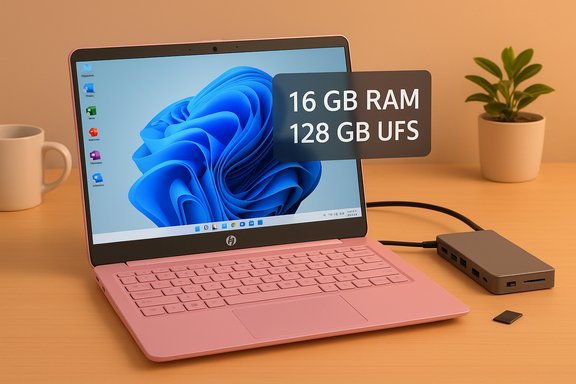
HP’s latest clearance-style pricing on a 14-inch Stream model has reignited the perennial budget-laptop debate: for a few hundred dollars you can now get a fully licensed Windows 11 machine with a one-year Microsoft 365 subscription and an accessory bundle that ordinarily costs far more than the device itself. The headline numbers—an Intel Processor N150, 16 GB RAM, 128 GB UFS internal storage paired with an additional 128 GB in a bundled docking station, a 14-inch HD anti‑glare display, and one year of Microsoft 365—make this SKU an unusually complete package for the entry-level laptop market, but the deal is also symptomatic of broader retail shifts and potential buyer traps that every Windows shopper should understand before clicking “buy.”
Source: Gizmodo This HP Windows Laptop with Office 365 Drops to Pennies, Now Cheaper Than a Generic Audio Headset
 Background
Why this sale matters now
The budget laptop segment is crowded and noisy: manufacturers are constantly balancing cost, battery life, and enough compute to run Windows comfortably. That tension has pushed many buyers toward Chromebooks — devices that are cheaper and often more responsive for basic tasks — but which also lock you out of native Win32 applications and the broader Windows ecosystem. HP’s recent Stream 14 promotions target buyers who explicitly want a Windows experience without sacrificing the basic productivity stack that many schools or small offices require, notably a full year of Microsoft 365 bundled with the purchase. Independent outlets have been actively covering similar markdowns across retailers in recent months, underscoring how aggressive inventory clearing can create outsize value opportunities for pragmatic buyers.What’s changed in the market
Two trends intersect here. First, Intel’s entry N-series chips (like the N150) are newer low‑power silicon designed to deliver acceptable everyday performance while maximizing battery life — a sensible choice for students and commuters. Second, retail bundling strategies have evolved: instead of artificially trimming CPU or memory to hit a price point, some retailers now include accessories and time‑limited software subscriptions to move inventory while keeping nominal MSRP figures deceptively high. That combination creates temporary windows where a full‑featured Windows laptop can out‑value many plain‑vanilla audio accessories or single‑use peripherals — but these windows are narrow and inconsistent across sellers.Overview of the HP Stream 14 configuration being promoted
Core hardware at a glance
- Processor: Intel Processor N150 (4 cores / 4 threads, up to 3.6 GHz boost, very low 6 W base TDP).
- Memory: 16 GB RAM — a noteworthy step up from the 4–8 GB commonly found on many budget lines.
- Storage: 128 GB UFS internal + additional 128 GB in the included docking station (varies by merchant; some kits advertise larger docked SSD sizes). This appears in multiple retail listings and is one reason the package feels complete for general productivity.
- Display: 14‑inch HD anti‑glare, roughly 1360×768 (some listings show 1366×768 or 1360×768—these variations are common in retail copy).
- OS / Software: Windows 11 Home in S Mode with the option to switch out of S Mode, and 1 year of Microsoft 365 included.
- Extras: a 7‑in‑1 docking station (adds ports and extra storage), microSD card, Type‑C cable and other low‑cost accessories depending on the bundle.
Retail price behavior
Different retailers list different sale prices depending on configuration and colorway. Best Buy and Walmart pages for similar HP Stream 14 SKUs show prices commonly in the low‑to‑mid hundreds — frequently between $279 and $399 — with some short‑term promos and seller-specific discounts pushing it even lower. Headlines from deal sites have called out prices in the $170–$329 range at times, but those are snapshot deals and vary by seller, time, and inventory. Treat any single published “list price” or “was $999” claim with skepticism unless it’s coming from the manufacturer’s own MSRP documentation. Deals of this kind are ephemeral.Deep dive: component-by-component analysis
CPU — Intel Processor N150: capable, efficient, not a powerhouse
The Intel N150 is an ultra‑low‑power quad‑core part designed for fanless, low‑heat designs. According to Intel, it has four cores (four threads), a maximum turbo frequency of 3.6 GHz, and a very low base power—characteristics that prioritize battery life and thermals over raw, sustained single‑thread or multi‑thread performance. Real‑world benchmarks place N150’s single‑thread and multi‑thread performance in the “everyday productivity” band: email, web browsing, video playback, light photo edits, and Office workloads are fine; heavy software compiling, large dataset manipulation, or real‑time video editing will quickly show limitations. The N150’s efficiency profile makes it an excellent match for a student’s or casual user’s daily tasks but not for power users. Why that matters- Battery and thermals: low‑TDP chips run cool and extend unplugged time, which is the practical priority for many buyers in this segment.
- Responsiveness: short bursty tasks (opening apps, browsing) benefit from the N150’s turbo headroom, but longer CPU‑bound workloads will be limited by its efficiency‑oriented tuning.
- Integrated graphics: the laptop relies on Intel integrated graphics—fine for streaming and light media editing, but not for modern AAA gaming or GPU‑accelerated creative workflows.
Memory — 16 GB is the standout feature here
Most true bargain Windows machines ship with 4 or 8 GB RAM, which immediately constrains multitasking in Windows 11. This Stream SKU’s 16 GB is the practical upgrade that changes the real‑world user experience: the laptop can keep multiple browser tabs, Office apps, and a video call active before memory starts to swap heavily. For buyers who want a small, portable Windows box that’s genuinely usable for a few years, this is a defensible choice and one of the most meaningful differences between this Stream SKU and cheaper alternatives. Retail listings consistently show the 16 GB SKU as a higher-tier variant, so confirm the exact memory configuration before purchasing.Storage — UFS versus eMMC versus SSD: real speed matters
This configuration advertises 128 GB UFS internal storage, not the older and slower eMMC found on many low‑cost Stream models. UFS (Universal Flash Storage) offers substantially higher read/write throughput and lower latency compared with eMMC, translating to faster app launches and snappier general responsiveness. The bundle’s docking station often ships with additional storage (128 GB or larger), connected over USB. That extra storage is handy for files and media but should be treated as secondary to the internal UFS for OS and application installs. Check whether the dock storage is SSD or an external UFS module; retail copy can be inconsistent. Practical tip- For maximum long‑term usability, install Windows and core apps on the internal UFS and keep large media or archives on the docked drive or a microSD card. If you expect to keep the device for years, plan to pair the purchase with an external SSD for fast media or project storage.
Display and build — adequate for productivity, not premium media
The 14‑inch HD anti‑glare panel is sized for mobility and legibility rather than cinematic fidelity. Resolutions listed around 1360–1366×768 are common on budget 14‑inch laptops and are perfectly serviceable for document work, web browsing, and casual streaming. Anti‑glare helps readability under fluorescent or outdoor lighting, but do not expect the color gamut, brightness, or contrast of IPS Full HD panels found on pricier machines. For students and most office tasks, this tradeoff is acceptable; photographers and video editors will want a higher‑resolution, better‑calibrated panel.Software bundle — one year of Microsoft 365 and OneDrive
The package includes a one‑year Microsoft 365 subscription, which adds immediate value for users who rely on Word, Excel, PowerPoint, and the broader Microsoft apps ecosystem. As of the latest Microsoft pricing, Microsoft 365 Personal is listed at $99.99/year and Microsoft 365 Family at $129.99/year, following the 2025 price adjustments. That means the included subscription is not trivial; it’s a service many buyers would otherwise purchase separately, and it also provides 1 TB of OneDrive storage, which complements the limited local storage on the device. (Note: Microsoft’s consumer pricing changed in 2025; confirm whether the bundle includes Personal or Family and whether the subscription auto-renews after the promotional year. Caveat on the “value math”- Some deal writeups subtract the retail Microsoft 365 price from the laptop price to show a “true cost” that looks dramatically lower. That arithmetic is useful only if you would have otherwise bought Microsoft 365 separately. For users who don’t need a full year or who already subscribe, the perceived value diminishes.
Buyer’s checklist: what to verify before you buy
- Confirm the exact SKU and memory/storage configuration on the product page. Retailers often list several near‑identical SKUs with important differences (e.g., 8 GB vs 16 GB, UFS vs eMMC).
- Check the seller and return policy. Many deeply discounted listings are third‑party sellers on marketplaces; verify seller ratings, warranty coverage, and return shipping terms.
- Verify the Microsoft 365 plan included (Personal vs Family), activation method, and whether the subscription auto‑renews. Microsoft pricing changed in 2025; the one‑year value depends on the plan.
- Confirm whether the Windows installation is Windows 11 Home in S mode; switching out of S mode is typically free but may be one‑way and can affect app installation options.
- Inspect the docking station spec: is the “extra” storage an internal SSD inside the dock, or simply a microSD or USB‑attached module? Dock connectivity and throughput vary.
Strengths — why this deal looks attractive
- Unusually generous RAM for the segment. The inclusion of 16 GB RAM is the single biggest usability upgrade over the common 4–8 GB alternatives; it materially improves multitasking and longevity.
- UFS internal storage instead of eMMC. UFS delivers a more responsive Windows experience and faster app load times, which makes the machine feel less “cheap” in daily use.
- Real Windows with Microsoft 365 included. For buyers who must run native Windows apps, the bundle removes the primary Chromebook tradeoff (no Win32 apps) and includes a widely used productivity suite and cloud backup.
- Accessory value. The dock, microSD, and cables expand usefulness for desk setups and file capacity without extra spending.
Risks and limitations — what could go wrong
- Retail copy and SKU confusion. Sellers sometimes conflate model names and specs to make a listing look better. Multiple “HP 14” or “Stream 14” SKUs exist—confirm the model number and spec sheet before buying. This is a persistent source of buyer complaints in the budget space.
- Price volatility and limited windows. Deal prices quoted in articles are snapshots. A “$329” or “$279” price today can revert quickly; some outlets call the same model a very different price a week later. Don’t buy on headline FOMO—verify the live price and return terms.
- S Mode and software policies. Some Windows 11 Home units ship in S Mode, which restricts app installation to the Microsoft Store. While switching out of S Mode is straightforward, it’s often one‑way; verify whether the seller’s SKU is locked and whether the preloaded software meets your needs.
- Docked storage as “bonus” — not primary. The dock’s extra storage is convenient but connected over USB; it’s not a replacement for a fast internal SSD when running apps. Treat dock storage as secondary unless the seller explicitly confirms NVMe inside the dock and provides benchmarks.
- Warranty and support caveats. Deep discounts can come from clearance sellers or overstock channels that don’t offer full manufacturer warranty support. Verify HP’s warranty route for the particular seller or reseller.
Who should buy this, and who should look elsewhere
- Buy this if:
- You need a small, native Windows machine with good multitasking on a tight budget.
- You’ll benefit from a one‑year Microsoft 365 subscription (and don’t already have one).
- You value battery life, light weight, and a cool-running fanless design for study or office tasks.
- Look elsewhere if:
- You do heavy content creation, software development, or anything that needs sustained CPU/GPU throughput. The N150 and integrated graphics will throttle under prolonged loads.
- You need a higher‑resolution or color‑accurate display for photo/video work.
- You plan to keep a laptop for many years and want a strong warranty pathway or upgradeability (these machines are typically sealed and limited for upgrades).
Practical buying strategy and negotiation tips
- Compare the exact SKU across multiple retailers (Best Buy, Walmart, Amazon, and HP’s own store) and note seller identity and return policy.
- If the price seems unreasonably low relative to HP’s advertised MSRP, watch for coupon stacking or single‑seller clearance tactics—those can be legitimate but ephemeral.
- For long‑term use, factor in the cost of adding an external NVMe or compact SSD if you plan to store many large files or games. The dock’s storage is useful but not always a high‑performance substitute.
- If the included Microsoft 365 plan is the main driver of value for you, verify whether the plan is Personal (one user) or Family (up to six users) before calculating the “net” price. Microsoft’s consumer plans increased in 2025; use the current Microsoft list price as a baseline.
Final verdict: a pragmatic win for the cautious buyer
This HP Stream 14 configuration is an unusually well-equipped budget Windows laptop thanks to 16 GB RAM and UFS internal storage coupled with a one‑year Microsoft 365 subscription and a practical docking bundle. For the typical student, remote worker, or light‑duty user who needs Windows compatibility, it offers a compelling out‑of-the-box experience that beats many barebones budget alternatives and is easier to live with than a basic Chromebook for those who depend on native Windows apps. However, the offer is not risk‑free. Retail copy can be inconsistent, the docked storage is not a substitute for a fast internal SSD, and the sale prices and configurations vary wildly between sellers and over short timeframes. Shoppers must confirm the exact SKU, the Microsoft 365 plan included, the seller’s warranty policies, and the return window before buying. In short: this deal is real and useful for the right buyer, but it’s not a magic bullet that turns a low‑end chassis into a long‑term workstation.Quick recap — what to check right now
- Confirm SKU (RAM, internal storage type, model number).
- Verify Microsoft 365 plan type and expiration/renewal rules.
- Check seller reputation and warranty coverage.
- Treat the docking station storage as helpful but secondary; plan to use internal UFS for the OS/app installs.
Source: Gizmodo This HP Windows Laptop with Office 365 Drops to Pennies, Now Cheaper Than a Generic Audio Headset
