

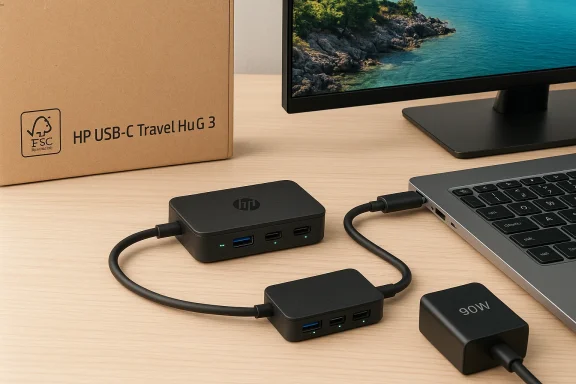
The HP USB‑C Travel Hub is a compact, thoughtfully engineered dongle that aims to solve the most common travel connectivity problems—adding HDMI video, high‑speed USB‑A and USB‑C data ports, and pass‑through power in a pocketable package—while raising questions about real‑world compatibility, power constraints, and what “universal” actually means for modern USB‑C notebooks. (onmsft.com)
At the same time, the Windows mobile story continues to haunt Microsoft’s hardware and ecosystem strategy. A widely circulated retrospective post from OnMSFT in 2017 noted the company’s repeated claims that Windows 10 Mobile was not officially dead even when community signals and internal branch changes suggested otherwise. The tug‑of‑war between engineering reality and public perception is instructive for hardware like travel hubs: marketing and a spec sheet only go so far if platform support and interoperability aren’t clear. (onmsft.com)
Why is that relevant to an accessory like a travel hub? Because interoperability and user expectations hinge on clear platform roadmaps. When a vendor promises broad cross‑platform compatibility, customers need both accurate specs and confidence that their platform of choice remains supported. The Windows Mobile saga is a reminder that platform fragmentation and shifting support priorities can quickly change what “compatible” means in the field. (onmsft.com)
Similarly, the Windows 10 Mobile narrative (as recalled by OnMSFT and corroborated by contemporaneous reporting) demonstrates how platform ambiguity can cause confusion and erode trust. Product pages and spec sheets are necessary, but not sufficient; clear platform roadmaps and honest, accessible support documentation are what actually let users plan and buy with confidence. The HP Travel Hub is a reliable piece of the puzzle—so long as buyers understand the rest of the system it plugs into. (onmsft.com)
Source: onmsft.com 3- HP USB-C Travel Hub » On MSFT – OnMSFT
 Background
Why this matters now
USB‑C has finally matured into the default connector on laptops and tablets, but the ecosystem remains fragmented: not all USB‑C ports support the same mix of Power Delivery (PD), DisplayPort Alt Mode, or high‑speed USB signaling. Travelers and hybrid workers have responded by carrying small USB‑C travel hubs that promise multiport convenience. HP’s latest offering—the HP USB‑C Travel Hub G3—arrives as a convenient, branded option with explicit sustainability claims and a focus on practical features rather than exotic bells and whistles.At the same time, the Windows mobile story continues to haunt Microsoft’s hardware and ecosystem strategy. A widely circulated retrospective post from OnMSFT in 2017 noted the company’s repeated claims that Windows 10 Mobile was not officially dead even when community signals and internal branch changes suggested otherwise. The tug‑of‑war between engineering reality and public perception is instructive for hardware like travel hubs: marketing and a spec sheet only go so far if platform support and interoperability aren’t clear. (onmsft.com)
HP USB‑C Travel Hub: What it is and what it promises
Core feature set
The HP USB‑C Travel Hub G3 packs the following into a small composite enclosure:- HDMI video output (HDMI 2.0) supporting up to 4K @ 60 Hz on a single external display.
- Two USB‑A ports and two USB‑C ports (host + downstream), with advertised 10 Gbps transfer rates on supported ports.
- Pass‑through Power Delivery with up to 65 W to the host (when paired with a higher‑wattage PD adapter).
- A short integrated USB‑C cable—about 11.8 inches (30 cm)—and a light 64 g body, making it eminently travelable.
- A sustainability angle: HP states the hub uses over 80% post‑consumer recycled plastic and ships in FSC‑certified packaging.
How HP positions the product
HP describes the Travel Hub as a universal accessory that “works with most devices” and lists compatibility across Windows, macOS, Chrome OS, iPadOS and Android—an important marketing message for people who use multiple platforms. HP’s product and support pages are careful to include the single most critical technical caveat: the host USB‑C port must support both USB Power Delivery and DisplayPort Alt Mode (i.e., a full‑feature USB‑C port) for video and pass‑through charging to work as advertised.Technical reality check: what HP’s specs mean in practice
Power delivery and the “up to 65 W” caveat
HP advertises “Power to Host up to 65 W” but also notes that to reach that level the hub should be paired with a 90 W adapter. That language matters: the hub itself can negotiate PD profiles up to 20V/3.25A (65 W), but some power supplies and hosts require negotiation behaviors that vary by vendor. Put simply, you can expect pass‑through charging that’s sufficient for most thin-and-light notebooks, but heavier 15‑inch workstations that expect 100 W or more will not receive full charging rates and may still discharge under heavy load. Always check your laptop’s power draw and test with the hub in your specific configuration.Video: Alt Mode is mandatory
The Travel Hub’s HDMI 2.0 output will deliver 4K60 only if the host USB‑C port implements DisplayPort Alt Mode and provides enough lanes (and if the host OS and GPU support the external resolution). Many laptops expose USB‑C ports that are power‑only or limit DisplayPort lanes (single vs dual‑lane), which can cap external displays at 4K30 or 2560×1600. Users upgrading to this hub for dock‑like video performance must confirm their laptop’s USB‑C is a full‑feature port. HP’s spec pages emphasize this point.Data speeds vs. real‑world throughput
HP lists 10 Gbps signaling for USB ports—useful for modern NVMe enclosures and fast flash drives—but sustained throughput depends on host controller behavior and cable quality. In practice you should expect occasional lower speeds with older host controllers or when multiple high‑bandwidth devices share the same hub bandwidth. Retailers that list product throughput and reseller spec sheets corroborate HP’s claim of high speed, but real‑world tests are still needed to validate throughput under multi‑device load.Strengths: Where the HP Travel Hub earns its keep
- Port density in a true travel form factor: five ports plus HDMI in a 64‑gram package is a practical tradeoff for portability.
- 4K@60 support for single external displays—valuable for content creators and presenters who need sharp output on projectors or 4K monitors.
- Sensible sustainability messaging—80% post‑consumer recycled material is a differentiator in a market flooded with cheap plastic dongles. That’s meaningful for corporate procurement and environmentally minded buyers.
- Broad OS compatibility: listing macOS, Windows, Chrome OS, Android, and iPadOS recognizes the mixed‑platform workflows many professionals run.
Risks and limitations: what to watch for
- Port function depends on the host. The Travel Hub is a classic example of “works if your laptop port supports it.” If your device lacks PD passthrough or DP Alt Mode, the hub will not unlock its headline features. HP explicitly calls this out on its support pages, but many customers still buy without checking.
- Power ceiling and charging behavior. Up to 65 W pass‑through is fine for Ultrabooks but not for high‑performance workstations. The requirement of a 90 W adapter to approach maximum PD to host is counterintuitive and worth testing.
- No Ethernet, no SD card slot. For some business travelers these omissions are meaningful: the Travel Hub is optimized for minimalism, not full docking capability. If you need wired networking or card reading, you’ll need an additional adapter.
- Firmware and driver reliance. HP mentions “secure firmware update” support; while that’s reassuring, it also means the hub may receive firmware updates for interoperability, and older hubs could require updates to fix compatibility bugs. Users should be prepared to run HP’s firmware tools if they run into problems.
Buying considerations: a quick checklist
- Confirm your laptop’s USB‑C port supports DisplayPort Alt Mode and USB PD (Full Feature USB‑C).
- Decide whether 65 W pass‑through meets your power needs—test under load if possible.
- If you require Ethernet, SD cards, or multiple external monitors, consider a fuller dock rather than this travel‑oriented hub.
- Keep a short, high‑quality USB‑C cable and a compatible PD adapter (90 W recommended) in your travel kit.
The OnMSFT angle and broader context: why mention Windows 10 Mobile?
The OnMSFT page that lists the HP Travel Hub also links to an earlier OnMSFT story from April 15, 2017 titled “Microsoft has not killed Windows 10 Mobile (yet) despite reports that they have.” That article captures a recurring theme in Microsoft’s ecosystem narrative: confusion between engineering branching decisions and product death. In 2017, community reports and tweets claimed Microsoft had “wiped” Windows 10 Mobile from the Redstone development tree; Ars Technica and other outlets pushed back, reporting Microsoft sources who said the change was a temporary branching decision (Feature2) and not an official end‑of‑life declaration. The ambiguity persisted and eventually Microsoft confirmed a maintenance‑mode reality later in 2017, when it became clear the OS would not receive extensive new features and focus shifted elsewhere. (onmsft.com)Why is that relevant to an accessory like a travel hub? Because interoperability and user expectations hinge on clear platform roadmaps. When a vendor promises broad cross‑platform compatibility, customers need both accurate specs and confidence that their platform of choice remains supported. The Windows Mobile saga is a reminder that platform fragmentation and shifting support priorities can quickly change what “compatible” means in the field. (onmsft.com)
Broader implications for users and enterprise buyers
For consumers
If you’re a knowledge worker who hops between an Ultrabook, an iPad, and an Android phone, the HP Travel Hub is a pragmatic compromise: it won’t replace a full docking station, but it will provide HDMI output, extra USB ports, and pass‑through charging in one tidy unit. Ensure your gear supports full‑feature USB‑C, and don’t expect workstation‑level charging. HP’s product pages and retailer listings provide the precise PD and video specs you’ll want to match to your laptop.For IT and procurement teams
Enterprises should standardize testing: include the Travel Hub in a compatibility matrix and test with corporate laptops and common USB‑C models. Document whether the hub supports your fleet’s power draw, whether firmware updates are required, and whether remote management or imaging processes are affected. The hub’s sustainability credentials may be attractive for procurement programs, but they should not be the sole buying criterion.Evaluating HP’s messaging: honest marketing or optimistic positioning?
HP’s brief product page is measured: it lists the practical caveats and does not overpromise. That said, marketing phrasing like “works with most devices” and “universal connectivity” can mislead untrained buyers who assume “USB‑C” equals full functionality. HP’s support documentation and the technical spec sheet correct expectations by explicitly stating the need for PD and DisplayPort Alt Mode support on the host, but those fine‑print realities are easy to miss on a retail thumbnail. The buyer’s responsibility remains high in the USB‑C era.Where the Travel Hub sits in the market (competitive analysis)
- Compared to no‑name knockoffs, HP’s Travel Hub offers verified HDMI 2.0 and 10 Gbps ports, which is significant for reliability and long‑term support.
- Compared to full docking stations (Thunderbolt docks or powered USB‑C docks), the Travel Hub sacrifices ports and power for size and price; that’s an intentional tradeoff for travelers.
- From a value perspective, retail listings show typical MSRP positioning in the low‑to‑mid range for branded travel hubs; independent resellers and enterprise channels carry similar part numbers, corroborating the product’s global availability.
Final verdict and practical recommendations
The HP USB‑C Travel Hub G3 is a solid, no‑frills accessory for users who need a compact multiport adapter with good video and decent charging support. It ticks the key boxes:- Portability: Excellent for briefcases and backpacks.
- Video capabilities: 4K@60 Hz is a genuine differentiator if your laptop’s USB‑C supports it.
- Speed: 10 Gbps ports make it suitable for fast portable storage.
Closing thoughts: engineering clarity beats optimistic marketing
The USB‑C transition promised a one‑plug future, but the reality has been messy: variable port feature sets, differing PD profiles, and divergent display lane allocations mean that accessories must be evaluated alongside the host device. HP’s Travel Hub is a good example of a vendor doing the right things—clear specs, sustainability notes, and moderate price—while the responsibility for a successful experience still squarely sits with the buyer to verify compatibility.Similarly, the Windows 10 Mobile narrative (as recalled by OnMSFT and corroborated by contemporaneous reporting) demonstrates how platform ambiguity can cause confusion and erode trust. Product pages and spec sheets are necessary, but not sufficient; clear platform roadmaps and honest, accessible support documentation are what actually let users plan and buy with confidence. The HP Travel Hub is a reliable piece of the puzzle—so long as buyers understand the rest of the system it plugs into. (onmsft.com)
Quick reference: sources consulted and verification notes
- HP product specifications and support pages for the HP USB‑C Travel Hub G3 provided the authoritative technical specifications used throughout this analysis, including port counts, PD profiles, and display support.
- Reseller and distributor listings confirmed part numbers, regional SKUs, and typical retail positioning.
- OnMSFT’s product post and historical piece on Windows 10 Mobile framed the editorial connection between the Travel Hub listing and the platform‑support conversation. (onmsft.com)
- Independent technology outlets (Ars Technica and Windows Central) were used to cross‑reference the Windows 10 Mobile development branching and public statements about the platform’s future. Those contemporaneous reports clarified that initial rumors of “death” were tied to engineering branches (Feature2 vs. Redstone) before Microsoft’s later maintenance‑mode posture.
Source: onmsft.com 3- HP USB-C Travel Hub » On MSFT – OnMSFT
