

Microsoft’s Ignite 2025 made clear that Copilot is no longer an add-on — it’s the operational fabric Microsoft expects enterprises to build around, introducing Work IQ, a new generation of Office agents, and a centralized control plane called Agent 365 that together turn Microsoft 365 Copilot from a conversational helper into an agentic platform for business automation.
Microsoft framed the Ignite narrative around the idea of the Frontier Firm — organizations that combine human leadership with fleets of AI agents to accelerate work, scale expertise, and reduce friction across day-to-day business processes. That framing drives three parallel product goals: give users contextual, role-aware intelligence at work; provide the tooling to build and operate specialized agents; and deliver governance, identity, and telemetry needed to treat agents as production services. These announcements are staged across Microsoft 365, Windows, Azure, and partner tooling. Highlights at Ignite include:
Source: TECHi Microsoft 365 Copilot Transforms Work with AI Agents: The Rise of Frontier Firms at Ignite 2025
 Background
Microsoft framed the Ignite narrative around the idea of the Frontier Firm — organizations that combine human leadership with fleets of AI agents to accelerate work, scale expertise, and reduce friction across day-to-day business processes. That framing drives three parallel product goals: give users contextual, role-aware intelligence at work; provide the tooling to build and operate specialized agents; and deliver governance, identity, and telemetry needed to treat agents as production services. These announcements are staged across Microsoft 365, Windows, Azure, and partner tooling. Highlights at Ignite include:- Work IQ, the inference layer that learns from work data and user memory to map intent to the right agent or action.
- Word, Excel, and PowerPoint Agents surfaced both inside Office apps (Agent Mode) and in Copilot Chat to create polished artifacts via multi-turn, iterative workflows.
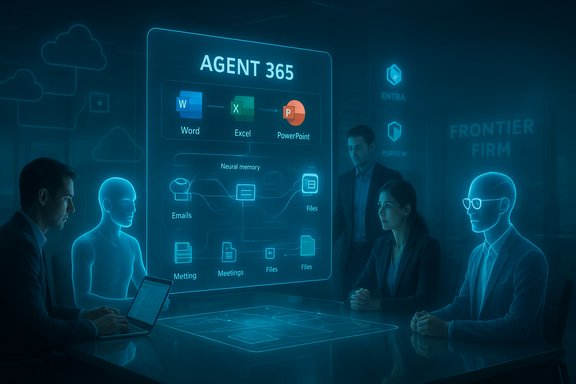
- Agent 365, a tenant control plane and registry to discover, monitor, secure, and manage agents at scale.
What Work IQ Is — and Why it Matters
A role-aware intelligence layer
Work IQ is described as the intelligence layer behind Microsoft 365 Copilot that ingests your emails, files, meetings, chats, and interaction patterns, then uses a combination of memory and inference to recommend actions and choose appropriate agents. It’s meant to be both personal (learning style and habits) and organizational (understanding a company’s structure and workflows). This shift matters for three reasons:- Context: Agents perform better when they know the job, the workflows, and the boundaries; Work IQ supplies that context.
- Personalization: By remembering style and preferences, Copilot can produce outputs that require less manual editing.
- Routing: Work IQ can map vague prompts to a specific agent (for example, choosing an Excel Agent for forecasting or a Researcher agent for deep synthesis).
Verification and caveats
Microsoft’s blog and Book of News publish the Work IQ concept and its intended integrations, and independent coverage confirms Microsoft’s emphasis on this layer. However, the operational boundaries — what Work IQ stores, how long memory persists, and the precise admin controls available at GA — require scrutiny during pilots because Microsoft’s public docs leave some governance and retention detail to tenant configuration and forthcoming admin consoles. Treat privacy and retention claims as contingent on tenant settings and published admin controls.Agents Everywhere: Word, Excel, PowerPoint, Teams, and Beyond
Office in Agent Mode
Ignite introduced two complementary agent paradigms: Agent Mode inside the Office canvas (in-app, multi-step automation that executes changes directly inside a document or workbook) and Office Agents surfaced in Copilot Chat (chat-first agents that can hand off outputs to native apps). This is a deliberate dual entry model that recognizes different work habits: chat-first ideation and in-app finalization. Key Office capabilities announced:- Excel Agent: Decomposes briefs into cleaning, calculation, formula, and chart steps; executes and exposes the plan so users can inspect and rollback changes.
- Word Agent: Iterative drafting, refactoring, and formatting with grounding in permitted workspace files and meeting notes.
- PowerPoint Agent: Design-aware slide generation and brand fidelity with template and layout controls (PowerPoint Agent availability staged through the Frontier program).
Teams: facilitator agents and MCP integrations
Teams gains Facilitator agents that run meeting agendas, take notes, track action items, and can even drive follow-ups. Agents in Teams Channels can pull data from third-party apps using Model Context Protocol (MCP) servers (e.g., Jira, Asana) to surface blockers or schedule follow-ups. This tight integration is meant to cut context switching and make meetings actionable.Sales and workforce agents
Microsoft demoed role-specific agents such as a Sales Development Agent that can nurture leads and personalize outreach by connecting to CRM systems, and Workforce Insights agents that give leaders real-time insights across roles and tenure. These vertical agents represent Microsoft’s intent to productize agent templates for common business functions.Agent 365: Governance, Observability, and Control
What Agent 365 promises
Agent 365 is presented as the control plane for agents — a centralized registry, life-cycle manager, and admin dashboard that allows IT to discover agents, assign identities, inspect permissions, and monitor agent actions and telemetry. Microsoft positions it to integrate with Entra (identity), Purview (data governance), Defender (security), and the Microsoft 365 admin center. This is the single most enterprise-focused announcement: Microsoft is signaling that agents will be treated like services that require provisioning, RBAC, audit trails, and compliance playbooks. Independent coverage and pre-release admin screenshots echo this narrative, and partner playbooks emphasize the need for formal change control when authorizing agent actions.Practical admin obligations
Agent 365 shifts responsibilities to IT and security teams in concrete ways:- Inventory agents and attach them to access reviews and incident playbooks.
- Define connector policies (what systems agents can query or write to).
- Enforce short-lived credentials and strong telemetry to prevent silent, long-lived automation that could be abused.
Unverified or evolving points to watch
Some community reporting has surfaced tentative SKU names and licensing mechanics for agent identities; Microsoft’s public documents confirm the control plane concept but leave final licensing and pricing details to later documentation. These specifics should be verified with Microsoft or your reseller before procurement.Copilot Studio, Model Choice, and the Multi-Model Strategy
Copilot Studio and Copilot Tuning
Copilot Studio continues to be Microsoft’s low-code/no-code environment for building agents, with tooling for tuning models on company data, testing agents, and publishing to an Agent Store. Copilot Tuning allows domain-specific model customization without exposing customer data to foundation model training. Microsoft explicitly states company data isn’t used to train foundation models.Multi-model routing and vendor choice
Microsoft is broadening model choice inside Copilot: customers can select OpenAI models, Anthropic models, and Microsoft’s own tuned models (including GPT-5 and Sora variants where available). Model routing — choosing the best model for a task — is surfaced as a tenant option in some flows. This multi-model posture is intended to balance performance, safety profiles, and regulatory constraints.What to validate in pilots
- Model routing defaults (which model handles which type of request).
- Whether Copilot Tuning truly isolates your tuning data from foundation model training. Microsoft’s published commitments are clear on intent, but contractual and tech validation are required for regulated industries.
Windows Integration: Taskbar Agents, Copilot+ PCs, and Windows 365 for Agents
Agents on the taskbar and Ask Copilot
Ignite previewed a redesigned taskbar experience — Ask Copilot — that surfaces text, voice, and vision entry points, and makes agents discoverable from the taskbar. The goal is to normalize agent invocation and reduce context switching. Microsoft preview messaging stresses opt-in controls for end users and admin policy for organizations.Copilot+ PCs and on-device SLMs
Microsoft continues to push the Copilot+ hardware narrative: PCs with dedicated NPUs and on-device small language models (SLMs) to enable low-latency and private, offline scenarios such as fluid dictation, systemwide writing assistance, and local privacy-sensitive operations. Independent reporting and Microsoft’s preview docs indicate several Copilot+ features will remain opt-in and require compatible hardware. Validate hardware baselines and NPU capabilities with OEMs before claiming parity across your fleet.Windows 365 for Agents (Cloud PCs tuned for agent workloads)
Windows 365 for Agents is a Cloud PC offering tailored to run agent workloads under enterprise policies — useful for scaling agent compute in the cloud with centralized governance. This reduces risk of exposing sensitive connectors to end-user endpoints. The offering is being previewed for enterprise customers.Security, Compliance, and Risk Analysis
New attack surface — same old rules, but stricter
Agentic automation introduces a concentration of privileges and automation logic that must be managed like any critical service. The attack vectors include:- Misconfigured connectors enabling data exfiltration.
- Stale or broad agent permissions that can act without appropriate approval.
- Social-engineering attacks that manipulate agents into taking unauthorized actions.
Operational recommendations
- Inventory: map candidate systems and classify data sensitivity before enabling agent connectors.
- Pilot: run low-risk pilots focused on reporting, marketing, or HR workflows with strict RBAC and time-limited access.
- Monitor: instrument agent activity with telemetry and integrate agent events into SIEM and incident response runbooks.
- Contracting: verify model routing and data usage clauses with vendors; contractual guardrails matter for regulated workloads.
Commercials, Licensing, and Cost Considerations
Microsoft is rolling both broad consumer-facing Copilot bundles and enterprise-grade metered offerings. Announcements include a Microsoft 365 Copilot Business plan priced at $21 per user per month for organizations with fewer than 300 seats, and a broader range of Copilot licensing tied to Microsoft 365 SKUs and frontier preview programs. Price, metering, and availability are staged and vary by region and program. Independent press coverage has also documented Microsoft’s other consumer and individual offerings, signaling a market segmentation strategy that separates basic Copilot chat (available to many Microsoft 365 subscribers) from advanced agent capabilities (gated by Copilot licenses, Frontier previews, or metered plans). IT buyers should model both per-user licensing and metered compute/creation costs when forecasting TCO for agent adoption.Benefits — What Organizations Stand to Gain
- Time savings: Repetitive authoring, report generation, and triage tasks will compress from hours to minutes when agents run reliably.
- Scale expertise: Agents can encode subject-matter expertise and apply it broadly across teams, reducing single-person bottlenecks.
- Better handoffs: Integrated agents in Teams, Outlook, and Office reduce the friction of passing work between email, meetings, and documents.
Risks and Wider Societal Concerns
Job displacement and organizational knowledge erosion
Industry observers and commentators warn that widespread agent adoption may displace certain roles or shift work composition — a theme highlighted in media coverage exploring the “agent boss” future. Organizations must plan reskilling, knowledge retention, and human oversight strategies in parallel with agent deployments. These are not hypothetical: economists and policy groups have repeatedly cautioned about job exposure when automation accelerates. Flag these risks and include workforce planning in any enterprise rollout.Hallucination, provenance, and IP posture
Automated generation of content creates IP and provenance questions. While Work IQ and grounding aim to reduce hallucination, agents that mix web grounding and tenant data can still produce incorrect or unverified outputs. Enterprises need:- Provenance logging for agent outputs.
- Human review gates for decisions with legal, compliance, or external communications risk.
Cost runaway and metering surprises
Agent workloads — especially those that generate media or use high-capacity LLMs — can create unanticipated metered cloud costs. Budget modeling and guardrails for consumption are essential.How to Pilots Wisely — A Practical 6-Week Program
- Define success metrics: time saved, error rate, and adoption rate.
- Choose 1–2 low-risk domains (e.g., marketing deck generation, weekly reporting).
- Configure least-privilege connectors and enable Agent 365 visibility for the pilot agents.
- Run agent workflows with a human-in-the-loop validation step for two sprints.
- Audit and tune: review telemetry, adjust model routing, tighten connectors.
- Expand scope gradually with policy templates and a cost-control guardrail.
Critical Analysis: Ambition, Strengths, and Open Questions
Strengths
- End-to-end vision: Microsoft presents a coherent stack — authoring (Copilot Studio), runtime (Azure AI Foundry / Foundry runtimes), discovery (Agent Store), and governance (Agent 365) — which lowers the integration work for enterprise adopters.
- Multi-model approach: Offering choices (OpenAI, Anthropic, Microsoft models) helps balance safety, cost, and performance trade-offs.
- Platform-level controls: Integrations with Entra, Purview and Defender indicate Microsoft understands the scale/enterprise management problem and is building tooling for it.
Potential weaknesses and risks
- Governance complexity: The number of moving parts increases admin burden; small orgs without mature governance could accidentally create high-risk automation.
- Opaque model behavior: Even with Work IQ grounding, model hallucination and reasoning edge cases remain a concern; product demos rarely reflect adversarial or ambiguous prompts.
- Economic surprises: Metered compute for agent workloads and media generation can balloon costs without strict controls.
Unverifiable or evolving claims (flagged)
- Exact SKU names, final licensing packaging for Agent 365 identities, and precise hardware TOPS thresholds for Copilot+ NPUs were discussed in preview materials and community reporting but are not fully finalized in public SKU documentation; treat these as provisional until Microsoft publishes final commercial terms.
Verdict: Strategic Opportunity — With Operational Responsibilities
Microsoft’s Ignite 2025 announcements represent a strategic bet: agents will become first-class workers inside enterprise IT stacks. The product moves (Work IQ, Office Agents, Agent 365, Copilot Studio, and Windows integration) show a coherent platform push that can deliver real productivity gains if implemented with discipline. For forward-leaning IT organizations, the time to pilot is now — but with clearly defined governance, telemetry, and workforce planning baked into every rollout. Organizations that treat agents as ephemeral toys will likely face governance, cost, and compliance headaches; those that treat them as production services — with identity, auditing, and lifecycle management — can compress cycles, scale expertise, and unlock new operating models.Conclusion
Ignite 2025 advances a readable thesis: the future of work is human-led and agent-operated. Microsoft has laid down an ambitious platform and a road map that crosses productivity, identity, cloud runtime, and governance. The practical outcome for companies will hinge on two things: the discipline of their pilots and the clarity of vendor commitments on pricing, data use, and model routing. The announcements are profound, but they are the start of a transformation — not its completion. Enterprises should prepare to adopt aggressively, govern prudently, and measure outcomes carefully as agents move from demo rooms into daily operations.Source: TECHi Microsoft 365 Copilot Transforms Work with AI Agents: The Rise of Frontier Firms at Ignite 2025
