Intel’s Core Ultra 200V family is being positioned as the x86 answer to Microsoft’s Copilot+ ambitions — a silicon platform that combines CPU, GPU and a beefed‑up Neural Processing Unit (NPU) to deliver local AI features in Windows 11 — and OEMs and Microsoft now say those processors will unlock the next generation of Copilot+ PCs.
Background / Overview
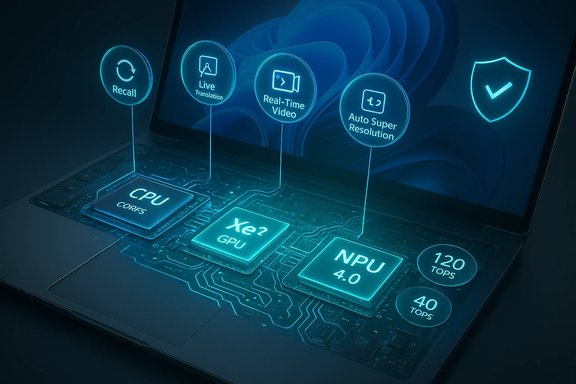
Since Microsoft introduced the Copilot+ label for Windows 11 devices, the company has defined a higher performance tier of features that rely on on‑device AI acceleration rather than cloud inference. That gating requirement — a neural processing unit capable of roughly **40 TOPS (trillions of operations per seconAM and fast storage baseline, is what separates standard Windows 11 Copilot features from the fully local, low‑latency Copilot+ experience. Intel’s response is the Core Ultra 200V family (often referred to by Intel as “Lunar Lake” in technical briefings), which integrates a fourth‑generation Intel NPU alongside a redesigned hybrid CPU and a new Xe‑class GPU. Intel quotes up to 120 total platform TOPS when CPU, GPU and NPU are accounted for together and positions the 200V line as a low‑power, high‑AI throughput mobile option that OEMs can ship as Copilot+‑qualified machines. This is an important shift: it means mainstream x86 vendors (Intel and AMD) are now offering on‑device AI power previously associated more with ARM‑based silicon, and Microsoft has already signaled that Copilot+ feature support will expand to those Intel‑ and AMD‑powered devices in staged Windows updates. Early messaging and coverage indicated a staged availability plan, with many Intel‑powered Copilot+ features scheduled to arrive through Windows 11 updates and Insider channels before broader availability.What Intel is claiming: architecture and performance highlights
Hybrid CPU + Xe2 GPU + NPU 4.0: a three‑way split
Intel describes the Core Ultra 200V as a tightly integrated platform where three compute engines share data and workload responsibilities:- New P‑ and E‑core microarchitectures optimized for performance per watt.
- Intel Xe2 (sometimes referenced by Intel as Xᵉ2) graphics, increasing integrated GPU throughput and bringing Intel XMX matrix engines to the platform.
- NPU 4.0 — a bigger, more capable neural engine intended to run sustained inference while consuming modest power. Intel quotes a multi‑engine platform TOPS number (CPU+GPU+NPU) that reaches up to 120 TOPS under some workloads.
Notable claimed figures (what to remember)
- Up to 120 total platform TOPS (CPU+GPU+NPU, vendor aggregate).
- Up to 50% lower package power compared to the immediate predecessor in certain usage scenarios, per Intel marketing.
- GPU XMX contribution quoted separately (Intel advertises up to ~67 TOPS from XMX on selected parts), which factors into the platform TOPS tally.
Why Core Ultra 200V matters to Copilot+ features
Microsoft’s Copilot+ experiences include features that benefit materially from local, low‑latency AI inference: things like Recall (local, searchable activity history), real‑time translation and live captions, Windows Studio Effects, Auto Super Resolution for games, and locally accelerated image/video operations in Photos and Paint. Many of these can be run in the cloud, but local NPUs cut round‑trip latency, remove bandwidth bottlenecks, and reduce cloud‑based privacy exposure.- Local private inference: Copilot+ aims to do as much as possible on the device for privacy‑sensitive workflows (Recall snapshots, local search indexes), and a 40+ TOPS NPU is Microsoft’s practical minimum for that capability. Intel’s platform figures and NPU changes aim directly at those requirements.
- Lower latency for interactive features: Voice isolation, camera enhancements, and on‑device summarization become more responsive when run on an NPU rather than a cloud endpoint. Intel and Microsoft both emphasize this UX payoff.
Cross‑checking the claims: what independent reporting confirms
Multiple independent outlets and Microsoft communications corroborate the core claims:- Intel’s newsroom and product briefs outline the Core Ultra 200V architecture, platform TOPS numbers and the NPU upgrade in detail. Those materials are Intel’s authoritative specification and positioning for the product.
- Microsoft’s internal posts about Copilot+ reiterate the 40 TOPS practical threshold for local, on‑device AI features and explain how NPUs enable offline and low‑latency operation for Windows‑level services. That explains why Microsoft views Intel’s 200V family as a fit for the Copilot+ label.
- Industry press coverage — including BetaNews, The Verge and Wired — independently reported that Intel’s 200V chips are being used as the basis for new Copilot+ PCs and that features will be rolled out via Windows updates. These outlets also note the staged nature of the rollout and the caveats around software readiness and OEM driver support.
The strengths: real benefits for Windows users and OEMs
- On‑device privacy and speed: Running Copilot+ tasks locally reduces cloud exposure and improves responsiveness for translation, transcription and interactive editing tasks. Microsoft’s documentation frames this as a privacy and UX win when the hardware meets the minimum NPU threshold.
- Consolidated platform approach: Intel’s integrated CPU+GPU+NPU simplifies OEM designs compared with adding discrete accelerators, enabling thinner, lighter Copilot+ laptops with broad app compatibility compared to ARM alternatives.
- Broader Copilot+ ecosystem: More OEMs shipping Intel‑based Copilot+ SKUs (HP, Dell, Acer, Lenovo, and mini‑PC vendors) means buyers will have a wider choice of form factors and price points than the earlier ARM‑centric phase. Product announcements at CES and OEM briefings confirm multiple Intel‑powered Copilot+ SKUs.
- Potential gaming and creative boosts: Intel’s XMX matrix extensions and Xe2 GPU additions are explicitly called out for improving creative workflows and GPU‑assisted AI operations like Auto Super Resolution in games. When software uses those extensions, performance can be compelling.
The risks and caveats: what buyers and IT teams must consider
1) The TOPS number is not a single truth
Platform TOPS figures are aggregated across CPU, GPU and NPU and are sensitive to workload type and thermal budget. Different SKUs and chassis thermal designs will deliver different sustained NPU performance; vendor spec pages may show different TOPS numbers for each SKU. Buyers should check OEM spec sheets for the exact NPU/TOPS numbers and validate them against Microsoft’s Copilot+ device guidance if the local features are important. Treat vendor TOPS claims as configuration‑specific, not universal.2) Software and driver maturity matter
Copilot+ functionality depends on Windows runtime support, OEM firmware/driver stacks, and ISV adoption. A device announced as Copilot+ capable only reaches its full potential after driver updates and app updates land. Early buyers may not see the full list of Copilot+ features immediately. Industry reporting and community threads consistently warn of a phased rollout that creates a temporary “feature lag.”3) Privacy and default behavior concerns
Features like Recall — which captures encrypted on‑device snapshots for searchable history — have provoked user concern. Microsoft has adjusted defaults and controls following feedback, but organizations should audit policies around on‑device AI features before broad rollouts to employees. This is a governance and compliance question as much as a technical one.4) Battery and thermal tradeoffs
Intel markets reduced package power for the 200V family, but AI‑heavy tasks still consume notable power. Real‑world battery life for heavy local inference workloads depends on the chassis thermal budget and the vendor’s power management policies. Thin‑and‑light Copilot+ machines will inevitably balance peak NPU throughput against battery life; buyers should scrutinize independent battery tests for the specific SKU they plan to purchase.5) Enterprise deployment considerations
IT teams should treat Copilot+ capabilities as a new class of platform requirement: a Copilot+ certified laptop may need extra attention for imaging, manageability, and security (TPM/UEFI/NPU attestation). Microsoft’s Copilot+ guidance and OEM documentation should be used to build procurement checklists for enterprise fleets.Practical buyer guidance: how to evaluate Copilot+ PCs powered by Core Ultra 200V
- **Verify the Copilook for device documentation from the OEM and Microsoft that lists the machine as Copilot+ capable and confirms the NPU TOPS figure meets Microsoft’s practical threshold.
- Check memory and storage: Microsoft’s Copilot+ guidance commonly lists 16 GB RAM and 256 GB SSD as realistic minima for local Copilot+ workloads. If you plan to use Recall or local model caching, err on the side of more RAM and more fast NVMe storage.
- Assess vendor firmware and driver cadence: Confirm the OEM has shipped or promised driver/firmware updates that enable the NPU/Windows co‑processing facilities for the chosen SKU. Early adopters benefit from vendor‑provided roadmaps.
- Test the features you care about: If possible, demo the specific Copilot+ experience you expect to use (Recall, Studio Effects, Auto Super Resolution) on the SKU you plan to buy, because the real‑world experience varies by chassis and software state.
- Plan for governance: For business deployments, define acceptable defaults for features that capture local data (e.g., Recall) and integrate them into data protection and compliance workflows.
Enterprise impact: deployment, manageability and security
For IT teams, Copilot+ is not merely a new checkbox on procurement lists — it raises practical concerns around image management, telemetry, and security attestation.- Security stack alignment: Copilot+ machines still require TPM 2.0, Secure Boot and VBS/HVCI alignment for enterprise posture. Microsoft explicitly ties secure tokens and encryption keys to on‑device AI features to protect local inference pipelines and snapshots. Ensure firmware configuration aligns with corporate security baselines.
- Patch and driver management: Because NPU drivers and the Copilot runtime are actively evolving, patch cadences should be integrated into the organization’s update plans. Consider pilot cohorts for Copilot+ rollouts to validate behavior before broad deployment.
- Policy controls: Use MDM policies and configuration service providers to control Copilot+ feature availability across user cohorts. Default opt‑ins for features that capture snapshots or audio should be carefully governed.
Market implications and the road ahead
Intel’s Core Ultra 200V family represents a strategic shift: by building NPUs into mainstream x86 mobile silicon, Intel reduces the binary between ARM and x86 for AI‑first Windows experiences and makes Copilot+ viable across a wider swath of the PC market. This should accelerate OEM choice and competition among form factors, from ultraportables to small desktops and all‑in‑ones. Early flagship Copilot+ systems from HP, Dell and OEM mini‑PC vendors demonstrate that this shift is underway. Yet the feature set that makes Copilot+ compelling remains software‑driven: Microsoft’s runtime, ISV optimization and OEM firmware updates will determine how much of Intel’s theoretical TOPS actually translate into daily user value. Expect a multi‑year evolution as applications adapt to the on‑device inference model and as Microsoft continues to tune Copilot for both cloud and local execution paths.Final analysis: who should buy now, and who should wait?
- Buy now if:
- You need the lowest latency for on‑device AI (offline translation, local model inference for privacy‑sensitive tasks).
- You want a modern Windows laptop with advanced hardware security and you're comfortable with a phased software rollout.
- You are an early adopter or IT pilot who can accept driver/feature cadence risk and wants to shape deployment policy.
- Consider waiting if:
- Your workflows are cloud‑centric and don’t require local NPUs.
- You need guaranteed immediate support for all legacy x86 apps without worrying about initial driver/firmware teething problems.
- You prioritize battery runtime during continuous heavy AI workloads — thinner Copilot+ systems can trade off sustained battery life for peak NPU throughput in real workloads.
Closing assessment
Intel’s Core Ultra 200V processors are a credible and material step toward making Windows laptops truly AI‑native: the platform integrates a larger NPU, a stronger integrated GPU, and reworked cores to deliver the throughput required for Microsoft’s Copilot+ ambitions. Intel’s own brief and Microsoft’s Copilot+ guidance converge on the central thesis: local NPUs of roughly 40 TOPS and above are required to make the fully offline Copilot+ experiences practical, and Intel’s 200V family is explicitly aimed at that market. That said, the headline TOPS and “up to” platform numbers should be treated as vendor maxima that vary by SKU, chassis thermals and software maturity. Real‑world value will be contingent on OEM driver support, ISV adoption, and Microsoft’s staged feature rollouts — all of which remain works in progress. Buyers and IT teams evaluating Copilot+ laptops should therefore focus on validated OEM specs, confirm Microsoft/Copilot+ certification, and pilot the specific features they plan to use before broad deployment. In short: the underlying hardware is here, the software path is mapped, and the real test now is turning platform TOPS into tangible, day‑to‑day improvements for users.Source: BetaNews https://betanews.com/article/intel-core-ultra-200v-x86-processing/]