

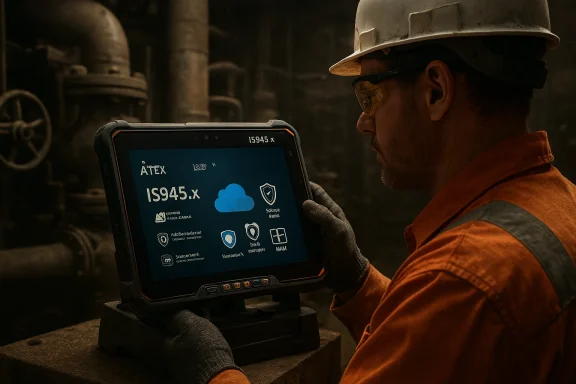
i.safe MOBILE’s IS945.x marks a meaningful inflection point: for the first time an Ex‑certified tablet from a leading hazardous‑area specialist ships with full Windows 11 IoT Enterprise LTSC on a Qualcomm ARM64 platform, bringing the familiar Windows ecosystem—and its enterprise applications—directly into zones where explosion safety is non‑negotiable.
The industrial mobility market has long been split between two realities. On one hand, rugged Android devices and purpose‑built mobile terminals dominate hazardous environments because they are compact, energy efficient, and easier to make intrinsically safe. On the other, many operational technology (OT) applications—legacy instrument configuration tools, Windows‑only SCADA clients, specialist engineering suites, and established corporate automation workflows—have historically required Windows. Bridging that gap without creating additional certified hardware or adding risky workarounds in Ex‑zones has been a stubborn problem for oil & gas, chemical, pharmaceutical and utility operators.
i.safe MOBILE’s IS945.x addresses that gap by combining a Qualcomm ARM-based chipset with Windows 11 IoT Enterprise LTSC (ARM64) in an ATEX/IECEx approved package. The result is an intrinsically safe, fanless Windows tablet specifically built for field work inside explosive atmospheres, with an emphasis on long battery runtime, heat efficiency and a controlled servicing model that industrial deployments require.
What to do:
What to do:
What to do:
What to do:
What to do:
What to do:
However, the success of a Windows‑in‑Ex deployment will hinge on meticulous integration work: verifying Arm64 drivers for every peripheral, validating emulated applications under load, enforcing charging and accessory rules required by certification, and implementing robust management and security practices that bridge OT and IT domains. Organisations that rush to standardise on Windows tablets for hazardous areas without this discipline risk introducing new operational or safety liabilities.
For procurement and operations teams, the path forward is clear: embrace the opportunity, but do it the industrial way—pilot, validate, document, and control. With the right controls in place, the IS945.x and similar Windows‑on‑ARM Ex‑certified devices can materially simplify field IT, reduce device sprawl, and enable richer, faster digital workflows where they matter most—right at the edge, in the most demanding environments.
Conclusion
i.safe MOBILE’s Windows‑based IS945.x is a significant and practical innovation for hazardous‑area computing: it brings the full Windows platform—on a power‑efficient ARM64 foundation—into Ex‑certified form factors that field teams can use without giving up safety or enterprise integration. But this capability shifts responsibility: successful deployments require careful technical validation, strict adherence to Ex‑zone handling rules, and an operational plan that covers drivers, accessories, patching and lifecycle alignment. When those pieces come together, operators gain a compelling new option to run Windows‑dependent industrial applications directly where work gets done—dramatically shortening the loop between field observations and enterprise action.
Source: HazardEx Windows 11 on ARM64 brings true mobility to Ex-certified hazardous areas
 Background / Overview
The industrial mobility market has long been split between two realities. On one hand, rugged Android devices and purpose‑built mobile terminals dominate hazardous environments because they are compact, energy efficient, and easier to make intrinsically safe. On the other, many operational technology (OT) applications—legacy instrument configuration tools, Windows‑only SCADA clients, specialist engineering suites, and established corporate automation workflows—have historically required Windows. Bridging that gap without creating additional certified hardware or adding risky workarounds in Ex‑zones has been a stubborn problem for oil & gas, chemical, pharmaceutical and utility operators.i.safe MOBILE’s IS945.x addresses that gap by combining a Qualcomm ARM-based chipset with Windows 11 IoT Enterprise LTSC (ARM64) in an ATEX/IECEx approved package. The result is an intrinsically safe, fanless Windows tablet specifically built for field work inside explosive atmospheres, with an emphasis on long battery runtime, heat efficiency and a controlled servicing model that industrial deployments require.
What the IS945.x Brings to Hazardous Areas
A full Windows experience inside Ex‑zones
- Windows 11 IoT Enterprise LTSC on ARM64: The IS945.x runs the LTSC variant of Windows 11 IoT Enterprise—Microsoft’s long‑term servicing channel tailored to fixed‑function and embedded devices. That means a stable feature set and a predictable 10‑year servicing window for devices that must remain consistent over long operational lifecycles.
- Native ARM64 and emulation support: Windows on ARM64 supports native ARM64 apps and can emulate x86 and x64 binaries where necessary, which gives organisations a practical path to run legacy Windows applications while planning longer‑term migrations to native ARM builds.
- Enterprise security and manageability: LTSC editions preserve enterprise features (BitLocker, Windows security controls, domain/MDM support) critical for centrally managed OT/IT convergence.
Hardware designed for the field
- Qualcomm ARM platform: The IS945.x is built on Qualcomm’s mobile compute family (the product line selects Qualcomm Dragonwing–class SoCs in its platform choices), delivering modem, GPU and AI engines in a single SoC for integrated connectivity and on‑device inference capabilities.
- Fanless operation and extended battery life: ARM64 power efficiency enables fanless designs and meaningful gains in battery runtime—an important operational improvement in shift‑based work where charging opportunities are limited.
- Full Ex‑certification: The IS945.x lineup is offered in configurations certified for ATEX/IECEx zones, and carries the kind of markings and accessory‑control guidance required for safe use in Zone 1/21 and Zone 2/22 environments, depending on model and configuration.
Practical operational benefits
- Reduced hardware sprawl: Organisations can reduce the number of distinct device types they maintain (no separate Windows workstation to be kept close to Ex‑areas, for instance).
- Direct OT/IT integration at the edge: Field operators can access corporate apps, cloud services and on‑premise IT systems directly from inside hazardous areas—supporting faster workflows and fewer manual handovers.
- Unified certified portfolio: Vendors can now offer both Android and Windows tablets inside a single certified family, simplifying procurement and lifecycle planning.
Why ARM64 + Windows 11 IoT Enterprise LTSC Makes Sense Here
Power, heat and form factor
ARM64 SoCs are optimized for energy efficiency. That’s materially important in intrinsically safe designs where excess heat and mechanical ventilation (fans) complicate certification and reliability. A fanless, low‑heat tablet reduces moving parts and thermal stresses, making the overall device simpler to certify and more robust in field conditions.Long term servicing and predictability
LTSC editions of Windows provide a fixed feature set and long servicing window. For industrial devices that run validated software stacks for years, the LTSC support model removes the disruption of frequent feature updates and gives organisations a predictable patch and life‑cycle timetable—essential for compliance and validation activities.A pragmatic migration path for legacy apps
Windows on ARM has matured substantially: it can run native ARM64 binaries and also emulate x86/x64 applications. For many industrial shops with Windows‑only toolchains, this means immediate compatibility with existing software while they evaluate longer‑term porting to native ARM. The implication is significant: many Windows‑dependent industrial apps no longer need to remain locked out of the Ex‑zone.Strengths: Why IT and Operations Should Take Notice
- True Windows in the Ex‑zone: IT teams can apply familiar policies, endpoint management and security stack tooling to devices that operate in hazardous areas—reducing operational friction between IT and OT.
- Reduced need for workarounds: No more carrying separate Windows laptops outside Ex‑areas for certain tasks or using bespoke desktop emulators; the IS945.x enables those workflows directly where the work happens.
- Lower thermal and mechanical complexity: Fanless ARM designs simplify the build and certification process and generally improve reliability in dirty, dusty or corrosive environments.
- Long‑term support: The LTSC servicing window aligns device maintenance windows with long procurement and operational cycles that are typical in industrial environments.
- Connectivity and on‑device AI: With integrated modems and AI engines, these tablets can support low‑latency telemetry, local inference and robust cellular failover—valuable for distributed remote field operations.
Risks and Limitations — What Buyers Must Watch For
While the IS945.x is a meaningful step forward, moving full Windows into certified hazardous areas introduces both operational and technical tradeoffs that must be evaluated carefully.1) Driver and peripheral compatibility
Windows on ARM requires device drivers built for Arm64. Many industrial peripherals and legacy drivers were written for x86/x64 and may not have Arm64 counterparts. That can limit the use of some third‑party accessories or legacy USB/serial devices unless the vendor supplies Arm64 drivers.What to do:
- Validate that all required peripherals (barcode scanners, serial adapters, docking stations, measurement instruments) have Arm64 drivers or vendor‑supported equivalents.
- Test critical workflows end‑to‑end with the exact OS image intended for deployment.
2) Emulation performance variability
Emulating x86 or x64 applications on ARM is feasible, but not all apps behave identically. Performance, latency or subtle behavioral differences can appear in CPU‑bound or driver‑sensitive tools.What to do:
- Prioritise native ARM builds for performance‑sensitive applications.
- Bench and validate legacy tools under real workloads in both emulated and native modes.
3) Certification constraints still impose operational limits
Ex‑certification carries strict rules for battery charging, accessory use, and maintenance. For example, batteries may only be replaced or charged in non‑hazardous areas unless a certified docking/charging solution is used, and only OEM‑approved accessories can be attached in an Ex‑zone.What to do:
- Maintain a strict accessories and charging policy aligned with the device manual and Ex regulations.
- Procure certified docking stations and charging equipment if in‑zone charging is necessary.
4) Patch management and security in OT contexts
A full Windows endpoint increases attack surface compared with simpler Android devices. While LTSC reduces disruptive feature churn, it does not eliminate the need for vigilant security patching and configuration management. Mixing Windows endpoints into OT networks without proper segmentation or controls can introduce risk.What to do:
- Deploy Windows‑centric patching controls (WSUS, Windows Update for Business, or managed update pipelines) and consider hotpatch/reboot‑reducing strategies where supported.
- Implement strict network segmentation and allowlist controls between OT and corporate IT.
- Use hardware security features available on the platform (TPM, secure boot, secure enclave/Pluton if present) and integrate with identity services.
5) Lifecycles can diverge: hardware vs. OS support
The device lifecycle and the OS lifecycle are not always the same. Organisations must plan for hardware replacement, battery servicing, and accessory obsolescence across the long OS support window.What to do:
- Create lifecycle maps aligning hardware warranty and repair timelines with LTSC servicing dates.
- Budget for spare parts and certified accessory stock to avoid extended downtime.
6) Vendor lock‑in & supply chain risk
Specialized Ex‑certified Windows tablets are low‑volume compared to consumer devices. Procurement and repairs may require OEM support chains that are slower or more expensive.What to do:
- Negotiate clear SLA and spare parts terms with the vendor.
- Plan for local repair/maintenance partners who understand Ex devices.
Technical and Compliance Checklist — Purchase and Deployment Questions
Before you sign off on a Windows in‑Ex deployment, verify the following items with your vendor and internal teams.- Device certification and model specifics:
- Is the tablet certified for the exact zone(s) you operate (Zone 0/1/2 / 20/21/22 as relevant)?
- Are the ATEX/IECEx/NEC/North American markings and certificates available for review?
- OS and servicing:
- Which Windows 11 IoT Enterprise LTSC build is preinstalled, and what is the vendor’s image‑freeze policy for deployed units?
- What is the exact support lifecycle for the OS image in use?
- Processor and driver support:
- Which SoC and chipset revision is deployed (e.g., Qualcomm QCM/QCS family) and which Arm64 drivers are provided?
- Are drivers for all required peripherals available in Arm64?
- Charging and battery rules:
- What are the permitted charging procedures and approved chargers/docking stations for in‑zone use?
- Are spare batteries handled per the vendor’s hazardous‑area guidance?
- Peripherals and accessories:
- Which accessories (headsets, docks, scanners) are certified for in‑zone connection?
- What are the constraints for data connection and charging inside hazardous areas?
- Management and security:
- How will devices be enrolled in your MDM/endpoint management and patched over time?
- Which hardware root‑of‑trust features are present and enabled (TPM, secure boot, device attestation)?
- Application compatibility:
- Have you tested all mission‑critical apps in the device image, including any third‑party middleware and drivers?
- For emulated Windows apps, what functional and performance tests have been run?
- Repair and supply chain:
- Where are repairs carried out and how long is the turnaround for Ex‑certified hardware?
- Are spare certified parts stockable for rapid replacement?
Deployment Blueprint — Recommended Steps
- Pilot, evaluate, repeat:
- Run a small pilot in the exact operational environment with the full set of accessories and workflows.
- Validate certifications and operational rules:
- Review the device manual, docking/charging instructions and Ex certificates line by line with safety officers.
- Baseline applications and drivers:
- Create a validated image that includes necessary drivers, security baseline and your management agent; freeze that image for field deployments.
- Harden and segment:
- Place devices on segmented subnets with strict firewall rules; only allow essential traffic to and from OT systems.
- Patch strategy:
- Use a controlled patch cadence mapped to the LTSC servicing windows; test monthly security updates in a staging environment before mass rollouts.
- Training and procedures:
- Train field operators on device‑specific Ex rules (battery handling, accessory controls, damage protocols).
- Spare parts and servicing:
- Maintain a small pool of certified spare devices and batteries to avoid operational downtime.
The Strategic Implications for OT/IT Convergence
Deploying Windows 11 IoT Enterprise LTSC on ARM64 devices inside Ex‑zones is more than a hardware refresh—it’s a strategic enabler.- Accelerated digitisation at the edge: With full Windows available in hazardous zones, operators can instrument work processes, capture richer telemetry and run local analytics without leaving the danger area.
- Simplified software lifecycle: Organisations that standardise on Windows tools can reduce the need to maintain parallel software stacks or complex middleware bridges—if they do the necessary compatibility and security engineering up front.
- New security responsibilities for OT teams: Windows endpoints bring enterprise‑grade features—and enterprise‑grade attack surfaces. OT teams must evolve to adopt modern endpoint protection, identity and patch management models aligned with IT practices.
Realistic Expectations — What This Isn’t
- This is not a drop‑in replacement for every legacy Windows x86 workstation. Driver availability, peripheral compatibility and emulation performance will determine success for specific applications.
- This is not an invitation to treat hazardous area devices like consumer tablets. Intrinsically safe operation imposes strict accessory and maintenance rules; you cannot freely swap batteries, charge with arbitrary cables, or attach uncertified peripherals in an Ex‑zone.
- This is not a silver bullet for all OT cybersecurity issues. Proper segmentation, identity, monitoring and incident response still must be implemented.
Final Analysis: Opportunity Balanced with Prudence
The IS945.x platform demonstrates a pragmatic, well‑engineered approach to a persistent industrial challenge: how to bring the Windows ecosystem safely and reliably into areas where explosion hazards previously limited device choice. The combination of a Qualcomm ARM64 SoC with Windows 11 IoT Enterprise LTSC delivers the technical building blocks the industry asked for—fanless power efficiency, a predictable servicing model, and the option to run existing Windows apps while migrating to native ARM over time.However, the success of a Windows‑in‑Ex deployment will hinge on meticulous integration work: verifying Arm64 drivers for every peripheral, validating emulated applications under load, enforcing charging and accessory rules required by certification, and implementing robust management and security practices that bridge OT and IT domains. Organisations that rush to standardise on Windows tablets for hazardous areas without this discipline risk introducing new operational or safety liabilities.
For procurement and operations teams, the path forward is clear: embrace the opportunity, but do it the industrial way—pilot, validate, document, and control. With the right controls in place, the IS945.x and similar Windows‑on‑ARM Ex‑certified devices can materially simplify field IT, reduce device sprawl, and enable richer, faster digital workflows where they matter most—right at the edge, in the most demanding environments.
Conclusion
i.safe MOBILE’s Windows‑based IS945.x is a significant and practical innovation for hazardous‑area computing: it brings the full Windows platform—on a power‑efficient ARM64 foundation—into Ex‑certified form factors that field teams can use without giving up safety or enterprise integration. But this capability shifts responsibility: successful deployments require careful technical validation, strict adherence to Ex‑zone handling rules, and an operational plan that covers drivers, accessories, patching and lifecycle alignment. When those pieces come together, operators gain a compelling new option to run Windows‑dependent industrial applications directly where work gets done—dramatically shortening the loop between field observations and enterprise action.
Source: HazardEx Windows 11 on ARM64 brings true mobility to Ex-certified hazardous areas
