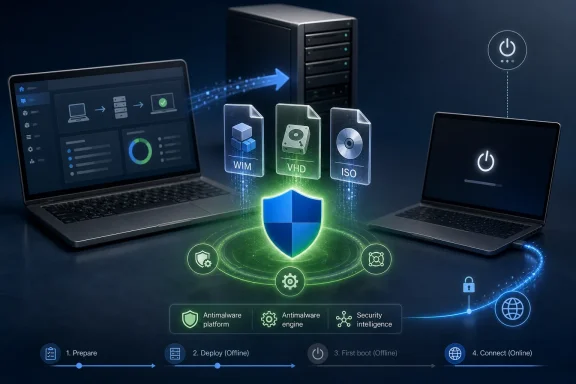
Microsoft has refreshed its offline Microsoft Defender update package for Windows installation images, bringing WIM and VHD media for Windows 11, Windows 10, and supported Windows Server releases up to Defender package version 1.447.236.0 with platform version 4.18.26040.7 and engine version 1.1.26040.8. The move is not the kind of Windows update that announces itself with a reboot countdown or a tray notification. It is quieter, more administrative, and arguably more revealing about where Windows security actually begins. Microsoft is again reminding IT departments that a “clean install” is only clean if the image it came from is not already stale.
The ordinary Windows security story starts after first boot. A machine joins a network, checks Windows Update, pulls Defender security intelligence, downloads platform bits, applies cumulative updates, and eventually settles into the managed state administrators expect. That story is tidy, but it skips the most awkward moment in the lifecycle: the gap between installation and protection.
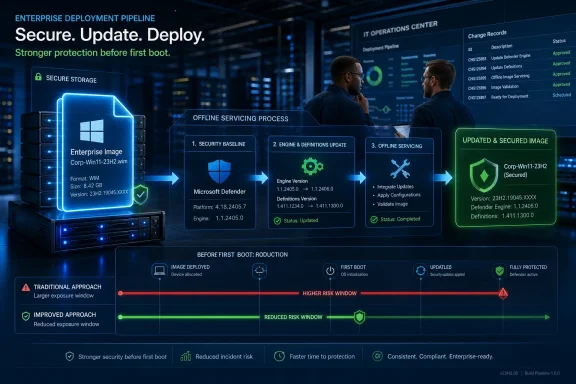
This Defender package targets that gap. It is meant for Windows operating system installation images, including WIM and VHD files, the formats used by enterprises, OEMs, labs, and power users to deploy Windows repeatedly and predictably. Microsoft’s update refreshes the Defender anti-malware client, engine, and signatures inside those images so the machine is not born with months-old threat knowledge.
That matters because Windows installation media ages badly. An ISO downloaded in February can still install Windows in June, but the Defender components baked into it may belong to a security world that no longer exists. Malware families change infrastructure, loaders mutate, ransomware operators rotate tooling, and commodity stealers are repackaged faster than many organizations refresh their deployment shares.
The important distinction is that this is not an emergency fix for already-running PCs. It is a supply-chain maintenance task for Windows itself. Microsoft is not just updating Windows; it is updating the thing from which Windows is made.
A modern Windows image is not merely a snapshot of files. It is a security posture frozen in time. Its Defender platform version determines what anti-malware capabilities are available before the first round of servicing. Its engine version controls how detections are interpreted. Its security intelligence version determines which threats are recognized before cloud protection, policy enforcement, and update orchestration fully come online.
The newly listed versions show how granular that posture has become. Microsoft’s package carries platform version 4.18.26040.7, engine version 1.1.26040.8, and security intelligence version 1.447.236.0. Those are not numbers most home users will ever inspect, but they are the sort of numbers that matter in a deployment pipeline, especially when images are used at scale.
The consumer version of this story is simple: if you create installation media using Microsoft’s current tools, you are more likely to begin with fresher Defender bits than if you reuse an old ISO from a folder called “Windows installs.” The enterprise version is more demanding. If your organization maintains custom images, golden images, task sequences, or virtual desktop templates, you have to decide whether those artifacts are being serviced as living assets or treated as museum pieces.
Newly installed machines often sit in a highly privileged and highly transitional state. They may be domain-joining, enrolling in management, accepting scripts, pulling drivers, installing line-of-business software, and receiving credentials or certificates. They are also commonly connected to networks before every hardening step has completed. A stale Defender build during this phase is not automatically catastrophic, but it is one more weak seam in a process that already has many moving parts.
The risk is not that every unrefreshed ISO will instantly lead to compromise. That would be melodrama. The risk is that organizations often stack small assumptions on top of one another: the image is trusted, the network is trusted, the staging VLAN is trusted, the first update cycle will be quick, and Defender will catch anything obvious. Each assumption may be defensible alone, but together they produce a window in which the endpoint is less capable than policy says it should be.
This is especially relevant for environments that frequently rebuild devices. Schools, labs, call centers, contractors, kiosks, test benches, and virtual desktop fleets can create large numbers of “new” Windows installations from the same source image. If that source image lags, the same lag is cloned repeatedly.
That list tells two stories at once. First, Microsoft knows that long-lived Windows editions are not edge cases. LTSC and Server deployments are precisely the systems most likely to be deployed from carefully maintained images rather than ad hoc downloads. Second, the migration away from older Windows versions does not erase the need to keep their installation sources defensible while they remain supported.
Windows 10’s consumer support deadline has already pushed many organizations into planning mode, but planning does not equal completion. Some fleets will move quickly; others will remain on LTSC editions, ESU coverage, or Server releases because application compatibility, hardware constraints, or regulatory validation make rapid upgrades impractical. Those environments still need fresh Defender components in their offline media.
There is a subtle irony here. The machines that change least often are often the ones whose installation images most need periodic attention. A Windows Server 2016 image used only for occasional rebuilds may feel stable precisely because nobody touches it. But from a threat-intelligence perspective, untouched can also mean neglected.
Security intelligence is perishable. A package released for installation images can narrow the gap, but it cannot eliminate it unless the image is refreshed continuously. By the time an administrator applies a quarterly Defender package to a WIM file, the daily intelligence channel may already have moved ahead. The goal is not to make offline media perfectly current; the goal is to prevent it from being embarrassingly old.
That is why this update should be read as hygiene rather than heroics. It gives deployment images a better starting point. It does not replace first-boot updating, network controls, endpoint onboarding, or post-deployment validation. A system installed from refreshed media still needs to check in, update, apply policies, and report healthy status.
The practical question for administrators is not whether this package is “latest” in the same sense as live Defender intelligence. It almost certainly will not be for long. The better question is whether the image has been serviced recently enough that the first minutes of a machine’s life are not governed by threat data from a different season.
Enterprise IT does not have that luxury everywhere. A corporate image may include language packs, drivers, provisioning packages, unattend files, OEM utilities, VPN clients, management agents, security baselines, or preinstalled applications. Rebuilding it from scratch every time Microsoft refreshes Defender is not always realistic. Servicing the image becomes part of the maintenance burden.
That burden is easy to underestimate because the work does not look dramatic. Mount the image, apply the package, commit the changes, test deployment, and update the distribution points. None of that has the executive visibility of a major Windows migration or a zero-day response. But it is the kind of work that determines whether endpoint security policy begins at deployment or only after deployment catches up.
The danger is that image maintenance often falls between teams. The security group cares about Defender versions. The desktop engineering group owns the task sequence. The server team maintains VHD templates. The help desk keeps a USB stick for emergency rebuilds. Unless ownership is explicit, the “official” image can quietly drift away from the organization’s security baseline.
Attackers do not need to compromise Microsoft’s official media to benefit from stale local copies. They only need to find organizations whose deployment process creates predictable windows of weakness. A newly imaged laptop that spends its first boot applying old drivers, running scripts, and waiting for updates is a softer target than the same laptop after Defender, EDR, firewall rules, and device management have fully converged.
This is why offline image servicing belongs in the same conversation as patch management. Patch management usually focuses on running systems because running systems are visible and measurable. Images are harder. They do not show up in endpoint dashboards as noncompliant unless somebody builds the process to check them.
For sysadmins, the lesson is uncomfortable but useful: an image repository is not just storage. It is a production dependency. It should have version control, change records, retirement dates, and a documented servicing schedule. If the only person who knows which ISO is current is “the admin who made it,” the process is already fragile.
The refreshed package updates the anti-malware client, anti-malware engine, and signatures in installation images. That matters because older platform binaries may lack performance improvements or fixes that newer detection logic assumes. Microsoft says these image updates can also provide performance benefits in some cases, which is a reminder that security tooling can age in ways that affect bootstrapping speed and reliability, not just detection coverage.
Administrators should also resist the urge to compare the image package version against the live security intelligence version and declare the package obsolete the moment a newer number appears. Live Defender intelligence moves constantly. Offline image servicing is about reducing lag at deployment time, not freezing the perfect state of the service.
Still, the version gap is worth noting. Neowin observed that a newer live intelligence version was already available at the time of its report. That is normal, but it reinforces the point: refreshed media is a head start, not a finish line. If deployment workflows block or delay Defender updates after first boot, even a newly serviced image can fall behind quickly.
This Defender package is a bridge between those worlds. It lets administrators inject newer protection into images before the machine has a chance to ask the cloud for help. That is especially important in restricted environments where internet access is delayed, proxied, or intentionally blocked. A newly installed server in a segmented network may not be able to reach Microsoft update services immediately, and that makes the contents of the installation image more consequential.
There is also a compliance angle. Many organizations claim a baseline that includes current anti-malware protection, but the definition of “current” often starts after device enrollment. Auditors and incident responders may take a less charitable view if a rebuild process repeatedly introduces machines with old Defender components, even if those machines eventually update.
The best posture is procedural. Organizations should define how often images are refreshed, how version numbers are recorded, who signs off, and how old media is retired. That does not require panic. It requires treating installation images as living infrastructure rather than static downloads.
But old install media should be treated like old drivers: useful in a pinch, risky as a default. If a USB installer has been sitting in a drawer since last year, it may still install Windows perfectly, but it will not represent the current state of Windows setup, Defender, drivers, or servicing assumptions. For personal machines, the easiest fix is simply to recreate media before a planned reinstall.
This is doubly true for Windows 11, where setup behavior, hardware compatibility checks, out-of-box experience flows, and update integration have all become more fluid over time. An old ISO is not just old security intelligence. It may also mean a rougher install experience and more catch-up work after first boot.
Power users who customize images should borrow a page from enterprise practice. Keep notes. Track versions. Retire old builds. Do not assume that because an image boots, it is a good starting point.
Windows servicing has become a layered calendar. There are monthly cumulative updates, out-of-band fixes, Defender platform updates, security intelligence updates, Store app updates, driver updates, Microsoft 365 app updates, and feature enablement packages. Installation image servicing sits beneath all of that, out of sight but not out of scope.
This is where many Windows debates go wrong. Users argue about whether Windows Update is too aggressive or too opaque, while administrators argue about change control and reboot windows. Those arguments matter. But they often begin after the operating system is already installed. Microsoft’s Defender image package shifts attention earlier, to the factory floor of Windows deployment.
That factory floor is where consistency is supposed to be created. If the source image is old, inconsistent, or poorly documented, every downstream tool has to compensate. If the source image is fresh and predictable, management systems start with a stronger hand.
Microsoft has provided the updated package for multiple architectures and supported Windows families. Administrators should validate it against their own images, especially if they maintain WIM or VHD files outside Microsoft’s standard download flow. The update should then move through the same testing path as any other image change, because deployment images are operational artifacts, not disposable files.
This should also prompt a cleanup exercise. Old ISOs and stale WIMs accumulate because storage is cheap and deletion feels risky. But every old image is a possible future mistake. If an image is not approved for deployment, it should be clearly labeled, isolated, or removed.
The same applies to emergency media. A break-glass USB drive that nobody updates is better than nothing during an outage, but it should not become the organization’s default reinstall path. Emergency tools need maintenance precisely because they are used when people are under pressure.
 Microsoft Is Patching the Moment Before Windows Update Exists
The ordinary Windows security story starts after first boot. A machine joins a network, checks Windows Update, pulls Defender security intelligence, downloads platform bits, applies cumulative updates, and eventually settles into the managed state administrators expect. That story is tidy, but it skips the most awkward moment in the lifecycle: the gap between installation and protection.This Defender package targets that gap. It is meant for Windows operating system installation images, including WIM and VHD files, the formats used by enterprises, OEMs, labs, and power users to deploy Windows repeatedly and predictably. Microsoft’s update refreshes the Defender anti-malware client, engine, and signatures inside those images so the machine is not born with months-old threat knowledge.
That matters because Windows installation media ages badly. An ISO downloaded in February can still install Windows in June, but the Defender components baked into it may belong to a security world that no longer exists. Malware families change infrastructure, loaders mutate, ransomware operators rotate tooling, and commodity stealers are repackaged faster than many organizations refresh their deployment shares.
The important distinction is that this is not an emergency fix for already-running PCs. It is a supply-chain maintenance task for Windows itself. Microsoft is not just updating Windows; it is updating the thing from which Windows is made.
The ISO Is No Longer a Static Artifact
For decades, IT culture treated installation media as a stable object. You downloaded an ISO, verified it, stored it, and used it until the next major version or service pack made it obsolete. That mental model has been crumbling for years, but Defender updates for installation images are one of the clearest examples of why it no longer fits.A modern Windows image is not merely a snapshot of files. It is a security posture frozen in time. Its Defender platform version determines what anti-malware capabilities are available before the first round of servicing. Its engine version controls how detections are interpreted. Its security intelligence version determines which threats are recognized before cloud protection, policy enforcement, and update orchestration fully come online.
The newly listed versions show how granular that posture has become. Microsoft’s package carries platform version 4.18.26040.7, engine version 1.1.26040.8, and security intelligence version 1.447.236.0. Those are not numbers most home users will ever inspect, but they are the sort of numbers that matter in a deployment pipeline, especially when images are used at scale.
The consumer version of this story is simple: if you create installation media using Microsoft’s current tools, you are more likely to begin with fresher Defender bits than if you reuse an old ISO from a folder called “Windows installs.” The enterprise version is more demanding. If your organization maintains custom images, golden images, task sequences, or virtual desktop templates, you have to decide whether those artifacts are being serviced as living assets or treated as museum pieces.
The Security Gap Is Small, But It Is Real
Microsoft’s own rationale is straightforward: installation images may contain outdated anti-malware definitions and software binaries, and that creates a temporary protection gap during new deployments. The word temporary can make the issue sound trivial. In practice, temporary gaps are exactly the kind attackers like.Newly installed machines often sit in a highly privileged and highly transitional state. They may be domain-joining, enrolling in management, accepting scripts, pulling drivers, installing line-of-business software, and receiving credentials or certificates. They are also commonly connected to networks before every hardening step has completed. A stale Defender build during this phase is not automatically catastrophic, but it is one more weak seam in a process that already has many moving parts.
The risk is not that every unrefreshed ISO will instantly lead to compromise. That would be melodrama. The risk is that organizations often stack small assumptions on top of one another: the image is trusted, the network is trusted, the staging VLAN is trusted, the first update cycle will be quick, and Defender will catch anything obvious. Each assumption may be defensible alone, but together they produce a window in which the endpoint is less capable than policy says it should be.
This is especially relevant for environments that frequently rebuild devices. Schools, labs, call centers, contractors, kiosks, test benches, and virtual desktop fleets can create large numbers of “new” Windows installations from the same source image. If that source image lags, the same lag is cloned repeatedly.
Windows 10 Is Still in the Room
The supported list is a reminder that Windows 11 may be the marketing center of gravity, but Windows 10 and Windows Server remain deeply embedded in production. Microsoft’s package applies to Windows 11, Windows 10 under Extended Security Updates, Windows 10 Enterprise LTSC 2021, Windows 10 Enterprise LTSC 2019, Windows 10 Enterprise LTSB 2016, Windows Server 2022, Windows Server 2019, and Windows Server 2016.That list tells two stories at once. First, Microsoft knows that long-lived Windows editions are not edge cases. LTSC and Server deployments are precisely the systems most likely to be deployed from carefully maintained images rather than ad hoc downloads. Second, the migration away from older Windows versions does not erase the need to keep their installation sources defensible while they remain supported.
Windows 10’s consumer support deadline has already pushed many organizations into planning mode, but planning does not equal completion. Some fleets will move quickly; others will remain on LTSC editions, ESU coverage, or Server releases because application compatibility, hardware constraints, or regulatory validation make rapid upgrades impractical. Those environments still need fresh Defender components in their offline media.
There is a subtle irony here. The machines that change least often are often the ones whose installation images most need periodic attention. A Windows Server 2016 image used only for occasional rebuilds may feel stable precisely because nobody touches it. But from a threat-intelligence perspective, untouched can also mean neglected.
The Three-Month Rhythm Is a Compromise, Not a Cure
Neowin’s report notes that Microsoft pushes these Defender updates for Windows images roughly every few months, while Defender security intelligence for running systems updates far more frequently. That cadence makes sense operationally, but it also exposes the limits of offline servicing.Security intelligence is perishable. A package released for installation images can narrow the gap, but it cannot eliminate it unless the image is refreshed continuously. By the time an administrator applies a quarterly Defender package to a WIM file, the daily intelligence channel may already have moved ahead. The goal is not to make offline media perfectly current; the goal is to prevent it from being embarrassingly old.
That is why this update should be read as hygiene rather than heroics. It gives deployment images a better starting point. It does not replace first-boot updating, network controls, endpoint onboarding, or post-deployment validation. A system installed from refreshed media still needs to check in, update, apply policies, and report healthy status.
The practical question for administrators is not whether this package is “latest” in the same sense as live Defender intelligence. It almost certainly will not be for long. The better question is whether the image has been serviced recently enough that the first minutes of a machine’s life are not governed by threat data from a different season.
The Media Creation Tool Helps Consumers, But Enterprises Own the Mess
For home users and enthusiasts, the path of least resistance is to recreate installation media with Microsoft’s current Media Creation Tool or official download sources. That approach does not require manually injecting Defender packages into mounted images. It is boring, which is exactly what most recovery media should be.Enterprise IT does not have that luxury everywhere. A corporate image may include language packs, drivers, provisioning packages, unattend files, OEM utilities, VPN clients, management agents, security baselines, or preinstalled applications. Rebuilding it from scratch every time Microsoft refreshes Defender is not always realistic. Servicing the image becomes part of the maintenance burden.
That burden is easy to underestimate because the work does not look dramatic. Mount the image, apply the package, commit the changes, test deployment, and update the distribution points. None of that has the executive visibility of a major Windows migration or a zero-day response. But it is the kind of work that determines whether endpoint security policy begins at deployment or only after deployment catches up.
The danger is that image maintenance often falls between teams. The security group cares about Defender versions. The desktop engineering group owns the task sequence. The server team maintains VHD templates. The help desk keeps a USB stick for emergency rebuilds. Unless ownership is explicit, the “official” image can quietly drift away from the organization’s security baseline.
Offline Images Are Part of the Attack Surface
It is tempting to treat installation media as inert. A WIM file sitting on a deployment share does not execute itself, and an ISO in cold storage does not phone home. But in modern operations, images are upstream of many endpoints. Anything upstream deserves security scrutiny.Attackers do not need to compromise Microsoft’s official media to benefit from stale local copies. They only need to find organizations whose deployment process creates predictable windows of weakness. A newly imaged laptop that spends its first boot applying old drivers, running scripts, and waiting for updates is a softer target than the same laptop after Defender, EDR, firewall rules, and device management have fully converged.
This is why offline image servicing belongs in the same conversation as patch management. Patch management usually focuses on running systems because running systems are visible and measurable. Images are harder. They do not show up in endpoint dashboards as noncompliant unless somebody builds the process to check them.
For sysadmins, the lesson is uncomfortable but useful: an image repository is not just storage. It is a production dependency. It should have version control, change records, retirement dates, and a documented servicing schedule. If the only person who knows which ISO is current is “the admin who made it,” the process is already fragile.
Defender’s Quiet Updates Carry Loud Operational Implications
The updated package also highlights the layered nature of Microsoft Defender. Users often reduce Defender to “the antivirus that comes with Windows,” but the product is a moving stack of platform components, engine code, signatures, behavior monitoring, cloud protection, and enterprise management hooks. Updating only one layer is not the same as updating the whole posture.The refreshed package updates the anti-malware client, anti-malware engine, and signatures in installation images. That matters because older platform binaries may lack performance improvements or fixes that newer detection logic assumes. Microsoft says these image updates can also provide performance benefits in some cases, which is a reminder that security tooling can age in ways that affect bootstrapping speed and reliability, not just detection coverage.
Administrators should also resist the urge to compare the image package version against the live security intelligence version and declare the package obsolete the moment a newer number appears. Live Defender intelligence moves constantly. Offline image servicing is about reducing lag at deployment time, not freezing the perfect state of the service.
Still, the version gap is worth noting. Neowin observed that a newer live intelligence version was already available at the time of its report. That is normal, but it reinforces the point: refreshed media is a head start, not a finish line. If deployment workflows block or delay Defender updates after first boot, even a newly serviced image can fall behind quickly.
Microsoft’s Security Model Assumes Servicing Discipline
Microsoft’s broader Windows security model increasingly assumes that devices are connected, managed, measured, and updated continuously. That model works best when machines are already inside a mature management loop. It is less elegant during deployment, recovery, lab rebuilds, and offline staging.This Defender package is a bridge between those worlds. It lets administrators inject newer protection into images before the machine has a chance to ask the cloud for help. That is especially important in restricted environments where internet access is delayed, proxied, or intentionally blocked. A newly installed server in a segmented network may not be able to reach Microsoft update services immediately, and that makes the contents of the installation image more consequential.
There is also a compliance angle. Many organizations claim a baseline that includes current anti-malware protection, but the definition of “current” often starts after device enrollment. Auditors and incident responders may take a less charitable view if a rebuild process repeatedly introduces machines with old Defender components, even if those machines eventually update.
The best posture is procedural. Organizations should define how often images are refreshed, how version numbers are recorded, who signs off, and how old media is retired. That does not require panic. It requires treating installation images as living infrastructure rather than static downloads.
The Enthusiast Lesson Is Simple: Stop Hoarding Old ISOs
Windows enthusiasts have their own version of this problem. Many of us keep a small archive of bootable USB drives, rescue ISOs, and “known good” installers. There is nothing wrong with that instinct; when a system is broken, the last thing anyone wants is to begin by downloading several gigabytes of media.But old install media should be treated like old drivers: useful in a pinch, risky as a default. If a USB installer has been sitting in a drawer since last year, it may still install Windows perfectly, but it will not represent the current state of Windows setup, Defender, drivers, or servicing assumptions. For personal machines, the easiest fix is simply to recreate media before a planned reinstall.
This is doubly true for Windows 11, where setup behavior, hardware compatibility checks, out-of-box experience flows, and update integration have all become more fluid over time. An old ISO is not just old security intelligence. It may also mean a rougher install experience and more catch-up work after first boot.
Power users who customize images should borrow a page from enterprise practice. Keep notes. Track versions. Retire old builds. Do not assume that because an image boots, it is a good starting point.
The Real Story Is Not the Version Number
The headline version in this release is Defender package 1.447.236.0, but the version number is the least interesting part of the story. The more important fact is that Microsoft continues to maintain a separate servicing path for the security contents of installation images. That is an admission that the first boot problem is real enough to deserve its own machinery.Windows servicing has become a layered calendar. There are monthly cumulative updates, out-of-band fixes, Defender platform updates, security intelligence updates, Store app updates, driver updates, Microsoft 365 app updates, and feature enablement packages. Installation image servicing sits beneath all of that, out of sight but not out of scope.
This is where many Windows debates go wrong. Users argue about whether Windows Update is too aggressive or too opaque, while administrators argue about change control and reboot windows. Those arguments matter. But they often begin after the operating system is already installed. Microsoft’s Defender image package shifts attention earlier, to the factory floor of Windows deployment.
That factory floor is where consistency is supposed to be created. If the source image is old, inconsistent, or poorly documented, every downstream tool has to compensate. If the source image is fresh and predictable, management systems start with a stronger hand.
The Defender Refresh Belongs in the Deployment Checklist
The most useful way to interpret this release is as a checklist item. It is not a feature to celebrate, nor a bug to fear. It is a reminder that Windows deployment media needs periodic security servicing, especially in environments where installs are repeated, automated, or performed without immediate access to the public internet.Microsoft has provided the updated package for multiple architectures and supported Windows families. Administrators should validate it against their own images, especially if they maintain WIM or VHD files outside Microsoft’s standard download flow. The update should then move through the same testing path as any other image change, because deployment images are operational artifacts, not disposable files.
This should also prompt a cleanup exercise. Old ISOs and stale WIMs accumulate because storage is cheap and deletion feels risky. But every old image is a possible future mistake. If an image is not approved for deployment, it should be clearly labeled, isolated, or removed.
The same applies to emergency media. A break-glass USB drive that nobody updates is better than nothing during an outage, but it should not become the organization’s default reinstall path. Emergency tools need maintenance precisely because they are used when people are under pressure.
The Install Image Is Now a Security Boundary
There is a compact lesson in this release, and it is bigger than Defender. Windows security no longer begins when the user reaches the desktop. It begins when the image is assembled, stored, selected, and deployed.- Microsoft’s refreshed Defender package updates the anti-malware client, engine, and security intelligence inside Windows installation images rather than only on running systems.
- The package applies across Windows 11, supported Windows 10 servicing channels, and Windows Server releases including Server 2022, Server 2019, and Server 2016.
- The included versions are Defender package 1.447.236.0, platform 4.18.26040.7, engine 1.1.26040.8, and security intelligence 1.447.236.0.
- The update reduces the protection gap that can occur between a new Windows installation and the first successful round of Defender and Windows Update servicing.
- Enterprises using custom WIM or VHD images should treat this as routine image hygiene, while home users should prefer freshly created Microsoft installation media over old ISOs.
- A refreshed image is not a substitute for post-install updating, policy enforcement, cloud protection, or endpoint management validation.
References
- Primary source: Neowin
Published: Sat, 06 Jun 2026 18:12:00 GMT
Microsoft released new Defender update for Windows 11, 10, Server ISO installations - Neowin
Microsoft released a new Defender update for Windows 10 and 11 ISO images. According to the company, this update should be deployed across all new Windows 11 and 10 installs. www.neowin.net
- Official source: support.microsoft.com
Microsoft Defender update for Windows operating system installation images - Microsoft Support
Describes a Windows Defender update package for Windows Server 2019, Windows Server 2016, and Windows 10.support.microsoft.com - Related coverage: windowscentral.com
Here are the 6 biggest features and improvements coming to Windows 11 in the June 2026 update on Tuesday | Windows Central
Microsoft's June 2026 Windows 11 update boosts responsiveness, adds Shared Audio, expands NPU metrics, and improves OOBE.www.windowscentral.com - Official source: microsoft.com
Latest security intelligence updates for Microsoft Defender Antivirus and other Microsoft antimalware - Microsoft Security Intelligence
Download the latest security intelligence updates for Microsoft Defender Antivirus, Microsoft Security Essentials (MSE), System Center Endpoint Protection (SCEP) and other antimalware.www.microsoft.com - Official source: learn.microsoft.com
Microsoft Defender Antivirus security intelligence and product updates and support - Microsoft Defender for Endpoint | Microsoft Learn
Learn about security intelligence updates, platform updates, and engine updates for Microsoft Defender Antivirus, including rollback and support options.learn.microsoft.com - Official source: techcommunity.microsoft.com
Act now: Secure Boot certificates expire in June 2026 - Windows IT Pro Blog
Get tips to prepare for the rollout of updated certificates across your organization. techcommunity.microsoft.com
- Related coverage: pcsofter.com
Microsoft Issues Updated Microsoft Defender for Windows 11, 10 and Server ISO Installations - PCSofter.COM - Technology & Software News
Microsoft has released a new Microsoft Defender security update tailored for Windows installation media, covering ISO, WIM, and VHD images for Windows 11, Windows 10, and Windows Server editions. While Microsoft pushes daily Defender updates to block newly emerging malware, it also integrates...www.pcsofter.com
- Related coverage: techradar.com
Microsoft confirms two major Defender security issues — so update now or face possible attack | TechRadar
CISA confirms two bugs being actively exploited in the wildwww.techradar.com - Official source: download.microsoft.com
- Official source: learn-attachment.microsoft.com
- Related coverage: techrounder.com
windows 11 24h2 kb5058411 build 26100 4061 everything you need to know
PDF documentwww.techrounder.com
- Related coverage: techriver.com