

Microsoft released KB5077180 on February 10, 2026 — a narrowly scoped but operationally important Safe OS Dynamic Update for Windows 11, versions 24H2 and 25H2 that refreshes the Windows Recovery Environment (WinRE) to WinRE version 10.0.26100.7817, and administrators need to treat it as mandatory image‑hygiene rather than a routine quality update. ([support.microsoft.microsoft.com/en-us/topic/kb5077180-safe-os-dynamic-update-for-windows-11-versions-24h2-and-25h2-february-10-2026-d47532c0-d1f4-456f-8f9e-e97c156fd2f0))
Microsoft divides servicing into several update families. Among them, Safe OS (WinRE) Dynamic Updates and Setup Dynamic Updates are tiny, surgical packages that patch the small set of binaries used during offline recovery, system resets, and feature upgrades. These packages do not deliver feature changes or broad security rollups; instead, they refresh the minimal runtime and drivers that WinRE and Setup rely on so that recovery and setup flows remain compatible with recent firmware, drivers, and the latest cumulative updates. This pattern of targeted servicing is well established and documented by Microsoft and community outlets alike.
KB5077180 follows that same model: its public summary is brief — “This update makes improvements to the Windows recovery environment (WinRE)” — but the operational implications for imaging, deployment, and support teams are substantial because WinRE is the last line of defense when a device can’t boot or needs offline recovery. The KB explicitly sets the expected post‑install WinRE version to 10.0.26100.7817, notes that no restart is required, and warns that the update cannot be removed once applied to a Windows image. It also replaces the earlier KB5074108 package. (support.microsoft.com)
Why file manifests matter: Microsoft distributes a manifest of file names, versions, and timestamps alongside these updates so imaging teams can verify that injected or on‑device WinRE images match the official package. That manifest is the single best ground truth for administrators validating that an image has been updated correctly. Community guidance strongly recommends verifying the manifest after injection into install.wim or winre.wim.
Treat KB5077180 as a required maintenance step for Windows 11 24H2/25H2 fleets that value reliable recovery and upgrade flows. Document your verification outputs (checksums, WinRE version, event logs), stage the rollout in controlled rings, and coordinate Secure Boot / firmware changes with your platform team to avoid surprises. The effort invested up front will pay dividends the day you actually need WinRE to perform its last‑resort job. (support.microsoft.com)
Source: Microsoft Support KB5077180: Safe OS Dynamic Update for Windows 11, versions 24H2 and 25H2: February 10, 2026 - Microsoft Support
 Background / Overview
Microsoft divides servicing into several update families. Among them, Safe OS (WinRE) Dynamic Updates and Setup Dynamic Updates are tiny, surgical packages that patch the small set of binaries used during offline recovery, system resets, and feature upgrades. These packages do not deliver feature changes or broad security rollups; instead, they refresh the minimal runtime and drivers that WinRE and Setup rely on so that recovery and setup flows remain compatible with recent firmware, drivers, and the latest cumulative updates. This pattern of targeted servicing is well established and documented by Microsoft and community outlets alike. KB5077180 follows that same model: its public summary is brief — “This update makes improvements to the Windows recovery environment (WinRE)” — but the operational implications for imaging, deployment, and support teams are substantial because WinRE is the last line of defense when a device can’t boot or needs offline recovery. The KB explicitly sets the expected post‑install WinRE version to 10.0.26100.7817, notes that no restart is required, and warns that the update cannot be removed once applied to a Windows image. It also replaces the earlier KB5074108 package. (support.microsoft.com)
What KB5077180 actually does
The technical scope: WinRE refresh and file manifest expectations
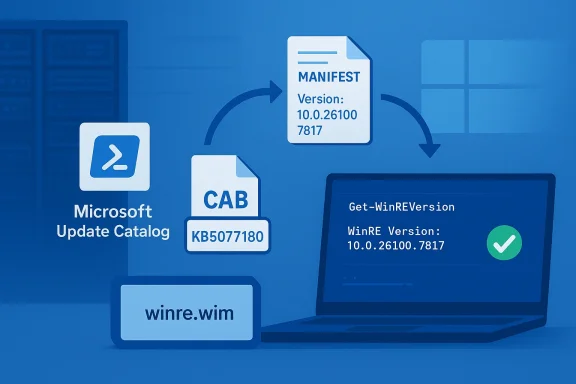
On the surface KB5077180 is small: it updates a handful of pre‑boot drivers, small orchestration binaries, and trimmed runtime components inside the WinRE image (winre.wim). The expected outcome after successful servicing is a WinRE image whose embedded version string equals 10.0.26100.7817. Microsoft publishes a PowerShell verification script (GetWinReVersion.ps1) and suggests using WinREAgent event logs or DISM inspection to confirm the version — standard verification mechanisms for Safe OS dynamic packages. (support.microsoft.com)Why file manifests matter: Microsoft distributes a manifest of file names, versions, and timestamps alongside these updates so imaging teams can verify that injected or on‑device WinRE images match the official package. That manifest is the single best ground truth for administrators validating that an image has been updated correctly. Community guidance strongly recommends verifying the manifest after injection into install.wim or winre.wim.
Delivery and install behavior
- How it arrives: Delivered th, the Microsoft Update Catalog (standalone CAB for offline injection), and WSUS** for managed environments. (support.microsoft.com)
- Restart: No host restart is required after the update is applied to the WinRE image; the updated code becomes relevant the next time WinRE runs. (support.microsoft.com)
- Rollback: When applied to a captured image, the update is **nat image; rolling back requires restoring a prior golden image or rebuilding the media. This permanence means mistakes in golden images are expensive to correct.
Why this matters: the operational impact
Recovery reliability is mission‑critical
WinRE is a highly trimmed runtime: it contains only the drivers and orchestration components needed to present the recovery UI, access storage, manage TPM/BitLocker interactions, and handle cloud reinstall or Reset flows. If those components are out of sync with the installed OS or device firmware, recovery flows can fail in subtle but severe ways: USB keyboards may not respond in recovery, BitLocker may prevent automated resets, or cloud reinstall flows may stall. A small binary mismatch can turn a routine recovery into an outage. KB5077180 reduces that risk by aligning the WinRE payload with current servicing.Secure Boot certificate expiration: an aisk
KB5077180’s KB page also calls attention to the upcoming Secure Boot certificate expiration beginning in June 2026 and points administrators to Microsoft’s guidance on certificate updates. That advisory is an important contextual detail: updates that touch pre‑boot components or the booth firmware‑level signature databases, and organizations must plan for the certificate rollover to avoid Secure Boot violations. Community analyses from previous dynamic updates have flagged conditional replacements of the boot manage newer UEFI CA entry) as an operationally delicate change that can surface as boot failures if administrators later modify the Secure Boot DB. Treat the Secure Boot advisory as a pre configuration and recovery media before making any DB changes. (support.microsoft.com)Real‑world consequences for deployment teams
- Imaging pipelines: Inject KB5077180 into install.wim/winre.wim as part of media refresh automation to ensure freshly built ISOs and frozen images contain up‑to‑date WinRE. Failure to do so leaves older images vulnerable to compatibility gaps.
- Help‑desk and field operations: Prepare support scripts and guidance for recovery scenarios (Reset this PC, Automatic Repair, BitLocker recovery) and update runbooks to account for the new WinRE version string for verification.
- Change control: Because many WinRE DU updates are permanent to images, add a verification gate in youreck file manifests and run staged pilot deployments.
Verification and validation — a practical checklist
Administrators should treat KB5077180 like aden images: validate in lab, pilot broadly, then roll out. The following steps reflect Microsoft’s recommended validation methods and community best practices.- Download the standalone CAB from the Microsoft Update Catalog and record checksums. (support.microsoft.com)
- Inject the Safe OS DU into a copy of your winre.wim using DISM (or your automation tooling) and mount the result for inspection.
- Verify the WinRE version with the published GetWinReVersion.ps1 script, reagentc /info, or DISM: ensure the expected version equals 10.0.26100.7817. (support.microsoft.com)
- Run representative recovery scenarios on target hardware families: Reset this PC (local and cloud), Automatic Repair, BitLocker unlock, and USB input verification.
- Pilot for 7–14 days on a small ring, monitor telemetry and help‑desk tickets, then expand by risk class. Maintain golden‑image backups for safe rollback.
Security, risk and the non‑obvious side effa “security update” in the usual sense — but it touches security surfaces
KB5077180 is framed as a recovery reliability update, not a CVE patch. Nevertheless, because WinRE interacts with firmware, TPM and BitLocker, it does traverse security surfaces.g pre‑boot binaries or signatures can alter Secure Boot behavior; any mismatch between signed boot managers and a platform’s Stored DB can be treated as a secure‑boot violation by firmware. The KB’s explicit notetificate expiry underscores that risk. Administrators must therefore coordinate firmware and certificate updates with WinRE servicing, not treat them as unrelated tasks. (support.microsoft.com)Non‑removable image updates increase rollback costs
Because Safe OS DUs applied into a WIM are often non‑removable, the cost of an incorrect injection is high: you may need to restore the previous golden image or rebuild media. That permanence elevates the importance of pre‑deployment verification and staged rollouts. Treat KB5077180 as a media‑refresh item rather than an “automatic install and forget” patch.Possible side effects to watch for
- Device‑specific regressions: older hardware with unusual firmware may encounter driver or input regressions inside WinRE. Validate on each hardware family.
- Secure Boot toggles: if an administrator later resets or modifies Secure Boot keys on a device that received a conditional boot manager replacement, firmware might reject the new binary and block boot. Creaore making DB changes.
- Telemetry noise: expect a short‑term spike in help‑desk tickets focused on recovery scenarios; prepare knowledge‑base articles and scripts that show how to check WinRE version and confirm correct servicing.
Cross‑checking KB5077180: independent reporting and context
authoritative for the update’s technical details and verification instructions, including the target WinRE version and distribution channels. To corroborate operational context and community guidance, multiple independent outlets covered the surrounding Patch Tuesday servicing and the role of dynamic updates:- Windows Central and other reputable Windows outlets have repeatedly described dynamic updates as setup and WinRE plumbing fixes that Microsoft stages alongside monthly cumulative updates to ring upgrades. Those reports emphasize the practical need to refresh the setup/runtime components before s.
- Neowin and similar tech sites haveafe OS Dynamic Updates and their Secure Boot interactions, reinforcing community best practices for injecting DUs into images and validating winre.wim contents.
Recommended rollout strategy (practical, step‑by‑step)
Below is a pragmatic rollout pattern that balances speed and risk for departmental IT teams and imaging engineers.- vices and images currently in scope (24H2 and 25H2). Classify by hardware family and firmware age.
- Acquire: Download KB5077180 from the Microsoft Update Catalog and store checksums in your artifact repository. (support.microsoft.com)
- Inject & Verify: Inject the DU into a copy of your winre.wim using DISM. Use GetWinReVersion.ps1 and DISM to verify the WinRE version equals 10.0.26100.7817. (support.microsoft.com)
- Lab validation: On representative hardware run Reset this PC (local/cloud), Automatic Repair, and BitLocker unlock scenarios. Confirm USB input and network/cloud‑reinstall behavior.
- Pilot: Deploy to a pilot ring (7–14 days). Monitor WinREAgent servicing events and support queues.
- Full rollout: Once the pilot is clean, roll out image refreshes an management channels. Preserve golden‑image backups and document the injected image versions and checksums for future audits.
Frequently asked technical questions (short77180 affect normal desktop runtime behavior?
No. The update refreshes WinRE and WinRE‑embedded files; it affects recovery flows and is only exercised when WinRE runs. No host restart is required after the update is appline. (support.microsoft.com)- Can I r injecting it into a WIM?
Not usually. Safe OS DUs applied into an image are typically non‑removable; revert by restoring a previous golden image or rebuilding. - How do I confirm the update installed correctly?
Use Microsoft’s GetWinReVersion.ps1, check WinREAgent Event ID 4501 for servicing succeeded messages, or inspect the WinRE image with DISM — all methods are documented in the KB. The canonical verification string is 10.0.26100.7817 for this release. (support.microsoft.com) - Should I be worried about Secure Boot changes?
Yes, plan for it. The KB calls out upcoming Secure Boot certificate expirations starting June 2026 and earlier dynamic updates have performed conditional boot‑manager replacements on devices with newer UEFI CA entries; coordinate firmware and DB changes carefully and create recifying the Secure Boot DB. (support.microsoft.com)
Strengths, limitations and risk judgment
Strengths
- Focused fix: KB5077180 is small and narrowly scoped, making it easy to validate against file manifests and WinRE version strings. (support.microsoft.com)
- Low‑surface change: Because it only touches the trimmed WinRE runtime, the likelihood of widespread runtime regressions is low if verification steps are followed.
- Clear verification: Microsoft provides a script and event guidance to confirm successful servicing, which is excellent for automation and compliance. (support.microsoft.com)
Limitations and risks
- Permanence for images: The non‑removable nature of image‑applied DUs raises rollback complexity and operational cost.
- Firmware interplay: Interactions with Secure Boot and pre‑boot signing can create edge cases that manifest as boot failures if administrators subsequently modify the platform’s DB without following recovery precautions.
- Testing burden: Because failures are visible only when recovery flows are executed, meaningful validation requires time and representative hardware testing — something many organizations under‑resource.
Final verdict and actionable takeaway
KB5077180 is not flashy, but it is consequential. It refreshes the Windows Recovery Environment to WinRE 10.0.26100.7817, replaces an earlier Safe OS DU, and must be handled as image hygiene: verify, pilot, and then inject into golden images. The risk profile is manageable if you follow a disciplined process — download the catalog package, verify file manifests and WinRE version, test recovery scenarios on representative hardware, and maintain golden‑image backups for rollback.Treat KB5077180 as a required maintenance step for Windows 11 24H2/25H2 fleets that value reliable recovery and upgrade flows. Document your verification outputs (checksums, WinRE version, event logs), stage the rollout in controlled rings, and coordinate Secure Boot / firmware changes with your platform team to avoid surprises. The effort invested up front will pay dividends the day you actually need WinRE to perform its last‑resort job. (support.microsoft.com)
Source: Microsoft Support KB5077180: Safe OS Dynamic Update for Windows 11, versions 24H2 and 25H2: February 10, 2026 - Microsoft Support
