Microsoft released KB5089592 on May 26, 2026, as a Safe OS Dynamic Update for Windows 11 version 26H1, improving the Windows Recovery Environment while again warning that Secure Boot certificates on most Windows devices begin expiring in June 2026. The update itself is narrow, automatic, and unrecoverable once applied to an image. The warning attached to it is the larger story. Microsoft is using routine servicing notes to push administrators toward a boot-chain maintenance deadline that can no longer be treated as distant background noise.
KB5089592 is not a feature drop, not a cumulative update in the usual Patch Tuesday sense, and not a headline-grabbing security fix. It is a Safe OS Dynamic Update, the class of servicing package Microsoft uses to refresh the environment Windows relies on during setup, recovery, and repair. In this case, Microsoft says the update improves the Windows Recovery Environment, or WinRE, for Windows 11 version 26H1.
That would normally be the sort of release that only deployment engineers and image maintainers notice. It arrives through Windows Update automatically, is also available from the Microsoft Update Catalog, requires no restart after application, has no prerequisites, and cannot be removed once applied to a Windows image. Microsoft says the WinRE version after installation should be 10.0.28000.2169, and KB5089592 replaces the earlier KB5089591 released two weeks prior.
But the support article opens with a warning that dwarfs the package description. Secure Boot certificates used by most Windows devices are set to expire starting in June 2026, and Microsoft says some personal and business devices could be affected if they are not updated in time. That placement matters. Microsoft is not merely maintaining 26H1 recovery bits; it is threading Secure Boot preparation through the monthly machinery of Windows servicing.
The result is a deceptively quiet update with a loud subtext. Microsoft’s boot trust infrastructure is approaching a scheduled rollover after roughly a decade and a half, and the company is trying to make the transition feel like ordinary servicing before it becomes an emergency ticket queue.
That makes KB5089592 easy to misread. If you are managing a normal fleet of 24H2 or 25H2 devices, this particular KB number may not be destined for most of your machines. But the Secure Boot warning attached to it is not confined to 26H1. Microsoft has been repeating the certificate-expiration notice across Windows servicing communications because the underlying issue sits below any one Windows release.
Safe OS Dynamic Updates are part of the setup and recovery plumbing, which is why they attract attention from IT pros who build offline media, maintain deployment images, or troubleshoot upgrade failures. They are not glamorous, but they sit in the same operational neighborhood as BitLocker recovery surprises, WinRE partition constraints, and boot repair scenarios. When Microsoft attaches a Secure Boot certificate warning to this class of update, it is effectively telling administrators to look below the desktop layer.
The practical distinction is important. KB5089592 is about 26H1 WinRE. The certificate rollover is about the broader trust chain that allows Windows and other signed boot components to pass Secure Boot validation. One is a package; the other is a platform event.
The problem now is not that Secure Boot suddenly stopped working. The problem is that foundational Microsoft certificates issued in the 2011 era are reaching the end of their planned life. Microsoft has identified replacement 2023 certificate authorities and has been moving devices toward them through Windows updates, OEM firmware updates, and staged rollout logic.
That distinction should calm one kind of panic while sharpening another. A PC does not necessarily become a brick the instant a certificate reaches its expiration date. Microsoft’s own guidance has been more nuanced: devices may continue to start, but they can lose the ability to receive future Secure Boot database updates, revocations, or newly signed boot components if the trust store is not modernized.
For security teams, that is still a real problem. A Secure Boot stack that cannot accept fresh trust updates becomes stale at the exact layer where staleness is most dangerous. The risk is not just whether Windows boots on June 25; it is whether the machine can keep adapting to boot-layer vulnerabilities after the old certificates age out.
The less tidy reality is that Secure Boot is not owned by Windows alone. Firmware vendors, OEMs, silicon platforms, recovery partitions, BitLocker state, third-party bootloaders, and fleet management policies all sit in the blast radius. A Windows update can deliver part of the remediation, but firmware must accept and store the relevant Secure Boot database changes.
That is why Microsoft’s guidance keeps nudging organizations toward OEM firmware updates and validation. Some devices may need BIOS or UEFI updates before the Windows-side certificate update succeeds cleanly. Some may have storage, recovery, or firmware quirks that make the rollout noisier than the support article implies.
This is the recurring bargain of the Windows ecosystem. Microsoft gets the scale advantage of servicing hundreds of millions of PCs through a common update pipeline, but the firmware layer remains fragmented by vendor, model, age, and enterprise configuration. The company can coordinate the transition, but it cannot make every device’s UEFI implementation equally boring.
That work is unglamorous and essential. Administrators need inventory signals, update compliance data, event logs, firmware baselines, OEM advisories, BitLocker recovery readiness, and a realistic exception list. The machines most likely to cause trouble are rarely the ones sitting at headquarters on current firmware with clean Windows Update telemetry.
The awkward devices are the ones on shelves, in labs, in classrooms, in branch offices, in kiosks, in factories, and in “do not touch” executive travel bags. They may be Windows 11 capable, but they may not have seen recent firmware. They may boot only a few times a year. They may run dual-boot configurations, security tools, disk encryption products, or specialized pre-boot environments that depend on a specific Secure Boot trust path.
In that sense, the expiration date is a poor planning milestone. If a fleet administrator waits until certificates have already started expiring to begin inventory, the problem has shifted from planned maintenance to incident response.
KB5089592 sits squarely in that world. It improves WinRE for a hardware-scoped Windows 11 release, and Microsoft says it cannot be removed once applied to an image. That is normal for this class of package, but it is also a reminder that servicing the recovery environment is not the same as installing a userland app.
Dynamic Updates exist because Windows setup and recovery need current components while the operating system is not fully online. In enterprise deployment, these updates matter for install media and offline images. If administrators disable Dynamic Update or maintain custom media without refreshing it, they can find themselves installing an OS with stale setup or recovery components even after monthly updates are available elsewhere.
The Secure Boot certificate transition raises the stakes for that discipline. Boot trust, recovery, and setup are all parts of the same pre-desktop chain of custody. A fleet that treats WinRE, firmware, and Secure Boot as separate silos will have a harder time diagnosing failures when they collide.
That phased approach is prudent. Secure Boot changes are exactly the kind of update that can create ugly edge cases if pushed too broadly without telemetry. Microsoft wants devices to demonstrate successful update signals before receiving certain certificate changes, because a failed boot-chain update is worse than a delayed one.
But staged rollout also creates uncertainty for administrators. A device that has not yet received the new certificate may be intentionally deferred, misconfigured, unsupported, firmware-blocked, offline, or simply waiting its turn. The difference matters, and it cannot be inferred from one missing update alone.
This is where Microsoft’s consumer-friendly message and enterprise reality diverge. “Windows Update will handle it” is a reasonable simplification for many home users. For a business fleet, it is a starting assumption that must be verified with actual compliance data.
For organizations paying for Extended Security Updates, Microsoft’s path is clearer. For unmanaged or unsupported Windows 10 systems, the question becomes part of the larger post-support dilemma: an old operating system can continue to run, but its security maintenance story gets narrower and more conditional.
This matters because Secure Boot is not a decorative Windows 11 feature. It is part of the baseline security posture for modern Windows, Linux distributions using Microsoft-signed shims, anti-cheat systems, endpoint security stacks, and enterprise compliance frameworks. A stale Secure Boot trust store can ripple beyond Windows Update itself.
The transition therefore reinforces Microsoft’s broader migration pressure. Even when the company frames certificate replacement as routine cryptographic hygiene, the operational message is hard to miss: unsupported endpoints are losing their margin for error at the firmware layer, not just the OS layer.
The 2023 certificate transition should not be interpreted as Microsoft trying to break Linux. It is a planned certificate lifecycle event, and aging credentials eventually have to be retired. But any trust-store transition at this layer can expose assumptions made by dual-boot users, distribution maintainers, device vendors, and administrators who manage mixed environments.
The risks are not evenly distributed. A mainstream Windows-only laptop from a current OEM is likely to have a smoother path than an older workstation with custom boot media, a Linux dual-boot install, vendor recovery tools, and a firmware setup screen nobody has opened in years. The more bespoke the boot chain, the more testing matters.
That is where Windows enthusiasts should resist the urge to treat this as either a non-event or an apocalypse. It is neither. It is a large-scale trust migration in a messy PC ecosystem, and messy ecosystems punish assumptions.
A surprising amount of this work is social rather than technical. Desktop engineering needs OEM firmware data. Security needs to know whether Secure Boot remains enforceable. Service desk teams need scripts for BitLocker recovery and boot failures. Procurement needs to understand whether unsupported hardware is becoming a security liability. Application owners need to test systems that use special boot drivers or pre-OS authentication.
The hardest part may be convincing leadership that this is not “just another certificate expiration.” In web PKI, a certificate problem usually breaks a site or a connection. In Secure Boot, the failure domain can include OS startup, updateability, and recovery. That moves the issue from routine housekeeping into business continuity.
Good organizations will make the rollover boring by treating it as a campaign. Bad organizations will wait for the first visible symptom and then discover that the machines most affected are the least instrumented.
Users with older PCs, dual-boot setups, custom boot tools, or disabled updates should pay closer attention. The danger is not that every affected device will suddenly fail on the same morning. The danger is drifting into a degraded security state without realizing it, then discovering the problem when a later bootloader, recovery tool, or security update expects the newer trust chain.
BitLocker adds another practical wrinkle. Firmware and boot-chain changes can sometimes trigger recovery prompts, especially on systems with unusual configurations. Users should make sure their recovery key is backed up before applying firmware or Secure Boot-related updates, because a security maintenance event should not turn into a data-access crisis.
The best consumer posture is boring: update Windows, update firmware, verify backups, and avoid random Secure Boot toggling unless you understand the consequences. Turning Secure Boot off to dodge a certificate problem is not a fix; it is surrendering the very protection being maintained.
That mismatch is classic Microsoft servicing communication. The company publishes precise, package-oriented notes because that is how Windows servicing is cataloged. But the operational meaning often spans multiple releases, update channels, and hardware layers. Administrators have to translate the KB language into fleet risk.
To Microsoft’s credit, the company has been more explicit than usual about the certificate deadline, the need for preparation, and the possibility that some devices require OEM firmware. It has also repeated the message across support pages, release-health notes, and server guidance. The drumbeat is deliberate.
Still, the burden remains on readers to understand that KB5089592 is not the Secure Boot fix for every PC. It is one new entry in a broader servicing campaign. Treating it as a universal remedy would be as mistaken as ignoring it because 26H1 is not broadly deployed.
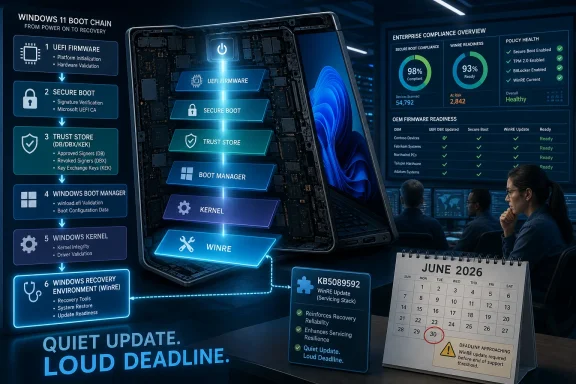 A Small Recovery Update Carries a Much Bigger Alarm
KB5089592 is not a feature drop, not a cumulative update in the usual Patch Tuesday sense, and not a headline-grabbing security fix. It is a Safe OS Dynamic Update, the class of servicing package Microsoft uses to refresh the environment Windows relies on during setup, recovery, and repair. In this case, Microsoft says the update improves the Windows Recovery Environment, or WinRE, for Windows 11 version 26H1.That would normally be the sort of release that only deployment engineers and image maintainers notice. It arrives through Windows Update automatically, is also available from the Microsoft Update Catalog, requires no restart after application, has no prerequisites, and cannot be removed once applied to a Windows image. Microsoft says the WinRE version after installation should be 10.0.28000.2169, and KB5089592 replaces the earlier KB5089591 released two weeks prior.
But the support article opens with a warning that dwarfs the package description. Secure Boot certificates used by most Windows devices are set to expire starting in June 2026, and Microsoft says some personal and business devices could be affected if they are not updated in time. That placement matters. Microsoft is not merely maintaining 26H1 recovery bits; it is threading Secure Boot preparation through the monthly machinery of Windows servicing.
The result is a deceptively quiet update with a loud subtext. Microsoft’s boot trust infrastructure is approaching a scheduled rollover after roughly a decade and a half, and the company is trying to make the transition feel like ordinary servicing before it becomes an emergency ticket queue.
The 26H1 Footnote Is Not the Deployment Story
Windows 11 version 26H1 is already an unusual release. Microsoft describes it as a specialized Windows 11 release for select new devices and new hardware platforms, not a broad feature update for existing PCs. It is not the successor that most Windows 11 24H2 or 25H2 users should expect to install through Windows Update.That makes KB5089592 easy to misread. If you are managing a normal fleet of 24H2 or 25H2 devices, this particular KB number may not be destined for most of your machines. But the Secure Boot warning attached to it is not confined to 26H1. Microsoft has been repeating the certificate-expiration notice across Windows servicing communications because the underlying issue sits below any one Windows release.
Safe OS Dynamic Updates are part of the setup and recovery plumbing, which is why they attract attention from IT pros who build offline media, maintain deployment images, or troubleshoot upgrade failures. They are not glamorous, but they sit in the same operational neighborhood as BitLocker recovery surprises, WinRE partition constraints, and boot repair scenarios. When Microsoft attaches a Secure Boot certificate warning to this class of update, it is effectively telling administrators to look below the desktop layer.
The practical distinction is important. KB5089592 is about 26H1 WinRE. The certificate rollover is about the broader trust chain that allows Windows and other signed boot components to pass Secure Boot validation. One is a package; the other is a platform event.
Secure Boot’s 2011 Trust Chain Is Finally Aging Out
Secure Boot was designed to prevent unsigned or untrusted code from running before the operating system loads. That is the right layer to defend if the threat is a bootkit, a compromised bootloader, or a malicious pre-OS component designed to hide below Windows. The mechanism depends on firmware databases and trusted certificates, not just Windows files on disk.The problem now is not that Secure Boot suddenly stopped working. The problem is that foundational Microsoft certificates issued in the 2011 era are reaching the end of their planned life. Microsoft has identified replacement 2023 certificate authorities and has been moving devices toward them through Windows updates, OEM firmware updates, and staged rollout logic.
That distinction should calm one kind of panic while sharpening another. A PC does not necessarily become a brick the instant a certificate reaches its expiration date. Microsoft’s own guidance has been more nuanced: devices may continue to start, but they can lose the ability to receive future Secure Boot database updates, revocations, or newly signed boot components if the trust store is not modernized.
For security teams, that is still a real problem. A Secure Boot stack that cannot accept fresh trust updates becomes stale at the exact layer where staleness is most dangerous. The risk is not just whether Windows boots on June 25; it is whether the machine can keep adapting to boot-layer vulnerabilities after the old certificates age out.
Microsoft Is Trying to Make a Firmware Problem Look Like a Windows Update
The ideal Microsoft story is simple: keep Windows updated, let Microsoft manage the process, and the new Secure Boot certificates arrive with minimal drama. For many consumer PCs and well-managed business devices, that may be true. Microsoft has already been expanding targeting data and rolling out certificate updates in phases rather than trying to flip the entire Windows ecosystem at once.The less tidy reality is that Secure Boot is not owned by Windows alone. Firmware vendors, OEMs, silicon platforms, recovery partitions, BitLocker state, third-party bootloaders, and fleet management policies all sit in the blast radius. A Windows update can deliver part of the remediation, but firmware must accept and store the relevant Secure Boot database changes.
That is why Microsoft’s guidance keeps nudging organizations toward OEM firmware updates and validation. Some devices may need BIOS or UEFI updates before the Windows-side certificate update succeeds cleanly. Some may have storage, recovery, or firmware quirks that make the rollout noisier than the support article implies.
This is the recurring bargain of the Windows ecosystem. Microsoft gets the scale advantage of servicing hundreds of millions of PCs through a common update pipeline, but the firmware layer remains fragmented by vendor, model, age, and enterprise configuration. The company can coordinate the transition, but it cannot make every device’s UEFI implementation equally boring.
The Real Deadline Is Earlier Than the Expiration Date
The calendar says June 2026. IT departments should read that as “already late for discovery.” The first job is not installing one KB package; it is identifying which devices still rely on 2011-era Secure Boot certificates, which ones have already received 2023 replacements, and which ones need firmware help before Windows can finish the job.That work is unglamorous and essential. Administrators need inventory signals, update compliance data, event logs, firmware baselines, OEM advisories, BitLocker recovery readiness, and a realistic exception list. The machines most likely to cause trouble are rarely the ones sitting at headquarters on current firmware with clean Windows Update telemetry.
The awkward devices are the ones on shelves, in labs, in classrooms, in branch offices, in kiosks, in factories, and in “do not touch” executive travel bags. They may be Windows 11 capable, but they may not have seen recent firmware. They may boot only a few times a year. They may run dual-boot configurations, security tools, disk encryption products, or specialized pre-boot environments that depend on a specific Secure Boot trust path.
In that sense, the expiration date is a poor planning milestone. If a fleet administrator waits until certificates have already started expiring to begin inventory, the problem has shifted from planned maintenance to incident response.
Recovery Plumbing Is Where Windows Servicing Gets Real
WinRE is easy to ignore until the day it is the only thing between a failed update and a truck roll. Microsoft has spent years discovering that recovery environments are not peripheral. They are where BitLocker recovery behavior, update rollback, reset flows, repair tools, and automated remediation meet the hard facts of disk layout.KB5089592 sits squarely in that world. It improves WinRE for a hardware-scoped Windows 11 release, and Microsoft says it cannot be removed once applied to an image. That is normal for this class of package, but it is also a reminder that servicing the recovery environment is not the same as installing a userland app.
Dynamic Updates exist because Windows setup and recovery need current components while the operating system is not fully online. In enterprise deployment, these updates matter for install media and offline images. If administrators disable Dynamic Update or maintain custom media without refreshing it, they can find themselves installing an OS with stale setup or recovery components even after monthly updates are available elsewhere.
The Secure Boot certificate transition raises the stakes for that discipline. Boot trust, recovery, and setup are all parts of the same pre-desktop chain of custody. A fleet that treats WinRE, firmware, and Secure Boot as separate silos will have a harder time diagnosing failures when they collide.
The May 2026 Servicing Pattern Shows Microsoft Tightening the Net
KB5089592 did not arrive in isolation. Microsoft’s May 2026 Windows communications have already included language about Secure Boot certificate rollout, additional restarts for some devices, and improved targeting for systems eligible to receive new certificates. The company is clearly moving from awareness to execution.That phased approach is prudent. Secure Boot changes are exactly the kind of update that can create ugly edge cases if pushed too broadly without telemetry. Microsoft wants devices to demonstrate successful update signals before receiving certain certificate changes, because a failed boot-chain update is worse than a delayed one.
But staged rollout also creates uncertainty for administrators. A device that has not yet received the new certificate may be intentionally deferred, misconfigured, unsupported, firmware-blocked, offline, or simply waiting its turn. The difference matters, and it cannot be inferred from one missing update alone.
This is where Microsoft’s consumer-friendly message and enterprise reality diverge. “Windows Update will handle it” is a reasonable simplification for many home users. For a business fleet, it is a starting assumption that must be verified with actual compliance data.
Windows 10 Makes the Rollover More Politically Awkward
The certificate expiration lands after Windows 10’s mainstream consumer support cutoff, which makes the optics messier. Many Windows 10 devices remain physically capable, operationally embedded, and still important to users or businesses. But their ability to receive the latest Secure Boot certificate updates depends on support status and update eligibility.For organizations paying for Extended Security Updates, Microsoft’s path is clearer. For unmanaged or unsupported Windows 10 systems, the question becomes part of the larger post-support dilemma: an old operating system can continue to run, but its security maintenance story gets narrower and more conditional.
This matters because Secure Boot is not a decorative Windows 11 feature. It is part of the baseline security posture for modern Windows, Linux distributions using Microsoft-signed shims, anti-cheat systems, endpoint security stacks, and enterprise compliance frameworks. A stale Secure Boot trust store can ripple beyond Windows Update itself.
The transition therefore reinforces Microsoft’s broader migration pressure. Even when the company frames certificate replacement as routine cryptographic hygiene, the operational message is hard to miss: unsupported endpoints are losing their margin for error at the firmware layer, not just the OS layer.
Linux, Dual-Boot, and Third-Party Bootloaders Sit in the Crossfire
Secure Boot on PCs is often discussed as a Windows feature, but the Microsoft UEFI CA has long played a broader ecosystem role. Many non-Windows bootloaders and EFI applications depend on Microsoft’s UEFI signing infrastructure because it is the trust anchor widely present on commodity PCs. That includes common Linux Secure Boot workflows through signed shim loaders.The 2023 certificate transition should not be interpreted as Microsoft trying to break Linux. It is a planned certificate lifecycle event, and aging credentials eventually have to be retired. But any trust-store transition at this layer can expose assumptions made by dual-boot users, distribution maintainers, device vendors, and administrators who manage mixed environments.
The risks are not evenly distributed. A mainstream Windows-only laptop from a current OEM is likely to have a smoother path than an older workstation with custom boot media, a Linux dual-boot install, vendor recovery tools, and a firmware setup screen nobody has opened in years. The more bespoke the boot chain, the more testing matters.
That is where Windows enthusiasts should resist the urge to treat this as either a non-event or an apocalypse. It is neither. It is a large-scale trust migration in a messy PC ecosystem, and messy ecosystems punish assumptions.
The Enterprise Burden Is Proof, Not Hope
For IT pros, the central task is to prove readiness. That means proving that firmware is current enough, Windows Update or enterprise update tooling is delivering the right payloads, recovery partitions are healthy, BitLocker recovery keys are escrowed, and affected models have been tested through reboot cycles after receiving Secure Boot-related changes.A surprising amount of this work is social rather than technical. Desktop engineering needs OEM firmware data. Security needs to know whether Secure Boot remains enforceable. Service desk teams need scripts for BitLocker recovery and boot failures. Procurement needs to understand whether unsupported hardware is becoming a security liability. Application owners need to test systems that use special boot drivers or pre-OS authentication.
The hardest part may be convincing leadership that this is not “just another certificate expiration.” In web PKI, a certificate problem usually breaks a site or a connection. In Secure Boot, the failure domain can include OS startup, updateability, and recovery. That moves the issue from routine housekeeping into business continuity.
Good organizations will make the rollover boring by treating it as a campaign. Bad organizations will wait for the first visible symptom and then discover that the machines most affected are the least instrumented.
Home Users Should Update, But Not Panic
For individual Windows users, the advice is simpler. Keep Windows Update enabled, install firmware updates from the PC manufacturer, and do not ignore restart prompts over the next several weeks. If the device is a relatively recent Windows 11 PC receiving normal updates, the odds are good that Microsoft and the OEM have already done much of the work.Users with older PCs, dual-boot setups, custom boot tools, or disabled updates should pay closer attention. The danger is not that every affected device will suddenly fail on the same morning. The danger is drifting into a degraded security state without realizing it, then discovering the problem when a later bootloader, recovery tool, or security update expects the newer trust chain.
BitLocker adds another practical wrinkle. Firmware and boot-chain changes can sometimes trigger recovery prompts, especially on systems with unusual configurations. Users should make sure their recovery key is backed up before applying firmware or Secure Boot-related updates, because a security maintenance event should not turn into a data-access crisis.
The best consumer posture is boring: update Windows, update firmware, verify backups, and avoid random Secure Boot toggling unless you understand the consequences. Turning Secure Boot off to dodge a certificate problem is not a fix; it is surrendering the very protection being maintained.
Microsoft’s Messaging Is Clearer Than Its Naming
The KB naming here does Microsoft no favors. “KB5089592: Safe OS Dynamic Update for Windows 11, version 26H1” sounds like a narrow technical bulletin for a niche Windows release. The support article then immediately pivots to a warning about Secure Boot certificates used by most Windows devices.That mismatch is classic Microsoft servicing communication. The company publishes precise, package-oriented notes because that is how Windows servicing is cataloged. But the operational meaning often spans multiple releases, update channels, and hardware layers. Administrators have to translate the KB language into fleet risk.
To Microsoft’s credit, the company has been more explicit than usual about the certificate deadline, the need for preparation, and the possibility that some devices require OEM firmware. It has also repeated the message across support pages, release-health notes, and server guidance. The drumbeat is deliberate.
Still, the burden remains on readers to understand that KB5089592 is not the Secure Boot fix for every PC. It is one new entry in a broader servicing campaign. Treating it as a universal remedy would be as mistaken as ignoring it because 26H1 is not broadly deployed.
The May 26 Update Turns June’s Certificate Deadline Into an Operations Checklist
The useful way to read KB5089592 is as another marker on Microsoft’s countdown. The specific package updates WinRE for Windows 11 26H1, but the attached warning is a reminder that Secure Boot certificate maintenance is now an immediate operations issue rather than a future advisory. The organizations that win here will be the ones that can show status, not the ones that can quote the deadline.- Microsoft released KB5089592 on May 26, 2026, for Windows 11 version 26H1, and it updates the Windows Recovery Environment rather than delivering visible desktop features.
- The update installs automatically through Windows Update, has no prerequisites, requires no restart after application, and cannot be removed once applied to a Windows image.
- Microsoft says the expected WinRE version after installation is 10.0.28000.2169, and this package replaces KB5089591.
- The Secure Boot warning in the article applies far beyond 26H1 because most Windows devices rely on certificates that begin expiring in June 2026.
- Administrators should verify certificate status, firmware readiness, recovery health, BitLocker key escrow, and OEM guidance before the deadline rather than waiting for symptoms.
- Home users should keep Windows and firmware updates current, especially on older PCs, dual-boot systems, and machines that have been offline for long periods.
References
- Primary source: Microsoft Support
Published: Tue, 26 May 2026 21:02:26 Z
- Official source: learn.microsoft.com

Update Secure Boot Certificates for Windows Devices - Windows Client
Update your Windows devices to maintain Secure Boot protection with 2023 certificates before they expire in June 2026.learn.microsoft.com - Official source: microsoft.com

Prepare your servers for Secure Boot certificate updates | Microsoft Windows Server Blog
The original Secure Boot certificates introduced in 2011 are approaching the end of their planned lifecycle, with expirations beginning in late June 2026. www.microsoft.com
- Related coverage: windowscentral.com
Microsoft warns Secure Boot certificates will expire soon — what to expect
After 15 years, the original Secure Boot certificates that keep your PC secure during boot are expiring. Here's what you need to know. www.windowscentral.com
- Related coverage: notebookcheck.net
Microsoft sets 2026 deadline for Secure Boot certificate expiration
Microsoft has issued new guidance warning that 2011 Secure Boot certificates begin expiring in June 2026. Windows updates are rolling out 2023 replacement certificates, with some PCs requiring OEM firmware updates. www.notebookcheck.net
- Official source: techcommunity.microsoft.com
Act now: Secure Boot certificates expire in June 2026 - Windows IT Pro Blog
Get tips to prepare for the rollout of updated certificates across your organization. techcommunity.microsoft.com

- Related coverage: tomshardware.com
Microsoft is refreshing Secure Boot certificates to plug security holes before they happen — if you bought a PC last year, you should be set
Be sure to keep Windows 11 systems updated to get refreshed security certificates.www.tomshardware.com
- Related coverage: techradar.com

Microsoft's Secure Boot replacements could be bad news for Windows 10 users
Secure Boot certificate upgrades is bad news for Windows 10www.techradar.com
- Related coverage: cisco.com
Loading…
www.cisco.com - Related coverage: pcgamer.com
Loading…
www.pcgamer.com - Official source: download.microsoft.com