KB5095185 Safe OS Dynamic Update: Secure Boot Certificate Expiry Warning (June 2026)

Microsoft released KB5095185 on June 9, 2026, as a Safe OS Dynamic Update for Windows 11 version 26H1, refreshing the recovery and setup environment while again warning that long-lived Windows Secure Boot certificates begin expiring this month. The update itself is small in presentation but large in context. Microsoft is trying to make a certificate rollover feel like ordinary patch hygiene, even though it reaches into the trust chain that decides what can run before Windows is fully awake. That is the right engineering instinct, but it also exposes how much of the PC ecosystem still depends on assumptions made in the Windows 8 era.

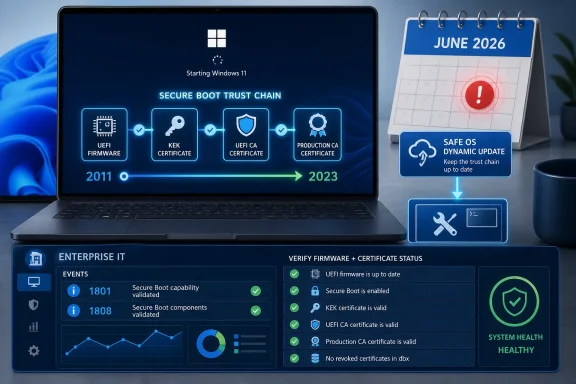
Laptop screen shows a secure boot trust chain timeline from 2011 to 2023, with system health and update status.A Routine Dynamic Update Carries an Unroutine Warning​

KB5095185 belongs to a class of Windows updates that rarely attracts much public attention. Safe OS Dynamic Updates service the Windows recovery environment, setup files, and preinstallation components rather than the desktop features users see after signing in. In practical terms, they help Windows install, repair, reset, and recover itself more reliably.
That makes the Secure Boot note attached to this release more interesting than the update package alone. Microsoft is not saying that KB5095185 is the grand certificate fix for every machine. It is using the update channel, and the steady drumbeat of monthly servicing, to keep pushing a broader message: the Secure Boot certificates that have anchored most Windows devices since 2011 are aging out.
The company’s wording is deliberately calming. Devices that have not yet received the newer certificates “will continue to start and operate normally,” and standard Windows updates will continue to install. That sentence is doing a lot of work, because the nightmare version of this story has always been mass boot failure when a certificate date rolls over.
Microsoft is instead drawing a narrower, more technical line. The danger is not that every unrefreshed PC turns into a brick on June 24 or June 27. The danger is that machines left on old Secure Boot trust material become increasingly unable to participate in future boot-level security work.

Secure Boot’s 2011 Roots Are Finally Showing​

Secure Boot arrived in the PC mainstream with Windows 8 and the UEFI transition. Its purpose was straightforward: establish a chain of trust before the operating system loads, so bootkits, unsigned bootloaders, and tampered early-start components have a harder time gaining control before Windows security features are active.
That chain depends on certificates stored in firmware databases. Microsoft’s 2011-era certificates became part of the default trust fabric for Windows PCs and many third-party boot scenarios. They were not an afterthought; they were a foundation.
Fifteen years later, the foundation needs replacing. Microsoft’s guidance identifies the old Microsoft Corporation KEK CA 2011, Microsoft Corporation UEFI CA 2011, and Microsoft Windows Production PCA 2011 certificates as expiring in stages beginning in June 2026 and running into October. The replacement family is based on 2023 certificates, including updated KEK, Windows UEFI CA, and option ROM-related certificates.
That transition sounds bureaucratic until you remember where these certificates live. They are not just files in a Windows directory. They are part of the firmware-level policy that decides whether early boot code is trusted. Updating them requires Windows, firmware, OEM assumptions, event logs, restarts, and sometimes management policy to line up correctly.

Microsoft Wants Consumers to Do Almost Nothing​

For home users and many unmanaged business PCs, Microsoft’s strategy is automation. The company says it has been updating certificates on consumer and non-managed business devices for months. It is also surfacing Secure Boot certificate status inside the Windows Security app, which is exactly where a normal user would expect to see a device-health warning rather than a PowerShell incantation.
That is the right product choice. If Microsoft had treated this as a manual firmware maintenance campaign for every Windows user, the effort would have failed immediately. Most users do not know which Secure Boot certificates their PC trusts, and they should not need to.
The reassurance matters: a PC without the newer certificates is expected to keep starting, operating, and receiving standard Windows updates. That undercuts the panic narrative that June 2026 is a universal boot cliff. But it should not be mistaken for a declaration that nothing matters.
A machine that continues to boot can still be in a degraded security posture. Microsoft’s own guidance is careful to distinguish normal Windows servicing from future Secure Boot protections for early boot components. The desktop may look fine while the pre-OS trust machinery is no longer where Microsoft wants it to be.

Enterprise IT Gets the Harder Version of the Story​

The consumer story is “let Windows Update handle it.” The enterprise story is “inventory, test, stage, monitor, and remediate.” That difference is not just Microsoft covering itself. It reflects the actual risk profile of managed fleets.
Corporate devices are more likely to have update controls, diagnostic data restrictions, custom images, older firmware, virtual machines, BitLocker policies, third-party security tools, and hardware models that were purchased in waves years apart. A certificate update that is uneventful on a new Surface laptop may be less predictable on a neglected branch-office desktop or a long-lived industrial workstation.
Microsoft’s playbook asks administrators to verify Secure Boot status, identify device models and firmware versions, test representative samples, and monitor event IDs such as 1801 and 1808. Event 1801 indicates that remediation has not been applied; event 1808 indicates that the required new certificates are present. That is not glamorous work, but it is exactly the sort of telemetry-driven plumbing that separates a controlled rollout from a help-desk incident.
The uncomfortable part is that Microsoft cannot fully abstract away firmware quality. Secure Boot certificate updates require the device firmware to participate correctly. If firmware is stale, buggy, or abandoned by the OEM, Windows can be ready and still run into a platform problem.

The Firmware Layer Is Where Patch Tuesday Meets Reality​

Windows administrators are used to thinking in terms of operating system versions, cumulative updates, and management rings. Secure Boot certificate rotation forces them to think one layer lower. The relevant question is not only whether a device has installed the latest Windows update, but whether its firmware can accept and persist the new trust material correctly.
That is why Microsoft keeps emphasizing firmware updates, representative pilot groups, and OEM support. Older devices may need BIOS or UEFI updates before the Secure Boot certificate update can complete reliably. In some cases, devices that are no longer supported by their manufacturer may become exceptions that IT has to document, isolate, or replace.
This is also where BitLocker enters the anxiety loop. Changes in firmware state and boot trust can trigger recovery prompts if a device interprets the change as a boot environment alteration. Microsoft’s guidance treats unexpected or repeated BitLocker recovery prompts as a risk scenario to test for, not as a surprise to discover after broad deployment.
The lesson is familiar but easy to ignore: modern Windows security is not just a Windows problem. It is a supply-chain arrangement among Microsoft, silicon vendors, firmware vendors, OEMs, enterprise management tools, and administrators. Secure Boot is only as smooth as that arrangement is disciplined.

The 26H1 Detail Signals Where Windows Is Going​

The version number in KB5095185 is also notable. Windows 11 version 26H1 points to the next turn of Microsoft’s servicing calendar, and Safe OS Dynamic Updates for that branch suggest the company is already laying groundwork around installation and recovery scenarios.
Dynamic Updates matter most when Windows is being installed, upgraded, repaired, or reset. Those are precisely the moments when boot trust, recovery reliability, and compatibility with newer platform security requirements become visible. Microsoft’s certificate campaign is therefore not merely about preserving today’s boot path; it is about keeping future Windows servicing paths viable.
That becomes more important as Windows leans harder on hardware-backed security. TPM 2.0, virtualization-based security, measured boot, BitLocker, kernel protections, and Secure Boot all form a layered model. If one layer becomes stale, the machine may keep working, but the security story becomes less coherent.
Microsoft has spent years arguing that Windows 11’s hardware requirements were about moving the ecosystem forward. The Secure Boot certificate rollover is a test of that argument in reverse. It asks whether the ecosystem can move forward without leaving too many functioning but under-maintained PCs behind.

The Unsupported Windows Problem Never Really Went Away​

The certificate rollover also lands in the long shadow of Windows 10’s lifecycle. Microsoft’s guidance has repeatedly tied certificate availability to supported Windows versions and, where applicable, extended security arrangements. That means unsupported systems are not simply missing feature upgrades; they risk missing the plumbing needed to stay current with boot-level trust.
This is where the messaging gets awkward. Microsoft can say, correctly, that standard Windows updates continue on eligible devices. It can also say, correctly, that unsupported versions should not be expected to receive the same security modernization. To users, those distinctions often collapse into one sentence: my PC still works, so why is Microsoft telling me it is less safe?
The answer is that security deadlines rarely look dramatic from the desktop. A vulnerable machine can browse the web, run Office, print, join meetings, and install ordinary patches until the day a specific exploit path matters. Secure Boot certificate expiration is not a fireworks show; it is a narrowing of future trust.
That makes it harder to communicate than a broken Start menu or a failed cumulative update. There may be no obvious symptom. The failure mode is strategic rather than cosmetic.

Linux, Anti-Cheat, and the Wider UEFI Ecosystem Are Part of the Blast Radius​

Windows owns the narrative here because Microsoft’s certificates are central to Windows PCs, but Secure Boot is not a Windows-only concern. Many Linux distributions, boot utilities, recovery tools, and specialized software paths have historically depended on Microsoft’s UEFI trust chain to boot on consumer hardware without asking users to manage their own keys.
That is why the phrase “Microsoft UEFI CA” has always carried more weight than its name suggests. It has functioned as a practical interoperability bridge across the PC ecosystem. Rotating that trust anchor requires coordination well beyond the Windows desktop.
Games and anti-cheat systems add another dimension. Some anti-cheat vendors have leaned into Secure Boot and TPM requirements as part of their effort to make kernel-level tampering and cheat loaders harder to hide. If boot trust becomes inconsistent across a user base, support issues can appear in places that do not obviously look like Windows servicing problems.
The same is true for recovery media and deployment tools. An IT shop that maintains old bootable utilities may discover that “it worked for years” is not a security maintenance plan. The certificate rollover is a reminder that pre-OS tooling has a lifecycle too.

Microsoft’s Reassurance Is Credible, but Not Complete​

Microsoft deserves credit for trying to avoid panic. The company has been rolling out updated certificates ahead of the deadline, documenting enterprise deployment options, and adding user-facing status checks. Compared with the historic messiness of firmware-adjacent changes, this is a relatively transparent campaign.
But “your PC will continue to start” is not the same as “there is nothing to do.” For many users, the correct action really is simply to stay current with Windows Update and check Windows Security if prompted. For administrators, the correct action is to prove that the fleet is updated, not assume it.
There is also an uncomfortable timing issue. Certificate expiration is not a surprise; these dates were built into the system years ago. Yet many organizations are encountering the operational complexity only as the deadline approaches. That is not unique to Microsoft, but it is a familiar pattern in IT: infrastructure debt becomes visible only when a date turns theoretical risk into scheduled work.
The best reading of KB5095185 is therefore not that it is a crisis patch. It is a marker in a longer campaign. Microsoft is using ordinary servicing channels to shepherd Windows PCs through a trust-anchor migration that should have been boring, but cannot be ignored.

The Practical Reading for WindowsForum Readers​

For enthusiasts, sysadmins, and support pros, the message is narrower and more useful than the alarmist versions circulating online. This is not a universal “PCs will not boot in June” story. It is a “verify your Secure Boot trust state before future boot-level security work depends on it” story.
  • Windows 11 version 26H1 received KB5095185 on June 9, 2026, as a Safe OS Dynamic Update aimed at setup and recovery components rather than ordinary desktop features.
  • Microsoft’s Secure Boot warning concerns certificates originally issued in 2011 that begin expiring in June 2026, with additional related expirations later in 2026.
  • Devices without the newer certificates are expected to keep starting and receiving standard Windows updates, but they may miss future protections for early boot components.
  • Home users should keep Windows Update enabled and check the Secure Boot certificate status in the Windows Security app when available.
  • Administrators should inventory firmware models, monitor Secure Boot update events, pilot across representative hardware, and avoid treating Microsoft’s automated rollout as a substitute for fleet validation.
  • Older or unsupported hardware is the risk pocket, especially where firmware updates are unavailable or where BitLocker and Secure Boot policy changes have not been tested together.
The broader lesson is that Windows security now lives as much in firmware state and trust databases as it does in monthly cumulative updates. KB5095185 is a routine-looking update with a strategically important reminder attached: the PC boot chain is being renovated while the building is occupied. If Microsoft, OEMs, and administrators do their jobs well, most users will never notice the work; if they do not, the first visible symptoms may appear only when the next generation of boot security assumes the old certificates are finally gone.

References​

  1. Primary source: Microsoft Support
    Published: Tue, 09 Jun 2026 17:04:25 Z
  2. Official source: learn.microsoft.com
  3. Official source: microsoft.com
  4. Related coverage: windowscentral.com
  5. Related coverage: notebookcheck.net
  6. Related coverage: tomshardware.com
  1. Official source: techcommunity.microsoft.com
  2. Related coverage: windowslatest.com
  3. Related coverage: securitytoday.de
  4. Related coverage: pcgamer.com
  5. Related coverage: techradar.com
  6. Related coverage: tomsguide.com
  7. Related coverage: cisco.com
  8. Official source: cdn-dynmedia-1.microsoft.com
 

Microsoft’s June 9, 2026 Windows 11 23H2 security update, KB5093998, raises OS Build 22631.7219 while widening Secure Boot certificate rollout, fixing a BitLocker recovery problem tied to April boot-file servicing, updating mobile operator profiles, improving device-management certificate sync, and polishing File Explorer search behavior. It is not a flashy Patch Tuesday release, but it may be one of the more consequential maintenance updates of the year. The reason is simple: Microsoft is trying to refresh the trust chain beneath Windows before an old one starts aging out in public. For IT departments, the patch is less about a single build number than about whether Windows can keep boot security boring.

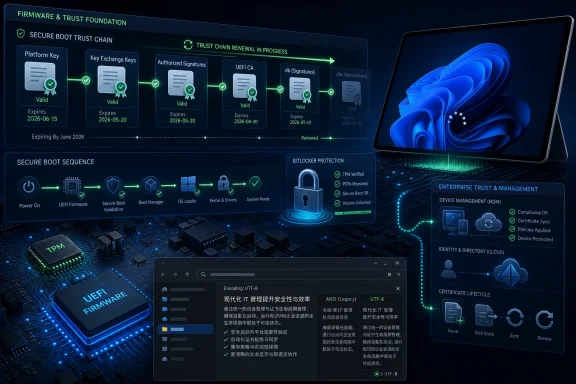
Futuristic secure boot and firmware trust dashboard with TPM, BitLocker, and certificate management screens.Microsoft Turns a Routine Patch into a Trust-Chain Checkpoint​

KB5093998 arrives as a conventional cumulative security update for Windows 11 version 23H2, but the center of gravity is Secure Boot. Microsoft’s notice makes clear that Secure Boot certificates used by most Windows devices begin expiring in June 2026, and that the company has spent recent months pushing newer certificates to consumer and unmanaged business PCs.
That distinction matters. Windows users tend to think of updates as files installed inside the operating system. Secure Boot is different: it sits in the firmware-mediated space where the machine decides what code is trusted before Windows ever gets a say.
Microsoft is telling customers two things at once. First, devices that have not yet received updated certificates should continue to start, operate, and receive standard Windows updates. Second, the certificate refresh is not optional theater; it is part of the security plumbing that determines whether future boot-level protections can be delivered cleanly.
That makes KB5093998 a confidence-building exercise. The update includes “additional high confidence device targeting data” so more eligible machines can automatically receive new Secure Boot certificates, but only after Microsoft sees enough successful update signals to consider the rollout safe. In other words, the company is not just shipping trust. It is measuring whether the device looks trustworthy enough to be handed the next piece of the chain.

The Secure Boot Deadline Is a Slow-Motion Infrastructure Event​

The phrase “certificate expiration” sounds like the kind of thing that belongs in a browser error dialog, not in the boot path of millions of PCs. But Secure Boot depends on certificates and signature databases to decide which bootloaders, option ROMs, and low-level components are allowed to run. When certificates issued in the Windows 8 era approach expiration, the problem is not that PCs suddenly become pumpkins at midnight. The problem is that the ecosystem’s ability to authenticate future boot components becomes constrained.
Microsoft’s messaging has been careful, and understandably so. Panic would be counterproductive. The company says affected devices will continue to boot and continue receiving standard Windows updates, which is a necessary clarification after months of community concern about whether older PCs might suddenly become unusable.
But “continues to boot” is not the same as “remains in the best possible security posture.” Secure Boot is most valuable when it can evolve: when compromised bootloaders can be revoked, when new signing authorities can be trusted, and when firmware and OS servicing remain aligned. A device stranded on old trust material may keep working, but it risks becoming harder to protect against the next boot-layer attack.
That is why the June 2026 deadline has become an enterprise planning issue rather than a consumer curiosity. Admins are not merely asking whether machines power on. They are asking whether a fleet can prove certificate state, survive firmware variance, handle dual-boot edge cases, and avoid triggering recovery workflows that swamp help desks.

Microsoft’s Rollout Strategy Admits the Firmware World Is Messy​

The most revealing phrase in the KB is “high confidence device targeting data.” That is not marketing copy; it is a quiet admission that Secure Boot updates are risky precisely because PCs are not uniform. The Windows ecosystem spans OEM firmware implementations, TPM states, BitLocker policies, custom deployment media, old imaging habits, and machines that have been upgraded in place for years.
A blunt rollout would be reckless. If Microsoft simply pushed new Secure Boot material to every nominally eligible device, it would be betting the bootability of real machines on the accuracy of firmware assumptions. Instead, KB5093998 extends the targeting system used to decide which devices should receive the newer certificates automatically.
That approach is slower, but it is rational. The boot chain is not like a Start menu regression or a broken widget. If a boot update goes wrong, the user may never reach the desktop, and the support path quickly descends into recovery keys, firmware setup screens, physical access, and imaging media.
The tradeoff is opacity. Most users will not know whether their machine has crossed the threshold into the updated Secure Boot certificate state. Many admins will have to rely on inventory scripts, event logs, registry signals, MDM reports, and vendor guidance to determine where their fleets stand. Microsoft is reducing risk through telemetry and targeting, but that also means the rollout can feel like a black box from the outside.

The New Policy Shows the Privacy Tension Behind Safer Servicing​

KB5093998 also adds a policy called LimitSecureBootRequiredServiceData under the Secure Boot administrative template path. When enabled, Windows limits the Secure Boot service data it sends by suppressing the event normally sent to Microsoft. Microsoft also places the policy inside its Windows Restricted Traffic Limited Functionality Baseline.
This is a small setting with a large subtext. Microsoft needs data to decide which machines can safely receive sensitive boot-trust updates, but some organizations deliberately restrict outbound telemetry for compliance, privacy, or network-control reasons. Those priorities are not fringe concerns in regulated environments; they are operating requirements.
The new policy is therefore a valve. It gives administrators a way to limit a particular Secure Boot-related signal, but the very existence of the setting highlights the bargain modern Windows servicing now asks customers to make. The more Windows becomes a cloud-informed servicing platform, the more some safety decisions depend on data flowing back to Microsoft.
That does not make the model illegitimate. A phased rollout for boot certificates is almost certainly safer than a blind one. But it does mean enterprises must understand what they are suppressing. Reducing service data may satisfy a baseline, but it can also affect how much confidence Microsoft has in a device’s readiness for automatic certificate updates.

The BitLocker Fix Is a Reminder That Boot Security Has Sharp Edges​

The other major practical fix in KB5093998 concerns devices that might enter BitLocker Recovery after boot files are updated on systems with certain TPM validation settings, including invalid PCR7 configurations. Microsoft ties the issue to the April 2026 security update KB5082052. For anyone who has managed BitLocker at scale, this is the sentence that turns an abstract security update into an operational incident.
BitLocker recovery prompts are not inherently failures. They are the designed response when the platform measurement changes in a way that violates the expected trust state. The trouble starts when a legitimate servicing event changes the boot environment and BitLocker interprets the result as suspicious, especially on machines with customized or misconfigured TPM validation profiles.
PCR7 sits at the intersection of Secure Boot and measured boot trust. If an organization has explicitly included PCR7 in a BitLocker validation profile, and the underlying configuration is invalid or fragile, servicing boot files can produce exactly the kind of state change BitLocker is supposed to notice. From the user’s chair, however, the distinction between “security is working” and “the update broke my laptop” is academic.
The June fix matters because it reduces the chance of repeat pain after the April servicing wave. But it should not be read as permission to forget BitLocker policy hygiene. If anything, the episode is a warning that boot-path hardening and recovery readiness must be managed together. A fleet that cannot reliably escrow, retrieve, and use recovery keys is not ready for aggressive boot security.

Dynamic Update Media Becomes Part of the Story​

The deployment note in KB5093998 deserves more attention than it will probably receive. Microsoft warns that if organizations deploy dynamic updates to an existing Windows image, the boot.stl file must be included in the installation media. If it is missing, devices may fail to start from that media and show error code 0xc0430001.
That is not a normal consumer concern, but it is exactly the kind of detail that can punish enterprise imaging pipelines. The boot.stl file is used during Secure Boot validation and must match the Windows version and architecture of the image being updated. If the media and the boot validation material drift apart, installation media that looked fine on paper may fail in the field.
Microsoft recommends using the Update WinPE script to update an existing Windows image. The alternative is to manually copy boot.stl from the device’s Windows\Boot\EFI folder to the corresponding folder on the installation media before deployment. Both options point to the same conclusion: image servicing is now inseparable from Secure Boot servicing.
For years, many organizations treated deployment media as a solved artifact. Build it, test it, store it, refresh it on a familiar cadence. The Secure Boot certificate transition makes that habit riskier. Media that boots reliably today may not be the media you want to depend on after trust material changes, especially during bare-metal recovery or large-scale refresh projects.

File Explorer Search Gets the Kind of Fix Users Actually Notice​

Compared with Secure Boot and BitLocker, the File Explorer changes look modest. KB5093998 improves File Explorer search, including support for Chinese text and UTF-8 encoded files without a byte order mark. Microsoft says text should display more clearly and consistently across search results, Content view, and tooltips.
This is the kind of improvement that rarely headlines an update but matters daily to multilingual users, developers, writers, and support teams. UTF-8 without a byte order mark is common across modern codebases and text workflows. If Explorer search mishandles those files, users experience Windows as unreliable in a surprisingly intimate way: they cannot find or preview their own information correctly.
The Chinese text improvement is similarly practical. Search is not merely a convenience layer; it is part of how users understand whether the file system can be trusted. When text rendering or indexing fails around language support, the operating system feels provincial, even if the underlying storage is sound.
There is an editorial irony here. The most consequential part of KB5093998 may happen invisibly at boot, while the most visible polish may arrive in Explorer. That combination is typical of Windows servicing in 2026: one update can touch firmware trust, enterprise management, mobile profiles, certificate renewal, and the simple act of looking for a file.

Device Management Fixes Aim at the Certificate Reality Enterprises Live In​

KB5093998 also improves connectivity for devices enrolled in both Microsoft Management Platform Configuration and Secure Lifecycle Device Management, helping them sync and renew certificates more reliably. Microsoft separately describes better reliability for dual-enrolled devices managed by mobile device management platforms, including the Modern Management Platform Connector.
That phrasing is dense, but the operational meaning is straightforward. Many modern Windows devices are not governed by one clean management plane. They may be domain-joined, Entra-joined, co-managed, MDM-enrolled, certificate-bound, compliance-scored, and subject to lifecycle services that all expect the machine to check in and renew trust on schedule.
Certificate renewal is the quiet dependency under much of that model. If a device cannot sync or renew the certificates it needs for management, it becomes progressively less manageable. Policies drift. Compliance signals degrade. Remediation that should be automatic becomes manual.
This is where KB5093998’s themes converge. Secure Boot certificates, management certificates, BitLocker protectors, TPM measurements, and deployment media are not separate islands. They are layers of a trust stack that only looks simple when everything is healthy. The June update is Microsoft trying to keep that stack synchronized before time, firmware entropy, and enterprise complexity pull it apart.

Windows 11 23H2 Enterprise and Education Enter the Last Stretch​

Microsoft also uses the release notes to remind customers that Windows 11 version 23H2 Enterprise and Education reach end of updates on November 10, 2026. After that date, those editions will no longer receive fixes for known issues, time zone updates, technical support, or monthly security and preview updates.
That date gives enterprises a second calendar to manage. The Secure Boot certificate transition begins in June 2026; Windows 11 23H2 Enterprise and Education support ends in November 2026. For organizations still stabilizing on 23H2, the window for “we will deal with it later” is narrowing quickly.
The practical recommendation is to move to a newer Windows 11 release before the end-of-updates date. But the real work is not clicking “upgrade.” It is validating application compatibility, security baselines, device health, firmware versions, recovery processes, and management enrollment state before those machines age out of support.
Microsoft’s servicing cadence is often criticized for forcing change, and sometimes fairly. But the alternative is not stasis; it is unsupported complexity. Once a build leaves support, every unresolved trust-chain or management issue becomes harder to justify and harder to fix.

The Patch Says More About Windows Than Its Changelog Suggests​

KB5093998 is a useful snapshot of where Windows is in 2026. The operating system is no longer just the thing loaded from disk after firmware completes its job. It is a participant in a constantly serviced chain of trust that begins before the kernel, depends on firmware cooperation, and extends into cloud-assisted management.
That model is more secure than the old one when it works. It allows Microsoft to revoke bad boot components, roll new certificates, coordinate with OEMs, and respond to threats that live below the operating system. It also gives administrators more ways to assert policy and measure compliance across large fleets.
But it is also more brittle in the places where documentation, tooling, or firmware quality lag behind. Secure Boot can protect the machine, but it can also complicate recovery. BitLocker can defend data, but it can also lock out a user when measurements shift unexpectedly. Telemetry-informed targeting can prevent bad rollouts, but it can also leave admins wondering why one machine updated and another did not.
That is the tension KB5093998 embodies. Windows security has moved downward into the boot chain and outward into management services. The benefits are real, but so are the coordination costs.

The June Build Rewards Admins Who Treat Boot Trust as Inventory​

The useful response to KB5093998 is not panic. It is inventory. Administrators need to know which machines have current firmware, which have received newer Secure Boot certificates, which BitLocker policies include sensitive PCR settings, which recovery keys are escrowed, and which deployment images contain the right boot validation files.
For individual users, the advice is simpler: keep Windows Update enabled, install firmware updates from reputable OEM channels, and make sure BitLocker recovery keys are backed up before major servicing events. The Secure Boot certificate transition should be largely invisible on healthy consumer systems, but invisible is not the same as unimportant.
For enterprise IT, the June update should trigger a more deliberate review. Machines that are offline for long stretches, heavily locked down, managed by multiple platforms, or built from old images are the ones most likely to create surprises. The risk is not one catastrophic deadline; it is a collection of edge cases that become visible only when the boot chain is serviced.
This is also a moment to test recovery media. A beautiful compliance dashboard will not help much if the image used during an outage cannot boot because boot.stl was missing or mismatched. The time to discover that is before the emergency.

The Fine Print Is the Action Plan​

KB5093998 does not demand dramatic action from every Windows 11 user, but it does reward anyone who reads beyond the build number. The release is a security update, a Secure Boot targeting expansion, a BitLocker recovery mitigation, a deployment-media warning, and a support-lifecycle reminder in one package.
  • Windows 11 version 23H2 systems receiving KB5093998 move to OS Build 22631.7219.
  • Microsoft is widening automatic delivery of newer Secure Boot certificates using additional device targeting data.
  • Devices without updated Secure Boot certificates are expected to keep booting and receiving standard Windows updates, but they may not be in the best long-term boot-security posture.
  • The update fixes a BitLocker recovery issue linked to April 2026 boot-file servicing on systems with certain TPM validation settings, including invalid PCR7 configurations.
  • Organizations updating Windows images with Dynamic Update need to ensure boot.stl is present and matched to the image version and architecture.
  • Windows 11 23H2 Enterprise and Education leave support on November 10, 2026, making migration planning part of the same operational calendar.
KB5093998 is the kind of Windows update that looks small only if you stop reading at the first sentence. Its importance lies beneath the desktop, in the machinery that decides what a PC is allowed to trust before Windows starts and how confidently Microsoft can service that trust afterward. If the next few months go well, most users will never think about Secure Boot certificates again. That would be the ideal outcome: a major platform transition experienced not as a crisis, but as one more quiet proof that modern Windows maintenance has become a firmware, cloud, and operating-system negotiation all at once.

References​

  1. Primary source: Microsoft Support
    Published: Tue, 09 Jun 2026 17:04:31 Z
  2. Official source: microsoft.com
  3. Official source: learn.microsoft.com
  4. Related coverage: techspot.com
  5. Official source: techcommunity.microsoft.com
  6. Related coverage: windowslatest.com
  1. Related coverage: notebookcheck.net
  2. Related coverage: spirhed.com
  3. Related coverage: windowscentral.com
  4. Related coverage: tomshardware.com
  5. Related coverage: pcgamer.com
  6. Related coverage: tomsguide.com
  7. Related coverage: techriver.com
 

Microsoft released KB5094149 on June 9, 2026, as a Safe OS Dynamic Update for Windows 11 versions 24H2 and 25H2, alongside renewed guidance that Secure Boot certificates used across most Windows devices are beginning to expire in June 2026. That makes this otherwise obscure servicing package part of a much larger trust rollover for the Windows ecosystem. The message from Redmond is deliberately calming: PCs will still start, Windows Update will still run, and most consumers should not need to take manual action. The message for IT, however, is sharper: the boot chain is entering a maintenance window that administrators cannot afford to treat as ordinary Patch Tuesday noise.

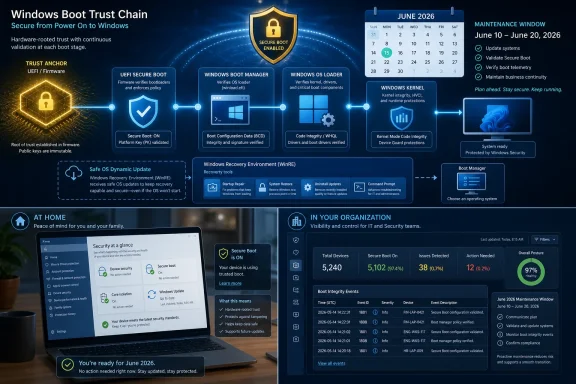
Infographic-style diagram showing Windows Boot Trust Chain secure-boot maintenance window for June 10–20, 2026.Microsoft Moves the Boot Chain Before the Deadline Moves It​

KB5094149 is not the kind of update that normally earns attention outside deployment teams. Safe OS Dynamic Updates target the Windows recovery and setup environment rather than the everyday desktop shell, which is why they often pass quietly through servicing channels while cumulative updates get the headlines. But this one lands on the same date that Microsoft is again warning customers about Secure Boot certificate expiration, and that timing matters.
Secure Boot depends on firmware-held trust anchors to decide which pre-OS components are allowed to execute. The relevant Microsoft certificates date back to the Windows 8 era, when Secure Boot became a mainstream PC feature rather than a niche enterprise control. Fifteen years later, those certificates are aging out, and Microsoft is trying to replace them across a messy landscape of consumer PCs, managed fleets, servers, virtual machines, OEM firmware stacks, and devices that have not seen a BIOS update in years.
The most important clarification is also the easiest to miss. Microsoft is not saying that every unremediated Windows PC will suddenly become a brick in June 2026. It is saying that systems without the newer certificates may fall behind on future protections for early boot components, including boot manager updates and Secure Boot database changes. That is a subtler failure mode, but for security teams it is the more dangerous one: the machine looks alive, patched, and compliant enough, while a foundational control has stopped evolving.
That is why KB5094149 should be read less as a standalone update and more as another piece of Microsoft’s certificate migration machinery. The update’s title says “Safe OS,” but the story is really about custody of trust before Windows proper even starts.

The Expiration Is Real, but the Panic Version Is Wrong​

The Secure Boot certificate issue has been circulating for months because it hits a rare combination of ingredients: firmware, cryptography, Windows Update, OEM support, BitLocker, and a hard calendar date. Those are precisely the areas where small misunderstandings become expensive tickets. Microsoft’s latest language is clearly written to drain drama from the deadline.
The company says devices that have not yet received the newer certificates will continue to start and operate normally, and that standard Windows updates will continue to install. That sentence is doing a lot of work. It separates ordinary monthly servicing from the narrower but critical ability to receive future Secure Boot protections for the early boot path.
The distinction matters because “my PC still boots” is not the same as “my PC is in the security state Microsoft intends.” A system can keep loading Windows while being unable to participate fully in the next phase of boot-level hardening. In enterprise terms, that is not an outage; it is a drift condition. Drift conditions are harder to detect than outages because they do not force immediate attention.
Microsoft has also been careful to say that it has been updating certificates on consumer and non-managed business devices for months. That is the right default for home users, who should not be expected to understand firmware variables or certificate stores in UEFI. The Windows Security app is being positioned as the visible status surface, giving ordinary users a place to check whether their PC has made the transition.
For managed environments, the posture is different. Microsoft points administrators to its Secure Boot playbook because this is not just a download-and-reboot exercise at fleet scale. The state of the firmware, the OS build, the boot manager, the update channel, and the device model all become relevant.

Safe OS Updates Are Boring Until Recovery Is the Only Thing Left​

Safe OS Dynamic Updates occupy an unglamorous corner of Windows servicing. They update the Windows recovery environment and setup-related components used during installation, repair, reset, and feature update workflows. These components are rarely visible when everything is working, but they become central when a device is trying to recover from a failed boot, roll back a feature update, or repair itself.
That is why Microsoft’s inclusion of a Safe OS update in this moment is worth noting. Secure Boot is a pre-OS technology, and recovery tooling is where the operating system meets the firmware and boot chain under stress. If the trust chain is being refreshed, the recovery environment cannot be treated as an afterthought.
The modern Windows servicing model spreads responsibility across multiple layers. A cumulative update may patch the running OS, a servicing stack update may improve the machinery that installs updates, a dynamic update may improve setup or recovery, and firmware may need to accept new variables or signatures. Users experience all of this as “Windows Update,” but administrators know better. The boot path is an ecosystem, not a file.
KB5094149 applies to Windows 11 versions 24H2 and 25H2, which also tells us where Microsoft is concentrating its current client servicing attention. Windows 11 24H2 is the broad deployment base, while 25H2 is the next turn of the crank. Treating both together for Safe OS servicing suggests Microsoft wants the newer Windows 11 line aligned before certificate expiration becomes a support story.
The update is therefore not dramatic by itself. Its importance comes from where it sits in the chain. When a trust rollover touches firmware and recovery paths, the small servicing packages are often the ones that make the difference between a smooth migration and a very long afternoon.

Secure Boot’s Fifteen-Year Bet Comes Due​

Secure Boot was always a promise that the PC could defend itself before the operating system had loaded enough code to defend anything. In practice, that promise depends on a chain of signed components, revocation lists, firmware databases, and certificate authorities. If attackers can compromise the boot path, they can operate below the OS and potentially evade tools that assume Windows has already started from a trustworthy state.
The original Microsoft Secure Boot certificates were issued in the early 2010s, when Windows 8 and UEFI PCs were reshaping what “default security” meant for consumer hardware. At the time, 2026 was safely far away. The industry now has to perform the kind of long-horizon maintenance that proves whether a security architecture was designed for renewal as well as enforcement.
Microsoft’s replacement chain centers on newer 2023 certificates. The point is not merely to swap old labels for new labels, but to ensure that future boot components can continue to be signed, validated, revoked, and updated under a supported trust hierarchy. Without that, the boot security model freezes at the exact moment attackers keep moving.
This is where the “it still boots” reassurance must be interpreted carefully. A device that keeps booting after certificate expiration is not necessarily in catastrophic failure. But if it cannot receive future Secure Boot database updates, boot manager hardening, or revocation changes, it is losing the forward motion that makes Secure Boot useful in the first place.
Security controls that cannot be updated become historical artifacts. They may still be present, and they may still satisfy a checkbox, but they are no longer participating in the active defense of the platform.

The Consumer Path Is Meant to Be Invisible​

For home users and small businesses without central device management, Microsoft’s strategy is clear: make the certificate update disappear into normal Windows servicing. That is the only realistic approach. Asking consumers to manipulate Secure Boot keys would invite mistakes, panic, and a cottage industry of bad advice.
The Windows Security app is the right place for the status indicator because it already functions as Windows’ consumer-facing security dashboard. A user who wants to check their PC’s state should not need to open Event Viewer or PowerShell. They should be able to see whether Secure Boot is on and whether the certificate update has landed.
The practical advice for this group is refreshingly dull. Keep Windows Update enabled, install firmware updates from the PC maker when offered, reboot when updates request it, and do not disable Secure Boot as a workaround. Disabling the feature to avoid a certificate transition would be like removing a smoke detector because the battery warning is annoying.
There will still be edge cases. Older systems, devices with stale firmware, dual-boot configurations, unusual Option ROM dependencies, and neglected laptops pulled from drawers after months offline can all complicate the story. But Microsoft’s messaging implies that the mainstream consumer path should be largely automatic.
That invisibility is a feature, not a cover-up. The best platform security migrations are the ones users barely notice, provided the administrators and OEMs have done the work beforehand.

Managed Fleets Inherit the Hard Part​

Enterprises do not get to rely on vibes. They need inventory, targeting, staged deployment, monitoring, and exception handling. Microsoft’s Secure Boot playbook reads like a tacit admission that the certificate rollover is safe only when treated as a deployment project rather than a routine monthly patch.
The first task is knowing which devices actually have Secure Boot enabled and which certificate state they are in. That means collecting model, manufacturer, BIOS version, firmware date, OS version, Secure Boot status, and certificate update signals. The devices most likely to surprise an administrator are not necessarily the oldest ones; they are the ones whose firmware behavior differs subtly from the rest of the fleet.
Microsoft’s guidance emphasizes event IDs and registry signals because fleet management needs machine-readable evidence. Event ID 1801 indicates that updated certificates have not been applied, while Event ID 1808 indicates that required new certificates are present in firmware. That is the kind of telemetry administrators should be turning into dashboards before help desks start receiving BitLocker screenshots.
The firmware step is the awkward one. Windows can initiate the process, but firmware must cooperate. Microsoft says most device firmware is expected to behave properly, which is reassuring only up to a point. “Most” is not a deployment plan when an organization has thousands of endpoints from multiple OEMs and procurement eras.
BitLocker adds another layer of operational anxiety. Microsoft’s troubleshooting guidance mentions recovery prompts and startup hangs as possible symptoms in higher-risk scenarios. That does not mean certificate updates are expected to trigger BitLocker chaos across normal fleets. It does mean smart administrators will ensure recovery keys are escrowed, pilot groups are representative, and firmware updates are applied before broad rollout where OEM guidance recommends it.

Virtual Machines Do Not Magically Escape Firmware Problems​

The Secure Boot discussion often defaults to laptops and desktops, but virtualized Windows environments deserve their own scrutiny. A virtual machine still has firmware, even if that firmware is software-defined and controlled by a hypervisor or cloud platform. The trust chain does not vanish just because the hardware is abstracted.
Microsoft’s guidance describes two broad paths for virtualized environments. The platform provider can update the virtual firmware template so new VMs are born with the right certificates, or Windows can update long-running VMs if the virtual firmware supports the required Secure Boot changes. That distinction matters for organizations with persistent VDI, lab environments, development images, and long-lived server workloads.
Cloud and virtualization teams should resist assuming that “new template fixed” equals “estate fixed.” Templates help future deployments, but they do not automatically remediate every VM that has been running for years. Golden images, dormant snapshots, disaster recovery replicas, and lab clones all have a way of preserving old assumptions.
The Hyper-V known-issue history in Microsoft’s guidance also shows why this topic cannot be reduced to a single deadline. Microsoft has already revised its documentation as issues were discovered and resolved. That is normal for a migration of this scope, but it is also evidence that enterprises should keep checking guidance rather than relying on a plan written months ago.
The virtualized case is a reminder of the larger truth: Secure Boot is not merely a laptop feature. It is a platform trust dependency that follows Windows wherever Windows boots.

Windows 10 Turns the Certificate Story Into a Lifecycle Story​

The certificate rollover also intersects with the end of mainstream Windows 10 support, which gives Microsoft an uncomfortable but useful lever. Unsupported Windows versions will not receive the same continuing flow of updates, and Microsoft has been blunt that customers should move to supported releases for the best protection. The Secure Boot transition gives that familiar message new technical weight.
For Windows 10 systems covered by Extended Security Updates or supported long-term servicing channels, the story is more nuanced. Microsoft’s enterprise guidance lists a broad set of supported Windows 10, Windows 11, and Windows Server releases in scope. The real divide is not simply Windows 10 versus Windows 11, but supported versus unsupported, managed versus unmanaged, and firmware-capable versus firmware-stranded.
Still, the optics are unavoidable. Many PCs that cannot move to Windows 11 because of hardware requirements are also the PCs most likely to have older firmware, less consistent OEM support, and less predictable Secure Boot behavior. The certificate expiration does not create the Windows 10 hardware cliff, but it makes the cliff more visible.
For enthusiasts, this is where the conversation becomes emotionally charged. Secure Boot has always had critics who view it as a mechanism of platform control as much as platform security. Linux users, dual-booters, repair shops, and tinkerers have legitimate reasons to watch Microsoft’s certificate transitions carefully, especially where third-party bootloaders and option ROMs are involved.
But the security case is real. Bootkits, malicious pre-OS components, and compromised boot managers are not imaginary threats. The challenge is making the trust rollover transparent and well-documented enough that it strengthens the platform without turning older or nonstandard configurations into collateral damage.

The Calendar Is Less Important Than the State of the Device​

June 2026 is the headline date, but administrators should not mistake it for a single switch-flip event. Microsoft’s own language says certificates begin expiring in June, with related certificate timelines extending beyond that. The practical question is not “what happens on one day?” but “is this device ready for the next generation of boot trust?”
That distinction matters for planning. A device that receives the new certificates after June may still be remediable, according to Microsoft’s broader guidance, but waiting until after expiration compresses testing and increases uncertainty. The risk is not that every late device explodes; it is that late devices become harder to reason about at the exact moment support queues are busier.
Microsoft’s deployment mechanics also suggest patience is required. The certificate application process can involve scheduled tasks, staged firmware variable updates, a boot manager update signed by the newer certificate, and one or more restarts. At fleet scale, “installed” and “complete” are not necessarily the same state.
This is why the Windows Security app status and enterprise event telemetry matter. They translate an invisible firmware transition into something observable. Without that observability, organizations are left trusting update compliance reports that may say nothing about whether the Secure Boot chain has actually moved.
The correct mental model is migration, not patch. Patches are applied. Migrations are verified.

OEMs Are the Quiet Gatekeepers​

Microsoft can publish guidance and ship Windows-side plumbing, but OEM firmware is where much of the risk lives. UEFI implementations vary. Firmware update cadence varies. Support pages vary. Enterprise manageability varies. The PC ecosystem’s greatest strength — hardware diversity — becomes its greatest nuisance when a platform-wide trust rollover is required.
This is especially relevant for devices that have gone through years of BIOS updates, TPM firmware updates, BitLocker enablement, endpoint security tooling, and OS upgrades. Their current state may not match the neat assumptions of a factory-fresh machine. A laptop purchased in 2021 and upgraded to Windows 11 24H2 may be technically modern while still carrying firmware baggage.
OEM communication therefore becomes part of the security boundary. Administrators should be checking vendor advisories for model-specific firmware requirements, known issues, and recommended sequencing. If an OEM says to apply a BIOS update before rolling out Secure Boot certificate changes, that is not optional trivia.
For consumers, this remains a weak spot in the Windows ecosystem. Windows Update may deliver many firmware updates, but not all users trust firmware updates, and not all OEM utilities are pleasant or clear. A successful certificate rollover depends in part on whether PC makers can make firmware maintenance feel less like a trip into the basement.
Microsoft’s confidence-based deployment approach is a pragmatic response to this mess. If a device class has enough observed success, it can be treated differently from one with little data or known compatibility concerns. That is sensible engineering, but it also means obscure models and unmanaged fleets may have more work to do.

The Real Failure Mode Is Security Stagnation​

The temptation is to frame the certificate deadline as a boot/no-boot drama. That is understandable because boot failures are immediate and frightening. But Microsoft’s own statements suggest the more common danger is security stagnation rather than instant failure.
A device that misses the new certificates may keep receiving standard Windows updates. Users may browse, work, game, and reboot without noticing anything unusual. Yet the device may not be able to receive future updates for Secure Boot databases, revocation lists, or early boot mitigations. That is the kind of silent degradation attackers love and auditors hate.
This puts pressure on compliance programs. A machine that reports current OS patches may still be incomplete from a platform trust perspective. Security baselines will need to evolve from “Secure Boot enabled” to “Secure Boot enabled and using the current certificate chain.” The old checkbox is no longer granular enough.
It also puts pressure on incident response assumptions. If a future boot-level vulnerability requires a DBX update or boot manager mitigation, devices that did not complete the certificate transition may be outside the normal protection path. The consequences would show up later, not necessarily in June.
That delayed consequence is what makes the issue easy to underfund. No executive likes spending time on a certificate rollover for machines that appear to be working. But the point of boot security is to prevent the class of compromise that is hardest to clean up after the fact.

The June 9 Signal Administrators Should Not Ignore​

The practical reading of KB5094149 is not that every Windows 11 24H2 and 25H2 user must rush to manually install a Safe OS update. It is that Microsoft is continuing to align recovery, setup, and Secure Boot-adjacent servicing as the certificate deadline arrives. The update is a marker in a broader campaign.
For Windows enthusiasts, the advice is simple but not passive. Check Windows Security, install updates, reboot fully, and make sure firmware is not years out of date. If the system is a daily driver with BitLocker enabled, verify that the recovery key is backed up before experimenting with firmware or boot settings.
For administrators, the advice is more operational. Build an inventory of Secure Boot state and certificate status, pilot by model and firmware version, check for Event ID 1801 and 1808, and coordinate with OEM firmware guidance. If the environment includes virtual machines, treat virtual firmware as part of the same project rather than an exception.
The uncomfortable truth is that a lot of organizations still treat firmware as something below the waterline. Secure Boot certificate expiration makes that posture untenable. Firmware is not separate from Windows security; it is one of the places Windows security begins.

The Useful Facts Hiding Under the Servicing Noise​

The KB number will vanish into update histories, but the operating lessons are more durable. Microsoft is asking the ecosystem to rotate a trust foundation that has been in place since the beginning of mainstream Secure Boot, and the work is already underway.
  • KB5094149 is a June 9, 2026 Safe OS Dynamic Update for Windows 11 versions 24H2 and 25H2, not a conventional desktop feature update.
  • Secure Boot certificates issued in 2011 are beginning to expire in June 2026, while Microsoft is moving devices to newer 2023-era certificates.
  • PCs without the newer certificates should still boot and receive standard Windows updates, but they may miss future protections for early boot components.
  • Consumer and non-managed business devices are intended to receive the newer certificates through Windows Update, with status visible in Windows Security.
  • Managed environments should treat the rollover as a staged deployment involving firmware inventory, pilot groups, event monitoring, and OEM guidance.
  • Disabling Secure Boot is not a sensible workaround because it avoids the transition by weakening the protection the transition is meant to preserve.
The Secure Boot certificate rollover is not a catastrophe, and KB5094149 is not a magic fix by itself. It is another sign that Windows security now depends on maintenance below the surface most users ever see: firmware variables, recovery images, boot managers, revocation databases, and certificate chains that must age out without breaking the world. If Microsoft and its OEM partners get this right, most people will experience June 2026 as just another month of updates; if administrators ignore it, they may discover later that the machines still booting happily are the ones least prepared for the next boot-level threat.

References​

  1. Primary source: Microsoft Support
    Published: Tue, 09 Jun 2026 17:04:07 Z
  2. Official source: learn.microsoft.com
  3. Official source: microsoft.com
  4. Related coverage: windowscentral.com
  5. Related coverage: notebookcheck.net
  6. Related coverage: tomshardware.com
  1. Related coverage: pcworld.com
  2. Official source: techcommunity.microsoft.com
  3. Related coverage: arstechnica.com
  4. Related coverage: pcgamer.com
  5. Related coverage: techradar.com
  6. Related coverage: cisco.com
  7. Related coverage: tomsguide.com
  8. Official source: cdn-dynmedia-1.microsoft.com
 

Back
Top