
 Microsoft’s Quiet Patch Tuesday Says More Than the Changelog
KB5095051 lands in the familiar Patch Tuesday cadence, but the support note supplied by Microsoft is more operational than narrative. It does not sell a headline feature. It tells administrators how to install one or more MSU packages, in the right order, using DISM, PowerShell, Windows Update Standalone Installer, or offline image servicing.
That framing matters because it reflects where Windows 11 servicing now lives. For consumers, a cumulative update is still something that arrives in Settings, reboots the machine, and increments the build number. For IT pros, it is a package graph: prerequisite MSUs, Dynamic Update alignment, offline media servicing, architecture-specific payloads, and special-case components that may or may not apply to a given device.
The most conspicuous phrase in the KB5095051 instructions is not a security fix or a known issue. It is “Download link will be available soon.” Microsoft’s article describes the catalog workflow before the catalog payload is apparently ready for direct download. That may be a temporary publication mismatch, but in an enterprise environment the difference between “announced” and “deployable” is not academic.
The result is an update that looks routine from 30,000 feet and awkward at ground level. Microsoft is telling admins exactly how to deploy the package while simultaneously asking them to wait for the package itself.
Build 28000.2269 Puts 26H1 Into the Servicing Machine
Windows 11 version 26H1 has already crossed the threshold from preview curiosity to serviced platform. KB5095051 pushes the 28000 branch to Build 28000.2269, continuing the monthly march that started earlier in the year with the 28000 baseline and subsequent cumulative releases. The build number is less interesting as trivia than as a signal: 26H1 is now in the same operational rhythm as the mature Windows 11 branches before it.
That rhythm is Microsoft’s preferred answer to Windows complexity. Instead of asking administrators to reason about every individual fix, Microsoft rolls fixes forward into cumulative packages. If you install the latest cumulative update, the theory goes, you get the current security and quality state without building a bespoke patch stack.
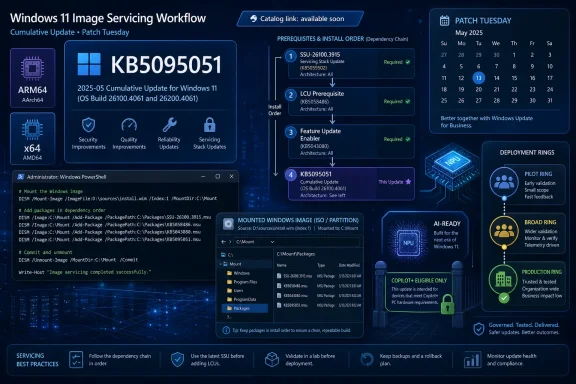
But KB5095051 complicates that story at the edges. The article says the Microsoft Update Catalog entry contains one or more MSU files that require installation in a specific order. Microsoft offers two approaches: put all the MSU files in the same folder and let DISM discover what it needs, or install each MSU individually in the order Microsoft lists.
That is a perfectly defensible servicing model, but it is also a long way from the old mental picture of “download the update and run it.” The administrator is now expected to understand not just that the update exists, but how Windows package discovery behaves when prerequisite packages sit beside the target package.
The Catalog Is No Longer a Simple Escape Hatch
The Microsoft Update Catalog has long been the place admins go when Windows Update is not enough. It is the manual override: the website you visit when you need an MSU for a repair, an offline image, a lab system, a disconnected network, or a deployment pipeline that does not trust automatic update timing.
KB5095051 shows how that manual override has itself become more layered. Microsoft’s preferred Method 1 is to download all MSU files for KB5095051, place them in a folder such as C:\Packages, and then point DISM at the package path. DISM then handles the discovery and installation of prerequisite MSUs as needed.
That is elegant if the folder is complete. It is brittle if the folder is not. A missing prerequisite can turn what looks like a standard cumulative update into a troubleshooting session, especially when administrators are servicing images, validating task sequences, or staging updates across rings.
Method 2 is more explicit: install each MSU one by one, in Microsoft’s stated order. That appeals to administrators who want deterministic steps, logs, and failure boundaries. It also exposes the underlying complexity Microsoft’s cumulative update branding often hides.
The support article’s current wording appears to list the ARM64 package placeholder as the ordered item. That makes sense for Windows on Arm and Copilot+ PC deployments, but it raises an obvious caution for mixed estates: do not treat copied commands from a support page as architecture-neutral deployment guidance. The difference between x64 and ARM64 is not a typo when you are building offline images or automation.
DISM Remains the Tool Microsoft Trusts When Things Get Serious
For online systems, Microsoft provides the expected DISM command: run an elevated Command Prompt and add the package from the local package path. It also gives the PowerShell equivalent through Add-WindowsPackage. For many WindowsForum readers, that is standard muscle memory.
The more revealing part is that Microsoft also directs administrators to use the same servicing logic for Windows installation media. KB5095051 can be added to a mounted image with DISM or PowerShell, which means the update is not merely for already-running PCs. It is part of the image hygiene story.
That distinction matters in 2026 because the clean install image is still the root of many enterprise problems. If your deployment media is stale, your first boot is already behind. If your Dynamic Update packages are mismatched, setup can behave differently from the environment you tested. If your base image lacks current servicing stack expectations, the first cumulative update after deployment can become the slowest and riskiest part of the build.
Microsoft’s note about Dynamic Update packages is therefore more important than it looks. When downloading other Dynamic Update packages, admins are told to match the same month as KB5095051. If SafeOS Dynamic Update or Setup Dynamic Update is not available for that month, Microsoft says to use the most recently published version.
That is sensible guidance, but it is also an admission that Windows setup is now a moving target composed of several update streams. The OS image, the SafeOS environment, setup components, and cumulative update all need to line up closely enough to avoid creating a Frankenstein installer.
The AI Payload Is Included, But Not For Everyone
The KB5095051 note includes a small but increasingly familiar caveat: the latest cumulative update includes updates for AI components, but those AI component updates apply only to Windows Copilot+ PCs and will not install on ordinary Windows PCs or Windows Server.
This is the new Windows servicing reality in one sentence. Microsoft is shipping AI-related components through broad cumulative update channels while gating applicability by device capability. The package may contain the bits, but Windows decides whether the target system gets them.
That approach has advantages. It lets Microsoft keep Copilot+ PCs current without inventing a parallel consumer-visible patching mechanism. It also allows the company to service AI features as part of the operating system rather than as a loose collection of app updates and driver downloads.
But the model also increases the burden on administrators who need to explain what did and did not install. A security scanner, inventory tool, or compliance report may see references to AI components in a cumulative update. A non-Copilot+ device may never install those components. A Windows Server deployment should not receive them at all.
For ordinary users, that distinction may be invisible. For IT, it matters because Windows is no longer a single uniform payload even within the same build family. The operating system is increasingly conditional: architecture, silicon capability, device class, installed features, and policy all shape what the update actually does.
Copilot+ PCs Turn Windows Update Into Silicon-Aware Servicing
Copilot+ PCs are not just a marketing category. They are forcing Windows servicing to become more silicon-aware. Features that depend on neural processing units, local AI models, or Microsoft’s current definition of eligible hardware cannot be treated exactly like Notepad or a shell bug fix.
KB5095051 does not need to describe the AI components in detail for the servicing implication to be clear. Microsoft wants AI features patched through the same trusted update pipeline that carries security and quality fixes. That is the right instinct. AI components that run locally, interact with user data, or integrate with the shell should not be left to ad hoc update channels.
The tradeoff is opacity. A single cumulative update can now mean different things on different systems. One machine receives only the classic OS fixes. Another receives those fixes plus AI component updates. A server receives neither the client-only AI pieces nor the consumer feature surface. A Windows on Arm device may interact with a different catalog package than the x64 fleet sitting beside it.
This is not necessarily a flaw. Windows has always varied by edition, language pack, optional feature, and hardware driver. What is new is the strategic importance of the conditional layer. Microsoft’s AI roadmap depends on it, and administrators will increasingly have to audit it.
The practical advice is blunt: treat AI component servicing as part of endpoint management, not as a consumer feature toggle. If your organization owns Copilot+ PCs, you need to know how those components are updated, how applicability is detected, and how failures surface in logs.
The ARM64 Clue Points to a Bigger Platform Shift
The KB5095051 instructions shown for the catalog path repeatedly reference windows11.0-kb5095051-arm64. That may simply reflect the package Microsoft exposed or the text captured from the article at publication time. Either way, ARM64 is no longer a side note in Windows servicing.
Windows on Arm used to be easy to ignore in many enterprise conversations. It was present, occasionally promising, and often treated as a compatibility curiosity. Copilot+ PCs changed that. Microsoft’s first wave of modern AI PC messaging leaned heavily on Arm-based systems, and the update infrastructure has to meet that world where it is.
For administrators, ARM64 brings familiar but unforgiving demands. Update packages must match architecture. Offline images must be serviced with the right payloads. Driver readiness matters. Security tooling must not assume x64. Application compatibility testing has to include translation layers, native binaries, and deployment scripts that may have hard-coded assumptions from a decade of Intel dominance.
KB5095051 is not an Arm manifesto, but its package guidance is a reminder that Windows’ future is not exclusively x64. Microsoft can ship the same branded Windows 11 release across architectures, yet the operational artifacts remain architecture-specific. That is exactly where automation mistakes tend to happen.
In a homogenous environment, that is manageable. In a mixed estate with x64 laptops, ARM64 Copilot+ PCs, virtual desktops, and servers, it becomes another reason to slow down before turning Patch Tuesday into a single global push.
The “Available Soon” Problem Is Small Until It Breaks a Change Window
The phrase “Download link will be available soon” is easy to dismiss as a temporary publishing artifact. Microsoft support pages and catalog entries do not always appear in perfect lockstep. Anyone who has watched Patch Tuesday closely has seen metadata, release notes, and payload availability arrive in a staggered sequence.
Still, timing matters. IT organizations plan change windows around release days. Security teams ask when vulnerabilities are remediated. Desktop engineering teams build pilot rings. Help desks prepare for call volume. If a KB article says the update exists but the catalog package is not yet available, the operational answer becomes murky.
Windows Update and Windows Update for Business may still carry the update on their own schedule, but the catalog is essential for manual deployment and offline servicing. It is also the fallback when automated channels are blocked, delayed, or unsuitable for a specific machine. If the catalog package is not available, the update is not equally available to every deployment model.
This is one of the quiet tensions in Microsoft’s servicing strategy. The company wants Windows updating to be continuous, cloud-managed, and policy-driven. Many administrators still need file-level artifacts they can stage, hash, test, and inject into images. KB5095051 sits right at that intersection.
Microsoft will likely resolve the placeholder quickly if it has not already by the time many readers see the article. But the episode is a useful reminder: never build a deployment assumption solely from the existence of a support page. Verify that the payload is live, that the architecture matches, and that the package installs cleanly in a test ring.
Offline Media Is Where Sloppy Servicing Becomes Expensive
The KB5095051 guidance for installation media deserves special attention because offline servicing is where small mistakes have long lives. A running PC can often recover from a failed update with a retry, rollback, repair install, or a subsequent cumulative update. A bad image can reproduce the same problem across hundreds or thousands of machines.
Microsoft’s instruction to mount an image and add the package with DISM is straightforward, but it assumes administrators understand the rest of the imaging chain. The cumulative update is only one component. Dynamic Update, drivers, language packs, optional features, provisioning packages, and security baselines can all affect the final result.
The monthly alignment warning is especially important. If you are adding KB5095051 to installation media, Microsoft wants related Dynamic Update packages from the same month where possible. If the matching SafeOS or Setup Dynamic Update does not exist, use the most recent version. That is practical, but it also means image builders must track more than one release artifact.
This matters for disaster recovery as much as deployment. When a business needs to rebuild machines quickly, the install media becomes the foundation. If that foundation is months behind, the first boot may require a large update chain, extended downtime, and avoidable exposure. If the foundation is incorrectly serviced, the organization may discover the problem only when it can least afford delay.
KB5095051 therefore belongs in the monthly image maintenance conversation, not just the endpoint patching conversation. The question is not only whether existing PCs receive Build 28000.2269. It is whether newly deployed PCs start their lives close to that baseline.
Security Is the Subtext Even When the Article Talks About Packages
The support text provided for KB5095051 does not enumerate the security fixes in the excerpt, but Patch Tuesday cumulative updates are inseparable from security operations. The point of the cumulative model is that quality and security fixes move together through a predictable channel. Even when the support page emphasizes installation mechanics, the deployment clock is still a security clock.
June 2026 is also not an ordinary month in the Windows security calendar. Microsoft has spent the last year warning organizations about Secure Boot certificate expiration beginning in June 2026 and the need to move supported systems onto updated trust material. That issue is separate from KB5095051’s visible installation instructions, but it sits in the same operational frame: Windows security now depends on timely servicing of components below and around the OS, not just the OS shell itself.
For administrators, the lesson is to resist treating any single KB as isolated. A cumulative update may touch the OS. A Dynamic Update may affect setup. A Secure Boot certificate update may affect boot trust. Firmware and OEM updates may determine whether the platform accepts the new state. The security boundary is distributed.
That distribution is why Microsoft keeps pushing administrators toward managed update rings, telemetry, and compliance reporting. It is also why experienced admins keep demanding clear offline packages and deterministic install instructions. Both instincts are rational. Cloud orchestration helps at scale, but when boot trust, setup, and architecture-specific packages are involved, file-level clarity remains essential.
KB5095051’s dry procedural language is therefore more consequential than a feature changelog would be. It tells us how Microsoft expects Windows security maintenance to be performed in the field: with DISM, package folders, applicability logic, and monthly coordination across update types.
Home Users See a Reboot; Administrators See a Supply Chain
For most Windows 11 users on version 26H1, KB5095051 should be experienced as a normal cumulative update. It appears, installs, restarts, and leaves the system at OS Build 28000.2269. If the machine is not a Copilot+ PC, the included AI component updates should not apply. If the machine is a server, those client AI pieces should not install.
That simplicity is real, but it is not the whole story. Windows Update is now the visible tip of a servicing supply chain. The catalog entry, MSU ordering, architecture-specific package naming, Dynamic Update compatibility, offline image injection, and feature applicability rules all sit underneath the friendly Settings page.
This layered design is a strength when it works. It allows Microsoft to service an enormous Windows ecosystem through a unified cadence while still targeting specific device classes. It lets a Copilot+ PC receive relevant AI component updates without forcing the same components onto a server. It lets offline images be brought current before deployment.
It is also a weakness when documentation and payload timing are out of sync. The more layers there are, the more places a release can be technically published but not yet operationally usable. That is why KB5095051’s placeholder download language deserves attention beyond the momentary inconvenience.
The best posture for users is patience. The best posture for administrators is verification. Those are not the same thing.
The Real Test Is Whether Microsoft Can Make Complexity Feel Boring
Windows servicing has always been complicated. What has changed is that the complexity is now tied to Microsoft’s biggest strategic bets: AI PCs, Arm hardware, secure boot trust renewal, and cloud-managed endpoint fleets. KB5095051 is a mundane cumulative update on paper, but it travels through that larger system.
Microsoft’s challenge is to make this all feel boring. A Copilot+ PC should receive its AI component updates without drama. An x64 desktop should not waste time or disk space on inapplicable components. A Windows Server system should remain outside the consumer AI path. An offline image should be serviceable with clear instructions and available packages. A catalog release should not leave administrators staring at “available soon” during a change window.
The company is moving toward a Windows model where the OS is less a monolith than a serviced platform with conditional layers. That model can work, and in some ways it is unavoidable. Hardware is diversifying, AI features are becoming local, and security requirements increasingly reach into firmware and pre-boot environments.
But Microsoft cannot assume that cumulative branding eliminates deployment complexity. It merely hides it from people who are lucky enough not to manage it. The admins still need exact package names, reliable catalog timing, install order, architecture clarity, and honest known-issue reporting.
KB5095051 is therefore a useful snapshot of Windows in 2026. The update itself may be ordinary. The servicing ecosystem around it is anything but.
The KB5095051 Checklist Hiding in Plain Sight
KB5095051 should not send administrators into panic mode, but it should prompt a disciplined release-day routine. The safest reading of this update is that Microsoft is giving admins enough procedural detail to deploy it properly, while also exposing several places where assumptions can go wrong.
- KB5095051 updates Windows 11 version 26H1 systems to OS Build 28000.2269.
- Microsoft’s catalog instructions indicate that one or more MSU files may need to be installed together or in a specific order.
- DISM can discover prerequisite MSUs when all required packages are placed in the same folder.
- The article’s ARM64 package references should be treated carefully in mixed x64 and ARM64 environments.
- The included AI component updates apply only to Windows Copilot+ PCs and should not install on standard Windows PCs or Windows Server.
- Offline installation media should be serviced with attention to matching Dynamic Update packages from the same month where available.
The practical takeaway is that KB5095051 is less about chasing a shiny new feature than preserving deployment integrity. If the package is available through your normal Windows Update channel, test and roll it through rings as usual. If you depend on the Microsoft Update Catalog or offline images, confirm the downloads, architecture, and install sequence before the maintenance window starts.
Windows 11 servicing is entering its most conditional era yet: one operating system brand, multiple silicon targets, AI-gated components, and security dependencies that reach below the desktop. KB5095051 will likely be remembered, if it is remembered at all, as a routine June cumulative update. But routine is now the product Microsoft has to earn every month, and the administrators who understand the machinery underneath will be the ones least surprised when the next build number arrives.
