

A Bangkok ticket machine rebooted into a nearly quarter‑century‑old operating system this week, exposing a Windows 2000 Professional splash and a user‑mode fault dialog — a small, nostalgic image on its face, but one that raises immediate operational, security and compliance questions for any organisation that still runs legacy software in public, unattended devices.
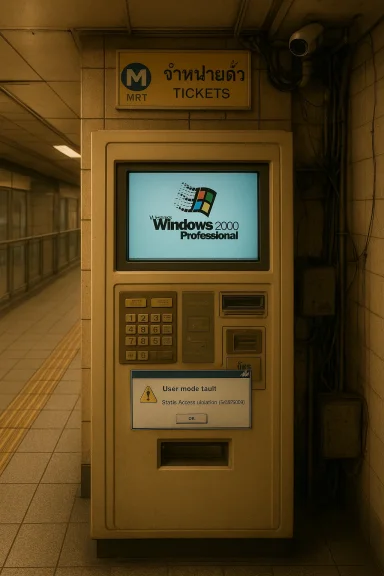
The photograph in circulation shows a ticket vending terminal — reported to be part of Bangkok’s MRT network — paused mid‑boot with the familiar Windows 2000 Professional loading graphics visible. At a glance it’s a reminder that appliances and kiosks often outlive the software images they were shipped with, and that long‑retired operating systems can remain in service where they are perceived to be “safer” because they are air‑gapped or stable. The same image is also a practical alarm bell: end‑of‑life (EOL) software no longer receives vendor security updates, and an unattended device that handles payments or personal data is a different class of risk compared with a personal desktop.
Hidden costs accumulate in other ways:
The weaknesses are systemic and growing:
Windows splash screens are sentimental artifacts of an earlier computing era — but when those screens appear in public kiosks, they should be treated as an operational incident, not a museum exhibit. The photograph from Bangkok is a timely reminder for transportation operators, city governments and payments vendors: fast containment now, funded migration next, and governance forever after.
Source: theregister.com Splash-screen memories from a Bangkok ticket machine
 Overview
The photograph in circulation shows a ticket vending terminal — reported to be part of Bangkok’s MRT network — paused mid‑boot with the familiar Windows 2000 Professional loading graphics visible. At a glance it’s a reminder that appliances and kiosks often outlive the software images they were shipped with, and that long‑retired operating systems can remain in service where they are perceived to be “safer” because they are air‑gapped or stable. The same image is also a practical alarm bell: end‑of‑life (EOL) software no longer receives vendor security updates, and an unattended device that handles payments or personal data is a different class of risk compared with a personal desktop. Background: Windows 2000 in public infrastructure
Windows 2000 was released around the turn of the millennium and formed the backbone of many enterprise deployments for years. Microsoft formally ended extended support for Windows 2000 on July 13, 2010; after that date security updates, patches and free vendor support ceased. That EOL date is central to why the presence of Windows 2000 on a public terminal matters: unpatched vulnerabilities discovered since 2010 will never receive official Microsoft fixes. Why this matters in plain terms: public kiosks, ticket machines and point‑of‑sale (POS) terminals are often unattended, physically accessible to the public, and — in many installations — connected to backend services that process payments or operate fare gates. Leaving those endpoints on software that hasn’t seen security updates for more than a decade increases the attack surface and complicates incident response. The image from Bangkok may be quaint, but it’s also a live demonstration of those risks.Bangkok’s transit context
The machine in the photograph was reported to belong to the Bangkok Metropolitan Rapid Transit (MRT) network — the city’s underground system whose initial Blue Line services entered commercial operation in 2004. Bangkok’s elevated BTS Skytrain, a separate network, began service in 1999. The MRT’s opening in 2004 means many hardware fleets deployed early in the network’s life could plausibly still be operating if they were ruggedised kiosks with long service lives and slow hardware refresh cycles. That long service life is one reason legacy OS installations keep turning up.What the screen likely shows — a technical snapshot
The visible error on the terminal appears to be a user‑mode process faulting while attempting a memory access. In Windows terminology this commonly surfaces as an access violation — code 0xC0000005 (STATUS_ACCESS_VIOLATION) — which indicates a process tried to read or write memory it should not have touched. That kind of fault can be the result of a bug in the kiosk application, a failing driver, corrupted memory, or (less commonly) deliberate exploitation that forces a crash. The difference between a user‑mode crash and a kernel panic (Blue Screen of Death) is important: a kernel crash would likely bring the whole system down, but a user‑mode fault can freeze the UI while leaving lower‑level services running. Diagnosing such an error on a retired OS is harder than on supported platforms. Modern debugging tools, symbol servers and vendor support channels are tuned to current operating systems; by contrast, Windows 2000 lacks many of the integration points administrators expect today. That means longer mean time to repair (MTTR), fewer safe, vendor‑sanctioned mitigations, and potentially ad‑hoc fixes that do not address root causes.Why legacy Windows still runs in the field
Several pragmatic reasons explain the persistence of Windows 2000 and similar legacy systems in kiosks and terminals:- Compatibility: Many point‑of‑sale, ticketing and industrial control applications were built against older Windows APIs or bundled with drivers that only work on those older kernels. Migrating the application often demands significant redevelopment or device replacement.
- Certification and vendor lock‑in: Hardware vendors sometimes certify a single OS image for a device family. Re‑certifying drivers and payment stacks on a newer OS can be expensive and time‑consuming, particularly where regulatory approvals or payment‑processing certifications are required.
- Budget and procurement cycles: Large public transit operators plan capital refresh programs across many years. Replacing hundreds or thousands of field devices is a multi‑year, capital‑intensive project.
- Perceived safety: Some operators assume that devices which are offline or on “private” networks are low risk. That assumption often underestimates indirect attack vectors, such as malicious firmware replacement, compromised maintenance laptops, or supply‑chain tampering.
The security and compliance angle
Running EOL operating systems in devices that process or transmit cardholder data intersects directly with modern payment security standards. PCI DSS version 4.0 introduced explicit expectations around the management of end‑of‑life software, including controls that require organisations to identify unsupported technologies and plan remediation. The PCI Security Standards Council has made clear that validated payment applications or certified devices running on unsupported OS images place a greater burden on operators to demonstrate compensating controls or move to supported platforms. Non‑compliance can lead to penalties from acquirers, fines and the potential loss of processing privileges. Practical implications for unattended terminals:- If the terminal stores, transmits or touches Primary Account Numbers (PAN), it is within scope of PCI DSS and must be protected by current controls. Allowing an unsupported OS to remain in scope is increasingly hard to justify during audits.
- The new PCI requirements include annual reviews of hardware and software to uncover EOL technology and mandate remediation planning. After the mandatory dates in the PCI timeline, exceptions are much harder to obtain.
- Compensating controls (segmentation, point‑to‑point encryption, strict network egress filtering, enhanced logging and monitoring) can buy time, but they are not permanent substitutes for migrating to supported, vendor‑maintained images.
Operational risks beyond compliance
Security is one dimension; operational availability and customer experience are another. A ticket machine that freezes or reboots during rush hour has immediate, measurable impact — missed journeys, customer complaints, and manual crowd control costs. The photograph’s visible UI fault hints that the terminal’s software stack may be brittle: a single application fault can escalate into service disruption when remote management is limited or when spare parts and engineers are constrained. That operational fragility itself often accelerates broader remediation costs, because reactive fixes tend to be more expensive than planned replacements.Hidden costs accumulate in other ways:
- Parallel‑run overhead: maintaining legacy fleets while deploying replacements doubles licensing, support and inventory complexity.
- Unknown dependencies: vendor tools, custom drivers, or third‑party middleware can block upgrades and require bespoke engineering time.
- Incident response complexity: crash dumps and forensic artifacts on EOL systems may be unreadable with modern tools, slowing diagnosis and increasing downtime.
Practical containment: immediate actions for operators
For operators who discover an unsupported OS on a device in the field, the first priorities are containment, evidence preservation and rapid risk reduction. The following checklist is a pragmatic sequence to follow:- Isolate: Remove the device from any non‑essential networks or place it behind a strict egress filter that only permits essential endpoints. Segment the terminal from other internal systems.
- Preserve evidence: Photograph the screen, record serial numbers, firmware and software versions, and capture any available logs before rebooting or reconnecting. This helps with root cause analysis and any potential regulatory reporting.
- Check card reader integrity: Inspect for physical tampering, skimmer attachments, or replaced readers. If card readers are suspect, disable payment acceptance and switch to offline, manual alternatives until replacements are installed.
- Communicate: Notify acquiring banks, payment processors and internal compliance teams. Early engagement reduces downstream penalties and coordinates support for incident response.
- Log and monitor: Forward logs from the device (or the gateway) to an external, hardened collector. If remote logging is not possible due to the OS, make sure to collect local artifacts and transport them for analysis.
- Plan replacement: Treat high‑risk devices (those that accept cards or store PII) as front‑line priorities for replacement or re‑imaging onto supported platforms. Funded multi‑phase replacement plans are the right long‑term fix.
Migration strategies: pragmatic, staged options
Replacing every kiosk overnight is rarely feasible. Good migration strategies balance security, budget and operational continuity:- Inventory first. Comprehensive discovery — software versions, payment stacks, driver lists, connectivity maps — is essential. Without an accurate inventory you cannot prioritise.
- Triage by exposure. Prioritise devices that process payments, handle PII, sit in high‑traffic locations, or are network‑exposed. Those are the highest business impact.
- Pilot and validate. Test replacement images on a small set of units to identify driver and peripheral compatibility issues before fleet‑wide rollouts. Validate payment acceptance, accessibility and uptime under load.
- Use compensating controls while migrating. Where immediate replacement is impossible, deploy strict network segmentation, P2PE (point‑to‑point encryption), and enhanced monitoring to reduce the effective attack surface. Document compensations for auditors.
- Replace hardware when appropriate. Sometimes the cheapest long‑term choice is to buy vendor‑supported terminals rather than repeatedly patching brittle legacy hardware. Factor total cost of ownership (TCO) into procurement decisions.
The nostalgia trap and why it’s dangerous
There’s a cultural reflex to smile at a screenshot of an older Windows splash — it triggers memories of an era of simpler GUIs and slower update cadences. Nostalgia, though, is a poor security strategy. If a device is running an OS that has not received security updates for years, the fact that “it still works” is not an argument for keeping it; it’s a sign the failure mode simply hasn’t been exploited in that particular deployment — yet. Organisations that accept that risk without formal compensating controls are inviting a failure mode with tangible consequences: fraud losses, regulatory fines, and reputational damage.Limits of what the image proves — caution on assumptions
The photograph is a useful data point, but it doesn’t prove everything. From a single image one cannot definitively say whether:- Cardholder data has been or can be exfiltrated from the device.
- The device is part of a larger fleet running the same image.
- The terminal’s network connectivity is wide open or tightly restricted in practice.
- The ticketing backend was impacted or merely the device UI crashed.
Final assessment: strengths, weaknesses and the path forward
What the photograph captures is both a strength and a weakness of legacy platforms. The strength: Windows 2000 and other old images are often simple, well‑understood, and — when they work — dependable for the narrow, original use case they were built for. That dependability has real operational value for vendors and operators.The weaknesses are systemic and growing:
- No vendor security updates for known and unknown vulnerabilities.
- Increasingly incompatible toolchains for diagnosis and maintenance.
- Tighter standards and regulatory expectations (PCI DSS 4.0) that explicitly require EOL tracking and remediation.
- Real costs associated with emergency repairs and potential brand damage when public devices fail in customer‑facing settings.
Recommended checklist (concise)
- Photograph and document the terminal, serials and software version.
- Immediately isolate or segment the device’s network access.
- Notify payment partners and internal compliance/security teams if the device handles payments.
- Inspect physical readers for tampering; disable payment acceptance if compromised.
- Collect logs and, where possible, forward to a hardened external collector for analysis.
- Begin a funded, triaged replacement program with pilots and driver validation.
Windows splash screens are sentimental artifacts of an earlier computing era — but when those screens appear in public kiosks, they should be treated as an operational incident, not a museum exhibit. The photograph from Bangkok is a timely reminder for transportation operators, city governments and payments vendors: fast containment now, funded migration next, and governance forever after.
Source: theregister.com Splash-screen memories from a Bangkok ticket machine
