

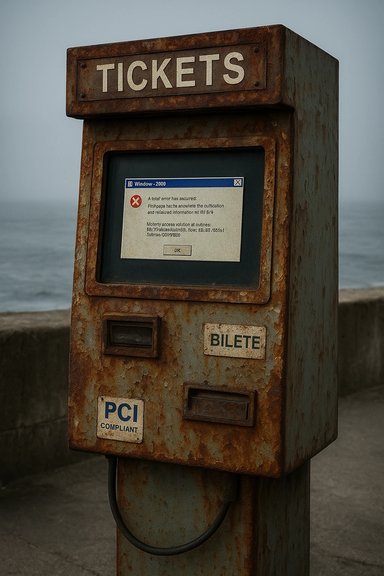
Windows 2000, once the stable backbone of enterprise IT, has turned up in public again — not in a museum, but as the operating system behind a battered ticket terminal on Portugal’s coastline, where a user-mode memory error left the touchscreen frozen and card payments reportedly out of service. The image of a rusted kiosk with a Windows 2000 message is a small, melancholy emblem of a far larger, ongoing problem: critical public-facing systems still running long‑unsupported operating systems, exposed to modern threats, compliance traps, and operational fragility. This feature examines what that picture tells us about legacy OS persistence, the technical meaning of the fault visible on the screen, real-world security and compliance implications (especially for payment acceptance), and practical paths operators should take now to reduce risk and accelerate replacement or containment.
A photograph circulating online shows a ticket vending terminal with a degraded touchscreen and a Windows dialog indicating a service has faulted while accessing memory. The terminal’s weathered bezel, salt-streaked plastic and peeling paint suggest long exposure to coastal conditions — hardly a forgiving environment for aging electronics. On first glance, the problem looks like a simple application crash; but the operating system beneath it — Windows 2000, released in 2000 and formally retired by Microsoft more than a decade ago — changes the urgency of the response from “clean and reboot” to “inventory, isolate, and plan an immediate mitigation or replacement.” Extended support for Windows 2000 ended on July 13, 2010, which means there have been no Microsoft security updates for the platform for many years.
Source: theregister.com Windows 2000 rusts in peace by the sea
 Background: the picture and the provenance
A photograph circulating online shows a ticket vending terminal with a degraded touchscreen and a Windows dialog indicating a service has faulted while accessing memory. The terminal’s weathered bezel, salt-streaked plastic and peeling paint suggest long exposure to coastal conditions — hardly a forgiving environment for aging electronics. On first glance, the problem looks like a simple application crash; but the operating system beneath it — Windows 2000, released in 2000 and formally retired by Microsoft more than a decade ago — changes the urgency of the response from “clean and reboot” to “inventory, isolate, and plan an immediate mitigation or replacement.” Extended support for Windows 2000 ended on July 13, 2010, which means there have been no Microsoft security updates for the platform for many years. Overview: why this matters beyond nostalgia
The image of a creaking ticket machine is evocative, but the risk it represents is concrete and immediate for any organisation that accepts cards, runs unattended kiosks, or operates public infrastructure:- Unsupported operating systems no longer receive vendor security patches, leaving known vulnerabilities permanently exploitable.
- Payment acceptance systems are in-scope for modern standards such as PCI DSS; running EOL software creates compliance risk and potential liability.
- Unattended devices — ticket machines, ATMs, kiosks, vending hardware — are physically exposed, harder to update remotely, and can be vectors for malware or data theft.
- A visible memory-access failure may be a symptom of application bugs, driver incompatibility, or malware — diagnosing it on an EOL OS is both harder and more hazardous.
Technical snapshot: what the screen likely shows
What “memory” errors mean in Windows terms
The visible failure — a service or process complaining about a memory access — is typically an access violation or unhandled exception. On modern Windows systems this appears as exception codes such as 0xC0000005 (STATUS_ACCESS_VIOLATION) and means a process attempted to read or write memory it was not allowed to touch. Causes range from simple programming bugs (null pointer dereferences, buffer overruns) to driver conflicts, heap corruption, or deliberate exploitation attempts. Microsoft’s documentation and technical Q&A describe these exceptions as common across legacy and modern Windows systems alike; remediation typically involves crash-dump analysis, reproducing the fault under controlled conditions, and updating or replacing the offending module.Why there’s no Blue Screen of Death (yet)
A kernel-level crash (BSOD) differs from a user-mode service crash. If a user-mode process faults (for example, the touch UI application or a payment-service daemon), Windows may present an application error dialog or simply freeze that process while leaving the underlying kernel and other services alive. That matches the reported behaviour: the terminal’s UI is frozen with a visible error, but the system hasn’t pinned a full kernel panic. Diagnosing user-mode crashes is still non-trivial, but less catastrophic than repeated kernel crashes. However, on an EOL OS, tools and modern debuggers may be unavailable or incompatible, making diagnosis slower and more error-prone.Deeper causes: why legacy Windows still runs in the field
The sight of Windows 2000 powering a public-facing terminal is not accidental. Organisations keep legacy operating systems for several well-understood reasons:- Compatibility with bespoke software or device drivers: Many ticketing, industrial and point‑of‑sale (POS) systems were written for older Windows APIs and rely on driver stacks that no longer work with current OS releases.
- Certification and vendor lock‑in: Approved installations (certified by suppliers or regulators) can be costly to re-certify; hardware vendors sometimes only support a single OS image for a product line.
- Budget and procurement cycles: Public sector and transport operators often have constrained budgets and long procurement timelines; replacing hundreds of field devices can require multi-year capital planning.
- Operational continuity: If a legacy system “just works” for its function and changing it risks downtime, an organisation may prefer gradual mitigation over risky immediate migration.
Security and compliance implications
Unsupported OS = attack surface frozen in time
An operating system that no longer receives security patches leaves any discovered vulnerability permanently exploitable. Attack techniques that were novel years ago are now commoditized: exploit tooling, memory-scraping malware for payment environments, and automated scanners make EOL systems especially easy targets.- Organisations that process cardholder data are governed by PCI DSS; the standard obliges covered entities to “protect system components and software from known vulnerabilities by installing applicable vendor-supplied security patches.” When vendor patches are unavailable, the organisation must implement documented compensating controls or face compliance failure. Recent PCI DSS updates and related guidance emphasize inventorying and remediating EOL technologies.
Payment acceptance: special rules and mitigations
Cards and payment terminals attract both opportunistic and targeted attackers. Best practices to reduce exposure include validated Point‑to‑Point Encryption (P2PE) solutions, EMV-compliant card readers, device tamper-evidence, and segmentation that keeps payment devices off general-purpose networks.- Using a validated P2PE solution encrypts card data at the point of interaction; if properly implemented, it can significantly reduce the scope of PCI DSS and the risk from a compromised kiosk. The PCI Security Standards Council publishes the P2PE standard and guidance on solution components, validations and lifecycle management. If a device running an EOL OS handles clear-text cardholder data, that presents an acute, non-trivial risk.
Real-world compliance consequences
Modern PCI DSS versions (and enforcement by acquiring banks) treat unsupported software and lack of patching as audit failures. Since PCI DSS 4.0 introduced additional requirements for technology inventory and end‑of‑life planning, assessors increasingly expect organisations to show senior‑management approved remediation plans for EOL systems. Non-compliance can lead to penalties, loss of acquiring privileges and expensive forensic and remediation requirements after a breach.Operational diagnosis: what operators should check immediately
If you manage unattended kiosks, ticket machines, ATMs or similar devices and you see a screenshot like the one described, treat it as a potentially serious incident. Follow this triage checklist:- Isolate the device — remove network access or place it in a quarantined VLAN to prevent lateral movement or data exfiltration.
- Document the visible failure — photograph the screen, note timestamps, serial numbers, installed software versions and any on-device logs.
- Verify transaction data flow — confirm whether the device was handling cardholder data when it failed. If so, preserve logs and notify the acquiring bank/security team.
- Check for physical tampering — unattended payment hardware is a target for skimming and hardware‑based attacks; inspect seals, enclosures and card-reader modules.
- Collect crash dumps / event logs — if feasible and safe, retrieve application logs or Windows event logs for post‑incident analysis.
- Apply compensating controls — if immediate replacement is impossible, restrict device functions, disable local storage of card data, and use tokenization/P2PE where available.
Practical mitigations and remediation options
No single fix suits every legacy deployment, but a practical, risk‑based approach helps. Below are layered measures ranked by urgency and impact.High‑priority (immediate to 30 days)
- Network isolation and segmentation: Place kiosks and POS devices on segmented networks with strict egress filtering and only allow required endpoints. This reduces attack surface and scope for PCI DSS.
- Deploy P2PE or certified readers: If the device collects card data, immediately assess whether you can substitute or supplement with a P2PE-validated reader that encrypts at the POI. This reduces exposure even if the host OS is outdated.
- Restrict local admin and services: Lock down the kiosk image — disable unnecessary services, remove writable shares, and ensure local administrative access is strictly controlled.
- Monitoring and logging: Add endpoint monitoring and forward logs to a secure collector outside the kiosk network. Rapid detection reduces dwell time for attackers.
Medium‑term (30–180 days)
- Compensating controls and documented remediation plans: Where immediate replacement is impossible, create and document compensating controls that go “above and beyond” PCI DSS requirements and obtain senior‑management approval. Note that compensating controls must be demonstrably effective and cannot be a business-as-usual substitute for patching.
- Vendor engagement: Contact the ticket machine vendor or integrator about upgrade paths — some vendors offer migration services, replacement controllers, or hardened appliance images that preserve functionality on modern, supported platforms.
- Hardware refresh planning: Build a capital plan to replace unsupported end-of-life hardware; many projects stall for lack of budgets or procurement time, so schedule early.
Long‑term (6–24 months)
- Full migration to a supported platform: Migrate appliance software to a current, supported OS (Windows 10/11 IoT Enterprise, Linux-based appliances, or vendor-maintained embedded images). The migration approach depends on application design: recompile/port, run in a secured virtual machine, or replace the entire application stack.
- Modernise architecture: Move sensitive functions to cloud-hosted or centrally managed services when feasible — offloading card processing to payment service providers can reduce local PCI scope.
- Lifecycle governance: Establish recurring inventories, EOL timelines and replacement roadmaps to prevent future surprises. PCI DSS and broader governance frameworks increasingly require documented EOL management.
Upgrade options: migration paths and trade-offs
- Replace the kiosk hardware and software — highest cost, cleanest long‑term result. Modern devices come with validated P2PE and hardened OS images, dramatically reducing PCI scope.
- Vendor-supplied appliance image on new hardware — moderate cost, faster deployment. Vendors may offer validated replacement images that retain existing management and remote‑monitoring features.
- Virtualise the legacy app on a supported host — possible for some applications. Run the legacy stack inside a tightly controlled VM with minimal exposure; still requires careful assessment for device‑driver compatibility.
- Emulation / compatibility layers — only for non‑security‑critical, offline functions; this is usually a stopgap and risks ongoing compliance challenges.
- Refactor or rewrite — highest engineering effort; provides future resilience and feature parity but requires time and capital.
Strengths and weaknesses of sticking with legacy OS in the field
Notable strengths (why organisations delay migration)
- Functional stability for legacy software: If the in‑field application is tightly integrated and unchanged for years, operators may prefer “if it ain’t broke” continuity.
- Avoidance of short-term capital expenditure: Immediate replacement can be expensive and disruptive.
- Known behavior and staff familiarity: Operators and maintenance teams are comfortable with the old stack and its idiosyncrasies.
Clear and growing risks
- Security risk from unpatched vulnerabilities: Threat actors target EOL systems as low-hanging fruit.
- Compliance exposure: Payment and regulatory standards increasingly demand documented EOL remediation or replacement.
- Operational fragility: Hardware failures and driver incompatibilities become more likely and harder to resolve due to fading vendor support.
- Hidden total cost of ownership: Ongoing maintenance, ad-hoc workarounds, and incident response costs often exceed projected replacement budgets over time.
How to prioritise replacements across a fleet
When an operator manages a fleet of kiosks or ticket machines, triage is essential:- Identify devices that store or process card data — highest priority for replacement or isolation.
- Map network exposure — devices with public Internet or wide network access should be remediated sooner.
- Assess usage criticality and customer impact — machines in high-traffic locations or mission-critical nodes take precedence.
- Estimate cost and timeline — build phased replacement waves that align with budgets and supply‑chain realities.
- Engage payment partners — coordinate with acquiring banks and payment processors to manage PCI expectations and avoidance of penalty exposure.
Caveats and unverifiable points in the public image
- The photograph and accompanying report indicate a Windows service fault and a possible impact to card payments, but the image alone does not prove that cardholder data has been compromised, nor does it confirm payment processing is entirely offline. Operators must treat such incidents as potentially serious but avoid definitive conclusions until logs and network traffic are analysed.
- The presence of Windows 2000 on a kiosk in one location does not necessarily imply a nationwide deployment; inventory and sampling are required to establish the scope. These observations should drive an immediate inventory sweep rather than assumptions about global fleets.
Final appraisal: the good, the bad and the actionable
The image of Windows 2000 “rusting in peace” is a useful reminder that legacy technology keeps turning up where the rubber meets the road: on the platforms people rely on every day. There is understandable inertia behind keeping these systems running — compatibility, certification and budgetary realities are real constraints. But those constraints are not absolutes; they are project levers that can be managed.- Short‑term containment (isolation, P2PE, segmentation) can blunt immediate exposure and buy time.
- Documentation of compensating controls and a formal remediation roadmap are essential for compliance with modern standards.
- Long‑term safety requires migration to supported platforms or replacement with vendor‑maintained appliances.
Recommended immediate checklist (for operators)
- Isolate the terminal from all non-essential networks and restrict outbound traffic to required endpoints only.
- Photograph and preserve evidence: screen, serials, firmware versions, and any immediate logs.
- Notify acquiring bank and internal security/compliance teams if the device handles card payments.
- Inspect for physical tampering and secure or replace compromised card readers.
- If possible, enable additional logging and forward logs to a secure external collector.
- Plan rapid replacement or hardware refresh for any kiosks that process cardholder data and run unsupported software.
Source: theregister.com Windows 2000 rusts in peace by the sea
