

Lenovo’s ThinkStation PX is a full‑size workstation that dresses server‑grade Intel Xeon silicon in a desk‑friendly tower, and ServeTheHome’s hands‑on review paints it as both a powerhouse for large‑scale workloads and a pragmatic, administrable workstation — not a server in disguise. The review’s test unit (a single-socket configuration with an Intel Xeon Gold 5416S, 128 GB of DDR5‑4400 ECC memory, and an NVIDIA RTX A6000) exposes the PX’s sweet spot: strong multi‑threaded throughput driven by an eight‑channel memory subsystem, top‑tier GPU compute, and a chassis engineered for high electrical and thermal headroom. Those conclusions hold up against Lenovo’s own platform documentation and independent component spec sheets, but they also reveal trade‑offs — notably around manageability features, OS choice, and price/performance for single‑socket builds — that buyers must weigh carefully.
Key CPU facts validated:
That said, the PX is not universally optimal. Its lack of a standard integrated BMC, chassis scale (both physical and power), and pricing profile mean it is best suited for buyers who will use its expansion headroom. If you operate primarily single‑threaded workloads, or you need a quieter, more power‑efficient desktop without server‑class scale, Lenovo’s smaller ThinkStation offerings or single‑socket configurations may deliver better bang for your dollar.
In short: buy a ThinkStation PX if you need local, scalable workstation power with server‑style expandability and pro‑grade GPU options; otherwise, evaluate whether a smaller, more cost‑effective workstation aligns better with your expected utilization. The ServeTheHome review is a useful, practical data point for that decision — and its conclusions are supported by Lenovo’s platform specs, Intel and NVIDIA component documentation, and Microsoft’s OS feature list for Windows 11 Pro for Workstations.
Conclusion
Lenovo built the ThinkStation PX for users who need workstation horsepower that can grow into server territory without leaving the desk. ServeTheHome’s review shows the platform achieves that goal: it delivers strong multi‑threaded compute and top‑end GPU acceleration while retaining serviceability and enterprise power options. However, the PX’s scale, optional BMC approach, and price mean it’s a targeted tool for teams that will use its headroom — not a one‑size‑fits‑all replacement for every pro workstation buyer. If your workflows need local, large‑memory, GPU‑accelerated compute and you plan to populate the PX accordingly, it’s one of the most capable desktop workstations available; otherwise, weigh the trade‑offs carefully before committing.
Source: ServeTheHome Lenovo ThinkStation PX Workstation Review Intel Xeon for Large Scale Workloads
 Background
Where the ThinkStation PX fits
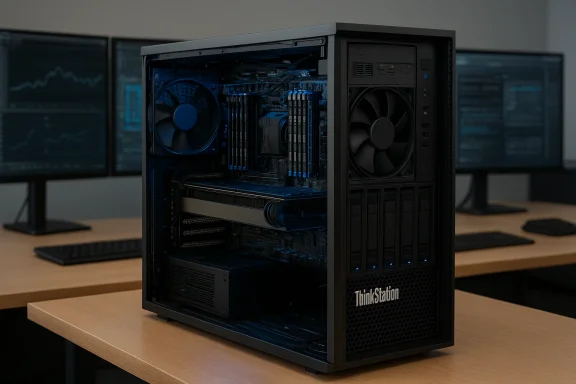
Lenovo positions the ThinkStation PX as its largest, highest‑capacity tower workstation: a dual‑socket, server‑class platform that accepts up to the latest Xeon Scalable processors, up to 16 DIMMs (8 per socket), and multiple professional GPUs. In maximum configurations Lenovo advertises up to 120 CPU cores and multi‑GPU support that reaches into four high‑end RTX‑class cards; the chassis and power delivery are sized accordingly, with single or redundant 1850 W power supplies available. This places the PX between conventional desktop workstations and compact server nodes — ideal for engineering simulation, large‑model machine learning inference, complex media rendering, and other heavy throughput tasks.The review snapshot
ServeTheHome’s review examined a mid‑range PX build: one Xeon Gold 5416S (16 cores / 32 threads), 128 GB DDR5‑4400 across eight channels, a single NVIDIA RTX A6000 GPU, and Windows 11 Pro for Workstations. That configuration served as the basis for CPU and GPU benchmark comparisons (Geekbench 6, Geekbench GPU Compute, Geekbench AI, and MLPerf Client v1.5) and for practical observations about noise, thermals, and expansion. The review emphasizes that results are highly configuration dependent — a point that is essential when comparing the PX to Lenovo’s smaller single‑socket offerings.Overview: Design, build and expandability
External design and chassis engineering
The ThinkStation PX’s 54‑liter tower is literal proof that this is not a small workstation. Its size accommodates a server‑grade motherboard, robust airflow channels, and serviceable front hot‑swap drive bays. Lenovo’s mechanical choices — tool‑less side panels, coded connectors, and front‑accessible storage — prioritize on‑site serviceability and fast component swaps. For deployments that need on‑desk accessibility to drives or frequent hardware reconfiguration, this chassis is purpose‑built.Expansion and power
The PX supports a large number of PCIe devices and has flexible power configurations. Lenovo documents a standard 1850 W power supply with an optional redundant second 1850 W unit for maximum configurations; the platform’s VRM and board design support high TDP CPUs and multiple pro GPUs, with abundant PCIe lanes coming from the server‑class Xeon platform. This is not a workstation to upgrade with consumer add‑ons — it’s intended for planned, professional scaling.Storage and I/O
ServeTheHome’s review highlights front hot‑swap bays (3 × 3.5″ by default, with optional front M.2 bays), rear networking that includes a 10 GbE controller and a 1 GbE management port, and plentiful USB‑C/USB‑A ports on the front and rear. The design choices favor enterprise data workflows — fast local NVMe storage plus high‑bandwidth network connectivity for moving large datasets.Software and manageability
OS options and why they matter
Lenovo offers blank‑image units as well as preconfigured units with either Ubuntu Linux or Windows 11 Pro for Workstations. The latter adds server‑class OS features relevant to multi‑CPU and high‑memory platforms — notably support for up to 4 physical CPUs and up to 6 TB of RAM, plus ReFS (Resilient File System) and SMB Direct (RDMA) for low‑latency, high‑throughput network file access. If you intend to use the PX in extremely large memory or multi‑socket configurations, Windows 11 Pro for Workstations is the more appropriate client OS than standard Windows 11 Pro. Microsoft explicitly lists the edition’s capabilities around multi‑CPU and large memory, underscoring its design for power users and workstation workloads.- Why ReFS matters: ReFS is designed for resilience with automatic integrity checking and data‑repair capabilities, which is useful when managing massive datasets on local storage arrays.
- Why SMB Direct matters: SMB Direct enables RDMA networking, which can dramatically reduce CPU overhead and latency for file‑server access — relevant in distributed rendering or data‑centric pipelines.
Management: no integrated BMC by default
A notable point ServeTheHome calls out — and Lenovo’s documentation confirms — is that the PX does not ship with an integrated Baseboard Management Controller (BMC) as a standard, onboard feature. Lenovo offers a BMC add‑in card for customers who need remote out‑of‑band management, but this is optional. That design choice positions the PX closer to an administrable desktop workstation rather than a headless server with full IPMI-style remote management out of the box. For some IT teams that expect server‑style remote control, the optional BMC will be mandatory.Internal hardware: CPUs, memory and GPUs
CPU: Intel Xeon Gold 5416S
ServeTheHome’s reviewed configuration used the Intel Xeon Gold 5416S, a Sapphire Rapids‑family part with 16 physical cores and 32 threads. Independent CPU databases confirm the part’s architecture and its eight‑channel DDR5 memory support, with memory rated up to DDR5‑4400 in many configurations. The 5416S trades single‑thread, high‑clock peak for a power‑efficient multi‑core topology and extensive platform features (large cache, PCIe Gen5 lanes, and enterprise accelerators supported in the platform). That core balance shows up in the review’s synthetic benchmarks: the PX trails in single‑threaded tests against a higher‑clocked Xeon W part, but performs strongly in multi‑threaded and memory‑heavy workloads thanks to its wider memory subsystem.Key CPU facts validated:
- 16 cores / 32 threads for the Xeon Gold 5416S; eight memory channels per CPU; DDR5 memory support (rated up to 4400 MT/s in many vendor configurations).
Memory: wide channels and capacity
One of the PX’s most meaningful advantages in multi‑threaded workloads is memory channel count. Each CPU supports eight memory channels, and Lenovo supports up to 16 DIMMs across two CPUs. The review’s unit used 8 × 16 GB DDR5‑4400 ECC RDIMMs (128 GB total), demonstrating how a relatively modest core count can be helped by broader memory bandwidth in memory‑sensitive tasks like image processing and object detection. Lenovo’s spec pages list memory speeds up to DDR5‑5600 on some SKUs, and maximum DIMM size options up to 128 GB RDIMMs, depending on configuration. That flexibility is beneficial for local dataset handling and large VM host scenarios.GPU: NVIDIA RTX A6000
In ServeTheHome’s testing the PX used an NVIDIA RTX A6000, a professional Ampere‑generation GPU with 48 GB GDDR6 ECC and a 300 W board TDP; NVIDIA documents its card for workstation compute, large VRAM datasets, and virtualization use. In GPU compute and AI tests the A6000 predictably outperformed the P5’s RTX 4500 configuration, with ServeTheHome reporting an average GPU compute advantage around ~29% and higher in some tests — and 10–15% advantages in Geekbench AI tests. For workflows that benefit from large VRAM and professional driver optimizations (CUDA, Tensor RT, vGPU), the A6000 is a heavy hitter in the PX.Real‑world performance: what the benchmarks show
CPU synthetic and multi‑threaded behavior
ServeTheHome’s Geekbench 6 CPU results show the PX’s Xeon Gold 5416S trailing a higher‑clock, single‑socket Xeon W part in single‑threaded measures, but largely matching or beating it in multi‑threaded workloads that harness many cores and memory bandwidth. The takeaways are predictable for a Sapphire Rapids server part: weaker peak single‑thread clocks but excellent scalability when threads and memory bandwidth matter. If your day‑to‑day workloads are threaded renderers, large compressions, or object detection pipelines that can utilize many cores and high memory throughput, the PX’s platform becomes a decisive advantage. ServeTheHome’s specific test results provide a usable baseline for those comparisons.GPU compute and AI
The RTX A6000’s presence transforms the PX into an AI/compute platform. ServeTheHome’s Geekbench GPU and AI scores show the A6000 comfortably ahead of the RTX 4500 in the P5, and the MLPerf Client v1.5 runs add further weight to the PX’s AI throughput claims. For organizations focused on inference, GPU‑accelerated data prep, or even small‑scale fine‑tuning, the PX provides a workstation‑sized base for those pipelines without stepping into rack‑mounted systems. As with CPUs, actual throughput will depend on driver/toolchain maturity (CUDA, cuDNN, ONNX/TF exports) and the memory footprint of the model in use.Power, thermals and acoustics (summary)
ServeTheHome’s review continues beyond raw numbers into power consumption and noise, noting that the PX’s cooling and large thermal mass enable sustained workloads with reasonable acoustics relative to the power involved. The chassis’ venting and multiple fans are designed to keep sustained CPU and GPU clocks higher than thinner consumer machines, at the cost of audible fan noise under load. For lab or office applications where noise is a concern, profile tuning and placement (server room vs desk) should factor into procurement.Critical analysis — strengths and trade‑offs
Strengths
- Scalable, server‑grade platform in a workstation form: The PX can be a one‑stop for tasks that would otherwise require rack servers or remote cloud instances, especially when low latency and data privacy matter.
- Memory bandwidth and capacity: Eight channels per CPU and high DIMM capacity let large in‑memory datasets and multi‑VM hosts run efficiently.
- High‑end professional GPU support: Support for cards like the RTX A6000 opens performance for rendering, simulation, and inference without compromise.
- Serviceability and enterprise power delivery: Tool‑less access, redundant PSU options, and hot‑swap drive bays reduce downtime in production environments.
Trade‑offs and risks
- No integrated BMC by default: While the PX is hardware‑robust, the lack of standard onboard out‑of‑band management is a real operational trade‑off for remote IT teams. The optional add‑in BMC is necessary for server‑style management, and that’s an incremental cost and procurement step. Buyers should plan for this if remote manageability is required.
- Price vs. utilization for single‑socket builds: A chassis and power system designed for dual‑socket, multi‑GPU configs may be overkill for users who will never populate the second CPU or multiple GPUs. Cost‑per‑core or per‑GPU will likely be less favorable for modest builds compared with smaller workstations.
- OS and feature matching: If you plan to use Windows 11 Pro (not the Workstations edition), you may miss platform features like ReFS and SMB Direct that matter in scale. Verify your Windows SKU against your planned configuration.
- Sustained thermal loads and noise: While the PX handles thermal loads well, sustained multi‑hour GPU or CPU saturation will drive fans and environmental heat output. For continuous batch jobs, consider room cooling and acoustic tolerances.
- Software/runtime dependency for AI workflows: MLPerf, Geekbench AI, and other scores are useful, but real application performance depends heavily on driver versions, CUDA/cuDNN/ONNX runtime maturity, and model engineering (quantization, sharding). Benchmarks are guideposts — not guarantees.
Comparing the PX to other Lenovo workstations
ServeTheHome compares the PX to Lenovo’s ThinkStation P5 in the review. The P5 — a single‑socket workstation built around Xeon W class parts — trades socket capacity and memory channels for higher per‑core clocks and lower base cost. That means:- Single‑thread peak: P5’s higher‑clock Xeon W parts can outperform PX’s lower‑clock Gold parts in latency‑sensitive, single‑threaded tasks.
- Multi‑thread and memory‑heavy tasks: The PX’s wider memory subsystem and multi‑socket scaling give it the edge in sustained multi‑threaded workloads and large in‑memory datasets.
- GPU compute: With the right GPU (e.g., RTX A6000 in the PX vs RTX 4500 in P5), GPU performance can swing heavily in favor of the PX.
Practical recommendations for buyers
- If your workflows are memory bandwidth bound (large image stacks, multi‑channel simulation, big data analytics), prioritize the PX’s multi‑channel memory configurations and populate DIMMs evenly per channel.
- If you require remote, out‑of‑band management, budget for the optional BMC card during purchase — don’t assume it’s included. Confirm Lenovo’s exact BMC part number and firmware policy with your sales rep.
- For GPU‑centric tasks (AI inference, CUDA rendering), prefer high‑VRAM pro cards (A6000 or current generation successors) and validate that your software stack (CUDA/ONNX/PyTorch/TensorRT) is certified on the chosen GPU drivers.
- If single‑socket cost efficiency matters more than headroom, compare the P5 (or other single‑socket offerings) to avoid overpaying for unused chassis and PSU capacity. Use ServeTheHome’s benchmark numbers as a starting comparison point for expected real‑world performance.
- Keep firmware and drivers current: server‑class Xeon platforms and pro GPUs evolve quickly, and BIOS/firmware/driver updates often improve performance stability and compatibility for AI runtimes and PCIe devices.
Final verdict
The ThinkStation PX is a compelling workstation when your priority is raw capacity and the ability to scale locally: more memory channels, multi‑CPU options, enterprise‑grade power, and support for professional GPUs make it an excellent choice for engineering, data science, and rendering labs that need on‑prem compute. ServeTheHome’s review demonstrates that even a modest single‑socket PX with a Xeon Gold 5416S and 128 GB of DDR5‑4400 can outpace smaller workstations in many multi‑threaded and GPU‑accelerated workloads — but only when the workload matches the platform’s strengths.That said, the PX is not universally optimal. Its lack of a standard integrated BMC, chassis scale (both physical and power), and pricing profile mean it is best suited for buyers who will use its expansion headroom. If you operate primarily single‑threaded workloads, or you need a quieter, more power‑efficient desktop without server‑class scale, Lenovo’s smaller ThinkStation offerings or single‑socket configurations may deliver better bang for your dollar.
In short: buy a ThinkStation PX if you need local, scalable workstation power with server‑style expandability and pro‑grade GPU options; otherwise, evaluate whether a smaller, more cost‑effective workstation aligns better with your expected utilization. The ServeTheHome review is a useful, practical data point for that decision — and its conclusions are supported by Lenovo’s platform specs, Intel and NVIDIA component documentation, and Microsoft’s OS feature list for Windows 11 Pro for Workstations.
Conclusion
Lenovo built the ThinkStation PX for users who need workstation horsepower that can grow into server territory without leaving the desk. ServeTheHome’s review shows the platform achieves that goal: it delivers strong multi‑threaded compute and top‑end GPU acceleration while retaining serviceability and enterprise power options. However, the PX’s scale, optional BMC approach, and price mean it’s a targeted tool for teams that will use its headroom — not a one‑size‑fits‑all replacement for every pro workstation buyer. If your workflows need local, large‑memory, GPU‑accelerated compute and you plan to populate the PX accordingly, it’s one of the most capable desktop workstations available; otherwise, weigh the trade‑offs carefully before committing.
Source: ServeTheHome Lenovo ThinkStation PX Workstation Review Intel Xeon for Large Scale Workloads
