

Linux is adopting a subtle but powerful tweak to its in‑kernel compressed‑swap subsystem — zswap — that gives administrators and container orchestrators fine‑grained control to keep cold pages compressed in RAM instead of writing them to disk, a capability Windows has provided system‑wide for years through its memory‑compression engine. This change — implemented as per‑cgroup zswap writeback controls and a cgroup‑aware zswap LRU/shrinker — removes a longstanding gap between how Linux and Windows handle memory pressure for latency‑sensitive workloads, and it matters far beyond desktop hobbyists: containers, virtual machines, WSL2, and cloud tenants all stand to gain measurable responsiveness and reduced SSD wear when it’s used correctly.
For many users this will be an immediately useful capability: developers in WSL2 who need snappy builds, containerized front‑ends with strict latency SLOs, and cloud tenants on consumer NVMe drives will see real benefits. But this is not a panacea: compression costs CPU, incompressible pages and misconfigured policies can worsen memory reclamation, and vendors will need to harden and enable sensible defaults for mass adoption.
The bottom line is simple and tangible: Linux already had the building blocks (zswap, zram) — now the kernel has added the controls that let you use them where it matters most. Administrators who plan and monitor will find this feature a reliable lever to squeeze more performance out of existing hardware — the same practical improvement Windows users have been enjoying for years, now implemented with Linux’s customary flexibility and control.
(Technical note: this article synthesizes kernel documentation and recent kernel mailing‑list/LWN reporting about zswap’s cgroup features, and it reflects practical guidance from WSL and community resources for enabling zswap where vendor kernels do not. For production rollouts, validate against your distribution’s kernel packaging and vendor advisories and test with representative workloads.
Source: Neowin https://www.neowin.net/news/linux-f...-feature-that-windows-1110-has-had-for-years/
 Background / Overview
What is zswap (and how is it different from zram)?
zswap is a Linux kernel facility that implements a compressed in‑RAM cache for pages that would otherwise be swapped out. Instead of immediately writing an evicted page to a backing swap device, the kernel compresses the page and stores it in a dynamic pool in RAM; only when that pool fills does the kernel write compressed pages back to the swap device. zswap was merged into upstream Linux in 2013 (Linux 3.11) and has evolved since, with options to select compressors (lz4, zstd, etc. and zpool implementations (zbud, z3fold, zsmalloc). zram, by contrast, creates a compressed block device in RAM (a compressed “RAM disk”) and is often used as a dedicated swap device; zram competes with regular workloads for RAM because it reserves compressed storage upfront, while zswap acts as a cache layered over an existing swap device and is more dynamic by design.What Windows has offered for years
Windows introduced an OS‑level memory compression store (often visible as “System and Compressed Memory” in Task Manager) with Windows 10 and the Server stack shortly thereafter. The Windows Memory Manager compresses pages before paging them out to disk, meaning many pages never hit the pagefile; the result is lower disk I/O and faster recovery of compressed pages vs. round‑trip swap to SSD. Administrators can enable or disable the feature via the MMAgent PowerShell cmdlets (Enable/Disable‑MMAgent -MemoryCompression). Windows’ approach is system‑wide rather than per‑cgroup, and it has been attractive to users with limited RAM or who need consistent desktop responsiveness.What changed in Linux: per‑cgroup zswap writeback and cgroup‑aware reclaim
The kernel patch set in simple terms
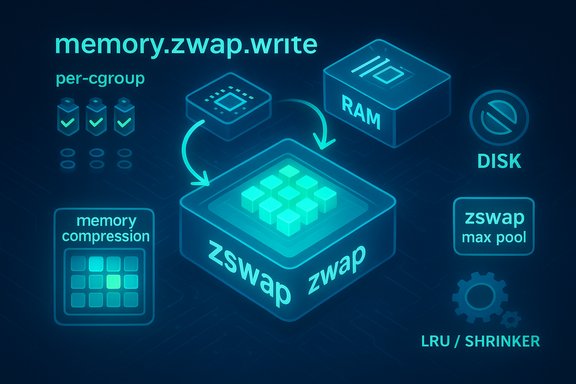
Over the past couple of kernel cycles the memory management maintainers and the zswap authors implemented a set of changes that make zswap cgroup‑aware and add a new cgroup attribute — memory.zswap.writeback — that allows users to disable zswap writebacks to backing swap devices on a per‑cgroup basis. When writeback is disabled for a cgroup, zswap will refuse to persist pages to the swap device for that cgroup; pages can still be stored in the zswap pool (compressed in RAM), but the kernel will avoid writing those compressed pages to disk for that scope. In other words, administrators can opt specific workloads to remain compressed in RAM only — mimicking the no‑swap‑to‑disk behavior that Windows’ memory compressor provides globally. The patch series also introduced a cgroup‑aware LRU and a zswap shrinker that can evict cold entries selectively, enabling the kernel to reclaim compressed pages from the zswap pool with workload granularity rather than globally evicting entries without regard to which service they belong to. That improves fairness in multi‑tenant systems and avoids situations where one aggressive container causes another to be written to disk.Which kernel versions and documentation reflect the change
The work landed in the recent mainline cycles and is documented in the kernel admin guides for the 6.x series (appearance in cgroup v2 and zswap admin docs). Kernel maintainers discussed and refined the implementation on the Linux‑mm mailing list and the patches are tracked in the upstream trees. The kernel documentation now exposes memory.zswap.writeback, memory.zswap.max, and related controls for admins to operate at cgroup granularity.Why this matters — the practical benefits
- Reduced disk I/O and SSD wear: When cold pages remain compressed in RAM rather than being shuffled to swap devices, write amplification to SSDs drops sharply. That’s important for laptops and cloud nodes with consumer NVMe storage.
- Improved responsiveness under pressure: Compress‑in‑RAM avoids the long latency of disk swap, which translates to fewer application stalls and smoother behavior for interactive workloads such as IDEs, browsers, and developer tooling. This is precisely the UX improvement Windows’ memory compression targeted years ago.
- Container and VM isolation: Per‑cgroup controls mean operators can opt only certain classes of workloads — e.g., front‑end containers or developer sandboxes — to avoid disk writebacks while allowing background batch jobs to use the host swap device normally. That leads to predictable tail latency improvements.
- Optimized cloud tenancy: Providers can give tenants a zswap‑only service profile that reduces noisy‑neighbor swap storms for latency‑sensitive tenants without globally disabling swap writebacks for the host. This opens realistic SLO (Service Level Objective) knobs for multi‑tenant infrastructure.
How this compares to Windows memory compression
- Scope: Windows implements memory compression as a system service (global store per system and per Windows Runtime app). Linux’s historical tools (zswap/zram) provided similar technical behavior, but zswap previously allowed writeback to disk as its eviction policy. The new kernel controls effectively let Linux emulate Windows’ no‑writeback behavior on a per‑cgroup basis. That’s the key difference: Linux gains workload‑level granularity rather than a single global toggle.
- Control and transparency: Linux exposes the knobs (zswap parameters, compressor choice, zpool, and cgroup attributes) at the OS and infra level; Windows exposes commands to turn the feature on/off but not the same fine grained, cgroup‑style scoping that the Linux change enables. The Linux model is more flexible but also more complex.
- Performance tradeoffs: Both approaches trade CPU cycles for reduced I/O. On modern CPUs with fast compressors like lz4 or zstd‑fast, the CPU cost is often a good tradeoff for avoiding SSD writes. However, the optimal compressor and pool sizing depend on workload compressibility; Linux gives admins the choice of compressor and pool configuration to tune the speed/ratio tradeoff.
How to use it: practical steps and tuning (overview)
1. Verify kernel support
- Check that your running kernel includes zswap and the cgroup attributes:
- Confirm zswap exists: cat /sys/module/zswap/parameters/enabled
- Check cgroup support and new files: ls /sys/fs/cgroup/<cgroup>/ | grep zswap
Kernel documentation and the admin guide show the new memory.zswap.* attributes in the cgroup v2 interface. If those entries are missing, you need a newer kernel or a kernel built with zswap and memcontrol changes enabled.
2. Enable zswap and pick compressor (system boot or runtime)
- Kernel cmdline examples:
- zswap.enabled=1
- zswap.compressor=lz4 (good speed) or zswap.compressor=zstd (better ratio, more CPU)
- zswap.max_pool_percent=20 (pool size limit as percentage of RAM)
- Or enable at runtime:
- echo 1 > /sys/module/zswap/parameters/enabled
- echo lz4 > /sys/module/zswap/parameters/compressor
Pick compressors supported by your kernel build (lz4/lz4hc, lzo, zstd, etc.. Use lz4 for lowest CPU overhead and zstd for best compression when CPU is plentiful.
3. Use cgroup attributes
- To disable writeback for a targeted cgroup:
- echo 0 > /sys/fs/cgroup/<cgroup>/memory.zswap.writeback
- To limit how much zswap a cgroup can consume:
- echo <bytes> > /sys/fs/cgroup/<cgroup>/memory.zswap.max
This lets you keep critical services compressed in RAM while allowing non‑critical workloads to spill to disk when needed.
4. For WSL2 users and Windows hosts
- WSL2 runs a Microsoft‑maintained kernel image inside the lightweight VM. Historically Microsoft’s WSL kernel did not enable zswap by default; that means WSL2 distributions did not benefit from zswap unless a custom kernel was compiled and pointed to via %USERPROFILE%.wslconfig. Community scripts and third‑party kernels (XanMod/Wsl kernel forks) automate this for users who want zswap inside WSL2. Microsoft’s documentation on using a custom WSL2 kernel and the WSL open‑source repo describe the process and tradeoffs.
- Build a custom kernel with CONFIG_ZSWAP and compressor support enabled.
- Place the bzImage and any modules.vhdx in a stable folder and update .wslconfig to reference them.
- Restart WSL (wsl --shutdown) and verify /sys/module/zswap/parameters/enabled inside the distro.
Concrete examples and recommended defaults
- Desktop/laptop with 8–16 GB RAM: zswap.enabled=1, zswap.compressor=lz4, zswap.max_pool_percent=15–25 — preserves interactivity while balancing CPU cost.
- Multi‑service host where front‑ends must avoid disk stalls: create a cgroup for front‑end services and set memory.zswap.writeback=0 and memory.zswap.max to a reasonable cap; allow batch workers to retain default settings so background jobs still writeback to swap if necessary.
Risks, caveats, and failure modes — what to watch for
- Incompressible pages and reclaim inefficiency: If a workload produces large amounts of incompressible pages (e.g., encrypted data, precompressed blobs), disabling writeback can lead to reclaim inefficiency where the zswap pool rejects pages and memory cannot be reclaimed easily for that cgroup — this can increase the likelihood of OOM kills. The kernel docs explicitly warn of this tradeoff. Administrators must monitor compressed pool utilization and rejection counts and not assume zero risk just because pages are “in zswap”.
- Increased CPU usage: Compression/decompression consumes CPU cycles. On heavily CPU‑constrained hosts, choosing an aggressive compressor (e.g., zstd high‑compression) can degrade overall throughput. Use lz4 for a lower CPU footprint when latency matters.
- Incorrect cgroup policy can hide problems: Disabling writeback for too many cgroups or making the policy too permissive can mask underlying memory pressure and cause catastrophic host instability. Per‑cgroup settings should be part of an SRE’s capacity plan and observability dashboards.
- Distribution and vendor defaults vary: Many Linux distributions ship kernels with zswap disabled by default or compiled without specific compressors as modules. On WSL2, the Microsoft‑provided kernel historically shipped without zswap enabled; users who rely on stock images should check vendor notes before assuming the feature is active.
- Bugs and hardening: Recent kernel developments also highlighted zswap code paths that needed hardening (race conditions with CPU hotplug, a few production bugs tracked as CVEs in the zswap path). Keep kernels up to date and test thoroughly before wide deployment. The kernel community has addressed several robustness issues in recent patches; operators should follow distro advisories and backport where necessary.
Adoption status — who gets it today?
- Mainline kernels (6.x series) include the cgroup zswap attributes and are documented in the admin guides; the feature is present in upstream trees and in the admin documentation for the 6.x kernels. Distributions based on modern kernels (recent Ubuntu, Fedora, Arch, etc. can provide these features if the distribution’s kernel packaging enables zswap and the relevant options.
- WSL2: Microsoft publishes a curated WSL kernel and documentation showing how to use a custom kernel; however the Microsoft‑provided kernel historically did not enable zswap out of the box, so WSL2 users who want zswap should either use a community kernel project or compile their own and point WSL at it. Microsoft’s broader move to open‑source WSL complicates this picture for the better — community contributions may accelerate mainstream inclusion in the official WSL kernels.
- Cloud providers and appliances: Adoption will be incremental. Cloud vendors will need to validate that per‑tenant writeback disabling does not create cross‑tenant resource exhaustion. Expect staged rollouts with conservative defaults in production clouds.
Recommendations for WindowsForum readers and IT teams
- For desktop power users: If you see sluggishness under memory pressure and your distribution’s kernel supports zswap, enable zswap with lz4 and monitor compressed pool stats. It often feels like getting “more RAM” with minimal downside. But keep an eye on CPU usage and compression rejection counters.
- For developers on Windows using WSL2: Be aware that the stock WSL kernel may not include zswap. If you rely on zswap-like behavior inside WSL, either use a community kernel built for WSL2 (with zswap enabled) or compile your own, testing carefully. Microsoft’s WSL docs and community scripts explain how to point WSL to a custom bzImage and modules.vhdx.
- For SREs and cloud operators: Leverage the per‑cgroup control to give latency‑sensitive tenants a zswap‑only profile, but instrument aggressively. Use memory.zswap.max to bound the pool per‑tenant and retain a global strategy for high‑throughput batch workloads. Always test workloads that are likely to produce incompressible pages.
Conclusion
The Linux kernel’s incremental but strategic extension of zswap into the cgroup space finally gives Linux operators a defensible path to the same practical win that Windows gained years ago: keep cold memory compressed in RAM under pressure to reduce swap I/O and improve responsiveness. What makes the Linux approach even more powerful is choice: per‑cgroup controls, compressor selection, and pool sizing let administrators tune the behavior for each workload profile — at the cost of additional operational complexity and a need for good observability.For many users this will be an immediately useful capability: developers in WSL2 who need snappy builds, containerized front‑ends with strict latency SLOs, and cloud tenants on consumer NVMe drives will see real benefits. But this is not a panacea: compression costs CPU, incompressible pages and misconfigured policies can worsen memory reclamation, and vendors will need to harden and enable sensible defaults for mass adoption.
The bottom line is simple and tangible: Linux already had the building blocks (zswap, zram) — now the kernel has added the controls that let you use them where it matters most. Administrators who plan and monitor will find this feature a reliable lever to squeeze more performance out of existing hardware — the same practical improvement Windows users have been enjoying for years, now implemented with Linux’s customary flexibility and control.
(Technical note: this article synthesizes kernel documentation and recent kernel mailing‑list/LWN reporting about zswap’s cgroup features, and it reflects practical guidance from WSL and community resources for enabling zswap where vendor kernels do not. For production rollouts, validate against your distribution’s kernel packaging and vendor advisories and test with representative workloads.
Source: Neowin https://www.neowin.net/news/linux-f...-feature-that-windows-1110-has-had-for-years/
