

Sometimes the quickest, safest way to get a job done is to open your browser, use an app that runs entirely in that tab, save your work locally, and close the tab — no installers, no accounts, and no invisible uploads to the cloud. The MakeUseOf round-up of five open‑source browser apps that “don’t touch the cloud” highlights exactly that type of workflow: single‑file personal wikis, hand‑drawn diagramming, in‑browser image editing, a full client‑side video editor, and an offline‑first productivity tool — all designed to keep data on your device and minimize friction. era when web apps necessarily required cloud backends is over. Modern browsers expose powerful APIs (IndexedDB, WebCodecs, WebGPU, WebAssembly, the File System Access API) that let developers run heavy workloads entirely on the client. That shift enables a class of local‑first, privacy‑respecting web apps that deliver near‑native performance without sending your content to remote servers. The five projects covered by MakeUseOf — TiddlyWiki, Excalidraw, miniPaint, OpenReel Video, and Super Productivity — are representative of this trend. The original feature frames these tools as privacy‑forward alternatives that trade centralized convenience for local control.
This article verifis‑references official project documentation and repos, and offers a critical look at where these apps shine and where they introduce trade‑offs for Windows users who prize privacy, portability, and zero‑install convenience.
The MakeUseOf summary of TiddlyWiki is accurate: it emphasizes non‑linear note structures and internal linking. The typical workflow is offline by default; saving behavior depends on your browser and saver setup (IndexedDB, File System API, or the fallback download/save dialog). Community tools (like TiddlyStow) exist to simplify persistent local saving to a file using the browser file system API.
A GitHub projects/trending summary also highlighted OpenReel as a recent open‑source browser editor promising local processing and 4K exports using WebCodecs/WebGPU — corroborating that the project aims to be a high‑end client‑side editor.
These projects are not theoretical experiments — their repos and docs show active development and clear design choices that favor client‑side processing and portability. However, local‑first does not remove responsibility: Windows users must test save flows, keep backups, and verify hardware/browser compatibility for high‑end features (notably those relying on WebGPU/WebCodecs). The payoff is a faster, leaner workflow where your content stays where you want it: on your device.
If you try any of these tools, back up your first project before you close the browser — you’ll thank yourself later.
Source: MakeUseOf 5 open-source apps that run entirely in your browser and don't touch the cloud
This article verifis‑references official project documentation and repos, and offers a critical look at where these apps shine and where they introduce trade‑offs for Windows users who prize privacy, portability, and zero‑install convenience.
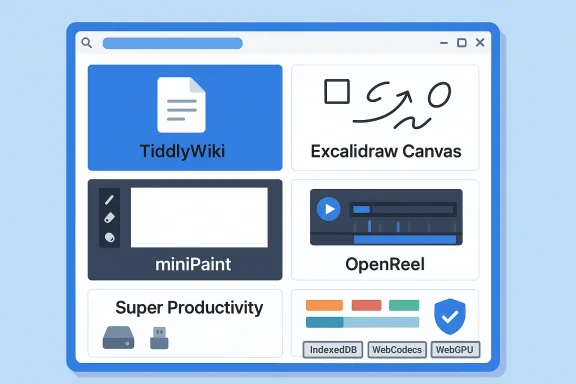 Why browser‑first, local‑first apps matter
- They reduce friction: Nothing to install, no onboarding to cloud accounts, and immediate access from any machine with a modern browser.
- They protect privacy: When code and storage run locally, sensitive content doesn’t need to traverse third‑party servers.
- They enhance portability: Single‑file apps or PWA installs can be carried on a USB stick, persisted to local disk, or installed as a lightweight PWA.
- They remain transparent: Open‑source projects let you inspect how data is handled and contribute fixes.
TiddlyWiki — a single‑file, non‑linear notebook
What it is and how it works
TiddlyWiki is the canonical example of a single‑file web app: the entire editor, UI, plugins, and your notes (called tiddlers) live inside a single HTML file (commonly distributed as empty.html) that you open in a browser and save back to disk. That single‑file model makes it extremely portable: copy the HTML file to a thumb drive, a shared folder, or store it on a laptop and you carry your entire knowledge base with you. The classic project docs explain the single‑file architecture and saving mechanics in depth.The MakeUseOf summary of TiddlyWiki is accurate: it emphasizes non‑linear note structures and internal linking. The typical workflow is offline by default; saving behavior depends on your browser and saver setup (IndexedDB, File System API, or the fallback download/save dialog). Community tools (like TiddlyStow) exist to simplify persistent local saving to a file using the browser file system API.
Strengths
- Complete portability: One file contains everything; copy it, move it, back it up.
- Powerful linking and composition: Tiddlers are small, reusable building blocks that you can embed and link.
- Extensible: Plugins and templates let you shape it into a journal, task manager, personal wiki, or a micro‑CMS.
- No cloud required: You control where the HTML file lives.
Cautions and limitations
- Browser differences: Some browsers handle saving a self‑modified HTML file differently, and older strategies (Java applets, exotic savers) are deprecated. Read the docs and test the save flow on the browsers you use.
- Backup responsibility: Because the file is the database, a lost or corrupted file means data loss unless you keep backups or export tiddlers regularly.
- Collaboration is manual: If you want multi‑user editing or strong versioning, you’ll need a hosted instance or a synchronization strategy.
Practical Windows tips
- When you download empty.html, store it in a folder you back up automatically (OneDrive, File History, or a manual backup routine).
- Use TiddlyDesktop or the File System Access API tools (e.g., TiddlyStow) if you want smoother in‑place saving on Windows.
- Export changes frequently as individual tiddlers or JSON for source control workflows.
Excalidraw — a hand‑drawn style whiteboard that saves locally
What it is and what it promises
Excalidraw is an open‑source, canvas‑based drawing tool built for fast diagramming with a hand‑drawn aesthetic. The project is free and provides PWA support, autosave to the browser, and offline capabilities through the hosted demo and the underlying library. The GitHub repository documents features like export to PNG/SVG, .excalidraw JSON saves, PWA offline support, and local autosave. ([github.com](GitHub - excalidraw/excalidraw: Virtual whiteboard for sketching hand-drawn like diagrams correctly highlights Excalidraw’s minimal UI, large canvas, and mobile responsiveness. The project explicitly supports local autosaves and exporting project files so your diagrams can stay local and re‑loaded later.Strengths
- Fast, intuitive sketching: The UI favors speed — draw boxes, arrows, text, then export.
- Local storage by default: Autosave keeps your work in the browser; export to .excalidraw or PNG/SVG for backups.
- PWA and mobile friendly: Installable as a PWA and usable on mobile browsers with responsive layouts.
Cautions
- Local storage is not a substitute for backups: Large canvases or browser cache clearing can remove content. The community recommends regular exports (.excalidraw files) as a backup routine.
- Large projects may strain the browser: Very complex diagrams can slow rendering or consume significant memory, especially in older machines or with very large embedded images.
Practical Windows tips
- Regularly export a .excalidraw file to a backed‑up folder.
- Use the PWA install option for quicker offline access and to keep a dedicated window for your work.
- If collaborating, use Excalidraw’s collaboration/room features only with clear alignment on how data is shared; local autosave is the default safe mode.
miniPaint — a lightweight HTML5 image editor
What it is
miniPaint is an in‑browser image editor writtegies. It provides layers, brushes, filters, and typical tools you expect from lightweight raster editors. The GitHub README explicitly states that nothing will be sent to any server and that everything stays in the browser: “Nothing will be sent to any server. Everything stays in your browser.” That claim aligns with MakeUseOf’s assessment that miniPaint is a privacy‑respecting, install‑free option for quick edits.Strengths
- Zero upload policy: The codebase and README emphasize local processing and local saves.
- Practical toolset: Layers, export options (PNG, JPG, WEBP, GIF), and clipboard paste make it handy for quick annotations.
- No ads / no limits: The project is open source and hosted so you can self‑host if preferred.
Cautions
- Not a Photoshop replacement: Advanced AI‑driven capabilities (generative fill, content‑aware fill, neural background removal) are absent; this is a pragmatic editor for cropping, annotations, and light retouching.
- Browser feature differences: Performance and available encoders may vary across browsers, particularly with animated GIF export and WebP support.
Practical Windows tips
- Use the local “save” options (download to disk) rather than leaving work in ephemeral tabs.
- If you need repeated use offline, clone the repo or the static GitHub Pages deployment to a local HTML copy that
OpenReel Video — a surprising, full‑featured client‑side video editor
What the MakeUseOf article claims
MakeUseOf identified OpenReel Video as a browser‑based CapCut alternative that does heavy processing locally and delivers features that CapCut sometimes locks behind paywalls: effects, transitions, multi‑track editing, audio mixing, keyframe animation, color grading, AI background removal, captions, and text‑to‑speech. The article frames OpenReel as “fully featured” and “100% local with no uploads.”What the project sources verify
OpenReel Video is an active open‑source project with a public GitHub repository whose README describes a 100% client‑side architecture built with React/TypeScript, leveraging WebCodecs and WebGPU for GPU‑accelerated decoding/encoding and rendering. The README lists an impressive array of professional features: multi‑track timeline, keyframe animations, color grading, audio effects, export formats including 4K, auto‑save to IndexedDB, WebGPU rendering, and hardware accelerated encoding via WebCodecs. Those claims are present on the official repo page. (github.com)A GitHub projects/trending summary also highlighted OpenReel as a recent open‑source browser editor promising local processing and 4K exports using WebCodecs/WebGPU — corroborating that the project aims to be a high‑end client‑side editor.
Where the MakeUseOf claims align and where to be cautious
- Aligns: The repo explicitly documents multi‑track timeline, keyframe animation, color grading, file export (including 4K), WebGPU/WebCodecs usage, and local autosave — all consistent with MakeUseOf’s main thrust. (github.com)
- Requires nuance: MakeUseOf’s list of advanced AI features (background removal, text‑to‑speech, translation into 90+ languages) may be partially accurate but deserves verification against the source code and plugin modules. The README we reviewed lists chroma key (green‑screen style keying), robust subtitle support, and “AI upscaling,” but it doesn’t explicitly enumerate a built‑in TTS pipeline or universal translation pack in the core README. Some AI features could exist as experimental modules or integrations; check the project’s Issues/Discussions and the deployment notes to confirm availability for the version you run. In short: the project is ambitious and largely client‑side, but verify any specific AI feature you rely on before assuming it’s present out of the box. (github.com)
Strengths
- Professional feature set in the browser: If you run it on a capable machine and browser (Chrome/Edge with WebGPU/WebCodecs support), the project promises powerful editing without server uploads.
- Privacy by design: Client‑side processing means your video data doesn’t have to be uploaded to third‑party servers.
- Open source and MIT licensed: You can self‑host or inspect the code.
Cautions
- Browser/API support: WebGPU and WebCodecs adoption is progressing, but full, stable support depends on the browser version and OS/driver stack. Windows users should test with a recent Chromium‑based browser that exposes these features.
- CPU/GPU resource needs: 4K editing in the browser is feasible but heavy; expect long render/export times on modest hardware and ensure you have adequate RAM and a modern GPU where WebGPU is supported.
- Feature parity: Although the README lists many advanced tools, the real‑world polish and parity with mature native editors will vary. Some AI functionality may be experimental or rely on optional models that you need to fetch or enable.
Practical Windows tips
- Test in a recent Chromium build with WebCodecs/WebGPU enabled for best performance.
- Keep incremental exports and save projects frequently (OpenReel uses IndexedDB autosave, but offline projects benefit from explicit project exports).
- If you need guaranteed offline behavior, clone and host a local build so you control which features and models are available. (github.com)
Super Productivity — an offline‑first task manager with Pomodoro and time tracSuper Productivity is an open‑source task manager designed for deep work, combining to‑do lists, time tracking, notes, and focus tools (Pomodoro, time‑boxing). The project advertises a desktop app and a web version; however, its core promise is offline‑first operation with optional sync via WebDAV/Dropbox for cross‑device continuity. The official site notes it’s 100% offline and private by default, storing data locally (IndexedDB) and offering PWA and desktop packages.
MakeUseOf’s description that you can use Super Productivity straight from the browser or install it as a PWA and that syncing is optional is consistent with the project documentation.Strengths
- Offline‑first with optional sync: Use locally with zero accounts; enable WebDAV or Dropbox only if you want cross‑device sync.
- Integrated Pomodoro & time tracking: Built‑in focus session logic reduces the need for separate timers.
- Developer integrations: Rich integrations for GitHub, Jira, and others make it attractive for developer workflows.
Cautions
- Web version limitations: The web build is slightly limited compared with the packaged desktop apps (some integrations and background tracking only function in installed apps or with a companion extension).
- Sync complexity: If you enable WebDAV/Dropbox sync, be mindful of conflict resolution and test with your folder structure.
Practical Windows tips
- For maximum offline reliability, install the desktop package or PWA and store your projects in a backed‑up folder (or configure WebDAV to a self‑hosted endpoint).
- Use exports (JSON/CSV) periodically for long‑term archival and to avoid vendor lock‑in.
Security, privacy, and backup — a checklist for local‑first web apps
Working with local‑first browser apps gives you privacy advantages, but it also shifts responsibility to you. Here’s a practical checklist:- Backup regularly: For single‑file apps (TiddlyWiki) or IndexedDB content (Excalidraw, OpenReel, Super Productivity), export periodic snapshots to a backup folder or cloud archive you control.
- Test your save path: Try saving, closing the browser, and reopening the file on the same machine to make sure your chosen browser honors the save flow. Differences between Chromium, Edge, and Firefox matter.
- Use PWAs for a dedicated window: Installing as a PWA provides a more app‑like experience and can smooth offline behavior.
- Verify feature availability: For heavy features (WebGPU, WebCodecs, AI modules), validate that your browser and hardware support them before committing to a workflow. OpenReel documents its reliance on these APIs; verify support in your environment. (github.com)
- Inspect telemetry: Open‑source projects usually disclose tracking; check privacy docs if you need zero telemetry. Projects like Super Productivity explicitly promise zero tracking by default.
- Consider self‑hosting or local builds: If you want long‑term offline certainty (or when enterprise policy forbids external downloads), clone and serve the static build on a local machine or network.
Final analysis — trade‑offs and recommendations
- If your priority is maximum simplicity and portability for single‑user note taking, TiddlyWiki is unrivaled; one file contains everything and you control backups. The trade‑off is manual backup discipline.
- If you want fast, local diagramming with an aesthetic that works for brainstorming, Excalidraw hits the sweet spot: minimal UI, exportable file formats, and PWA support for offline use. Remember to export backups for large projects.
- For quick in‑browser image edits without uploads, miniPaint is reliable and practical; it’s not a feature‑complete Photoshop but it’s excellent for cropping, annotations, and light retouching.
- For advanced video editing in the browser, OpenReel Video is the most ambitious project here. Its client‑side, WebGPU/WebCodecs approach is validated in the repo and trending summaries, but expect to do careful verification of specific AI features (TTS, translation) for the exact release you use. When it works, local 4K exports and professional tools with no uploads are game‑changing — but hardware and browser support are crucial. (github.com)
- For deep‑work task management with privacy, Super Productivity is a mature offline‑first tool that supports Pomodoro, time tracking, and optional sync. If you want an all‑in‑one productivity hub that you can run locally without accounts, it’s a top pick.
How to adopt these tools safely on Windows — a quick action plan
- Decide whether you want a PWA (installable) or a portable file (single HTML). PWAs give easier updates; single files give maximum portability.
- Test the save and backup flow immediately: create a file, save it, close the browser, and re‑open to confirm persistence.
- Keep a versioned backup strategy: automated File History, manual exports to a backed‑up folder, or periodic commits into a private repository for TiddlyWiki/Excalidraw/miniPaint project files.
- For OpenReel, test exports on sample projects to validate WebCodecs/WebGPU performance on your machine before committing important work. If yoline behavior, consider building a local copy from the repo and hosting it internally. (github.com)
- Use the browser developer console only if you intend to inspect or modify local storage; accidental edits to IndexedDB or localStorage can make projects vanish.
Conclusion
The MakeUseOf collection shines a light on a practical category of tools that deserve more attention: open‑source, browser‑first apps that preserve privacy and minimize friction. TiddlyWiki, Excalidraw, miniPaint, OpenReel Video, and Super Productivity each demonstrate how modern web APIs let developers deliver genuinely local experiences that match many real‑world workflows.These projects are not theoretical experiments — their repos and docs show active development and clear design choices that favor client‑side processing and portability. However, local‑first does not remove responsibility: Windows users must test save flows, keep backups, and verify hardware/browser compatibility for high‑end features (notably those relying on WebGPU/WebCodecs). The payoff is a faster, leaner workflow where your content stays where you want it: on your device.
If you try any of these tools, back up your first project before you close the browser — you’ll thank yourself later.
Source: MakeUseOf 5 open-source apps that run entirely in your browser and don't touch the cloud