

Logitech’s Mac utility ecosystem hit a sudden and disruptive snag this week after an Apple Developer signing certificate expired, leaving Logi Options+ and G HUB unable to start on macOS and knocking advanced mouse and keyboard features offline for countless users worldwide. The outage was confirmed by Logitech and repeatedly diagnosed by users in system logs that flagged a certificate validation error, and while a patched installer was rolled out within hours, the incident exposes a brittle dependency in how peripheral vendors deploy signed software for macOS and highlights a number of operational and security risks that customers and vendors alike must reckon with.
Logi Options+ is Logitech’s modern configuration platform for its higher-end mice and keyboards, replacing the legacy Logitech Options app. The software provides button remapping, gesture control, application-specific profiles, Smart Actions, and firmware updates for devices such as the MX Master and MX Keys series. G HUB serves similar functions for Logitech’s gaming line. Both applications are signed with an Apple Developer ID and validated by macOS at launch to ensure integrity and authenticity.
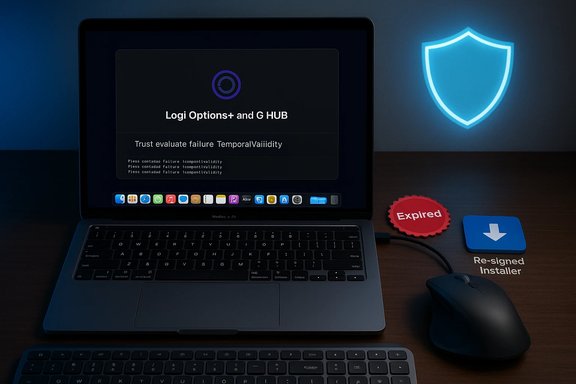
On January 6–7, 2026, many macOS users began reporting that Logi Options+ displayed an endless loading (purple) screen or simply refused to apply device settings. Console logs showed repeated “Trust evaluate failure: [leaf TemporalValidity]” messages—an indicator that macOS’s code signing checks had failed due to an expired certificate. Logitech publicly acknowledged that a certificate required for the apps to run had expired and published guidance while preparing a re-signed installer to resolve the issue.
The most important takeaways for Windows and Mac power users, IT administrators, and device vendors are straightforward:
Source: Neowin https://www.neowin.net/amp/expired-certificate-breaks-logitech-options-on-mac/
 Background
Logi Options+ is Logitech’s modern configuration platform for its higher-end mice and keyboards, replacing the legacy Logitech Options app. The software provides button remapping, gesture control, application-specific profiles, Smart Actions, and firmware updates for devices such as the MX Master and MX Keys series. G HUB serves similar functions for Logitech’s gaming line. Both applications are signed with an Apple Developer ID and validated by macOS at launch to ensure integrity and authenticity.On January 6–7, 2026, many macOS users began reporting that Logi Options+ displayed an endless loading (purple) screen or simply refused to apply device settings. Console logs showed repeated “Trust evaluate failure: [leaf TemporalValidity]” messages—an indicator that macOS’s code signing checks had failed due to an expired certificate. Logitech publicly acknowledged that a certificate required for the apps to run had expired and published guidance while preparing a re-signed installer to resolve the issue.
Why developer signing matters on macOS
Apple’s Developer ID signing process gives macOS a cryptographic mechanism to verify that an app was produced by a known developer and that its contents have not been tampered with. Signing certificates have validity windows; when the certificate used to sign an app expires, macOS is unable to validate the identity stamp and will block or limit app execution until the developer provides a re-signed binary or users bypass the checks. This is a security feature—but when developers fail to renew or reissue signatures in time, it can produce an abrupt service outage for end-users.Timeline of the outage
- January 5–6, 2026 (UTC): user reports begin to appear in forums and social platforms—Logi Options+ is “spinning” or stuck on its loading screen. Attempts to reinstall the app do not fix the problem for affected Macs. Community troubleshooting points to certificate validation failures in Console logs.
- January 6, 2026 (approximately 20:39:41 GMT): the Developer ID certificate used to sign certain Logitech macOS components reached its “notAfter” expiration timestamp, according to community-extracted openssl output from affected installer files. The logged certificate metadata showed a notBefore of Jan 5, 2021 and a notAfter of Jan 6, 2026 (GMT).
- January 6–7, 2026: Logitech publishes a support notice acknowledging the problem, explaining that a certificate required for the app to run expired, and promises a new installer that will fix the issue without changing the app version number or wiping user settings. Community members test temporary workarounds while Logitech readies the patched packages.
- January 7, 2026: patched installers and FAQ entries appear on Logitech’s support pages; users report that re-downloading and manually installing the fixed packages restores functionality for many, though some experienced link mix-ups and installer confusion during the initial patch rollout.
Symptoms and immediate impact
For impacted macOS users the practical effects were immediate and painful:- Mice and keyboards continued to function as basic HID devices—but advanced features (button remapping, gesture zones, per-app profiles, custom scroll behavior and Smart Actions) stopped working until the background agent could validate and load its components.
- Logi Options+ itself frequently hung on a purple loading spinner, produced multiple instances in Activity Monitor, or disappeared from the GUI while background agents still ran. Attempts to fully uninstall and reinstall did not always resolve the problem.
- Workflow interruption was widespread among pros — developers, designers, and productivity users who depend on multi-button mice and custom shortcuts reported meaningful productivity degradation.
- The issue appeared macOS-only; Windows installations and users were unaffected, per Logitech’s public notice.
What the logs showed (technical verification)
Users who examined the installer and agent logs produced consistent cryptographic evidence:- The agent and updater processes logged “Trust evaluate failure: [leaf TemporalValidity]” messages in Console.app—this is macOS signaling that the leaf certificate used to sign an app or helper has expired and no longer satisfies temporal validity checks.
- Community members extracted the signing certificate from a packaged installer and inspected it with openssl; the certificate’s notAfter field reported an expiration timestamp of Jan 6, 2026, 20:39:41 GMT, which coincides with the moment macOS began rejecting the signature on affected systems. That openssl output was shared widely as proof of the expiration.
Temporary workarounds (and their risks)
When a security-critical signature expires, macOS will refuse to run signed code as intended. Users and admins tried several stopgap measures to restore functionality quickly; each carries trade-offs.- Manual date rollback (commonly used, but risky)
- Procedure: disable “Set time and date automatically” in System Settings, set the Mac’s date to a time before the certificate expiration (e.g., Jan 5, 2026), launch Logi Options+ so the agent starts, then re-enable automatic date/time.
- Why it works: macOS validates certificate temporal validity against the system clock. Rolling the clock back allows the certificate to appear valid again.
- Risks: changing system date/time can break TLS sessions, certificate validation for other apps, scheduled tasks, sync services, and corporate network authentication; it is unsafe for production or managed corporate environments.
- Install an older, unsigned or differently-signed legacy build (Logitech Options)
- Procedure: reinstall the legacy “Logitech Options” app (which some users preserved as an offline installer) and disable automatic updates.
- Why it works: the older non-Options+ app may not rely on the same signed components or cloud-based update flow, providing a less featureful but functional replacement.
- Risks: legacy apps may lack support for newer devices and features, may not receive security updates, and this approach can require manual steps and care to avoid automatic updating into the broken release.
- Disable OCSP or global revocation checks (extreme and unsafe)
- Procedure: flip global security revocation settings (not recommended).
- Risks: disables protections across the entire OS, exposing users to real-world risks from revoked certificates and tampered binaries; this is a very high-risk measure and not advised for general users.
- Manual re-sign or Trust adjustments in Keychain (advanced users only)
- Procedure: locate the expired certificate in Keychain and change trust settings.
- Risks: nontrivial complexity, potential to undermine system-wide trust assumptions.
Logitech’s response and the patch
Logitech posted a support notice acknowledging the expired certificate and stated that it was preparing a new installer that re-signs the application so it can be validated by macOS again. The company emphasized that user settings and profiles would remain intact and that the app version would not necessarily change—Logitech’s fix was expected to be a re-signed distribution rather than a functional version bump. Within hours, patched installers and an FAQ appeared on Logitech’s support pages and community threads, and many users reported restored functionality after manually downloading and installing the updated packages. Some early distribution hiccups were reported—download links were accidentally swapped for a short window, creating confusion until corrected—but the core remediation (re-signed installer) functionally addressed the problem for most users who applied it.Why this happened: operational failure modes
At a high level, this incident is the result of a preventable operational lapse: failing to renew or rotate a Developer ID signing certificate before its expiry window closed. A few details explain how an expired certificate can become an acute outage:- Centralized signing dependency: If a vendor uses a single Developer ID certificate across installers, helpers, and the in-app updater, then expiration can affect multiple components simultaneously. If the updater itself is signed with the expired certificate, the application cannot self-update to fix the signature—forcing a manual installer push.
- Alerting or process gaps: Proper certificate lifecycle management requires tracking expiration dates, automating renewals or calendar alerts, and ensuring secondary approvals are in place. A missed renewal is ultimately a process failure.
- Last-mile distribution constraints: Once the cert is expired, an app’s in-situ update channel may be blocked by the same signature checks—necessitating manual downloads by users. For vendors with cloud-dependent agents, this compounds the user disruption.
- Reliability vs security trade-offs: Apple’s temporal certificate checks prevent tampered or compromised apps from running; however, when vendor processes fail, those protections can also cause legitimate software to stop functioning entirely.
Security and reliability implications
This event underscores several broader points for IT teams and vendors:- Security mechanisms are only as reliable as the operational processes that maintain them. Certificate expiry is a predictable event; failing to plan is inexcusable at scale.
- Code signing is a single point of failure. Vendors that rely on a single signing identity across critical components should consider compartmentalizing signatures and update mechanisms to reduce blast radius.
- Automated and redundant systems for key lifecycle management are essential. Automated renewal, multi-admin sign-off, and CI/CD gates that detect expiration long before they occur are basic hygiene for companies distributing signed binaries.
- Users should resist unsafe emergency workarounds. Temporarily rolling back system clocks or disabling revocation checks may restore functionality but introduces broader security problems and should be treated only as an absolute last resort in isolated non-production machines.
Practical advice for affected users and IT administrators
For users impacted by this outage, the safest route is to use Logitech’s official patched installer when it becomes available. Here are prioritized, practical steps:- Verify Logitech’s support page for an official patch and instructions. If a patched installer is published, download and install it directly rather than relying on in-app updates that may be blocked.
- Avoid global system changes. Do not disable OCSP or other global revocation checks unless under guidance from a security administrator and only on isolated test hardware.
- If immediate functionality is essential and the patched installer is not yet available:
- Consider reinstalling legacy Logitech Options (if compatible) from an archived offline installer and disable automatic updates to avoid being pushed to the broken release. Understand the trade-offs: lost features and no guaranteed updates.
- Use a secondary device (Windows machine) to upload or sync device profiles where supported, then reapply on Mac after the patch—some users reported profile migration strategies worked.
- For enterprise environments: block the broken release at your update proxies and push the vetted patched installer via managed distribution (e.g., JAMF, Munki, SCCM). Avoid instructing users to change system time as a support script.
- Back up device configurations where possible—users with complex profiles should export or snapshot settings when the app is healthy so recovery is faster for future incidents.
Recommendations for Logitech and other vendors
This incident provides a checklist of improvements that would reduce recurrence and impact:- Implement automated certificate lifecycle management with multiple alerting tiers (90/60/30/7/1 days) and clear owner responsibilities. Never allow a single-person dependency on certificate renewal.
- Use separate certificates for critical components: signing the updater and the main app with isolated keys reduces the chance that an expired cert will block the recovery path.
- Provide offline/archived installers and make them easily discoverable in support documentation for emergency recovery. Hosted fallback installers should be signed with valid certs and validated through additional integrity checks.
- Establish a dedicated incident playbook that includes immediate mitigation (e.g., alternative signed bundles), enterprise guidance, and transparent communication channels for IT admins.
- Improve telemetry and synthetic monitoring so builds and installers are tested against current OS validation routines as their signing certs approach expiry.
Broader context: not an isolated class of bug
Renewal and rotation mistakes have tripped major vendors before. The tech industry has a long history of accidental certificate expirations causing outages—ranging from secure email to corporate VPNs and even cloud APIs. The root cause is almost always process and governance rather than a technical impossibility. The expectation for users, however, is simple: devices and their management software must be reliable. Peripheral vendors that bundle deep OS integrations with cloud features must adopt enterprise-grade operational controls.Closing analysis
The Logitech Options+ outage was avoidable, and the company’s relatively quick acknowledgment and re-signed installer distribution limited the duration of the disruption. Still, the episode highlighted how a single expired Developer ID certificate can cascade into a widespread usability crisis for productivity devices. For users, the event reinforces the fragility of modern device ecosystems where firmware, cloud services, and signed desktop agents intersect. For vendors, it’s a reminder that security hardening without commensurate operational rigor can produce availability failures that erode customer trust.The most important takeaways for Windows and Mac power users, IT administrators, and device vendors are straightforward:
- Prioritize transparent incident communication and provide safe, documented emergency steps.
- Make operational investments in certificate lifecycle automation and redundancy.
- Provide readily accessible offline installers and profile portability so users are not held hostage to a single signature or online validation channel.
Source: Neowin https://www.neowin.net/amp/expired-certificate-breaks-logitech-options-on-mac/
