

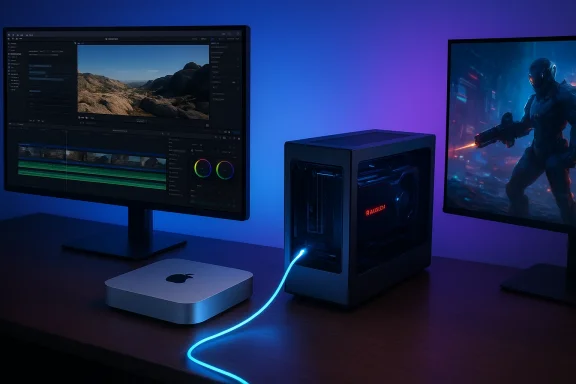
Six years on, the Intel-based Mac mini (2018) refuses to read its own obituary — not because it matches the raw single‑chip performance of Apple Silicon, but because it remains the only modern Mac mini with a practical, officially supported path to external GPU acceleration. For gamers and professionals who depenaltyd on discrete GPU horsepower, that single hardware capability transforms an otherwise modest small‑form‑factor desktop into a flexible GPU workstation and a surprisingly capable gaming machine — on both macOS and Windows — when paired with the right eGPU enclosure and card.
Apple’s 2018 Mac mini reintroduced a compact, upgradeable Intel desktop into the Mac lineup with four Thunderbolt 3 ports, user‑configurable RAM options, and the company’s T2 security coprocessor. Unlike modern Apple Silicon Mac minis, the 2018 model ships with an Intel CPU and a platform that macOS explicitly supports for external graphics processors (eGPUs). That combination — Intel CPU + Thunderbolt 3 + macOS eGPU support — is the core reason the machine remains relevant for GPU‑heavy workflows.
A realistic purchase plan:
Source: NoobFeed Why the Mac Mini 2018 Remains Relevant for Gaming and Professional GPU Workflows | NoobFeed
 Background: why the Mac mini (2018) still matters
Apple’s 2018 Mac mini reintroduced a compact, upgradeable Intel desktop into the Mac lineup with four Thunderbolt 3 ports, user‑configurable RAM options, and the company’s T2 security coprocessor. Unlike modern Apple Silicon Mac minis, the 2018 model ships with an Intel CPU and a platform that macOS explicitly supports for external graphics processors (eGPUs). That combination — Intel CPU + Thunderbolt 3 + macOS eGPU support — is the core reason the machine remains relevant for GPU‑heavy workflows.- The Mac mini (2018) ships with 8th‑generation Intel Core CPU options (quad‑ and six‑core configurations) and Intel UHD Graphics 630 as the internal GPU. The machine provides four Thunderbolt 3 (USB‑C) ports capable of up to 40 Gbps each and supports up to 64 GB of DDR4 RAM.
- Apple’s official eGPU guidance requires an Intel‑based Mac with Thunderbolt 3 and macOS High Sierra 10.13.4 or later in order to use eGPUs under macOS. In short: Apple Silicon does not enjoy the same, built‑in path to eGPU support.
Overview: what an eGPU adds to the Mac mini (2018)
Adding an eGPU changes the Mac mini’s capabilities in two distinct ways:- On macOS: it unlocks acceleration for Metal/OpenGL/OpenCL‑aware pro apps, and it allows certain games and GPU‑heavy creative workflows to use a modern discrete AMD GPU instead of the integrated Intel UHD 630.
- In Boot Camp (Windows 10): it permits almost any desktop GPU to be routed through the Mac’s Thunderbolt 3 link, turning the machine into a Windows gaming and workstation box — albeit with the known limits of Thunderbolt tunneling and Boot Camp driver support.
- Significant GPU performance uplift for 3D rendering, GPU‑accelerated video export, and photo editing.
- Full desktop‑class GPU resources available to Windows via Boot Camp, enabling access to NVIDIA and the latest AMD driver stacks.
- A highly modular platform: change the GPU or swap enclosures as needs evolve, without replacing the Mac itself.
eGPU on macOS: what works, what doesn’t
macOS driver reality and supported cards
macOS ships with integrated GPU drivers written/packaged by Apple; unlike Windows, macOS does not accept broad third‑party driver stacks. As a result, only GPUs whose architectures Apple supports in macOS releases will behave as plug‑and‑play eGPUs.- Apple’s eGPU guidance explicitly names a set of AMD Radeon GPUs as supported for use as an external GPU when the system is running a sufficiently recent version of macOS. That includes the Radeon RX 6600 XT (with macOS Monterey 12.1 or later) and certain RDNA2 high‑end cards (RX 6800/6800 XT/6900 XT) after the Big Sur 11.4 update. In short: several RDNA2 GPUs are supported in Apple’s macOS driver stack.
- Cards built on newer or unsupported AMD architectures (for example, RDNA3 / the RX 7000 family) do not have native macOS driver support by default, which means they will not provide hardware acceleration under macOS unless Apple releases drivers. Community workarounds exist, but they are not official and carry risk.
Which apps actually benefit
macOS exposes a “Prefer External GPU” toggle that lets many apps use the eGPU, but not all applications honor this. Notably:- Some pro apps, including Final Cut Pro and Motion, can explicitly choose and drive GPU selection and may not depend on the generic toggle.
- Adobe’s macOS strategy has moved toward Apple Metal; Premiere and After Effects can use Metal acceleration where available. That means a supported AMD eGPU on the Mac mini can speed up exports and GPU‑accelerated effects — but driver and app versions matter.
Practical macOS caveats
- eGPU hot‑plug behavior and OS updates: Apple’s firmware and macOS updates have sometimes caused temporary issues with eGPU hot‑plugging or detection. Community testing shows that firmware changes can create intermittent black‑screen or boot hang problems with some enclosures unless you follow specific connection and boot order steps.
- External display vs. internal display: macOS and the eGPU drivers are happiest when the external monitor is attached directly to the eGPU. Using an eGPU to accelerate the Mac’s internal output (or looping back to the internal display) can introduce overhead and reduce gains.
- Apple Silicon: Apple Silicon Macs do not have official eGPU support. That’s a platform decision; experimental third‑party efforts have demonstrated partial, narrowly scoped support in very specific setups, but they are not representative of a supported production workflow.
Boot Camp and Windows: the other face of the Mac mini (2018)
The Mac mini (2018)’s Boot Camp capability is where things get especially interesting for gamers and Windows‑centric GPU professionals.Boot Camp + eGPU = wide GPU choice
Under Boot Camp, Windows 10 will accept the full range of GPU drivers — whether AMD or NVIDIA — for external graphics cards. That means an RTX‑class card that macOS doesn’t support natively can run in Windows on the same hardware via Boot Camp.- Windows 10 + Boot Camp on the Mac mini (2018) is a mature, supported path for running Windows natively and taking advantage of eGPU enclosures.
- Apple’s official Boot Camp docs still focus on Windows 10 as the reference OS for Intel Macs; Windows 11’s hardware requirements (TPM 2.0 and Secure Boot expectations) and Apple’s T2 architecture complicate a straight upgrade path to Windows 11 in Boot Camp.
Windows 11 and the T2 chip — reality check
Windows 11 enforces TPM 2.0 and Secure Boot rules that many Intel Macs don’t satisfy out of the box. The Mac mini (2018) includes Apple’s T2 security chip, and while some workarounds exist, Boot Camp with Windows 11 is generally not the officially supported route. For stable, supported Boot Camp gaming, Windows 10 remains the practical choice on a Mac mini (2018).Performance considerations in Boot Camp
Boot Camp brings the advantage of mature Windows drivers, but Thunderbolt’s tunneling of PCIe introduces a measurable but manageable performance cost.- Thunderbolt 3 tunnels up to a PCIe Gen3 x4 equivalent across the cable. That is significantly less raw bandwidth than a full PCIe x16 slot inside a desktop, and the eGPU connection typically incurs a gaming performance penalty in the range of roughly 10–25% versus the same GPU on an internal PCIe x16 slot — the exact figure depends on the game, resolution, and whether you use an external monitor attached to the eGPU or drive the Mac’s internal display via loopback.
- Practical results and community testing show external display usage tends to realize the best performance (smaller penalty), while internal display loopback can be more bandwidth‑sensitive and show larger drops.
- For GPU compute workloads and high‑resolution rendering, the gap narrows because the GPU does more work per unit of data transferred.
Real‑world examples and limits: gaming, content creation, CAD
Gaming on macOS (native) with AMD eGPU
A proven route — plug a supported AMD RX 6600 XT (or other Apple‑supported RDNA2 card) into an eGPU enclosure, attach an external monitor, and run macOS‑native titles that support Metal. For games that have Mac ports and are well optimized, the experience can be pleasurable at 1080p:- Older AAA ports and titles that have been tuned for macOS can run with high settings at high frame rates when offloaded to a Radeon RDNA2 eGPU.
- Newer AAA Windows‑only releases (or titles that rely on NVIDIA‑specific tech) still require Boot Camp for best support.
Boot Camp gaming with NVIDIA/RTX eGPUs
Boot Camp opens the door to NVIDIA cards and Windows‑optimized drivers. Community test setups pairing the Mac mini (2018) with modern RTX cards in eGPU chassis have shown surprisingly robust results:- At 1080p, many demanding games reach playable high settings with frame rates that satisfy competitive play — but results depend on card, power limits, and whether the game is CPU‑bound.
- Thermal and power tuning can help: limiting the CPU and controlling GPU clocks (or using driver profiles) can keep temperatures in check during marathon sessions in a constrained small‑form‑factor chassis.
Professional GPU workflows
For creators the story is simple: GPU acceleration speeds many tasks, and an eGPU gives the Mac mini a desktop‑class accelerator without swapping computers.- Final Cut Pro, Motion, and other Apple apps will benefit from an AMD eGPU when those apps are designed to use external GPUs.
- Adobe’s macOS apps now rely on Apple Metal for GPU acceleration; a supported eGPU will improve timeline scrubbing, GPU effects, and export times compared with integrated Intel UHD graphics.
- For 3D rendering and GPU compute tasks that have macOS support, an eGPU reduces render times — with the caveat that not all render engines are available or optimized on macOS the way they are on Windows (CUDA on macOS has long been deprecated).
How to get the best results: practical checklist
- Choose the right GPU (macOS):
- Prefer AMD RDNA2 cards that Apple explicitly supports (RX 6600 XT, RX 6800/6900 series, etc.) for the most seamless macOS experience.
- Pick a solid Thunderbolt 3 eGPU enclosure:
- Look for enclosures with robust power delivery and cooling (Sonnet, Razer Core X, and similar units have long community track records).
- Use the correct cable and ports:
- Connect directly to a Thunderbolt 3 port on the Mac mini (avoid daisy‑chaining); use the cable supplied with the enclosure or an Apple‑rated TB3 cable for reliability.
- Attach your external display to the eGPU:
- This minimizes loopback bandwidth overhead and typically yields the best gaming and rendering performance.
- Manage OS and driver versions:
- In macOS, keep to versions known to support your chosen GPU. In Boot Camp (Windows 10), use the most stable NVIDIA or AMD desktop drivers and follow eGPU community guides for DDU/uninstall steps if required.
- Monitor thermals and power:
- Limit thermal throttling by ensuring good airflow in the enclosure and, if possible, manage the Mac’s CPU power profile for sustained desktop loads.
- Backup and be conservative with firmware updates:
- Firmware and macOS updates have, at times, caused temporary breakages for eGPU detection; maintain recovery options and backup your system before major updates.
Risks and long‑term considerations
- Software support is the limiting factor. Apple’s driver decisions ultimately determine which GPUs will work smoothly on macOS. That means newer architectures may never be supported if Apple doesn’t ship compatible drivers.
- Firmware and OS upgrades can break eGPU workflows. Users should expect occasional maintenance and troubleshooting and be prepared to revert to known‑good versions if a mission‑critical workflow depends on the eGPU.
- Boot Camp’s sustainability is uncertain in the long term. Apple has shifted the company to Apple Silicon, and while Boot Camp still works for Intel Macs today, the platform’s future is less clear for long‑term Windows users.
- Thunderbolt bandwidth is finite. High‑end GPUs will always be constrained by the TB3‑to‑PCIe x4 tunnel compared with a desktop PCIe x16 slot. This affects raw frame rates and some GPU compute workloads.
- Apple Silicon Macs currently lack official eGPU support; third‑party experimental projects may appear, but they’re not a replacement for official drivers and support in production environments.
Why the Mac mini (2018) still deserves attention
The Mac mini (2018) is not the fastest single‑chip Mac anymore, nor is it the lowest power or most integrated option. What it is — uniquely among contemporary Mac minis — is a small, affordable Intel Mac with four Thunderbolt 3 ports and official macOS eGPU support. For a specific set of users that matters:- Gamers who want to play Windows titles on a compact Apple machine can use Boot Camp + eGPU to run modern GPUs and drivers.
- Creators who need desktop GPU acceleration for Final Cut Pro, Adobe apps on macOS (Metal), or GPU compute can use an appropriately supported AMD card in an eGPU enclosure to dramatically speed workflows compared with the integrated Intel GPU.
- Labs and hybrid users who need a compact machine that can act as both a macOS workstation and a Windows gaming/professional box will find the Mac mini (2018) uniquely flexible.
Final thoughts and buyer guidance
If you are choosing a compact Mac today and GPU flexibility matters, the decision is practical and binary: modern Apple Silicon Mac minis provide extraordinary system‑level performance and efficiency, but they do not offer the officially supported eGPU flexibility that the Intel Mac mini (2018) does. That difference makes the older Mac mini an attractive option for niche users: gamers who wish to run Windows natively, creators who need a desktop GPU without moving to a full tower, and anyone who values the modular upgrade path that an eGPU enables.A realistic purchase plan:
- If your workflow depends on macOS‑native pro apps and you want a future‑proof, low‑maintenance machine: prefer Apple Silicon.
- If you must run Windows natively and want the option to upgrade GPU hardware over time, or you need GPU acceleration in both macOS and Windows, the Mac mini (2018) plus a well‑matched eGPU enclosure remains a compelling, cost‑effective solution — provided you accept the caveats around driver support, occasional OS update friction, and the Thunderbolt bandwidth ceiling.
Source: NoobFeed Why the Mac Mini 2018 Remains Relevant for Gaming and Professional GPU Workflows | NoobFeed
