

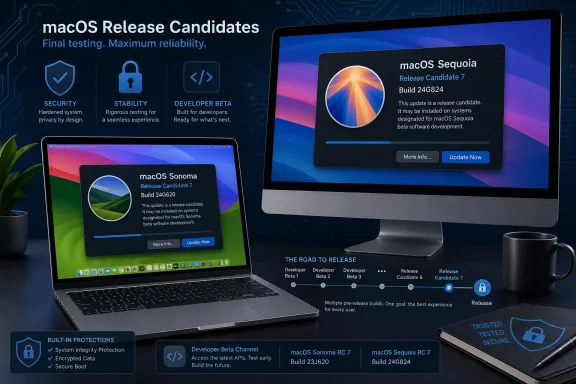
Apple has issued a seventh Release Candidate for both macOS Sonoma 14.8.8 and macOS Sequoia 15.7.8, extending an unusually long pre-release cycle for what appears to be a pair of security-focused maintenance updates. The new candidate builds are 23J620 for Sonoma and 24G824 for Sequoia, and they are available through Apple’s developer and public beta channels.
For Mac users, the immediate message is simple: these updates are not public releases yet, and Apple has not published a security-content breakdown. For IT administrators, developers, and households maintaining Macs that are not moving to the newest macOS generation, the seventh RC is a more consequential signal. Apple is clearly still validating something before it signs off on the final builds.
That does not necessarily mean a serious flaw has been found. It does mean that the normal assumption—an RC is the last stop before release—has become unreliable for these particular updates. After six candidates, the arrival of another pair of builds suggests Apple is prioritizing stability, security validation, compatibility, or all three over a rapid rollout.
The latest pre-release builds are:
At the time of writing, macOS Sonoma 14.8.7 and macOS Sequoia 15.7.7 remain the current public versions in their respective branches. The upcoming 14.8.8 and 15.7.8 releases are therefore expected to be incremental updates rather than feature upgrades.
Apple’s brief release-note language says only that the update provides important security fixes and is recommended for all users. That language is common for security maintenance releases, but it is also intentionally broad. Until Apple publishes its detailed security release notes, there is no responsible basis for claiming that a particular vulnerability, exploit, or feature issue is addressed.
Seven candidates are unusual.
There are several less alarming explanations:
This distinction matters for two reasons:
That is why security maintenance updates for older supported macOS versions matter. They allow users to remain on a stable operating environment while still receiving at least some protection against newly identified risks.
This does not turn Sonoma into a permanent solution. Operating systems eventually age out of active maintenance, and security support for older versions is always more limited than support for the newest branch. But as long as Apple continues to ship Sonoma updates, users should take those releases seriously.
A Mac that cannot move forward to a newer version should not be left behind on an older point release merely because the update contains no flashy new features. Security patches are often invisible right up until the moment they prevent a compromised account, malicious document, browser exploit, or network-based attack from becoming a serious incident.
That creates a clear boundary between verified information and speculation.
Until then, claims that these updates address a particular critical threat should be treated carefully unless Apple confirms them directly.
Some vulnerabilities require local access. Others can be reached through a malicious website, document, media file, app, or network service. The risk depends on the flaw, the Mac’s configuration, the user’s behavior, and the defenses already in place.
For home users, that usually means installing the final public update within a reasonable time after checking that no known application compatibility issue affects their workflow.
For organizations, it means having a defined patch-management process rather than treating every update as either an emergency or an inconvenience. A mature process typically includes:
Multiple RCs can reflect the difficulty of making a fix behave consistently across:
This is particularly relevant in mixed environments that include older Intel-based Macs, newer Apple silicon devices, or users who rely on USB audio interfaces, professional video hardware, smart-card authentication, network drives, virtualization tools, and specialized printing or scanning equipment.
Once the public versions become available, users who are currently on Sonoma 14.8.7 or Sequoia 15.7.7 should not assume that remaining on the prior build is safer. If Apple recommends an update for security reasons, delaying it without a specific compatibility concern can leave the Mac exposed to issues that have already been corrected.
The sensible middle path is straightforward:
Apple’s own beta guidance has long emphasized that pre-release operating systems can contain errors and should not be installed on business-critical systems without appropriate safeguards.
Useful areas to test include:
In a cross-platform environment, the Mac-specific version numbers can make it easy to lose track of patch status. A device can appear current because it is running a supported major version while still missing the newest security point release.
Administrators should ensure that their device-management reports can distinguish between:
Organizations should consider setting clear rules for:
Apple’s annual macOS cadence creates a rapid progression of names and version numbers, but user adoption is much slower. Businesses cannot always move at consumer speed. Older hardware cannot always move at all. Security support for prior macOS branches helps narrow the gap between Apple’s latest platform ambitions and the systems people actually use every day.
That is beneficial for users, but it also creates a higher expectation for clarity. With every additional RC, Apple’s minimal pre-release release notes become more noticeable. Administrators can accommodate a delayed release more easily than they can accommodate uncertainty around whether they are preparing for a narrow security patch, a significant compatibility correction, or both.
Apple may provide that clarity once the final builds ship and its security documentation is updated. Until then, the right response is measured: recognize the significance of the extended test cycle, avoid overstating what is unknown, and prepare for a prompt but controlled deployment when the public releases arrive.
Build 23J620 for Sonoma and build 24G824 for Sequoia are now the versions to watch in Apple’s beta channels. The repeated RC process suggests Apple is taking additional time to validate the release, although the reason remains unconfirmed and should not be overstated.
For most users, the best course is to remain on the stable public version, maintain a current backup, and install the final update after it becomes available. For developers, public beta participants, and managed Mac fleets, RC 7 is a useful opportunity to test critical workflows before the wider rollout begins.
Security updates rarely generate excitement, but they are often among the most valuable releases an operating system receives. Whether a Mac remains on Sonoma for hardware compatibility, Sequoia for established workflows, or a newer platform for current features, keeping it patched remains one of the simplest and most effective steps toward a safer, more reliable computing environment.
For Mac users, the immediate message is simple: these updates are not public releases yet, and Apple has not published a security-content breakdown. For IT administrators, developers, and households maintaining Macs that are not moving to the newest macOS generation, the seventh RC is a more consequential signal. Apple is clearly still validating something before it signs off on the final builds.
That does not necessarily mean a serious flaw has been found. It does mean that the normal assumption—an RC is the last stop before release—has become unreliable for these particular updates. After six candidates, the arrival of another pair of builds suggests Apple is prioritizing stability, security validation, compatibility, or all three over a rapid rollout.
 Overview: What Apple Has Released
The latest pre-release builds are:- macOS Sonoma 14.8.8 Release Candidate 7: build 23J620
- macOS Sequoia 15.7.8 Release Candidate 7: build 24G824
- Sonoma 14.8.8 RC 6: build 23J619
- Sequoia 15.7.8 RC 6: build 24G822
At the time of writing, macOS Sonoma 14.8.7 and macOS Sequoia 15.7.7 remain the current public versions in their respective branches. The upcoming 14.8.8 and 15.7.8 releases are therefore expected to be incremental updates rather than feature upgrades.
Apple’s brief release-note language says only that the update provides important security fixes and is recommended for all users. That language is common for security maintenance releases, but it is also intentionally broad. Until Apple publishes its detailed security release notes, there is no responsible basis for claiming that a particular vulnerability, exploit, or feature issue is addressed.
Why Seven Release Candidates Matter
A Release Candidate, often shortened to RC, is a pre-release build believed to be close enough to the finished product for final validation. Under ordinary circumstances, Apple may distribute one RC before making an update available to everyone. Occasionally, it will release a second candidate when an issue is found late in testing.Seven candidates are unusual.
An extended test cycle is not automatically bad news
It is tempting to interpret a prolonged RC cycle as evidence that an update is unstable or that Apple is scrambling to close an actively exploited security hole. Neither conclusion is supported by the available information.There are several less alarming explanations:
- A late-discovered bug may have affected a narrow group of Mac configurations.
- Apple may be validating fixes across different Intel and Apple silicon hardware.
- A security correction may have created an unexpected regression in networking, graphics, file handling, authentication, or enterprise management.
- The company may be coordinating the macOS updates with fixes in Safari, firmware, or related operating-system components.
- Build qualification may have required another pass after an internal change that is not visible to testers.
The important distinction between an RC and a public update
An RC is still pre-release software. It may be close to the final code, but it is not guaranteed to be identical to the public build, and it has not completed the same broad rollout process.This distinction matters for two reasons:
- End users should not feel compelled to install it immediately.
A public security update is generally the appropriate choice for a primary Mac, especially when the device is used for work, school, finance, or sensitive data. - Testers can provide value precisely because the update is unfinished.
Developers, IT teams, and public beta participants can identify failures that are hard to reproduce in Apple’s own test environment—particularly with specialized peripherals, VPN clients, security tools, virtual machines, accessibility software, legacy drivers, and managed-device configurations.
Sonoma and Sequoia Are Still Important Platforms
Apple’s newest Mac operating system receives the most attention, but older macOS branches remain strategically important. macOS Sonoma and macOS Sequoia continue to serve millions of Macs because hardware compatibility, software certification, organizational policy, and user preference do not change on Apple’s annual schedule.Why organizations deliberately stay on older macOS releases
A business may defer a major macOS upgrade for perfectly valid reasons:- An internal application may not yet be certified for the newer operating system.
- A specialized device driver or production workflow may require a known-good environment.
- Security software, endpoint management tools, or VPN clients may need updated support.
- Training materials and help-desk documentation may be tied to the installed version.
- A Mac fleet may include hardware that cannot run the newest macOS release.
- The organization may prefer to adopt a new major release only after several maintenance updates.
That is why security maintenance updates for older supported macOS versions matter. They allow users to remain on a stable operating environment while still receiving at least some protection against newly identified risks.
Sonoma is especially relevant for aging Mac hardware
Sonoma’s importance is heightened by the fact that some Macs capable of running it cannot run Sequoia or later releases. For those systems, a Sonoma security update may represent the best available path to stay within Apple’s supported software ecosystem.This does not turn Sonoma into a permanent solution. Operating systems eventually age out of active maintenance, and security support for older versions is always more limited than support for the newest branch. But as long as Apple continues to ship Sonoma updates, users should take those releases seriously.
A Mac that cannot move forward to a newer version should not be left behind on an older point release merely because the update contains no flashy new features. Security patches are often invisible right up until the moment they prevent a compromised account, malicious document, browser exploit, or network-based attack from becoming a serious incident.
What We Know—and What Apple Has Not Yet Confirmed
The seventh RCs have one major limitation: Apple has not published detailed release notes explaining their contents.That creates a clear boundary between verified information and speculation.
Verified details
The following points are established:- Apple has seeded a seventh Release Candidate for macOS Sonoma 14.8.8.
- Apple has seeded a seventh Release Candidate for macOS Sequoia 15.7.8.
- The build numbers are 23J620 and 24G824, respectively.
- The releases are available to Apple developers and public beta participants.
- Apple describes the updates as containing important security fixes.
- Neither version is publicly available as a standard final release at this stage.
Details that remain unknown
The following information has not been publicly detailed:- Which vulnerabilities are fixed.
- Whether any vulnerabilities are known to be actively exploited.
- Whether the updates contain non-security bug fixes.
- Why Apple issued seven Release Candidates.
- Whether RC 7 will be the final public build.
- Whether a public release will occur alongside updates for other Apple platforms.
- Whether the build includes hardware-specific fixes for particular Mac models.
Until then, claims that these updates address a particular critical threat should be treated carefully unless Apple confirms them directly.
The Security Angle: Why the Updates Should Still Be Taken Seriously
The generic wording around “important security fixes” should not be dismissed. Apple uses security maintenance updates to patch flaws in components that can affect browsing, file processing, networking, system permissions, media handling, kernel behavior, and other foundational parts of macOS.Some vulnerabilities require local access. Others can be reached through a malicious website, document, media file, app, or network service. The risk depends on the flaw, the Mac’s configuration, the user’s behavior, and the defenses already in place.
Security updates are most effective when deployed promptly
Once Apple publishes a fix, attackers can compare the patched and unpatched software to better understand what changed. That process can accelerate attempts to weaponize a vulnerability, especially when the affected component is widespread.For home users, that usually means installing the final public update within a reasonable time after checking that no known application compatibility issue affects their workflow.
For organizations, it means having a defined patch-management process rather than treating every update as either an emergency or an inconvenience. A mature process typically includes:
- Reviewing the update’s scope once official security details are available.
- Testing on representative Mac hardware and core business applications.
- Checking endpoint security, VPN, SSO, and MDM compatibility.
- Rolling out to pilot users before wider deployment.
- Monitoring failures such as boot loops, authentication problems, application crashes, or unusual battery behavior.
- Completing fleet deployment according to the organization’s risk tolerance and business requirements.
What the Long RC Cycle Could Mean for Reliability
The longest-running concern around an update with multiple candidates is not simply security—it is confidence. When software moves through repeated RC builds, IT departments naturally ask whether Apple is chasing an unresolved defect or tightening validation around a complicated fix.A cautious interpretation is the right interpretation
The evidence supports caution, not panic.Multiple RCs can reflect the difficulty of making a fix behave consistently across:
- Apple silicon Macs and Intel Macs
- Laptop and desktop models
- Different graphics architectures
- Various storage configurations
- Managed and unmanaged systems
- FileVault-enabled devices
- Enterprise network environments
- Third-party endpoint security tools
- External displays, docks, hubs, and storage devices
This is particularly relevant in mixed environments that include older Intel-based Macs, newer Apple silicon devices, or users who rely on USB audio interfaces, professional video hardware, smart-card authentication, network drives, virtualization tools, and specialized printing or scanning equipment.
The risk of waiting too long
There is also a downside to interpreting a long test cycle as a reason to postpone patching indefinitely.Once the public versions become available, users who are currently on Sonoma 14.8.7 or Sequoia 15.7.7 should not assume that remaining on the prior build is safer. If Apple recommends an update for security reasons, delaying it without a specific compatibility concern can leave the Mac exposed to issues that have already been corrected.
The sensible middle path is straightforward:
- Do not install the RC on critical production Macs unless there is a formal reason to test it.
- Do install the final public update after making a backup and allowing a reasonable compatibility-validation window.
- Do not confuse a lack of new features with a lack of importance.
Practical Guidance for Public Beta Testers
Public beta participants can see the seventh RC through the beta-update controls in macOS Software Update. That access does not make the update suitable for every machine.Apple’s own beta guidance has long emphasized that pre-release operating systems can contain errors and should not be installed on business-critical systems without appropriate safeguards.
Before installing an RC
A careful tester should complete several basic checks first:- Confirm that a recent Time Machine backup has completed successfully.
- Keep the Mac connected to reliable power and internet access.
- Ensure there is sufficient free storage for the update and temporary installation files.
- Record the existing macOS version and build number.
- Verify the status of critical apps, licenses, plug-ins, and drivers.
- Avoid testing first on the only Mac used for work, study, or essential personal tasks.
- Have a recovery plan if the Mac fails to boot or a key app stops functioning.
What testers should watch for
The most valuable testing feedback is concrete and reproducible. General statements such as “the Mac feels slower” are less helpful than observations tied to a clear sequence of events.Useful areas to test include:
- System startup and shutdown
- Sleep and wake behavior
- Wi-Fi and Ethernet connectivity
- VPN connections
- Bluetooth accessories
- External monitor detection
- Dock and hub reliability
- File sharing and network storage access
- Printing and scanning
- Audio interfaces
- Camera and video-conferencing tools
- FileVault login behavior
- Password-manager integration
- Browser stability
- Business-critical applications
- MDM enrollment and policy enforcement
Guidance for Windows and Cross-Platform IT Environments
Although this is Mac news, the implications extend well beyond Apple-only households. Many Windows-centric organizations operate mixed fleets, and macOS patching can become a blind spot when Windows Update has mature processes but Mac management is handled informally.Macs need the same patch discipline as Windows PCs
The core principle is platform-neutral: inventory devices, test updates, protect data, maintain backups, and verify deployment.In a cross-platform environment, the Mac-specific version numbers can make it easy to lose track of patch status. A device can appear current because it is running a supported major version while still missing the newest security point release.
Administrators should ensure that their device-management reports can distinguish between:
- macOS Sonoma 14.8.7 and macOS Sonoma 14.8.8
- macOS Sequoia 15.7.7 and macOS Sequoia 15.7.8
- Public final builds and beta-channel builds
- Supported corporate configurations and personally managed devices
Avoid mixing beta software with unmanaged policy exceptions
A Mac running a public RC should be clearly identified as a test device. It should not accidentally become part of a broad production standard simply because it reports a newer version number.Organizations should consider setting clear rules for:
- Which teams may test Apple beta releases
- Which Macs may enroll in beta channels
- How beta devices are identified in MDM
- Whether beta Macs may access sensitive production data
- How a device returns to the stable release channel
- Who approves deployment when the final update arrives
How to Prepare for the Final Release
When Apple publishes the final macOS Sonoma 14.8.8 and macOS Sequoia 15.7.8 updates, installation should be routine for most users. Still, routine is not the same as risk-free.A sensible update checklist
Before applying the public release:- Back up the Mac.
A current Time Machine backup is the simplest recovery tool for most users. - Check storage space.
Low free space can interrupt downloads, unpacking, and installation. - Update critical third-party software.
This is particularly important for security clients, VPN tools, virtualization products, audio drivers, enterprise applications, and device-management agents. - Keep the Mac on power.
Laptops should be connected to a charger. An interrupted installation can create a more difficult recovery situation. - Plan for restarts and downtime.
The update process may restart the Mac more than once and can leave the screen blank temporarily. - Verify the installed version afterward.
Use About This Mac or Software Update to confirm the Mac is on the intended final release rather than an earlier build. - Test core workflows after installation.
Sign in to the VPN, open essential applications, verify printers and displays, and confirm cloud-sync services are functioning normally.
The Bigger Picture: Apple’s Support Strategy Is Evolving
The continued delivery of Sonoma and Sequoia point updates illustrates an important reality of modern desktop operating systems: the newest version is not the only version that matters.Apple’s annual macOS cadence creates a rapid progression of names and version numbers, but user adoption is much slower. Businesses cannot always move at consumer speed. Older hardware cannot always move at all. Security support for prior macOS branches helps narrow the gap between Apple’s latest platform ambitions and the systems people actually use every day.
That is beneficial for users, but it also creates a higher expectation for clarity. With every additional RC, Apple’s minimal pre-release release notes become more noticeable. Administrators can accommodate a delayed release more easily than they can accommodate uncertainty around whether they are preparing for a narrow security patch, a significant compatibility correction, or both.
Apple may provide that clarity once the final builds ship and its security documentation is updated. Until then, the right response is measured: recognize the significance of the extended test cycle, avoid overstating what is unknown, and prepare for a prompt but controlled deployment when the public releases arrive.
Conclusion
The seventh Release Candidates for macOS Sonoma 14.8.8 and macOS Sequoia 15.7.8 are notable not because Apple has disclosed a dramatic new feature or emergency vulnerability, but because the company continues to refine two updates that initially looked like ordinary maintenance releases.Build 23J620 for Sonoma and build 24G824 for Sequoia are now the versions to watch in Apple’s beta channels. The repeated RC process suggests Apple is taking additional time to validate the release, although the reason remains unconfirmed and should not be overstated.
For most users, the best course is to remain on the stable public version, maintain a current backup, and install the final update after it becomes available. For developers, public beta participants, and managed Mac fleets, RC 7 is a useful opportunity to test critical workflows before the wider rollout begins.
Security updates rarely generate excitement, but they are often among the most valuable releases an operating system receives. Whether a Mac remains on Sonoma for hardware compatibility, Sequoia for established workflows, or a newer platform for current features, keeping it patched remains one of the simplest and most effective steps toward a safer, more reliable computing environment.
References
- Primary source: 9to5Mac
Published: 2026-07-24T19:20:55+00:00
Apple releases seventh RCs for macOS Sonoma 14.8.8 and macOS Sequoia 15.7.8 - 9to5Mac
Apple is now rolling out the seventh Release Candidates for macOS Sonoma 14.8.8 and macOS Sequoia 15.7.8. Here are the details.9to5mac.com - Related coverage: macworld.com
Security updates released in iOS 18.7, macOS Sequoia 15.7, and Sonoma 14.8 | Macworld
Security update coincides with the release of iOS 26 and macOS Tahoe.www.macworld.com - Related coverage: iclarified.com
Apple Releases macOS Sequoia 15.7 and Sonoma 14.8 With Security Fixes [Download] - iClarified
Apple has released macOS Sequoia 15.7 and macOS Sonoma 14.8. These updates provide important security fixes for Macs on older operating systems.www.iclarified.com - Related coverage: osxdaily.com
MacOS Sequoia 15.7.7 & MacOS Sonoma 14.8.7 Released - OS X Daily
MacOS Sequoia 15.7.7 & MacOS Sonoma 14.8.7 Released - OS X Dailyosxdaily.com
- Related coverage: macobserver.com
Apple Drops Rare Third Release Candidates For macOS Sonoma And Sequoia
Apple released third developer candidates for macOS Sonoma 14.8.8 and Sequoia 15.7.8. Learn about the new build numbers and latest security changes.www.macobserver.com - Related coverage: cincodias.elpais.com
Apple se pone el mono de trabajo: soluciona muchos problemas en iOS y macOS | Lifestyle | SmartLife | Cinco Días
La firma de Cupertino ha trabajado duro para solucionar más de 100 fallos detectados en sus diferentes sistemas operativos.cincodias.elpais.com
