

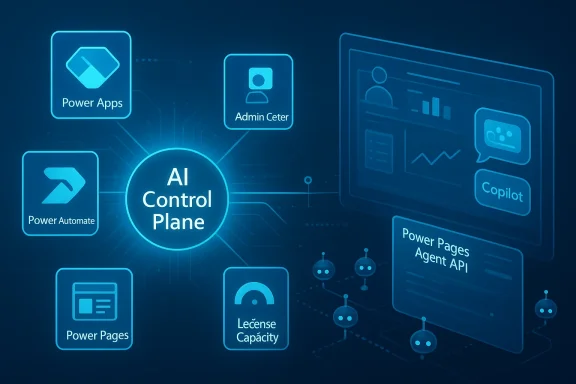
Microsoft’s March 2026 Power Platform update is less a routine monthly refresh than a clear statement about where the platform is headed: deeper Microsoft Copilot integration, more centralized admin visibility, and a stronger push toward agent-driven app experiences. The update spans Power Apps, Power Automate, Power Pages, and the management layer, and it arrives just as Microsoft’s 2026 release wave 1 begins rolling out across the broader business applications stack. For enterprises, the message is unmistakable: Power Platform is becoming not just a low-code suite, but an AI control plane for building, governing, and operationalizing work.
Microsoft has spent the last several release cycles converging its business apps story around a few core ideas: Copilot everywhere, agents everywhere, and governance everywhere. The March 2026 feature update continues that trajectory with a set of improvements that are individually useful but strategically more important when viewed together. The official update highlights licensing capacity reporting, Power Platform inventory, a new usage page, Microsoft 365 Copilot in model-driven apps, modern control quality updates, the new vibe.powerapps.com preview, object-centric process mining, a redesigned process intelligence experience, the Power Pages Agent API, and agentic coding tools for site creation.
This is not the first sign of Microsoft’s direction. In earlier updates, the company had already started standardizing Copilot experiences inside model-driven apps and making admin tooling more transparent. The February 2026 update, for example, focused on enabling Microsoft 365 Copilot chat for app users, while the redesigned Copilot hub introduced a central place for Copilot governance, usage, and cost visibility. March’s update extends that foundation into a broader operational story: better admin telemetry, deeper in-app reasoning, and more flexible ways to build with AI.
The timing matters. Microsoft’s 2026 release wave 1 plans began general availability on April 1, 2026, with regional deployments starting the same day, and the release plan explicitly frames this wave as one built around intelligent automation, modernized app experiences, and strengthened governance. The March feature update reads like the practical front end of that plan: a preview of how Microsoft wants organizations to operate across the next six months.
For IT leaders, this month’s update is especially notable because it closes a long-standing gap between innovation and oversight. Power Platform has always been easy to adopt, but harder to govern at scale. The new inventory and usage capabilities make it easier to answer the questions that matter most in large tenants: What exists? Who owns it? What’s being used? What is over capacity? That shift from discovery to control is one of the most important themes in Microsoft’s enterprise strategy this year.
The inventory is also more than a passive directory. Microsoft says it includes agents created in Copilot Studio and Microsoft 365 Copilot Agent Builder, apps created in Power Apps including canvas, model-driven, code, and vibe apps, and flows created across Power Automate, Copilot Studio, and Microsoft 365 Copilot’s Workflows agent. That breadth reflects a broader truth: governance is no longer just about apps and flows; it is about AI-enabled business objects moving across a tenant.
A second pillar is licensing capacity reporting, now fully available in the Power Platform admin center. Microsoft says admins can see which users are over capacity and which flows are driving that usage from a single location under Licensing → Power Automate → Usage. This is one of those features that sounds mundane but usually has outsized impact because it turns license disputes and capacity overages into a traceable operational issue rather than a spreadsheet argument.
The strategic angle is clear. Once admins can compare adoption patterns and resource usage across the Power Platform stack, they gain a stronger basis for rationalization, chargeback conversations, and app lifecycle decisions. The result is a more accountable platform, but also a more measurable one, which matters because AI spending tends to rise faster than governance maturity. That mismatch is where many enterprise pilots go wrong.
Microsoft’s documentation on Microsoft 365 Copilot chat in model-driven apps also reinforces the direction of travel. The company notes that the experience is being gradually deployed, that it is tied to admin and maker settings, and that some capabilities remain read-only unless customized with an agent. That suggests Microsoft is balancing ambition with safety, at least for now.
There is also a structural shift underneath the UI. Microsoft says users can @mention first-party agents such as Researcher and Analyst, or involve custom agents made available by the organization. That means the app is no longer just a place to view data; it becomes a launch point into a broader agent ecosystem. For power users, that is a major workflow compression.
The competitive implication is subtle but important. Microsoft is not merely competing with standalone chatbots; it is competing with every software vendor that wants to own the workflow layer. By putting Copilot inside the app and connecting it to documents, slides, meetings, and agents, Microsoft is betting that the future of enterprise software is less about switching products and more about continuity of intent.
Microsoft also says OnChange behavior has been refined so it fires at the right moments, reducing unnecessary recalculations and making apps feel faster and more responsive. That kind of update may not be flashy, but it directly affects user perception. Users forgive missing features more easily than they forgive lag. Speed is a trust signal.
Mobile-optimized defaults now apply automatically when adding controls to mobile layouts, which is another quiet but useful improvement. It suggests Microsoft is trying to reduce the number of decisions makers must remember when building for multiple form factors. That is especially helpful in organizations where app design is shared between citizen developers and professional developers.
That approach matters for developer adoption. Traditional low-code platforms often win on speed but lose credibility with professional developers when they feel too constrained. A prompt-driven, code-aware app builder gives Microsoft a way to speak to both audiences at once: makers who want acceleration and developers who want structure. That bridge is strategically valuable.
The upside is quick experimentation, especially for internal line-of-business tools. The risk is that prompt-generated apps can multiply just as quickly as they are created, which raises the stakes for governance, ownership, and lifecycle management. That is one reason the new inventory and usage tools are so relevant: they are the counterweight to AI-powered sprawl.
A sensible enterprise rollout will likely pair vibe-style generation with strict review processes, solution packaging discipline, and environment segmentation. Microsoft’s wider governance push suggests it understands this, but customers will need to enforce it in practice. Convenience is not a substitute for architecture.
The significance is easy to miss unless you work in operations, finance, or supply chain. In those environments, the failure is rarely a lack of events; it is an inability to see how those events interlock. Object-centric process mining offers a more faithful model of what happened, which can lead to more accurate bottleneck analysis and better optimization decisions.
Microsoft says this feature is automatically enabled for all Power Automate Process Mining customers, which lowers the adoption barrier. The company also notes support for ingesting object-centric event logs from Azure Data Lake or OneLake and for visualizing the data in a customizable process map. That combination should appeal to organizations already invested in Microsoft’s data ecosystem.
This is important because process intelligence often fails when it is too rigid for stakeholder needs. Finance wants one view, operations wants another, and executives want a third. Microsoft’s new layout system makes it easier to build those views without forcing everyone into the same analytical frame, which should improve adoption across teams.
Microsoft’s documentation shows that Power Pages already supports adding agents from the setup workspace and connecting them to site roles and identity providers, including anonymous access where appropriate. The new Agent API appears to deepen that model by making the agent integration more flexible and programmatic. That gives organizations more design freedom while keeping the agent inside Microsoft’s governance framework.
The public preview for agentic coding tools is also notable because it lowers the skill threshold for building sites. A developer can describe the site in natural language, and the plugin handles scaffolding, Web API integrations, permissions, and deployment. That is a powerful productivity story, but again, it amplifies the need for review discipline. AI can accelerate bad architecture as easily as good architecture.
This also broadens the competitive frame. Power Pages is no longer just competing with low-code portal tools; it is increasingly in the same conversation as AI-assisted web development platforms. Microsoft is trying to win by tying the experience to its broader stack of identities, agents, and admin tooling. That integration may prove more compelling than raw novelty alone.
The downside of breadth is complexity. A platform that touches many surfaces can also become hard to master, especially when preview, public preview, general availability, and deprecation timelines all overlap. Microsoft’s recent documentation on model-driven app chat illustrates that reality: the company is actively steering users from older Copilot chat patterns toward Microsoft 365 Copilot chat, while acknowledging that some settings may not yet be available everywhere during gradual deployment.
That complexity can still be a moat if Microsoft keeps making the management story stronger than its rivals. Many competitors can offer AI app generation. Fewer can pair it with tenant-wide inventory, capacity reporting, and integrated identity and compliance controls at Microsoft’s scale. That is the real differentiator.
The challenge for Microsoft will be proving that the embedded approach is not just convenient, but measurably better. Enterprises will want evidence of adoption, productivity gains, governance benefits, and reduced operational overhead. The new usage and inventory features are clearly designed to help answer that question.
The most important metric to watch is not feature count. It is whether customers can actually manage the growth of apps, agents, and automations without losing control of cost or compliance. If Microsoft’s admin tools keep improving at the same pace as its AI surfaces, Power Platform could become one of the company’s most persuasive enterprise AI stories. If not, adoption may outstrip governance again.
Source: The Tech Outlook Microsoft releases the March 2026 Power Platform update that brings deeper Microsoft Copilot experiences - The Tech Outlook
 Overview
Microsoft has spent the last several release cycles converging its business apps story around a few core ideas: Copilot everywhere, agents everywhere, and governance everywhere. The March 2026 feature update continues that trajectory with a set of improvements that are individually useful but strategically more important when viewed together. The official update highlights licensing capacity reporting, Power Platform inventory, a new usage page, Microsoft 365 Copilot in model-driven apps, modern control quality updates, the new vibe.powerapps.com preview, object-centric process mining, a redesigned process intelligence experience, the Power Pages Agent API, and agentic coding tools for site creation.This is not the first sign of Microsoft’s direction. In earlier updates, the company had already started standardizing Copilot experiences inside model-driven apps and making admin tooling more transparent. The February 2026 update, for example, focused on enabling Microsoft 365 Copilot chat for app users, while the redesigned Copilot hub introduced a central place for Copilot governance, usage, and cost visibility. March’s update extends that foundation into a broader operational story: better admin telemetry, deeper in-app reasoning, and more flexible ways to build with AI.
The timing matters. Microsoft’s 2026 release wave 1 plans began general availability on April 1, 2026, with regional deployments starting the same day, and the release plan explicitly frames this wave as one built around intelligent automation, modernized app experiences, and strengthened governance. The March feature update reads like the practical front end of that plan: a preview of how Microsoft wants organizations to operate across the next six months.
For IT leaders, this month’s update is especially notable because it closes a long-standing gap between innovation and oversight. Power Platform has always been easy to adopt, but harder to govern at scale. The new inventory and usage capabilities make it easier to answer the questions that matter most in large tenants: What exists? Who owns it? What’s being used? What is over capacity? That shift from discovery to control is one of the most important themes in Microsoft’s enterprise strategy this year.
The Governance Story Gets Sharper
The biggest administrative change in the March update is the maturation of Power Platform inventory and the addition of a more modern usage page. Inventory is now generally available, and Microsoft describes it as a unified view across agents, apps, flows, and environments. That is a significant operational improvement for large tenants that have struggled with fragmented visibility across Power Apps, Power Automate, Copilot Studio, and related Microsoft 365 Copilot experiences.Why inventory matters
This matters because modern automation estates do not fail only through technical outages; they fail through invisible sprawl. When admins cannot quickly see what has been deployed, who owns it, and which environment it lives in, risk accumulates quietly. A single inventory view reduces the number of places teams must reconcile before audits, incident response, and app rationalization exercises.The inventory is also more than a passive directory. Microsoft says it includes agents created in Copilot Studio and Microsoft 365 Copilot Agent Builder, apps created in Power Apps including canvas, model-driven, code, and vibe apps, and flows created across Power Automate, Copilot Studio, and Microsoft 365 Copilot’s Workflows agent. That breadth reflects a broader truth: governance is no longer just about apps and flows; it is about AI-enabled business objects moving across a tenant.
A second pillar is licensing capacity reporting, now fully available in the Power Platform admin center. Microsoft says admins can see which users are over capacity and which flows are driving that usage from a single location under Licensing → Power Automate → Usage. This is one of those features that sounds mundane but usually has outsized impact because it turns license disputes and capacity overages into a traceable operational issue rather than a spreadsheet argument.
- Centralized visibility reduces shadow IT.
- Capacity reporting helps justify licensing decisions.
- Inventory makes ownership and compliance easier to track.
- Better telemetry can shorten support investigations.
- Unified admin views reduce manual reconciliation work.
The new usage page
Microsoft also says the new usage page is now in public preview, with modern dashboards that show adoption trends and resource-level analytics for Power Apps, Power Automate, and Copilot Studio. That may seem like a UI change, but it is really a sign that Microsoft wants usage to be a first-class management signal, not an afterthought buried in product-specific tools.The strategic angle is clear. Once admins can compare adoption patterns and resource usage across the Power Platform stack, they gain a stronger basis for rationalization, chargeback conversations, and app lifecycle decisions. The result is a more accountable platform, but also a more measurable one, which matters because AI spending tends to rise faster than governance maturity. That mismatch is where many enterprise pilots go wrong.
Microsoft 365 Copilot Moves Closer to the Work
The most visible product story in the update is the expansion of Microsoft 365 Copilot inside model-driven Power Apps. Microsoft says users will be able to ask questions about app data, generate visualizations with code interpreter, and take action across Microsoft 365 without leaving the app. In other words, the app becomes a working surface for analysis and action rather than just a data-entry portal.From data lookup to decision support
That transition is important because it changes the role of model-driven apps. Instead of serving only as structured records systems, they become interactive decision environments where users can interrogate tables, inspect records, and then move directly into drafting documents, creating presentations, or scheduling meetings. Microsoft’s own description emphasizes that app and data context can feed these actions, which makes the experience more grounded than a generic chat interface.Microsoft’s documentation on Microsoft 365 Copilot chat in model-driven apps also reinforces the direction of travel. The company notes that the experience is being gradually deployed, that it is tied to admin and maker settings, and that some capabilities remain read-only unless customized with an agent. That suggests Microsoft is balancing ambition with safety, at least for now.
There is also a structural shift underneath the UI. Microsoft says users can @mention first-party agents such as Researcher and Analyst, or involve custom agents made available by the organization. That means the app is no longer just a place to view data; it becomes a launch point into a broader agent ecosystem. For power users, that is a major workflow compression.
- Ask questions about live business data.
- Visualize active and pending work.
- Summarize record history directly in context.
- Trigger documents, slides, and meetings.
- Bring in first-party or custom agents when needed.
Enterprise versus consumer impact
For enterprise customers, the upside is obvious: fewer context switches, faster decisions, and a tighter link between structured data and work outputs. For consumer-style usage, the implications are more muted because model-driven apps remain a business application pattern, not a mass-market productivity product. But the experience still matters because it shows how Microsoft expects Copilot to behave across its software estate: embedded, contextual, and action-oriented.The competitive implication is subtle but important. Microsoft is not merely competing with standalone chatbots; it is competing with every software vendor that wants to own the workflow layer. By putting Copilot inside the app and connecting it to documents, slides, meetings, and agents, Microsoft is betting that the future of enterprise software is less about switching products and more about continuity of intent.
Canvas Apps Get a Cleaner Foundation
While the Copilot headlines dominate the update, the modern controls refresh in Power Apps canvas apps may be just as consequential for makers who care about reliability and maintainability. Microsoft says quality updates shipped across all nine modern controls, including text, number input, date picker, text input, tab list, combo box, radio, link, and info button. Those controls now share a unified property model and standardized names and typed enum values.Why control consistency matters
A unified property model sounds like plumbing, but it affects everything from formula readability to app debugging. Better IntelliSense and fewer formula errors reduce the cognitive load on makers, especially in larger apps where inconsistent naming can become a hidden tax. For organizations with multiple development teams, standardization also makes governance and training easier.Microsoft also says OnChange behavior has been refined so it fires at the right moments, reducing unnecessary recalculations and making apps feel faster and more responsive. That kind of update may not be flashy, but it directly affects user perception. Users forgive missing features more easily than they forgive lag. Speed is a trust signal.
Mobile-optimized defaults now apply automatically when adding controls to mobile layouts, which is another quiet but useful improvement. It suggests Microsoft is trying to reduce the number of decisions makers must remember when building for multiple form factors. That is especially helpful in organizations where app design is shared between citizen developers and professional developers.
Builder productivity
The practical result is a tighter canvas app experience with fewer surprises. Makers get more predictable control behavior, more discoverable properties, and less friction when moving from desktop-centric layouts to mobile-friendly ones. In aggregate, that means fewer support tickets and a higher chance that apps remain maintainable after initial delivery.- Unified controls simplify app maintenance.
- Typed enums reduce formula ambiguity.
- Better OnChange behavior improves responsiveness.
- Mobile defaults reduce layout guesswork.
- IntelliSense improvements speed up development.
AI-Native App Creation Is Becoming More Ambitious
Microsoft’s vibe.powerapps.com preview is one of the clearest signals that the company wants to change how apps are created, not just how they are used. The preview enables developers to build full code Power Apps from a prompt using AI-driven planning, data generation, and app generation. That is a meaningful step beyond the familiar low-code narrative because it positions AI as a co-author of the app itself.What “vibe” really means
The obvious question is whether this is truly a new product motion or simply a friendlier on-ramp to existing Power Apps patterns. The answer is probably both. By allowing natural-language input to drive project scaffolding and app generation, Microsoft is trying to compress the distance between idea and prototype, while still keeping the app in the Power Platform ecosystem.That approach matters for developer adoption. Traditional low-code platforms often win on speed but lose credibility with professional developers when they feel too constrained. A prompt-driven, code-aware app builder gives Microsoft a way to speak to both audiences at once: makers who want acceleration and developers who want structure. That bridge is strategically valuable.
The upside is quick experimentation, especially for internal line-of-business tools. The risk is that prompt-generated apps can multiply just as quickly as they are created, which raises the stakes for governance, ownership, and lifecycle management. That is one reason the new inventory and usage tools are so relevant: they are the counterweight to AI-powered sprawl.
The developer trade-off
There is an unavoidable trade-off in any AI-assisted build system: the more the platform helps you get started, the more discipline you need to finish well. Code generation may accelerate the first 80 percent of an app, but the last 20 percent still determines durability, security, and integration quality. That is where experienced teams will continue to matter.A sensible enterprise rollout will likely pair vibe-style generation with strict review processes, solution packaging discipline, and environment segmentation. Microsoft’s wider governance push suggests it understands this, but customers will need to enforce it in practice. Convenience is not a substitute for architecture.
Power Automate Pushes Process Intelligence Forward
Power Automate’s update is especially strong on the process intelligence side, where Microsoft is introducing object-centric process mining and a more flexible process intelligence experience. These are not small cosmetic tweaks. They reflect a shift toward richer process modeling that better matches how real organizations operate.Object-centric process mining explained
Traditional process mining assumes a clean case ID and a single linear process path. Microsoft’s object-centric approach recognizes that real-world events often belong to multiple business objects at once, such as orders, invoices, deliveries, and payments. That means the same event can be understood in several contexts simultaneously, preserving relationships end-to-end rather than flattening them into a simplified case chain.The significance is easy to miss unless you work in operations, finance, or supply chain. In those environments, the failure is rarely a lack of events; it is an inability to see how those events interlock. Object-centric process mining offers a more faithful model of what happened, which can lead to more accurate bottleneck analysis and better optimization decisions.
Microsoft says this feature is automatically enabled for all Power Automate Process Mining customers, which lowers the adoption barrier. The company also notes support for ingesting object-centric event logs from Azure Data Lake or OneLake and for visualizing the data in a customizable process map. That combination should appeal to organizations already invested in Microsoft’s data ecosystem.
- Better support for multi-object business processes.
- More accurate end-to-end dependency analysis.
- Stronger fit for operations-heavy enterprises.
- Easier ingestion from Microsoft data platforms.
- Improved path and metric analysis flexibility.
A more customizable analysis workspace
The new process intelligence experience replaces the fixed process overview with a card-based dashboard system. Users can create multiple tabs, apply dynamic filters across visualizations, and arrange cards into personalized analytical workspaces. That makes process mining more like a living analyst environment and less like a single-purpose report page.This is important because process intelligence often fails when it is too rigid for stakeholder needs. Finance wants one view, operations wants another, and executives want a third. Microsoft’s new layout system makes it easier to build those views without forcing everyone into the same analytical frame, which should improve adoption across teams.
Power Pages Becomes More Agentic
Power Pages is getting a major identity boost in the March update through the Agent API for Power Pages and a public preview plugin that brings AI-assisted site creation into GitHub Copilot CLI and Claude Code. Together, these changes suggest Microsoft wants Power Pages to be a more capable front door for AI-powered web experiences.Building chat into the site itself
The Agent API allows site creators to build custom chat and other user experiences that integrate with Microsoft Copilot Studio agents. In practical terms, that means a Power Pages site can become a more interactive service layer, not just a static portal or form wrapper. That is especially relevant for self-service portals, customer engagement sites, and internal support experiences.Microsoft’s documentation shows that Power Pages already supports adding agents from the setup workspace and connecting them to site roles and identity providers, including anonymous access where appropriate. The new Agent API appears to deepen that model by making the agent integration more flexible and programmatic. That gives organizations more design freedom while keeping the agent inside Microsoft’s governance framework.
The public preview for agentic coding tools is also notable because it lowers the skill threshold for building sites. A developer can describe the site in natural language, and the plugin handles scaffolding, Web API integrations, permissions, and deployment. That is a powerful productivity story, but again, it amplifies the need for review discipline. AI can accelerate bad architecture as easily as good architecture.
Implications for web teams
For web teams, the likely benefit is speed. For platform teams, the likely concern is consistency. The more AI can generate around permissions, authentication, and API patterns, the more important it becomes to validate that those assumptions match enterprise policy. Microsoft says the plugin understands table permissions, web roles, site settings, authentication configuration, and Web API patterns, which is encouraging, but enterprises will still need guardrails.This also broadens the competitive frame. Power Pages is no longer just competing with low-code portal tools; it is increasingly in the same conversation as AI-assisted web development platforms. Microsoft is trying to win by tying the experience to its broader stack of identities, agents, and admin tooling. That integration may prove more compelling than raw novelty alone.
The Competitive Landscape Is Shifting
The March update is important not only for what it adds, but for what it reveals about Microsoft’s competitive posture. The company is clearly targeting a future where AI assistance, workflow automation, and administrative governance are bundled into a single enterprise platform story. That is a direct challenge to vendors that specialize in just one layer of that stack.Against low-code rivals
Against low-code competitors, Microsoft’s advantage is breadth. It can connect Power Apps, Power Automate, Power Pages, Copilot Studio, Microsoft 365, and Dataverse into a single motion. That means a prompt can become an app, an app can surface Copilot, and Copilot can trigger actions across Microsoft 365 without the organization leaving the Microsoft ecosystem.The downside of breadth is complexity. A platform that touches many surfaces can also become hard to master, especially when preview, public preview, general availability, and deprecation timelines all overlap. Microsoft’s recent documentation on model-driven app chat illustrates that reality: the company is actively steering users from older Copilot chat patterns toward Microsoft 365 Copilot chat, while acknowledging that some settings may not yet be available everywhere during gradual deployment.
That complexity can still be a moat if Microsoft keeps making the management story stronger than its rivals. Many competitors can offer AI app generation. Fewer can pair it with tenant-wide inventory, capacity reporting, and integrated identity and compliance controls at Microsoft’s scale. That is the real differentiator.
Against pure-play AI platforms
Against pure-play AI platforms, Microsoft’s message is even sharper: business value comes from being embedded in the system of work. The March update repeatedly emphasizes app context, data context, agent collaboration, and action-taking inside Microsoft 365. This is a fundamentally different pitch from a standalone chatbot.The challenge for Microsoft will be proving that the embedded approach is not just convenient, but measurably better. Enterprises will want evidence of adoption, productivity gains, governance benefits, and reduced operational overhead. The new usage and inventory features are clearly designed to help answer that question.
Strengths and Opportunities
The March update is strongest when viewed as a cohesive platform move rather than a checklist of features. Microsoft is making it easier to build with AI, easier to govern at scale, and easier to move from insight to action inside the same workspace. That combination should resonate with organizations that have already standardized on Microsoft 365 and Dataverse.- Deeper Copilot integration makes model-driven apps more useful for everyday decision work.
- Unified inventory gives admins a clearer view of apps, agents, flows, and environments.
- Capacity reporting helps control licensing and usage drift.
- Modern controls improve maker productivity and app consistency.
- Object-centric process mining better reflects complex real-world processes.
- Agent API for Power Pages expands conversational and agentic web experiences.
- Agentic coding previews could shorten the time from idea to deployable prototype.
Risks and Concerns
The same features that make this update compelling also introduce real operational risks. AI-native creation can accelerate sprawl, and richer in-app assistance can blur the line between simple observation and authorized action. Microsoft’s governance additions help, but they do not eliminate the burden on tenant owners and app teams.- Preview churn may create confusion across makers and admins.
- Agent sprawl could outpace governance if organizations move too quickly.
- License overuse may increase as AI adoption grows.
- Permission mistakes in AI-generated sites or apps could expose data.
- Read-only limitations may frustrate users expecting full Copilot action support.
- Regional rollout timing may leave some tenants with uneven feature access.
- Training gaps could cause teams to underuse or misuse new capabilities.
Looking Ahead
The next few months will show whether Microsoft can turn this update cycle into a durable operating model for enterprise AI. The 2026 release wave 1 plan already signals that the company intends to keep pushing deeper Copilot integration, modern app experiences, and stronger governance through September 2026. If the March update is the preview, the next releases should be the proving ground.The most important metric to watch is not feature count. It is whether customers can actually manage the growth of apps, agents, and automations without losing control of cost or compliance. If Microsoft’s admin tools keep improving at the same pace as its AI surfaces, Power Platform could become one of the company’s most persuasive enterprise AI stories. If not, adoption may outstrip governance again.
- Watch for broader rollout of Microsoft 365 Copilot chat in model-driven apps.
- Track whether Power Platform inventory expands with more usage and connector detail.
- Monitor adoption of vibe.powerapps.com and whether it reaches durable developer workflows.
- Look for new Power Pages guidance around Agent API and site provisioning.
- Follow the next Power Platform and Copilot Studio update for more release-wave details.
Source: The Tech Outlook Microsoft releases the March 2026 Power Platform update that brings deeper Microsoft Copilot experiences - The Tech Outlook
