

Microsoft Azure Images are the unsung backbone of any large-scale, repeatable cloud strategy — they convert system architecture into deployable, verifiable artifacts that make rapid provisioning, consistent security, and automated lifecycle management possible across development, test, and production estates.
Azure Images are more than just OS templates; they are the repeatable unit of infrastructure that modern IT teams use to enforce standards, accelerate delivery, and reduce operational drift. As organizations adopt cloud‑first and hybrid models, images become the atomic building blocks of everything from ephemeral test fleets to globally distributed production VM pools. The right image strategy reduces time-to-deploy from hours to minutes, lowers incident rates caused by configuration drift, and centralizes the controls that security and compliance teams need to enforce. Several operational and product threads from recent Azure discussions highlight new image patterns — including the growing use of the Azure Compute Gallery (formerly Shared Image Gallery), ephemeral OS disk patterns for stateless fleets, and partner tooling for automating image-based migrations.
Azure Images are the abstraction that lets infrastructure teams convert policy, security, and performance goals into repeatable artifacts. Done well, they reduce friction across provisioning, harden security posture at creation time, and enable predictable, auditable cloud operations. Done poorly, they create sprawl, stale baselines, and hidden compliance gaps. The pragmatic path is clear: automate image creation, enforce gallery and policy controls, pilot advanced placement models like ephemeral OS disks where they make sense, and measure outcomes with workload-appropriate tests before scaling across the enterprise.
Source: TechBullion Understanding Microsoft Azure Images and Their Role in Modern IT Departments
 Background
Azure Images are more than just OS templates; they are the repeatable unit of infrastructure that modern IT teams use to enforce standards, accelerate delivery, and reduce operational drift. As organizations adopt cloud‑first and hybrid models, images become the atomic building blocks of everything from ephemeral test fleets to globally distributed production VM pools. The right image strategy reduces time-to-deploy from hours to minutes, lowers incident rates caused by configuration drift, and centralizes the controls that security and compliance teams need to enforce. Several operational and product threads from recent Azure discussions highlight new image patterns — including the growing use of the Azure Compute Gallery (formerly Shared Image Gallery), ephemeral OS disk patterns for stateless fleets, and partner tooling for automating image-based migrations.Overview: What Are Azure Images?
Azure Images are pre‑configured VM templates you use to create virtual machines consistently. They typically contain:- An operating system image (Windows Server, Windows Client builds, or Linux distributions)
- Pre-installed applications, drivers, and agents
- System and security configuration (hardening, monitoring agents, logging)
- Network and storage presets or references
- Optional application frameworks and runtime dependencies
Image Types and Where to Use Them
Marketplace and Community Images
- Best for quick POCs and getting standard OS+app stacks without internal packaging.
- Useful when you want to evaluate third‑party offerings or use Microsoft‑maintained baseline images.
Custom Images (Managed Images)
- Created from a configured VM snapshot or build pipeline.
- Ideal when you need precise control over installed agents, security baselines, and licensing footprints.
Azure Compute Gallery (Shared Image Gallery)
- Designed for enterprise distribution: versioning, regional replication, and scale.
- Use it to publish images consistently across subscriptions and regions with immutable versions and metadata.
VM Capture Images
- Use capture from a managed‑disk VM only when classic snapshot-based capture workflows are supported.
- Note: some OS disk models (like ephemeral OS disks) cannot be captured directly; image capture must come from supported managed-disk VMs or from a dedicated image pipeline.
Why Azure Images Matter for IT Departments
Fast and Scalable Deployments
Deploying from an image removes repetitive installation and configuration steps. Provisioning becomes a declarative action rather than a manual process, enabling automated pipelines (ARM, Bicep, Terraform, Azure DevOps) and rapid scale-out for demand spikes.- Deploy consistent, fully provisioned VMs in minutes for dev/test, blue/green deployments, and autoscaling groups.
- Reduce time for onboarding infrastructure and for spin-up of ephemeral environments.
Consistency and Reduced Drift
Images enforce a baseline. When infrastructure is built from the same image, troubleshooting becomes predictable: the surface area of differences across hosts shrinks dramatically, and incident response becomes faster and more deterministic.- Consistency lowers the chance of configuration-related outages and makes remediation scripts and automation more effective.
Security, Compliance and Governance
Embedding security controls directly into images—up‑to‑date OS patches, endpoint protection, logging agents, and hardening baselines—reduces the operational window for vulnerable systems.- Azure Policy and gallery‑based governance let organizations restrict which images are allowed in production, enforcing approved baselines at scale.
Operational Efficiency and Automation
Images let you “build once, deploy many” — reducing repetitive tasks for IT staff and enabling fully automated lifecycle workflows. Combine images with VM Scale Sets, Azure Compute Gallery, and automation to reimage or recreate hosts reliably and quickly. This is particularly powerful for stateless or pooled fleets used in VDI and ephemeral test rigs.Disaster Recovery and Global Distribution
Publishing images to the Azure Compute Gallery and replicating them to target regions lets you reprovision quickly in alternative regions during outages, supporting failover plans and global low-latency deployments. Replication also speeds recovery times by keeping artifacts close to the target compute region.Operational Patterns: Building and Managing Image Pipelines
Image Build Tools and CI/CD
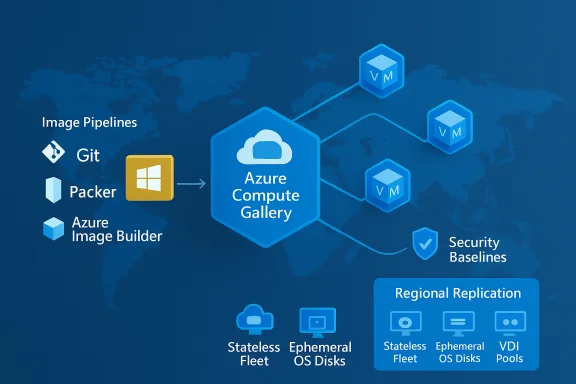
Automate image creation to avoid human error. Common approaches include:- Packer or Azure Image Builder for reproducible image builds
- CI pipelines that create, test, sign, and publish images to Azure Compute Gallery
- Integration with configuration management (e.g., Desired State Configuration, Chef, Ansible) to apply and verify hardening profiles
Versioning and Replication with Azure Compute Gallery
Use the gallery for:- Immutable image versions to enable rollbacks and audits
- Regional replication so deploys are fast and resilient
- Metadata tagging for traceability (what patch level, who approved, build pipeline ID)
Ephemeral OS Disks: When Statlessness Wins
Ephemeral OS disks place the OS layer on local VM storage (cache, temp disk or NVMe) rather than a remote managed disk. They deliver very fast provisioning and reimage cycles with lower OS-disk latency — an attractive pattern for pooled VDI estates and high-churn test fleets. However, ephemeral disks intentionally sacrifice OS-disk persistence and many disk-level management features:- No snapshots or OS-disk capture from ephemeral VMs
- No Azure Backup / Azure Site Recovery for the ephemeral OS disk
- Some encryption operations and CMK rotations may be limited or require VM deletion/recreation
- Not suitable when you need OS-disk persistence for compliance or forensic traceability
Security, Compliance and Governance: Hardening the Image Lifecycle
Bake Security In
Embedding security into images reduces the window where unpatched systems can be exposed. Standard items to include in the image build:- Latest OS patches and security updates
- Endpoint protection and monitoring agents (Microsoft Defender, Sentinel agents)
- Hardened baseline (CIS, DISA STIG, or internal policy)
- Minimal set of privileges and pre-provisioned roles
Image Signing and Attestation
Immutable image strategies increasingly require cryptographic signing and attestation. For high-assurance environments, adopt image signing and rotation as part of the CI/CD pipeline to ensure only approved images run in production. Newer Linux and kernel features (and some Microsoft-managed patterns) push organizations toward signed-image rotation workflows — plan for CI/CD integration and signing key management.Governance Controls
Enforce gallery usage with Azure Policy and role-based access control to prevent shadow images or unauthorized templates from spreading. Policy-driven enforcement should cover:- Approved image IDs or gallery version ranges
- Region and subscription restrictions
- Required image metadata (owner, build pipeline ID, expiry date)
Cost, Performance and Trade-offs
Performance Gains (and the Vendor Caveat)
Local NVMe placements and ephemeral OS disks can show dramatic OS-disk I/O improvements and faster boot/reimage times — some vendor messaging cited “up to 10x” improvements for certain NVMe scenarios. These are useful performance signals but are vendor-provided numbers; organizations must validate them with representative workloads and synthetic tests before adopting them as a justification for broad platform changes.Cost Nuances
- Ephemeral OS disks can lower managed‑disk storage costs because runtime OS state is local; however, base disk choices, autoscaling frequency, and VM runtime patterns materially affect TCO.
- Image publication and regional replication carry storage and operations costs.
- Migration and conversion tools (when used) may generate transient storage and bandwidth expenses during mass imports.
Practical Implementation Checklist
- Build a repeatable image pipeline using Packer or Azure Image Builder and integrate it into CI/CD.
- Harden and test images against your security baseline (patching, antivirus, logging).
- Publish images to Azure Compute Gallery with semantic versioning and metadata.
- Replicate gallery images to target regions aligned with DR and latency needs.
- Enforce gallery usage via Azure Policy and RBAC to block unauthorized images.
- Pilot ephemeral OS disks only for stateless fleets; validate deallocation, reimage and backup workflows first.
- Automate image rotation: schedule builds, tests, and retire old versions in a controlled way.
- Implement image signing and attestation for high-assurance workloads.
- Monitor image utilization and retire legacy images to prevent sprawl.
- Validate performance claims with workload-specific benchmarks before platform-wide adoption.
Common Pitfalls and How to Avoid Them
- Image Sprawl: Untethered image creation leads to hundreds of slightly different images. Enforce gallery-only publishing and require pipeline provenance to reduce sprawl.
- Stale, Unpatched Images: Relying on old images increases exposure. Automate rebuilds and require patch windows in CI/CD for LTS images.
- Misunderstanding Ephemeral Disks: Using ephemeral OS disks for workloads needing OS-disk snapshots or point-in-time recovery leads to lost forensic artifacts and compliance gaps. Reserve ephemeral patterns for pooled, stateless workloads only.
- Over‑trusting Marketing Numbers: Vendor claims about IO improvements or “up to X times faster” are context dependent. Always benchmark with representative workloads.
- Poor Key and Secret Management: Image signing and customer-managed keys (CMKs) require robust rotation plans; in some cases, CMK rotation may force VM recreation — validate workflows ahead of time to avoid surprise operations.
Real-World Tooling & Migration Patterns
Several partner tools and migration flows help operationalize image strategies at scale. For example, migration utilities that validate disk formats, remove incompatible agents, snapshot OS disks, and orchestrate ingestion into cloud desktop services can cut months off migration projects. These tools automate discovery, pre-validation, snapshot upload to customer storage accounts, and Graph/Windows 365 API provisioning — but they require careful governance (admin consent, least-privilege service principals) and strong pre-validation to avoid fail‑fast conditions at scale. When used together with gallery-based image publishing, these orchestration tools bridge legacy estates and modern image pipelines.Governance Example: VDI and Image Lifecycles
An enterprise VDI estate is a canonical case study for disciplined image management:- Build a dedicated image per persona (knowledge worker, developer, contractor).
- Bake group policies, FSLogix profiles, and monitoring agents into the image.
- Publish to Azure Compute Gallery with a versioning scheme (major.minor.patch).
- Use Azure Policy to prevent non-gallery images in production host pools.
- Leverage ephemeral OS disks for pooled session hosts where appropriate; preserve user state in FSLogix profile containers or OneDrive.
- Automate reimage events as part of patch cycles and use gallery version pins for controlled rollouts.
Final Recommendations
- Treat images as code: store build definitions, tests, and signing procedures in version control and CI/CD.
- Prefer Azure Compute Gallery for enterprise distribution and regional replication.
- Pilot ephemeral OS disks with real workloads first and validate backup/DR and compliance implications thoroughly.
- Automate scanning and retirement of images to prevent drift and reduce attack surface.
- Validate vendor performance claims with representative benchmarks.
- Implement policy and RBAC to enforce image provenance and prevent unauthorized templates from running in production.
Azure Images are the abstraction that lets infrastructure teams convert policy, security, and performance goals into repeatable artifacts. Done well, they reduce friction across provisioning, harden security posture at creation time, and enable predictable, auditable cloud operations. Done poorly, they create sprawl, stale baselines, and hidden compliance gaps. The pragmatic path is clear: automate image creation, enforce gallery and policy controls, pilot advanced placement models like ephemeral OS disks where they make sense, and measure outcomes with workload-appropriate tests before scaling across the enterprise.
Source: TechBullion Understanding Microsoft Azure Images and Their Role in Modern IT Departments
