Mico: Microsoft's Friendly Copilot Avatar Aims to Humanize AI Help

  • Thread Author
Microsoft’s new Copilot avatar, Mico, arrives as an unmistakable attempt to give Microsoft’s assistant a friendly, expressive face for voice and learning interactions — a deliberately non‑human, blob‑like companion that listens, emotes, and even hides a cheeky Clippy easter egg for users who poke it enough.

CoPilot Learn Live tutoring UI with a friendly gradient blob mascot and a group chat panel.Background​

Microsoft unveiled a broad set of Copilot updates in its Fall release that reposition Copilot from a purely transactional chat tool into a persistent, multimodal assistant spanning Windows, Edge, and mobile. The package pairs the visible symbol of that strategy — the Mico avatar — with functional changes: group chats, long‑term memory controls, connectors for email and cloud storage, a health‑grounded Copilot experience, and tighter agentic features inside Microsoft Edge for multi‑step tasks. Independent coverage and Microsoft’s preview materials confirm the rollout is staged and initially targeted at U.S. consumers, with other regions such as the U.K. and Canada slated to follow. This release signals two strategic bets. First, Microsoft wants voice interactions to feel natural on PCs and phones, and it sees a visual anchor as a key way to reduce the social friction of talking to a silent interface. Second, Microsoft is leaning into an assistant that remembers and acts — not just answers — which raises new operational and governance considerations for both consumers and IT administrators. Reuters, The Verge, and AP reporting all track these parallel shifts and the staged, opt‑in nature of the rollout.

What Mico is — design, intent, and how it differs from Clippy​

A deliberately non‑human face​

Mico is an abstract, animated avatar that appears primarily in Copilot’s voice mode and study/tutor experiences. The design language is intentionally non‑photorealistic — a floating, amorphous blob that changes color, shape, and expression to signal listening, thinking, or acknowledgement. That non‑human aesthetic is a clear, learned lesson: avoid the uncanny valley and limit emotional over‑attachment. Microsoft positions Mico as optional; users may disable the avatar if they prefer a text‑only or silent experience.

The Clippy easter egg — wink, not resurrection​

If you repeatedly tap Mico in preview builds, early reports show it temporarily morphing into the familiar paperclip from Office (Clippy). That behavior is presented as a deliberate easter egg — a low‑stakes nod to Microsoft’s UX history rather than a return of an always‑present, interruptive assistant. Treat the tap‑to‑Clippy behavior as observed in staged previews and early rollouts; Microsoft’s public documentation emphasizes it as a playful flourish and the avatar itself as optional.

Why give Copilot a face?​

  • Lower the social friction of voice: visual cues (color shifts, small animations) help users know when the assistant is listening or processing, which is useful for long, hands‑free dialogs.
  • Provide role signals: when acting as a tutor or study partner, Mico can adopt visual cues (e.g., glasses or a “study” mode) to make the interaction feel purposeful.
  • Increase discoverability: an animated avatar encourages exploration of voice and learning features, which helps adoption of Copilot’s broader capabilities.
    These are intentional product choices backed by internal user research and external previews.

The feature map: what arrived with Copilot’s Fall release​

Microsoft bundled Mico with a suite of features that change how Copilot behaves and where it can act.

Headline features​

  • Mico avatar — expressive, tappable, and optional; appears in voice mode and Learn Live sessions.
  • Copilot Groups — shared sessions where up to 32 people can interact with a single Copilot instance for planning and coordination.
  • Long‑term memory — richer, persistent memory for preferences and projects, surfaced with UI controls to view, edit, or delete stored items.
  • Real Talk — an optional conversational mode designed to push back, surface counterpoints, and make reasoning explicit rather than reflexively agreeing.
  • Learn Live — a Socratic, tutor‑style mode that guides users through concepts with interactive boards, quizzes, and scaffolded prompts.
  • Copilot Health / Find Care — health responses grounded in vetted sources (Microsoft cites publishers such as Harvard Health) and flows to help find clinicians.
  • Edge Journeys & Actions — an AI‑enabled browsing experience that summarizes tabs, creates resumable “Journeys,” and performs multi‑step tasks (bookings, form‑fills) with explicit permission.
Multiple independent outlets confirm the composition of this feature set and note the staged U.S.‑first rollout; availability varies by device, region, and account type.

Learn Live and the push for educational tutoring​

Learn Live is one of the clearest product plays for Mico: pairing voice, visual cues, and stepwise pedagogy to coax users into active learning rather than passive answer consumption.

What Learn Live promises​

  • Socratic scaffolding: Copilot asks guiding questions, presents practice problems, and encourages incremental recall rather than delivering final answers.
  • Visual support: Mico adopts study cues (glasses, a board) and uses gestures to point at diagrams or highlight steps.
  • Session continuity: long‑term memory helps preserve progress across sessions (with user controls to manage what is remembered).
Early coverage suggests this approach is aimed at reducing the common AI tutoring failure mode — handing answers without comprehension — but it also depends heavily on transparent modeling of reasoning and provenance for trust. Learn Live’s pedagogical value hinges on evidence that the assistant can reliably scaffold learning and avoid producing incorrect or misleading guidance. Until broader independent evaluations are published, claims about learning efficacy should be treated as promising but unverified.

Real Talk: intentionally opinionated assistance​

The Real Talk mode is an explicit answer to the “yes‑man” problem of prior assistants. Microsoft describes this as a mode that mirrors a user’s conversational style but is “grounded in its own perspective,” willing to push back and challenge ideas to encourage different viewpoints.

Why this matters​

  • Helps prevent echo chambers where an assistant simply repeats and amplifies user biases.
  • Forces the assistant to expose reasoning and show evidence, which can improve user critical thinking.
  • Creates new UX challenges: how to tune pushback so it’s constructive rather than contrarian for contrarianism’s sake.
Independent reporting flags an important tension: Real Talk’s benefits depend on robust grounding and provenance. If the model pushes back with poorly supported claims or mischaracterizes user intent, it could erode trust quickly. Microsoft says Real Talk will be optional and text‑only in some builds, reflecting caution around voice tone and escalation risks.

Privacy, memory, and consent: practical realities​

Giving Copilot memory and connectors turns a helpful assistant into a system that can reason about personal context — powerful, but risky.

Controls Microsoft highlights​

  • Opt‑in connectors: Access to OneDrive, Outlook, Gmail, Google Drive and Google Calendar requires explicit OAuth consent.
  • Memory management: A dashboard lets users view, edit, and delete remembered items, and voice commands can trigger forgetting flows.
  • Granular toggles: Mico and other appearance features are optional and can be disabled in Copilot settings.

Where the risk lives​

  • Data surface expansion: Connectors and memory increase exposure of personal content to AI processing. Even with encryption and consent, misconfigurations or unclear defaults can leak sensitive context into summarizations or group chats.
  • Group dynamics: Copilot Groups create shared contexts where multiple people can see aggregated outputs. Who owns the memory and who can recall it later needs clear UX and governance boundaries.
  • Export and provenance: Copilot can export chat outputs into Word, Excel, PowerPoint, and PDFs. That convenience also creates a permanent record that organizations must account for in compliance and e‑discovery.
These trade‑offs are real for consumers and enterprise IT alike. Microsoft’s messaging emphasizes consent and opt‑in flows, but the default settings and administrative controls will determine whether the technology becomes safe by design or safe by user diligence. Independent reporting and Microsoft documentation corroborate the presence of memory dashboards and connector opt‑ins; the efficacy of these controls in diverse deployments remains to be validated.

Edge, Journeys, and the rise of AI browsers​

Microsoft is pushing Edge to be an AI‑first browser where Copilot can see your open tabs, summarize sessions into persistent “Journeys,” and perform permissioned Actions like booking hotels or filling out forms.

Functional capabilities​

  • Tab reasoning: Copilot summarizes and compares information across multiple tabs.
  • Actions: Permissioned automation where Copilot performs multi‑step web tasks with confirmation flows.
  • Journeys: Resumable browsing snapshots that can be paused and revisited, saving research context.
These features place Copilot in direct competition with other AI‑enabled browsers and agentic tools, including OpenAI’s ChatGPT Atlas and other startups building agentic browsing experiences. The Edge play is transformative: it can reduce manual steps but also concentrates far more behavioral and transactional data inside Microsoft’s ecosystem. Reuters, The Verge, and support documentation all report these features as central to Microsoft’s strategy.

Market context: personalities, companions, and regulatory headlines​

Microsoft is not alone in anthropomorphizing AI. OpenAI, xAI, and many app‑store offerings have built voice personalities, visual avatars, and companion‑style experiences. The consumer appetite for character-driven AI is evident in millions of downloads for companion apps, but that demand has drawn regulatory and safety scrutiny as well.
  • OpenAI has experimented with personality and voice options in ChatGPT while pausing or moderating features tied to sensitive domains.
  • xAI’s Grok has pushed into more provocative territory with companion-like experiences that raise moderation concerns.
  • High‑profile safety incidents and lawsuits tied to inappropriate chatbot behavior have forced vendors to reconsider how human‑like AIs are allowed to behave. Major reporting highlights the mental health risks associated with overly anthropomorphic bots when safeguards are weak.
Microsoft’s emphasis on opt‑in, grounding with trusted health sources, and “Real Talk” as configurable responses indicates a posture of measured experimentation rather than unfettered immersion.

Critical analysis: strengths, weaknesses, and measurable trade‑offs​

Strengths​

  • Reduced friction for voice: Mico supplies nonverbal cues that make voice dialogs feel natural and less awkward, which is a proven UX pattern for spoken interfaces.
  • Purpose‑driven persona: Targeting Mico at tutoring and group facilitation — not at every context — is a smart product limitation that avoids the pitfalls of Clippy’s interruptive behavior.
  • Tighter grounding for sensitive queries: Copilot Health’s use of vetted sources (Microsoft cites Harvard Health) is a meaningful improvement over free‑wheeling hallucinations, provided citations are surfaced and users are warned about limitations.
  • Enterprise potential: Connectors and Actions create real productivity gains for knowledge workers when governed properly.

Weaknesses and risks​

  • Attention and engagement: Animated avatars can increase engagement (good for adoption) but also risk encouraging overreliance, distraction, or prolonged sessions that contradict Microsoft’s stated aim of “getting you back to your life.” That tension is not fully resolved in the UI defaults.
  • Privacy complexity: Memory + connectors + group sessions create a complex consent surface that many users will misunderstand. Defaults and administrative controls will matter more than marketing claims.
  • Moderation and safety: Real Talk’s argumentative style can be valuable, but without transparent reasoning and provenance it can also appear arbitrary or hostile; moderation safeguards will be crucial.
  • Staged availability and fragmentation: Features are rolling out regionally and by SKU, which risks fragmentation of the user experience across devices and accounts; organizations will need careful pilot plans.

Verifiability and caution flags​

Several interactions — notably the tap‑to‑Clippy easter egg and exact participant caps for Groups — have been observed in preview builds and press demos, but Microsoft’s full release notes may refine these behaviors. Treat specific interaction counts, UI thresholds, and rollout timelines as subject to change until Microsoft’s official documentation is updated for every platform and SKU.

Practical guidance for users, parents, and IT administrators​

  • For casual users:
  • Try Mico in voice mode if you want a friendlier voice experience, but check Appearance settings to disable animations if they distract.
  • Review Copilot memory settings after enabling connectors; delete any stored items you don’t want retained.
  • For parents and educators:
  • Treat Learn Live as an aid, not a substitute for teaching. Verify Copilot’s answers, and use the memory controls to manage student data.
  • Use Real Talk thoughtfully with minors; a pushback persona could be beneficial for critical thinking but may also confuse younger learners.
  • For IT administrators and security teams:
  • Pilot Copilot Groups and connectors in a controlled environment; map enterprise data flows and define retention policies before wide deployment.
  • Enforce tenant‑level controls for connector authorization and review audit logs for agent Actions performed by Copilot in Edge.
  • Establish training and playbooks: who can enable memory, what can be exported, and how to handle sensitive outputs.
These steps are practical first actions to balance benefit and risk while Microsoft’s staged rollout completes.

Competitive and industry implications​

Mico’s arrival is part of a broader, competitive acceleration: companies are racing to design attractive, relatable interfaces for consumer AI while juggling safety and regulatory pressure. Microsoft’s advantage is deep integration across Windows, Office, and Edge — a distribution moat that makes Copilot a likely daily touchpoint for millions. However, the competitive set (OpenAI, xAI, Perplexity, browser vendors) is innovating rapidly on voice, persona, and browsing automation, so Microsoft’s execution, controls, and trust signals will determine who benefits most.
Two industry trends to watch:
  • The balance between engagement and restraint: vendors that optimize solely for daily active users risk regulatory scrutiny and user fatigue.
  • The rise of AI browsers and agentic tools: as agents perform transactions, they will reshape commerce, advertising, and the publisher ecosystem; antitrust and privacy considerations will follow.

Conclusion: an avatar with consequences​

Mico is more than a cute animated blob — it is Microsoft’s visible bet that a face, when carefully engineered, can make voice and learning experiences more natural and approachable. The Fall Copilot release ties that face to a substantive platform shift: memory, connectors, group collaboration, grounded health guidance, and agentic browser features that let Copilot act on your behalf.
Strengths are clear: improved voice UX, role‑specific persona design, and explicit opt‑in controls. But the real test will be whether Microsoft’s governance, privacy defaults, and transparency mechanisms keep pace as Copilot moves from preview builds into everyday use. The easter egg nod to Clippy is telling: legacy UX lessons matter. Mico’s success will depend on whether Microsoft truly keeps the assistant purposeful, consentful, and auditable — and whether users and organizations insist on the same.
Readers should treat early interaction details and rollout timings as provisional — the public preview behavior of Mico and related features has been widely reported in previews and demos, but official documentation and region‑by‑region release notes will be the definitive source for exact limits and administrative controls.

Source: TechCrunch Microsoft's Mico is a 'Clippy' for the AI era | TechCrunch
 

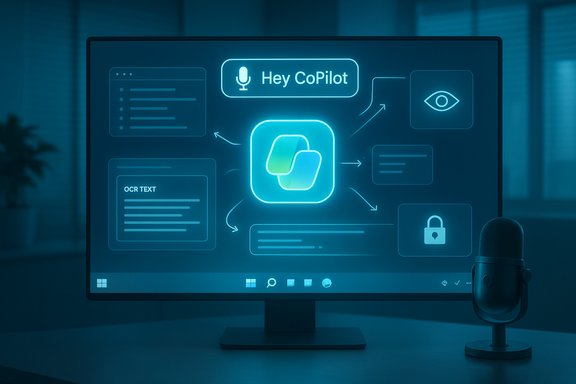
Microsoft’s October Windows 11 update frames Copilot not as a sideline assistant but as the operating system’s new conversational and multimodal core, introducing voice wake words, screen‑aware vision, and constrained agentic actions that together push Windows closer to an “AI PC” paradigm.

Blue neon UI on a monitor displays 'Hey CoPilot' with a central app icon and a desk microphone.Background​

Microsoft’s recent Windows 11 refresh is the most visible demonstration yet of the company’s strategy to make AI a native, everyday part of the desktop experience. The update bundles three interlocking capabilities that reflect that strategy: Copilot Voice (hands‑free wake‑word activation), Copilot Vision (on‑screen contextual analysis), and Copilot Actions (permissioned agents that can perform multi‑step tasks). These are positioned alongside device‑level initiatives — Copilot+ PCs and partner reseller programs — designed to accelerate enterprise adoption and hardware refresh cycles as older Windows releases near end‑of‑support.
This release is notable for two reasons. First, it moves beyond suggestion‑only assistants and toward agentic behaviors: Copilot can now act on behalf of users in constrained, auditable ways. Second, it explicitly frames voice and visual context as primary inputs for productivity workflows, rather than experimental add‑ons. Both represent a pragmatic re‑engineering of the OS experience to treat generative AI as a core modality of interaction.

What’s new: feature by feature​

Copilot Voice — “Hey, Copilot” becomes a first‑class input​

  • A new opt‑in wake‑word lets users summon Copilot hands‑free by saying “Hey, Copilot.”
  • The wake‑word detector runs locally as a small on‑device spotter, then escalates audio to cloud processing when a session begins; full multimodal processing still relies on cloud or on‑device models where available.
  • When active, Copilot shows a floating microphone UI and plays a chime to indicate listening; the PC must be unlocked for the wake word to function.
Why it matters: Voice is being elevated to the same practical tier as keyboard and mouse for many interactions, enabling quicker multitasking and more accessible workflows for users who prefer or require hands‑free operation. The local wake‑word spotter is intended to limit continuous cloud audio capture — a design decision made to reduce privacy exposure.
Caveats: Voice functionality is opt‑in and initially biased toward certain language settings; full feature parity and global language support will continue to roll out.

Copilot Vision — your screen as contextual input​

  • With explicit user consent, Copilot can analyze selected windows, regions, full desktop captures or shared application content to extract text (OCR), identify UI elements, summarize documents and surface contextual suggestions.
  • Vision supports both voice‑driven and text‑driven interactions in some builds, allowing users to type to Copilot if audio is impractical.
  • Vision can highlight where to click within an app, extract tables for Excel, and even provide creative guidance for media editing or game‑specific tips.
Why it matters: By enabling screen awareness, Copilot closes the context gap between what a user sees and what the assistant can do, reducing task friction (for example, extracting a table without manual copying). This turns the entire desktop into actionable context for AI‑driven assistance.
Caveats: Vision sessions are session‑limited and permissioned, but screen‑reading raises fresh privacy and compliance questions — especially in regulated business environments where screens may show sensitive data.

Copilot Actions — constrained agents that act for you​

  • Copilot Actions is an experimental agent layer that can execute multi‑step workflows on the user’s behalf: booking reservations, filling forms, summarizing documents and orchestrating tasks across multiple apps.
  • Actions operate under explicit permissioning with visibility into what resources an agent may access; they are off by default and are rolling out in controlled preview experiences.
  • Agents are designed to be limited in scope and auditable, with the company emphasizing guardrails and user consent.
Why it matters: Agentic capabilities are the most consequential change here — they move Copilot from “suggest and assist” to “do this for you” for routine processes. If governed correctly, agents can save time on recurring tasks and reduce manual handoffs.
Caveats: Agentic behavior amplifies the need for robust governance, clear permission models, and audit trails. The practical enterprise value depends heavily on the specificity of those controls and the integration with existing identity and access management systems.

File Explorer, Widgets and Productivity Enhancements​

  • AI‑driven contextual options now appear in File Explorer (image edits, semantic search), and a redesigned Copilot entry point makes the assistant more discoverable.
  • New connectors and integrations (e.g., with cloud storage services and Microsoft 365) aim to simplify cross‑platform workflows.
  • The UI introduces “Click‑to‑Do” overlays and right‑click AI actions intended to make micro‑automations immediately accessible.
Why it matters: These changes reduce the friction of invoking AI capabilities and localize common AI tasks to familiar system surfaces.

Enterprise implications and the Copilot+ PC strategy​

Microsoft is positioning these features as enterprise‑scale enablers, not just consumer toys. The company pairs OS capabilities with a Copilot+ PC device category and reseller distribution channels to streamline upgrades and controlled rollouts.
  • Copilot+ PCs are marketed with hardware prerequisites and software entitlements designed to enable on‑device AI acceleration where applicable.
  • For business buyers, resellers and systems integrators are positioned to deliver turnkey migration paths, hardware provisioning, and managed deployment services.
  • The Windows lifecycle calendar — notably the end of mainstream support for older releases — materially increases the urgency for many organizations to plan upgrades that include AI‑ready hardware and Copilot licensing.
This combined hardware‑software approach makes Windows a platform not only for AI experiences, but also for enterprise revenue streams: device refresh cycles, licensing for premium Copilot features, and managed services from resellers.

Security, privacy and compliance — what’s changed and what remains risky​

Microsoft’s design emphasizes opt‑in permissioning, local wake‑word detection, and session‑bound Vision captures. These mitigations are meaningful but not definitive.
Key security / privacy points:
  • Local wake‑word spotting reduces continuous cloud audio capture by keeping initial detection on‑device, but full voice processing will still move to cloud models for richer reasoning unless a device offers on‑device models.
  • Permissioned Vision sessions are session‑initiated, but screen capture invariably increases the attack surface for leakage of sensitive information. The company documents clear deletion semantics for captured images and voice transcripts, but enterprise settings will need policy controls to restrict when Vision can be used.
  • Copilot Actions require granular permissioning and auditing. Enterprises must ensure agents only access sanctioned services and that actions are logged for compliance and incident response.
  • Licensing surface: Several advanced features appear to be gated behind device or subscription entitlements, which affects how organizations budget for rollout and governance.
Risk summary:
  • Data exfiltration vectors increase when assistants can read screens or operate across apps; relying solely on opt‑in flows is insufficient for regulated environments.
  • Edge and on‑device model support varies by hardware; many users will still rely on cloud processing, which has implications for data residency and corporate policy.
  • Auditable logs and RBAC (role‑based access controls) for agentic actions are required to preserve enterprise governance and must be integrated with existing SIEM/IDAM solutions.
Cautionary note: while vendor documentation outlines deletion and retention behaviors, third‑party audits and independent verification are necessary before trusting AI workflows with highly sensitive data.

Hardware, performance and licensing realities​

The full experience depends on device capabilities and licensing entitlements.
  • On‑device acceleration: Copilot+ PCs and certain premium devices provide on‑device model execution for lower latency and reduced cloud dependency. The practical performance gain varies across architectures and model sizes.
  • Minimum hardware: Many advanced features are available on a wide range of devices, but to achieve the lowest latency and on‑device AI benefits you’ll need modern processors and sufficient memory. The company has published baseline device tiers and Copilot+ hardware specifications for best experience.
  • Licensing and entitlements: Some features — especially agentic capabilities and deeper Microsoft 365 integrations — may require Copilot or Microsoft 365 entitlements. Organizations should expect a mixed licensing model: base AI features through free OS updates, with premium features tied to subscriptions or Copilot+ device programs.
Operational implications:
  • Inventory devices against published Copilot feature tiers.
  • Prioritize hardware refreshes for teams with heavy AI‑driven workloads.
  • Map Copilot feature gates to licensing to avoid unexpected costs.

Adoption scenarios: where Copilot will help most​

Copilot’s current suite is most potent in three scenarios:
  • Knowledge work automation: Summarizing documents, drafting emails, extracting structured data from reports and preparing meeting briefs. These are high‑value, low‑risk uses where agentic automation can reclaim time.
  • IT and support: Vision‑enabled guidance that can visually identify UI elements and provide step‑by‑step remediation helps on‑call technicians and support desks.
  • Creative and media workflows: Integrated suggestions for photo editing, slide design and code scaffolding speed iterative tasks for creatives and developers.
The potential productivity gains are plausible: vendor‑published case studies and customer deployments show measured time savings ranging from single‑digit percentages up to 30% or more depending on task, role and integration depth. Those numbers vary widely by workload, and independent benchmarking is still emerging.
Unverifiable claim flagged: where Microsoft or partner reports cite single studies with headline percentages, those results are context‑dependent. Organizations should run pilot measurements in their own environments before assuming identical outcomes.

Developer and partner ecosystem​

The update includes hooks for partners and resellers to build verticalized Copilot experiences:
  • Resellers are actively marketed as implementation partners to handle device procurement, migration, and configuration for enterprise customers.
  • Developers can integrate app context and create extensions that let Copilot act across application surfaces. SDKs and APIs for Copilot integration are being expanded to allow tighter, enterprise‑grade workflows.
  • Copilot Studio and related tooling are positioned as the place for organizations to develop, customize and govern their Copilot experiences and agents.
This opens a new channel for independent software vendors and systems integrators to monetize bespoke Copilot integrations — but it also creates complexity for governance and testing.

Regulatory, ethical and workforce considerations​

The move to agentic, screen‑aware assistants raises policy and workforce implications:
  • Regulatory scrutiny: Screen capture plus cloud reasoning intersects with data protection regimes and sector‑specific regulations. Enterprises in healthcare, finance, and government must inventory the legal implications before broad rollouts.
  • Auditability: Agentic actions require clear logs, traceability and approval workflows. Without these, organizations may struggle with compliance and incident response.
  • Workforce impact: Automating routine tasks can free employees for higher‑value work, but it also requires reskilling. Effective adoption programs must include training on prompt engineering, verifying AI outputs and managing agent approvals.
Ethical considerations: Transparency about how Copilot reached a recommendation or executed an action becomes critical when the assistant is given power to act.

Strengths and strategic wins​

  • Integrated OS approach: By making AI first‑class throughout the OS, Microsoft reduces friction for everyday AI interactions and makes the experience discoverable to all users.
  • Permissioned, session‑based design: The opt‑in, session‑scoped model for vision and local wake‑word detection shows an emphasis on privacy by design.
  • Device and partner play: Copilot+ PCs plus reseller programs create a commercial pathway for enterprises to modernize hardware and consolidate AI capability planning.
  • Productivity potential: Case studies show real time savings in document handling, summarization and repetitive workflows — meaningful gains for knowledge workers when integrated thoughtfully.

Risks and limitations​

  • Privacy risk persists: Screen reading and voice capture, even when permissioned, create new leakage paths that require enterprise policy controls and technical enforcement to mitigate.
  • Hardware fragmentation: On‑device AI experiences depend on chipset and model support. Many users will still rely on cloud processing, negating some latency and privacy benefits.
  • Agent governance gap: Experimental agentic features need strong enterprise controls; without mature governance, these agents risk unauthorized actions or data misuse.
  • Overpromising productivity: Vendor‑published figures are often derived from pilots and vary widely. Organizations should be skeptical of headline percentages and require internal validation.
  • Cost complexity: A hybrid gating model of free OS features plus premium subscription/device entitlements introduces planning and budgeting complexity.

Practical rollout checklist for IT leaders​

  • Inventory: Identify which devices are Copilot+ capable and which will need hardware refreshes.
  • Pilot: Run a focused pilot with a small set of teams to measure real productivity gains and capture governance needs.
  • Policy: Define Vision/Audio usage policies, including allowed applications, data handling and retention rules.
  • Governance: Implement RBAC, agent‑approval workflows, and logging/audit integration with SIEM.
  • Training: Provide concise training on prompting, validation of AI outputs, and escalation paths for erroneous actions.
  • Budgeting: Map feature entitlements to licensing and device costs to avoid surprise spend.

What to watch next​

  • Expansion of language and regional support for voice and Vision features.
  • Audits and third‑party verification of privacy and security controls for screen capture and agent logs.
  • Vendor and partner pricing clarity for Copilot‑enabled enterprise licensing.
  • Developer SDK maturity and the emergence of curated, verticalized Copilot integrations.
Unverifiable/conditional forecasts: Claims about precise monetary ROI or exact percentage productivity gains should be treated as provisional until independent, peer‑reviewed studies are available or until large‑scale deployment case studies provide consistent results.

Conclusion​

The October Windows 11 update is a clear turning point: Copilot is no longer an optional sidebar, it is being positioned as the OS’s multimodal command center. The combination of voice activation, screen‑aware vision, and permissioned agentic actions lays out a plausible path toward PCs that anticipate and act on user intent. For enterprises, the update presents both a productivity opportunity and a governance challenge: the technology can materially reduce routine work, but only under rigorous permissioning, auditability and policy controls.
Adopters should proceed with a structured rollout: prioritize security and compliance, validate productivity claims internally, and plan for hardware and licensing realities. When managed intentionally, Copilot can be a force multiplier. Left unmanaged, it widens the attack surface and operational complexity. The next year will show whether the operating system pivot to AI becomes a durable productivity revolution — or a costly lesson in governance caught up to hype.

Source: WebProNews Microsoft Unveils AI-Powered Windows 11 Upgrades for Copilot in 2025
 

Back
Top