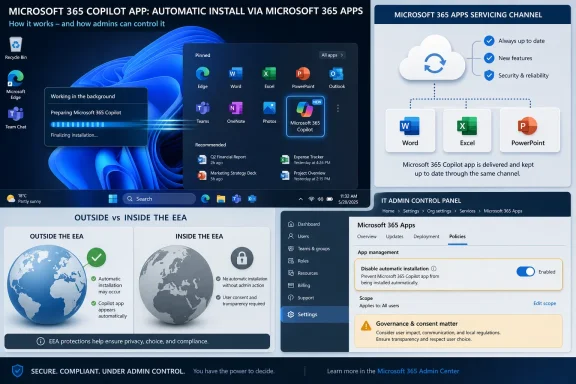
Microsoft is again automatically installing the Microsoft 365 Copilot app on eligible Windows PCs running commercial Microsoft 365 desktop apps between mid-June and mid-July 2026, while excluding European Economic Area tenants and giving administrators an opt-out in the Microsoft 365 Apps admin center. The move is not a blanket Windows 11 consumer rollout, but it will feel familiar to anyone who thought Microsoft had finally learned restraint. What has changed is not the product strategy but the delivery route: Copilot is being pushed through the productivity suite, where many organizations already accept a steady stream of updates as the cost of doing business. That makes this less a story about one app icon and more a story about who controls the modern Windows desktop.
The easy version of the story is that Copilot is coming back. The more accurate version is that Microsoft has shifted the venue. Instead of treating Copilot as a Windows accessory that appears through the Store or the shell, the company is using Microsoft 365 Apps as the carrier for the Microsoft 365 Copilot app on commercial Windows devices.
That distinction matters. Windows users have spent the last few years watching Copilot appear in the taskbar, Settings, Edge, File Explorer-adjacent surfaces, Office apps, and dedicated app shells. Some of those experiments have been rolled back, renamed, softened, or hidden behind policies after complaints. But the underlying direction has not changed: Microsoft wants Copilot to be the connective layer across the workday.
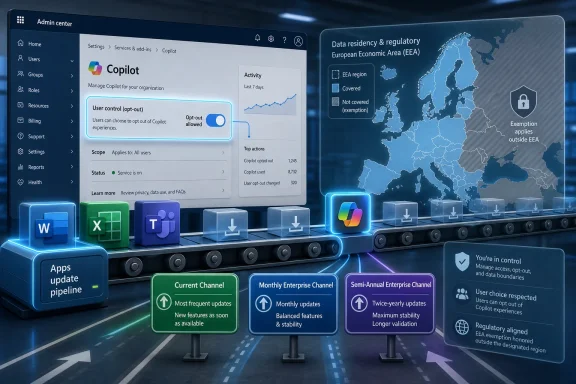
The new rollout applies to eligible Windows devices with commercial Microsoft 365 desktop apps, not ordinary Windows 11 Home machines sitting in a family room. It depends on Microsoft 365 Apps version 2511 or later, with Current Channel and Monthly Enterprise Channel devices in scope, while Semi-Annual Enterprise Channel devices are not targeted by the automatic installation. The app can arrive in the background after the Office suite is updated, and Microsoft says it can take up to seven days after eligibility is met.
That is why this episode lands differently from yet another Start menu experiment. Microsoft 365 Apps is already trusted infrastructure in many businesses. IT departments expect Word, Excel, Outlook, PowerPoint, and Teams to evolve continuously; the suite’s update mechanism is part of the operating rhythm of modern enterprise computing. By placing Copilot inside that machinery, Microsoft has made the deployment less visible to users and more consequential for administrators.
That reading was only half right. Microsoft did respond to the backlash, but it did not abandon the premise that Copilot belongs close to the user. The company’s adjustments were tactical: remove some entry points, change some defaults, clarify some controls, and reframe certain experiences as optional or manageable. The strategy remained intact.
This is a familiar pattern in platform companies. When a feature is controversial at the shell level, the vendor often relocates it to a layer that is harder to characterize as “the operating system.” For Microsoft, Microsoft 365 is the perfect hiding-in-plain-sight layer. It is not Windows, but it is installed on the Windows machines that matter most to Microsoft’s commercial AI ambitions.
The result is a kind of institutional whiplash. Users hear that Microsoft is backing off forced Copilot exposure, while administrators see new message center items, new default behaviors, and new settings to audit. Both impressions can be true at the same time. Microsoft is reducing the most obvious sources of consumer irritation while preserving the enterprise funnel.
That changes the administrative calculation. Many organizations deliberately restrict the Microsoft Store, either for security, standardization, licensing control, or simple desktop hygiene. If those organizations assumed that Store lockdowns would also prevent this class of Copilot deployment, the suite-based installer complicates that assumption. Microsoft’s own documentation makes clear that the Store is not required for installation through Microsoft 365 Apps or via the standalone installer path.
The app can also update through more than one route. Microsoft describes both Store-based updates and a built-in updater using Microsoft’s content delivery network. That redundancy is sensible from a reliability perspective, especially in managed environments where the Store may be disabled. It is also exactly the sort of redundancy that makes admins wary, because one blocked path no longer necessarily means the behavior is stopped.
This is where the language of “simplifying access” runs into the culture of enterprise management. To Microsoft, a unified Copilot app is an entry point for chat, search, agents, and Microsoft 365 context. To an administrator, it is another endpoint artifact, another package lifecycle, another policy dependency, and another item that may generate help-desk tickets when users ask why an AI app appeared on their work PC.
That is a sharp contrast with the non-EEA approach. For a U.S.-based tenant, a device in France can still be eligible; for a France-based tenant, a device in the U.S. is not eligible through this automatic route. Microsoft’s own framing turns on tenant attributes, not merely the physical location of the PC. The practical effect is that Europe’s regulatory perimeter follows the customer more than the laptop.
The likely explanation is not hard to infer. Microsoft has spent decades under antitrust scrutiny for the way it binds browsers, media players, collaboration tools, cloud services, and identity systems into dominant platforms. The current generation of European digital regulation gives competition authorities a sharper set of tools, and Microsoft has already had to adjust Windows and Microsoft 365 behavior in the region in ways it does not elsewhere.
That does not prove the Copilot exemption is a direct response to one specific law or proceeding. But it does show how differently Microsoft behaves when bundling carries immediate regulatory risk. Outside Europe, the company treats automatic installation as a manageable admin preference. Inside the EEA, it treats the same default as something it cannot offer through that suite mechanism.
Windows veterans have a long memory. They remember the “Get Windows 10” campaign, Edge prompts, Teams bundling, OneDrive nudges, Start menu recommendations, Microsoft account pressure, and the gradual migration from clean OS surfaces to service-promotion surfaces. Copilot enters that history at a sensitive moment because AI is not merely another app category. It carries privacy questions, cost questions, accuracy questions, and workplace governance questions.
Microsoft’s answer is that commercial Copilot experiences are governed by enterprise data protections, tenant controls, licensing, and admin policy. That answer is not meaningless. Enterprise Copilot is not the same as a consumer chatbot bolted onto a desktop. In a properly configured tenant, identity, compliance, data boundaries, and access permissions do matter.
But trust is not built only from architecture diagrams. It is built from defaults. If a vendor repeatedly introduces visible new experiences first and explains the controls second, users learn to treat every update as a negotiation. That is dangerous for Microsoft because Windows and Office depend on a baseline of quiet confidence: people must believe updates are primarily there to secure, stabilize, and improve the system, not to advance a platform adoption metric.
The problem is that “if they are paying attention” is doing a lot of work. Microsoft 365 administration is already fragmented across the Microsoft 365 admin center, Microsoft 365 Apps admin center, Teams admin center, SharePoint admin center, Exchange admin center, Entra admin center, Intune, Defender portals, Purview, and policy surfaces that overlap without always feeling coherent. A control can exist and still be operationally easy to miss.
This is especially true for smaller organizations that lack dedicated endpoint teams. A five-person consultancy, a school, a nonprofit, or a regional business may rely on default Microsoft 365 settings because they do not have the staff to review every message center change. Those tenants are precisely where opt-out-by-portal becomes less a meaningful choice and more a compliance ritual.
Even larger enterprises face complications. The automatic install can be system-wide, not merely user-context, which matters for shared devices, VDI images, labs, kiosks, and multi-user machines. A user who uninstalls the app may not trigger automatic reinstallation through the suite mechanism, but the initial provisioning event still has imaging and inventory consequences. In mature environments, any new default app has to be reconciled with software asset management, security baselines, application control, and user communication.
That is why the desktop app matters even when the same services are available on the web. A web address is something a user must remember or be trained to visit. An app in the Start menu is ambient. It creates a sanctioned destination, a place that feels like part of the work environment rather than a separate product trial.
The Microsoft 365 Copilot app also supports Microsoft’s larger shift from application-centric productivity to agent-centric workflow. The company’s pitch is no longer just that Copilot can summarize a document or draft an email. It is that Copilot can act across the Microsoft Graph, Teams conversations, files, meetings, and business data sources. That vision needs a persistent front door.
The risk is that Microsoft is trying to compress behavioral change into deployment mechanics. Installing an app is easy. Making people trust it with company knowledge, decision support, and daily workflow is harder. If Copilot arrives as something users feel was foisted on them, Microsoft may win distribution while losing goodwill.
That makes Windows both central and oddly secondary. The OS provides the surface where users notice the change, but the entitlement, policy, update channel, and value proposition live in Microsoft 365. This is the post-Windows version of platform leverage: not bundling a browser into an OS as in the 1990s, but threading an AI assistant through identity, documents, meetings, storage, search, and endpoint management.
For enthusiasts, this can feel like Windows is being hollowed out into a launcher for subscriptions. That criticism is sometimes overstated, but it has force. Windows 11 still has a kernel, driver model, security stack, gaming platform, developer subsystem, and desktop heritage that matter enormously. Yet the parts of Windows that users see most often increasingly serve Microsoft’s service ecosystem.
For IT pros, the concern is less philosophical and more practical. Every cloud-connected desktop experience expands the policy surface. Every AI entry point raises questions about data residency, prompt logging, model grounding, user permissions, and whether the experience respects existing information barriers. Even if Microsoft’s enterprise assurances are strong, administrators need time and clarity to validate them against their own risk models.
That will not be an accident for many enterprises. The Semi-Annual Enterprise Channel exists because some organizations cannot absorb constant feature churn in core productivity software. Regulated industries, manufacturing floors, healthcare environments, government agencies, and tightly controlled VDI deployments often prefer slower movement not because they dislike innovation, but because they must prove that innovation will not disrupt operations.
Copilot’s automatic installation gives those servicing choices a new political weight. A channel decision that once centered on Office feature timing now also determines whether an AI-branded desktop app lands automatically. That may push some admins to re-evaluate whether Current Channel is still worth the administrative overhead.
But there is a tradeoff. Slower channels can delay useful fixes and features, and Microsoft’s AI investments are increasingly intertwined with productivity improvements that some users may want. Enterprises will have to decide whether Copilot is a risk to be contained, a tool to be piloted, or a default to be embraced. The answer will not be the same across departments, let alone industries.
Still, removal is not the same thing as governance. If an organization wants a clean baseline, it should not depend on users uninstalling apps after they appear. If a security team wants to restrict AI tools, it must account for app presence, authentication paths, browser fallbacks, web endpoints, Teams surfaces, Office in-app features, and licensing state. The app is only one piece of the Copilot estate.
There is also a difference between the Microsoft 365 Copilot app and Copilot functionality inside Word, Excel, PowerPoint, Outlook, and Teams. Some features require paid Microsoft 365 Copilot licenses; some Copilot Chat experiences are available more broadly; some surfaces can be controlled separately. That scattering is exactly why users perceive the experience as inescapable even when individual toggles exist.
The cleanest administrative posture is therefore not “remove the icon.” It is to define what Copilot is allowed to do in the tenant, who is licensed to use it, which apps expose it, which data sources it can ground against, how prompts and responses are handled, and how users are trained. Microsoft’s defaults may start the conversation, but they cannot finish it.
That does not make Microsoft uniquely villainous. Every major productivity platform is trying to turn AI assistants from optional tools into ambient work companions. Google, Salesforce, Atlassian, ServiceNow, Zoom, Adobe, and others are all moving in the same direction. The industry consensus is that AI adoption improves when it is placed where work already happens.
Microsoft’s difference is its footprint. The company has Windows on the endpoint, Office in the document workflow, Teams in communication, Entra in identity, SharePoint and OneDrive in storage, Defender and Purview in security and compliance, and Azure underneath much of the stack. When Microsoft changes a default, it ripples through an unusually large portion of the enterprise environment.
That reach is why the company’s choices attract harsher scrutiny. A startup can ship an AI app and hope users install it. Microsoft can cause the app to appear through a suite update on machines that already depend on its software. The technical distinction between “available,” “installed,” “enabled,” and “licensed” matters to IT, but to users the experience is simpler: Microsoft put another Copilot thing on my PC.
The first step is inventory. Which devices run Microsoft 365 Apps version 2511 or later? Which update channels are in use? Which tenants are EEA-based and which are not? Which devices are shared, persistent, non-persistent, restricted, or subject to regulatory controls? Without that map, the rollout becomes something that happens to IT rather than something IT manages.
The second step is communication. If an organization chooses to allow the app, users should know whether Copilot is approved, what data it can access, what it should not be used for, and whether a paid license changes the experience. If the organization blocks the app, users should know why, especially if they have seen Microsoft marketing that presents Copilot as the default future of work.
The third step is policy hygiene. Admins should check the Microsoft 365 Apps admin center setting, review app-level Copilot controls across Microsoft 365 services, validate Intune and application control policies, and document the intended state. The point is not to panic-remove every AI surface. The point is to avoid sleepwalking into an AI deployment because the default happened to be “on.”
The concrete lessons are narrower than the outrage cycle suggests, and more important than Microsoft’s calming language implies.
 Microsoft Moves Copilot From Windows Furniture to Office Plumbing
The easy version of the story is that Copilot is coming back. The more accurate version is that Microsoft has shifted the venue. Instead of treating Copilot as a Windows accessory that appears through the Store or the shell, the company is using Microsoft 365 Apps as the carrier for the Microsoft 365 Copilot app on commercial Windows devices.That distinction matters. Windows users have spent the last few years watching Copilot appear in the taskbar, Settings, Edge, File Explorer-adjacent surfaces, Office apps, and dedicated app shells. Some of those experiments have been rolled back, renamed, softened, or hidden behind policies after complaints. But the underlying direction has not changed: Microsoft wants Copilot to be the connective layer across the workday.
The new rollout applies to eligible Windows devices with commercial Microsoft 365 desktop apps, not ordinary Windows 11 Home machines sitting in a family room. It depends on Microsoft 365 Apps version 2511 or later, with Current Channel and Monthly Enterprise Channel devices in scope, while Semi-Annual Enterprise Channel devices are not targeted by the automatic installation. The app can arrive in the background after the Office suite is updated, and Microsoft says it can take up to seven days after eligibility is met.
That is why this episode lands differently from yet another Start menu experiment. Microsoft 365 Apps is already trusted infrastructure in many businesses. IT departments expect Word, Excel, Outlook, PowerPoint, and Teams to evolve continuously; the suite’s update mechanism is part of the operating rhythm of modern enterprise computing. By placing Copilot inside that machinery, Microsoft has made the deployment less visible to users and more consequential for administrators.
The Retreat Was Real, but It Was Never a Surrender
Earlier this year, Microsoft appeared to be in retreat. After months of user frustration over Copilot’s expanding footprint, the company paused or revised some of its more aggressive ideas and leaned into language about listening to feedback. The broader Windows community took that as a sign that the company had recognized the danger of making the desktop feel like a billboard for AI.That reading was only half right. Microsoft did respond to the backlash, but it did not abandon the premise that Copilot belongs close to the user. The company’s adjustments were tactical: remove some entry points, change some defaults, clarify some controls, and reframe certain experiences as optional or manageable. The strategy remained intact.
This is a familiar pattern in platform companies. When a feature is controversial at the shell level, the vendor often relocates it to a layer that is harder to characterize as “the operating system.” For Microsoft, Microsoft 365 is the perfect hiding-in-plain-sight layer. It is not Windows, but it is installed on the Windows machines that matter most to Microsoft’s commercial AI ambitions.
The result is a kind of institutional whiplash. Users hear that Microsoft is backing off forced Copilot exposure, while administrators see new message center items, new default behaviors, and new settings to audit. Both impressions can be true at the same time. Microsoft is reducing the most obvious sources of consumer irritation while preserving the enterprise funnel.
The Office Update Channel Is the New Front Door
The most important technical fact in this rollout is the one that sounds least dramatic: the Microsoft Store is no longer the central chokepoint. Earlier app deployments could be influenced by Store policies, user-level app controls, and familiar app management assumptions. The new path ties installation to Microsoft 365 Apps and the Office servicing model.That changes the administrative calculation. Many organizations deliberately restrict the Microsoft Store, either for security, standardization, licensing control, or simple desktop hygiene. If those organizations assumed that Store lockdowns would also prevent this class of Copilot deployment, the suite-based installer complicates that assumption. Microsoft’s own documentation makes clear that the Store is not required for installation through Microsoft 365 Apps or via the standalone installer path.
The app can also update through more than one route. Microsoft describes both Store-based updates and a built-in updater using Microsoft’s content delivery network. That redundancy is sensible from a reliability perspective, especially in managed environments where the Store may be disabled. It is also exactly the sort of redundancy that makes admins wary, because one blocked path no longer necessarily means the behavior is stopped.
This is where the language of “simplifying access” runs into the culture of enterprise management. To Microsoft, a unified Copilot app is an entry point for chat, search, agents, and Microsoft 365 context. To an administrator, it is another endpoint artifact, another package lifecycle, another policy dependency, and another item that may generate help-desk tickets when users ask why an AI app appeared on their work PC.
Europe’s Exemption Says the Quiet Part Out Loud
The European Economic Area exemption is not an incidental detail. It is one of the clearest signals that Microsoft knows default bundling is no longer just a product decision. In the EEA, Microsoft says customers cannot enable automatic installation of the Microsoft 365 Copilot app through Microsoft 365 Apps, though manual deployment remains available through other channels.That is a sharp contrast with the non-EEA approach. For a U.S.-based tenant, a device in France can still be eligible; for a France-based tenant, a device in the U.S. is not eligible through this automatic route. Microsoft’s own framing turns on tenant attributes, not merely the physical location of the PC. The practical effect is that Europe’s regulatory perimeter follows the customer more than the laptop.
The likely explanation is not hard to infer. Microsoft has spent decades under antitrust scrutiny for the way it binds browsers, media players, collaboration tools, cloud services, and identity systems into dominant platforms. The current generation of European digital regulation gives competition authorities a sharper set of tools, and Microsoft has already had to adjust Windows and Microsoft 365 behavior in the region in ways it does not elsewhere.
That does not prove the Copilot exemption is a direct response to one specific law or proceeding. But it does show how differently Microsoft behaves when bundling carries immediate regulatory risk. Outside Europe, the company treats automatic installation as a manageable admin preference. Inside the EEA, it treats the same default as something it cannot offer through that suite mechanism.
The App Icon Is Smaller Than the Trust Problem
For many users, the immediate annoyance is simple: an app appeared that they did not ask for. It may sit in the Start menu. It may be harmless if unused. It may even be removable after the fact. But the emotional charge comes from a bigger question: how many times should a user have to say no?Windows veterans have a long memory. They remember the “Get Windows 10” campaign, Edge prompts, Teams bundling, OneDrive nudges, Start menu recommendations, Microsoft account pressure, and the gradual migration from clean OS surfaces to service-promotion surfaces. Copilot enters that history at a sensitive moment because AI is not merely another app category. It carries privacy questions, cost questions, accuracy questions, and workplace governance questions.
Microsoft’s answer is that commercial Copilot experiences are governed by enterprise data protections, tenant controls, licensing, and admin policy. That answer is not meaningless. Enterprise Copilot is not the same as a consumer chatbot bolted onto a desktop. In a properly configured tenant, identity, compliance, data boundaries, and access permissions do matter.
But trust is not built only from architecture diagrams. It is built from defaults. If a vendor repeatedly introduces visible new experiences first and explains the controls second, users learn to treat every update as a negotiation. That is dangerous for Microsoft because Windows and Office depend on a baseline of quiet confidence: people must believe updates are primarily there to secure, stabilize, and improve the system, not to advance a platform adoption metric.
Administrators Get a Choice, but Not a Simple One
Microsoft is not leaving administrators completely powerless. There is an opt-out path in the Microsoft 365 Apps admin center, specifically under the modern apps settings for the Microsoft 365 Copilot app. Admins can clear the automatic installation option before the rollout reaches their devices. If they are paying attention, they can stop the install.The problem is that “if they are paying attention” is doing a lot of work. Microsoft 365 administration is already fragmented across the Microsoft 365 admin center, Microsoft 365 Apps admin center, Teams admin center, SharePoint admin center, Exchange admin center, Entra admin center, Intune, Defender portals, Purview, and policy surfaces that overlap without always feeling coherent. A control can exist and still be operationally easy to miss.
This is especially true for smaller organizations that lack dedicated endpoint teams. A five-person consultancy, a school, a nonprofit, or a regional business may rely on default Microsoft 365 settings because they do not have the staff to review every message center change. Those tenants are precisely where opt-out-by-portal becomes less a meaningful choice and more a compliance ritual.
Even larger enterprises face complications. The automatic install can be system-wide, not merely user-context, which matters for shared devices, VDI images, labs, kiosks, and multi-user machines. A user who uninstalls the app may not trigger automatic reinstallation through the suite mechanism, but the initial provisioning event still has imaging and inventory consequences. In mature environments, any new default app has to be reconciled with software asset management, security baselines, application control, and user communication.
Microsoft’s AI Business Needs Defaults More Than Demos
The business logic behind the rollout is obvious. Microsoft has invested heavily in AI infrastructure, licensing, and product integration, and Microsoft 365 Copilot is one of the company’s most important attempts to turn that investment into recurring revenue. The company does not merely need Copilot to be available. It needs Copilot to become habitual.That is why the desktop app matters even when the same services are available on the web. A web address is something a user must remember or be trained to visit. An app in the Start menu is ambient. It creates a sanctioned destination, a place that feels like part of the work environment rather than a separate product trial.
The Microsoft 365 Copilot app also supports Microsoft’s larger shift from application-centric productivity to agent-centric workflow. The company’s pitch is no longer just that Copilot can summarize a document or draft an email. It is that Copilot can act across the Microsoft Graph, Teams conversations, files, meetings, and business data sources. That vision needs a persistent front door.
The risk is that Microsoft is trying to compress behavioral change into deployment mechanics. Installing an app is easy. Making people trust it with company knowledge, decision support, and daily workflow is harder. If Copilot arrives as something users feel was foisted on them, Microsoft may win distribution while losing goodwill.
Windows Becomes the Stage for a Microsoft 365 Argument
One reason this story keeps being framed as a Windows 11 controversy is that the visible artifact appears on Windows PCs. But the strategic center of gravity is Microsoft 365. Copilot is the bridge between the operating system Microsoft controls, the productivity suite businesses pay for, and the identity and data layer that gives AI its workplace context.That makes Windows both central and oddly secondary. The OS provides the surface where users notice the change, but the entitlement, policy, update channel, and value proposition live in Microsoft 365. This is the post-Windows version of platform leverage: not bundling a browser into an OS as in the 1990s, but threading an AI assistant through identity, documents, meetings, storage, search, and endpoint management.
For enthusiasts, this can feel like Windows is being hollowed out into a launcher for subscriptions. That criticism is sometimes overstated, but it has force. Windows 11 still has a kernel, driver model, security stack, gaming platform, developer subsystem, and desktop heritage that matter enormously. Yet the parts of Windows that users see most often increasingly serve Microsoft’s service ecosystem.
For IT pros, the concern is less philosophical and more practical. Every cloud-connected desktop experience expands the policy surface. Every AI entry point raises questions about data residency, prompt logging, model grounding, user permissions, and whether the experience respects existing information barriers. Even if Microsoft’s enterprise assurances are strong, administrators need time and clarity to validate them against their own risk models.
The Semi-Annual Channel Becomes an Accidental Safe Harbor
The exclusion of Semi-Annual Enterprise Channel devices is telling. Microsoft’s faster channels are where new Microsoft 365 capabilities arrive first, and they are also where the Copilot app automatic install is aimed. Organizations that prioritize stability over novelty may find themselves insulated from the rollout simply because they already chose a slower servicing cadence.That will not be an accident for many enterprises. The Semi-Annual Enterprise Channel exists because some organizations cannot absorb constant feature churn in core productivity software. Regulated industries, manufacturing floors, healthcare environments, government agencies, and tightly controlled VDI deployments often prefer slower movement not because they dislike innovation, but because they must prove that innovation will not disrupt operations.
Copilot’s automatic installation gives those servicing choices a new political weight. A channel decision that once centered on Office feature timing now also determines whether an AI-branded desktop app lands automatically. That may push some admins to re-evaluate whether Current Channel is still worth the administrative overhead.
But there is a tradeoff. Slower channels can delay useful fixes and features, and Microsoft’s AI investments are increasingly intertwined with productivity improvements that some users may want. Enterprises will have to decide whether Copilot is a risk to be contained, a tool to be piloted, or a default to be embraced. The answer will not be the same across departments, let alone industries.
The Removal Story Is Messier Than the Install Story
Microsoft’s documentation contains a detail that deserves more attention: if the Microsoft 365 Copilot app is automatically installed through Microsoft 365 Apps and a user later uninstalls it, Microsoft says that same automatic mechanism does not reinstall it again. That is a meaningful limitation on the most alarming version of the story. This is not described as an endless resurrection loop.Still, removal is not the same thing as governance. If an organization wants a clean baseline, it should not depend on users uninstalling apps after they appear. If a security team wants to restrict AI tools, it must account for app presence, authentication paths, browser fallbacks, web endpoints, Teams surfaces, Office in-app features, and licensing state. The app is only one piece of the Copilot estate.
There is also a difference between the Microsoft 365 Copilot app and Copilot functionality inside Word, Excel, PowerPoint, Outlook, and Teams. Some features require paid Microsoft 365 Copilot licenses; some Copilot Chat experiences are available more broadly; some surfaces can be controlled separately. That scattering is exactly why users perceive the experience as inescapable even when individual toggles exist.
The cleanest administrative posture is therefore not “remove the icon.” It is to define what Copilot is allowed to do in the tenant, who is licensed to use it, which apps expose it, which data sources it can ground against, how prompts and responses are handled, and how users are trained. Microsoft’s defaults may start the conversation, but they cannot finish it.
Microsoft’s Language Collides With Admin Reality
Vendors love the phrase “simplify access.” It sounds benevolent, user-centered, and frictionless. In this case, it also obscures the fact that simplification for end users often means new complexity for administrators. The shorter the path to launch Copilot, the longer the checklist for the people responsible for controlling it.That does not make Microsoft uniquely villainous. Every major productivity platform is trying to turn AI assistants from optional tools into ambient work companions. Google, Salesforce, Atlassian, ServiceNow, Zoom, Adobe, and others are all moving in the same direction. The industry consensus is that AI adoption improves when it is placed where work already happens.
Microsoft’s difference is its footprint. The company has Windows on the endpoint, Office in the document workflow, Teams in communication, Entra in identity, SharePoint and OneDrive in storage, Defender and Purview in security and compliance, and Azure underneath much of the stack. When Microsoft changes a default, it ripples through an unusually large portion of the enterprise environment.
That reach is why the company’s choices attract harsher scrutiny. A startup can ship an AI app and hope users install it. Microsoft can cause the app to appear through a suite update on machines that already depend on its software. The technical distinction between “available,” “installed,” “enabled,” and “licensed” matters to IT, but to users the experience is simpler: Microsoft put another Copilot thing on my PC.
The Real Deployment Decision Belongs Before the Rollout
Organizations that wait for user complaints are already late. The right time to decide Copilot policy is before the app appears, not after employees start asking whether they are supposed to use it. That means administrators should treat this rollout as a governance trigger rather than merely an application packaging event.The first step is inventory. Which devices run Microsoft 365 Apps version 2511 or later? Which update channels are in use? Which tenants are EEA-based and which are not? Which devices are shared, persistent, non-persistent, restricted, or subject to regulatory controls? Without that map, the rollout becomes something that happens to IT rather than something IT manages.
The second step is communication. If an organization chooses to allow the app, users should know whether Copilot is approved, what data it can access, what it should not be used for, and whether a paid license changes the experience. If the organization blocks the app, users should know why, especially if they have seen Microsoft marketing that presents Copilot as the default future of work.
The third step is policy hygiene. Admins should check the Microsoft 365 Apps admin center setting, review app-level Copilot controls across Microsoft 365 services, validate Intune and application control policies, and document the intended state. The point is not to panic-remove every AI surface. The point is to avoid sleepwalking into an AI deployment because the default happened to be “on.”
The June Rollout Draws the New Boundary Line
This rollout is not the end of the Copilot debate, but it does clarify the terms. Microsoft is no longer merely experimenting with where to put an AI button. It is testing how much AI distribution the Microsoft 365 servicing model can carry without breaking customer trust.The concrete lessons are narrower than the outrage cycle suggests, and more important than Microsoft’s calming language implies.
- The automatic installation targets eligible commercial Windows devices with Microsoft 365 desktop apps, not the broad population of Windows 11 Home users.
- The deployment path runs through Microsoft 365 Apps rather than relying solely on the Microsoft Store, which changes how administrators must think about blocking and updates.
- European Economic Area tenants are excluded from this automatic suite-based installation path, while non-EEA tenants remain in scope unless they opt out.
- Devices on the Semi-Annual Enterprise Channel are not targeted by the automatic installation, making update-channel strategy part of Copilot governance.
- Administrators can prevent the installation in the Microsoft 365 Apps admin center, but the control is only useful if it is found and configured before rollout.
- The app’s arrival should prompt a broader review of Copilot licensing, data access, user training, and AI policy rather than a narrow fight over a Start menu entry.
References
- Primary source: Digital Trends
Published: Mon, 22 Jun 2026 21:25:41 GMT
Windows 11 is getting Copilot on Microsoft 365 Business accounts again, unless you're in Europe - Digital Trends
Microsoft made Copilot optional in April. It's force-installing it again in June, this time through Office updates, and EU users are the only ones being spared.www.digitaltrends.com - Related coverage: windowscentral.com
Microsoft’s AI strategy feels like a beta test — at the expense of Windows and Office | Windows Central
The future of Windows and Office potentially hangs in the balance as Microsoft pivots to AI.www.windowscentral.com - Related coverage: techradar.com
Microsoft makes Copilot Cowork open to everyone, and wants to help you tackle even the trickiest work tasks | TechRadar
Copilot Cowork gets an upgrade as it opens to all userswww.techradar.com - Related coverage: pcworld.com
Microsoft is force-installing M365 Copilot again after a brief pause | PCWorld
Months after pausing due to bugs and user backlash, Microsoft is now resuming forced Copilot installs for Microsoft 365 users by July 1st.www.pcworld.com - Related coverage: windowslatest.com
Microsoft says it won't auto install Microsoft 365 Copilot app on Windows 11, likely due to outrage over 'Microslop'
Microsoft says it’s taking a step back and temporarily disabling the automatic installation of Microsoft 365 Copilot on Windows 11. In September 2025, Microsoft confirmed it was auto-installing Microsoft 365 Copilot (formerly called Microsoft 365 / Office Hub) on Windows, and that was in... www.windowslatest.com
- Related coverage: windowsforum.com
Microsoft 365 Copilot Auto-Install Returns in June 2026: Admin Controls Tested | Windows Forum
Microsoft has resumed the automatic installation of the Microsoft 365 Copilot app on eligible commercial Windows PCs in June 2026, targeting devices with...windowsforum.com
- Related coverage: techzine.eu
Microsoft resumes automatic rollout of Copilot on PCs - Techzine Global
Microsoft has resumed the automatic installation of the Microsoft 365 Copilot app on business Windows systems. www.techzine.eu
- Official source: learn.microsoft.com
Release Notes for Microsoft 365 Copilot | Microsoft Learn
Lists the features that reach General Availability in each release of Microsoft 365 Copilot.learn.microsoft.com - Related coverage: techcrunch.com
Microsoft says it has over 20M paid Copilot users, and they really are using it | TechCrunch
Despite the lingering perception that no one really uses Copilot, Microsoft said on Wednesday that the number of users and engagement is growing.techcrunch.com - Related coverage: tomshardware.com
Microsoft will force install the Copilot AI app for users with desktop versions of 365 apps like Word and Excel — coming October, with no way to opt out for personal users | Tom's Hardware
More bloatware added to Windows, courtesy of Microsoft 365.www.tomshardware.com - Related coverage: tomsguide.com
Biggest Microsoft Build 2026 announcements — agentic AI, RTX Spark Dev Box, GitHub Copilot app, new MAI models, and more | Tom's Guide
All the big news from Microsoft's AI-focused eventwww.tomsguide.com - Related coverage: techriver.com
- Official source: adoption.microsoft.com
- Official source: download.microsoft.com
Microsoft Security Copilot – Purchasing guide
</rdf:Alt> </dc:description> <dc:creator> <rdf:Seq> <rdf:li>Joey Caparasdownload.microsoft.com
- Official source: microsoft.com
</rdf:Alt> </dc:title> <dc:description> <rdf:Alt> <rdf:li xml:lang="x-default"/> </rdf:Alt> </dc:description> <dc:creator> <rdf:Seq> <rdf:li>Lukas V
</rdf:Alt> </dc:description> <dc:creator> <rdf:Seq> <rdf:li>Lukas Velushwww.microsoft.com