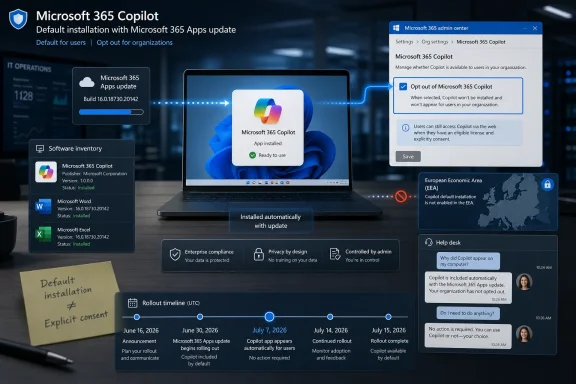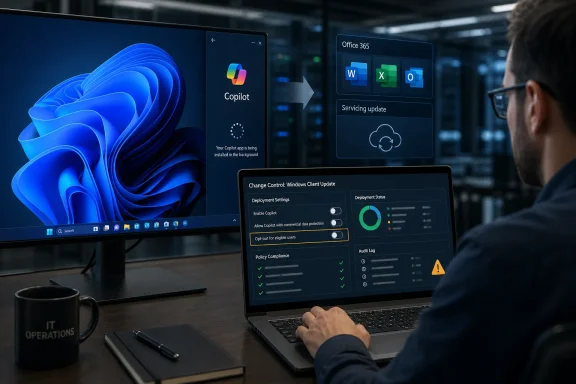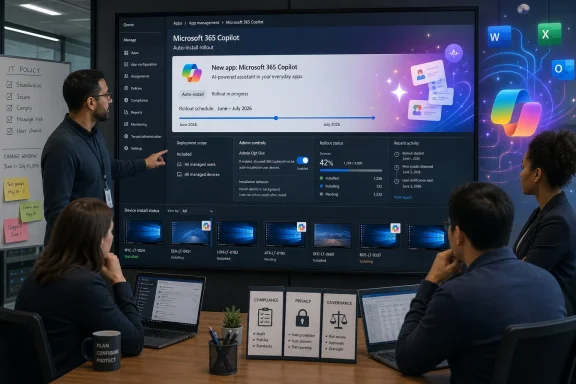
The argument Microsoft wants to make is simple: Copilot is becoming part of Microsoft 365, so installing the Microsoft 365 Copilot app beside Word, Excel, Outlook, and PowerPoint is just product housekeeping. The counterargument is simpler still: if an app appears on managed PCs because the vendor decided silence meant consent, IT will treat it as a governance problem before it treats it as a productivity feature. That is why this rollout matters. It is not merely about one app icon in the Start menu; it is about who controls the software estate in the age of bundled AI.
Microsoft Has Turned Office Into an AI Distribution Channel
The most important detail in this latest Copilot push is not the app itself. It is the route Microsoft is taking to get it onto machines. Reports and Microsoft’s own deployment guidance indicate that eligible Windows devices with Microsoft 365 desktop apps can receive the Microsoft 365 Copilot app automatically, with administrators expected to opt out if they do not want it deployed.
That distinction matters because Microsoft 365 Apps is not an optional curiosity in most companies. It is the document layer, the email layer, the spreadsheet layer, and the meeting layer. By attaching Copilot distribution to that installed base, Microsoft is effectively saying that the productivity suite is now also an AI client delivery mechanism.
For Microsoft, this is rational strategy. The company has spent years training customers to accept Microsoft 365 Apps as a continuously serviced subscription, not a static boxed product. If Word and Excel update themselves on a schedule, and if Teams, OneDrive, Loop components, and other Microsoft 365 experiences shift around in the background, then a Copilot shell can be framed as one more moving part.
For administrators, however, the difference between “updated” and “added” is not semantic. An update patches or changes something already in the baseline. A newly appearing app changes the baseline itself. It affects inventories, user training, help desk scripts, app control policies, privacy assessments, and software approval records.
That is where Microsoft’s quiet confidence collides with enterprise process. The company sees a unified Microsoft 365 experience. IT departments see a vendor modifying endpoints at scale unless they find and flip the right switch in time.
The Pause Was a Tactical Retreat, Not a Change of Direction
This rollout did not arrive out of nowhere. Microsoft had previously planned and then paused automatic installation of the Microsoft 365 Copilot app after backlash and technical issues. The pause gave some users and administrators the impression that Microsoft had absorbed the lesson: AI features should be discoverable, removable, and governed by the customer.
The June 2026 resumption suggests a narrower lesson was learned. Microsoft did not abandon the plan; it adjusted the timing, documentation, and administrative path. The goal remained intact: place Copilot more directly in front of users who already live inside Microsoft 365.
That is typical of modern Microsoft. The company rarely reverses strategic direction because of a burst of complaints. It waits, sands off the sharpest edges, gives admins a management control, and tries again. Anyone who has followed OneDrive integration, Teams bundling, Edge promotion, or Microsoft account nudges in Windows will recognize the rhythm.
There is a reason the Copilot app controversy keeps resurfacing. Microsoft is not just shipping a tool; it is trying to normalize a new default. The company wants AI assistance to feel like a built-in layer of work, not a separate product an employee must deliberately seek out.
That ambition explains both the persistence and the resentment. If Copilot were merely another optional download, adoption would depend on user enthusiasm. By making it present by default, Microsoft shifts the burden from “why install this?” to “why remove this?” In enterprise software, that shift is everything.
The Opt-Out Model Is the Real Provocation
Microsoft can fairly say there is an administrative escape hatch. Organizations can use Microsoft 365 Apps admin controls to prevent the Microsoft 365 Copilot app from being installed automatically. The problem is not that no control exists. The problem is that Microsoft has made control reactive.
Opt-out defaults are powerful because they exploit administrative reality. Many organizations do not have a single perfectly maintained Microsoft 365 Apps admin posture. Some rely on inherited tenant settings, some manage Office through Intune, some use Configuration Manager, some use third-party tooling, and some have drift between policy intent and endpoint state. In that environment, “admins can opt out” is not the same as “admins have meaningfully consented.”
This is especially sensitive because Copilot is not perceived as a neutral utility. It carries questions about data access, licensing, training boundaries, prompt logging, compliance posture, and user expectations. Even when the standalone app does not magically grant paid Copilot capabilities to everyone, its arrival creates a visible AI entry point on devices that may not have completed internal AI governance work.
Microsoft’s defenders will argue that the app is simply a front door and that enterprise data protections depend on identity, licensing, tenant configuration, and service boundaries. That is true as far as it goes. But in regulated or conservative environments, the appearance of a sanctioned AI app can be enough to trigger review, confusion, or policy conflict.
The deeper issue is trust. Microsoft is asking administrators to trust that its default AI deployment choices align with their operational requirements. Many administrators have spent the last decade learning the opposite lesson: defaults are vendor priorities expressed as configuration.
Commercial PCs Are the Target Because Work Is Where Copilot Can Pay
This is not primarily a consumer Windows 11 story. The automatic installation mainly concerns commercial Windows devices with Microsoft 365 desktop apps, not the average home PC sitting beside a gaming keyboard. That targeting is important because it reveals where Microsoft believes the economic opportunity sits.
The consumer Copilot story has always been messy. A chatbot in Windows can answer questions, summarize copied text, and perform some assistant-like tasks, but the value proposition competes with every other AI app, browser sidebar, and phone-based assistant. In the workplace, Microsoft has a much stronger hand. It controls the files, the meetings, the mail, the directory, the calendar, and the productivity apps.
That is why the Microsoft 365 Copilot app matters. It is not just an icon; it is a bridge between the old Office habit and the new AI workflow Microsoft wants to sell. If employees learn to ask Copilot for document summaries, meeting recaps, email drafts, spreadsheet explanations, and agent-like help, Microsoft has a path to make AI feel indispensable inside the subscription stack.
The business incentive is obvious. Microsoft 365 is already one of the most successful enterprise software franchises in history. Adding AI as a premium layer, a usage driver, and a stickiness engine gives Microsoft a way to expand revenue without replacing the productivity suite. The app is a low-friction entry point into that commercial future.
That is also why administrators should not treat the rollout as a one-off annoyance. The Copilot app is part of a broader packaging strategy. Microsoft wants AI surfaces to appear throughout the places employees already work, and the company is unlikely to stop at whichever boundary seems comfortable today.
Europe’s Exemption Says the Quiet Part Clearly
The European Economic Area carve-out is one of the more revealing parts of the rollout. Microsoft’s documentation indicates that customers in the EEA are not included in the same automatic installation path. The most plausible explanation is not technical complexity. It is regulatory caution.
Europe has been more willing than the United States to challenge large platform vendors over bundling, defaults, data access, and user choice. Microsoft has already had to adjust various Windows and Microsoft 365 behaviors in Europe under competition and digital markets pressure. When a feature is acceptable as an opt-out default in one region but not enabled in another, users elsewhere are entitled to notice the asymmetry.
This does not automatically mean the rollout is unlawful outside Europe. It does mean Microsoft is calibrating user choice differently depending on jurisdiction. That is a bad look for a company trying to present the change as a simple convenience feature.
For enterprise customers outside the EEA, the exemption also creates an awkward governance question. If a deployment model is too sensitive for one major regulatory bloc, should a global company voluntarily apply the stricter posture everywhere? Many multinationals will decide that consistency matters more than Microsoft’s regional defaults.
That is one of the recurring side effects of European tech regulation. Even when a rule formally applies only in Europe, it creates a reference standard. Users and administrators elsewhere can now ask why they are receiving a more aggressive default than their European counterparts.
Copilot’s Value Is Real, but Microsoft Keeps Undermining the Pitch
The frustrating thing about this controversy is that Copilot is not vaporware. In the right context, with the right data access and licensing, generative AI inside Microsoft 365 can be useful. Summarizing long documents, drafting routine correspondence, extracting action items, turning meeting context into follow-up work, and helping users navigate dense information are all credible enterprise use cases.
The problem is that Microsoft keeps making the adoption story feel less like empowerment and more like encroachment. A tool that should be sold on usefulness is instead being noticed because it appeared. That changes the emotional frame from curiosity to suspicion.
For workers already drowning in digital clutter, another Microsoft app can look like yet another corporate mandate. For administrators, it can look like the latest example of Redmond treating managed Windows as a canvas for strategic priorities. For security teams, it can look like an AI-branded endpoint change that arrived before risk review caught up.
Microsoft has tried to reduce some of the friction around Copilot in Windows, including making certain AI components easier to remove or toning down some entry points after user complaints. But those gestures lose force when another Copilot-related app returns through a different deployment path. The message becomes muddled: Microsoft hears feedback, but only within the boundaries of its own rollout plan.
That is the danger for Copilot as a brand. If users come to associate it with nagging, bundling, and involuntary presence, Microsoft will have made its AI assistant feel like the new toolbar era: potentially useful to some, resented by many, and always suspected of serving the vendor first.
Administrators Now Have Another Baseline to Police
For IT departments, the immediate work is prosaic. They need to know whether their tenant and device population are eligible, whether the opt-out setting is configured, whether the app has already landed, and whether removal or blocking policies are required. This is not glamorous AI strategy. It is endpoint hygiene.
The challenge is that Copilot sits across several administrative domains. There is the Microsoft 365 Copilot service and licensing story. There is the app installation story. There are Microsoft 365 Apps update channels. There are Store and app package considerations. There are identity and compliance controls. A user may see one Copilot icon, but the admin sees a stack of moving pieces.
This fragmentation makes communication harder. A help desk technician needs to know whether “Copilot appeared on my laptop” is expected. A compliance officer needs to know whether the app changes data handling. A department head needs to know whether employees can use it. A security administrator needs to know whether it bypasses existing app allow lists or simply rides along with approved Microsoft 365 update mechanisms.
The correct answer will vary by organization. A company already piloting Microsoft 365 Copilot may welcome the app and simply document the change. A law firm, hospital, government agency, school system, or manufacturer with strict change control may regard the default install as unacceptable until reviewed. Microsoft’s one-size-fits-most default lands differently in each environment.
That is why the rollout should trigger a policy conversation, not just a removal script. If AI tools are now going to arrive through productivity-suite servicing, organizations need a declared posture: who approves AI clients, how new Microsoft 365 experiences are evaluated, which regions or business units are exempt, and how users are told what they can and cannot do.
The App Icon Is a Proxy War Over Managed Windows
Windows has always contained a tension between owner control and vendor control. On paper, a business owns the device, licenses the software, configures the policies, and carries the risk. In practice, Microsoft controls the operating system roadmap, the servicing model, many defaults, and increasingly the cloud-connected experiences that define the desktop.
The Microsoft 365 Copilot app lands directly in that tension. It is small enough that Microsoft can describe objections as overblown. It is visible enough that administrators can describe the install as a breach of trust. Both views can be true at once.
This is the same pattern that made previous Windows and Microsoft 365 changes controversial. Edge prompts were not catastrophic, but they were persistent. Teams bundling was defensible as integration, but regulators saw market leverage. OneDrive backup prompts could protect files, but they could also surprise users by moving known folders into a sync regime they did not fully understand.
Copilot inherits that history. Microsoft is not operating in a vacuum; it is acting against a backdrop of cumulative annoyance. Each new default is judged not only on its own merits, but on the memory of every previous time users had to undo something they did not ask for.
That is why “you can uninstall it” or “admins can opt out” does not end the debate. A reversible imposition is still an imposition. In enterprise IT, being forced to spend time restoring yesterday’s baseline is itself a cost.
Microsoft Is Betting That Familiarity Will Beat Friction
Microsoft’s gamble is that the resistance will fade once Copilot becomes familiar. That is not an unreasonable bet. Many technologies that initially irritated users became accepted after they were folded into daily workflows. The ribbon in Office, autosave, cloud sync, Teams, and browser-based productivity all generated resistance before becoming ordinary.
The difference is that AI arrives with a heavier burden. It is not merely a UI change. It affects how people create text, interpret information, summarize colleagues’ work, and rely on machine-generated answers. It also intersects with sensitive data in ways that many organizations are still trying to understand.
Familiarity may still win. If Copilot saves enough time, users will forgive the path it took onto their PCs. If it reduces meeting overload, explains spreadsheets, finds documents, and helps employees get through repetitive tasks, the app icon will stop feeling like an intrusion and start feeling like infrastructure.
But Microsoft is making adoption harder than it needs to be by leaning on defaults. The company has a strong product story when Copilot is framed as a managed, licensed, auditable assistant inside Microsoft 365. It has a weaker story when the first user experience is surprise.
The enterprise market does not hate automation. It hates unexplained automation. Microsoft should know the difference better than anyone.
Redmond’s AI Default Leaves IT With a Short Checklist and a Long Memory
For WindowsForum readers, the practical takeaway is not to panic over the app itself. It is to treat the rollout as a signal that Microsoft 365 change management now includes AI client deployment by default unless an organization says otherwise. The app may be manageable, removable, or harmless in many environments, but the default deserves attention.
- Eligible commercial Windows devices with Microsoft 365 desktop apps can receive the Microsoft 365 Copilot app automatically during the June-to-July 2026 rollout.
- The automatic deployment is controlled through Microsoft 365 Apps administration rather than behaving like a traditional user-initiated Store install.
- Organizations that do not want the app deployed need to verify the relevant opt-out setting before the rollout reaches their device population.
- European Economic Area customers are treated differently, reinforcing that Microsoft’s deployment defaults are partly shaped by regulatory pressure.
- The appearance of the app does not by itself settle whether users are licensed or authorized to use every Copilot capability, so internal communication still matters.
- The larger governance issue is whether AI tools can appear through existing software servicing channels before security, compliance, and support teams have approved them.
Microsoft will almost certainly keep pushing Copilot deeper into Windows and Microsoft 365 because the company’s AI strategy depends on making the assistant feel native to work itself. The June 2026 auto-install resumption shows how that future is likely to arrive: not as one dramatic Windows upgrade, but as a sequence of defaults, admin toggles, regional exceptions, and app surfaces that slowly redefine the managed desktop. For organizations that want control, the lesson is equally clear. The time to write an AI endpoint policy is before the next icon appears.
References
- Microsoft 365 Copilot Auto-Installs on Enterprise PCs: Italy Launches Antitrust Probe - Tech Times Tech Times · Mon, 29 Jun 2026 19:11:39 GMT
- Microsoft Quietly Reinstalls Copilot on Windows 11 Through Office App Updater Technobezz · 2026-06-28T20:42:15.214132
- learn.microsoft.com learn.microsoft.com