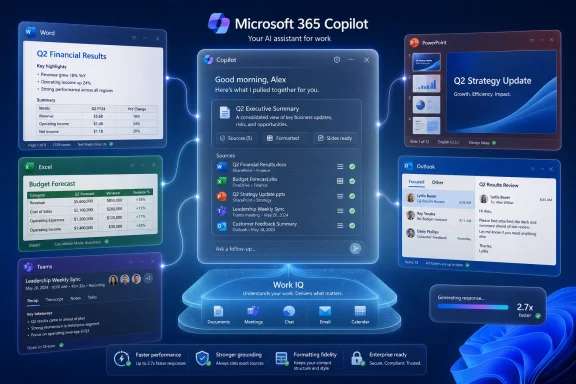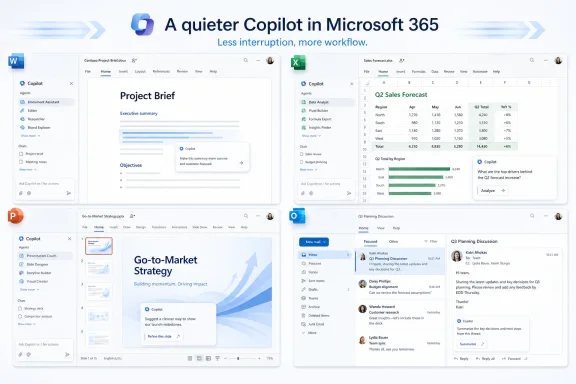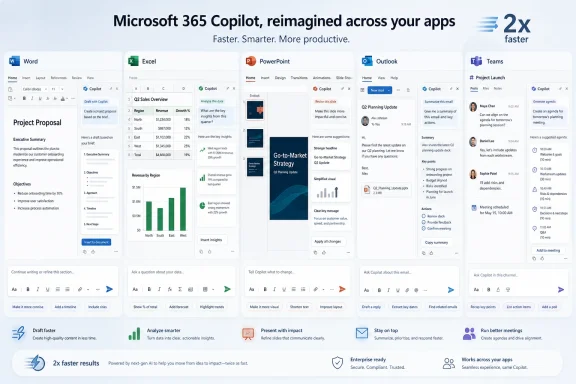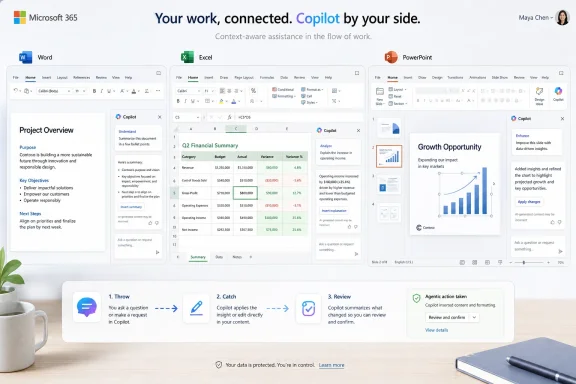
Microsoft announced on May 28, 2026, a redesigned Microsoft 365 Copilot experience for Word, Excel, PowerPoint, Outlook, and the Microsoft 365 Copilot app, adding a unified entry point, more contextual in-app assistance, adaptive controls, pinned sessions, and the Work IQ intelligence layer for enterprise work. The short version is that Copilot is no longer being positioned as a chatbot sitting beside Office; Microsoft wants it to become the connective tissue inside Office. That is a much bigger bet than a prettier button. It makes Microsoft’s AI strategy harder for competitors to dismiss — and harder for customers to evaluate cleanly.
The first generation of Microsoft 365 Copilot had a familiar problem: it was impressive in demos, uneven in daily use, and too easy to ignore once the novelty faded. A prompt box can summarize a document or draft an email, but a prompt box still asks the user to stop, think like a prompt engineer, and translate work into an instruction. Microsoft’s redesign is an admission that the interface was part of the bottleneck.
The new design pushes Copilot into the flow of Office apps rather than treating it as a detachable AI sidecar. Microsoft says the redesigned experience uses a consistent entry point across apps, surfaces actions based on context, and lets Copilot operate on the document, spreadsheet, slide, or email already in front of the user. That sounds like a user-interface update, but the strategic goal is deeper: make AI feel less like a destination and more like a native command layer.
This is why the numbers matter, even with all the usual caution around vendor-provided metrics. Microsoft says usage rose after rollout by 27 percent in Word, 33 percent in Excel, 43 percent in PowerPoint, and 30 percent in Outlook, based on short comparison windows. Those gains do not prove lasting productivity improvement, but they do suggest that placement, discoverability, and context are not cosmetic details. In enterprise software, the most powerful feature is often the one users can actually find.
The redesign also lands at a moment when the AI market is trying to move past the “chat with your data” phase. Enterprises bought into generative AI partly on faith, partly on fear of missing out, and partly because Microsoft, Google, Salesforce, ServiceNow, Adobe, and others attached AI to platforms already embedded in corporate work. Now the bill is coming due. CIOs want evidence that AI saves time, respects permissions, reduces rework, and does not create new governance nightmares.
That is why a unified entry point matters more than it sounds. A consistent Copilot control across Word, Excel, PowerPoint, and Outlook reduces the mental tax of remembering where the AI lives and what it can do in each app. It also gives Microsoft a visual and behavioral anchor for Copilot as a system-wide layer rather than a collection of unrelated features.
The danger for Microsoft is clutter. Office is already crowded with ribbons, panes, menus, comments, templates, suggestions, search boxes, and collaboration indicators. The company has often struggled to reconcile power-user density with approachable design. Copilot adds another layer of interface ambition, and if it becomes too noisy, users will treat it like every other intrusive assistant they have learned to dismiss.
But the redesign appears built around a more disciplined idea: progressive disclosure. Instead of exposing every AI capability at once, the interface can offer what seems relevant to the task. That is exactly how enterprise AI needs to behave if it is going to become routine. The user should not have to know whether they need an “agent,” a “skill,” a “model,” a “prompt,” or a “workflow.” They should be able to ask for a cleaner slide, a better formula, a shorter memo, or a reply that reflects the meeting they just had.
This is the quiet war beneath the AI platform war. Model makers want buyers to care about benchmarks. Application vendors want buyers to care about where the work gets done. Microsoft’s redesign is a vote for the second camp.
That is both the dream and the anxiety of enterprise AI. A Copilot that understands the current spreadsheet, the relevant meeting, the latest email thread, and the company’s preferred deck style can be dramatically more useful than a generic chatbot. It can skip the tedious setup that makes many AI tools feel like unpaid internships for the user.
It is also a governance problem in waiting. Context is another word for access, and access is where enterprise AI gets complicated. If permissions are wrong, stale, overbroad, or poorly understood, an AI assistant can surface information faster than a human would have found it. That does not necessarily create a new data leak, but it can expose old access problems at machine speed.
Microsoft’s advantage is that it already sits on top of Microsoft Graph, Entra ID, Purview, SharePoint, Exchange, Teams, and the compliance architecture many enterprises use to run daily work. That gives it a formidable base for context-aware AI. It also means Copilot inherits the messiness of real Microsoft 365 tenants: abandoned SharePoint sites, inconsistent labels, legacy distribution lists, permissive Teams channels, and documents whose sensitivity depends on tribal knowledge rather than metadata.
This is where “embedded AI” stops being a marketing phrase and becomes an operational discipline. A company that wants Copilot to produce useful work needs its information architecture to be less chaotic than most companies’ information architecture actually is. The redesign may raise the bar for AI experience, but it also raises the bar for tenant hygiene.
This is especially important in Office because Office documents are not just text containers. Excel workbooks contain formulas, references, pivot tables, charts, formatting conventions, hidden assumptions, and terrifying legacy logic. PowerPoint decks contain hierarchy, layout, brand rules, object alignment, visual pacing, and the political compromises of every stakeholder who touched the file. Word documents contain citations, comments, sections, styles, tracked changes, and the delicate difference between “make this clearer” and “rewrite my argument into nonsense.”
For Copilot to matter in those environments, it has to understand the native grammar of each application. It cannot behave like a web chatbot that happens to export a file. Microsoft’s redesign suggests the company understands this. The point is not just to generate an artifact; it is to edit the artifact where it already lives.
That is a major competitive wedge. A best-of-breed AI model can be brilliant in isolation, but it still has to cross the last mile into the user’s workflow. Microsoft owns that last mile for hundreds of millions of productivity users. If Copilot can reliably manipulate Office artifacts without breaking them, Microsoft does not need to win every model benchmark to win a lot of enterprise AI usage.
The word “reliably” is doing heavy lifting here. Anyone who has used generative AI for real work knows the pattern: the first result can be dazzling, the third correction can be tedious, and the fifth attempt can erase the time saved. Agentic AI raises the stakes because the system is not just answering; it is acting. A wrong answer is one problem. A wrong edit across a workbook or deck is another.
The blank prompt box is a surprisingly hostile interface for normal workers. It rewards people who can describe tasks precisely, break problems into steps, provide context, and evaluate output critically. Those are valuable skills, but they are not the same as doing quarterly forecasting, writing a board memo, cleaning CRM exports, or preparing a sales deck under deadline pressure.
Microsoft’s redesign tries to reduce that burden by turning the current app state into the prompt. If the user is in a slide, Copilot can infer that visual restructuring may be relevant. If the user is in a cell range, data analysis or formula generation may be relevant. If the user is drafting an Outlook reply, the email thread itself becomes part of the work surface.
That is the right direction. The more AI requires users to leave the task, explain the task, and then paste results back into the task, the more it resembles yet another productivity tax. The more it can appear at the moment of friction, the more likely it is to become a habit.
This is also where Microsoft’s usage increases should be read carefully. Short-term jumps after a redesign can reflect novelty, curiosity, or a better call-to-action. Sustained usage will depend on whether users come back because Copilot solved a real problem. Enterprise buyers should ask not only whether Copilot usage is rising, but what kind of usage is rising: one-off summaries, repeated document edits, spreadsheet transformations, meeting follow-ups, or high-value workflows that replace manual effort.
Microsoft has published various research and customer signals around Copilot, and third-party analyst work points to productivity as a primary measure of AI success. That makes sense. Most enterprises are not buying Copilot because they want a chatbot; they are buying it because they want knowledge workers to move faster without hiring proportionally more staff.
But productivity in Office work is notoriously difficult to measure. A developer’s build time, a support agent’s handle time, or a finance close cycle can be tracked with some rigor. The productivity of a program manager refining a strategy memo is fuzzier. Did Copilot save time, improve quality, reduce cognitive load, or simply produce more drafts for everyone else to review?
This matters because Microsoft 365 Copilot is not free, and enterprise licensing costs accumulate quickly. For a small pilot, enthusiasm may be enough. For broad deployment, IT and finance teams will want defensible ROI. Usage metrics are an early signal, not a business case.
The redesign helps Microsoft because it can increase the chance that licensed users actually encounter Copilot. But adoption is not value. The next phase of enterprise AI buying will be less impressed by activation charts and more focused on repeatable outcomes: faster sales proposals, cleaner financial analysis, shorter document cycles, better support handoffs, fewer missed commitments, and less time spent hunting through organizational memory.
Microsoft’s deeper integration makes trust more important, not less. When Copilot sits in a separate chat window, users may treat it as a drafting aid. When Copilot edits the document, manipulates the spreadsheet, and writes the customer response, the psychological boundary changes. The system begins to feel like part of the application itself, and users may assume a level of authority that the technology has not earned.
Microsoft appears aware of this tension. The company has emphasized clearer signals about what Copilot is doing, user control over changes, and context grounding through Work IQ. Those are necessary design moves. They are not sufficient by themselves.
Enterprises will need controls that match real governance needs: logging, retention, eDiscovery alignment, sensitivity labels, data-loss prevention, admin visibility, model choice policies, plugin and agent governance, and ways to evaluate output quality in business-specific contexts. A beautiful AI interface will not satisfy a compliance officer after a sensitive document appears in the wrong workflow.
The harder issue is that trust is partly local. A Copilot that performs well for marketing drafts may be untrusted for finance analysis. A model that is useful in English may be less reliable for multilingual operations. A workflow that works in a clean demo tenant may behave unpredictably in a 15-year-old enterprise environment with mergers, legacy permissions, and inconsistent content classification.
The market is unlikely to settle into one universal assistant. Enterprises are too fragmented, too regulated, and too politically complex for that. A law firm, a manufacturer, a hospital network, and a software company may all use Microsoft 365, but the workflows that matter most to each are different. Copilot can be the default assistant for Office work without becoming the only AI system in the business.
That is why Microsoft’s real strategic advantage is not exclusivity; it is default presence. If Copilot is already in Word when the memo is written, in Excel when the forecast is adjusted, in Outlook when the customer reply is drafted, and in Teams when the meeting ends, it gets first refusal on a huge amount of knowledge work. Competitors must either integrate into that surface or pull users away from it.
The rise of multi-model and multi-agent approaches complicates the picture. Microsoft itself has been more open to model diversity, including scenarios involving models beyond OpenAI. That is pragmatic. Enterprise buyers do not want to discover that one model family is the ceiling for every use case. They want leverage, resilience, and some ability to route tasks to the right tool.
Still, the user experience layer may matter more than the underlying model roster. If Copilot becomes the place where users invoke, coordinate, and review AI work across Microsoft 365, Microsoft can benefit even when the model underneath is not exclusively its own. The interface becomes the control plane.
The first practical issue is licensing and availability. Copilot capabilities vary by subscription, tenant configuration, app version, platform, and rollout channel. That creates support friction. A user may see a Copilot button in one app and not another, have access in the web version but not the desktop version, or encounter features that are still rolling out across Windows and Mac clients.
The second issue is update cadence. Microsoft 365 Apps already move faster than many enterprise change-management processes prefer. AI features add a new kind of volatility because the behavior of the system can change without the obvious version boundaries admins are used to. A ribbon change is visible. A model behavior change may be discovered only when users report that Copilot’s output feels different.
The third issue is policy alignment. Admins will need to understand not just whether Copilot is enabled, but what data it can reference, what agents are allowed, how connectors are governed, and how audit trails appear in existing compliance tooling. The organizations that treat Copilot as merely another Office feature are likely to stumble. It is closer to a new interaction layer over the tenant.
Training will matter more than Microsoft’s marketing suggests. Users do not need to become prompt engineers, but they do need to know when to use Copilot, how to review its work, what not to put into prompts, and when AI output is inappropriate for regulated or high-stakes tasks. Without that, Copilot can become either underused or overtrusted. Both outcomes waste money.
A context-aware Copilot works best when files are in SharePoint and OneDrive, meetings are in Teams, email is in Outlook, identities are in Entra, labels are in Purview, and workflows are built around Microsoft 365. The more complete the Microsoft estate, the richer the AI context. The richer the context, the harder it becomes to replace the assistant.
This is the old suite logic updated for the AI age. In the 1990s and 2000s, integration meant file formats, macros, directory services, and management tooling. In the 2020s, integration means behavioral context, embeddings, agents, permissions, and organizational memory. The lock-in is less visible but potentially deeper.
That does not mean enterprises should reject Copilot. For many Microsoft-centric organizations, the integration will be the point. A tool that works inside the apps employees already use may beat a more flexible tool that requires constant context switching. The question is whether buyers maintain enough architectural discipline to avoid becoming passive passengers.
The smartest customers will push for portability, auditability, and policy clarity while still exploiting the productivity benefits. They will ask how Copilot-generated artifacts are tracked, how agents are governed, how external models are used, how data boundaries are enforced, and how they can measure value without relying entirely on Microsoft’s dashboards.
But shadow AI does not disappear simply because an approved tool exists. Employees route around friction. If Copilot is slow, unavailable, too restricted, or less capable for a particular task than a consumer tool, some users will still go elsewhere. If a specialized AI tool produces better code, better research synthesis, better design output, or better customer analysis, teams may adopt it whether IT blesses it or not.
The redesign may reduce casual shadow AI by making Copilot easier to access at the point of work. That is valuable. It gives IT a stronger answer than “don’t use AI” and gives employees a sanctioned path for common tasks. But it also raises expectations. Once users see AI embedded in Office, they will expect similar convenience everywhere.
This is where Microsoft’s agent strategy becomes important. If Copilot can become a governed hub for agents and workflows, Microsoft can absorb some of the demand that would otherwise spill into external tools. If it cannot, the enterprise AI stack will fragment. In most large organizations, it probably will fragment anyway — the question is whether Microsoft remains the default layer for everyday knowledge work.
Copilot changes that relationship. The user increasingly describes an outcome, reviews a proposed action, and approves or rejects changes. That sounds subtle until you consider how much Office work is based on muscle memory. The keyboard shortcut, the ribbon command, the formatting habit, the spreadsheet trick — these are the rituals of modern office labor.
Microsoft’s challenge is to introduce delegation without making users feel displaced or disoriented. If Copilot does too little, it is a gimmick. If it does too much, it becomes unpredictable. The best version feels like an expert pair worker who can accelerate tedious steps while leaving judgment with the human.
That balance will vary by app. In Word, users may tolerate more aggressive drafting because prose is easy to scan and revise. In PowerPoint, users may welcome layout help but resist changes that distort the story. In Excel, users may be far more cautious, because a plausible-looking formula can be wrong in ways that are not immediately obvious. Outlook sits somewhere in the middle: drafting help is useful, but tone, confidentiality, and context matter enormously.
This is why the redesign is more than surface polish. Microsoft is trying to invent a new interaction model for mature software without breaking the trust and habits that made the software dominant. That is hard, and it will not be solved in one release.
Microsoft Moves Copilot From Assistant to Workplace Interface
The first generation of Microsoft 365 Copilot had a familiar problem: it was impressive in demos, uneven in daily use, and too easy to ignore once the novelty faded. A prompt box can summarize a document or draft an email, but a prompt box still asks the user to stop, think like a prompt engineer, and translate work into an instruction. Microsoft’s redesign is an admission that the interface was part of the bottleneck.The new design pushes Copilot into the flow of Office apps rather than treating it as a detachable AI sidecar. Microsoft says the redesigned experience uses a consistent entry point across apps, surfaces actions based on context, and lets Copilot operate on the document, spreadsheet, slide, or email already in front of the user. That sounds like a user-interface update, but the strategic goal is deeper: make AI feel less like a destination and more like a native command layer.
This is why the numbers matter, even with all the usual caution around vendor-provided metrics. Microsoft says usage rose after rollout by 27 percent in Word, 33 percent in Excel, 43 percent in PowerPoint, and 30 percent in Outlook, based on short comparison windows. Those gains do not prove lasting productivity improvement, but they do suggest that placement, discoverability, and context are not cosmetic details. In enterprise software, the most powerful feature is often the one users can actually find.
The redesign also lands at a moment when the AI market is trying to move past the “chat with your data” phase. Enterprises bought into generative AI partly on faith, partly on fear of missing out, and partly because Microsoft, Google, Salesforce, ServiceNow, Adobe, and others attached AI to platforms already embedded in corporate work. Now the bill is coming due. CIOs want evidence that AI saves time, respects permissions, reduces rework, and does not create new governance nightmares.
The Button Is the Strategy
Microsoft has spent decades winning enterprise computing by owning the place where work happens. Windows owned the desktop. Office owned the document. Outlook owned the inbox. Teams attempted to own the collaboration surface. Copilot’s redesign follows the same institutional instinct: do not merely build a useful AI service; put it where habits already exist.That is why a unified entry point matters more than it sounds. A consistent Copilot control across Word, Excel, PowerPoint, and Outlook reduces the mental tax of remembering where the AI lives and what it can do in each app. It also gives Microsoft a visual and behavioral anchor for Copilot as a system-wide layer rather than a collection of unrelated features.
The danger for Microsoft is clutter. Office is already crowded with ribbons, panes, menus, comments, templates, suggestions, search boxes, and collaboration indicators. The company has often struggled to reconcile power-user density with approachable design. Copilot adds another layer of interface ambition, and if it becomes too noisy, users will treat it like every other intrusive assistant they have learned to dismiss.
But the redesign appears built around a more disciplined idea: progressive disclosure. Instead of exposing every AI capability at once, the interface can offer what seems relevant to the task. That is exactly how enterprise AI needs to behave if it is going to become routine. The user should not have to know whether they need an “agent,” a “skill,” a “model,” a “prompt,” or a “workflow.” They should be able to ask for a cleaner slide, a better formula, a shorter memo, or a reply that reflects the meeting they just had.
This is the quiet war beneath the AI platform war. Model makers want buyers to care about benchmarks. Application vendors want buyers to care about where the work gets done. Microsoft’s redesign is a vote for the second camp.
Work IQ Turns Microsoft Graph Into an AI Moat
The most consequential part of the redesign may be Work IQ, Microsoft’s term for the intelligence layer that grounds Copilot in the user’s work context. Microsoft has described Work IQ as drawing from signals across files, meetings, chats, emails, relationships, and organizational context. In plain English, Copilot is supposed to know not just what you typed, but what you are working on, who you work with, and what business context surrounds the task.That is both the dream and the anxiety of enterprise AI. A Copilot that understands the current spreadsheet, the relevant meeting, the latest email thread, and the company’s preferred deck style can be dramatically more useful than a generic chatbot. It can skip the tedious setup that makes many AI tools feel like unpaid internships for the user.
It is also a governance problem in waiting. Context is another word for access, and access is where enterprise AI gets complicated. If permissions are wrong, stale, overbroad, or poorly understood, an AI assistant can surface information faster than a human would have found it. That does not necessarily create a new data leak, but it can expose old access problems at machine speed.
Microsoft’s advantage is that it already sits on top of Microsoft Graph, Entra ID, Purview, SharePoint, Exchange, Teams, and the compliance architecture many enterprises use to run daily work. That gives it a formidable base for context-aware AI. It also means Copilot inherits the messiness of real Microsoft 365 tenants: abandoned SharePoint sites, inconsistent labels, legacy distribution lists, permissive Teams channels, and documents whose sensitivity depends on tribal knowledge rather than metadata.
This is where “embedded AI” stops being a marketing phrase and becomes an operational discipline. A company that wants Copilot to produce useful work needs its information architecture to be less chaotic than most companies’ information architecture actually is. The redesign may raise the bar for AI experience, but it also raises the bar for tenant hygiene.
The Old Copilot Was a Tool; the New Copilot Wants to Be a Coworker
The industry’s language has shifted from assistants to agents, and Microsoft is leaning hard into that shift. In Word, Excel, and PowerPoint, Copilot is increasingly expected to take multi-step, app-native actions rather than merely suggest text. That distinction matters. A chatbot that tells you how to fix a spreadsheet is useful; an agent that can actually restructure the workbook, add formulas, and explain the changes is a different category of software.This is especially important in Office because Office documents are not just text containers. Excel workbooks contain formulas, references, pivot tables, charts, formatting conventions, hidden assumptions, and terrifying legacy logic. PowerPoint decks contain hierarchy, layout, brand rules, object alignment, visual pacing, and the political compromises of every stakeholder who touched the file. Word documents contain citations, comments, sections, styles, tracked changes, and the delicate difference between “make this clearer” and “rewrite my argument into nonsense.”
For Copilot to matter in those environments, it has to understand the native grammar of each application. It cannot behave like a web chatbot that happens to export a file. Microsoft’s redesign suggests the company understands this. The point is not just to generate an artifact; it is to edit the artifact where it already lives.
That is a major competitive wedge. A best-of-breed AI model can be brilliant in isolation, but it still has to cross the last mile into the user’s workflow. Microsoft owns that last mile for hundreds of millions of productivity users. If Copilot can reliably manipulate Office artifacts without breaking them, Microsoft does not need to win every model benchmark to win a lot of enterprise AI usage.
The word “reliably” is doing heavy lifting here. Anyone who has used generative AI for real work knows the pattern: the first result can be dazzling, the third correction can be tedious, and the fifth attempt can erase the time saved. Agentic AI raises the stakes because the system is not just answering; it is acting. A wrong answer is one problem. A wrong edit across a workbook or deck is another.
Microsoft’s Real Competitor Is the Blank Prompt Box
It is tempting to frame this as Microsoft versus Google Gemini, Anthropic Claude, Salesforce Agentforce, or a rotating cast of AI startups. That is true at the platform level, but the more immediate competitor is user inertia. The enterprise AI market is full of licensed tools that employees barely touch.The blank prompt box is a surprisingly hostile interface for normal workers. It rewards people who can describe tasks precisely, break problems into steps, provide context, and evaluate output critically. Those are valuable skills, but they are not the same as doing quarterly forecasting, writing a board memo, cleaning CRM exports, or preparing a sales deck under deadline pressure.
Microsoft’s redesign tries to reduce that burden by turning the current app state into the prompt. If the user is in a slide, Copilot can infer that visual restructuring may be relevant. If the user is in a cell range, data analysis or formula generation may be relevant. If the user is drafting an Outlook reply, the email thread itself becomes part of the work surface.
That is the right direction. The more AI requires users to leave the task, explain the task, and then paste results back into the task, the more it resembles yet another productivity tax. The more it can appear at the moment of friction, the more likely it is to become a habit.
This is also where Microsoft’s usage increases should be read carefully. Short-term jumps after a redesign can reflect novelty, curiosity, or a better call-to-action. Sustained usage will depend on whether users come back because Copilot solved a real problem. Enterprise buyers should ask not only whether Copilot usage is rising, but what kind of usage is rising: one-off summaries, repeated document edits, spreadsheet transformations, meeting follow-ups, or high-value workflows that replace manual effort.
The Productivity Claim Still Needs Harder Evidence
The core promise of Microsoft 365 Copilot has always been productivity. The hard part is proving it. Minutes saved on drafting can be offset by minutes spent checking for errors. A better first draft can still require human repair. A meeting summary can be useful and incomplete at the same time. An AI-generated deck can look polished while subtly flattening the argument.Microsoft has published various research and customer signals around Copilot, and third-party analyst work points to productivity as a primary measure of AI success. That makes sense. Most enterprises are not buying Copilot because they want a chatbot; they are buying it because they want knowledge workers to move faster without hiring proportionally more staff.
But productivity in Office work is notoriously difficult to measure. A developer’s build time, a support agent’s handle time, or a finance close cycle can be tracked with some rigor. The productivity of a program manager refining a strategy memo is fuzzier. Did Copilot save time, improve quality, reduce cognitive load, or simply produce more drafts for everyone else to review?
This matters because Microsoft 365 Copilot is not free, and enterprise licensing costs accumulate quickly. For a small pilot, enthusiasm may be enough. For broad deployment, IT and finance teams will want defensible ROI. Usage metrics are an early signal, not a business case.
The redesign helps Microsoft because it can increase the chance that licensed users actually encounter Copilot. But adoption is not value. The next phase of enterprise AI buying will be less impressed by activation charts and more focused on repeatable outcomes: faster sales proposals, cleaner financial analysis, shorter document cycles, better support handoffs, fewer missed commitments, and less time spent hunting through organizational memory.
Trust Is the Feature Enterprises Cannot Demo Their Way Around
Reliability and hallucination management remain the biggest drag on generative AI adoption. That is not because users are unimaginative. It is because enterprise work often punishes confident wrongness. A fabricated citation in a legal memo, a mistaken revenue figure in a finance deck, or an invented policy in an HR response can create real cost.Microsoft’s deeper integration makes trust more important, not less. When Copilot sits in a separate chat window, users may treat it as a drafting aid. When Copilot edits the document, manipulates the spreadsheet, and writes the customer response, the psychological boundary changes. The system begins to feel like part of the application itself, and users may assume a level of authority that the technology has not earned.
Microsoft appears aware of this tension. The company has emphasized clearer signals about what Copilot is doing, user control over changes, and context grounding through Work IQ. Those are necessary design moves. They are not sufficient by themselves.
Enterprises will need controls that match real governance needs: logging, retention, eDiscovery alignment, sensitivity labels, data-loss prevention, admin visibility, model choice policies, plugin and agent governance, and ways to evaluate output quality in business-specific contexts. A beautiful AI interface will not satisfy a compliance officer after a sensitive document appears in the wrong workflow.
The harder issue is that trust is partly local. A Copilot that performs well for marketing drafts may be untrusted for finance analysis. A model that is useful in English may be less reliable for multilingual operations. A workflow that works in a clean demo tenant may behave unpredictably in a 15-year-old enterprise environment with mergers, legacy permissions, and inconsistent content classification.
The Competitive Field Is Moving Toward the Workflow
Microsoft’s redesign puts pressure on every AI competitor trying to sell into the enterprise. Google has a natural counterargument with Gemini in Workspace, especially for organizations already committed to Gmail, Docs, Sheets, Meet, and Drive. Salesforce can argue that customer workflows belong closer to CRM and business process data. ServiceNow can make a similar claim around IT, HR, and operational workflows. Anthropic and OpenAI can argue for model quality, ecosystem flexibility, and cross-platform reach.The market is unlikely to settle into one universal assistant. Enterprises are too fragmented, too regulated, and too politically complex for that. A law firm, a manufacturer, a hospital network, and a software company may all use Microsoft 365, but the workflows that matter most to each are different. Copilot can be the default assistant for Office work without becoming the only AI system in the business.
That is why Microsoft’s real strategic advantage is not exclusivity; it is default presence. If Copilot is already in Word when the memo is written, in Excel when the forecast is adjusted, in Outlook when the customer reply is drafted, and in Teams when the meeting ends, it gets first refusal on a huge amount of knowledge work. Competitors must either integrate into that surface or pull users away from it.
The rise of multi-model and multi-agent approaches complicates the picture. Microsoft itself has been more open to model diversity, including scenarios involving models beyond OpenAI. That is pragmatic. Enterprise buyers do not want to discover that one model family is the ceiling for every use case. They want leverage, resilience, and some ability to route tasks to the right tool.
Still, the user experience layer may matter more than the underlying model roster. If Copilot becomes the place where users invoke, coordinate, and review AI work across Microsoft 365, Microsoft can benefit even when the model underneath is not exclusively its own. The interface becomes the control plane.
Windows Admins Will Inherit the Mess Before They See the Magic
For WindowsForum readers, the Copilot redesign is not just a Microsoft 365 story. It is an endpoint, identity, compliance, training, and support story. Every time Microsoft makes AI more embedded, administrators inherit another layer of expectations from users and executives.The first practical issue is licensing and availability. Copilot capabilities vary by subscription, tenant configuration, app version, platform, and rollout channel. That creates support friction. A user may see a Copilot button in one app and not another, have access in the web version but not the desktop version, or encounter features that are still rolling out across Windows and Mac clients.
The second issue is update cadence. Microsoft 365 Apps already move faster than many enterprise change-management processes prefer. AI features add a new kind of volatility because the behavior of the system can change without the obvious version boundaries admins are used to. A ribbon change is visible. A model behavior change may be discovered only when users report that Copilot’s output feels different.
The third issue is policy alignment. Admins will need to understand not just whether Copilot is enabled, but what data it can reference, what agents are allowed, how connectors are governed, and how audit trails appear in existing compliance tooling. The organizations that treat Copilot as merely another Office feature are likely to stumble. It is closer to a new interaction layer over the tenant.
Training will matter more than Microsoft’s marketing suggests. Users do not need to become prompt engineers, but they do need to know when to use Copilot, how to review its work, what not to put into prompts, and when AI output is inappropriate for regulated or high-stakes tasks. Without that, Copilot can become either underused or overtrusted. Both outcomes waste money.
Vendor Lock-In Now Comes Wearing a Productivity Badge
The redesign strengthens Microsoft’s lock-in story because it makes Copilot more valuable the more deeply an organization lives inside Microsoft 365. That is not necessarily sinister; integration is why customers buy suites. But enterprise buyers should be honest about the trade-off.A context-aware Copilot works best when files are in SharePoint and OneDrive, meetings are in Teams, email is in Outlook, identities are in Entra, labels are in Purview, and workflows are built around Microsoft 365. The more complete the Microsoft estate, the richer the AI context. The richer the context, the harder it becomes to replace the assistant.
This is the old suite logic updated for the AI age. In the 1990s and 2000s, integration meant file formats, macros, directory services, and management tooling. In the 2020s, integration means behavioral context, embeddings, agents, permissions, and organizational memory. The lock-in is less visible but potentially deeper.
That does not mean enterprises should reject Copilot. For many Microsoft-centric organizations, the integration will be the point. A tool that works inside the apps employees already use may beat a more flexible tool that requires constant context switching. The question is whether buyers maintain enough architectural discipline to avoid becoming passive passengers.
The smartest customers will push for portability, auditability, and policy clarity while still exploiting the productivity benefits. They will ask how Copilot-generated artifacts are tracked, how agents are governed, how external models are used, how data boundaries are enforced, and how they can measure value without relying entirely on Microsoft’s dashboards.
The Redesign Makes Shadow AI Harder to Justify, Not Impossible
One argument Microsoft will make implicitly is that a governed, embedded Copilot is safer than employees pasting company data into consumer AI tools. That argument has force. If users can get decent AI help inside Word, Excel, PowerPoint, and Outlook, they have fewer reasons to use unsanctioned tools.But shadow AI does not disappear simply because an approved tool exists. Employees route around friction. If Copilot is slow, unavailable, too restricted, or less capable for a particular task than a consumer tool, some users will still go elsewhere. If a specialized AI tool produces better code, better research synthesis, better design output, or better customer analysis, teams may adopt it whether IT blesses it or not.
The redesign may reduce casual shadow AI by making Copilot easier to access at the point of work. That is valuable. It gives IT a stronger answer than “don’t use AI” and gives employees a sanctioned path for common tasks. But it also raises expectations. Once users see AI embedded in Office, they will expect similar convenience everywhere.
This is where Microsoft’s agent strategy becomes important. If Copilot can become a governed hub for agents and workflows, Microsoft can absorb some of the demand that would otherwise spill into external tools. If it cannot, the enterprise AI stack will fragment. In most large organizations, it probably will fragment anyway — the question is whether Microsoft remains the default layer for everyday knowledge work.
The Office Metaphor Is Being Rewritten in Real Time
For decades, Office apps have been built around a simple assumption: the user directly manipulates the artifact. You write the paragraph, build the formula, arrange the slide, and send the message. Assistance exists, but the human is the operator.Copilot changes that relationship. The user increasingly describes an outcome, reviews a proposed action, and approves or rejects changes. That sounds subtle until you consider how much Office work is based on muscle memory. The keyboard shortcut, the ribbon command, the formatting habit, the spreadsheet trick — these are the rituals of modern office labor.
Microsoft’s challenge is to introduce delegation without making users feel displaced or disoriented. If Copilot does too little, it is a gimmick. If it does too much, it becomes unpredictable. The best version feels like an expert pair worker who can accelerate tedious steps while leaving judgment with the human.
That balance will vary by app. In Word, users may tolerate more aggressive drafting because prose is easy to scan and revise. In PowerPoint, users may welcome layout help but resist changes that distort the story. In Excel, users may be far more cautious, because a plausible-looking formula can be wrong in ways that are not immediately obvious. Outlook sits somewhere in the middle: drafting help is useful, but tone, confidentiality, and context matter enormously.
This is why the redesign is more than surface polish. Microsoft is trying to invent a new interaction model for mature software without breaking the trust and habits that made the software dominant. That is hard, and it will not be solved in one release.
The Copilot Redesign Turns Office Into the AI Battleground
The immediate news is a redesigned Copilot experience. The larger story is that Microsoft is moving the enterprise AI contest away from the standalone chatbot and into the applications where business work is created, edited, reviewed, and sent. That gives Microsoft a powerful advantage, but it also increases the consequences of every mistake Copilot makes.- Microsoft’s May 2026 redesign makes Copilot more visible and more context-aware across Word, Excel, PowerPoint, Outlook, and the Microsoft 365 Copilot app.
- The reported usage increases are encouraging for Microsoft, but they should be treated as early engagement signals rather than proof of durable productivity gains.
- Work IQ is the strategic core of the redesign because it turns Microsoft 365 context into a personalization and workflow advantage.
- The same deep integration that makes Copilot useful also raises the stakes for permissions, compliance, auditing, and data governance.
- Competitors can still win specialized workflows, but Microsoft’s default presence inside Office gives it a strong position in everyday enterprise AI.
- IT teams should treat Copilot as a new workplace interaction layer, not merely another feature toggle in Microsoft 365.
References
- Primary source: The Futurum Group
Published: 2026-06-01T17:50:07.253161
Loading…
futurumgroup.com - Official source: microsoft.com
Introducing a new design for Microsoft 365 Copilot | Microsoft 365 Blog
Copilot’s redesigned experience delivers faster performance, adaptive tools, and clearer AI-powered workflows to help you easily move from intention to outcome.
www.microsoft.com
- Official source: support.microsoft.com
The Microsoft 365 app transition to the Microsoft 365 Copilot app | Microsoft Support
The Microsoft 365 (Office) app is now called the Microsoft 365 Copilot app. Get the details about the change and what it means to you.
support.microsoft.com
- Official source: techcommunity.microsoft.com
Loading…
techcommunity.microsoft.com - Official source: cdn-dynmedia-1.microsoft.com
Loading…
cdn-dynmedia-1.microsoft.com