

Users and administrators worldwide reported a sudden, broad disruption to Microsoft’s productivity cloud on January 21–22, 2026, withave complaints centering on Outlook mail flow, Microsoft Teams connectivity, Defender and Purview consoles, and linked Azure services — a pattern that points to a platform-level interruption rather than isolated client-side problems.
Microsoft 365 (Exchange Online, Outlook, Teams, OneDrive/SharePoint and the admin portals) is the backbone of daily collaboration for millions of organisations. That centralisation improves manageability and integration but concentrates systemic risk: when core routing, identity, or edge infrastructure falters, multiple user-facing apps can fail at once. Independent outage trackers and on-the-ground IT reports showed a sharp, near‑instantaneous spike in problem reports on the afternoon of January 21 (UTC), triggering an official Microsoft incident record (MO1221364) and public notices via the Microsoft 365 status channel.
Source: Swikblog Microsoft 365 Down? Users Report Widespread Issues Across Azure, Outlook and Teams
 Background
Microsoft 365 (Exchange Online, Outlook, Teams, OneDrive/SharePoint and the admin portals) is the backbone of daily collaboration for millions of organisations. That centralisation improves manageability and integration but concentrates systemic risk: when core routing, identity, or edge infrastructure falters, multiple user-facing apps can fail at once. Independent outage trackers and on-the-ground IT reports showed a sharp, near‑instantaneous spike in problem reports on the afternoon of January 21 (UTC), triggering an official Microsoft incident record (MO1221364) and public notices via the Microsoft 365 status channel. What users saw
- Intermittent or failed sign-ins to Microsoft 365 services.
- Outbound and inbound email delays and 4xx/5xx SMTP deferrals (many reports of 451 4.3.2 temporary server errors).
- Blank or error pages when opening security and Purview portals (500/502 responses).
- Teams messages missing or meetings unable to join.
Timeline and official acknowledgement
Microsoft opened an incident and posted a public advisory referencing incident ID MO1221364, stating it was "investigating a potential issue impacting multiple Microsoft 365 services, including Outlook, Microsoft Defender and Microsoft Purview." Administrators saw the active incident entry in the Microsoft 365 admin center while users simultaneously reported service interruptions on crowdsourced trackers and community forums. Public tracking sites and multiple news outlets captured the spikes in user reports. One live tracker observed thousands of reports in the first hour, with Outlook and Exchange showing among the largest surges. Coverage from outlets aggregating Downdetector data noted several thousand initial reports focused on email and Teams.The anatomy of a cross‑service outage: how a single fault becomes many failures
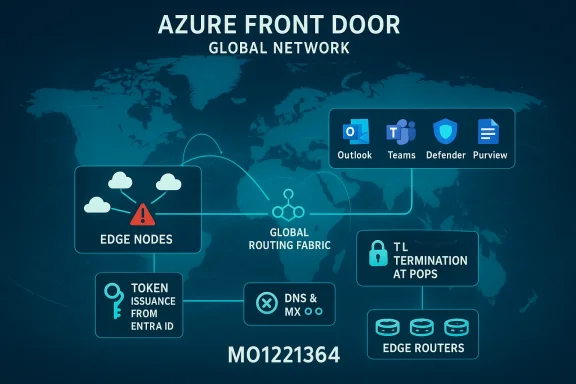
Understanding why an outage wearing multiple product badges can feel like “everything is down” requires looking at three critical shared layers that Microsoft (and similar hyperscalers) rely on:- Global edge and routing fabric (Azure Front Door and related CDN/AFD services). Azure Front Door acts as a global HTTP(S) ingress, terminating TLS at PoPs, applying routing rules, WAF protections and forwarding traffic to origins. If a control‑plane change or selective PoP failure alters routing or TLS termination, many web‑facing Microsoft portals and APIs can become unreachable even though backend servers are healthy. Microsoft’s architecture guidance shows how Front Door handles TLS termination and global traffic routing — functions that, when impaired, produce widespread sign‑in and portal errors.
- Identity and token issuance (Microsoft Entra ID / Azure AD). Microsoft 365 services rely on a centralized identity provider to issue tokens, handle MFA and gate access. If token issuance or validation paths are delayed or cannot be reached — whether due to routing issues, degraded identity front ends, or upstream transit problems — clients will be unable to authenticate even when the service backends are otherwise up.
- DNS, load balancing and regional transit. Misresolved MX or service CNAME records, CDN cache divergence, or transit provider issues can make mail relays, admin consoles and portal endpoints resolve to unreachable front ends or return gateway errors. Reported DNS anomalies (MX lookups failing, A records disappearing, or onmicrosoft subdomains not resolving) are consistent with this class of failure.
Evidence from the field: trackers and sysadmin reports
Crowdsourced outage trackers registered rapid, concentrated spikes for Outlook, Exchange and Teams reports during the incident window. News outlets and technical forums captured the same. Administrators posted symptom logs showing SMTP deferrals with messages like "451 4.3.2 Temporary server error" and screenshots of admin blades returning 5xx errors or timing out. Those on-the-ground details mirror the failures expected when a portion of dependent service infrastructure in a major region (North America in this incident) is not processing traffic as expected. IT and MSP communities reported:- Inbound mail queues backing up at spam appliances (Mimecast, Barracuda) because Microsoft’s mail ingress returned transient errors.
- 500/502 errors on security.microsoft.com and the Microsoft 365 admin center.
- Regional concentration in major U.S. metro areas, consistent with an upstream regional routing or transit failure.
Microsoft’s public position and troubleshooting guidance
Microsoft’s public messaging confirmed they were investigating and pointed administrators to the admin center incident entry (MO1221364) for tenant‑specific impact and rolling updates. For IT staff, Microsoft’s recommended immediate steps remain consistent with existing guidance:- Check the Microsoft 365 Admin Center Service Health page for incident details and tenant impact.
- Gather diagnostics (timestamps, tenant IDs, HTTP status codes, message trace evidence) before contacting support.
- Avoid repeated password resets or account changes unless directed by Microsoft, because credential changes can complicate recovery during a large, shared incident.
Technical analysis — likely fault domains and why experts pointed at edge/routing
Several technical signals in user reports point toward edge/routing/DNS and authentication dependencies rather than an application‑level bug that only affected, say, Exchange transport:- The outage started abruptly and produced simultaneous failures across web portals, mail transport and security consoles — a classic pattern when a shared ingress or global routing fabric changes behavior.
- Users saw DNS anomalies and MX lookups failing to return expected A records; mail relay deferrals displayed backend names tied to Outlook Online front ends. DNS and edge routing problems commonly trigger mail deferrals and 4xx SMTP transient errors seen in the wild.
- Historical precedent: prior high‑impact Microsoft incidents have involved Azure Front Door configuration and third‑party transit providers producing widespread authentication and portal failures. Those past incident post‑mortems show how control‑plane changes at the edge can rapidly create a global blast radius.
Business and operational impact
Even short interruptions to Microsoft 365 can have outsized consequences for organisations that rely on it for day‑to‑day operations:- Revenue and service disruptions. Customer support channels, sales pipelines and automated notifications driven by Exchange or Graph APIs can fail, delaying revenue‑critical actions.
- Operations and productivity. Teams meetings and chat are primary internal communication channels for many firms; multi‑hour outages force phone calls and fragmented workflows, raising friction and error risk.
- Security and compliance headaches. Admins unable to access Defender, Purview or the admin center may be blind to active threats or unable to apply emergency conditional‑access changes; conversely, outages sometimes trigger phishing attempts that mimic service‑status updates.
Short‑term mitigations and admin checklist
For IT teams operating under an active Microsoft outage, a pragmatic, ordered checklist reduces chaos and prevents compounding mistakes:- Confirm the incident — verify Microsoft’s service health entry (MO1221364) and gather tenant‑level impact. Do not assume local network problems are the cause when the admin center reports a platform incident.
- Collect diagnostics — timestamps, tenant IDs, message trace snippets showing SMTP response codes, screenshots of portal errors, and any PowerShell/Get‑ServiceHealth outputs. These accelerate Microsoft support triage.
- Enable out-of-band communication — instruct staff to use non‑Microsoft comms (phone, Slack, alternative email) for critical operations until services restore.
- Avoid mass credential changes — password resets or mass policy changes during platform authentication issues can lock users out once the identity path returns; confirm cause first.
- Switch to desktop/offline modes where possible — Outlook in Cached Exchange Mode may allow limited work with locally cached mail; encourage users to save work locally and sync later.
- Consider temporary SMTP relay or MX failover paths — if inbound mail is business‑critical, organisations with preconfigured MX backup or relay providers (for selective domains) can reduce inbox disruption. (This requires preplanning; fallback configuration during an active outage is fragile.
- If admin portals are unreachable, use PS/Graph automation — PowerShell modules and API endpoints may still be accessible; gather logs and apply emergency changes only if you are certain the control plane is responsive.
Strategic risk analysis: systemic weaknesses and resilience gaps
This outage (and comparable incidents in recent months) highlights structural risks that IT leaders must consider:- Concentration risk. Relying on a single vendor for identity, mail, collaboration and security centralises convenience and also the single point of failure. A failure in shared infrastructure, routing or identity cascades across multiple business functions.
- Third‑party transit and ISP dependency. Cloud providers depend on upstream transit providers and peering relationships; a third‑party network fault can cut large swathes of customers off from the service even though the cloud provider’s origins are healthy. Past post‑incident summaries from Microsoft incidents have repeatedly shown this coupling.
- Operational blind spots. When the admin center itself is intermittent, tenants lose their primary signal and control plane. Organisations that don’t maintain out‑of‑band notification and runbook capabilities are disadvantaged.
Practical long‑term recommendations for enterprises
- Design for graceful degradation. Identify mission‑critical workloads and design fallback procedures that allow business continuity when the productivity cloud is partially unavailable (alternative email providers for critical inboxes, telephony fallbacks for support lines, etc..
- Implement multi‑path mail routing and MX redundancy. Where regulatory and technical constraints allow, plan secondary MX records and partners so inbound messages can be retried or queued elsewhere during outages. (Test regularly.
- Decouple identity-critical controls where feasible. Use conditional access and staged Identity provider failover planning so emergency admin access is available if a primary identity token path is impaire creating an insecure backdoor.
- Runbooks and tabletop exercises. Regularly exercise outage runbooks that cover communication, triage, and mitigation during platform incidents. Include stakeholders from security, legal, and business units.
- Consider multi-cloud risk assessments for truly mission‑critical services. For the most critical public‑facing apps, platform diversity or geographically independent architectures can reduce single‑vendor blast radii. (Multi‑cloud adds complexity and cost — weigh tradeoffs.
- Strengthen monitoring and telemetry. Maintain external monitoring that does not rely on the provider’s control plane alone so you can detect outages independently and provide accurate status to users.
Security and compliance considerations
Outages create windows of opportunity for attackers and increase compliance risk:- Phishers often weaponise outage noise by sending fake “service status” emails or SMS messages — users must be warned to trust only official Microsoft channels and your organisation’s confirmed comms.
- For regulated sectors, outage windows can cause missed log retention, delayed reporting, or inability to enforce controls; maintaining documented business‑impact analyses and evidence of mitigations helps for compliance reviews.
- Admins should avoid emergency changes to identity or access controls unless they are part of validated runbooks; improvised policies can introduce longer‑term exposure.
How the vendor and industry should respond
Hyperscale providers and enterprise customers share an obligation to reduce systemic fragility:- Vendors should continue publishing clear incident timelines and post‑incident reports that explain root causes and remediation steps, including contributing third‑party or transit failures when relevant. Transparent RCAs help customers plan mitigations.
- Industry standards for edge routing control‑plane change management, canarying and safer rollback are essential. When global routing fabrics have the power to reach millions of tenants, configuration review and automated safe‑guards are critical.
- Enterprises should measure true business impact from outages and include downtime scenarios in supplier risk assessments and SLAs.
Conclusion
The January 21–22 Microsoft 365 disruption underscored a recurring reality of modern enterprise IT: centralised cloud convenience scales efficiency — and systemic exposure. Independent trackers, news outlets and on‑the‑ground reports recorded thousands of problem reports, and Microsoft opened incident MO1221364 while admin consoles and user portals reflected authentication and gateway errors across Outlook, Teams, Defender and Purview. For administrators, the immediate priority is accurate diagnosis (consult the Microsoft 365 Service Health entry), orderly communications, and adherence to tested runbooks. For organisational risk owners, the incident is a reminder to quantify concentration risks, test fallback mail and comms, and rehearse incident playbooks that survive a control‑plane outage. In the longer term, both cloud providers and customers must invest in architectures, processes and transparency that reduce the blast radius of the next unavoidable failure.Source: Swikblog Microsoft 365 Down? Users Report Widespread Issues Across Azure, Outlook and Teams
