

Microsoft has begun rolling out a new era of “vibe working” inside Microsoft 365 by introducing two complementary agent features—Agent Mode embedded in Office canvases (Word and Excel) and a chat‑first Office Agent surfaced from Microsoft 365 Copilot—that decompose plain‑English briefs into stepwise plans, act directly inside documents and workbooks, and iterate with visible intermediate artifacts until a human approves the result.
Microsoft’s Copilot strategy has shifted from a sidebar helper toward a platform of coordinated agents, governance controls, and model‑routing capabilities. The company has invested in a control plane—Copilot Studio, the Agent Store and tenant management surfaces—that lets organizations build, publish, route and govern agents across Microsoft 365; Agent Mode and Office Agent are the first widely visible manifestations of that strategy inside Office itself.
This announcement is intentionally staged: the initial rollout is web‑first and appears through Microsoft’s Frontier preview program and selected Microsoft 365 subscription tiers, with desktop parity and broader regional availability promised but not guaranteed on a fixed calendar. Administrators are advised to confirm tenant availability through Microsoft 365 admin channels and release notes before planning production deployments.
Microsoft has published example prompts to show the experience: an 8‑slide pop‑up kitchen plan for a restaurant, a retirement savings presentation with numbers and visuals, and a social‑media-trends report for the coffee industry—illustrations of how Office Agent can translate constraints (budget, guest count, compliance) into a structured deliverable. These example prompts highlight the chat‑first, constraint‑driven nature of Office Agent.
At the same time, these gains come with concrete operational responsibilities for IT, legal, procurement and security teams. The winning deployments will be those that treat agents as managed services—piloting early on low‑risk tasks, enforcing tenant‑level model routing and residency rules, instrumenting consumption, and requiring human verification for critical outputs.
Organizations should take three immediate actions:
Source: Cloud Wars Microsoft Introduces Agent Mode and Office Agent in Microsoft 365 Copilot to Power 'Vibe Working'
 Background
Microsoft’s Copilot strategy has shifted from a sidebar helper toward a platform of coordinated agents, governance controls, and model‑routing capabilities. The company has invested in a control plane—Copilot Studio, the Agent Store and tenant management surfaces—that lets organizations build, publish, route and govern agents across Microsoft 365; Agent Mode and Office Agent are the first widely visible manifestations of that strategy inside Office itself.This announcement is intentionally staged: the initial rollout is web‑first and appears through Microsoft’s Frontier preview program and selected Microsoft 365 subscription tiers, with desktop parity and broader regional availability promised but not guaranteed on a fixed calendar. Administrators are advised to confirm tenant availability through Microsoft 365 admin channels and release notes before planning production deployments.
What Microsoft shipped: Agent Mode and Office Agent
Agent Mode: in‑canvas, stepwise automation
Agent Mode embeds an agent directly inside the Office canvas so it can plan, act, validate and iterate inside the file rather than producing a single opaque response. In practical terms:- In Excel, Agent Mode can create sheets, populate formulas (including advanced functions and dynamic arrays), build PivotTables and charts, apply conditional formatting, run validation checks on intermediate figures, and surface each step for human inspection. The UI intentionally shows the plan and step outputs so users can pause, edit, reorder or abort work.
- In Word, Agent Mode acts as a conversational drafter: it drafts sections, applies brand and style guidelines, imports permitted context (attachments or email snippets when allowed), asks clarifying questions, and iteratively refactors tone and structure while showing intermediate drafts and the execution plan.
Office Agent (Copilot chat): chat‑first document and slide generation
Office Agent lives in the Microsoft 365 Copilot chat surface and focuses on chat‑initiated generation. In this flow, a user provides a brief, answers clarifying questions, and the agent performs optional web‑grounded research and produces near‑final Word documents or PowerPoint decks—complete with speaker notes and slide previews. Microsoft routes some Office Agent workloads to Anthropic’s Claude models where it deems them a better fit, while other flows are powered by OpenAI‑lineage models; routing is tenant‑configurable and requires administrator opt‑in for third‑party models.Microsoft has published example prompts to show the experience: an 8‑slide pop‑up kitchen plan for a restaurant, a retirement savings presentation with numbers and visuals, and a social‑media-trends report for the coffee industry—illustrations of how Office Agent can translate constraints (budget, guest count, compliance) into a structured deliverable. These example prompts highlight the chat‑first, constraint‑driven nature of Office Agent.
How this changes real‑world workflows
Human/agent collaboration — “vibe working” explained
“Vibe working” is Microsoft’s shorthand for a human + agent loop in which:- The user states an objective in natural language.
- The agent decomposes that objective into a sequence of executable subtasks.
- The agent executes tasks inside the document or chat surface and surfaces intermediate artifacts.
- The human reviews, edits, pauses or rejects steps, and the agent iterates until the desired outcome is reached.
Practical examples (how teams might use it)
- Finance teams: Ask Agent Mode to build a monthly close workbook with consolidated product lines, YoY calculations, variance analyses and a summary narrative—then step through and validate each pivot and formula.
- Marketing and comms: Use Office Agent in Copilot chat to assemble a shareable presentation about social media trends that combines numbers, charts and narrative analogies—then refine tone and visuals via follow‑up chat turns.
- HR and leadership: Draft employee communications or program overviews (for example, retirement savings materials) with Office Agent, generate speaker notes and visual aids, and then have legal or HR review the draft before distribution.
Technical architecture and multi‑model routing
Microsoft is positioning Copilot as a model‑agnostic platform rather than a single‑model service. Key points:- Some in‑app Agent Mode flows use Microsoft‑routed OpenAI lineage models for reasoning and code‑generation style tasks.
- Office Agent can route select research or slide‑generation workloads to Anthropic’s Claude models where Microsoft believes those models offer a better fit. Tenant administrators control model routing and must opt into third‑party providers.
- The control plane (Copilot Studio, Agent Store) provides the governance surfaces for publishing agents, setting routing rules and centralizing policy enforcement.
Availability, licensing and deployment notes
- Agent Mode for Excel and Word is initially available via Microsoft’s Frontier preview program for Microsoft 365 Copilot license holders and is also appearing for qualifying Microsoft 365 Personal, Family and Premium subscribers on the web. Microsoft states that desktop parity is planned for later releases. Administrators should check the Microsoft 365 admin center for tenant‑specific availability.
- Office Agent in Copilot (Anthropic‑routed flows) began in the U.S. through the Frontier program and requires admin opt‑in to enable third‑party models. This U.S. preview constraint may expand over time; organizations with regulated data should treat current availability as preview‑stage and plan pilots accordingly.
- Model routing, telemetry, and training policies are subject to contractual terms that vary by tenant and third‑party vendor—making it imperative to confirm specifics before enabling agents for sensitive workloads. Treat claims about telemetry and training use as conditional until validated contractually for your organization.
Strengths — why this is a meaningful step
- Productivity lift: Agent Mode turns complex, multi‑step processes—advanced Excel modeling, structured report creation—into plain‑English interactions that save time and lower the expertise barrier. This can accelerate first‑draft creation and repetitive analysis tasks.
- Human‑in‑the‑loop design: By surfacing the agent’s plan and intermediate artifacts, Microsoft intentionally reduces opacity relative to one‑shot generation, enabling better verification and audit trails.
- Platform governance: The existence of Copilot Studio, tenant controls and an Agent Store provides a path for scaled, governed adoption across organizations—if IT teams adopt a disciplined rollout strategy.
- Model choice: Multi‑model routing allows workload‑specific optimization—using Anthropic’s Claude where it may excel and OpenAI‑lineage models for other reasoning tasks—potentially improving output quality across diverse scenarios.
Risks and gaps — what IT and business leaders must plan for
- Accuracy and hallucinations: Agentic workflows that construct formulas, pivots and narrative summaries can introduce calculation errors or incorrect assertions. Outputs must be verified, and high‑stakes decisions should require human sign‑off. Independent benchmarking and early reports show real‑world edge cases where verification is essential.
- Model routing and data residency: Routing to third‑party models introduces contractual and residency complexity. Some Anthropic endpoints or other models may be hosted outside Azure, requiring careful contract review and explicit tenant opt‑in. Statements about usage for model training vary by vendor and contract and should be validated.
- Governance and compliance: Agent access to tenant data, attachments and mail content can surface compliance risks. Organizations must define agent privileges, data scopes, and approval processes before broad deployment.
- Cost and metering: Agent actions generate a new consumption vector. Without caps and monitoring, usage can produce unpredictable bills—especially for chat‑heavy Office Agent flows that perform web grounding or multi‑model routing.
- Preview‑stage limitations: Because many features are web‑first and preview‑gated, desktop parity, regional availability and performance SLAs are not guaranteed. Treat current availability as constrained and verify actual tenant rollout timing.
Practical rollout checklist for IT (pilot → scale)
- Define scope and risk tolerance
- Choose non‑critical, repeatable tasks (month‑end reports, template slides) for initial pilots.
- Confirm tenant availability and licensing
- Verify Frontier preview enrollment, Copilot license assignments and Personal/Family seat eligibility in the Microsoft 365 admin center.
- Lock down model routing and third‑party opt‑ins
- Keep Anthropic or other third‑party model routing disabled until contractual, residency and telemetry terms are reviewed.
- Instrument and monitor consumption
- Set metering alerts, weekly audit logs and cost caps for agent usage.
- Require human verification for high‑stakes outputs
- Establish review gates, especially for financials, legal, regulatory filings or customer communications.
- Build templates and agent playbooks
- Capture successful agent prompts and approved templates to reduce repeat errors and standardize outputs.
- Train users on agent steering and pitfalls
- Emphasize that agents are teammates that need steering—clarify when to trust outputs and when to escalate for human review.
Verification and governance: specifics IT must demand
- Request written contractual assurances about telemetry, conversational trace retention and whether tenant conversations may be used for model training; these differ by vendor and tenant. Do not assume uniform policies—get contractual clarity.
- Require the ability to route workloads to models hosted within guaranteed compliance boundaries (for example, Azure‑hosted models) for regulated workloads. Confirm physical data residency guarantees if required by law or corporate policy.
- Insist on audit logs that record the agent plan, step outputs, user approvals and rollbacks so that auditors and governance teams can reconstruct what the agent did and why. The UI’s surfaced step list is useful, but machine‑readable logs and retention policies are critical for compliance.
The user experience: what to expect day‑to‑day
- Conversations will feel more like issuing a brief to a junior analyst: “Make a 10‑slide investor update highlighting last quarter’s revenue drivers, include three charts and speaker notes.” The Office Agent will ask clarifying questions (audience, tone, emphasis) and then generate a draft for review.
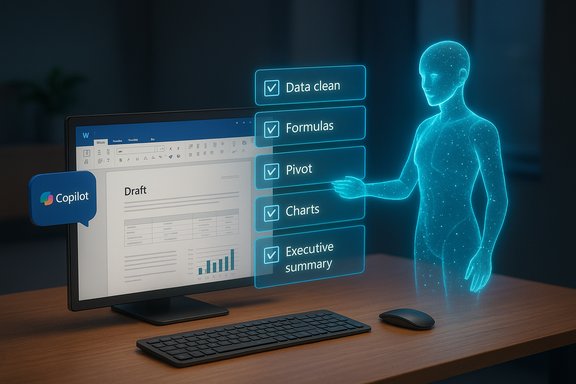
- Inside Word or Excel, Agent Mode will show a plan pane with discrete steps (for example, create input sheet → populate formulas → build pivot → add charts → draft executive summary). Users can pause, modify or reorder the steps and inspect intermediate artifacts before finalizing.
- Voice integration and chat‑first flows are emphasized: Office Agent supports voice interaction in Copilot chat, making hands‑free brief creation possible for some workflows—an extension of Microsoft’s broader push into voice‑enabled Copilot experiences. Expect continued investment in voice and avatar features.
Caveats and unverifiable claims
- Any statement about exact rollout dates, desktop parity timing, or global availability beyond the preview must be treated as provisional. Microsoft’s public messaging indicates desktop parity is planned, but no firm, universal ship date is guaranteed; confirm tenant release notes for precise timing.
- Claims that conversational traces from every routing pathway are or are not used for model training cannot be universally assumed—these practices depend on the contractual relationship between Microsoft, the third‑party model provider and the tenant. Treat such claims as conditional until confirmed in writing.
Final assessment and recommended next steps
Microsoft’s Agent Mode and Office Agent represent a substantive evolution of Copilot from a single‑turn assistant into an agentic platform that can plan, act and iterate inside Office canvases and Copilot chat. The productivity potential is real: faster drafts, democratized spreadsheet modeling, and scaled template generation can free knowledge workers to focus on judgment and strategy rather than mechanical assembly.At the same time, these gains come with concrete operational responsibilities for IT, legal, procurement and security teams. The winning deployments will be those that treat agents as managed services—piloting early on low‑risk tasks, enforcing tenant‑level model routing and residency rules, instrumenting consumption, and requiring human verification for critical outputs.
Organizations should take three immediate actions:
- Start narrow pilots on non‑critical workflows to capture early productivity wins and build validated prompt/templates.
- Lock down model routing and confirm contractual terms for telemetry and training before enabling third‑party models.
- Instrument policies, audit logs and cost controls so agent adoption can scale safely and transparently.
Source: Cloud Wars Microsoft Introduces Agent Mode and Office Agent in Microsoft 365 Copilot to Power 'Vibe Working'
