

Microsoft’s move to fold research tooling and enterprise primitives into a single open‑source SDK — the Microsoft Agent Framework — marks a decisive moment in the shift from one‑off LLM assistants to durable, multi‑agent automation designed for real business workflows. The Agent Framework brings together the orchestration patterns pioneered in AutoGen with the integration and governance features of Semantic Kernel, offers official SDKs for both .NET and Python, and plugs into Azure AI Foundry for cloud hosting, observability, and lifecycle management.
The Microsoft Agent Framework is a developer kit and runtime for building, orchestrating, and deploying agentic systems that can coordinate across tools, services, and other agents. It is positioned as an open, standards‑friendly bridge between research prototypes and production deployments, with first‑class support for:
Adopting teams should start small, validate integrations with internal tools and MCP servers, and use Foundry’s observability and policy controls to tighten trust boundaries before scaling agentic automation into sensitive workflows. The payoff — agents that coordinate reliably across systems and provide auditable decision trails — is substantial, but it will be won through disciplined engineering and governance as much as via the SDK’s capabilities.
Source: i-programmer.info Exploring The Microsoft Agent Framework
 Overview
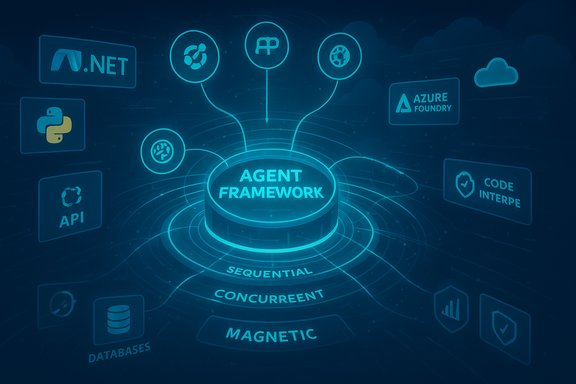
The Microsoft Agent Framework is a developer kit and runtime for building, orchestrating, and deploying agentic systems that can coordinate across tools, services, and other agents. It is positioned as an open, standards‑friendly bridge between research prototypes and production deployments, with first‑class support for:- Multi‑agent orchestration patterns (sequential, concurrent, handoff, group chat, and Magnetic‑style manager/orchestrator patterns).
- Provider‑ and cloud‑agnostic tooling via an OpenAPI‑first connector model plus support for Model Context Protocol (MCP) and Agent‑to‑Agent (A2A) interactions.
- Observability and governance primitives for tracing, identity, and policy controls when agents run inside Azure AI Foundry.
Background: why one framework now?
Over the past two years the AI development lifecycle shifted. Early LLM usage focused on single‑turn assistants (answering queries), but enterprise needs moved toward multi‑step, stateful automation: workflows that must call internal systems, persist state, and produce auditable traces. Two Microsoft strands met this demand:- AutoGen: experimental multi‑agent research and orchestration patterns, known for manager‑worker (Magnetic) styles and emergent team behaviors.
- Semantic Kernel: an enterprise SDK focused on plugin tooling, connectors, and production integration for models.
What the Agent Framework actually provides
Core technical primitives
At the SDK level the framework exposes a small set of consistent abstractions that make agent composition repeatable:- Agents — encapsulated roles with instructions, model bindings, and a toolset.
- Tools — first‑class connectors to APIs, databases, vector stores, code interpreters, and MCP endpoints.
- Workflows — graph‑based orchestrations with durable checkpoints, parallelism, conditional branching, and retries.
- Threads / Conversations — durable thread objects to maintain state across long‑running tasks and restarts.
Orchestration patterns supported
The Agent Framework ships or documents common orchestration models that cover most enterprise scenarios:- Sequential orchestration — step‑by‑step workflows for predictable, ordered tasks.
- Concurrent orchestration — run subagents in parallel and gather results.
- Group chat orchestration — specialist agents collaborate in a shared channel to debate or synthesize.
- Handoff orchestration — explicit task transfers as subtasks complete.
- Magnetic (manager/orchestrator) — a manager agent creates and updates a task list and coordinates specialist subagents.
Autonomy and observability: the three pillars
Microsoft frames agentic systems around three operational pillars:- Orchestration — how tasks and subagents are organized.
- Autonomy — agents decide which tools to call and when.
- Observability — developers can trace decisions, tool calls, and thread state for debugging and compliance.
Interoperability: A2A, MCP and OpenAPI
Interoperability is a central claim:- Agent‑to‑Agent (A2A) standardizes discovery and messaging between agents across runtimes so multi‑vendor or multi‑cloud agents can collaborate.
- Model Context Protocol (MCP) provides a structured way for agents/models to access tools, memory services, and retrieval systems with well‑defined I/O.
- OpenAPI‑first connectors let agents call enterprise APIs with schema validation and contract compliance.
Getting started (practical steps)
The repository’s README provides the minimal setup to get an agent running locally.- Python (pre‑release):
pip install agent-framework --pre. The repo also exposes individual packages for fine‑grained installs. - .NET (pre‑release): add the Microsoft agent packages from NuGet (examples show
Microsoft.Agents.AI.OpenAI --prerelease), and authenticate using Azure CLI when targeting Azure resources.
Integration points and sample connectors
The framework and Foundry emphasize connection to real data and action surfaces:- Built‑in grounding includes Bing web search, SharePoint, Microsoft Fabric, Azure AI Search, and other enterprise data sources.
- Popular vector stores and retrieval services are supported via plugins or MCP adapters (e.g., Pinecone, Qdrant and Foundry‑native indexing workflows are documented under Foundry tooling).
- Code interpreter and browser automation tools are first‑class options for agents that must execute code or interact with web UIs.
Strengths: what matters for Windows developers and enterprises
- Unified developer path — prototype locally in Python or C#, then deploy the same primitives to a cloud runtime; migration guides ease the transition from Semantic Kernel.
- Enterprise observability — OpenTelemetry‑style tracing and Application Insights integration let teams reconstruct agent decisions for audits and debugging.
- Standards and composability — MCP and A2A reduce bespoke adapter work and make it feasible to assemble agent ecosystems from multiple providers.
- Tool and data grounding — native connectors for Microsoft services and documented support for third‑party vector stores make it practical to ground agents on enterprise knowledge.
- Visual tooling and lifecycle features — VS Code extension, Copilot Studio / Foundry authoring, and the Foundry Agent Service offer visual debugging and lifecycle management for complex workflows.
Risks and practical caveats (what to test before trusting agents)
The framework addresses many production concerns, but real risk remains. Developers and IT teams must treat these seriously.- Data exfiltration and tool trust boundaries. The Agent Framework supports calling third‑party MCP servers and external tools; anything sent to an external tool may leave your compliance envelope. Microsoft’s own README warns developers to review data flows when integrating non‑Microsoft MCP servers. Plan strict egress controls and logging for any external tool usage.
- Prompt injection and downstream manipulation. Any agent that composes prompts and executes tool calls can be manipulated by crafted inputs. Built‑in content filters and prompt shields help, but they are not invulnerable. Red‑teaming and runtime sanitization remain essential.
- Operational complexity. Multi‑agent systems introduce new failure modes (deadlocks, inconsistent state between agents, resource storms). Durable checkpointing and thread management are provided, but teams must design for observability, retries, and human‑in‑the‑loop escalation points.
- Supply‑chain and manifest trust. Public manifests or community‑shared agent definitions can include connectors or scripts that expose credentials or perform unsafe actions. Vetting, signing, and an internal registry policy are recommended.
- Cost and model selection tradeoffs. Multi‑agent workflows can combine numerous model calls and multimodal services (voice, image, reasoning). Use hybrid routing (light models for routine steps, premium models for high‑assurance reasoning), caching, and token budgets to control spend. Foundry pricing varies by model and region — validate in your tenant.
Migration notes for Semantic Kernel and AutoGen users
Microsoft has published migration guides and a release candidate path for users of Semantic Kernel and AutoGen. Key considerations:- Namespace and API changes — Semantic Kernel namespaces are consolidated under Microsoft.Agents.AI in Agent Framework; some patterns and agent types have been renamed or unified.
- Thread and lifecycle semantics — AgentThread and thread lifecycle behavior are now explicit primitives; some providers expose hosted threads differently, so deletion semantics may vary.
- Testing and compatibility — migration guides include step‑by‑step code changes, but breaking changes remain possible during pre‑release stages; plan a compatibility window for production migrations.
Operational recommendations — a checklist for adopting teams
- Create a staging Foundry project and exercise long‑running workflows end‑to‑end.
- Implement strict egress controls for MCP and external tools; use internal MCP registries where possible.
- Design human‑in‑the‑loop escalation points for any agent that takes irreversible actions.
- Red‑team prompt injection and tool invocation scenarios; model adversarial inputs to surface vulnerabilities.
- Use OpenTelemetry traces and Application Insights from day one to enable post‑mortem analysis.
- Budget for model and tool costs — simulate realistic traffic to measure spend under different model routing strategies.
What to watch next
- Adoption and standardization of MCP and A2A beyond Microsoft’s ecosystem will determine the practical portability of agent components between vendors and clouds. Early Windows and app ecosystem integrations (MCP support in Windows Shell/Foundry efforts) are promising but partial.
- The pace at which Microsoft and partners harden responsible AI controls around agentic workflows will shape enterprise exposure — expect incremental improvements (PII detection, prompt shields, policy hooks), but not an immediate removal of all risk.
- Tooling maturity — visual authoring (VS Code/Foundry interfaces), debugging primitives, and libraries for safe connector creation — will directly affect developer velocity and the cost of safe deployments. Foundry continues to expand region availability and tooling features.
Final assessment
The Microsoft Agent Framework is a meaningful consolidation of prior experimental and enterprise work into a single, opinionated SDK and runtime that addresses many of the real problems enterprises face when moving agents to production: observability, identity, governance, and structured tool invocation. It also doubles down on standards‑first interoperability — a pragmatic hedge against vendor lock‑in if the broader ecosystem embraces MCP and A2A. However, the framework is not a turnkey safety solution. It reduces friction and supplies important guardrails, but organizations still carry responsibility for data governance, adversarial testing, supply‑chain scrutiny, and cost control. Treat the Agent Framework as an enabling platform that requires robust operational practices to realize its promise safely and sustainably.Adopting teams should start small, validate integrations with internal tools and MCP servers, and use Foundry’s observability and policy controls to tighten trust boundaries before scaling agentic automation into sensitive workflows. The payoff — agents that coordinate reliably across systems and provide auditable decision trails — is substantial, but it will be won through disciplined engineering and governance as much as via the SDK’s capabilities.
Source: i-programmer.info Exploring The Microsoft Agent Framework
