

Microsoft Turns AI Training Into a Five-Day Funnel
The most important thing about AI Skills Fest is its packaging. Microsoft has taken what could have been a scattered collection of Learn modules, webinars, certification prep streams, and hackathon prompts, then compressed it into a five-day event with a deadline attached. That deadline is doing a lot of work.
A self-paced course can be ignored forever. A weeklong event with a free exam voucher dangling at the end creates urgency. Microsoft understands this dynamic well because its certification economy has always depended on turning vague professional ambition into a scheduled exam.
The event runs through AI Skills Navigator, which is Microsoft’s current front door for organizing AI learning by role and objective. Instead of asking users to hunt across Microsoft Learn, GitHub, Azure docs, LinkedIn streams, and partner pages, Microsoft is trying to give them a single map. The promise is convenience; the strategy is consolidation.
That consolidation matters because Microsoft’s AI portfolio has become sprawling. Copilot is no longer just a chat box in Office. It is now a family of developer tools, security workflows, admin surfaces, agent frameworks, Azure services, and productivity features. AI Skills Fest is Microsoft’s attempt to make the sprawl feel navigable.
The Voucher Is the Hook, but the Platform Is the Point
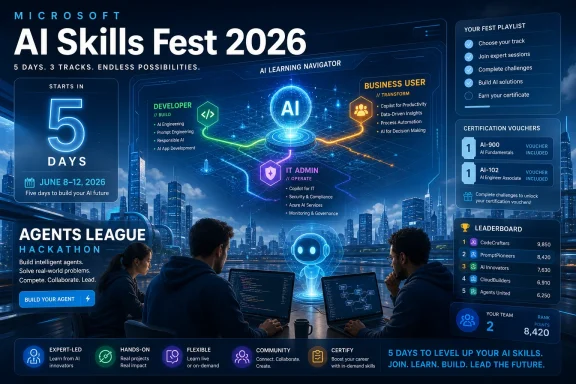
The free certification voucher is the sharpest incentive in the package. Participants who complete at least one eligible featured learning playlist during the June 8–12 event window and submit the claim form by the deadline can receive a 100 percent discount voucher for a Microsoft or GitHub certification exam, subject to the program’s terms and exclusions.
That is a serious offer. Microsoft exams are not ruinously expensive, but they are expensive enough to make casual learners hesitate. Removing the fee changes the psychology: a learner who might have watched a session and drifted away now has a reason to finish a playlist, submit a form, and schedule an exam.
Still, the voucher should not be mistaken for charity. Microsoft gets something valuable in return: verified engagement, certification pipeline growth, and a larger population of professionals trained around its AI stack. The company is not just teaching AI; it is teaching AI through Microsoft’s vocabulary.
That distinction matters. A developer learning “agents” through Azure AI Foundry, GitHub Copilot, and Microsoft tooling is learning a particular view of the AI future. An IT admin learning agent management through Microsoft 365 is being trained to see governance, identity, and policy through Microsoft’s control plane. The credential is portable in career terms, but the mental model is vendor-shaped.
AI Skills Navigator Is Microsoft’s Answer to Training Chaos
Microsoft Learn has long been both useful and overwhelming. It contains excellent material, but the experience can feel like walking into a warehouse where every shelf is labeled correctly and none of the aisles tell you where to start. AI Skills Navigator is designed to fix that first-mile problem.
The event’s playlists appear to be organized around practical personas rather than abstract product categories. Developers get paths involving GitHub, Azure AI Foundry, and Azure DevOps. IT professionals get playlists around Azure administration, Microsoft 365 agent management, and security. Business users get tracks focused on writing, sales workflows, and customer communication.
That role-based structure is not cosmetic. It reflects how AI adoption is actually happening inside organizations. The developer wants to know how to build and ship with AI. The admin wants to know how to govern it. The business user wants to know how to save time without getting fired for pasting confidential material into the wrong tool.
Microsoft’s challenge is that these audiences do not share the same vocabulary. “Agent” means one thing to a developer building workflow automation, another thing to a security team evaluating permissions, and yet another thing to an executive who heard the word in a keynote. AI Skills Fest tries to reduce that translation cost.
Agents Move From Keynote Theater to Homework
The Agents League Hackathon is the most revealing piece of the event. Microsoft is not merely asking people to watch AI sessions; it is asking developers to build custom AI agents, submit them, compete on a leaderboard, and treat agent creation like a spectator-friendly contest. That framing says a lot about where Microsoft thinks developer energy should go next.
The esports-style language may make some admins roll their eyes, but it serves a purpose. Hackathons are a way to turn platform adoption into play. They let Microsoft showcase tooling without making the whole thing feel like a sales demo.
Agents are also the right theme for Microsoft in 2026. After years of Copilot branding, the industry has moved from “chat with your documents” toward software that can take actions, coordinate tools, and sit inside workflows. Whether all of that deserves the agent label is debatable, but the market has settled on the word for now.
For Windows developers, this is where the story gets interesting. Microsoft wants AI agents to become a normal part of building software on its stack, not a research project bolted onto the side. The hackathon gives developers a low-risk way to experiment with that future, while giving Microsoft a high-signal view into what participants actually build when pointed at its tools.
The Mainstage Sells the Future, but the Playlists Sell the Workflow
Every major tech event now needs a Mainstage, and AI Skills Fest is no exception. The Mainstage conversations are meant to provide the big narrative: where AI is going, which skills matter, and how workers should prepare. That is the inspirational layer.
The playlists are the operational layer. That is where the event either succeeds or becomes another nicely branded Microsoft campaign. Professionals do not need more vague assurances that AI will transform work; they need to know which button to press, which permissions to configure, which service to test, and which exam objective they are actually preparing for.
The gap between those two layers has been a recurring problem in AI adoption. Executives hear that AI will transform productivity. Developers hear that agents will transform software. IT hears that governance must be airtight. Then everyone goes back to work and discovers that transformation depends on licensing, identity, data classification, endpoint policy, compliance review, user training, and plain old budget.
AI Skills Fest cannot solve all of that in five days. But it can give organizations a common starting point. If a team’s developer, security admin, business analyst, and manager each complete a role-specific playlist, they may at least have a shared vocabulary for the next internal conversation.
Certification Becomes Microsoft’s AI Distribution Channel
Microsoft’s certification program has always done more than validate skills. It distributes Microsoft’s priorities into the labor market. When Microsoft updates exam objectives, training providers follow. When employers list certifications in job descriptions, workers follow. When workers study for those exams, Microsoft’s product assumptions become part of the professional baseline.
AI Skills Fest extends that machinery into the AI era. The company is effectively saying: if you want to show you understand modern AI work, here is a fast path into the credential system. That is powerful because credentials sit at the intersection of personal ambition and enterprise procurement.
For individuals, a free exam voucher lowers the barrier to taking a credential seriously. For employers, a Microsoft or GitHub certification offers a cleaner signal than “I watched some YouTube videos about Copilot.” For Microsoft, each certified professional becomes a small ambassador for its platform.
There is a risk here, too. Certification can reward test familiarity over operational competence. Passing an exam does not mean a person can safely deploy AI agents across a regulated enterprise. But it does mean they have been exposed to the official model of how Microsoft thinks the technology should be used.
That official model matters. In a market crowded with AI tools, Microsoft is trying to make its version of AI literacy the one HR departments, IT managers, and procurement teams recognize.
Windows Users Are No Longer Outside the AI Story
For years, Windows users could treat cloud and AI announcements as background noise. A new Azure service might matter to developers and enterprises, but the average Windows enthusiast could safely ignore it. That separation is collapsing.
Copilot has already pushed AI into Windows and Microsoft 365. Admin controls, endpoint behavior, data access, and user expectations increasingly depend on understanding how Microsoft’s AI services are wired together. A Windows power user who once cared mainly about builds, drivers, and registry settings now has to care about identity, cloud policy, and model-assisted workflows.
AI Skills Fest reflects that shift. The event is not only for machine learning engineers. It is explicitly aimed at developers, IT pros, business users, students, faculty, and executives. Microsoft is trying to make AI training horizontal across the workforce.
That makes sense from the company’s perspective. If Copilot and agents are to become default features across Windows, Microsoft 365, GitHub, Azure, and security products, then every role needs at least a functional understanding of what these systems do. Otherwise, adoption stalls at the help desk.
The Windows angle is especially important for IT pros. As AI features become more deeply integrated into Microsoft 365 and endpoint management, admins will be asked to answer questions that are not purely technical: who can use which agent, what data can it reach, what logs exist, how retention works, and what happens when a user trusts a generated answer that turns out to be wrong.
The Global Voucher Is Generous, the Prize Pool Less So
One notable detail is the distinction between the certification voucher and the physical prizes. The voucher offer is described as broadly available worldwide, while physical prizes are restricted to residents of selected countries. That split is common in global contests because shipping, tax, sweepstakes, and local promotion laws are messy.
For participants outside the prize-eligible countries, the practical advice is simple: treat the voucher as the real prize. A VIP trip or hardware package is nice, but the credential discount is the incentive most people can actually use. It is also the incentive most aligned with professional development.
The reported prize pool adds spectacle, especially around the hackathon. Trips to Microsoft Ignite 2026 in San Francisco are designed to catch attention and give winners a career-validating story. Technology packages are the lighter-weight reward layer.
But the broader event does not depend on those prizes. If Microsoft wanted only hackathon submissions, it could have run a developer contest. By tying the event to learning playlists and certification prep, it is aiming at a much larger population than competitive builders.
The Deadline Is Local, but the Risk Is Universal
The voucher claim deadline is one of the details participants should not hand-wave. The event runs June 8 through June 12, and the claim form must be submitted by the stated cutoff. Anyone treating this like a normal self-paced Learn path could miss the voucher even if they complete the content later.
This is where Microsoft’s event mechanics can create friction. Learners need to register, choose an eligible featured playlist, complete it during the active period, and submit the claim form. If any of those steps are ambiguous inside the platform, some users will inevitably end up in support threads asking why their completion did not count.
The safest approach is to be conservative. Start from the AI Skills Fest event page, use playlists explicitly marked for the event, do not modify the playlist, complete it inside the event window, and submit the voucher form immediately after completion. Waiting until the last hour is a bad strategy for any web form tied to a global promotion.
For IT departments encouraging staff to participate, this is worth spelling out internally. A vague message saying “Microsoft has free AI training this week” is not enough. If the voucher matters, employees need instructions that include the event dates, completion requirement, and claim deadline.
Where Enterprise IT Should Be Both Interested and Skeptical
Enterprise IT should welcome the training and remain skeptical of the hype. Those are not contradictory positions. Free structured learning from a major platform vendor is useful, especially when organizations are under pressure to “do something with AI” without having enough staff who understand the tools.
But Microsoft’s framing inevitably emphasizes adoption. It wants more people building agents, using Copilot, managing AI features, and sitting for Microsoft-aligned exams. It is less likely to center the organizational reasons not to deploy a feature yet.
That means IT leaders should treat AI Skills Fest as a training input, not a governance strategy. A playlist on Microsoft 365 agent management can help an admin understand the knobs. It does not replace a policy for data classification, prompt logging, user access, retention, procurement, or incident response.
The same is true for security. AI in security scenarios can be valuable, but it can also create false confidence. Security teams need to know not only how Microsoft’s AI tools assist investigations, but where they fail, what telemetry they depend on, and how to audit their outputs.
The best use of the event for enterprise teams may be comparative. Have different roles complete different tracks, then bring them together afterward to discuss what Microsoft taught each group. The mismatches will be revealing.
Developers Get the Clearest Signal
Developers are the audience with the most direct call to action. Microsoft wants them building agents, using GitHub Copilot more deeply, and seeing Azure AI Foundry as the natural place to assemble AI applications. The hackathon makes that obvious, but the playlists reinforce it.
The developer story is also more mature than it was a year or two ago. The conversation has moved beyond “AI can autocomplete code” toward “AI can help orchestrate software work.” That includes planning, testing, debugging, issue triage, and connecting applications to external tools.
Still, developers should avoid confusing demo velocity with production readiness. A hackathon agent that impresses a leaderboard is not the same thing as an agent that belongs in a customer-facing workflow. Error handling, permissions, observability, cost control, and data boundaries remain the difference between a clever prototype and a system worth maintaining.
Microsoft benefits when developers start with its stack. Developers benefit if they learn transferable patterns: tool use, retrieval, evaluation, human review, identity boundaries, and safe deployment. The trick is to take the free training without mistaking vendor fluency for architectural wisdom.
Business Users Are the Largest and Hardest Audience
The business tracks may be the most important part of AI Skills Fest because business users are where AI adoption often gets messy. Developers and admins know they are touching technology. Business users are simply trying to write a better email, summarize a meeting, draft a sales note, or respond to a customer faster.
That is where organizations face the highest volume of small decisions. Should a user paste customer data into a prompt? Can a generated message be sent externally without review? What happens when AI produces a confident but inaccurate summary of a contract? These are not edge cases; they are daily workflow risks.
Microsoft’s business playlists reportedly focus on drafting, sales workflows, and customer communications. That is a sensible place to start because these are high-frequency tasks where AI can save time quickly. It is also a place where tone, accuracy, and confidentiality matter.
The value of training here is not that every office worker becomes an AI expert. It is that workers learn when to trust, when to verify, and when not to use the tool at all. A five-day event cannot create judgment by itself, but it can introduce the idea that AI productivity requires rules, not just enthusiasm.
Students and Faculty Are Being Pulled Into the Same Credential Economy
The inclusion of students and faculty shows that Microsoft is thinking beyond immediate enterprise adoption. If AI skills become part of professional formation, then universities, bootcamps, and training programs become another distribution channel for Microsoft’s stack. That is not new, but AI gives it fresh urgency.
Students are under pressure to prove they can use AI rather than merely be disrupted by it. Faculty are under pressure to teach AI without turning every assignment into a plagiarism investigation. Microsoft can present AI Skills Fest as a structured answer to both problems.
For students, the free voucher may be especially meaningful. Certification costs can be a barrier, and a recognized credential can help separate a serious learner from someone who merely claims to be “AI-savvy.” For faculty, curated playlists offer a way to incorporate vendor-supported material without building an entire curriculum from scratch.
The downside is familiar: education risks becoming too tightly coupled to one vendor’s product map. Teaching students how to use GitHub Copilot, Azure, and Microsoft 365 is useful. Teaching them that AI competence equals Microsoft competence would be too narrow.
The Event Arrives After Build’s Agent Push
The timing is not accidental. AI Skills Fest follows a period in which Microsoft has been heavily emphasizing agents across its developer and cloud story. Build 2026 kept attention on AI-native development, agent frameworks, GitHub tooling, and Windows as a platform for modern AI applications.
AI Skills Fest turns that keynote momentum into training throughput. Build tells developers and IT leaders what Microsoft wants them to care about. Skills Fest gives them a structured way to start learning it. Ignite, later in the year, becomes the enterprise stage where these themes are likely to return with customer stories, governance language, and product packaging.
This calendar strategy is classic Microsoft. Announce the direction, train the ecosystem, certify the professionals, and then sell the enterprise roadmap. The novelty is the speed with which AI has compressed that cycle.
For WindowsForum readers, the lesson is that AI is no longer confined to special events. It is becoming the connective tissue across Microsoft’s calendar. Build, Learn, certification, Ignite, Microsoft 365, GitHub, Azure, and Windows are increasingly telling different chapters of the same story.
The Free Offer Still Comes With Fine Print
Participants should assume there are terms, limits, exclusions, and operational details. Free certification promotions commonly include restrictions such as one voucher per person, expiration dates, non-transferability, and exclusions for certain exam delivery channels. The user-provided information says Certiport-delivered exams and Microsoft Office Specialist exams are excluded.
That exclusion makes sense because Certiport and MOS sit in a different part of the certification ecosystem. The more relevant audience for this event is likely aiming at Microsoft role-based certifications, fundamentals exams, GitHub credentials, or AI-adjacent credentials tracked through AI Skills Navigator.
The important practical point is to choose the intended exam early. A voucher is only useful if the recipient can schedule, prepare, and sit for the exam before it expires. A free exam does not remove the cost of poor preparation.
There is also a support angle. If voucher emails are fulfilled through a partner such as Pearson VUE’s MindHub Pro, users should watch spam folders, use the same email address consistently, and keep screenshots or records of completion and claim submission. Promotions at this scale can generate edge cases.
The Smart Move Is to Treat This Week Like a Sprint
The people who benefit most from AI Skills Fest will not be the ones who click around randomly. They will be the ones who pick a specific goal before starting. That goal might be earning a voucher, preparing for an AI-related certification, testing Microsoft’s agent tooling, or giving a team a shared baseline.
A developer might choose the agent path and use the hackathon as a forcing function. An admin might choose the Microsoft 365 agent management material and turn it into an internal governance checklist. A business user might focus on drafting and customer communication, then document where human review remains necessary.
The worst approach is to consume the event like background noise. AI training has a way of feeling productive even when nothing changes afterward. The point should be to leave the week with a completed playlist, a claimed voucher, and a next step that survives beyond June 12.
For managers, the event is an opportunity to run a lightweight internal skilling campaign. Assign tracks by role, give employees time to complete them, and schedule a follow-up discussion. If the organization is already paying for Microsoft 365, GitHub, Azure, or security products, this is a low-cost way to improve the odds that staff use them responsibly.
The June 12 Clock Makes the Decision Simple
The practical story is short, even if the strategic story is broad. Microsoft has created a limited-time path from AI learning to certification, and the deadline is close enough that hesitation has a cost.
- Participants should register through AI Skills Navigator and start from the AI Skills Fest 2026 event experience rather than searching for unrelated Learn modules.
- Participants should complete at least one eligible featured playlist during the June 8–12 event window if they want the certification voucher.
- Participants should submit the voucher claim form before the June 12 deadline instead of assuming completion alone is enough.
- Developers should look at the Agents League Hackathon if they want hands-on practice with Microsoft’s current agent-building push.
- IT teams should treat the event as useful training, but not as a substitute for internal AI governance, security review, and data policy.
- Anyone outside the physical-prize countries should focus on the globally relevant voucher incentive rather than the restricted prize pool.
Microsoft AI Skills Fest is not just a free training week; it is a preview of how the company wants AI competence to be measured, distributed, and normalized across the Windows and Microsoft ecosystem. The immediate opportunity is a no-cost certification voucher, but the larger shift is more consequential: Microsoft is turning AI literacy into a platform habit. If that habit sticks, the professionals who use Windows, Microsoft 365, GitHub, Azure, and Microsoft security tools will increasingly be judged not by whether they have touched AI, but by whether they can use it safely, practically, and with enough fluency to keep up.
References
- Microsoft AI Skills Fest Is Live Now: Here's What We Know TechJuice · 2026-06-08T11:18:08.927141